

最新消息(2026 年 9 月 17 日) - Player Radar 已收到一项重大兼容性更新,现已支持 Minecraft 1.21.x 至 1.21.11 以及 26.1 至 26.3!本次发布还带来了改进的雷达渲染、更简洁的设置菜单、更好的 UI 缩放效果,以及针对特定版本的修复,从而在支持的各个 Minecraft 版本中提供更一致的使用体验。
本模组历经数百小时的开发,得以实现离不开像你这样的玩家的支持。 如果你希望表达对我工作的些许感谢,并帮助支持 Player Radar 的持续开发,请考虑支持该项目。
? 自定义设置界面
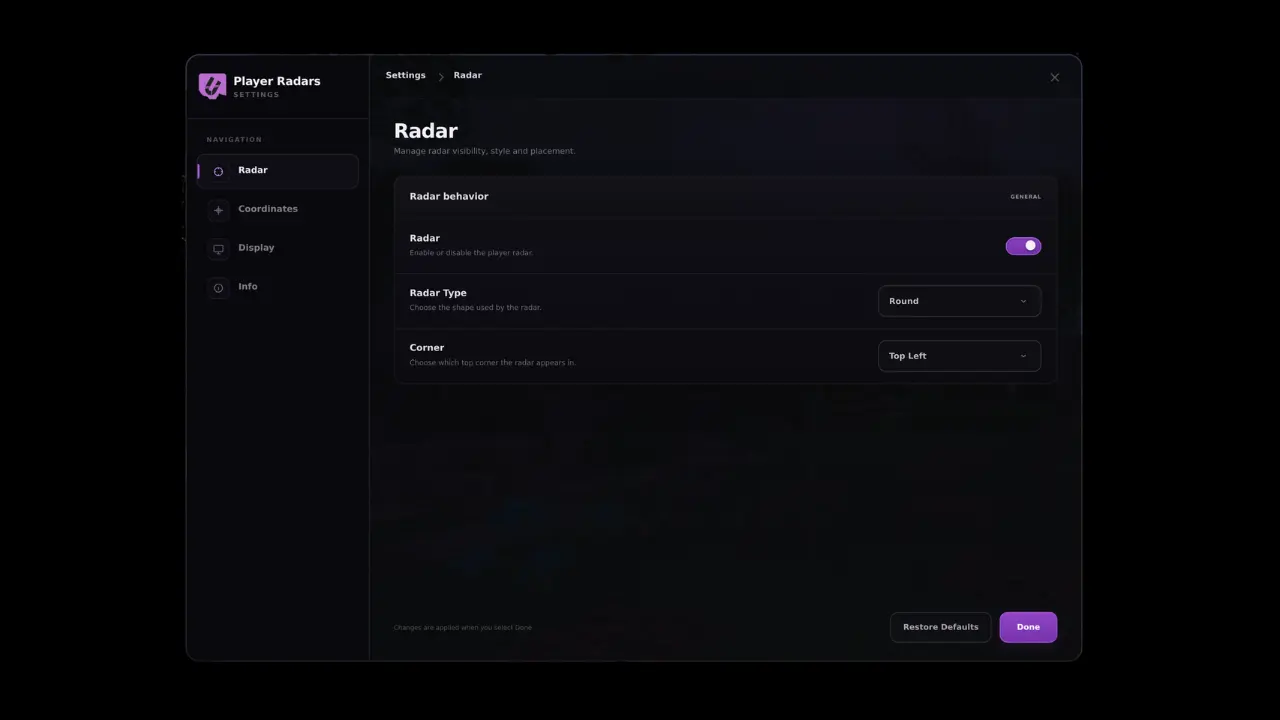 Player Radar 是一款精致的 Fabric Minecraft 雷达模组,专为追求更干净、更现代 HUD 体验的玩家打造。它提供流畅的实时玩家追踪、多种雷达样式、可自定义的坐标位置显示,以及一个品牌化的游戏内设置菜单,让你能够微调显示效果以匹配你的个人配置。

? 安装指南
Player Radar 专为 Fabric 设计。安装好加载器后,只需将 Player Radar 的文件放入你的 mods 文件夹即可。
不确定是否安装正确? 请检查游戏内的设置菜单,那里会显示带有品牌标识的 Player Radar 配置界面。你可以直接从该菜单调整雷达大小、内边距、缩放比例和坐标位置;如果需要重置配置,也可以使用“恢复默认值”选项。
✨ 功能特性
-
多种样式:可选择各种雷达样式和布局,以适应你的 UI 风格。
-
流畅追踪:高保真度、平滑的玩家头像追踪。
-
深度自定义:可调整雷达大小、内边距、缩放比例及坐标位置。
-
专业 UI:品牌化且直观的游戏内配置菜单。
✅ 适用场景
-
专注于 PvP 玩法。
-
生存服务器。
-
精简 HUD 配置。
-
希望对屏幕信息显示拥有更多控制权的玩家。
? 如何报告问题
请使用 Discord 服务器报告错误、图形故障或崩溃情况。提交报告时,请确保附上你当前激活的模组列表,并附加任何相关的崩溃日志或堆栈跟踪信息,以便我们快速解决问题。
注:雷达的性能和显示效果可能因你特定的 HUD 布局及其他已安装的界面模组而有所不同。
Latest News (September 17, 2026) - Player Radars has received a major compatibility update, now supporting Minecraft 1.21.x through 1.21.11 and 26.1 through 26.3! This release also brings improved radar rendering, a cleaner settings menu, better UI scaling, and version-specific fixes for a more consistent experience across supported Minecraft versions.
This mod is the result of hundreds of hours of development and is made possible thanks to players like you. If you would like to show a token of your appreciation for my work and help support the continued development of Player Radar, consider supporting the project.
? Custom Settings UI
Player Radar is a polished Fabric Minecraft radar mod built for players who want a cleaner, more modern HUD experience. It provides smooth real-time player tracking, multiple radar styles, customizable coordinate placement, and a branded in-game settings menu so you can fine-tune the display to match your setup.
? Installation Guide
Player Radar is designed for Fabric. Once you have installed the loader, simply place the Player Radar file into your mods folder.
Not sure if you installed the mod correctly? Check your in-game settings menu, which will display the branded Player Radar configuration interface. You can adjust your radar size, padding, scaling, and coordinate placement directly from this menu, and use the "Restore Defaults" option if you ever need to reset your configuration.
✨ Features
-
Multiple Styles: Choose from various radar styles and layouts to fit your UI.
-
Smooth Tracking: High-fidelity, smooth player-head tracking.
-
Deep Customization: Adjust radar size, padding, scaling, and coordinate positioning.
-
Professional UI: Branded, intuitive in-game configuration menu.
✅ Built For
-
PvP-focused gameplay.
-
Survival servers.
-
Streamlined HUD setups.
-
Players who demand more control over their on-screen information.
? How to Report Issues
Please use the Discord server to report bugs, graphical glitches, or crashes. When submitting a report, ensure you include your list of active mods and attach any relevant crash logs or stack traces to help us resolve the issue quickly.
Note: The performance and display of the radar may vary depending on your specific HUD layout and other installed interface mods.

下载 URS Player Radar's
下载 URS Player Radar's
下载 URS Player Radar's
下载 URS Player Radar's
下载 URS Player Radar's
下载 URS Player Radar's
下载 URS Player Radar's
下载 URS Player Radar's
下载 URS Player Radar's
下载 URS Player Radar's
更新日志
- 修复了雷达的透明度问题。
- 提升了雷达渲染质量。
- 修正了雷达定位与箭头对齐问题。
- 优化了滑块和下拉菜单的界面。
- 改进了设置菜单的样式。
- 修复了用户界面缩放相关问题。
- 其他常规错误修复与视觉改进。
关于这个资源的讨论、问题反馈与使用心得
还没有讨论,来发第一帖吧
你是这个资源的作者?登录后可认领此资源。
相似资源
 模组
缓冲的原始输入和线程化的事件轮询
 模组

可定制的鞘翅模组,支持装饰纹饰、旗帜图案等更多功能!
 模组

一个用于收集生物掉落物的多区块模组。
 模组

显示你正在注视的方块的信息。(适用于 Minecraft 1.16+ 的 Hwyla/Waila 分支)
 模组

原版世界生成优化模组
 模组
在游戏画面角落显示附近世界地形、玩家、生物和实体的地图。可创建路径点,帮助你找到标记过的位置。
评论 0
登录后参与评分
还没有评论,来抢沙发吧