
报告问题 • 在 Discord 上聊天 • CurseForge • Modrinth
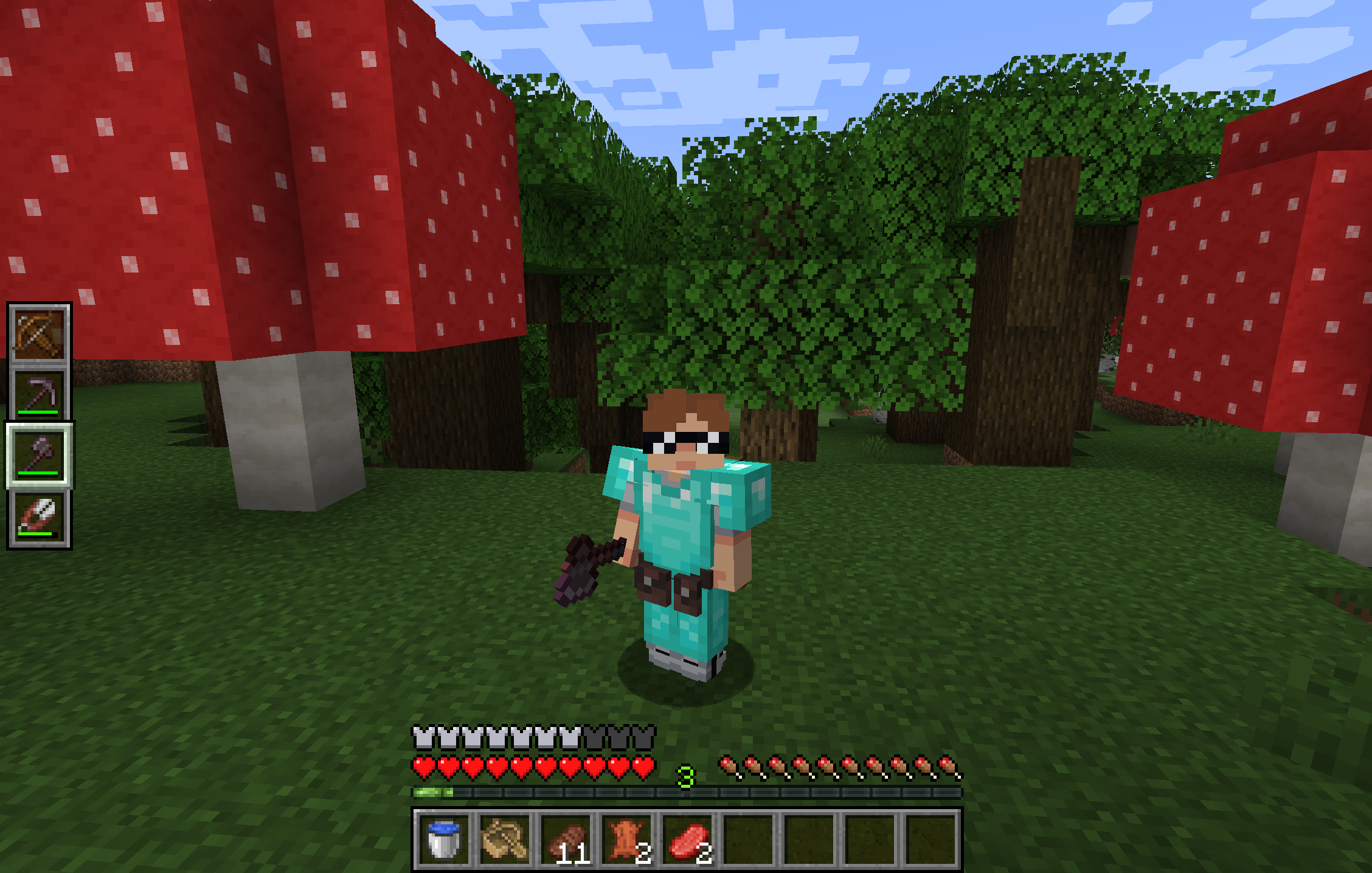
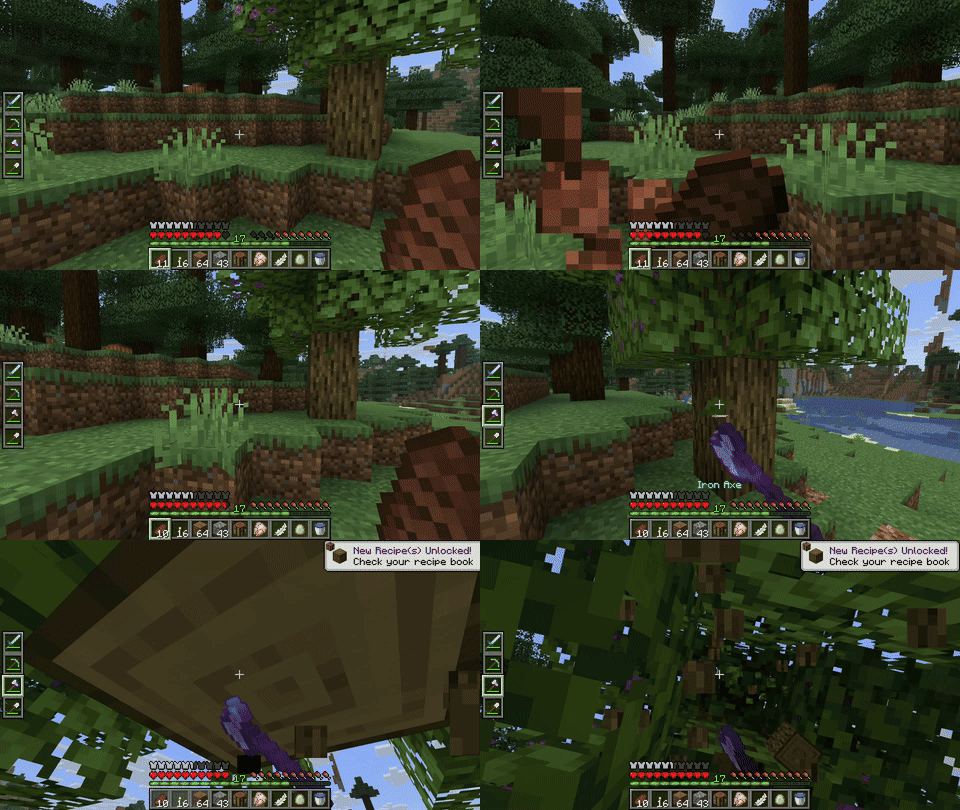
Utility Belt 将解决你物品栏杂乱的问题。9 个快捷栏槽位可能不够用,尤其是在玩模组时。佩戴工具腰带会给你提供第二个快捷栏,其中只能存放工具和武器。
?️ 入门指南
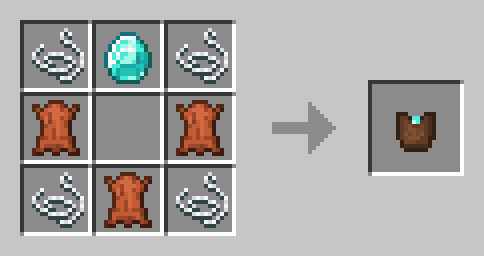
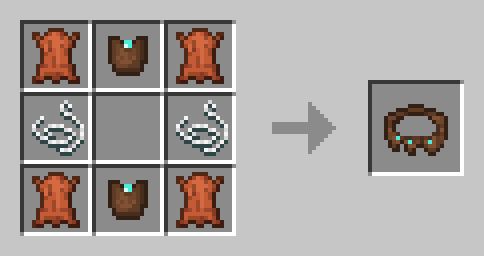
- 制作两个腰带包(使用上述配方)。
- 制作一条 Utility Belt(使用上述配方)。
- 将其装备到腰带槽位。
- 填充工具和武器。
⬆️ 升级腰带
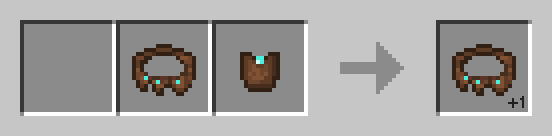
默认情况下,腰带有 4 个槽位,最高可升级至拥有 6 个槽位(这些数值可在模组配置中更改)。你可以使用下方的配方,在锻造台中为腰带添加槽位。
? 控制设置
| 操作 | 默认按键绑定 | 描述 |
|---|---|---|
| 打开腰带界面 | ' |
打开腰带 GUI 以便在腰带中存储物品 |
| 切换快捷栏 | B (切换), N (按住) |
在主快捷栏和腰带快捷栏之间切换 |
| 快速转移 | 潜行 + 切换 |
在手握物品、主快捷栏和腰带快捷栏之间交换物品 |
⚙️ 配置
你可以使用游戏内配置屏幕自定义 Utility Belt 的选项:
- Fabric: 通过 ModMenu 访问。
- Forge/NeoForge: 通过 Mods 屏幕访问。
要更改腰带接受的物品类型,你可以制作一个数据包并将物品添加到allowed_in_utility_belt标签中。
? 兼容性
- LambDynamicLights:腰带中的火把和灯笼将为周围的世界提供光源。
? Bug 与建议
你可以在 GitHub Issue 追踪器 报告任何问题并提出修改建议。在等待修复期间,尝试运行 /utilitybelt fixme 命令看看是否能解决问题。
始终保留世界备份,尤其是在游玩标记为 beta 的版本时。
Utility Belt will solve your inventory clutter issues. 9 hotbar slots are not enough, especially when playing with mods. Wearing a Utility Belt gives you a second hotbar where only tools and weapons can be stored.
?️ Getting Started
- Craft two belt pouches using the recipe above.
- Craft a Utility Belt using the recipe above.
- Equip it in your belt slot.
- Fill it with your tools and weapons.
⬆️ Upgrading the Belt
By default, the belt has 4 slots and can be upgraded to have up to 6 slots (these values can be changed in the mod configuration). You can add a slot to a belt in a Smithing Table using the recipe below.
? Controls
| Action | Default Keybind | Description |
|---|---|---|
| Open Belt Screen | ' |
Opens the belt GUI to store items in the belt |
| Swap Hotbar | B (toggle), N (hold) |
Switches between your main hotbar and the belt hotbar |
| Quick Transfer | Sneak + Swap |
Swap the item in your hand between your main hotbar and the belt |
⚙️ Configuration
You can customize Utility Belt's options using the in-game configuration screen:
- Fabric: Accessible using ModMenu.
- Forge/NeoForge: Accessible using the Mods screen.
To change which items are accepted in the belt, you can make a datapack and add items to the allowed_in_utility_belt tag.
? Compatibility
- LambDynamicLights: torches and lanterns in your belt will light up the world around you.
? Bugs and Suggestions
You can report any issues and suggest changes on the GitHub issue tracker. Try out the /utilitybelt fixme command to see if it resolves the issue while you wait for a fix.
Always keep backups of your world, especially when playing versions marked as beta.

下载 Utility Belt
下载 Utility Belt
需要联机服务器吗?
稳定流畅、一键部署,几分钟即可和朋友联机开服
最低仅需 8 元/月 即可畅快联机
下载 Utility Belt
下载 Utility Belt
下载 Utility Belt
下载 Utility Belt
下载 Utility Belt
下载 Utility Belt
下载 Utility Belt
下载 Utility Belt
3.0.2 版本发布
- 代码优化,可能修复了一个未被报告的、可能存在也可能不存在的 bug。
关于这个资源的讨论、问题反馈与使用心得
还没有讨论,来发第一帖吧
你是这个资源的作者?登录后可认领此资源。
相似资源
 模组

可定制的鞘翅模组,支持装饰纹饰、旗帜图案等更多功能!
 模组

显示你正在注视的方块的信息。(适用于 Minecraft 1.16+ 的 Hwyla/Waila 分支)
 模组
在游戏画面角落显示附近世界地形、玩家、生物和实体的地图。可创建路径点,帮助你找到标记过的位置。
 模组

查看物品与配方
 模组
使用 JavaScript 编辑配方、添加自定义物品、编写世界事件!
 模组
AE2:一款流行的自动化与存储模组
评论 0
登录后参与评分
还没有评论,来抢沙发吧