

为生存体验提供的简单工具。旨在替代那些用于全光照、缩放等功能的众多模组。
功能
简要概览
- 全光照 / 自定义伽马值 / 夜视
- 完全可配置的缩放
- 光照叠加层
- 客户端时间与天气
- 解除所有材质包的固定(强制绕过服务器资源包)
- 自动复制截图
- 隐藏南瓜头遮罩
- 降低火焰与盾牌高度(可自定义)
- 移动时船内显示地图
- 更小的图腾图标
- 隐藏其他玩家
- 显示屏障方块
- 单独或全部关闭不同类型的雾效
- 自动攻击
- 切换工具时保持挖掘进度(修复用经验修补工具挖石英矿时的麻烦)
全光照 / 伽马值 / 夜视

将你的伽马值调整至正常限制之上。主要用途是实现全光照,但伽马值也可以调低。 如果你使用了光影,建议使用夜视效果而不是自定义伽马值。
使用方法
使用 /fullbright 命令或 Toggle Fullbright 键绑定在 1500%(最大)和 100%(默认)伽马值之间切换。
使用 /fullbright [value] 将伽马值设置为任意正值。
使用 Toggle Nightvision 键绑定来切换客户端夜视效果。
你可以在设置中切换普通/全光照伽马值(通过 ModMenu 访问)
缩放
通过简单的热键进行放大和缩小。你可以选择缓动效果,或者分别为放大和缩小使用即时缩放。
使用方法
按住 Zoom 键绑定进入缩放模式。
访问配置文件查看所有设置。(选项很多)
光照叠加层

实时显示附近方块的光照等级。对于用火把防刷怪很有用。
使用方法
使用 Toggle Light Overlay 键绑定来开启或关闭。
你可以在设置中的 Light Overlay Threshold 下设置绿色纹理的阈值。
客户端时间与天气
将本地时间更改为 DAY,NOON,NIGHT,MIDNIGHT 并禁用降雨。这也适用于服务器,因为它是仅在客户端生效的。
使用方法
你可以在设置中更改时间和天气(/utools config 或在 ModMenu 中)。
或者使用 /clienttime set day|noon|night|midnight 更改时间,并使用 /clienttime reset 重置。
解除材质包固定
这允许你解除所有材质包的固定。这样,你可以独立于其预期顺序移动所有材质包。当服务器强制应用你不想要的资源包时,这尤其有用。要绕过此限制,只需将服务器资源包移到底部,位于默认材质之下,因为它不再被固定。
使用方法
解除所有固定的设置位于设置中(/utools config 或通过 ModMenu)
复制截图
截取截图时,图片会自动复制到剪贴板。
使用方法
可在设置中切换
多种视觉修改
- 隐藏头上的南瓜遮罩
- 降低火焰叠加层(可自定义)
- 降低盾牌(可自定义)
- 移动时船内显示地图
- 手中/弹出动画中的图腾更小
- 显示屏障方块
使用方法
在配置文件的 Visual Modifications 类别下切换/自定义
自定义雾效
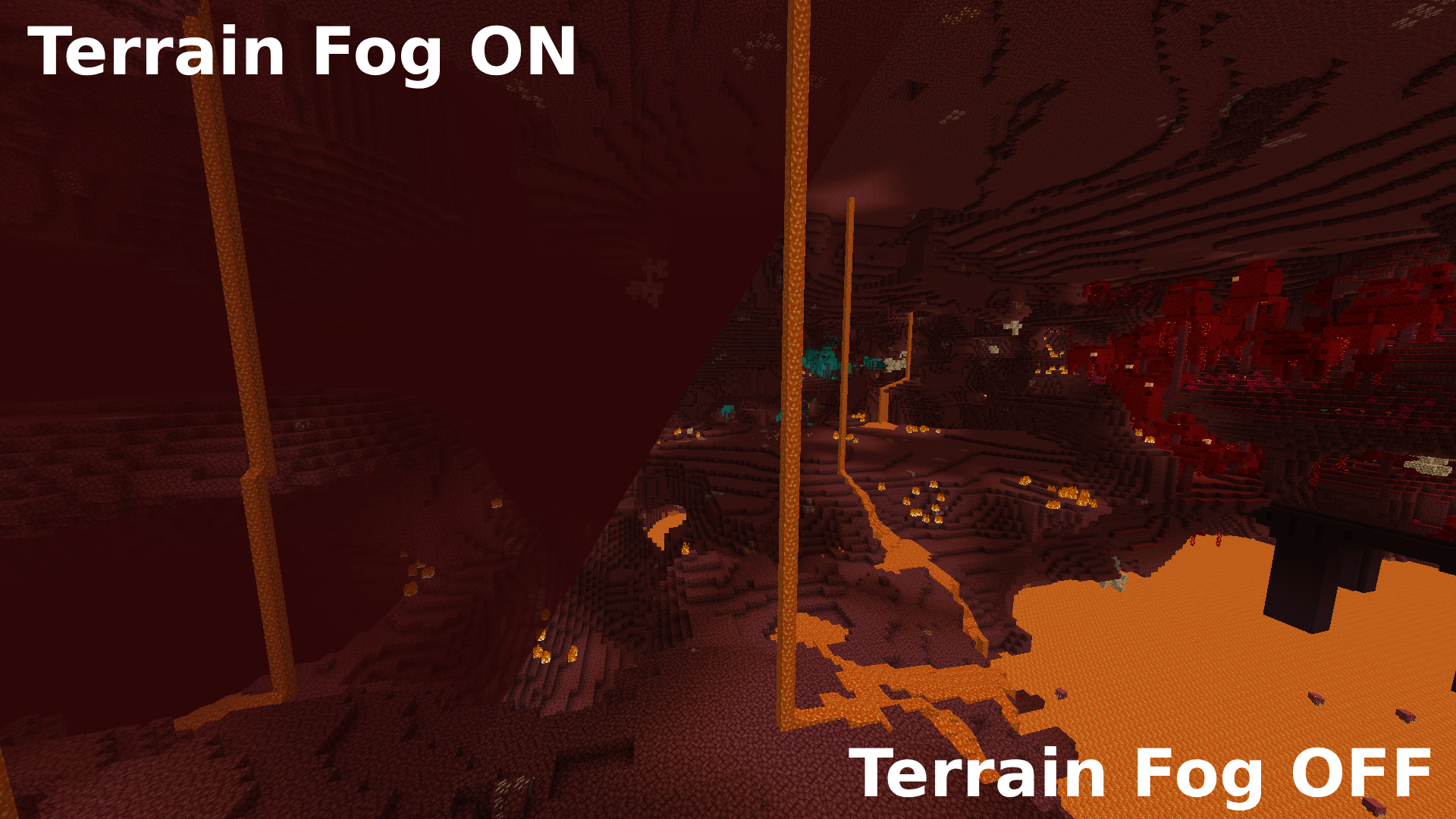
允许你启用/禁用所有类型的雾效。参见下方下界中的地形雾效对比图
使用方法
在配置文件的 Fog 类别下查看所有雾效类型。按需关闭它们。
注意:禁用雾效,特别是黑暗、失明、岩浆和水的雾效,可能被某些玩家或服务器管理员视为作弊或不公平优势。
自动攻击
当你的攻击冷却结束后自动点击攻击按钮。
使用方法
按 Toogle Autoattack 键绑定来开启/关闭。
隐藏其他玩家
允许你通过键绑定隐藏所有其他玩家。
使用方法
按 Toggle Hiding other Players 键绑定来切换。
切换工具时保持挖掘进度
允许你在切换工具/获得经验修补时保持方块的挖掘进度。 修复每次用经验修补工具挖掘石英矿时方块破碎重新开始的麻烦。
使用方法
可在设置中切换
翻译
en_en 英语: @lugosieben (必须随任何新功能更新!)
de_de 德语: @Kolpixx & @lugosieben
es_es 西班牙语: @lugosieben
许可证
本项目采用 Creative Commons Attribution-NonCommercial 4.0 International 许可协议授权。
Simple tools for the survival experience. This should act as a replacement to having tons of mods for things like Fullbright, Zoom etc.
Features
Short Overview
- Fullbright / Custom Gamma / Night Vision
- Fully configurable Zoom
- Light Overlay
- Client Side Time & Weather
- Unpin all texture packs (Forced Server Resource Pack Bypass)
- Auto-Copy Screenshots
- Hide Pumpkin Overlay
- Lower Fire & Shield (Customizable)
- Show Map in Boat while moving
- Smaller totems
- Hide other players
- Show Barrier blocks
- Turn off different types of Fog individually or all together
- Auto-Attack
- Keep Mining when switching Tools (fixes annoying quartz mining with a mending tool)
Fullbright / Gamma / Night Vision
Change your Gamma above the normal limits. The intended usage is to get Fullbright, but the Gamma can also be changed to a low value. If you're using shaders, you should use Night Vision instead of custom gamma.
Usage
Use /fullbright or the Toggle Fullbright keybinding to switch between 1500% (Max) or 100% (Default) gamma.
Use /fullbright [value] to change your gamma to any positive value.!
Use the Toggle Nightvision keybinding to toggle the clientside night vision effect.
You can toggle the normal / fullbright Gamma values in the settings (Accessible via ModMenu)
Zoom
Zoom in (and out) with a simple hotkey. You can choose between easings or use an instant zoom for zoom-ins and zoom-outs individually.
Usage
Hold the Zoom keybinding to switch into zoom mode.
Visit the config to view all settings. (There are many)
Light Overlay
Display the light levels of nearby blocks in real-time. Useful to spawn-proof with torches.
Usage
Use the Toggle Light Overlay keybinding to toggle on or off.
You can set the threshold for a green texture in the settings under Light Overlay Threshold.
Client Time & Client Weather
Change your local time to DAY,NOON,NIGHT,MIDNIGHT and disable rain. This also works on servers since it is only client side.
Usage
You can change the time and weather in the settings (/utools config or in ModMenu).
Alternatively you can change the time with /clienttime set day|noon|night|midnight and reset with /clienttime reset.
Unpin Texture Packs
This allows you to unpin all texture packs. Doing so, you can move all texture packs independent of their intended order. This is especially useful when a server forces a resource pack which you don't want. To bypass, you can just move the server pack to the bottom, below the default textures since it is no longer pinned.
Usage
The setting to unpin all packs is located in the settings (/utools config or via ModMenu)
Copy Screenshots
When taking screenshots, the images will be automatically copied to the clipboard.
Usage
Toggleable in the settings
Several Visual Modifications
- Hide the pumpkin on head overlay
- Lower fire overlay (customizable)
- Lower shield (customizable)
- Show map in boat while moving
- Smaller totem in hand / in pop animation
- Show barrier blocks
Usage
Toggle / Customize in the config under the category Visual Modifications
Custom Fog
Allows you to enable / disable ALL types of fogs. See comparison in the nether for Terrain Fog below
Usage
See all fog types in config under Fog category. Turn them off to your likings.
Caution: Disabling fogs, especially darkness, blindness, lava and water fogs could be considered cheating or an unfair advantage by some players or server administrators.
Auto-Attack
Automatically clicks the attack button when your hit cooldown has finished.
Usage
Press the Toogle Autoattack keybinding to toggle on/off.
Hide other players
Allows you to hide all other players with a keybinding.
Usage
Press the Toggle Hiding other Players keybinding to toggle.
Keep Mining when switching tools
Allows you to keep your Mining progress on your block when switching tool / getting mended. Fixes annoying restart of block breaking everytime you break a quartz ore with mending.
Usage
Toggleable in the settings
Translations
en_en English: @lugosieben (Must be updated with any new feature!)
de_de German: @Kolpixx & @lugosieben
es_es Spanish: @lugosieben
License
This project is licensed under Creative Commons Attribution-NonCommercial 4.0 International.

下载 UTools
下载 UTools
下载 UTools
下载 UTools
需要联机服务器吗?
稳定流畅、一键部署,几分钟即可和朋友联机开服
最低仅需 8 元/月 即可畅快联机
下载 UTools
需要联机服务器吗?
稳定流畅、一键部署,几分钟即可和朋友联机开服
最低仅需 8 元/月 即可畅快联机
下载 UTools
需要联机服务器吗?
稳定流畅、一键部署,几分钟即可和朋友联机开服
最低仅需 8 元/月 即可畅快联机
下载 UTools
下载 UTools
需要联机服务器吗?
稳定流畅、一键部署,几分钟即可和朋友联机开服
最低仅需 8 元/月 即可畅快联机
下载 UTools
需要联机服务器吗?
稳定流畅、一键部署,几分钟即可和朋友联机开服
最低仅需 8 元/月 即可畅快联机
下载 UTools
需要联机服务器吗?
稳定流畅、一键部署,几分钟即可和朋友联机开服
最低仅需 8 元/月 即可畅快联机
暂无更新日志
关于这个资源的讨论、问题反馈与使用心得
还没有讨论,来发第一帖吧
你是这个资源的作者?登录后可认领此资源。
相似资源
 模组

显示你正在注视的方块的信息。(适用于 Minecraft 1.16+ 的 Hwyla/Waila 分支)
 模组

查看物品与配方
 模组
在游戏画面角落显示附近世界地形、玩家、生物和实体的地图。可创建路径点,帮助你找到标记过的位置。
 模组
使用 JavaScript 编辑配方、添加自定义物品、编写世界事件!
 模组
添加区块认领和玩家组队功能,并与 Xaero's Minimap 和 World Map 集成
 模组
添加全屏世界地图,显示你在世界中已探索的区域。与 Xaero's Minimap 搭配使用效果极佳。
评论 0
登录后参与评分
还没有评论,来抢沙发吧