
Vanilla Tooltips 是一款轻量级的客户端装饰性模组,在保持 Minecraft 熟悉视觉风格的同时增强物品提示框。
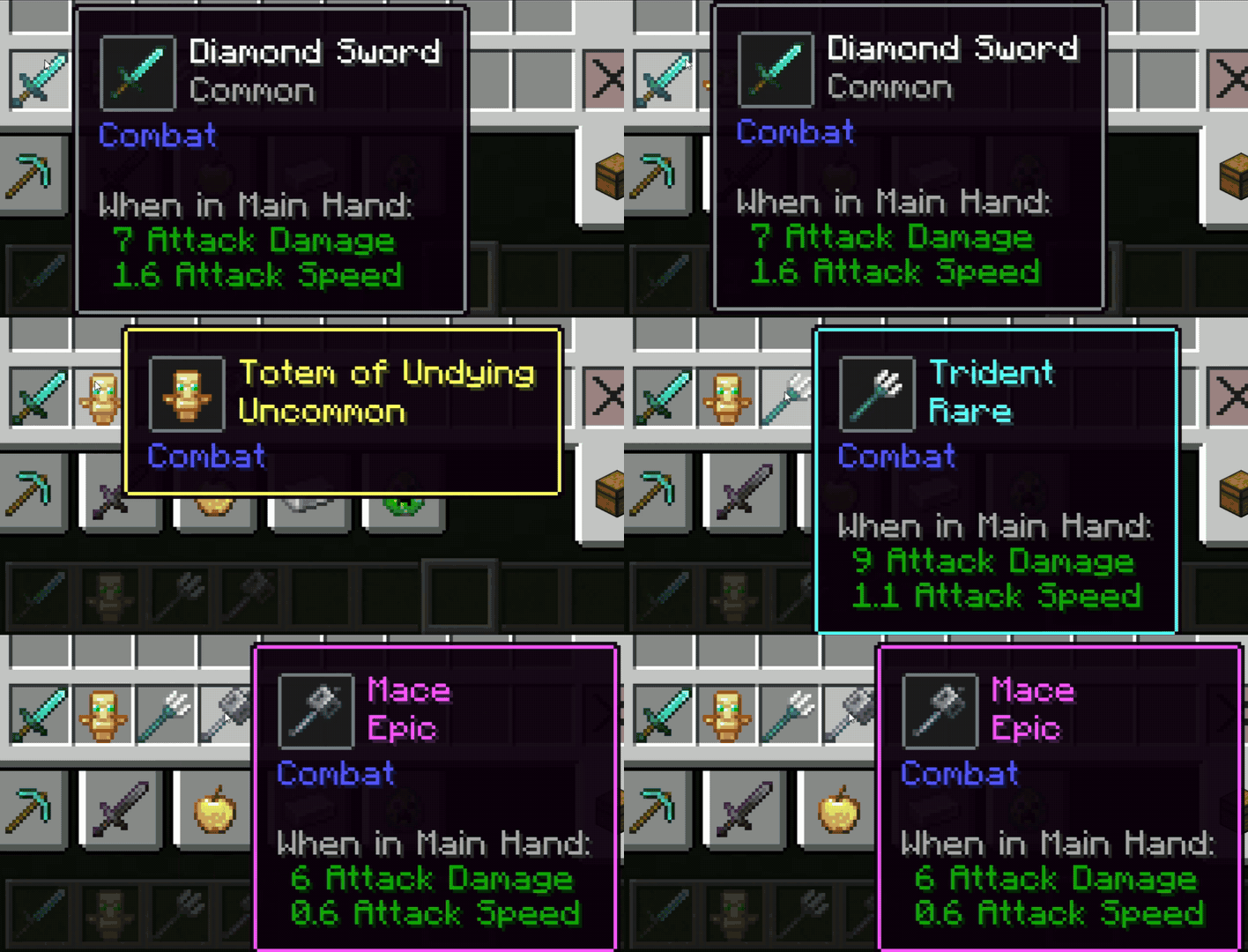
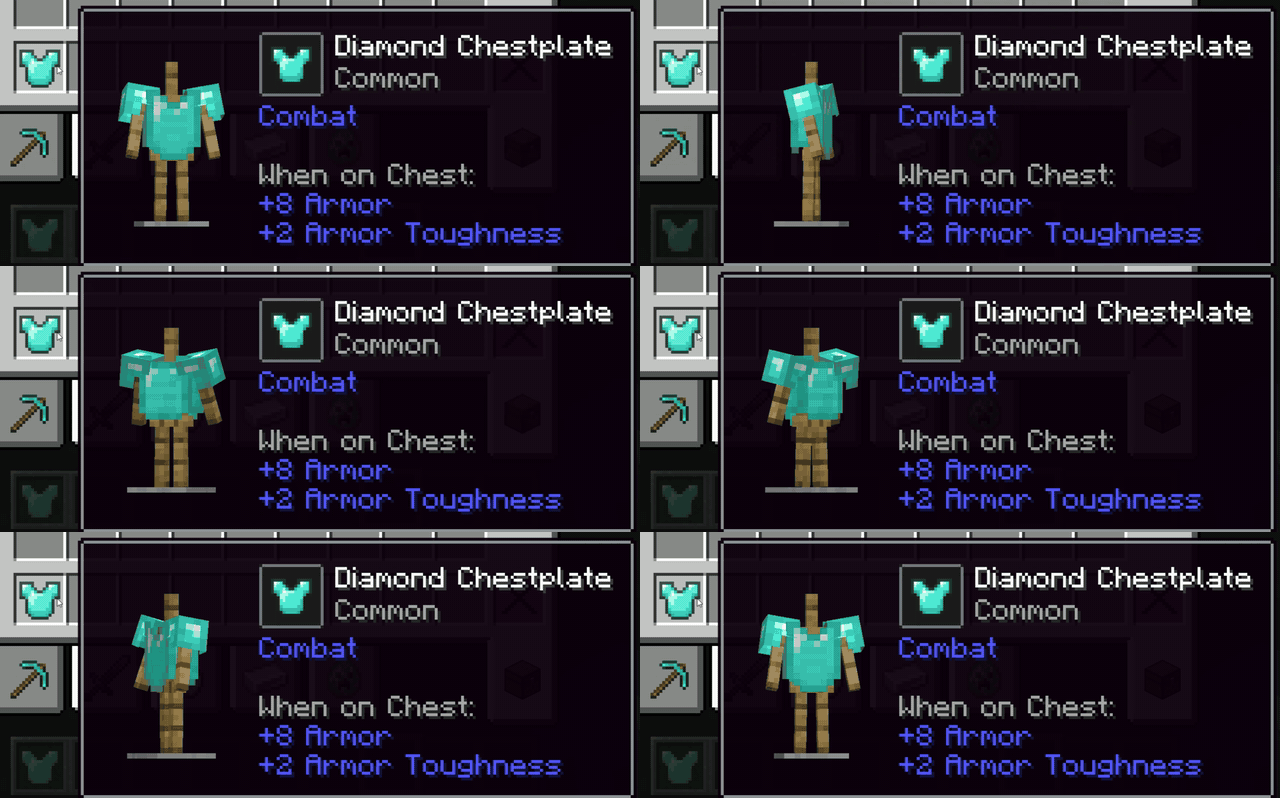
它添加了动态的物品预览、稀有度样式以及 3D 盔甲预览。你可以自定义它们的外观、颜色、布局和动画,也可以单独关闭各项视觉功能。




功能
- 可调整大小和动画速度的动态物品预览
- 可自定义的物品预览边框和背景,支持标准、按稀有度、自定义和渐变四种颜色模式
- 支持双色垂直渐变以配置更多颜色选项,默认颜色基于每种稀有度
- 可选择隐藏物品预览边框或其背景
- 可启用或禁用的稀有度标签和提示框轮廓,使用可配置的颜色模式
- 使用基于稀有度的样式时,每种稀有度拥有独立颜色
- 可调整大小、位置、盔甲架不透明度以及旋转速度和方向的 3D 盔甲预览
- 可选地将盔甲预览与物品及其属性分离,提供线条和窗口两种分隔样式,或无分隔线
- 每个视觉功能拥有独立的设置
配置
在 Fabric 上,安装 Mod Menu 即可打开配置界面。Mod Menu 是可选的。在 Forge 和 NeoForge 上,从已安装的模组列表打开配置界面。
兼容性
Vanilla Tooltips 为纯客户端模组,无需安装在服务器上。
| Loader | Minecraft versions |
|---|---|
| Fabric | 26.3, 26.2, 1.21.11, 1.21.1 |
| Forge | 1.20.1 |
| NeoForge | 1.21.1 |
Fabric 版本需要 Fabric API 和 YACL。Forge 和 NeoForge 版本需要 YACL。
安装
下载适用于你的 Minecraft 版本和加载器的文件,安装其所需的依赖项,然后将 JAR 文件放入客户端的 mods 文件夹中。
许可证
Vanilla Tooltips 采用 MIT License 许可。只要你包含版权声明和许可证通知,就可以使用、修改和重新分发该模组。参见 GitHub 上的源代码和许可证。
Vanilla Tooltips is a lightweight, client-side cosmetic mod that enhances item tooltips while keeping Minecraft’s familiar visual style.
It adds animated item previews, rarity styling, and a 3D armor preview. Customize their appearance, colors, layout, and animations, or turn visual features off individually.
Features
- Animated item previews with adjustable size and animation speed
- Customizable item preview frames and backgrounds with Standard, By Rarity, Custom, and Gradient color modes
- Two-color vertical gradients for configurable color options, with default colors based on each rarity
- Options to hide the item preview frame or its background
- Rarity labels and tooltip outlines that can be enabled or disabled and use configurable color modes
- Separate colors for each rarity when using rarity-based styling
- 3D armor previews with adjustable size, position, armor stand opacity, and rotation speed and direction
- Optional armor preview separation from the item and its stats, with Line and Window styles, or no divider
- Independent settings for each visual feature
Configuration
On Fabric, install Mod Menu to open the configuration screen. Mod Menu is optional. On Forge and NeoForge, open the configuration screen from the installed mods list.
Compatibility
Vanilla Tooltips is client-side and does not need to be installed on a server.
| Loader | Minecraft versions |
|---|---|
| Fabric | 26.3, 26.2, 1.21.11, 1.21.1 |
| Forge | 1.20.1 |
| NeoForge | 1.21.1 |
Fabric versions require Fabric API and YACL. Forge and NeoForge versions require YACL.
Installation
Download the file for your Minecraft version and mod loader, install its required dependencies, and place the JAR files in your client’s mods folder.
License
Vanilla Tooltips is licensed under the MIT License. You may use, modify, and redistribute the mod provided you include the copyright and license notice. See the source code and license on GitHub.

下载 Vanilla Tooltips
下载 Vanilla Tooltips
下载 Vanilla Tooltips
下载 Vanilla Tooltips
下载 Vanilla Tooltips
下载 Vanilla Tooltips
Vanilla Tooltips 3.0.0
在可配置的颜色设置中添加了双色垂直渐变。渐变从顶部到底部运行,默认颜色灵感来源于每种稀有度。
Vanilla Tooltips 2.3.0 — 修复与改进
修复了短提示框中护甲预览的对齐问题。带有翼龙的盔甲架现在保持居中。 修复了在没有护甲预览的项目在单独窗口模式下的额外间距。 已将修复应用到所有六个版本:Fabric 1.21.1, 1.21.11, 26.2 和 26.3; Forge 1.20.1; NeoForge 1.21.1。
感谢超过 1,000 次下载 Vanilla Tooltips!您的支持意义重大,并帮助模组持续成长。
关于这个资源的讨论、问题反馈与使用心得
还没有讨论,来发第一帖吧
你是这个资源的作者?登录后可认领此资源。
相似资源
 模组

可定制的鞘翅模组,支持装饰纹饰、旗帜图案等更多功能!
 模组

显示你正在注视的方块的信息。(适用于 Minecraft 1.16+ 的 Hwyla/Waila 分支)
 模组
在游戏画面角落显示附近世界地形、玩家、生物和实体的地图。可创建路径点,帮助你找到标记过的位置。
 模组

查看物品与配方
 模组
使用 JavaScript 编辑配方、添加自定义物品、编写世界事件!
 模组
AE2:一款流行的自动化与存储模组
评论 0
登录后参与评分
还没有评论,来抢沙发吧