
厌倦了每次切换 Minecraft 版本或加载器时都要手动更换模组?Version Mod Sorter 允许你将模组分类放入 mods 文件夹内的子文件夹中。将文件夹命名为某个加载器或 Minecraft 版本号,其中的模组仅在游戏使用该加载器或版本运行时才会被加载。保留一个游戏实例,让 VMS 自动决定加载哪些模组。
工作原理
在 mods 文件夹内创建子文件夹并将模组放入其中。子文件夹中的模组是否被加载取决于文件夹的名称。
| 文件夹名称 | 加载条件 |
|---|---|
fabric / forge / neoforge |
当游戏使用对应的加载器运行时 |
包含 . 的名称(例如 1.21.1、Disabled.Mod) |
仅当名称与当前 Minecraft 版本匹配时 |
其他任何名称(例如 utility) |
始终加载 |
文件夹可以任意顺序和深度嵌套。只有当模组路径上的所有文件夹都满足其条件时,该模组才会被加载。例如,位于 mods/fabric/1.21.1/ 中的模组仅在 Fabric 且 Minecraft 为 1.21.1 时加载。mods/1.21.1/fabric/ 的工作原理相同。
直接放置在 mods 文件夹中的模组会像往常一样始终加载。当前版本和加载器的文件夹会在启动时自动创建。

快速参考
| 位置 | Fabric 1.21.1 | Fabric 1.20.1 | Forge 1.21.1 |
|---|---|---|---|
| mods/ (根目录) | ✅ | ✅ | ✅ |
| mods/utility/ | ✅ | ✅ | ✅ |
| mods/fabric/ | ✅ | ✅ | ❌ |
| mods/1.21.1/ | ✅ | ❌ | ✅ |
| mods/fabric/1.21.1/ | ✅ | ❌ | ❌ |
| mods/Disabled.Mod/ | ❌ | ❌ | ❌ |
功能特性
- 支持 Fabric、Forge 和 NeoForge —— 单个 jar 文件兼容三者
- 按加载器、Minecraft 版本或两者对模组进行分类
- 自由地将模组组织到类别文件夹中
- 将模组移至
Disabled.Mod即可将其停用,而无需删除 - 无需单独的游戏目录、配置文件或实例
- 不修改 Minecraft 类或进行字节码补丁
常见问题
Fabric 能加载子文件夹中的模组吗?
默认情况下不能。Fabric Loader 仅加载直接放置在 mods/ 文件夹中的模组,且加载器开发者已拒绝添加子文件夹支持功能。Version Mod Sorter 补充了这一缺失的功能。
我能否使用同一个实例运行多个 Minecraft 版本?
可以。这正是本模组的设计目的。将特定版本的模组放入版本文件夹,将共享模组放入加载器文件夹或 mods/ 根目录,然后你就可以从启动器自由切换版本,而无需触碰 mods 文件夹。
更新 Minecraft 时我需要重命名或移动模组吗?
不需要。不匹配版本文件夹中的模组会被简单地忽略,因此旧版本的模组可以留在原地不动。
为什么我的名为 Create 0.5 的文件夹没有被加载?
包含 . 的文件夹名称会被视为 Minecraft 版本号。请移除旨在用于组织整理的文件夹名称中的 .。
崩溃分析 (Fabric)
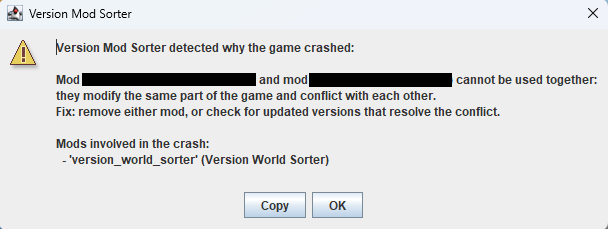
当游戏在 Fabric 上崩溃时,VMS 会分析原因并显示一个对话框。它首先检查崩溃报告 (crash-reports/),如果未找到则回退查看 logs/latest.log 的尾部内容。此功能仅在至少有一个模组从子文件夹加载时生效。
它会检测两种类型的崩溃,并显示涉及的模组及建议的修复方法:
- 模组冲突 —— 当多个模组修改相同的代码并发生冲突时,会同时显示两个模组的名称,并建议移除其中一个或检查更新
- 版本不匹配 —— 当模组引用了当前 Minecraft 版本中不存在的代码时,会显示该模组的名称,并建议将其移至匹配的 version 文件夹,或更新或移除该模组
对于不属于上述两类的崩溃,VMS 仍会根据堆栈跟踪列出推断出的模组。如果加载器本身报告模组解析失败(如 Mod resolution failed 等),VMS 不会显示第二次通知,因为加载器已经显示了其自身的错误屏幕。
要求
- Fabric Loader 0.13.0+ / Forge 41.1.0 (MC 1.19)+ / NeoForge 20.6.62-beta (MC 1.20.6)+
注意事项
- 版本文件夹名称必须与当前 Minecraft 版本完全匹配。
1.21和1.21.0被视为不同的版本。 - 在 Fabric 上,如果至少有一个模组从子文件夹加载,VMS 会重启游戏一次,因此启动时间会稍长。
- 如果你将同一个模组放入多个同时加载的文件夹中,它会被加载两次,可能会导致错误。
- 本模组依赖加载器的内部实现。加载器的大版本更新可能导致其停止工作,但它绝不会影响游戏或其他模组。
- 有关 0.1.x 及更早版本的文件夹规则,请参阅 此页面。
Tired of swapping mods every time you switch Minecraft versions or loaders? Version Mod Sorter lets you sort mods into subfolders inside your mods folder. Name a folder after a loader or a Minecraft version, and the mods inside it are loaded only when the game runs with that loader or version. Keep one instance and let VMS sort out which mods to load.
How It Works
Create subfolders inside the mods folder and put your mods in them. Whether a mod in a subfolder is loaded depends on the folder names.
| Folder name | Loaded when |
|---|---|
fabric / forge / neoforge |
The game runs with that loader |
A name containing . (e.g. 1.21.1, Disabled.Mod) |
Only when the name matches the current Minecraft version |
Anything else (e.g. utility) |
Always |
Folders can be nested in any order and depth. A mod is loaded only when every folder on its path meets its condition. For example, a mod in mods/fabric/1.21.1/ is loaded only on Fabric with Minecraft 1.21.1. mods/1.21.1/fabric/ works the same way.
Mods placed directly in the mods folder are always loaded, as usual. Folders for the current version and loader are created automatically at launch.
Quick Reference
| Location | Fabric 1.21.1 | Fabric 1.20.1 | Forge 1.21.1 |
|---|---|---|---|
| mods/ (root) | ✅ | ✅ | ✅ |
| mods/utility/ | ✅ | ✅ | ✅ |
| mods/fabric/ | ✅ | ✅ | ❌ |
| mods/1.21.1/ | ✅ | ❌ | ✅ |
| mods/fabric/1.21.1/ | ✅ | ❌ | ❌ |
| mods/Disabled.Mod/ | ❌ | ❌ | ❌ |
Features
- Works with Fabric, Forge, and NeoForge — a single jar supports all three
- Sort mods by loader, by Minecraft version, or both
- Organize mods into category folders freely
- Set mods aside in
Disabled.Modwithout deleting them - No need for separate game directories, profiles, or instances
- No Minecraft class modifications or bytecode patching
FAQ
Can Fabric load mods from subfolders?
Not by default. Fabric Loader only loads mods placed directly in the mods/ folder, and subfolder support has been declined by the loader developers. Version Mod Sorter adds this missing feature.
Can I use one instance for multiple Minecraft versions?
Yes. That is exactly what this mod is for. Put version-specific mods in version folders and shared mods in the loader folder or mods/ root, then switch versions freely from your launcher without touching the mods folder.
Do I need to rename or move mods when updating Minecraft?
No. Mods in non-matching version folders are simply ignored, so old versions' mods can stay where they are.
Why isn't my folder named Create 0.5 loaded?
A folder name containing . is treated as a Minecraft version. Remove the . from folder names meant for organizing.
Crash Analysis (Fabric)
When the game crashes on Fabric, VMS analyzes the cause and shows a dialog. It checks crash reports (crash-reports/) first, then falls back to the tail of logs/latest.log. This feature works only when at least one mod is loaded from a subfolder.
It detects two kinds of crashes and shows the involved mods and suggested fixes:
- Mod conflicts — when multiple mods modify the same code and collide, both mod names are shown with the suggestion to remove one or check for updates
- Version mismatch — when a mod references code that does not exist in the current Minecraft version, the mod name is shown with the suggestion to move it to the matching version folder, or to update or remove it
For crashes that match neither category, VMS still lists mods inferred from the stack trace. If the loader itself reports a mod resolution failure (Mod resolution failed, etc.), VMS does not show a second notification because the loader already shows its own error screen.
Requirements
- Fabric Loader 0.13.0+ / Forge 41.1.0 (MC 1.19)+ / NeoForge 20.6.62-beta (MC 1.20.6)+
Notes
- A version folder name must exactly match the current Minecraft version.
1.21and1.21.0are treated as different versions. - On Fabric, if at least one mod is loaded from a subfolder, VMS restarts the game once, so startup takes slightly longer.
- If you put the same mod in more than one folder that loads at the same time, it gets loaded twice and may cause an error.
- This mod relies on internal loader implementations. A major loader update may cause it to stop working, but it will never affect the game or other mods.
- For the folder rules in 0.1.x and earlier, see this page.

下载 Version Mod Sorter
下载 Version Mod Sorter
需要联机服务器吗?
稳定流畅、一键部署,几分钟即可和朋友联机开服
最低仅需 8 元/月 即可畅快联机
下载 Version Mod Sorter
下载 Version Mod Sorter
下载 Version Mod Sorter
需要联机服务器吗?
稳定流畅、一键部署,几分钟即可和朋友联机开服
最低仅需 8 元/月 即可畅快联机
下载 Version Mod Sorter
下载 Version Mod Sorter
下载 Version Mod Sorter
需要联机服务器吗?
稳定流畅、一键部署,几分钟即可和朋友联机开服
最低仅需 8 元/月 即可畅快联机
下载 Version Mod Sorter
下载 Version Mod Sorter
需要联机服务器吗?
稳定流畅、一键部署,几分钟即可和朋友联机开服
最低仅需 8 元/月 即可畅快联机
- 仅在与加载器同名的文件夹(fabric、forge、neoforge)中加载对应加载器的模组
- 仅在文件夹名称包含“.”且与当前 Minecraft 版本匹配时,才加载该文件夹中的模组
- 始终加载其他命名文件夹中的所有模组
- 添加 Disabled.Mod 文件夹以排除不加载的模组
Forge
- 修复了在较旧版本的 Forge 中,当 Version Mod Sorter jar 文件放置在 mods/forge/ 目录下时出现的无效模组文件警告。
- 修复了当 mods/ 目录中存在重命名的 Version Mod Sorter jar 副本时导致的启动失败问题。
关于这个资源的讨论、问题反馈与使用心得
还没有讨论,来发第一帖吧
你是这个资源的作者?登录后可认领此资源。
相似资源
 模组

显示你正在注视的方块的信息。(适用于 Minecraft 1.16+ 的 Hwyla/Waila 分支)
 模组

查看物品与配方
 模组
在游戏画面角落显示附近世界地形、玩家、生物和实体的地图。可创建路径点,帮助你找到标记过的位置。
 模组
使用 JavaScript 编辑配方、添加自定义物品、编写世界事件!
 模组
添加区块认领和玩家组队功能,并与 Xaero's Minimap 和 World Map 集成
 模组
添加全屏世界地图,显示你在世界中已探索的区域。与 Xaero's Minimap 搭配使用效果极佳。
评论 0
登录后参与评分
还没有评论,来抢沙发吧