这是 Void Island Control 的一个分支。区别在于起始物品可以拥有 NBT 数据,并且会放置在对应的槽位中。
如果您遇到问题或有建议,欢迎在 GitHub Issue 追踪器中提出。
此外,这不是官方延续版本,原作者与此分支无关。
对于自定义起始岛屿:
将名为 "bedrock.nbt" 的结构文件放入 config 文件夹下的 voidislandcontrolstructures 目录中。
原始描述:
现在仅支持 1.12 版本!
有关如何创建自定义岛屿的说明……请查看本页下方内容!
添加了一个适用于多人游戏和团队模式的“虚空”世界类型。
基本使用说明
- 确保已安装 CompatLayer(仅限 1.10/1.11)
- 在单人游戏中选择世界类型 Void? World,或在服务器上选择 voidworld。
- 输入 /island create <可选类型> 以在一个岛屿上开始游戏
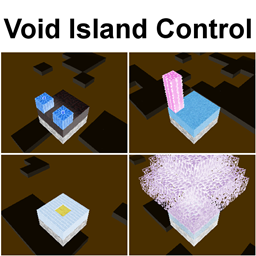
内置 5 种默认岛屿类型,均具有可配置选项并可在配置中启用/禁用:
Garden of Glass (仅在配置中启用且安装了 Botania 和 Garden of Glass 时可用)
自定义岛屿
- 使用结构方块数据(位于 "存档文件夹/structures" 中)
- 将使用结构方块制作的 .nbt 文件放入 "voidislandcontrolstructures" 配置文件夹中
- 要设置出生点,请在数据模式下放置一个结构方块。将其标签设置为 "spawn_point"。
- 在配置中将岛屿添加到自定义岛屿列表中
这些岛屿类型可作为 Sky Resources 的起始岛屿使用
(与 1.10 版本的 Sky Resources 不兼容)
自定义部分内置配置:
- 填充岛屿下方的方块
- 移除基岩
- 生成主世界(甚至可以使用单一生物群系)
- 云和地平线的 Y 轴高度
- 岛屿 Y 轴高度、大小、缓冲距离
- 存在虚空下界维度,且传送门与主世界一一对应链接
- 单区块模式(每个岛屿仅一个区块)
- 初始空箱子
- 初始背包物品
- 使用 startingInv 命令轻松设置!
- 只需将物品放入您的背包并使用该命令即可!
- 为每个岛屿生成命令方块
- 在世界启动时运行命令
- 以及更多高级配置项!
/island 命令包含许多子命令。
- create (可选 int/string)[type] - create 命令会在世界中的某个位置创建一个新的岛屿。
- invite [player] - invite 命令邀请其他玩家加入您的岛屿。
- join - join 命令会使您加入最近通过 invite 命令邀请的岛屿。
- leave - leave 命令会使您离开当前所在的岛屿,返回出生点,并清空背包。如果您是岛上最后一名玩家,则该岛屿将无法再被认领。
- home - home 命令会将玩家传送回其主岛屿,但默认必须距离至少 500 格。
- spawn - spawn 命令会将玩家传送到出生点。
- reset (可选 int/string)[type] - reset 命令会清除岛屿、清空背包,并像 create 命令一样重新开始。
- onechunk - onechunk 命令会在出生点创建一个大小为单个区块的世界边界,并重置出生点。此命令默认禁用,需在配置中进行更改。
想要支持我吗?
您可以通过上方的 PayPal 捐赠或通过 Patreon 进行支持。
不过不必有压力,游玩我的模组本身就是一种支持!!
This is a fork of Void Island Control. The difference is starting items can have NBT's and it will put at the corresponding slot.
If you have an issue or suggestions feel free to ask in Github issue tracker.
Also THIS ISN'T AN OFFICIAL CONTINUATION, official dev has nothing to do with this fork.
For custom starting islands:
put structure file called "bedrock.nbt" to voidislandcontrolstructures called folder in config.
Original description:
Only the 1.12 version will be supported now!
FOR INSTRUCTIONS ON HOW TO DO CUSTOM ISLANDS....LOOK DOWN ON THIS PAGE!
Adds a world type for a "void" world that works for multiplayer and teams.
Basic Instructions
- Make sure CompatLayer is installed (1.10/1.11 Only)
- Choose the world type Void? World in single-player, or voidworld on servers.
- Type /island create <optional type> to start on an island
Comes with 5 default island types that all have some customize configs and can enabled/disabled:
Garden of Glass (Only if enabled in config and Botania and Garden of Glass are installed)
Custom Islands
- Uses structure block data (located in the "save folder/structures")
- Place the .nbt files made using structure blocks in the "voidislandcontrolstructures" config folder
- To set a spawn point, place down a structure block in data mode. Set the tag to "spawn_point".
- Add the island to the Custom Islands list in the config
These island types work with Sky Resources as starting islands
(Incompatible with Sky Resources on 1.10)
Customize some of these included configs:
- Fill blocks for under the islands
- Get rid of bedrock
- Generate an overworld (and even with a single biome)
- Cloud and horizon Y level
- Island Y level, Size, Buffer Distance
- Have a void nether dimension, and have portals link 1-1 to the overworld
- One Chunk Mode on 1 island
- Starter Empty Chest
- Starting Inventory
- Use the startingInv command to easily set it!
- Just put the items in your inventory and use the command!
- Have command blocks spawn for each island
- Run commands on world start
- Along with more advanced configs!
The /island command has many sub-commands.
- create (optional int/string)[type] - The create command creates a new island at a position in the world.
- invite [player] - The invite command asks another player join your island.
- join - The join command will have you join an island if recently asked by the invite command.
- leave - The leave command has you leave the island you're on, go to spawn, and clears the inventory. If you are the last person on the island, the island can't be claimed again.
- home - The home command teleports the player back to their home island, but has to be by default 500 blocks away.
- spawn - The spawn command teleports the player to spawn.
- reset (optional int/string)[type] - The reset command clears the island, the inventory, and starts brand new like the create command does.
- onechunk - The onechunk command creates a world border of one chunk size at spawn and resets spawn. This command is disabled by default and has to be changed in the config.
Want to support me?
You can donate above to paypal or through patreon.
Don't feel like you have to, though. Playing with my mods is already showing support!!
评论 0
登录后参与评分
还没有评论,来抢沙发吧


