
小部件
为你的游戏添加可自定义的游戏内小部件。
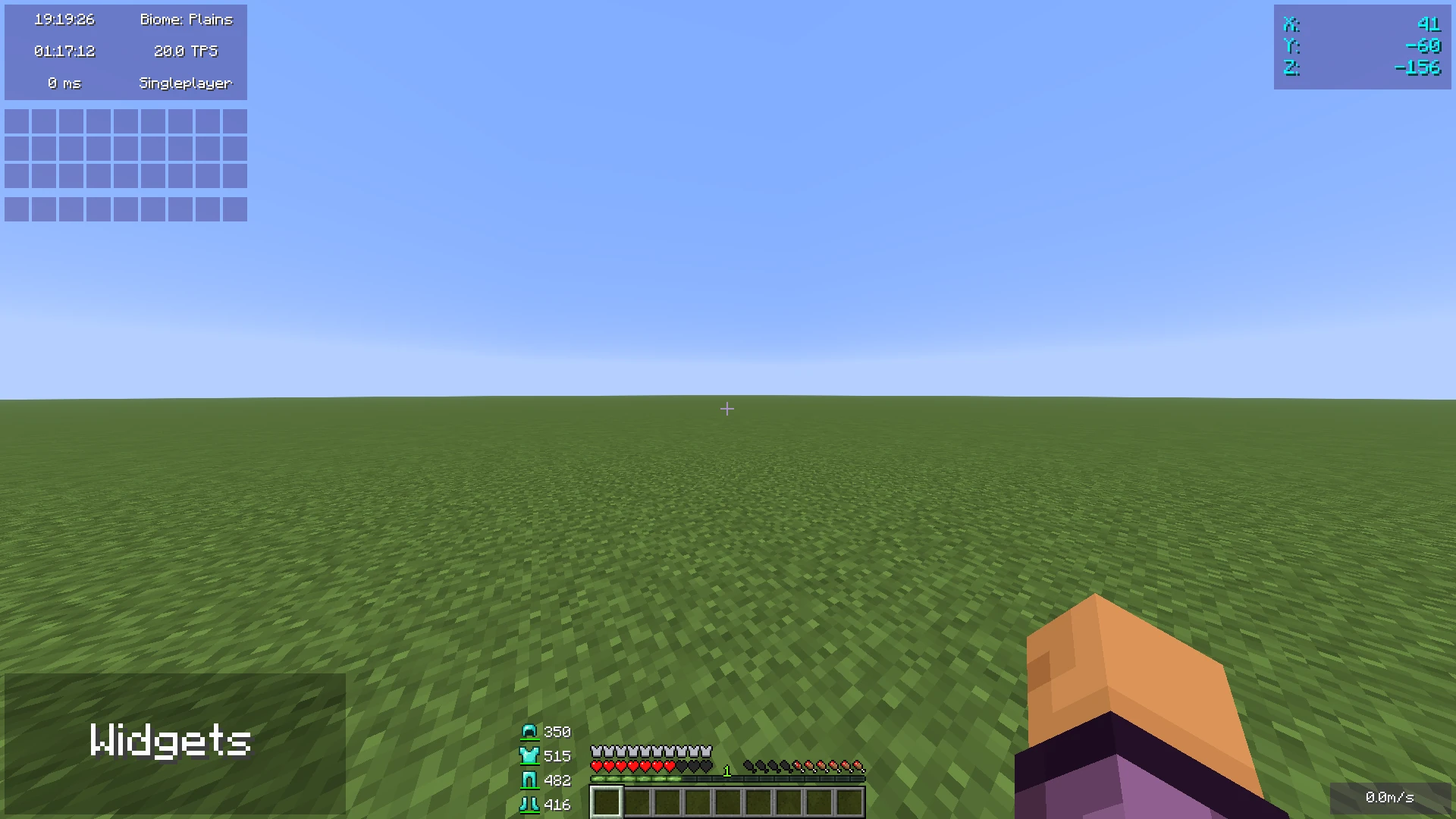
这款 Minecraft 模组添加了你可能在其他 Minecraft 客户端中见过的小部件。
该模组专为仅使用 Fabric 或 Quilt(且不使用特定客户端)的玩家专门制作。 与使用客户端相比,它还有一些优势:
- 性能:
- 我们尽可能优化了模组,以确保游戏运行尽可能流畅。
- 禁用的小部件不会占用任何性能资源
- 无额外功能
- 模组专注于仅限小部件。它不包含任何其他功能,如性能提升或模组。
- 易于使用
- 我们努力使模组尽可能易用,例如,打开配置菜单有三种方式,而不仅仅是一个按键绑定。
小部件设置
有三种方法可以打开小部件设置:
- 按下按键绑定(默认绑定为右 Shift 键)
- 输入命令 "/widgetsmod"
- 通过 Mod Menu 打开配置菜单
一旦你打开了设置,你将看到小部件概览菜单:
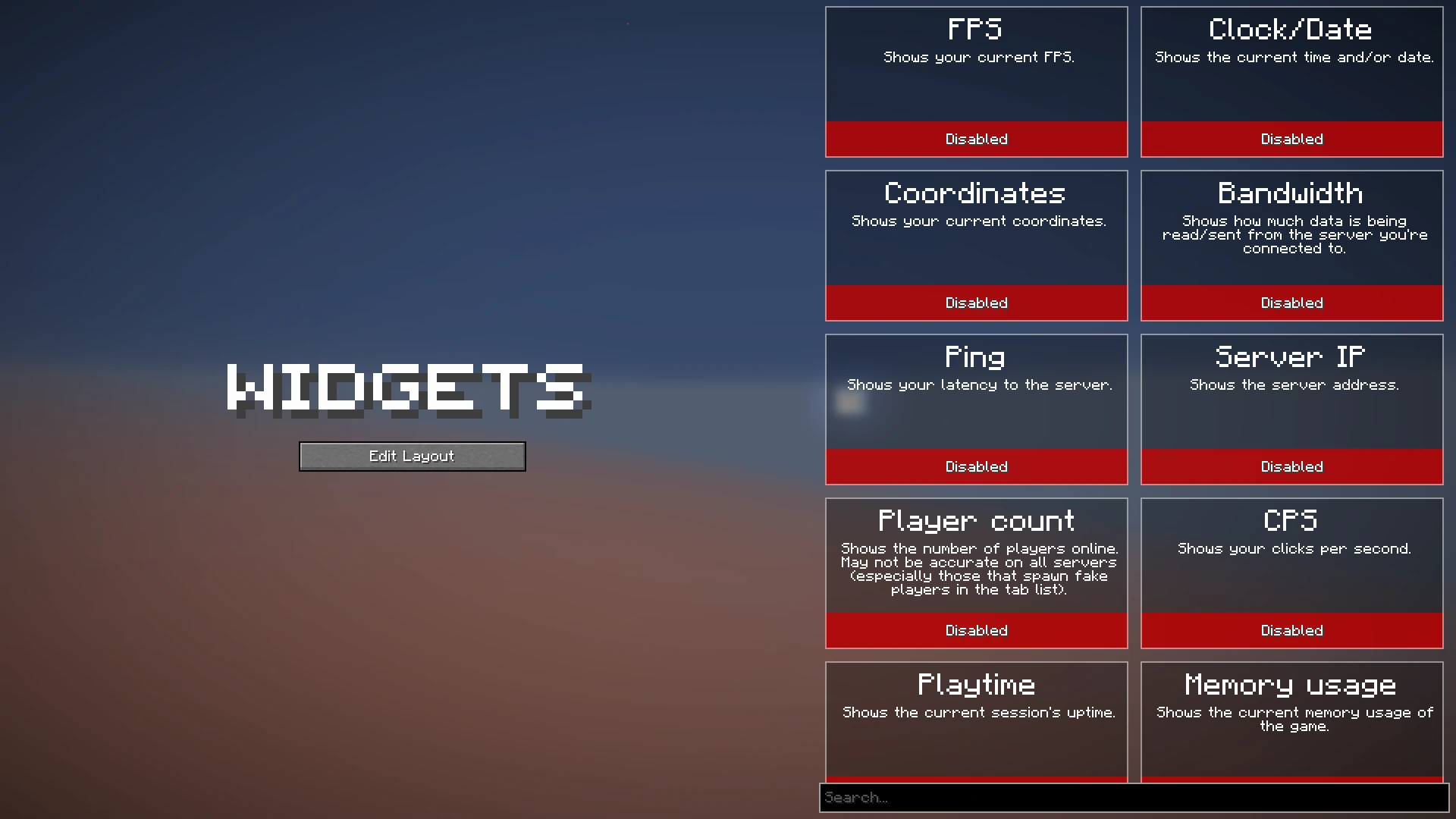
你现在可以启用你想要启用的小部件,或者点击它们以查看其附加设置,如下所示:
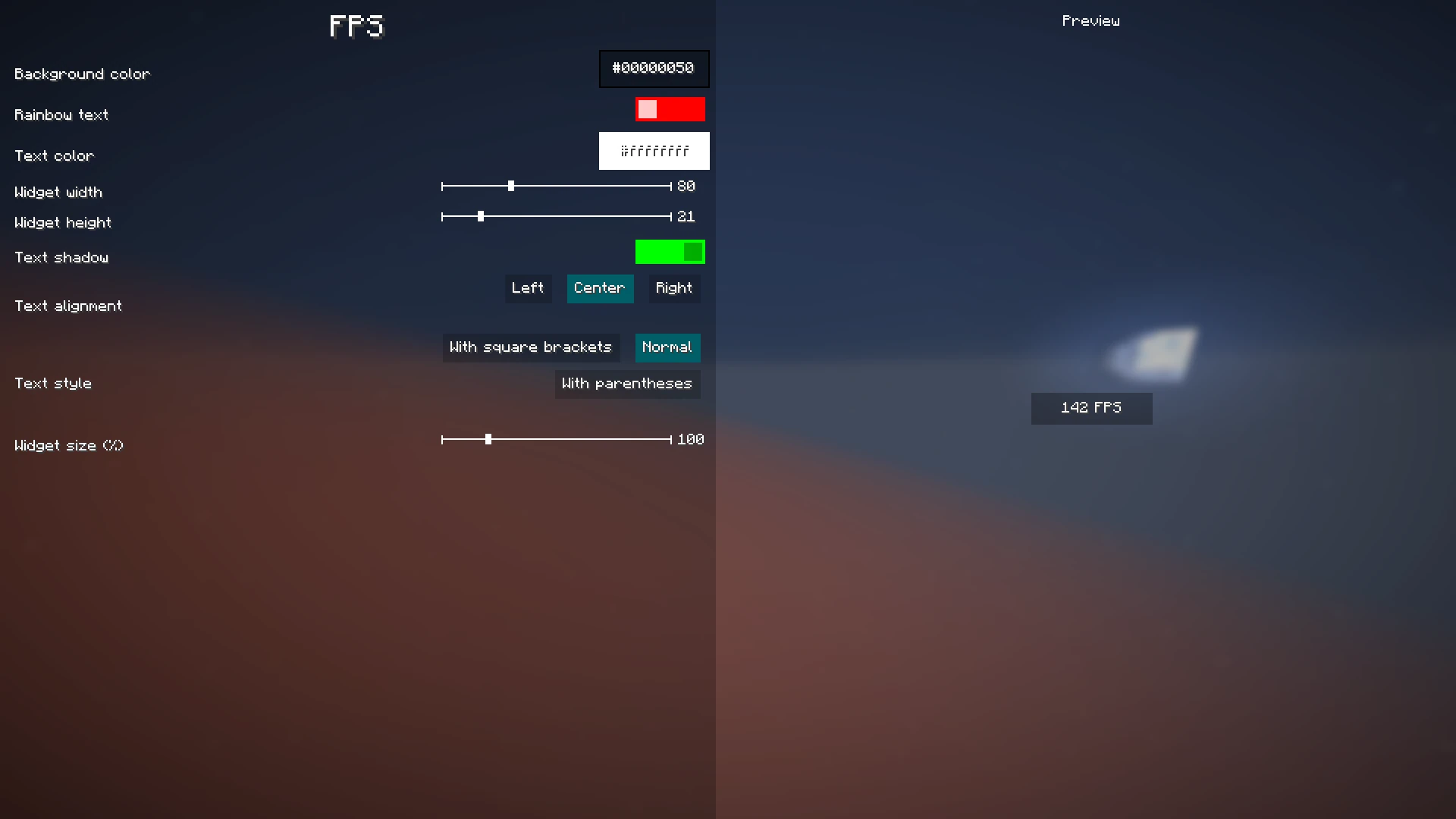
当你完成配置要启用哪些小部件及其设置后,点击模组配置屏幕左侧的“编辑布局”按钮。
这将带你进入一个可以自由移动已启用小部件的屏幕。
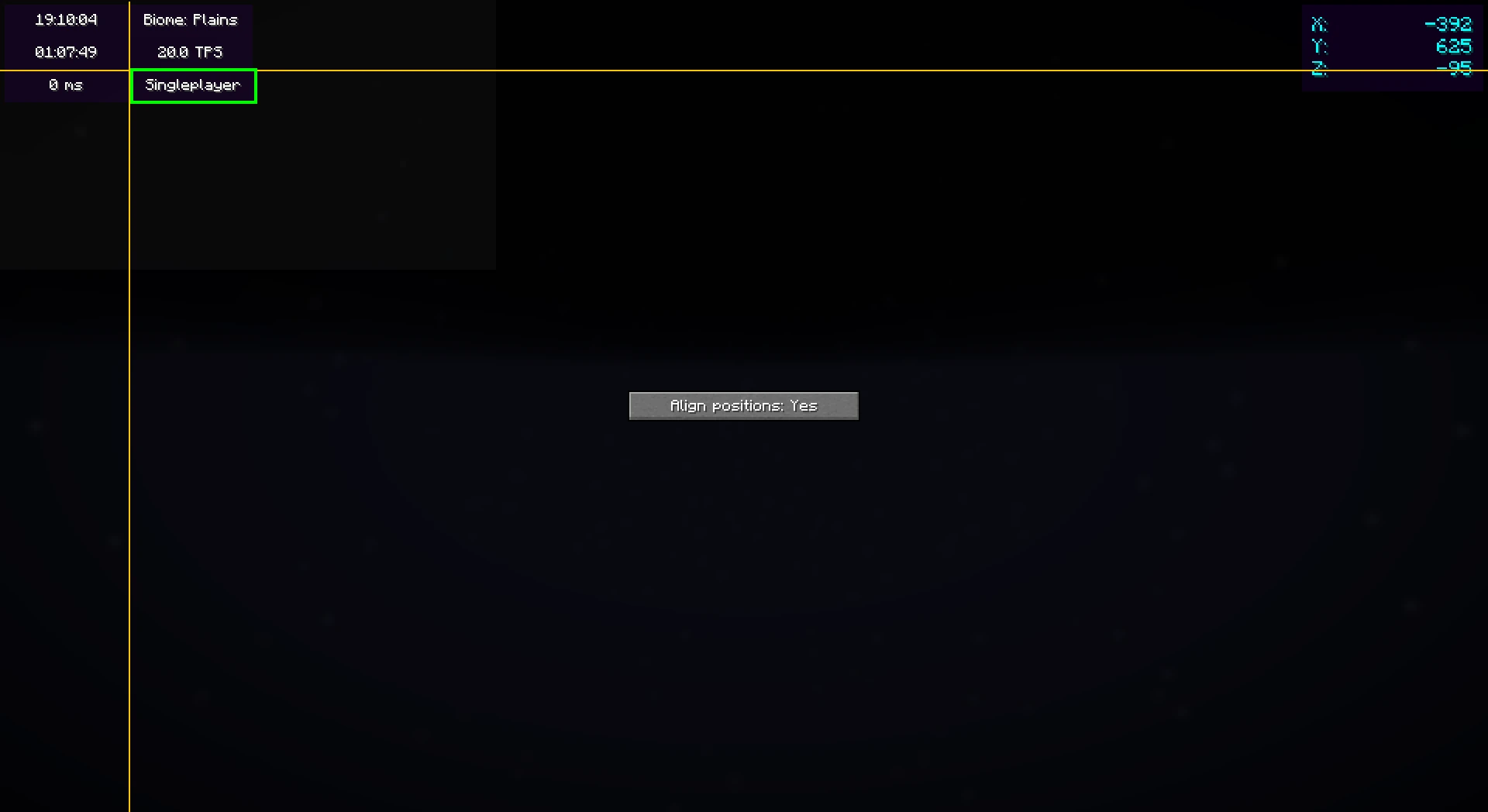
在此屏幕上右键单击将弹出一个有用的上下文菜单,其中包含附加选项,如启用/禁用小部件或更改其设置。
完成后,只需按 Escape 键直到返回游戏即可。
现在,一切就绪。你的小部件会自动保存,以便下次游玩时使用。
颜色编辑器
较新的模组版本(2.3.0+)包含一个颜色编辑器,可为小部件的背景和文本颜色提供完全自定义:
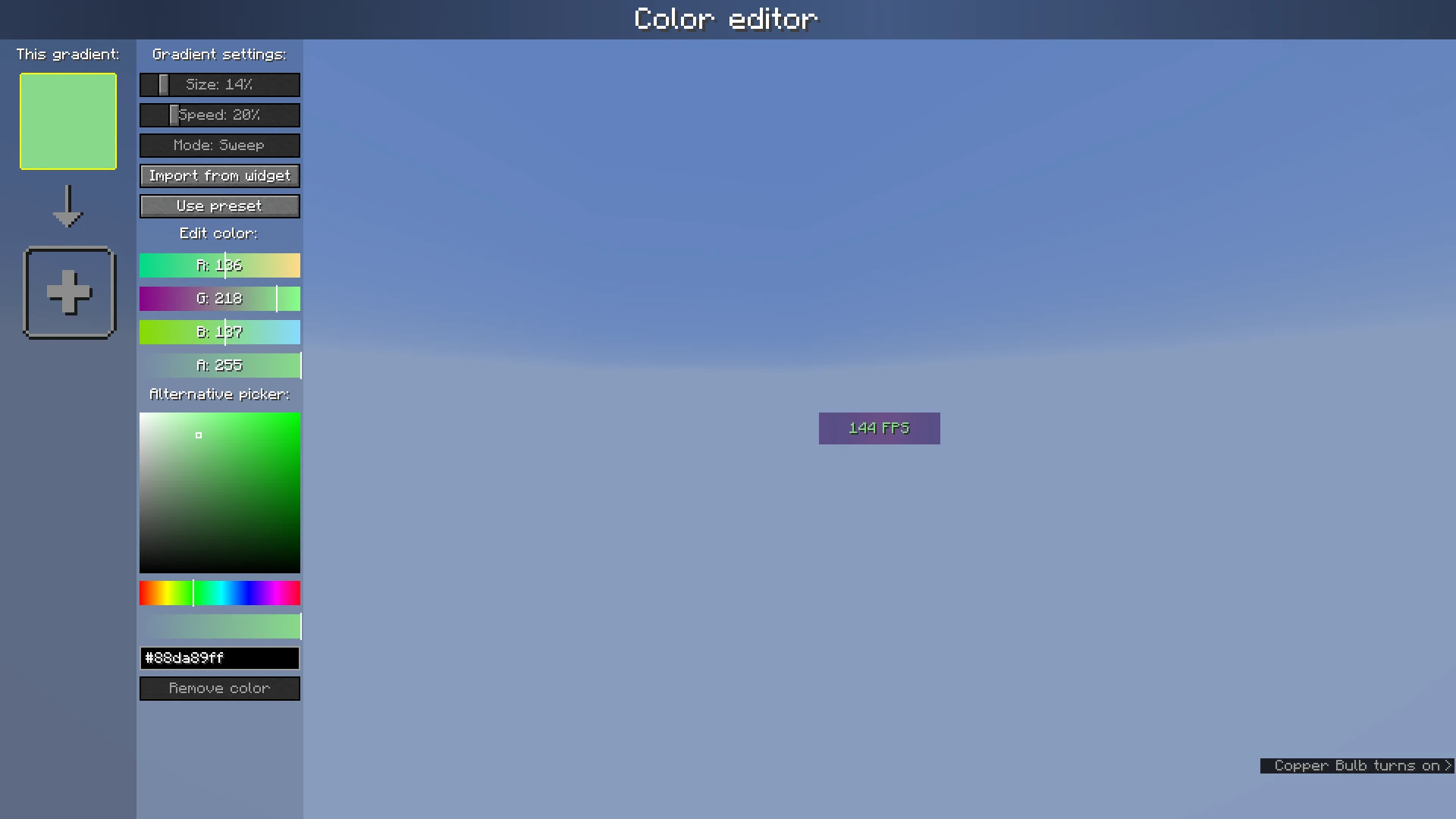
颜色列表左侧显示当前配置的颜色;如果添加多个颜色,它将变成渐变。单击颜色可选中它们。
颜色列表右侧的设置栏可用于自定义渐变设置、从其他小部件导入或使用预设。 在其下方,可以更改或删除当前选中的颜色。
Widgets
Adds customizable in-game widgets to your game.
This Minecraft mod adds customizable widgets that you may know from other Minecraft clients.
This mod was specifically made for people who just use Fabric or Quilt (and no specific client). It also has some benefits over using clients:
- Performance:
- We've tried to optimize the mod as much as possible to make sure the game runs as smoothly as possible.
- Disabled widgets don't use any performance
- No additional features
- The mod focuses on widgets only. It does not contain any other features such as performance improvements or mods.
- Easy to use
- We've tried to make the mod as easy to use as possible, for example, there are three ways to open the config menu instead of only a keybind.
Widget settings
There are three ways to open the widget settings:
- Press the key bind (bound to right shift by default)
- Enter the command "/widgetsmod"
- Open the config menu through Mod Menu
Once you've opened the settings, you will see the widget overview menu:
You can now enable the widgets you want to enable, or click on them to view their additional settings, as you can see here:
When you're done with configuring which widgets you want to enable and their settings, click the "Edit Layout" button on the left side of the mod configuration screen.
This will take you to a screen where you can freely move around your enabled widgets.
Right-clicking on this screen will bring up a useful context menu with additional options, like enabling/disabling widgets or changing their settings.
When you're done, just press Escape until you return to the game.
Now, everything is done. Your widgets automatically save for the next time you play.
Color editor
Newer mod versions (2.3.0+) include a color editor which provides full customization for your widgets' background and text colors:
The color list on the left shows the colors which are currently configured; if you add more than one, it becomes a gradient. Clicking on the colors will select them.
The settings bar on the right of the color list can be used to customize gradient settings, import from other widgets, or use presets. Below that, the color which is currently selected can be changed or deleted.

下载 Widgets
需要联机服务器吗?
稳定流畅、一键部署,几分钟即可和朋友联机开服
最低仅需 8 元/月 即可畅快联机
下载 Widgets
需要联机服务器吗?
稳定流畅、一键部署,几分钟即可和朋友联机开服
最低仅需 8 元/月 即可畅快联机
下载 Widgets
需要联机服务器吗?
稳定流畅、一键部署,几分钟即可和朋友联机开服
最低仅需 8 元/月 即可畅快联机
下载 Widgets
需要联机服务器吗?
稳定流畅、一键部署,几分钟即可和朋友联机开服
最低仅需 8 元/月 即可畅快联机
下载 Widgets
需要联机服务器吗?
稳定流畅、一键部署,几分钟即可和朋友联机开服
最低仅需 8 元/月 即可畅快联机
下载 Widgets
需要联机服务器吗?
稳定流畅、一键部署,几分钟即可和朋友联机开服
最低仅需 8 元/月 即可畅快联机
下载 Widgets
需要联机服务器吗?
稳定流畅、一键部署,几分钟即可和朋友联机开服
最低仅需 8 元/月 即可畅快联机
下载 Widgets
需要联机服务器吗?
稳定流畅、一键部署,几分钟即可和朋友联机开服
最低仅需 8 元/月 即可畅快联机
下载 Widgets
需要联机服务器吗?
稳定流畅、一键部署,几分钟即可和朋友联机开服
最低仅需 8 元/月 即可畅快联机
下载 Widgets
需要联机服务器吗?
稳定流畅、一键部署,几分钟即可和朋友联机开服
最低仅需 8 元/月 即可畅快联机
- 添加了实验性 NeoForge 支持
关于这个资源的讨论、问题反馈与使用心得
还没有讨论,来发第一帖吧
你是这个资源的作者?登录后可认领此资源。
相似资源
 模组

可定制的鞘翅模组,支持装饰纹饰、旗帜图案等更多功能!
 模组

显示你正在注视的方块的信息。(适用于 Minecraft 1.16+ 的 Hwyla/Waila 分支)
 模组

查看物品与配方
 模组
在游戏画面角落显示附近世界地形、玩家、生物和实体的地图。可创建路径点,帮助你找到标记过的位置。
 模组
使用 JavaScript 编辑配方、添加自定义物品、编写世界事件!
 模组

适用于 MC 1.18+ 的 Effekseer 加载器
评论 0
登录后参与评分
还没有评论,来抢沙发吧