
World Handler - Command GUI
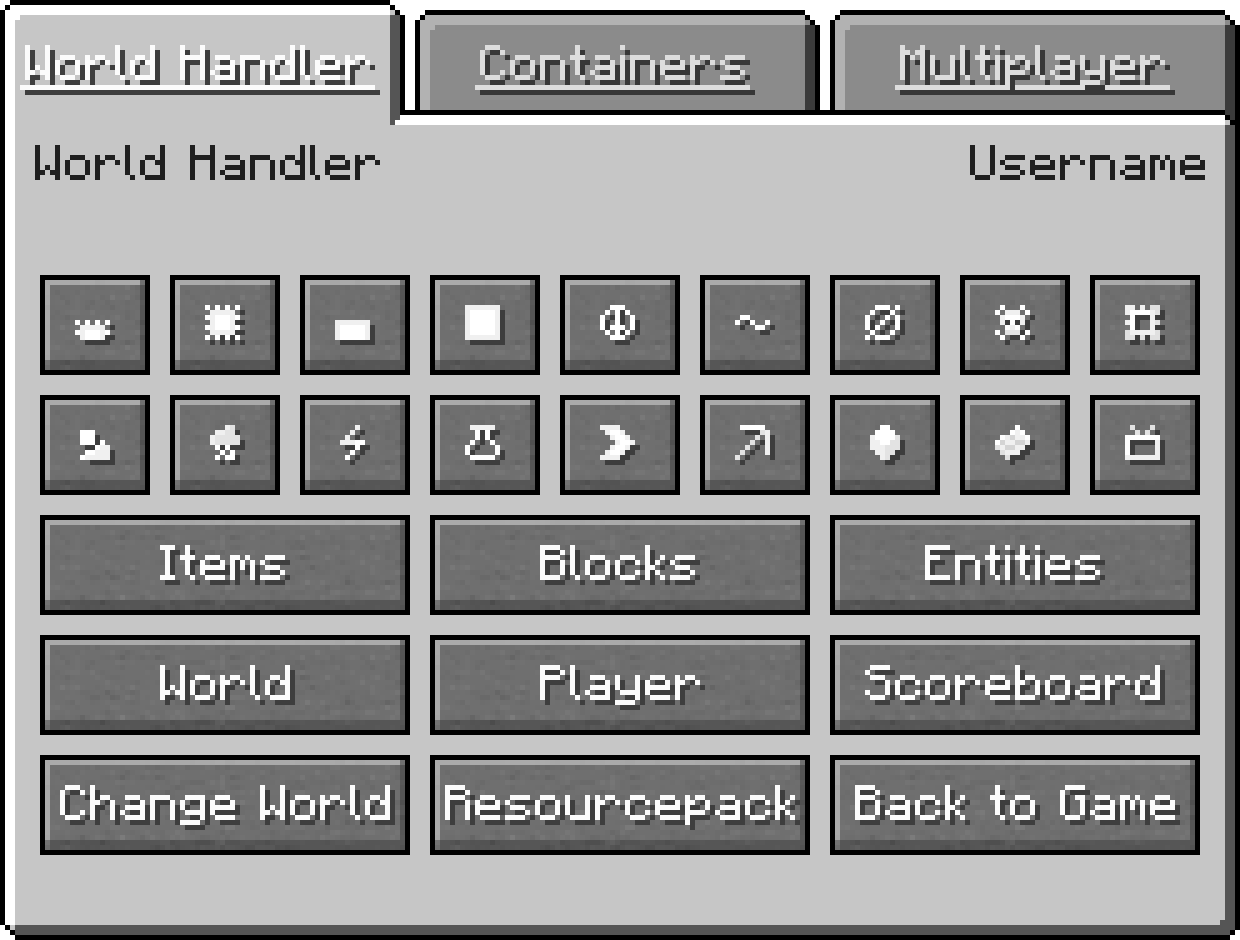
World Handler 提供了一个简单且易于使用的图形用户界面来执行命令。它让你能够在几秒钟内创建强大的复杂子命令以及 NBT 结构。
功能
- 命令的 GUI
- 客户端命令:advancement、blockdata、clear、clone、difficulty、effect、enchant、fill、gamemode、gamerule、give、kill、recipe、scoreboard、setworldspawn、spawnpoint、summon、tag、team、time、trigger、weather、xp
- 服务端命令:ban、deop、kick、op、pardon、save-all、save-off、save-on、whitelist
- 世界和玩家信息
- /wh 用于简化的 /fill 和 /clone
- 可通过 json 文件和子模组扩展的 GUI
- 仅客户端
安装
下载 World Handler 或从源代码构建
前置条件
- 1. 确保已安装 Minecraft Forge
安装程序
- 1. 运行 "WorldHandler-[VERSION]-UNIVERSAL.jar"
- 2. 选择你的 Minecraft 目录
- 3. 点击 Install(安装)
手动安装
- 1. 导航至 "..\.minecraft\mods"
- 2. 复制 "WorldHandler-[VERSION]-UNIVERSAL.jar"
- 3. 按照以下步骤操作
启动器设置
- 1. 选择 Forge 作为配置文件
- 2. 启动 Minecraft
- 3. 加入一个世界或服务器
- 4. 按 "V" 键打开 World Handler
配置
- ≥ 1.14.4: 手动: "..\.minecraft\config\worldhandler\worldhandler.toml"
- 1.13-1.14.4: 手动: "..\.minecraft\config\worldhandler.toml"
- 1.9-1.12: 游戏内:Mods -> World Handler -> Config (手动: "..\.minecraft\config\worldhandler.cfg")
- ≤ 1.8: 手动: "..\.minecraft\config\worldhandler\[CONFIG].cfg"
使用 ModLoader 安装 (1.6.2)
- 1. 导航至 "..\.minecraft\mods"
- 2. 将 "World_Handler_GUI_[VERSION].zip" 中的所有文件复制到 "1.6.2ML.jar" 中
- 3. 运行 Minecraft
扩展
World Handler GUI 还可以通过使用 json 和 javascript 文件配置的自定义标签页,或者作为用 Java 编写的独立子模组进行扩展。有关如何实现自定义 json 和 javascript 文件的说明,请参阅 此处,示例子模组可在 此处 找到。
常见问题
- 问:这是仅客户端的吗?
- 答:是的
- 问:你能把它移植到 Fabric、LiteLoader、Rift 等平台吗?
- 答:不能
- 问:我可以把它添加到我的整合包中吗?
- 答:可以,只要你注明出处即可
支持
此模组将不再更新。
许可证
GNU GENERAL PUBLIC LICENSE Version 3
World Handler - Command GUI
The World Handler provides a simple and easy to use graphical user interface for commands. It lets you create powerful and complex sub-commands alongside NBT-structures within seconds.
Features
- GUI for commands
- Client Commands: advancement, blockdata, clear, clone, difficulty, effect, enchant, fill, gamemode, gamerule, give, kill, recipe, scoreboard, setworldspawn, spawnpoint, summon, tag, team, time, trigger, weather, xp
- Server Commands: ban, deop, kick, op, pardon, save-all, save-off, save-on, whitelist
- World and player information
- /wh for a simplified /fill and /clone
- Expandable GUI with json files and child mods
- Client-side only
Installation
Download World Handler or build from source
Prerequisites
- 1. Make sure Minecraft Forge is installed
Installer
- 1. Run "WorldHandler-[VERSION]-UNIVERSAL.jar"
- 2. Select your Minecraft directory
- 3. Click Install
Manual
- 1. Navigate to "..\.minecraft\mods"
- 2. Copy the "WorldHandler-[VERSION]-UNIVERSAL.jar"
- 3. Follow the steps below
Launcher Settings
- 1. Select Forge as your profile
- 2. Launch Minecraft
- 3. Join a world or server
- 4. Press "V" to open the World Handler
Configuration
- ≥ 1.14.4: Manual: "..\.minecraft\config\worldhandler\worldhandler.toml"
- 1.13-1.14.4: Manual: "..\.minecraft\config\worldhandler.toml"
- 1.9-1.12: Ingame: Mods -> World Handler -> Config (Manual: "..\.minecraft\config\worldhandler.cfg")
- ≤ 1.8: Manual: "..\.minecraft\config\worldhandler\[CONFIG].cfg"
Installation with ModLoader (1.6.2)
- 1. Navigate to "..\.minecraft\mods"
- 2. Copy all files of the "World_Handler_GUI_[VERSION].zip" into the "1.6.2ML.jar"
- 3. Run Minecraft
Expansion
The World Handler GUI can also be expanded with custom tabs configured with json and javascript files or as a separate child mod written in java. A description on how to implement a custom json and javascript file can be found here and an example child mod can be found here.
FAQ
- Q: Is this client-side only ?
- A: Yes
- Q: Can you port this to fabric, liteloader, rift, etc ?
- A: No
- Q: Can i add this to my modpack ?
- A: Yes, as long as you give credit
Support
This mod will no longer be updated.
License
GNU GENERAL PUBLIC LICENSE Version 3

下载 World Handler - 命令 GUI
需要联机服务器吗?
稳定流畅、一键部署,几分钟即可和朋友联机开服
最低仅需 8 元/月 即可畅快联机
下载 World Handler - 命令 GUI
需要联机服务器吗?
稳定流畅、一键部署,几分钟即可和朋友联机开服
最低仅需 8 元/月 即可畅快联机
下载 World Handler - 命令 GUI
需要联机服务器吗?
稳定流畅、一键部署,几分钟即可和朋友联机开服
最低仅需 8 元/月 即可畅快联机
下载 World Handler - 命令 GUI
需要联机服务器吗?
稳定流畅、一键部署,几分钟即可和朋友联机开服
最低仅需 8 元/月 即可畅快联机
下载 World Handler - 命令 GUI
需要联机服务器吗?
稳定流畅、一键部署,几分钟即可和朋友联机开服
最低仅需 8 元/月 即可畅快联机
下载 World Handler - 命令 GUI
需要联机服务器吗?
稳定流畅、一键部署,几分钟即可和朋友联机开服
最低仅需 8 元/月 即可畅快联机
下载 World Handler - 命令 GUI
需要联机服务器吗?
稳定流畅、一键部署,几分钟即可和朋友联机开服
最低仅需 8 元/月 即可畅快联机
下载 World Handler - 命令 GUI
需要联机服务器吗?
稳定流畅、一键部署,几分钟即可和朋友联机开服
最低仅需 8 元/月 即可畅快联机
下载 World Handler - 命令 GUI
需要联机服务器吗?
稳定流畅、一键部署,几分钟即可和朋友联机开服
最低仅需 8 元/月 即可畅快联机
下载 World Handler - 命令 GUI
需要联机服务器吗?
稳定流畅、一键部署,几分钟即可和朋友联机开服
最低仅需 8 元/月 即可畅快联机
- 已更新至 1.21.1(NeoForge);感谢 MrSphay
关于这个资源的讨论、问题反馈与使用心得
还没有讨论,来发第一帖吧
你是这个资源的作者?登录后可认领此资源。
相似资源
 模组

显示你正在注视的方块的信息。(适用于 Minecraft 1.16+ 的 Hwyla/Waila 分支)
 模组

查看物品与配方
 模组
在游戏画面角落显示附近世界地形、玩家、生物和实体的地图。可创建路径点,帮助你找到标记过的位置。
 模组
使用 JavaScript 编辑配方、添加自定义物品、编写世界事件!
 模组
添加区块认领和玩家组队功能,并与 Xaero's Minimap 和 World Map 集成
 模组
添加全屏世界地图,显示你在世界中已探索的区域。与 Xaero's Minimap 搭配使用效果极佳。
评论 0
登录后参与评分
还没有评论,来抢沙发吧