
Yes Steve Model 模组是一个适用于 Minecraft Forge/Fabric/NeoForge 的模组,它基于 Geckolib,使用 Minecraft 基岩版的模型和动画文件来修改原版玩家模型。这使得玩家可以按照自己的意愿自定义玩家模型和动画。
-
自定义模型 Wiki:
-
Discord:
-
此 GitHub 仓库由社区玩家 @Elaina 维护,存储了许多艺术作者分享的 YSM 模型:
平台支持
1.1.5 及更早版本完全使用 Java 编写,支持三大主流平台以及移动端。
由于早期 Java 版本的加密算法被迅速破解,从 1.2.0 版本开始,核心加密与渲染部分均改用 C++ 编写。这大幅提升了渲染性能与安全性,但多平台支持情况较差。
系统支持情况如下:
| 系统 | 客户端 | 服务端 |
|---|---|---|
| Windows AMD64 | ✅ | ✅ |
| Linux AMD64 | ✅ | ✅ |
| Android AArch64 | ✅ | ❌ |
| macOS (Intel) | ❌ | ❌ |
| macOS (Apple Silicon) | ❌ | ❌ |
介绍视频
文字介绍
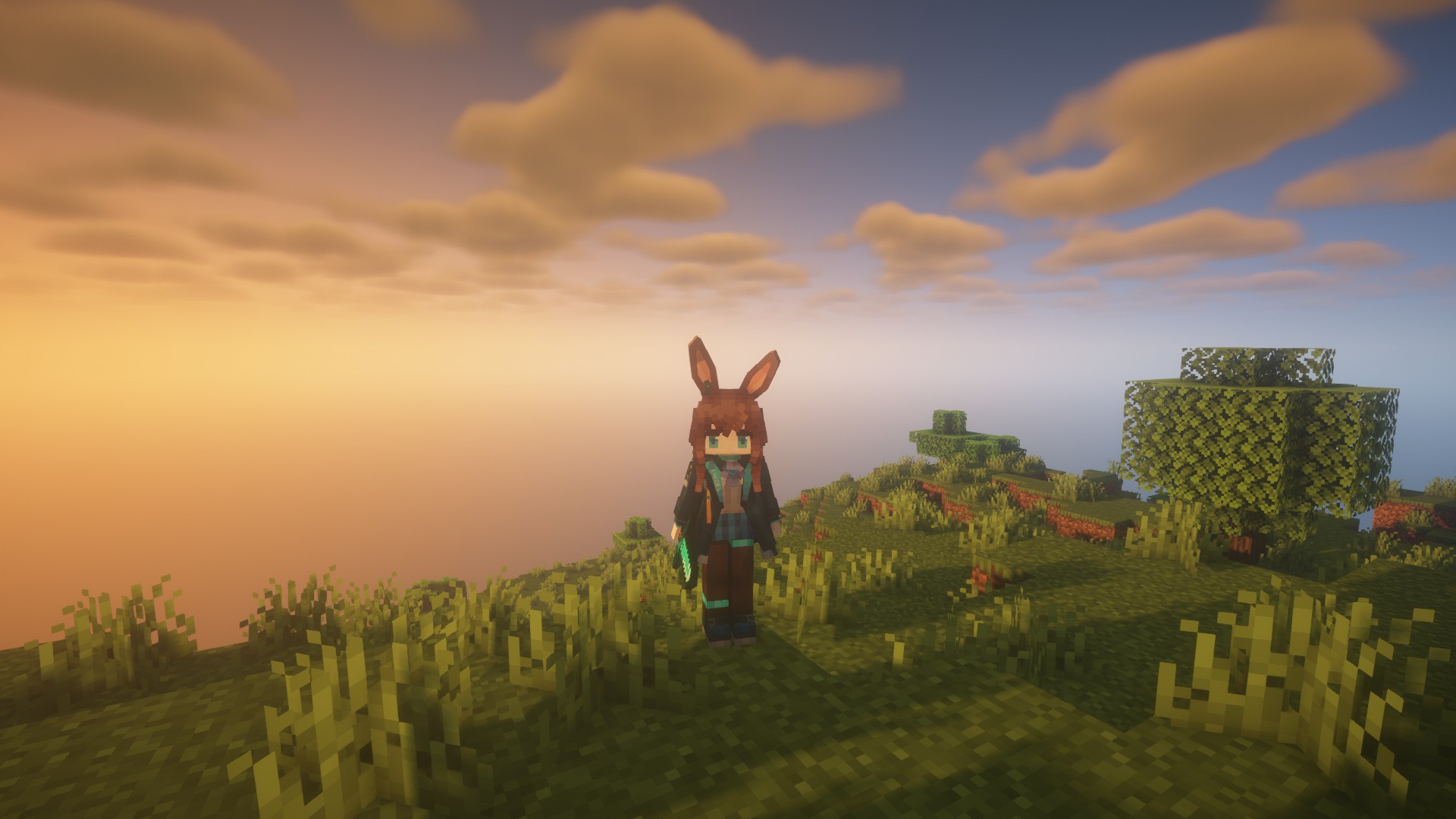
Yes Steve Model 模组考虑到了服务器社区的需求,采用了许多适合服务器环境的设计,包括但不限于:
- 客户端模型自动同步:当玩家加入服务器时,服务器会自动将模型同步到玩家的计算机。
- 加密的模型文件:所有发送给玩家客户端的模型均为加密的二进制文件,有效避免了模型被盗的问题!
- 模型授权功能:模型可单独进行授权,只有 OP 输入指令完成授权后,才能使用特定模型。
- 原版玩家模型修改:添加了默认的 Steve 和 Alex 模型,两者均可自动调用玩家皮肤显示。
自定义功能非常简单:模型自定义功能极其简单。你只需将模型、纹理和动画文件放入指定文件夹,并在游戏中输入重载命令即可自动加载并同步。无需编写任何配置文件!
对于客户端玩家来说,使用方法也同样简单。玩家首次加入服务器并等待十余秒(用于模型同步的时间消耗)后,可以使用快捷键 Alt + Y 打开以下 GUI:
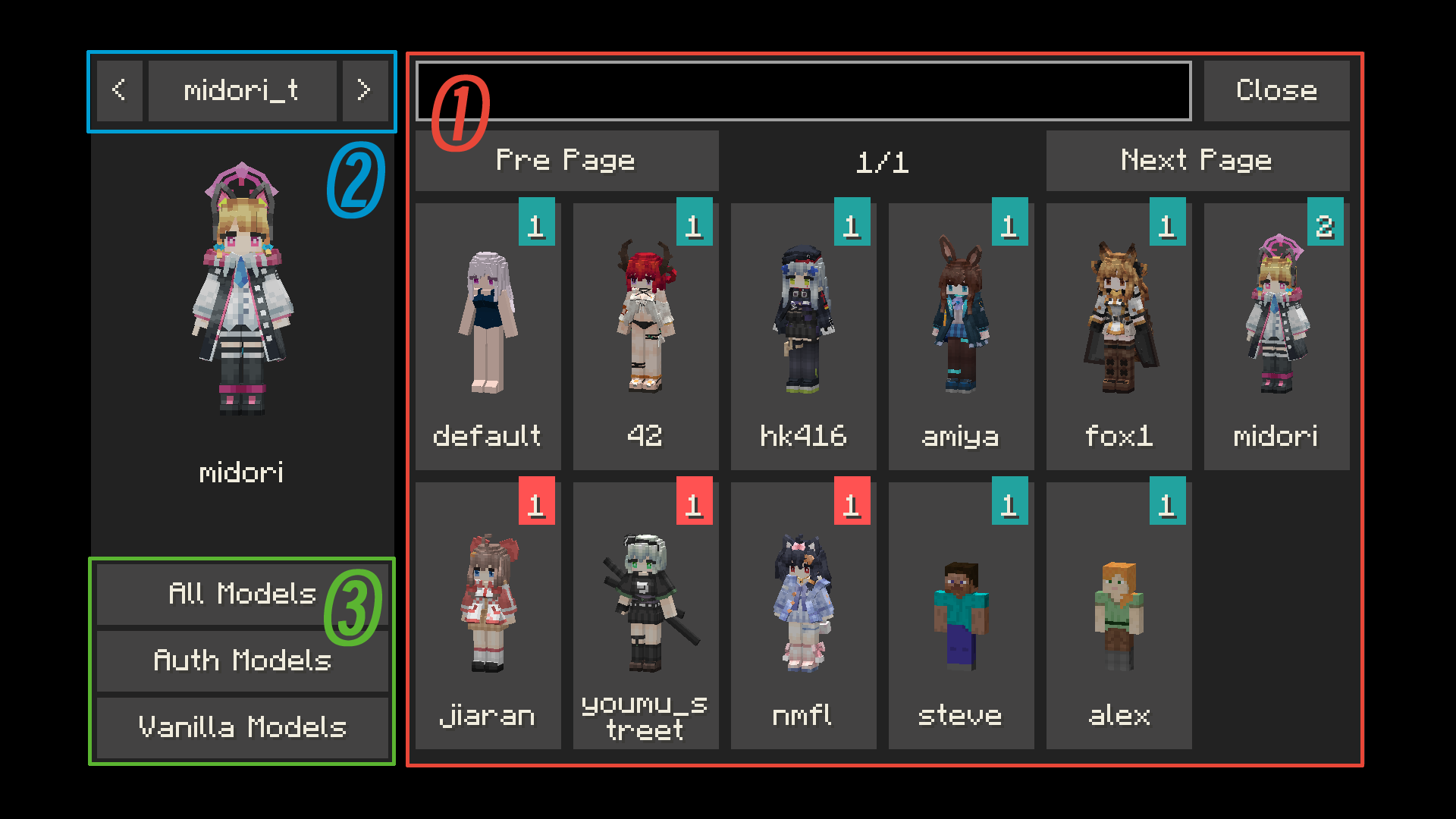
- ① 模型切换按钮:点击可切换到对应模型。如果按钮右上角的图标为红色,则表示该模型未获授权。图标中的数字代表该模型可切换的材质数量。
- ② 纹理切换按钮:对于拥有多种纹理的模型,点击左右按钮可切换模型纹理。
- ③ 模型类别切换按钮:你可以在所有模型、已授权模型和原版模型之间切换(目前仅包含 Steve 和 Alex 模型)。
有许多作者已在 PlanetMinecraft 上发布了作品。你可以关注他们:
- NekuroMC:
- Omegaff0048:
- rWby9:
- WelfarexWaifu:
额外警告:
请勿制作任何违反法律法规的模型。本制作组亦反对任何形式的 R18/NSFW 内容创作!我们从未参与过任何此类内容的制作!
请不要制作任何违反法律法规的模型,本制作组也反对任何形式的 R18 内容创作!也从未参与过任何相关内容创作!
2.2.2 及以上版本使用了 C++ 和 VMP。
尽管我们已尽可能使用数字签名来避免此问题,但仍可能引发部分杀毒软件的误报。
The Yes Steve Model mod is a Minecraft Forge/Fabric/NeoForge mod that modifies the vanilla player model, using geckolib at its core, using Minecraft Bedrock Edition models and animation files. This allows players to customize player models and animations as they wish.
-
Custom Model Wiki:
-
Discord:
-
This github repository is maintained by community player @Elaina and stores many YSM models shared by art authors:
Platform Support
Versions 1.1.5 and earlier were written in pure Java and support the three major mainstream platforms and mobile platforms.
Since the encryption algorithm of the old versions written in Java was quickly cracked, starting from version 1.2.0, the core encryption and rendering parts are all written in C++. This greatly improves the rendering performance and security, but the multi-platform support is poor.
The system support situation is as follows:
| System | Client | Server |
|---|---|---|
| Windows AMD64 | ✅ | ✅ |
| Linux AMD64 | ✅ | ✅ |
| Android AArch64 | ✅ | ❌ |
| macOS (Intel) | ❌ | ❌ |
| macOS (Apple Silicon) | ❌ | ❌ |
Introductory Videos
Text introduction
The Yes Steve Model mod takes into account the mod needs of the server community, and adopts many designs suitable for the server environment, including but not limited to:
- Automatic synchronization of client models: When players enter the server, the server will automatically synchronize the models to the player's computer.
- Encrypted model files: All the models sent to the player client are encrypted binary files, effectively avoiding the problem of model theft!
- Model auth function: Models can be authorized separately, and only after the OP input command is authorized, a specific model can be used.
- Vanilla player model modification: Added default Steve and Alex models, both of which can automatically call the player skin display.
Simple customization function: The model customization function is extremely simple. You only need to place the model, textures and animation files in a specific folder, and input the reload command in the game to automatically load and synchronize. No need to write any configuration files!
For client players, it is also extremely simple to use. After the player enters the server for the first time and waits for more than ten seconds (time-consuming for model synchronization), he can use the shortcut key Alt + Y to open the following GUI:
- ① Model switching button: Click to switch to the corresponding model. If the icon in the upper right corner of the button is red, it means the model is not authorized. The number in the icon represents the number of materials that the model can switch.
- ② Texture switching button: For models with multiple textures, click the left and right buttons to switch the model texture.
- ③ Model category switching button: You can switch between all models, auth models and vanilla models (currently only Steve and Alex models
There are many authors who have published works on planetminecraft. You can follow them:
- NekuroMC:
- Omegaff0048:
- rWby9:
- WelfarexWaifu:
Additional Warning:
Please do not create any models that violate laws and regulations. This production team is also opposed to any form of R18/NSFW content creation! We have never participated in any related content creation!
请不要制作任何违反法律法规的模型,本制作组也反对任何形式的 R18 内容创作!也从未参与过任何相关内容创作!
Version 2.2.2+ uses C++ and VMP.
Although we have used digital signatures to avoid this as much as possible, there may still be false positives from some antivirus software.

下载 Yes Steve Model
需要联机服务器吗?
稳定流畅、一键部署,几分钟即可和朋友联机开服
最低仅需 8 元/月 即可畅快联机
下载 Yes Steve Model
需要联机服务器吗?
稳定流畅、一键部署,几分钟即可和朋友联机开服
最低仅需 8 元/月 即可畅快联机
下载 Yes Steve Model
需要联机服务器吗?
稳定流畅、一键部署,几分钟即可和朋友联机开服
最低仅需 8 元/月 即可畅快联机
下载 Yes Steve Model
需要联机服务器吗?
稳定流畅、一键部署,几分钟即可和朋友联机开服
最低仅需 8 元/月 即可畅快联机
下载 Yes Steve Model
需要联机服务器吗?
稳定流畅、一键部署,几分钟即可和朋友联机开服
最低仅需 8 元/月 即可畅快联机
下载 Yes Steve Model
需要联机服务器吗?
稳定流畅、一键部署,几分钟即可和朋友联机开服
最低仅需 8 元/月 即可畅快联机
下载 Yes Steve Model
需要联机服务器吗?
稳定流畅、一键部署,几分钟即可和朋友联机开服
最低仅需 8 元/月 即可畅快联机
下载 Yes Steve Model
需要联机服务器吗?
稳定流畅、一键部署,几分钟即可和朋友联机开服
最低仅需 8 元/月 即可畅快联机
下载 Yes Steve Model
需要联机服务器吗?
稳定流畅、一键部署,几分钟即可和朋友联机开服
最低仅需 8 元/月 即可畅快联机
下载 Yes Steve Model
需要联机服务器吗?
稳定流畅、一键部署,几分钟即可和朋友联机开服
最低仅需 8 元/月 即可畅快联机
- 修复了远程玩家模型未渲染的问题
- 修复了第一人称手臂未渲染的问题
关于这个资源的讨论、问题反馈与使用心得
还没有讨论,来发第一帖吧
你是这个资源的作者?登录后可认领此资源。
相似资源
 模组

可定制的鞘翅模组,支持装饰纹饰、旗帜图案等更多功能!
 模组

适用于 MC 1.18+ 的 Effekseer 加载器
 模组

新增 50+ 个独特生物群系,为你的世界增添新树木、花卉等更多元素!
 模组

基于 GTCEu 1.12.2 的现代 GregTech
 模组

添加睡袋和吊床,分别用于便携性和昼夜转换,同时不会设置新的出生点。共有16种颜色可选!
 模组

为你的终界增添新生物群系、神秘仪式和全新生物
评论 0
登录后参与评分
还没有评论,来抢沙发吧