
? CDisc Music
将互联网上的任何音轨变成真正的音乐唱片。
将其放入唱片机后,附近的所有玩家都能通过距离语音聊天听到它:站得越近,声音越大。
支持 YouTube、Spotify、SoundCloud、Yandex Music、VK、TikTok、Twitch、Discord 附件、你自己的音乐文件夹等。
无需 API 密钥、令牌或账号。 安装后即可播放。如果你已有密钥,它们仍然有效,但并非必需。
? 要求
- Simple Voice Chat 或 Plasmo Voice。只需其中之一;如果同时安装了这两个模组,CDisc 会通过两者播放,因此使用任一模组的玩家都能听到同一个唱片机的声音,而同时安装了两个模组的玩家则只听到一次。
- Spigot、Paper 或 Folia,1.20 或更高版本。一个 JAR 文件即可兼容这三个服务端实现。
可选:使用 WorldGuard 保护区域内的唱片机,使用 PlaceholderAPI 提供占位符。
将 CDisc 和语音插件放入 plugins/ 目录并重启服务器。玩家需要安装对应的语音聊天 客户端模组 才能听到音乐。
? 快速入门
手持任意音乐唱片并运行:
/cdisc create never gonna give you up
从聊天栏列出的曲目中选择一首。你手中的唱片现在会附带该曲目,并在物品提示中显示名称和作者。将其放入唱片机后,音乐将从唱片机本身播放,范围内所有玩家同步收听。
更多创建唱片的方法:
/cdisc create直接写入一段链接到唱片/cdisc create sc:lofi hip hop搜索 SoundCloud(yt:、sp:、ym:、vk:同理)/cdisc create local:rain.mp3播放位于plugins/CDisc/local目录下的文件,支持 Tab 补全/cdisc disc playlist <链接>写入整个播放列表:将空白唱片放入窗口中,每张唱片对应一首曲目
从那时起,唱片成为了普通物品:你可以携带它、交易它,或者把它存放在箱子里。
✨ 特性
? 唱片机与玩家界面
- 蹲下查看正在播放的留声机,即可看到显示曲目与时间的进度条,然后右键点击以打开播放器。不蹲下时,右键点击会像原版一样取出唱片。
/cdisc sneak命令允许每位玩家自定义蹲下的行为。 - 播放器界面:支持播放/暂停、快进/快退 ±5 秒或输入精确的时间码、上一曲/下一曲、重复(关闭、整列循环、单曲循环)和随机播放。在 1.21.6+ 版本中,它会以带有滑块和按钮的真实窗口形式打开;旧版本和 Spigot 服务器则使用箱子界面。
- 每个留声机拥有 42 张唱片的队列,按顺序依次播放。你可以选择已播放完的唱片如何处理:保留、弹出或移至队尾。
- 交叉淡入淡出:一张唱片的结尾平滑过渡到下一张,曲目之间无缝衔接。
- 数据永不丢失:队列会在重启和崩溃后保留,正在播放的留声机会从停止处继续播放,破坏或烧毁留声机会掉落仍保存所有唱片的留声机。重新放置后,队列将恢复。
- 直播流:Twitch 和 YouTube 的直播内容将在广播持续期间一直播放。
- 鹦鹉随音乐起舞:CDisc 唱片中的音乐同样会让鹦鹉跳舞,如同原版唱片一般。
? 音效
- 真正的距离音效:音乐源自留声机,并随距离增加而衰减。
- 信标范围增强:在留声机下方建造信标金字塔,并通过播放器界面提升其覆盖范围。金字塔等级越高,覆盖范围越大。
| 金字塔等级 | 额外范围 |
|---|---|
| 1 | +16 格 |
| 2 | +32 格 |
| 3 | +64 格 |
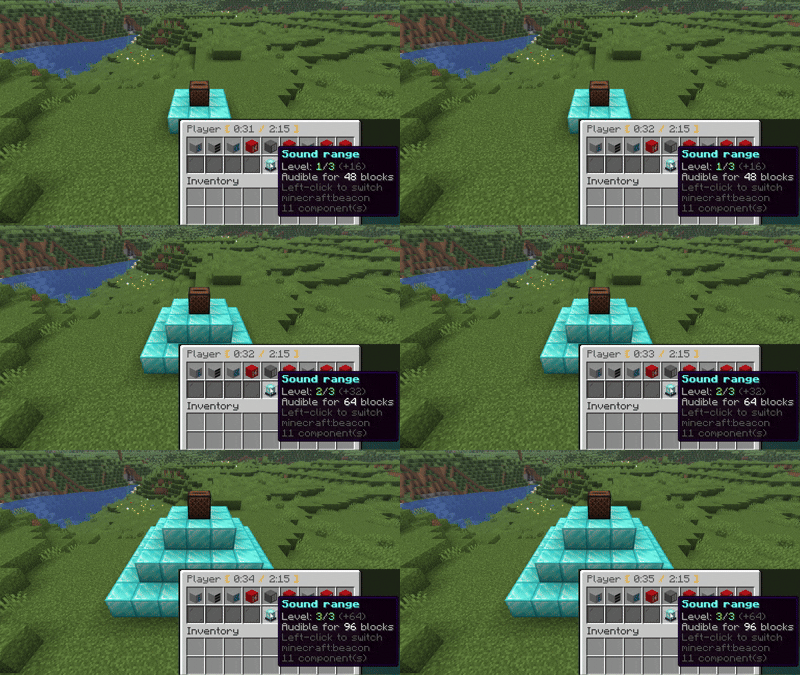
- 扬声器组:最多可将 8 台留声机链接为一个组,同步播放同一首曲目。每台扬声器可独立设置为立体声、单声道、左声道或右声道,并调整各自的音量。适用于俱乐部、竞技场或城镇广场。
- 携带留声机:拿起正在播放的留声机而不停止曲目,音乐会跟随你移动,即使穿过传送门也是如此。使用
/cdisc player scoreboard命令,歌词会显示在你的侧边栏,而其他玩家则在你头顶上方看到歌词。 - 双重音量控制:一个用于控制留声机周围玩家的音量,另一个用于控制携带者的音量。
- 山羊角录音:手持山羊角并使用
/cdisc create命令,可将短音频录制到山羊角中,默认最长 15 秒。吹响山羊角可通过语音聊天播放录音。
? 留声机上方的歌词
- 定时歌词:当留声机播放时,来自免费歌词数据库的歌词会逐行浮现在留声机上方。
- 每位玩家选择自己看到的内容:仅文字、带曲目和时间的文字、带时间的文字、仅曲目和时间、仅时间,或无内容。在玩家界面中点击或右键点击歌词按钮可切换视图,或使用
/cdisc lyrics命令。 - 自定义外观:使用
/cdisc preset设置颜色、大小、不透明度、行数、阴影、淡入淡出和滑动效果,并实时预览。每位玩家都可以按照自己的方式查看全息投影,而/cdisc preset share <player>可将你的外观分享给朋友。 - 服务器预设:管理员可通过
/cdisc admin presets创建命名的外观,并将其分配给特定玩家、选择器菜单或作为所有人的默认外观。可选择强制应用,以防止任何人更改。 - 实时聊天:在 Twitch 或 YouTube 直播中,直播间的聊天内容将替代歌词显示。
?️ 广播(实验性功能)
⚠️ 实验性功能。广播功能为新加入特性,可能仍存在漏洞。如果出现问题,请在 GitHub 上报告,最好附上
/cdisc admin logs日志链接。在config.yml中将broadcast.enabled: false可关闭该功能。
执行 /cdisc create broadcast:Name 会创建一个不播放音乐的唱片:将其放入留声机后即可开启直播。主持人最多可以添加六个麦克风。手持式麦克风可以在玩家之间传递;方块麦克风则能收录附近所有玩家的语音。声音会从留声机及其关联的所有扬声器中传出,因此只需一张唱片即可搭建舞台或广播电台。
? 专属音乐文件夹
-
将音频文件放入
plugins/CDisc/local,它们就会成为唱片:支持local:前缀的 Tab 补全,直接从磁盘播放,无需下载任何内容。 -
在音轨旁放置一个
.jsonc文件,即可为其设置独立的名称、音量、权限和歌词。使用/cdisc admin local-files-config <file>命令可在窗口中编辑所有这些配置。 -
/cdisc admin download <链接或搜索>可从游戏内、YouTube、Spotify、直接链接或搜索结果中将音轨保存到文件夹,从而继续播放原始内容。
?️ 面向服务器管理员
-
每项操作都有对应的权限:暂停、跳过、快进、排队、手持留声机、歌词显示等,所有权限均在
permissions.yml中配置。界面会隐藏玩家无权使用的按钮。对于非工作人员的玩家,可设置冷却时间、允许播放的最长曲目时长、直播源开关以及允许的/禁止的主机列表。 -
WorldGuard 支持:位于特定区域内的留声机仅对该区域的成员响应。通过
cdisc-jukebox标志可将区域内的留声机向所有人开放,或同样限制为仅限成员使用。 -
设置窗口:在 Minecraft 游戏内使用
/cdisc admin config命令即可编辑所有配置文件(需 Paper 1.21.7+)。 -
诊断工具:
/cdisc admin doctor可查看哪些音源正常运行、哪些缺少必要组件;/cdisc admin logs可上传包含该诊断报告的日志文件用于提交 Bug 反馈,并自动隐藏密钥和令牌等敏感信息。 -
自动更新:当服务器停机时,会自动从 Modrinth 或 GitHub 下载并安装新版本发布包。此功能可手动关闭。
-
7 种语言:英语、俄语、乌克兰语、德语、西班牙语、希伯来语和阿拉伯语。每位玩家根据其客户端的语言进行阅读,或者你可以为整个服务器固定一种语言。你的翻译文件会放入
languages/目录中。 -
PlaceholderAPI:支持
%cdisc_track%、%cdisc_position%、%cdisc_progress%等占位符,用于获取玩家可听到的最近唱片机播放的信息。 -
API:其他插件可以监听
TrackStartEvent、PlaybackStopEvent以及可取消的DiscCreateEvent,并通过CDiscApi查询某台唱片机当前正在播放的内容。 -
升级保留您的设置:每次从新版 jar 包更新时,配置文件会自动升级到最新版本,您的自定义更改得以保留,旧版配置文件会被备份为
.old后缀。
? 来源
| 来源 | 前缀 | 需要 |
|---|---|---|
| YouTube | yt:(或无前缀) |
无 |
| Spotify | sp: |
无;仅密钥会使搜索使用 Spotify 本身 |
| SoundCloud | sc: |
无 |
| Yandex Music | ym: |
无 |
| VK Music | vk: |
无 |
| TikTok | 链接,或 tt: + 视频编号 |
无 |
| Twitch、Mixcloud、Reddit | 链接 | 无 |
| Discord 附件 | 链接 | 无(Discord 的链接约一天后过期) |
| 你的音乐文件夹 | local: |
无 |
| 任意直接音频链接 | 链接 | sources.yml 中设置 http: true |
搜索会显示一个可供选择的列表;在末尾添加 :10 可获取更多结果。专辑和播放列表也可打开。
为什么不需要密钥
YouTube 会优先直接读取。当 YouTube 拒绝服务器请求时(例如针对许多托管地址),CDisc 会向其公共 后端 发起请求,该后端从其自有地址获取音轨。同一后端无需任何令牌即可读取 Spotify、Yandex Music 和 VK 链接。默认启用;可通过 sources.yml 关闭。
如果你添加了它们,tokens.yml 中的密钥和令牌仍会被读取:Spotify 客户端密钥、Yandex Music 和 VK 令牌作为无法访问后端时的备用方案、YouTube po-token,以及出站代理。这些都不是必需的。
⌨️ 命令
| 指令 | 功能说明 |
|---|---|
/cdisc create <链接或搜索> |
将音轨写入你手中持有的唱片或山羊角 |
/cdisc disc clear |
将手持的唱片还原为普通唱片 |
/cdisc disc playlist <链接> |
将播放列表写入空白唱片中 |
/cdisc disc convert |
转换由 pv-addon-discs 生成的唱片 |
| /cdisc player <暂停 \| 播放 \| 下一曲 \| 上一曲 \| 跳转 \| 重复 \| 队列 \| 信息> | 控制你正在查看或手持的唱片机 |
| /cdisc player scoreboard | 当你手持唱片机时,在侧边栏显示歌词 |
| /cdisc lyrics <view> | 选择在唱片机上方显示的内容 |
| /cdisc preset | 自定义你的全息投影外观;使用 share <player> 可将其分享给其他玩家 |
| /cdisc pair <create \| add \| remove \| dissolve \| channel \| volume \| list> | 音箱分组 |
| /cdisc sneak <toggle \| release \| off> | 设置你在唱片机前蹲下时的交互方式 |
| /cdisc messages | 开启或关闭“正在播放”提示消息 |
| /cdisc admin <reload \| doctor \| download \| logs \| config \| presets \| local-files-config> | 服务器管理工具;也可从控制台执行 |
? 统计
? CDisc Music
Turn any track from the internet into a real music disc. Put it in a jukebox and everyone nearby hears it through proximity voice chat: the closer you stand, the louder it gets.
YouTube, Spotify, SoundCloud, Yandex Music, VK, TikTok, Twitch, Discord attachments, your own music folder, and more.
No API keys, no tokens, no accounts. Install it and it plays. Keys still work if you have them, but nothing needs them.
? Requirements
- Simple Voice Chat or Plasmo Voice. One is enough; with both installed CDisc plays through both, so players on either mod hear the same jukebox, and players with both mods hear it once.
- Spigot, Paper or Folia, 1.20 or newer. One jar for all three.
Optional: WorldGuard for protecting jukeboxes in regions, PlaceholderAPI for placeholders.
Put CDisc and the voice plugin into plugins/ and restart. Players need the matching voice-chat client mod to hear the music.
? Quick start
Hold any music disc and run:
/cdisc create never gonna give you up
Pick a track from the list in chat. The disc in your hand now carries that track, with its name and author in the tooltip. Put it in a jukebox, and it plays from the jukebox itself, in sync for everyone in range.
More ways to make a disc:
- `/cdisc create writes a link straight to the disc
/cdisc create sc:lofi hip hopsearches SoundCloud (yt:sp:ym:vk:work the same way)/cdisc create local:rain.mp3plays a file fromplugins/CDisc/local, with Tab completion/cdisc disc playlist <link>writes a whole playlist: drop blank discs into the window and each gets a track
A disc is an ordinary item from then on: carry it, trade it, store it in a chest.
✨ Features
? Jukeboxes and the player screen
- Crouch at a playing jukebox to see a progress bar with the track and its time, then right-click it to open the player. Without crouching, a right-click takes the disc out as usual.
/cdisc sneaklets each player choose how crouching works. - The player screen: play / pause, seek ±5 s or type an exact timecode, previous / next, repeat (off, whole queue, one track) and shuffle. On 1.21.6+ it opens as a real window with sliders and buttons; older versions and Spigot get the chest screen.
- A queue of 42 discs per jukebox, played one after another. Choose what happens to a finished disc: it stays, it is ejected, or it moves to the end.
- Crossfade: the end of one disc blends into the next, with no gap between tracks.
- Nothing is lost: queues survive restarts and crashes, a playing jukebox resumes where it stopped, and breaking or burning a jukebox drops a jukebox that still holds every disc. Placing it again puts the queue back.
- Live streams from Twitch and YouTube play for as long as the broadcast runs.
- Parrots dance to CDisc discs just as they do to vanilla ones.
? Sound
- True proximity audio: the music comes from the jukebox and fades with distance.
- Beacon range boost: build a beacon pyramid under a jukebox and raise its range from the player screen. Bigger pyramids allow more range.
| Pyramid level | Extra range |
|---|---|
| 1 | +16 blocks |
| 2 | +32 blocks |
| 3 | +64 blocks |
- Speaker groups: link up to 8 jukeboxes into one group and they play the same track in sync. Each speaker can be set to stereo, mono, the left channel or the right one, at its own volume. Good for a club, an arena or a town square.
- Carry a jukebox: pick a playing jukebox up without stopping the track, and the music follows you, through portals too. With
/cdisc player scoreboardthe lyrics go to your sidebar, and everyone else reads them over your head. - Two volumes: one for everyone around the jukebox, and one for whoever carries it.
- Goat horns:
/cdisc createwith a goat horn in hand records a short sound onto it, up to 15 seconds by default. Blowing the horn plays it through voice chat.
? Lyrics over the jukebox
- Timed lyrics float above a playing jukebox, line by line, from free lyrics databases.
- Each player chooses what they see: the words, the words with the track and time, the words with the time, the track and time, the time alone, or nothing. Left and right click on the lyrics button in the player screen step through the views, or use
/cdisc lyrics. - Your own look:
/cdisc presetsets colours, size, opacity, line count, shadow, fade and slide, with a live sample in front of you. Everyone reads the hologram their own way, and/cdisc preset share <player>offers your look to a friend. - Server presets: admins make named looks with
/cdisc admin presetsand hand them to players, to a selector, or to everyone as a default. Optionally forced, so nobody can change them. - Live chat: on a Twitch or YouTube live stream, the stream's chat takes the place of the lyrics.
?️ Broadcasts (experimental)
⚠️ Experimental. Broadcasts are new and may still have bugs. If something goes wrong, please report it on GitHub, ideally with a
/cdisc admin logslink.broadcast.enabled: falseinconfig.ymlswitches them off.
/cdisc create broadcast:Name makes a disc that plays no music: in a jukebox it goes live. Its host adds up to six microphones. A handheld one can be passed from player to player; a block microphone hears everyone standing near it. Voices come out of the jukebox and every speaker linked to it, so a stage or a radio station is one disc away.
? Your own music folder
- Drop audio files into
plugins/CDisc/localand they are discs:local:with Tab completion, played straight from disk with nothing fetched. - A
.jsoncfile beside a track gives it its own name, volume, permission and lyrics./cdisc admin local-files-config <file>edits all of it in a window. /cdisc admin download <link or search>saves a track into the folder from in game, from YouTube, Spotify, a direct link or a search, so it keeps playing whatever happens to the original.
?️ For server owners
- A permission for every action: pause, skip, seek, queue, carrying a jukebox, lyrics and more, all set in
permissions.yml. Screens hide the buttons a player may not use. Limits for players who are not staff: a cooldown, the longest allowed track, live streams on or off, allowed and blocked hosts. - WorldGuard: a jukebox inside a region answers only the region's members. The
cdisc-jukeboxflag opens a region's jukeboxes to everyone, or closes them to members too. - A settings window:
/cdisc admin configedits every config file in game (Paper 1.21.7+). - Diagnostics:
/cdisc admin doctorshows which sources work and which are missing something, and/cdisc admin logsuploads the log with that report for a bug report, with keys and tokens hidden. - Updates itself: new releases from Modrinth or GitHub are downloaded and installed when the server stops. This can be turned off.
- 7 languages: English, Russian, Ukrainian, German, Spanish, Hebrew and Arabic. Each player reads their client's language, or you pin one for the whole server. Your own translation drops into
languages/. - PlaceholderAPI:
%cdisc_track%,%cdisc_position%,%cdisc_progress%and more for the nearest jukebox a player can hear. - API: other plugins can listen to
TrackStartEvent,PlaybackStopEventand the cancellableDiscCreateEvent, and askCDiscApiwhat a jukebox is playing. - Upgrades keep your settings: every config file is brought up to date from the new jar, your changes stay, and the old file is kept as
.old.
? Sources
| Source | Prefix | Needs |
|---|---|---|
| YouTube | yt: (or no prefix) |
nothing |
| Spotify | sp: |
nothing; keys only make search use Spotify itself |
| SoundCloud | sc: |
nothing |
| Yandex Music | ym: |
nothing |
| VK Music | vk: |
nothing |
| TikTok | links, or tt: + video number |
nothing |
| Twitch, Mixcloud, Reddit | links | nothing |
| Discord attachments | links | nothing (Discord's links expire after about a day) |
| Your music folder | local: |
nothing |
| Any direct audio link | links | http: true in sources.yml |
A search shows a list to pick from; add :10 at the end for more results. Albums and playlists open too.
Why no keys are needed
YouTube is read directly first. When YouTube refuses the server, as it does for many hosting addresses, CDisc asks its public backend, which fetches the track from its own address. The same backend reads Spotify, Yandex Music and VK links without any tokens. It is on by default; sources.yml turns it off.
Keys and tokens in tokens.yml are still read if you add them: Spotify client keys, Yandex Music and VK tokens as a fallback when the backend cannot be reached, a YouTube po-token, and an outgoing proxy. None of them are required.
⌨️ Commands
| Command | What it does |
|---|---|
/cdisc create <link or search> |
Write a track onto the disc or goat horn in your hand |
/cdisc disc clear |
Turn the held disc back into a normal one |
/cdisc disc playlist <link> |
Write a playlist onto blank discs |
/cdisc disc convert |
Convert a disc made by pv-addon-discs |
/cdisc player <pause | play | next | previous | seek | repeat | queue | info> |
Control the jukebox you are looking at or carrying |
/cdisc player scoreboard |
Lyrics in your sidebar while you carry a jukebox |
/cdisc lyrics <view> |
Choose what you see over jukeboxes |
/cdisc preset |
Your own hologram look; share <player> offers it to someone |
/cdisc pair <create | add | remove | dissolve | channel | volume | list> |
Speaker groups |
/cdisc sneak <toggle | release | off> |
How crouching at a jukebox works for you |
/cdisc messages |
Turn "Now playing" messages on or off |
/cdisc admin <reload | doctor | download | logs | config | presets | local-files-config> |
Server tools; they run from the console too |
? Stats

下载 CDisc Music
需要联机服务器吗?
稳定流畅、一键部署,几分钟即可和朋友联机开服
最低仅需 8 元/月 即可畅快联机
下载 CDisc Music
需要联机服务器吗?
稳定流畅、一键部署,几分钟即可和朋友联机开服
最低仅需 8 元/月 即可畅快联机
下载 CDisc Music
需要联机服务器吗?
稳定流畅、一键部署,几分钟即可和朋友联机开服
最低仅需 8 元/月 即可畅快联机
下载 CDisc Music
需要联机服务器吗?
稳定流畅、一键部署,几分钟即可和朋友联机开服
最低仅需 8 元/月 即可畅快联机
下载 CDisc Music
需要联机服务器吗?
稳定流畅、一键部署,几分钟即可和朋友联机开服
最低仅需 8 元/月 即可畅快联机
下载 CDisc Music
需要联机服务器吗?
稳定流畅、一键部署,几分钟即可和朋友联机开服
最低仅需 8 元/月 即可畅快联机
下载 CDisc Music
需要联机服务器吗?
稳定流畅、一键部署,几分钟即可和朋友联机开服
最低仅需 8 元/月 即可畅快联机
下载 CDisc Music
需要联机服务器吗?
稳定流畅、一键部署,几分钟即可和朋友联机开服
最低仅需 8 元/月 即可畅快联机
下载 CDisc Music
需要联机服务器吗?
稳定流畅、一键部署,几分钟即可和朋友联机开服
最低仅需 8 元/月 即可畅快联机
下载 CDisc Music
需要联机服务器吗?
稳定流畅、一键部署,几分钟即可和朋友联机开服
最低仅需 8 元/月 即可畅快联机
- 通过 Simple Voice Chat 播放唱片盒的声音更加清晰:音乐现在使用 Opus 的音乐模式进行编码,而非语音模式
- 后端节点:在启动时,CDisc 会从
sources.yml的nodes中选择往返时间最短且可达的节点;你可以添加自己的节点 - 已修复:当区块卸载后,正在播放的唱片盒会永久静音
- 已修复:被标记为不在服务器所在国家提供的唱片会永久保留该标记;YouTube 机器人检查不再被视为此类标记
- 已修复:对于所有排队唱片均加载失败的唱片盒,系统会无限循环尝试并刷屏控制台
警告: 自动更新功能已不再存在。此版本之后的所有更新均需从 Modrinth 手动下载。
-
受年龄限制的 YouTube 视频现在可通过关联账户播放:使用
/cdisc admin oauth-setup获取代码,然后在 google.com/device 处输入。请使用备用账户。在sources.yml中设置account可禁用此功能;cdisc.admin.oauth控制谁可以关联账户 -
Yandex Music 令牌同样操作:使用
/cdisc admin oauth-setup yandex获取代码,然后在 ya.ru/device 处输入,无需重启 -
曲库管理:在播放器界面点击星标收藏正在播放的曲目,或使用
/cdisc library add <链接或搜索词>。/cdisc library可显示已保存的曲目列表,并将选中的曲目写入唱片。library-size用于设置上限;cdisc.disc.library权限控制访问。 -
三种万圣节主题:南瓜、蜡烛、灯笼。
gui-theme: auto(新默认值)可为未设置主题的玩家在 10 月 20 日至 11 月 3 日期间启用南瓜主题 -
高级设置中的主题选择器:每位玩家可自选自己的主题;
gui-theme仍作为服务器默认值 -
歌曲版本:唱片机可查找纯音乐版与未删减版;玩家界面中的按钮可在播放过程中切换这些版本。
track-versions用于禁用搜索功能;cdisc.player.versions则隐藏该切换按钮 -
版本根据音频进行匹配:如果原始音频对其他上传中出现的歌词进行了消音或哔声处理,则该版本为未审查版
-
所有版本的音量保持一致;安静的纯音乐版本会在不削波的前提下进行标准化处理
-
对于带有前奏的视频,歌词现在从歌曲的实际开始处显示,适用于所有版本
-
/cdisc create <搜索内容> --version=uncensored|instrumental以及--results=N(1–10) -
Spotify 唱片现在会标注所有艺术家,而不仅仅是第一位
-
支持在运行插件(如 Mohist)的 Forge 服务器上,将 Simple Voice Chat 作为 Forge 模组使用
-
移除了自动更新功能:CDisc 不再替换自身的 jar 文件。更新通知仍然保留;
update-checker.auto-update已移除 -
修复:Spotify 专辑/播放列表链接生成的唱片无法播放
-
修复:歌词可能来自错误的歌曲或在标题杂乱时丢失
-
修复:某些唱片仅能播放 SoundCloud 曲目的 30 秒预览片段
-
修复:持续重定向的 YouTube 直播流可能无法正常播放
-
修复:后端在处理不存在的 YouTube 链接时会等待,而非立即失败
关于这个资源的讨论、问题反馈与使用心得
还没有讨论,来发第一帖吧
你是这个资源的作者?登录后可认领此资源。
相似资源
 插件

PacketEvents 是一款专为 Minecraft Java 版打造的协议库,旨在简化数据包的处理与传输。
 插件
ExyliaPlugins 的库。
 插件
通过对话框或铁砧界面帮助你的 Anthme
 插件
自定义你的Minecraft头像!
 插件
重新定义服务器上的生物运输方式。使用高度可定制的口袋道具,安全地捕获、存储和释放任何实体。
 插件
为基于 Spigot/Paper/Folia 的服务器添加对 Vivecraft 的支持
评论 0
登录后参与评分
还没有评论,来抢沙发吧