
CustomCommands for Velocity
这是一个 Velocity 插件,允许你创建自定义命令。 它提供了一种简单的方式来创建玩家可执行的命令。 这些命令可以根据你的喜好进行自定义。
安装
- 从 modrinth 下载最新版本。
- 将 jar 文件放入
plugins/目录。 - 重启服务器。
用法
| 命令 | 描述 | 权限 |
|---|---|---|
/customcommands reload |
重新加载配置文件和所有自定义命令 | customcommands.reload |
/customcommands list |
列出所有自定义命令 | customcommands.list |
/customcommands help |
显示帮助页面 | customcommands.help |
/customcommands version |
显示插件版本 | customcommands.version |
/customcommands |
显示帮助页面 | customcommands.help |
所有这些命令都需要相应的权限或 customcommands.admin 权限。
它们也可以通过 /cc 执行。
/customcommands list
此命令显示所有自定义命令的列表,如下所示:
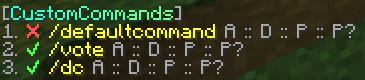
- ✔/❌ 表示命令是否启用。
- 黄色字符串是命令名称。点击可在聊天输入框中建议该命令。
- 悬停 A 可查看别名数组。
- 悬停 D 可查看描述。
- 悬停 P 可查看权限。
- 悬停 P? 可查看响应消息中是否应添加前缀。
配置
config.toml
配置文件位于 plugins/customcommands/config.toml。
config.toml 内容
# CustomCommands Configuration

# 这是将在所有消息前面显示的前缀
# 仅支持 MiniMessage,更多信息请参阅 https://docs.advntr.dev/minimessage/format.html 和 https://webui.advntr.dev/
Prefix = "<gray>[<gradient:#38ffdb:#8aff8c>CustomCommands<gray>]"

# 当玩家没有权限执行命令时将显示的默认消息
No-Permission = "<red>You do not have permission to execute this command."

# 当命令从控制台运行但命令不允许从控制台运行时显示的默认消息
No-Console-Command = "This command cannot be run from console!"

# 当命令成功执行时显示的默认消息
Command-Executed = "<green>Command executed successfully."

# 不要更改此项
Config-Version = 1.0
自定义命令
在 plugins/customcommands/Commands/ 中创建你的自定义命令。
每个命令都保存在单独的 toml 文件中。
默认命令文件的内容 (DefaultCommand.toml)
# Command Configuration

# 启用?
Enabled = true

# 这是在聊天中调用命令时使用的命令名称
Name = "defaultcommand"

# 这些是别名。如果你不需要任何别名,请将数组留空,例如:Aliases = []
Aliases = ["default", "defaultcmd"]

# 这是在帮助命令中显示的命令描述
Description = "This is the default command of CustomCommands"

# 使用此命令所需的权限。留空表示无权限要求
Permission = "customcommands.defaultcommand"

# 调用命令时将发送的响应。留空表示无响应
# 仅支持 MiniMessage,更多信息请参阅 https://docs.advntr.dev/minimessage/format.html 和 https://webui.advntr.dev/
Response = "<green>Command executed successfully!"

# 将 config.toml 中配置的插件前缀添加到响应消息中
UsePrefix = true

# 命令的冷却时间(秒)
Cooldown = 0

# 要执行的代理命令。此代码在控制台上运行,不进行任何权限检查。留空表示无代理命令
# 查看所有占位符,请参阅 https://github.com/thevalleyy/CustomCommands?tab=readme-ov-file#placeholders
# 示例:ProxyCommand = "send %player% hub"
ProxyCommand = ""
占位符
%player%- 执行命令的玩家

你是这个资源的作者?登录后可认领此资源。
相似资源
 插件

数据包事件PacketEvents
retrooper
PacketEvents 是一款专为 Minecraft Java 版打造的协议库,旨在简化数据包的处理与传输。
前置科技
28
 插件
ExyliaLib
ExyliaServices
ExyliaPlugins 的库。
前置实用
26
 插件
ProAuthMeLogin
3623813757
通过对话框或铁砧界面帮助你的 Anthme
实用
16
 插件
Vessel
muhdfdeen
重新定义服务器上的生物运输方式。使用高度可定制的口袋道具,安全地捕获、存储和释放任何实体。
生物存储
13
 插件
Vivecraft Spigot Extension
fayer3
为基于 Spigot/Paper/Folia 的服务器添加对 Vivecraft 的支持
前置实用
12
 插件
旅行地图
mysticdrew
用于绘制游戏内地图或在浏览器中随探索实时进行地图绘制的实时地图。
冒险实用
12
评论 0
登录后参与评分
还没有评论,来抢沙发吧