CustomCommands for Velocity
这是一个 Velocity 插件,允许你创建自定义命令。
它提供了一种简单的方式来创建玩家可执行的命令。
这些命令可以根据你的喜好进行自定义。
安装
- 从 modrinth 下载最新版本。
- 将 jar 文件放入
plugins/ 目录。
- 重启服务器。
用法
| 命令 |
描述 |
权限 |
/customcommands reload |
重新加载配置文件和所有自定义命令 |
customcommands.reload |
/customcommands list |
列出所有自定义命令 |
customcommands.list |
/customcommands help |
显示帮助页面 |
customcommands.help |
/customcommands version |
显示插件版本 |
customcommands.version |
/customcommands |
显示帮助页面 |
customcommands.help |
所有这些命令都需要相应的权限或 customcommands.admin 权限。
它们也可以通过 /cc 执行。
/customcommands list
此命令显示所有自定义命令的列表,如下所示:
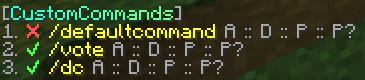
- ✔/❌ 表示命令是否启用。
- 黄色字符串是命令名称。点击可在聊天输入框中建议该命令。
- 悬停 A 可查看别名数组。
- 悬停 D 可查看描述。
- 悬停 P 可查看权限。
- 悬停 P? 可查看响应消息中是否应添加前缀。
配置
config.toml
配置文件位于 plugins/customcommands/config.toml。
config.toml 内容
# CustomCommands Configuration
# 这是将在所有消息前面显示的前缀
# 仅支持 MiniMessage,更多信息请参阅 https://docs.advntr.dev/minimessage/format.html 和 https://webui.advntr.dev/
Prefix = "<gray>[<gradient:#38ffdb:#8aff8c>CustomCommands<gray>]"
# 当玩家没有权限执行命令时将显示的默认消息
No-Permission = "<red>You do not have permission to execute this command."
# 当命令从控制台运行但命令不允许从控制台运行时显示的默认消息
No-Console-Command = "This command cannot be run from console!"
# 当命令成功执行时显示的默认消息
Command-Executed = "<green>Command executed successfully."
# 不要更改此项
Config-Version = 1.0
自定义命令
在 plugins/customcommands/Commands/ 中创建你的自定义命令。
每个命令都保存在单独的 toml 文件中。
默认命令文件的内容 (DefaultCommand.toml)
# Command Configuration
# 启用?
Enabled = true
# 这是在聊天中调用命令时使用的命令名称
Name = "defaultcommand"
# 这些是别名。如果你不需要任何别名,请将数组留空,例如:Aliases = []
Aliases = ["default", "defaultcmd"]
# 这是在帮助命令中显示的命令描述
Description = "This is the default command of CustomCommands"
# 使用此命令所需的权限。留空表示无权限要求
Permission = "customcommands.defaultcommand"
# 调用命令时将发送的响应。留空表示无响应
# 仅支持 MiniMessage,更多信息请参阅 https://docs.advntr.dev/minimessage/format.html 和 https://webui.advntr.dev/
Response = "<green>Command executed successfully!"
# 将 config.toml 中配置的插件前缀添加到响应消息中
UsePrefix = true
# 命令的冷却时间(秒)
Cooldown = 0
# 要执行的代理命令。此代码在控制台上运行,不进行任何权限检查。留空表示无代理命令
# 查看所有占位符,请参阅 https://github.com/thevalleyy/CustomCommands?tab=readme-ov-file#placeholders
# 示例:ProxyCommand = "send %player% hub"
ProxyCommand = ""
占位符
CustomCommands for Velocity
This is a Velocity plugin that allows you to create custom commands.
It offers you a simple way to create commands that can be executed by players.
These commands can be customized to your liking.
Installation
- Download the latest release from modrinth.
- Put the jar file in
plugins/.
- Restart your server.
Usage
| Command |
Description |
Permission |
/customcommands reload |
Reload the configuration file and all the custom commands |
customcommands.reload |
/customcommands list |
List all custom commands |
customcommands.list |
/customcommands help |
Show the help page |
customcommands.help |
/customcommands version |
Show the plugin's version |
customcommands.version |
/customcommands |
Show the help page |
customcommands.help |
All these commands require their respective permissions or the customcommands.admin permission.
They can also be executed via /cc.
/customcommands list
This command displays a list of all custom commands, which looks like this:

- The ✔/❌ indicates whether the command is enabled or disabled.
- The yellow string is the command name. Click to suggest the command in the chat input.
- Hover A to see an array of all the aliases.
- Hover D to see the description.
- Hover P to see the permission.
- Hover P? to see whether the prefix should be added to the response message.
Configuration
config.toml
The config is located at plugins/customcommands/config.toml.
Content of config.toml
# CustomCommands Configuration
# This is the prefix that will be displayed in front of all messages
# Only supports MiniMessage, see https://docs.advntr.dev/minimessage/format.html and https://webui.advntr.dev/ for more information
Prefix = "<gray>[<gradient:#38ffdb:#8aff8c>CustomCommands<gray>]"
# This is the default message that will be displayed when a player does not have permission to execute a command
No-Permission = "<red>You do not have permission to execute this command."
# This is the default message that will be displayed when a command is run from the console, but the command is not allowed to be run from the console
No-Console-Command = "This command cannot be run from console!"
# This is the default message that will be displayed when a command has been executed successfully
Command-Executed = "<green>Command executed successfully."
# Do not change this
Config-Version = 1.0
Custom Commands
Create your custom commands in plugins/customcommands/Commands/.
Each command is saved in a separate toml file.
Content of the default command file (DefaultCommand.toml)
# Command Configuration
# Enabled?
Enabled = true
# This is the command name that will be used to call the command in the chat
Name = "defaultcommand"
# These are the aliases. Empty the array if you don't need any aliases, like so: Aliases = []
Aliases = ["default", "defaultcmd"]
# This is the description of the command that will be displayed in the help command
Description = "This is the default command of CustomCommands"
# This is the permission required to use the command. Leave empty for no permission
Permission = "customcommands.defaultcommand"
# This is the response that will be sent when the command is called. Leave empty for no response
# Only supports MiniMessage, see https://docs.advntr.dev/minimessage/format.html and https://webui.advntr.dev/ for more information
Response = "<green>Command executed successfully!"
# Add the plugins Prefix configured in config.toml to the response message
UsePrefix = true
# This is the cooldown of the command in seconds
Cooldown = 0
# Proxy command to execute. This code is run on console, without any permission checks. Leave empty for no proxy command
# To view all placeholders, see https://github.com/thevalleyy/CustomCommands?tab=readme-ov-file#placeholders
# Example: ProxyCommand = "send %player% hub"
ProxyCommand = ""
Placeholders
%player% - The player who executed the command
评论 0
登录后参与评分
还没有评论,来抢沙发吧