
在原版 Minecraft 对话框内可点击、像素级定位的 GUI —— 无需客户端模组。
Glyphwork 将完整的屏幕内容(面板、按钮、列表、网格、文本)渲染到自 1.21.6 版本以来 Minecraft 所采用的对话框界面中。玩家只需安装资源包,而 Glyphwork 会自动生成并发送该资源包。所有元素均在其绘制位置精确可点击。
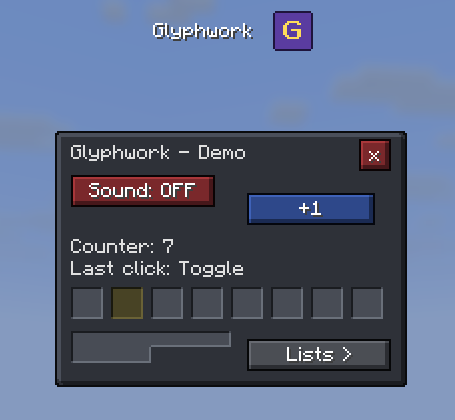
适用人群
- 服务器管理员: 使用 YAML 文件描述菜单(执行命令的按钮、打开其他菜单或请求输入的按钮、滑块、复选框、选择项和表单、PlaceholderAPI、每个菜单对应一条命令、条件判断、模板、变量、标签页、滚动窗格、冷却时间、点击音效、根据数值改变颜色的进度条、在线玩家/世界/RSS 源或 JSON Web API 列表、自动刷新的菜单)—— 无需编程。请参阅 菜单指南,或使用鼠标在 菜单设计器 中进行构建。
- 插件开发者: 通过 Java API 构建屏幕界面。
# plugins/Glyphwork/menus/warps.yml  ->  /warps
title: "<gold>传送点"
command: warps
elements:
  - type: button
    x: 8
    y: 24
    width: 72
    height: 16
    text: "出生点"
    tint: "#50E050"
    actions: ["player: spawn", "close"]
功能特性
- 场景 API(Scene API) 供插件开发者使用:支持任意平铺形状的面板、标签、按钮、不可见碰撞盒、带自动分页功能的列表和网格、工具提示、颜色、玩家专属状态、导航操作(打开 / 返回 / 重新打开 / 关闭)、标签页、滚动窗格、进度条、自定义图片、大型玩家头像、支持粗体/斜体/下划线的文本、滑块、复选框以及从皮肤绘制的选择按钮,并通过小型原生对话框实现文本输入或完整表单(文本、滑块、复选框、选择项)。多玩家共享屏幕(如游戏房间、大厅、拍卖行):可重绘其他玩家已打开的屏幕、查询当前打开的场景、了解屏幕关闭的原因。自 1.0 版本起保持稳定:1.x 系列内无破坏性变更。
- 物品图标:支持 1595 种物品作为网格、按钮、列表和菜单中的图标,直接从客户端已有的纹理中绘制。图标遵循服务器的资源包设置:替换过的纹理会被测量尺寸,且资源包自带的物品(如
myserver:ruby)也可用作图标。玩家头像可作为小型 8x8 图标(格式为head:Steve),例如用于在线玩家列表,或在按钮、列表和网格中以 16 至 32 像素大小从皮肤绘制。图标上会显示堆叠数量,如同背包界面一样。GUI 精灵图同样支持:包括心形、食物、盔甲、每种状态效果、统计信息以及小型图标(如gui:hud/heart/full、gui:mob_effect/speed)。 - 自定义图片(PNG 格式,任意尺寸):可像其他元素一样放置,并支持调整大小(通过
width、height、scale)。 - 自定义字体(自 1.4 版本起,实验性功能):将 TrueType/OpenType 字体(文件或 URL)放入
config.yml,并在菜单或任何文本元素中使用font:属性调用。Glyphwork 会将字体嵌入资源包本身,从而确保换行、裁剪和对齐保持像素级精确;像素字体效果最佳。若字体缺少某些字母,则回退使用 Minecraft 内置字体。 - 像素级精准点击:即使不在 9 像素文本网格线上也能精确识别点击。
- 皮肤系统:边框由小图块自动拼接而成,因此任意形状均可无缝衔接。内置三种皮肤(原版、深色、羊皮纸);可使用基于浏览器的 皮肤编辑器 创建自定义皮肤。
- 浏览器端菜单设计器:用鼠标放置元素,编辑表单和变量,试用菜单后下载适用于服务器运行版本的 Glyphwork YAML 文件。加载自定义客户端 jar 后,可显示真实的物品图标和字体(仅浏览器只读预览);配合字体文件,还可预览自定义字体效果。
- 示例插件:随每个发行版附带的轻量级交易员插件,可直接参考其代码。
- 自动化资源包管理:启动时自动生成资源包,哈希值稳定(避免重复下载),可通过内置 Web 服务器提供,也可写入磁盘供你自己的 Web 服务器/CDN 使用,或与服务器或代理发送的资源包合并。反之亦然:可将你服务器的资源包整合进 Glyphwork 的资源包中,使玩家只需接收一个统一资源包。
- 备用原生对话框:拒绝安装资源包的玩家,以及通过 Geyser 连接的基岩版玩家,将获得基于相同屏幕构建的原生对话框(或菜单的独立简易视图)。
- 每位玩家的显示模式(完整 / 无图标 / 简易):针对因自身资源包导致菜单错乱的玩家,可通过
/glyphwork display命令切换,或通过 API 由你的自定义系统控制。 - 英文与德文消息及命令,根据玩家的游戏语言自动选择;可在
plugins/Glyphwork/lang/中编辑文本或添加其他语言。 /glyphwork reload命令应用配置和皮肤更改,并向所有在线玩家发送更新后的资源包。
安装步骤
- 将 jar 文件放入 Paper 26.1 至 26.3 服务器(版本 26.1.2、26.2、26.3;Java 25)的
plugins/目录并启动。对于 Paper 1.21.11,请使用-mc1.21.11版本(需 Java 21)。 - 在
plugins/Glyphwork/config.yml中将pack.url设置为玩家可访问的地址(使用内置服务器时,请开启pack-server.port;或使用你自己的 Web 服务器时,设置pack.hosting: external)。 - 执行
/glyphwork reload,然后运行/glyphwork test(演示)或/glyphwork menu example(示例菜单;德语服务器上为beispiel)。
开发者说明
Scene settings = Scene.builder("myplugin:settings", 176, 96)
    .background()
    .add(Label.of(8, 7, "设置"))
    .add(Button.of(8, 24, 80, 16)
        .text(v -> soundOn(v.player()) ? "音效:开启" : "音效:关闭")
        .onClick(c -> { toggleSound(c.player()); c.reopen(); }))
    .build();
Glyphwork.get().open(player, settings);
depend: [Glyphwork],从 GitHub 发布页面 编译 glyphwork-api。文档:API · 皮肤格式 · 工作原理。
限制
- Paper 26.1 至 26.3,使用 26.1 至 26.3 客户端的玩家(对于 Paper 1.21.11,请使用
-mc1.21.11版本)。标记为实验性的部分(选项卡、滚动窗格、网页源、自定义纯文本视图、基岩版行为)在小版本更新中仍可能发生变化。 - 对话框仅报告点击事件:不支持悬停、右键点击或按键按住状态。Glyphwork 的响应是一个模式按钮或首次点击作为预览。
- 文本和图标始终绘制在框架之上;方块仅显示一个面(无 3D 效果),由特殊渲染器绘制的物品(箱子、床、旗帜、盾牌)没有图标;小型玩家头像大小为 8 x 8,并位于 9 px 文本网格上(带有头像的小元素最多移动 4 px,大元素保持原位);彩绘头像可以放置在任何位置。
该技术源自 PaperMC Discord 中一名开发者的公开描述;Glyphwork 是一个独立的、采用 MIT 许可证的实现。
Clickable, pixel-positioned GUIs inside vanilla Minecraft dialogs — no client mod.
Glyphwork renders whole screens (panels, buttons, lists, grids, text) into the dialog screen that Minecraft has had since 1.21.6. Players only need a resource pack, which Glyphwork generates and sends by itself. Everything is clickable exactly where it is drawn.
For whom
- Server admins: describe menus in YAML files (buttons that run commands, open other menus or ask for input, sliders, checkboxes, choices and forms, PlaceholderAPI, a command per menu, conditions, templates, variables, tabs, scroll panes, cooldowns, click sounds, progress bars that change color by value, lists of online players, worlds, RSS feeds or JSON web APIs, menus that refresh themselves) - no coding. See the menu guide, or build them with the mouse in the menu designer.
- Plugin developers: build screens with the Java API.
# plugins/Glyphwork/menus/warps.yml  ->  /warps
title: "<gold>Warps"
command: warps
elements:
  - type: button
    x: 8
    y: 24
    width: 72
    height: 16
    text: "Spawn"
    tint: "#50E050"
    actions: ["player: spawn", "close"]
Features
- Scene API for plugin developers: panels of any tile shape, labels, buttons, invisible hitboxes, lists and grids with automatic paging, tooltips, colors, per-player state, navigation (open / back / reopen / close), tabs, scroll panes, progress bars, own pictures, big player heads, text with bold / italics / underline, sliders, checkboxes and choice buttons drawn from the skin, and text input or whole forms (text, slider, checkbox, choice) through small native dialogs. Screens shared by several players (games, lobbies, auctions): redraw another player's open screen, ask which scene is open, know why a screen closed. Stable from 1.0 on: no breaking changes within 1.x.
- Item icons for 1595 items in grids, buttons, lists and menus, drawn from the textures every client already has. Icons follow your server's resource pack: replaced textures are measured, and the pack's own items (
myserver:ruby) work as icons. Player heads as small 8 x 8 icons (head:Steve), e.g. in a list of online players, or painted from the skin at 16 to 32 px on buttons, lists and grids. Stack counts at the icon like in the inventory. GUI sprites too: hearts, food, armor, every status effect, statistics and small icons (gui:hud/heart/full,gui:mob_effect/speed). - Own pictures (PNG, any size) placed like any element, also smaller or bigger (
width,height,scale). - Own fonts (since 1.4, experimental): put a TrueType/OpenType font (a file or a URL) into
config.ymland use it withfont:on the menu or any text element. Glyphwork draws it into the pack itself, so wrapping, cutting and centering stay pixel-exact; pixel fonts look best. Letters a font lacks come from the Minecraft font. - Pixel-exact clicks, also off the 9 px text grid.
- Skins: frames are autotiled from tiny sheets, so any shape joins seamlessly. Three skins are built in (vanilla, dark, parchment); make your own with the browser-based skin editor.
- Menu designer in the browser: place elements with the mouse, edit forms and variables, try the menu out and download the YAML file, for the Glyphwork version your server runs. With your own client jar loaded it shows the real item icons and font (read only in your browser), and with the font files Glyphwork writes it previews your own fonts too.
- Example plugin to copy from: a small trader built against the API, attached to every release.
- Resource pack handled for you: generated on start, stable hash (no re-downloads), served by a built-in web server, written to disk for your own web server / CDN, or merged into the pack your server or proxy sends. Or the other way round: your server's pack goes into the Glyphwork pack, so players get a single pack.
- Plain dialog: players who decline the pack, and Bedrock players through Geyser, get a native dialog built from the same screen (or an own plain view of the menu).
- Display mode per player (full / without icons / plain) for players whose own resource pack tears the menus:
/glyphwork display, or controlled by your own system through the API. - English and German messages and commands, picked per player from the game language; edit the texts or add languages in
plugins/Glyphwork/lang/. /glyphwork reloadapplies config and skin changes and sends the new pack to everyone online.
Setup
- Put the jar into
plugins/of a Paper 26.1 to 26.3 server (26.1.2, 26.2, 26.3; Java 25) and start it. For Paper 1.21.11 take the-mc1.21.11version (Java 21). - In
plugins/Glyphwork/config.ymlsetpack.urlto an address your players can reach (built-in server: openpack-server.port; orpack.hosting: externalwith your own web server). /glyphwork reload, then/glyphwork test(demo) or/glyphwork menu example(example menu;beispielon German servers).
For developers
Scene settings = Scene.builder("myplugin:settings", 176, 96)
    .background()
    .add(Label.of(8, 7, "Settings"))
    .add(Button.of(8, 24, 80, 16)
        .text(v -> soundOn(v.player()) ? "Sound: ON" : "Sound: OFF")
        .onClick(c -> { toggleSound(c.player()); c.reopen(); }))
    .build();
Glyphwork.get().open(player, settings);
depend: [Glyphwork], compile against glyphwork-api from the GitHub release. Documentation: API · skin format · how it works.
Limits
- Paper 26.1 to 26.3, players with 26.1 to 26.3 clients (for Paper 1.21.11 take the
-mc1.21.11versions). Parts marked experimental (tabs, scroll panes, web sources, the own plain view, Bedrock behaviour) may still change in a minor version. - Dialogs report clicks only: no hover, no right click, no keys held while a dialog is open. Glyphwork's answer is a mode button or a first click as preview.
- Text and icons are always drawn on top of frames; blocks show one face (no 3D), items drawn by special renderers (chests, beds, banners, shields) have no icon; small player heads are 8 x 8 and sit on the 9 px text grid (small elements with a head move by up to 4 px, big ones keep their place); painted heads sit anywhere.
The technique goes back to a public description by a developer in the PaperMC Discord; Glyphwork is an independent, MIT-licensed implementation.

下载 Glyphwork
需要联机服务器吗?
稳定流畅、一键部署,几分钟即可和朋友联机开服
最低仅需 8 元/月 即可畅快联机
下载 Glyphwork
需要联机服务器吗?
稳定流畅、一键部署,几分钟即可和朋友联机开服
最低仅需 8 元/月 即可畅快联机
下载 Glyphwork
需要联机服务器吗?
稳定流畅、一键部署,几分钟即可和朋友联机开服
最低仅需 8 元/月 即可畅快联机
下载 Glyphwork
需要联机服务器吗?
稳定流畅、一键部署,几分钟即可和朋友联机开服
最低仅需 8 元/月 即可畅快联机
下载 Glyphwork
需要联机服务器吗?
稳定流畅、一键部署,几分钟即可和朋友联机开服
最低仅需 8 元/月 即可畅快联机
下载 Glyphwork
需要联机服务器吗?
稳定流畅、一键部署,几分钟即可和朋友联机开服
最低仅需 8 元/月 即可畅快联机
下载 Glyphwork
下载 Glyphwork
下载 Glyphwork
下载 Glyphwork
1.5.0 的 1.21.11 构建版本(参见 1.5.0 发布说明):点击音效、按数值显示条形图颜色、font: 属性支持条形图、标签在菜单边缘处截断、可点击但无边框的按钮。已在 1.21.11 客户端中测试;Java 21,数据包格式 75,1.21.11 之后更新的 66 个图标保持为空。
1.4.0 版(参见 1.4.0 发布说明)的 1.21.11 构建版本:为菜单文本提供自定义字体,支持在菜单和元素中使用 font: 属性,并包含用于菜单设计器的字体文件。已在 1.21.11 客户端中测试;使用 Java 21、资源包格式 75,但比 1.21.11 更新的 66 个图标仍为空。
1.3.0 的 1.21.11 版本构建(参见 1.3.0 发行说明):菜单变量默认值中的占位符
(nick: "%player%" 初始化为玩家名称)。26.1 至 26.3 对 1.3.0 的支持是针对另一个构建;此构建仍基于 Paper 1.21.11(Java 21,数据包格式 75,比 1.21.11 更新 66 个图标的图标保持为空)。
菜单、配置和插件在 1.0 到 1.2 版本间保持兼容。
- 皮肤缓存(可选):
config.yml中的heads.skin-cache(例如7d,默认0= 关闭) 将大型头颅的面部信息保存在plugins/Glyphwork/cache/faces.json中,这样重启和重载时不会再次请求 Mojang 并触发其速率限制(否则大型头颅会显示为小型占位头颅)。 - 与旧版客户端的图标兼容性: Minecraft 1.21.11 之后的原版纹理拥有独立的字体。如果缺少某个纹理,客户端就会丢失整个字体;因此之前 1.21.11 版本的客户端会丢失所有图标;现在只有那 66 个较新的图标保持为空。
- 修复:
/glyphwork reload在 Paper 构建命令树时可能会抛出 ConcurrentModificationException。 - Paper 1.21.11: GitHub Releases 上提供了独立构建版本
1.2.1-mc1.21.11(分支mc/1.21.11,Java 21)。 - 菜单设计器(已上线):它会读取加载的客户端 jar 文件的 Minecraft 版本,并用红色框出该版本所缺失的图标;另一个客户端 jar 文件会替换之前加载的所有内容。
- 示例插件:选项文本会根据当前名称命名普通模式。
通过使用该 API 构建小型游戏(扫雷、井字棋和双人对战战舰)发现。为 1.0 和 1.1 制作的菜单、配置和插件仍可使用;其中一个绘图细节有所更改(带有玩家头像的大元素,见下文)。
- 其他玩家的屏幕:
Glyphwork.get().redraw(player)重新绘制玩家当前打开的屏幕(状态、页面和历史记录保持不变),redraw(sceneId)为所有打开了该场景的玩家执行此操作,openScene(player)告知某个玩家打开了哪个场景。此前,双人游戏中的每一步操作都必须重新打开另一位玩家的屏幕。 - 屏幕关闭的原因:
onClose((click, reason) -> ...)接收PLAYER、REPLACED或CLOSED_BY_CODE;旧的onClose(click -> ...)行为与之前相同。 - 大元素在带有玩家头像时保持位置不变: 高度为 24 px 或以上的按钮、列表行和网格单元格不再为了适应客户端 9 px 的文字网格而移动以放置头像;改为移动头像本身(最多偏离中心 4 px)。此前,带有头像的大按钮棋盘看起来参差不齐。
- 按钮上的大头像:
Button.headSize(16|24|32)/head-size:从皮肤中绘制head:图标的面部,位于按钮中间(无文本)或其左侧;与列表和网格一样,它可放置在任意像素位置,而不必对齐到 9 px 的文字网格。 - 预加载头像(可选):
Glyphwork.get().preloadHeads(names...)提前加载大头像所需的皮肤,并在加载完成后返回结果,从而使屏幕打开时头像已就位,避免稍后用小占位头像替换的情况。 - 关于标签与按钮重叠的提示: 若一个没有设置宽度的标签其文本延伸到旁边的按钮上,系统会记录一次警告,并附带能够容纳该文本所需的宽度值。
- 菜单设计器: 下一个版本将显示为“尚未发布”(永远不会作为默认选项),预览界面将按照所选版本中行为发生更改的方式呈现。新增功能:按钮支持
head-size。 - 对话框中无法实现的功能: 现已通过尝试进行文档说明:服务器仅能获知点击事件,而无法得知鼠标位置、鼠标按键或在对话框打开期间按住的键盘按键。
此处一切均为新增内容;专为 1.0 版本制作的菜单、配置和插件均可保持原样正常运行。
- 将 GUI 精灵用作图标:
icon: "gui:hud/heart/full"、gui:mob_effect/speed、gui:statistics/item_crafted、gui:icon/checkmark以及约 100 种更多选项(心形、食物、护甲、空气、 所有状态效果、统计数据、小图标),可在 YAML 和 API 中任何需要物品 ID 的地方使用。它们会 从客户端自身的纹理中提取,并以原始大小居中绘制在图标中间;普通对话框中也显示精灵; 重新加载客户端 jar 后,菜单设计器即可显示它们。 - 文档支持:
<sprite:...>和<head:...>可在工具提示、标题和消息中使用。 - 其他尺寸的图像: 在
image元素上使用width/height(另一侧按比例自动调整)或scale。Glyphwork 会在构建整合包时调整图像尺寸,并将其作为额外图片添加; YAML 菜单会自动设置其尺寸,插件则通过Glyphwork.get().imageSize("logo", 32, 0)/imageScale(...)声明尺寸,并使用Image.size(w, h)/.scale(s)进行绘制(实验性功能)。菜单设计器会显示尺寸信息。若未指定尺寸, 整合包将保持与之前完全一致。 - 面向客户端的单一整合包:
pack.include-source-pack: true可将服务器自身的资源包 (icons.source-pack)纳入 Glyphwork 整合包中;其 pack.mcmeta 和 pack.png 文件得以保留, Glyphwork 自身文件优先。此时 server.properties 中的resource-pack=留空即可。这有助于处理那些仅保留最后一个服务器资源包的客户端模组,并避免了手动合并的麻烦,正如使用hosting: provided那样。 - 菜单设计器:Glyphwork 版本。 选择你的服务器所运行的版本:较新的设置会被隐藏或标记, 检查清单会列出所有需要更高版本的功能。文档中以 since 1.1 标记自 1.1 版本之后新增的内容。
关于这个资源的讨论、问题反馈与使用心得
还没有讨论,来发第一帖吧
你是这个资源的作者?登录后可认领此资源。
相似资源
 插件

PacketEvents 是一款专为 Minecraft Java 版打造的协议库,旨在简化数据包的处理与传输。
 插件
ExyliaPlugins 的库。
 插件
通过对话框或铁砧界面帮助你的 Anthme
 插件
重新定义服务器上的生物运输方式。使用高度可定制的口袋道具,安全地捕获、存储和释放任何实体。
 插件
为基于 Spigot/Paper/Folia 的服务器添加对 Vivecraft 的支持
 插件
用于绘制游戏内地图或在浏览器中随探索实时进行地图绘制的实时地图。
评论 0
登录后参与评分
还没有评论,来抢沙发吧