在原版 Minecraft 对话框内可点击、像素级定位的 GUI —— 无需客户端模组。
Glyphwork 将完整的屏幕内容(面板、按钮、列表、网格、文本)渲染到自 1.21.6 版本以来 Minecraft 所采用的对话框界面中。玩家只需安装资源包,而 Glyphwork 会自动生成并发送该资源包。所有元素均在其绘制位置精确可点击。
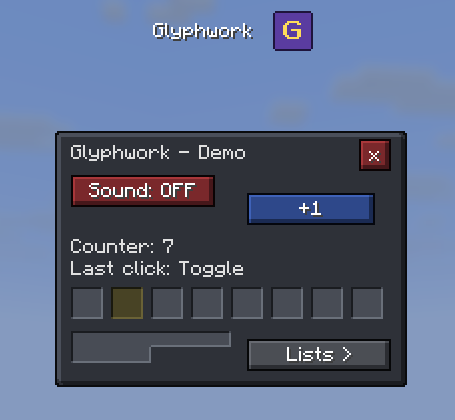
适用人群
- 服务器管理员: 使用 YAML 文件描述菜单(执行命令的按钮、打开其他菜单或请求输入的按钮、滑块、复选框、选择项和表单、PlaceholderAPI、每个菜单对应一条命令、条件判断、模板、变量、标签页、滚动窗格、冷却时间、点击音效、根据数值改变颜色的进度条、在线玩家/世界/RSS 源或 JSON Web API 列表、自动刷新的菜单)—— 无需编程。请参阅 菜单指南,或使用鼠标在 菜单设计器 中进行构建。
- 插件开发者: 通过 Java API 构建屏幕界面。
# plugins/Glyphwork/menus/warps.yml  ->  /warps
title: "<gold>传送点"
command: warps
elements:
  - type: button
    x: 8
    y: 24
    width: 72
    height: 16
    text: "出生点"
    tint: "#50E050"
    actions: ["player: spawn", "close"]
功能特性
- 场景 API(Scene API) 供插件开发者使用:支持任意平铺形状的面板、标签、按钮、不可见碰撞盒、带自动分页功能的列表和网格、工具提示、颜色、玩家专属状态、导航操作(打开 / 返回 / 重新打开 / 关闭)、标签页、滚动窗格、进度条、自定义图片、大型玩家头像、支持粗体/斜体/下划线的文本、滑块、复选框以及从皮肤绘制的选择按钮,并通过小型原生对话框实现文本输入或完整表单(文本、滑块、复选框、选择项)。多玩家共享屏幕(如游戏房间、大厅、拍卖行):可重绘其他玩家已打开的屏幕、查询当前打开的场景、了解屏幕关闭的原因。自 1.0 版本起保持稳定:1.x 系列内无破坏性变更。
- 物品图标:支持 1595 种物品作为网格、按钮、列表和菜单中的图标,直接从客户端已有的纹理中绘制。图标遵循服务器的资源包设置:替换过的纹理会被测量尺寸,且资源包自带的物品(如
myserver:ruby)也可用作图标。玩家头像可作为小型 8x8 图标(格式为 head:Steve),例如用于在线玩家列表,或在按钮、列表和网格中以 16 至 32 像素大小从皮肤绘制。图标上会显示堆叠数量,如同背包界面一样。GUI 精灵图同样支持:包括心形、食物、盔甲、每种状态效果、统计信息以及小型图标(如 gui:hud/heart/full、gui:mob_effect/speed)。
- 自定义图片(PNG 格式,任意尺寸):可像其他元素一样放置,并支持调整大小(通过
width、height、scale)。
- 自定义字体(自 1.4 版本起,实验性功能):将 TrueType/OpenType 字体(文件或 URL)放入
config.yml,并在菜单或任何文本元素中使用 font: 属性调用。Glyphwork 会将字体嵌入资源包本身,从而确保换行、裁剪和对齐保持像素级精确;像素字体效果最佳。若字体缺少某些字母,则回退使用 Minecraft 内置字体。
- 像素级精准点击:即使不在 9 像素文本网格线上也能精确识别点击。
- 皮肤系统:边框由小图块自动拼接而成,因此任意形状均可无缝衔接。内置三种皮肤(原版、深色、羊皮纸);可使用基于浏览器的 皮肤编辑器 创建自定义皮肤。
- 浏览器端菜单设计器:用鼠标放置元素,编辑表单和变量,试用菜单后下载适用于服务器运行版本的 Glyphwork YAML 文件。加载自定义客户端 jar 后,可显示真实的物品图标和字体(仅浏览器只读预览);配合字体文件,还可预览自定义字体效果。
- 示例插件:随每个发行版附带的轻量级交易员插件,可直接参考其代码。
- 自动化资源包管理:启动时自动生成资源包,哈希值稳定(避免重复下载),可通过内置 Web 服务器提供,也可写入磁盘供你自己的 Web 服务器/CDN 使用,或与服务器或代理发送的资源包合并。反之亦然:可将你服务器的资源包整合进 Glyphwork 的资源包中,使玩家只需接收一个统一资源包。
- 备用原生对话框:拒绝安装资源包的玩家,以及通过 Geyser 连接的基岩版玩家,将获得基于相同屏幕构建的原生对话框(或菜单的独立简易视图)。
- 每位玩家的显示模式(完整 / 无图标 / 简易):针对因自身资源包导致菜单错乱的玩家,可通过
/glyphwork display 命令切换,或通过 API 由你的自定义系统控制。
- 英文与德文消息及命令,根据玩家的游戏语言自动选择;可在
plugins/Glyphwork/lang/ 中编辑文本或添加其他语言。
/glyphwork reload 命令应用配置和皮肤更改,并向所有在线玩家发送更新后的资源包。
安装步骤
- 将 jar 文件放入 Paper 26.1 至 26.3 服务器(版本 26.1.2、26.2、26.3;Java 25)的
plugins/ 目录并启动。对于 Paper 1.21.11,请使用 -mc1.21.11 版本(需 Java 21)。
- 在
plugins/Glyphwork/config.yml 中将 pack.url 设置为玩家可访问的地址(使用内置服务器时,请开启 pack-server.port;或使用你自己的 Web 服务器时,设置 pack.hosting: external)。
- 执行
/glyphwork reload,然后运行 /glyphwork test(演示)或 /glyphwork menu example(示例菜单;德语服务器上为 beispiel)。
开发者说明
Scene settings = Scene.builder("myplugin:settings", 176, 96)
    .background()
    .add(Label.of(8, 7, "设置"))
    .add(Button.of(8, 24, 80, 16)
        .text(v -> soundOn(v.player()) ? "音效:开启" : "音效:关闭")
        .onClick(c -> { toggleSound(c.player()); c.reopen(); }))
    .build();
Glyphwork.get().open(player, settings);
depend: [Glyphwork],从 GitHub 发布页面 编译 glyphwork-api。文档:API · 皮肤格式 · 工作原理。
限制
- Paper 26.1 至 26.3,使用 26.1 至 26.3 客户端的玩家(对于 Paper 1.21.11,请使用
-mc1.21.11 版本)。标记为实验性的部分(选项卡、滚动窗格、网页源、自定义纯文本视图、基岩版行为)在小版本更新中仍可能发生变化。
- 对话框仅报告点击事件:不支持悬停、右键点击或按键按住状态。Glyphwork 的响应是一个模式按钮或首次点击作为预览。
- 文本和图标始终绘制在框架之上;方块仅显示一个面(无 3D 效果),由特殊渲染器绘制的物品(箱子、床、旗帜、盾牌)没有图标;小型玩家头像大小为 8 x 8,并位于 9 px 文本网格上(带有头像的小元素最多移动 4 px,大元素保持原位);彩绘头像可以放置在任何位置。
该技术源自 PaperMC Discord 中一名开发者的公开描述;Glyphwork 是一个独立的、采用 MIT 许可证的实现。
Clickable, pixel-positioned GUIs inside vanilla Minecraft dialogs — no client mod.
Glyphwork renders whole screens (panels, buttons, lists, grids, text) into the dialog screen that Minecraft has had since 1.21.6. Players only need a resource pack, which Glyphwork generates and sends by itself. Everything is clickable exactly where it is drawn.
For whom
- Server admins: describe menus in YAML files (buttons that run commands, open other menus or ask for input, sliders, checkboxes, choices and forms, PlaceholderAPI, a command per menu, conditions, templates, variables, tabs, scroll panes, cooldowns, click sounds, progress bars that change color by value, lists of online players, worlds, RSS feeds or JSON web APIs, menus that refresh themselves) - no coding. See the menu guide, or build them with the mouse in the menu designer.
- Plugin developers: build screens with the Java API.
# plugins/Glyphwork/menus/warps.yml  ->  /warps
title: "<gold>Warps"
command: warps
elements:
  - type: button
    x: 8
    y: 24
    width: 72
    height: 16
    text: "Spawn"
    tint: "#50E050"
    actions: ["player: spawn", "close"]
Features
- Scene API for plugin developers: panels of any tile shape, labels, buttons, invisible hitboxes, lists and grids with automatic paging, tooltips, colors, per-player state, navigation (open / back / reopen / close), tabs, scroll panes, progress bars, own pictures, big player heads, text with bold / italics / underline, sliders, checkboxes and choice buttons drawn from the skin, and text input or whole forms (text, slider, checkbox, choice) through small native dialogs. Screens shared by several players (games, lobbies, auctions): redraw another player's open screen, ask which scene is open, know why a screen closed. Stable from 1.0 on: no breaking changes within 1.x.
- Item icons for 1595 items in grids, buttons, lists and menus, drawn from the textures every client already has. Icons follow your server's resource pack: replaced textures are measured, and the pack's own items (
myserver:ruby) work as icons. Player heads as small 8 x 8 icons (head:Steve), e.g. in a list of online players, or painted from the skin at 16 to 32 px on buttons, lists and grids. Stack counts at the icon like in the inventory. GUI sprites too: hearts, food, armor, every status effect, statistics and small icons (gui:hud/heart/full, gui:mob_effect/speed).
- Own pictures (PNG, any size) placed like any element, also smaller or bigger (
width, height, scale).
- Own fonts (since 1.4, experimental): put a TrueType/OpenType font (a file or a URL) into
config.yml and use it with font: on the menu or any text element. Glyphwork draws it into the pack itself, so wrapping, cutting and centering stay pixel-exact; pixel fonts look best. Letters a font lacks come from the Minecraft font.
- Pixel-exact clicks, also off the 9 px text grid.
- Skins: frames are autotiled from tiny sheets, so any shape joins seamlessly. Three skins are built in (vanilla, dark, parchment); make your own with the browser-based skin editor.
- Menu designer in the browser: place elements with the mouse, edit forms and variables, try the menu out and download the YAML file, for the Glyphwork version your server runs. With your own client jar loaded it shows the real item icons and font (read only in your browser), and with the font files Glyphwork writes it previews your own fonts too.
- Example plugin to copy from: a small trader built against the API, attached to every release.
- Resource pack handled for you: generated on start, stable hash (no re-downloads), served by a built-in web server, written to disk for your own web server / CDN, or merged into the pack your server or proxy sends. Or the other way round: your server's pack goes into the Glyphwork pack, so players get a single pack.
- Plain dialog: players who decline the pack, and Bedrock players through Geyser, get a native dialog built from the same screen (or an own plain view of the menu).
- Display mode per player (full / without icons / plain) for players whose own resource pack tears the menus:
/glyphwork display, or controlled by your own system through the API.
- English and German messages and commands, picked per player from the game language; edit the texts or add languages in
plugins/Glyphwork/lang/.
/glyphwork reload applies config and skin changes and sends the new pack to everyone online.
Setup
- Put the jar into
plugins/ of a Paper 26.1 to 26.3 server (26.1.2, 26.2, 26.3; Java 25) and start it. For Paper 1.21.11 take the -mc1.21.11 version (Java 21).
- In
plugins/Glyphwork/config.yml set pack.url to an address your players can reach (built-in server: open pack-server.port; or pack.hosting: external with your own web server).
/glyphwork reload, then /glyphwork test (demo) or /glyphwork menu example (example menu; beispiel on German servers).
For developers
Scene settings = Scene.builder("myplugin:settings", 176, 96)
    .background()
    .add(Label.of(8, 7, "Settings"))
    .add(Button.of(8, 24, 80, 16)
        .text(v -> soundOn(v.player()) ? "Sound: ON" : "Sound: OFF")
        .onClick(c -> { toggleSound(c.player()); c.reopen(); }))
    .build();
Glyphwork.get().open(player, settings);
depend: [Glyphwork], compile against glyphwork-api from the GitHub release. Documentation: API · skin format · how it works.
Limits
- Paper 26.1 to 26.3, players with 26.1 to 26.3 clients (for Paper 1.21.11 take the
-mc1.21.11 versions). Parts marked experimental (tabs, scroll panes, web sources, the own plain view, Bedrock behaviour) may still change in a minor version.
- Dialogs report clicks only: no hover, no right click, no keys held while a dialog is open. Glyphwork's answer is a mode button or a first click as preview.
- Text and icons are always drawn on top of frames; blocks show one face (no 3D), items drawn by special renderers (chests, beds, banners, shields) have no icon; small player heads are 8 x 8 and sit on the 9 px text grid (small elements with a head move by up to 4 px, big ones keep their place); painted heads sit anywhere.
The technique goes back to a public description by a developer in the PaperMC Discord; Glyphwork is an independent, MIT-licensed implementation.

 插件

 插件
 插件
 插件
 插件
 插件
评论 0
登录后参与评分
还没有评论,来抢沙发吧