
关于
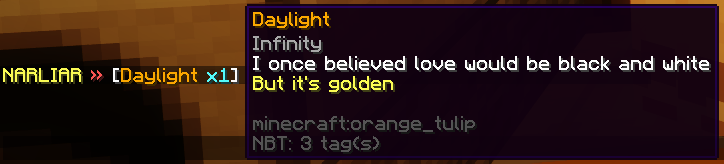
聊天功能很棒,玩家可以在其中互相交流。但话说回来,为什么不让它更具互动性呢? 通过这个插件,你可以向好友展示你手中的物品、背包内容以及末影箱内容!即使是在跨服务器的全局 Bungeecord 聊天中也能实现!
此外,该插件还允许你为玩家创建自定义的交互式关键词!
InteractiveChat 旨在作为现有聊天格式化插件的补充,而非替代品!
 正在使用 DiscordSRV?
请查看 此附加组件,它允许你在 Discord 上显示 InteractiveChat 中的占位符和库存! 你还可以将 Discord 发送的图片预览在地图中,并将附件美化成游戏中可点击和悬停显示的文本!
功能
视频由 Server.pro 制作,展示了 过时的 InteractiveChat 版本 (v2)
1. 物品展示功能
- 在聊天中输入 [item] 即可展示你手中的物品!
- 在聊天中输入 [inv] 即可展示你的背包
- 输入 [ender] 没错!展示你的末影箱!
(每一项都可以在配置文件中启用/禁用,并且可以更改其关键词)
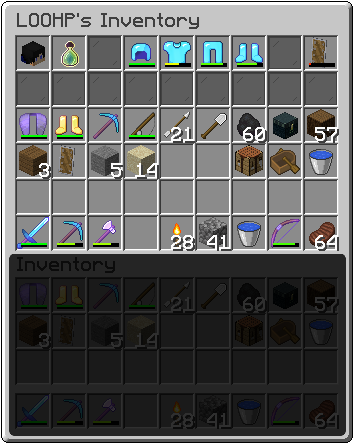
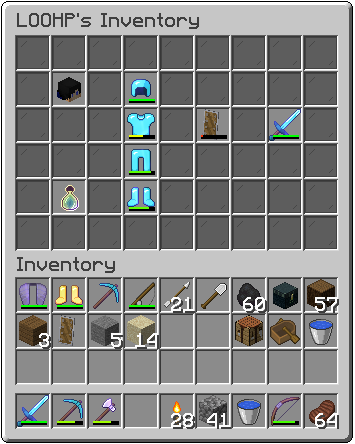
^ 你可以选择的两种库存显示布局(布局 0 & 1)
2. 自定义交互式聊天关键词
- 你可以创建任意你想要的占位符,并让它们在聊天中替换关键词
- 或者简单地仅为关键词添加悬停消息和点击动作
- 或者两者兼有!
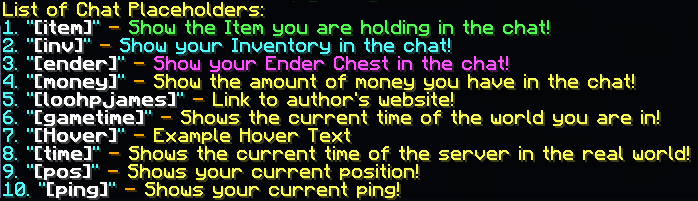
- 支持多行悬停文本 v [pos] 是默认示例自定义交互式关键词之一
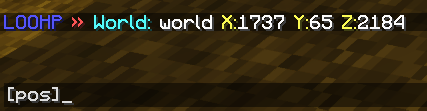
v 随默认配置提供的默认自定义占位符,可以删除或修改(1 - 3 为物品显示占位符)
3. 交互式玩家名称
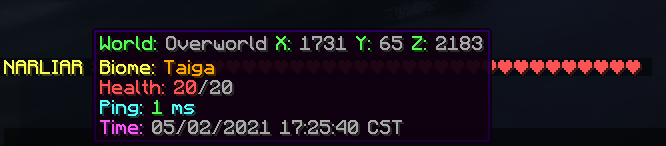
- 用交互式内容(如悬停消息和点击动作)替换聊天中出现的所有玩家名称! (支持 [URL=' [/URL] 昵称!如果你需要支持自己的昵称插件,可以通过 API 创建附加组件。)
4. 玩家提及
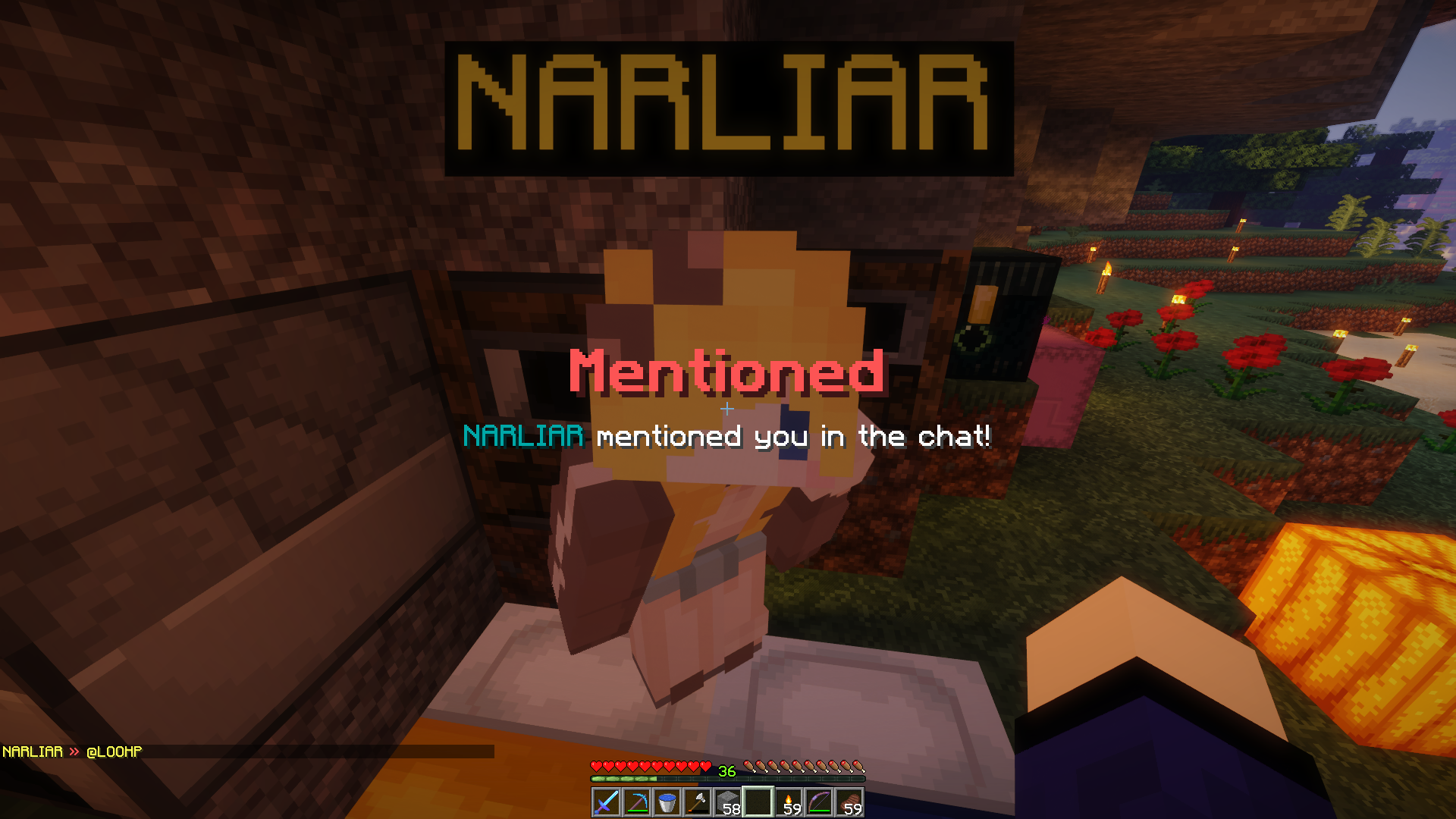
- 如果其他玩家提到了某人的名字,该玩家将会收到声音和消息通知!
- 如果 Minecraft 版本支持,通过标题/副标题/状态栏/BossBar/Toast 通知玩家(每种通知方式均可在配置文件中禁用) (当然也可以在配置文件中切换启用/禁用!)
5. 支持 Bungeecord 和 Velocity!一切在你的网络中畅通无阻!
如果你使用支持 Bungeecord 或 Velocity 的聊天管理插件,可以通过在 Spigot 和 Bungeecord/Velocity 上安装插件,并在所有 Spigot 服务器的配置中启用 bungeecord 选项来启用 Bungeecord 模式!
启用 Bungeecord 后,所有占位符(包括 [item]、[inv] 等以及自定义占位符)将在服务器间正常工作。提及及其他功能也将在服务器间生效!
6. 简易 RGB 和字体*[1.16 或更高版本]*
你可以在任何支持颜色的配置部分使用 RGB 代码!甚至可以在 聊天 中使用它们!
&x&f&f&f&f&f&f
或者
[color=#123456]
或者
&#fe34d5
如果你有包含不同字体的自定义资源包,甚至可以像颜色代码一样使用它们! 适用于聊天中的所有消息,甚至包括来自其他插件的聊天消息。
[font=uniform]
7. 语言支持!
当然!你也可以修改发送给玩家的所有消息以适应你的服务器需求! 物品材质名称将自动翻译为每个用户客户端的语言!
该插件在数据包级别更改消息,因此它应该能与其他聊天插件配合使用 (前提是不具备相同功能的插件)。
依赖项 (代理端不需要这些依赖项)
- ProtocolLib 或 PacketEvents+Module (请安装与你的服务器版本兼容的最新版本)
- PlaceholderAPI
- Vault
安装
- 将 InteractiveChat.jar 放入 plugins 文件夹,同时安装所需的依赖项 (如果你计划将插件与 Bungeecord 或 Velocity 一起使用,请在 Bungeecord/Velocity 上也安装插件,并在 所有 Spigot 服务器的 interactivechat 配置中启用 bungeecord 选项,Bungeecord 端不需要依赖项,是的,只需使用同一个 jar 文件)
- 启动服务器
- 编辑配置文件(如果需要)
- 重启服务器(如果在步骤 3 中修改了配置文件)
开发构建版
展示服务器
想试试这个插件吗?
IP: mc.loohpjames.com

命令
Minecraft 服务器(Spigot、Paper 等)命令:
/interactivechat reload - 重新加载插件(或 /ic reload) /interactivechat update - 检查更新(或 /ic update) /interactivechat chat - 发送聊天消息,支持占位符和玩家名称自动补全(或 /ic chat) /interactivechat list - 列出所有可用的占位符(或 /ic list) /interactivechat mentiontoggle - 切换自己的提及功能开关(或 /ic mentiontoggle) /interactivechat setinvdisplaylayout - 设置你偏好的物品栏显示布局(或 /ic setinvdisplaylayout)
代理服务器(Bungeecord / Velocity)命令:
/interactivechatproxy backendinfo - 列出代理服务器上所有 InteractiveChat 服务器的信息(或 /icp backendinfo)
常见问题解答
我的占位符无法使用!它们显示为类似 %player_name%! 我该怎么办?
PlaceholderAPI 需要下载扩展包才能正常工作,你可以在此处查看不同的扩展包及其占位符 点击这里。 例如,如果你希望 %player_name% 能够工作:
- 运行 /papi ecloud download player
- 运行 /papi reload
我的玩家因为“您发送了太多数据包!”被踢出,我该怎么办?
踢出消息:“您发送了太多数据包!”很可能来自 ViaVersion。 尝试在 ViaVersion 配置中增加或 将全局数据包限制器设置为 -1 [无论是在 bungeecord/velocity(如果你在这些平台上安装了它)还是在后端服务器(例如 spigot)上]
权限
interactivechat.reload:
    description: 允许你重新加载插件
    default: op
  interactivechat.backendinfo:
    description: 允许你在 bungeecord 上检查后端服务器的状态
    default: op
  interactivechat.cooldown.bypass:
    description: 允许你绕过冷却时间
    default: op
  interactivechat.module.item:
    description: 允许你使用物品占位符
    default: true
  interactivechat.module.inventory:
    description: 允许你使用物品栏占位符
    default: true
  interactivechat.module.inventory.setlayout:
    description: 允许你设置你偏好的物品栏显示布局
    default: true
  interactivechat.module.inventory.setlayout.others:
    description: 允许你设置他人的偏好物品栏显示布局
    default: op
  interactivechat.module.enderchest:
    description: 允许你使用末影箱占位符
    default: true
  interactivechat.module.custom:
    description: 允许你在聊天中使用自定义占位符
    default: true
  interactivechat.mention.player:
    description: 允许你提及他人
    default: true
  interactivechat.mention.here:
    description: 允许你提及服务器中的所有玩家
    default: op
  interactivechat.mention.everyone:
    description: 允许你提及所有人
    default: op
  interactivechat.mention.toggle:
    description: 允许你切换自己的提及功能
    default: true
  interactivechat.mention.toggle.others:
    description: 允许你切换其他玩家的提及功能
    default: op
  interactivechat.list:
    description: 列出你拥有权限的所有占位符
    default: true
  interactivechat.list.all:
    description: 列出所有占位符
    default: op
  interactivechat.parse:
    description: 让你测试你拥有权限的占位符
    default: true
  interactivechat.chat:
    description: 让你使用 interactivechat 聊天命令
    default: true
  interactivechat.chatcolor.translate:
    description: 允许你使用替代的颜色代码
    default: true
  interactivechat.customfont.translate:
    description: 允许你使用字体格式化代码
    default: true
  interactivechat.update:
    description: 允许你接收更新通知
    default: op
  interactivechat.bedrock.events:
    description: 允许 floodgate geyser 基岩版玩家访问聊天事件菜单
    default: true
API
InteractiveChat 确实为开发者提供了 API,用于自定义或使用其功能
更多说明请通过此链接查看
向 InteractiveChat 注册你自己的昵称
请查看此页面:
默认配置
数据使用
上的使用统计数据将对公众可见,并将包含你的服务器。不会发送你服务器的任何私人信息。
版本检查也通过 进行,以便在新版本发布时通知你。不会发送你服务器的任何私人信息。
About
The chat is great, players can socialize with each other. But here's the thing, why not make it even more interact-able? With this plugin, you will be able to show your item in hand, inventory content and ender chest content with your friends! Even across servers in your global bungeecord chat!
This plugin also allows you to create your own interactive keywords for your players to use in chat!
InteractiveChat is designed to work on top of your existing chat formatting plugin, not as a replacement!
Using DiscordSRV?
Check out this addon which lets you show placeholders and show inventories from InteractiveChat on discord! You can also have images sent from discord previewed on maps and have attachments beautified into clickable and hoverable text in-game!
Features
Video by Server.pro featuring an outdated version of InteractiveChat (v2)
1. Item Display Functions
- Type [item] in chat to show off the item in your hand!
- Type [inv] in chat to show off your inventory
- Type [ender] and you guessed it! Show your ender chest!
(Each of them can be toggled in the config as well as changing their keyword)
^ The two types of inventory display layout you can choose from (Layout 0 & 1)
2. Custom Interactive Chat Keywords
- You can create whatever placeholder you want and have them replace keywords in the chat
- Or simply just add a hover message as well as click actions to keywords
- Or both!
- Supports multiple lines of hover text v [pos] is one of the default example custom interactive keyword
v The default custom placeholders that comes with the default config, can be removed or changed (1 - 3 are item display placeholders)
3. Interactive Player Names
- Replace all player names that appear in the chat with interactive content, such as hover messages and click actions! (Supports [URL=' [/URL]Nicknames! You can create an addon through the API if you need support for your own nicknaming plugins.)
4. Player Mentioning
- If a player's name is mentioned by another player, they will be notified with a sound and a message!
- Notify the player with a Title/SubTitle/ActionBar/BossBar/Toast, if the version of Minecraft supports it (Each can be disabled in the config) (Togglable in the config of course!)
5. Bungeecord and Velocity Supported! Everything works across your network!
If you use chat managing plugins that support bungeecord or velocity, you can enable bungeecord mode by installing the plugin on spigot and bungeecord/velocity and having the bungeecord option enabled in the config on all spigot servers!
With bungeecord enabled, all placeholders, including [item], [inv] etc. and custom ones will work across servers. Mentioning and everything else will also work between servers!
6. Easy RGB and Font*[1.16 or above]*
You can use RGB code in any part of the config that support colors! You can even use them in chat!
&x&f&f&f&f&f&f
or
[color=#123456]
or
&#fe34d5
If you have a custom resource pack that has different fonts, you can even use them like color codes! Works with any messages in the chat, even chat messages from other plugins.
[font=uniform]
7. Languages!
And of course! You will be able to modify all the messages that are sent to players to suit your server as well! Item material names will be automatically translated into each user's client language!
The plugin changes messages on a packet level, so it should work on top of other chat plugins (that doesn't also do this).
Dependencies (These dependencies are not required on Proxies)
- ProtocolLib or PacketEvents+Module (Please install the latest version that is compatible with your server version)
- PlaceholderAPI
- Vault
Installation
- Put InteractiveChat.jar into the plugins folder along with the required dependencies (If you plan to use the plugin with bungeecord or velocity, install the plugin on bungeecord/velocity as well and enable the bungeecord option in the interactivechat config on *ALL*spigot servers, no dependencies are required on bungeecord, and yes, just use the same jar)
- Start the server
- Edit the config (if you need to)
- Restart the server (if you changed something in the config in step 3)
Development Builds
Showcase Server
Want to give the plugin a try?
IP: mc.loohpjames.com
Commands
Minecraft Server (Spigot, Paper etc.) Commands:
/interactivechat reload - Reloads the plugin (or /ic reload) /interactivechat update - Check for updates (or /ic update) /interactivechat chat - Send chat messages with placeholder and player name auto complete (or /ic chat) /interactivechat list - List all placeholders you can use (or /ic list) /interactivechat mentiontoggle - Toggle mentioning for yourself (or /ic mentiontoggle) /interactivechat setinvdisplaylayout - Set your own preferred inventory display layout (or /ic setinvdisplaylayout)
Proxy Server (Bungeecord / Velocity) Commands:
/interactivechatproxy backendinfo - List all InteractiveChat information of the servers in your proxy (or /icp backendinfo)
Q&A
My placeholders don't work! They show as something like %player_name%! What do I do?
PlaceholderAPI requires you to download expansions in order to function, you can take a look at the different expansions and their placeholders here (click me). For example, if you want **%player_name%**to work:
- run /papi ecloud download player
- run /papi reload
My players get kicked for "You are sending too many packets!", what should I do?
The kick message: You are sending too many packets! probably comes from ViaVersion. Try increasing or setting the GLOBAL PACKET LIMITER to -1 in the ViaVersion config [Both in bungeecord/velocity (if you've installed it on that) and backend servers (e.g. spigot)]
Permissions
interactivechat.reload:
    description: Allows you to reload the plugin
    default: op
  interactivechat.backendinfo:
    description: Allows you check the status of backend servers on bungeecord
    default: op
  interactivechat.cooldown.bypass:
    description: Allows you to bypass cooldown
    default: op
  interactivechat.module.item:
    description: Allows you to use the item placeholder
    default: true
  interactivechat.module.inventory:
    description: Allows you to use the inventory placeholder
    default: true
  interactivechat.module.inventory.setlayout:
    description: Allows you to use set your preferred inventory display layout
    default: true
  interactivechat.module.inventory.setlayout.others:
    description: Allows you to use set the preferred inventory display layout of others
    default: op
  interactivechat.module.enderchest:
    description: Allows you to use the ender chest placeholder
    default: true
  interactivechat.module.custom:
    description: Allows you to use custom placeholders in chat
    default: true
  interactivechat.mention.player:
    description: Allows you to mention others
    default: true
  interactivechat.mention.here:
    description: Allows you to mention all players in your server
    default: op
  interactivechat.mention.everyone:
    description: Allows you to mention everyone
    default: op
  interactivechat.mention.toggle:
    description: Allows you to toggle your own mentions
    default: true
  interactivechat.mention.toggle.others:
    description: Allows you to toggle mentions of other players
    default: op
  interactivechat.list:
    description: List all placeholder which you have permission to
    default: true
  interactivechat.list.all:
    description: List all placeholder
    default: op
  interactivechat.parse:
    description: Let you try out placeholders which you have permission to
    default: true
  interactivechat.chat:
    description: Let you use the interactivechat chat command
    default: true
  interactivechat.chatcolor.translate:
    description: Allows you to use alternate color code
    default: true
  interactivechat.customfont.translate:
    description: Allows you to use font formatting code
    default: true
  interactivechat.update:
    description: Allows you to recieve update notifications
    default: op
  interactivechat.bedrock.events:
    description: Allow floodgate geyser bedrock players to access chat events menu
    default: true
API
InteractiveChat does provide an API for developers to customize or use its functions
More descriptions are provided through this link
Registering your own nicknames with InteractiveChat
Please take a look at this page:
Default Config
Config in the Latest Version with Descriptions
Data usage
Usage statistics at will be visible to the public with your server included in the statistics. No private information of your server is sent.
Update checking is also done via to notify you whenever a new version is released. No private information of your server is sent.

下载 InteractiveChat
需要联机服务器吗?
稳定流畅、一键部署,几分钟即可和朋友联机开服
最低仅需 8 元/月 即可畅快联机
下载 InteractiveChat
需要联机服务器吗?
稳定流畅、一键部署,几分钟即可和朋友联机开服
最低仅需 8 元/月 即可畅快联机
下载 InteractiveChat
需要联机服务器吗?
稳定流畅、一键部署,几分钟即可和朋友联机开服
最低仅需 8 元/月 即可畅快联机
下载 InteractiveChat
需要联机服务器吗?
稳定流畅、一键部署,几分钟即可和朋友联机开服
最低仅需 8 元/月 即可畅快联机
下载 InteractiveChat
需要联机服务器吗?
稳定流畅、一键部署,几分钟即可和朋友联机开服
最低仅需 8 元/月 即可畅快联机
下载 InteractiveChat
需要联机服务器吗?
稳定流畅、一键部署,几分钟即可和朋友联机开服
最低仅需 8 元/月 即可畅快联机
下载 InteractiveChat
需要联机服务器吗?
稳定流畅、一键部署,几分钟即可和朋友联机开服
最低仅需 8 元/月 即可畅快联机
下载 InteractiveChat
需要联机服务器吗?
稳定流畅、一键部署,几分钟即可和朋友联机开服
最低仅需 8 元/月 即可畅快联机
下载 InteractiveChat
需要联机服务器吗?
稳定流畅、一键部署,几分钟即可和朋友联机开服
最低仅需 8 元/月 即可畅快联机
下载 InteractiveChat
需要联机服务器吗?
稳定流畅、一键部署,几分钟即可和朋友联机开服
最低仅需 8 元/月 即可畅快联机
- 修复了一个关键问题
- 修复了 Velocity 的日志过滤问题
- 修复了预览假地图的问题
- 修复了一个严重问题
- 修复了 Velocity 上的日志过滤问题
关于这个资源的讨论、问题反馈与使用心得
还没有讨论,来发第一帖吧
你是这个资源的作者?登录后可认领此资源。
相似资源
 插件

PacketEvents 是一款专为 Minecraft Java 版打造的协议库,旨在简化数据包的处理与传输。
 插件
ExyliaPlugins 的库。
 插件
通过对话框或铁砧界面帮助你的 Anthme
 插件
自定义你的Minecraft头像!
 插件
重新定义服务器上的生物运输方式。使用高度可定制的口袋道具,安全地捕获、存储和释放任何实体。
 插件
为基于 Spigot/Paper/Folia 的服务器添加对 Vivecraft 的支持
评论 0
登录后参与评分
还没有评论,来抢沙发吧