
你是否喜欢将物品整齐地分类存放在不同的箱子中,却又讨厌整理它们所耗费的工作量?你是否经常把所有东西一股脑儿塞进一个箱子,打算以后再慢慢整理?MondoChest 正是为你而生的。
链接
工作原理
MondoChest 允许你指定一个“主箱”(通过放置特殊的告示牌),你可以将所有物品倾倒其中。然后,你再指定若干个“子箱”,你的物品将会被自动转移到这些子箱中。子箱可以位于楼下、楼上、另一个房间,或者任意位置(在可配置的半径范围内)。
MondoChest 会检查每个箱子中已有的物品,并根据现有内容决定新放入的物品应该“归位”到哪里。例如,如果某个子箱里已经有铁轨和动力铁轨,而另一个子箱里有木板和原木,那么当你把木材倒入主箱时,它会被自动移动到存放木材的子箱中。
使用方法
第一步
在箱子旁边放置一个写着 “[MondoChest]” 的告示牌,以此指定该箱子为主箱。
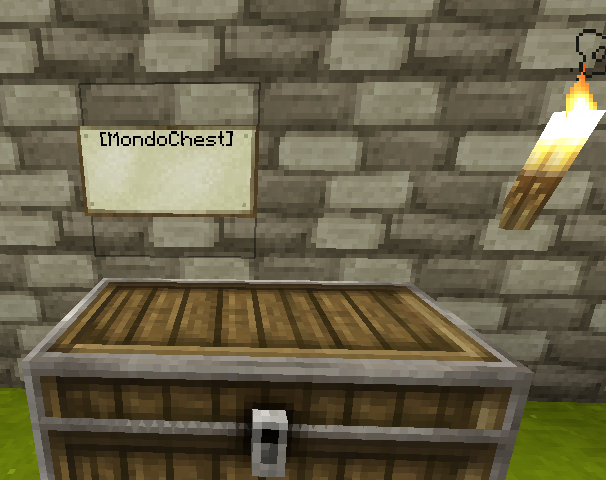
接下来右键点击 MondoChest 告示牌,你应该会看到类似这样的消息:MondoChest: Created bank with 0 chests.
第二步
对于你想要纳入管理的任何存储箱,在其旁边放置一个告示牌,第一行写上 “[MondoSlave]”。
注意 告示牌必须是墙挂式告示牌,立在柱子上的告示牌无法正常工作。
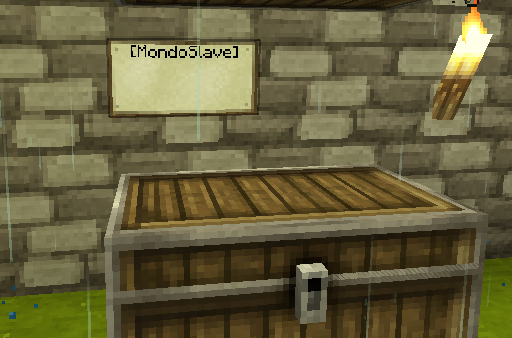
右键点击 子箱告示牌,将其添加到你创建的 MondoChest 银行系统中,并对所有子箱重复此操作。
你会看到类似这样的消息:MondoChest: Added 2 slaves to bank
第三步
每当有新物品需要整理时,将物品倒入主箱子,然后右键点击MondoChest 告示牌。物品会被移动到已包含该物品的从属箱子中。任何没有已知目标箱子的物品将保留在源箱子中。
安装/配置
安装方法:将 MondoChest.jar 放入您的 plugins 文件夹。系统将自动生成带有默认配置的配置文件。
详细配置文档,请阅读 Configuration
技巧与提示
- 箱子可以位于告示牌的任意一侧,一个 [MondoSlave] 告示牌可以处理多个箱子,从而节省告示牌的使用:箱子位置示例
- 不喜欢在您漂亮的箱子房中看到这些告示牌吗?在箱子下方挖个洞,把 [MondoSlave] 告示牌藏在那里。侧向放置的告示牌也可以 隐藏在墙壁里的箱子后面。
- 多个主箱子可以共享相同的从属箱子。例如,您可以在城堡前门设置一个 MondoChest,在后门设置另一个,所有物品都会被收纳到楼下城堡金库中的从属箱子里。操作方法:先右键点击一个主箱子,然后四处走动右键点击所有从属箱子以将它们添加到该主箱子中。对其他主箱子重复此操作即可。


计划中的功能
- MondoFurnace!!! (0.7.2)
- (重新)加载发射器 (0.7.2)
陷阱箱 (0.7.1)每个箱子的细粒度访问控制 (0.7)更强大的限制配置 (0.7)限制每个用户拥有的 MondoChest 数量 (0.6.1)MondoChest 特定用户权限 (0.6)箱子保护 (0.6)支持单个物品类型对应多个箱子,例如多个箱子用于存放圆石 (0.5)跨服务器重启缓存已找到的箱子 (0.5)多世界支持 (0.4)权限系统 (0.4)
关于指标数据
本插件使用了 Hidendra 的插件指标系统,这意味着以下信息会被收集并发送至 mcstats.org:
- 唯一标识符
- 服务器的 Java 版本
- 服务器是离线模式还是在线模式
- 插件的版本号
- 服务器的版本号
- 操作系统版本/名称及架构
- CPU 的核心数量
- 在线玩家的数量
- Metrics 版本
Do you like having your materials all neatly organized into different chests, but hate the work required to organize them? Do you find yourself dumping everything into one chest, to deal with it later? MondoChest is for you.
Links
- Download (v0.7.1)
- Forum Thread
- How To Use
- Tips and Tricks
- Advanced Configuration
How it Works
MondoChest lets you designate a master chest (by using a special sign) where you can dump your stuff. You then designate "slave" chests where your stuff will go to. They can be downstairs, upstairs, in another room, however you like (within a configurable radius.)
MondoChest will then see what's in each chest, and then decides where things get 'shelved' based on what's already in there. For example, one slave box has rails and powered rails in it, and another has wood planks and logs in it. If you dump wood into the master chest, it will be moved into the appropriate slave.
How to Use
Step 1
Designate a master chest by putting a "[MondoChest]" sign next to the chest.
now right-click the MondoChest sign, you should see a message like: MondoChest: Created bank with 0 chests.
Step 2
For any storage chests you have, create a sign with the first line containing "[MondoSlave]" next to the chest.
Note the sign must be a wall-mounted sign, signs standing on posts will not work.
right-click the slave sign to add it to the MondoChest bank you created, and repeat for any number of slave chests.
You will see a message like: MondoChest: Added 2 slaves to bank
Step 3
Any time you have new items to sort, dump items into the master chest and then right-click the MondoChest sign. Items will be moved into a slave chest which already contains that item. Any items which don't have a known destination chest will stay in the source chest
Installation/Configuration
To install, place MondoChest.jar in your plugins folder. A configuration file will be created with default configuration.
For detailed configuration docs, read Configuration
Tips and Tricks
- chests can be on any side of the sign, and one [MondoSlave] sign can handle multiple chests, allowing you to save on signs: Chest Positioning Example
- Don't like seeing the signs in your pretty chest room? dig a hole under the chest, and hide the [MondoSlave] sign down there. Sideways signs can also go behind chests in the wall.
- Multiple master chests can share the same slave chests. For example, you can have a MondoChest at the front gate and another at the rear gate of your castle, and everything gets shelved into the slaves in the castle vault downstairs. Do this by clicking one master, then run around right-clicking all the slaves to add them to the master. Repeat this for any other masters.
Planned Features
- MondoFurnace!!! (0.7.2)
- (Re)load dispensers (0.7.2)
Trapped Chests (0.7.1)Fine-grained access control per chest (0.7)more powerful limit configuration (0.7)Limit number of MondoChests per user (0.6.1)Specific users per MondoChest (0.6)Chest protection (0.6)Support multiple chests for a single item type, e.g. multiple chests for cobblestone (0.5)Cache found chests across server restarts (0.5)Multiworld support (0.4)Permissions (0.4)
About Metrics
This plugin utilizes Hidendra's plugin metrics system, which means that the following information is collected and sent to mcstats.org:
- A unique identifier
- The server's version of Java
- Whether the server is in offline or online mode
- The plugin's version
- The server's version
- The OS version/name and architecture
- The core count for the CPU
- The number of players online
- The Metrics version
下载 MondoChest
下载 MondoChest
下载 MondoChest
下载 MondoChest
下载 MondoChest
下载 MondoChest
下载 MondoChest
下载 MondoChest
下载 MondoChest
下载 MondoChest

版本 0.7.2-pre1:2014-05-26
- 通过新的配置选项和权限支持无需告示牌即可添加附属箱子。
版本 0.7.1:2013-11-14
- 修复移除组限制时出现的空指针异常问题。
- 支持陷阱箱。
- 放弃对旧版 MC 的支持,最低版本要求现为 1.5.2-R1。
版本 0.7:2013-03-20
- 修复箱子破坏保护中的漏洞。
- 实现更严格且具体的访问控制列表(ACL)。
- 基于对话的 ACL 控制。
- 权限可控制箱子数量限制。
- 智能处理添加重复箱子的情况。
- 提供不区分大小写的告示牌选项。
- 修复有时会出现重复箱子的问题。
- 允许在箱子前方放置告示牌的选项。
- 新增 /mondo check 命令,用于检查缺失的箱子和告示牌。
版本 0.6.2:2013-02-04
- 通过允许在箱子正前方放置告示牌,与 SignThatChest 良好兼容。
版本 0.6.1:2012-09-21
- 支持为每个用户设置主箱子的数量上限。
版本 0.6:2012-08-22
- 增加定义可访问 MondoChest 的用户的功能。
- 允许从控制台使用 'mondo' 命令(有限功能)。
- 增加打开箱子时的可选保护机制。
- 增加在水平方向上查找距离为 2 的附属箱子的可选功能。
- 修复当设置 slaves_vertical_two 时未能移除箱子的轻微漏洞。
- 集成 MCStats 指标统计。
- 官方支持 Bukkit 1.3.1。
版本 0.5.5:2012-08-05
- 修复漏洞:右键点击新创建的主箱子后,若不再次右键点击则无法注册以添加附属箱子。
版本 0.5.4:2012-07-05
- 增加在告示牌上下方距离为 2 的位置查找附属箱子的可选功能。
版本 0.5.3:2012-05-12
- 新增 /mondo find 命令。
- 移除已弃用的搜索半径参数。
- 使各项性能设置更具可配置性。
- 移除大量旧代码并进行常规代码清理。
- 不再支持 Bukkit 1.1.x。
版本 0.5.2:2012-04-03
- 修复漏洞:主告示牌会拾取距离告示牌 2 格远的箱子,而不仅仅是相邻的箱子。
- 性能改进:在附属箱子操作中采用 O(1) 数据结构。
- 提供更紧凑的配置策略。
- 任何解析错误都会自动备份 banks.yml 文件。
版本 0.5.1:2012-04-01
- 修复漏洞:主箱子可能将同一个箱子再次作为附属箱子包含在内。
版本 0.5:2012-03-29
- 支持 Vault 权限系统。
- 半径参数已弃用。
- MondoChest 拥有“所有者”。
- 附属告示牌会将物品添加到上次点击的箱子中。
- 支持每种物品类型对应多个箱子。
- 可选的告示牌保护功能。
- 仅所有者可以破坏告示牌。
- 破坏告示牌以移除附属箱子或整个 MondoChest 系统。
- 美化消息颜色显示。
版本 0.4.2:2012-02-29
- 移除多余的调试输出。
版本 0.4.1:2012-02-26
- 修复在正 Z 坐标处发生的漏洞,该漏洞导致箱子始终无法被找到。
版本 0.4:2012-02-25
- 支持权限系统。
- 支持多世界环境。
版本 0.3:2012-02-24
- 物品现在通过数据值进行区分:羊毛的颜色、染料等可以存入不同的箱子。
版本 0.2:2012-02-24
- 如果 config.yml 文件已存在,则不再尝试生成配置文件。
- 配置文件中默认关闭物品堆叠功能。
- 箱子搜索使用 world.getMaxHeight() 以适配 1.2 版本。
版本 0.1:2012-02-23
- 首次发布
启用告示牌保护后,破坏受保护告示牌背后的方块会导致告示牌破裂,而 MondoChest 对此不知情。爆炸情况可能也是如此。
关于这个资源的讨论、问题反馈与使用心得
还没有讨论,来发第一帖吧
你是这个资源的作者?登录后可认领此资源。
相似资源
 插件
重新定义服务器上的生物运输方式。使用高度可定制的口袋道具,安全地捕获、存储和释放任何实体。
 插件

使床在所有维度中爆炸的模组
 插件
为 Armor Poser 模组添加兼容性
 插件

SkyBlock、OneBlock、Boxed、SkyGrid、AcidIsland、CaveBlock、Poseidon、StrangerRealms——以及更多!这些只是由 BentoBox 支持的基于岛屿的游戏模式之一。来自原版 ASkyBlock 的作者。
 插件
一个高度兼容、功能完善且稳定的 TPA 模组
 插件
AbAcc AbAcc 是一款适用于 Minecraft 服务器的管理插件,可简化玩家作弊检测与举报管理工作。工作人员可以发起并管理对可疑玩家的检查流程,并在检查完成后将其释放。
评论 0
登录后参与评分
还没有评论,来抢沙发吧