你是否喜欢将物品整齐地分类存放在不同的箱子中,却又讨厌整理它们所耗费的工作量?你是否经常把所有东西一股脑儿塞进一个箱子,打算以后再慢慢整理?MondoChest 正是为你而生的。
链接
工作原理
MondoChest 允许你指定一个“主箱”(通过放置特殊的告示牌),你可以将所有物品倾倒其中。然后,你再指定若干个“子箱”,你的物品将会被自动转移到这些子箱中。子箱可以位于楼下、楼上、另一个房间,或者任意位置(在可配置的半径范围内)。
MondoChest 会检查每个箱子中已有的物品,并根据现有内容决定新放入的物品应该“归位”到哪里。例如,如果某个子箱里已经有铁轨和动力铁轨,而另一个子箱里有木板和原木,那么当你把木材倒入主箱时,它会被自动移动到存放木材的子箱中。
使用方法
第一步
在箱子旁边放置一个写着 “[MondoChest]” 的告示牌,以此指定该箱子为主箱。
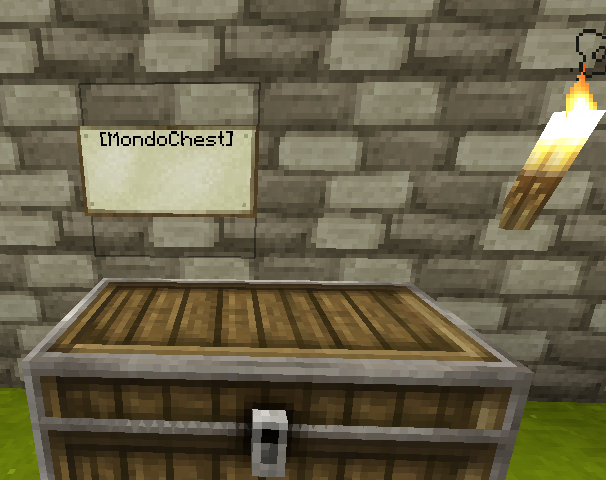
接下来右键点击 MondoChest 告示牌,你应该会看到类似这样的消息:MondoChest: Created bank with 0 chests.
第二步
对于你想要纳入管理的任何存储箱,在其旁边放置一个告示牌,第一行写上 “[MondoSlave]”。
注意 告示牌必须是墙挂式告示牌,立在柱子上的告示牌无法正常工作。
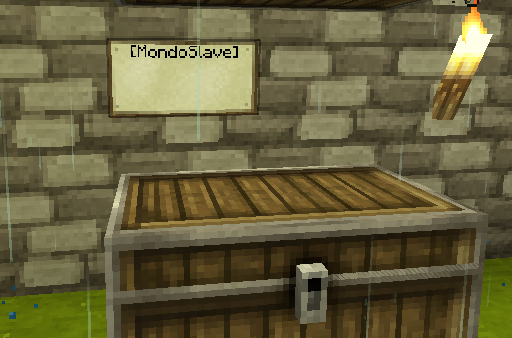
右键点击 子箱告示牌,将其添加到你创建的 MondoChest 银行系统中,并对所有子箱重复此操作。
你会看到类似这样的消息:MondoChest: Added 2 slaves to bank
第三步
每当有新物品需要整理时,将物品倒入主箱子,然后右键点击MondoChest 告示牌。物品会被移动到已包含该物品的从属箱子中。任何没有已知目标箱子的物品将保留在源箱子中。
安装/配置
安装方法:将 MondoChest.jar 放入您的 plugins 文件夹。系统将自动生成带有默认配置的配置文件。
详细配置文档,请阅读 Configuration
技巧与提示
- 箱子可以位于告示牌的任意一侧,一个 [MondoSlave] 告示牌可以处理多个箱子,从而节省告示牌的使用:箱子位置示例
- 不喜欢在您漂亮的箱子房中看到这些告示牌吗?在箱子下方挖个洞,把 [MondoSlave] 告示牌藏在那里。侧向放置的告示牌也可以 隐藏在墙壁里的箱子后面。
- 多个主箱子可以共享相同的从属箱子。例如,您可以在城堡前门设置一个 MondoChest,在后门设置另一个,所有物品都会被收纳到楼下城堡金库中的从属箱子里。操作方法:先右键点击一个主箱子,然后四处走动右键点击所有从属箱子以将它们添加到该主箱子中。对其他主箱子重复此操作即可。
计划中的功能
- MondoFurnace!!! (0.7.2)
- (重新)加载发射器 (0.7.2)
陷阱箱 (0.7.1)
每个箱子的细粒度访问控制 (0.7)
更强大的限制配置 (0.7)
限制每个用户拥有的 MondoChest 数量 (0.6.1)
MondoChest 特定用户权限 (0.6)
箱子保护 (0.6)
支持单个物品类型对应多个箱子,例如多个箱子用于存放圆石 (0.5)
跨服务器重启缓存已找到的箱子 (0.5)
多世界支持 (0.4)
权限系统 (0.4)
关于指标数据
本插件使用了 Hidendra 的插件指标系统,这意味着以下信息会被收集并发送至 mcstats.org:
- 唯一标识符
- 服务器的 Java 版本
- 服务器是离线模式还是在线模式
- 插件的版本号
- 服务器的版本号
- 操作系统版本/名称及架构
- CPU 的核心数量
- 在线玩家的数量
- Metrics 版本
Do you like having your materials all neatly organized into different chests, but hate the work required to organize them? Do you find yourself dumping everything into one chest, to deal with it later? MondoChest is for you.
Links
How it Works
MondoChest lets you designate a master chest (by using a special sign) where you can dump your stuff. You then designate "slave" chests where your stuff will go to. They can be downstairs, upstairs, in another room, however you like (within a configurable radius.)
MondoChest will then see what's in each chest, and then decides where things get 'shelved' based on what's already in there. For example, one slave box has rails and powered rails in it, and another has wood planks and logs in it. If you dump wood into the master chest, it will be moved into the appropriate slave.
How to Use
Step 1
Designate a master chest by putting a "[MondoChest]" sign next to the chest.
now right-click the MondoChest sign, you should see a message like: MondoChest: Created bank with 0 chests.
Step 2
For any storage chests you have, create a sign with the first line containing "[MondoSlave]" next to the chest.
Note the sign must be a wall-mounted sign, signs standing on posts will not work.
right-click the slave sign to add it to the MondoChest bank you created, and repeat for any number of slave chests.
You will see a message like: MondoChest: Added 2 slaves to bank
Step 3
Any time you have new items to sort, dump items into the master chest and then right-click the MondoChest sign. Items will be moved into a slave chest which already contains that item. Any items which don't have a known destination chest will stay in the source chest
Installation/Configuration
To install, place MondoChest.jar in your plugins folder. A configuration file will be created with default configuration.
For detailed configuration docs, read Configuration
Tips and Tricks
- chests can be on any side of the sign, and one [MondoSlave] sign can handle multiple chests, allowing you to save on signs: Chest Positioning Example
- Don't like seeing the signs in your pretty chest room? dig a hole under the chest, and hide the [MondoSlave] sign down there. Sideways signs can also go behind chests in the wall.
- Multiple master chests can share the same slave chests. For example, you can have a MondoChest at the front gate and another at the rear gate of your castle, and everything gets shelved into the slaves in the castle vault downstairs. Do this by clicking one master, then run around right-clicking all the slaves to add them to the master. Repeat this for any other masters.
Planned Features
- MondoFurnace!!! (0.7.2)
- (Re)load dispensers (0.7.2)
Trapped Chests (0.7.1)
Fine-grained access control per chest (0.7)
more powerful limit configuration (0.7)
Limit number of MondoChests per user (0.6.1)
Specific users per MondoChest (0.6)
Chest protection (0.6)
Support multiple chests for a single item type, e.g. multiple chests for cobblestone (0.5)
Cache found chests across server restarts (0.5)
Multiworld support (0.4)
Permissions (0.4)
About Metrics
This plugin utilizes Hidendra's plugin metrics system, which means that the following information is collected and sent to mcstats.org:
- A unique identifier
- The server's version of Java
- Whether the server is in offline or online mode
- The plugin's version
- The server's version
- The OS version/name and architecture
- The core count for the CPU
- The number of players online
- The Metrics version


 插件

 插件
 插件
 插件

 插件
 插件
评论 0
登录后参与评分
还没有评论,来抢沙发吧