
SpeedSMP Project
SpeedSMP 插件的官方 Modrinth 页面,包含我们的自定义插件和必需的资源包。
要求
为了按预期体验服务器,您必须安装 SpeedSMP 资源包。
注意:此资源包用于查看自定义物品纹理和服务器特定的 UI 元素。
支持的服务端


插件功能
- 等级系统: 所有人从 1 级开始。通过击杀玩家获得经验;死亡时失去一级。
- 速度成长: 您的移动速度会随着每获得一个等级而自动增加。
- 技能: 达到 5 级后解锁三种独特的战斗技能。
- 速度罐合成: 使用以下材料合成强力物品:
- 4x 钻石块(四角)
- 4x 金块(四周)
- 1x 下界合金锭(中心)
- 风格重铸合成: 使用以下材料合成强力物品:
- 4x 钻石块(四角)
- 4x 金块(四周)
- 1x 下界合金锭(中心)
如何使用终极技能
您可以通过以下命令激活您的终极技能:
/speedsmp activateultimate 或者按下 shift + f
按键设置
为了在战斗中快速触发此技能,您可以使用 CommandKeys 等模组将命令绑定到键盘按键上。
推荐模组:
快速设置指南:
- 安装您喜欢的按键绑定模组。
- 进入模组的配置菜单。
- 创建一个新的按键绑定。
- 将命令设置为:
/speedsmp activateultimate
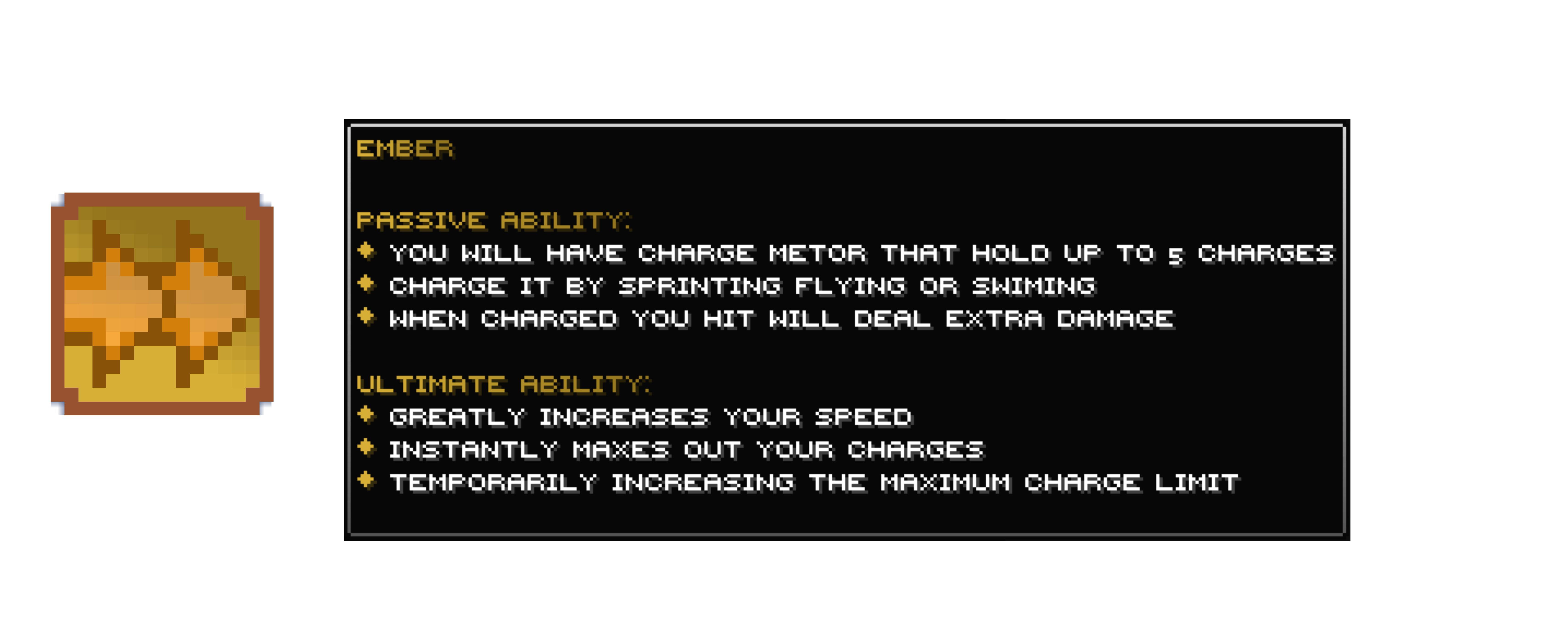
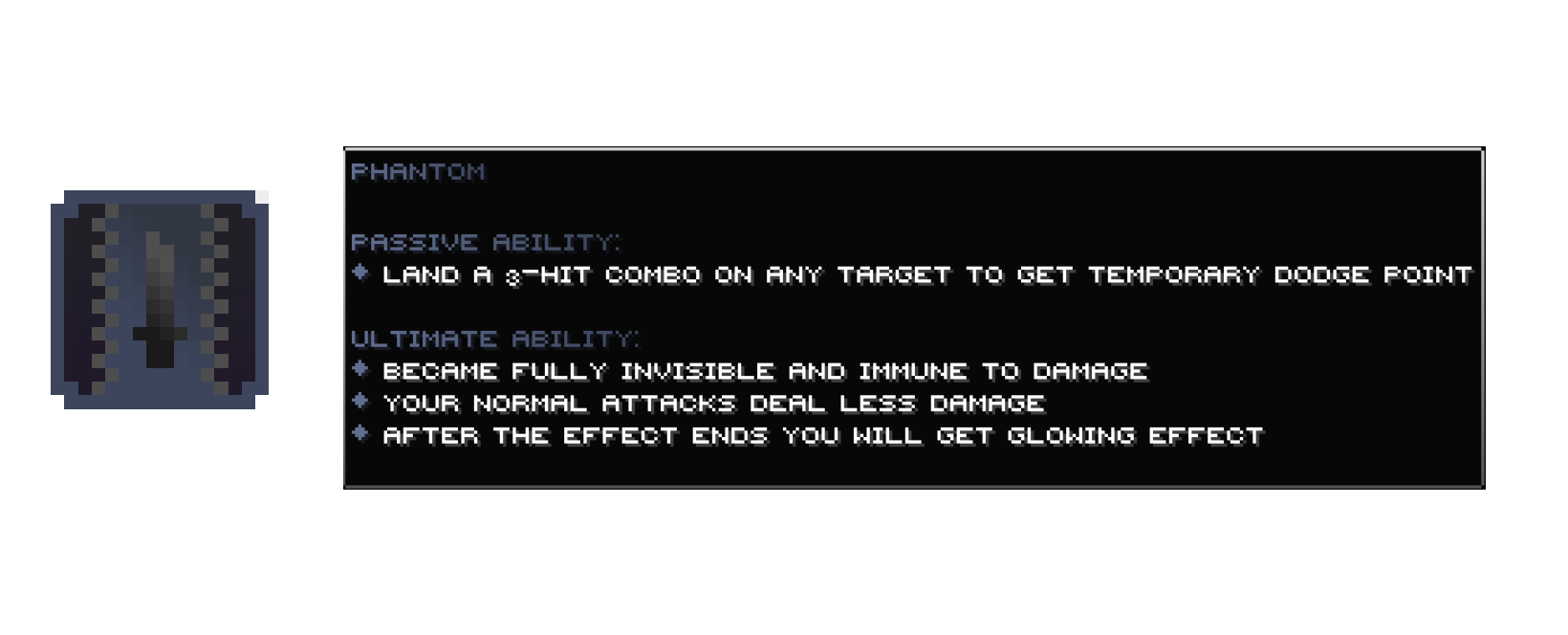
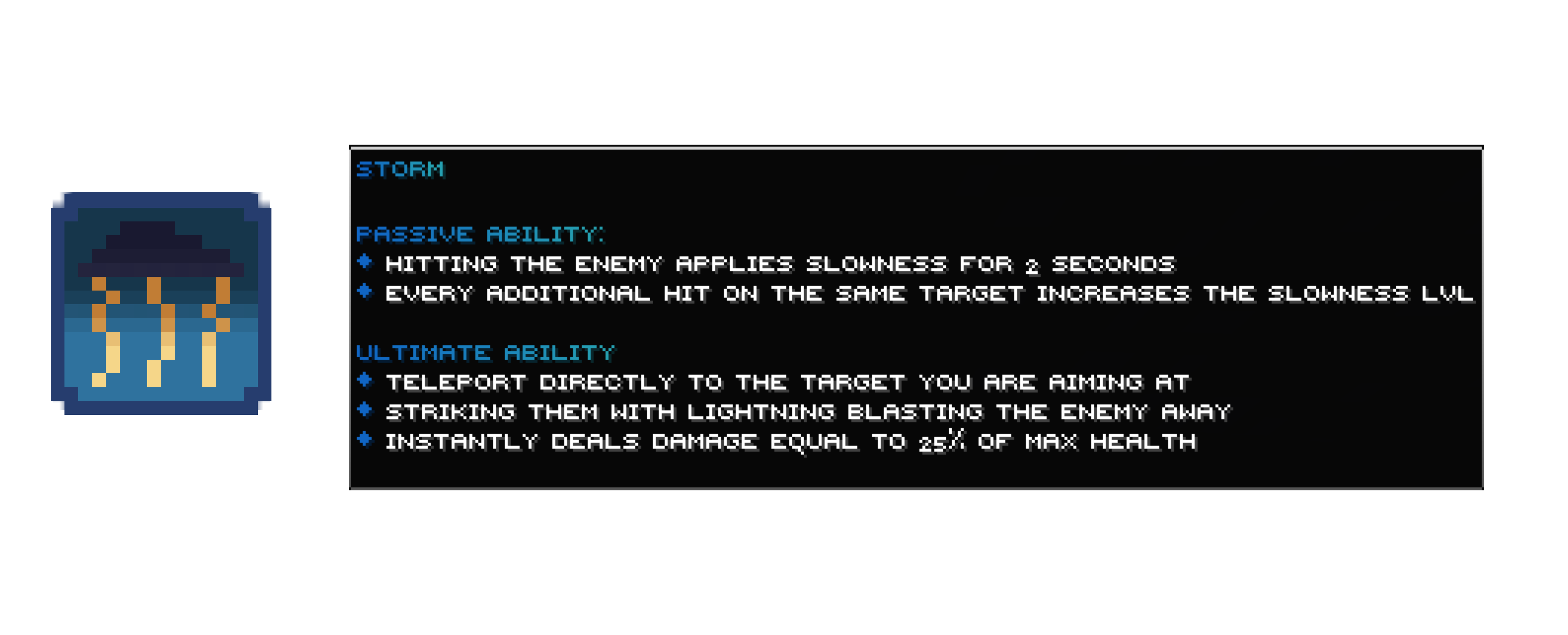
风格
命令与权限
以下是 SpeedSMP 的可用命令列表。
| 命令 |
描述 |
权限 |
/speedsmp view [player] |
查看您或其他玩家的速度 |
speedSMP.view |
/speedsmp withdraw <amount> |
将速度等级提取为速度罐 |
None |
/speedsmp recipe <type> |
查看自定义物品配方 (GUI) |
None |
/speedsmp info |
打开菜单 (GUI) |
None |
/speedsmp activateultimate |
激活您的终极战斗技能 |
None |
/speedsmp setspeed <player> <amount> |
为玩家设置特定的速度等级 |
speedSMP.set |
/speedsmp setstyle <player> <style> |
更改玩家风格 |
speedSMP.set |
/speedsmp give <player> <item> |
给予自定义物品 (speed_jar, style_reroll) |
speedSMP.give |
/speedsmp reload |
重载配置、消息和音效 |
speedSMP.reload |
/speedsmp debug <option> |
调试插件系统 |
speedSMP.debug |
注意: 权限可以通过任何标准的权限插件(如 LuckPerms)进行管理。
高度可定制
我们设计此插件使其完全可配置。您可以通过 YAML 文件修改游戏逻辑、消息和音效:
查看 Config.yml
# ─── 速度等级 ────────────────────────────────────────
# 控制速度系统的边界和进度。
#
#   max-level:     玩家可达到的最大速度等级
#   min-level:     最小速度等级(低于此等级时,死亡不会掉落速度罐)
#   default-level: 新玩家首次加入时分配的速度等级
#   speed-per-level: 每级增加的行走速度倍数 (0.1 = 每级增加 10%)
#   action-bar-update: 动作栏更新的 tick 间隔 (min = 1, max = 20) --- 需要重启服务器
#
max-level: 5
min-level: 0
default-level: 1
speed-per-level: 0.1
action-bar-update: 2

# ─── 技能 ───────────────────────────────────────────
# 控制技能激活要求和设置。
#
#   ultimate-level-requirement:  激活终极技能所需的最小等级
#   passive-level-requirement:   被动技能触发所需的最小等级
#                                (不要设置得高于终极技能要求等级,
#                                 否则会导致动作栏显示错误)
#   count-entities-hit:          如果为 true,技能可以针对非玩家实体
#                                (生物)触发。如果为 false,只有击中玩家才算。
#
ultimate-level-requirement: 5
passive-level-requirement: 3
count-entities-hit: true
─── 风暴终极调整 ───────────────────────────────
微调 Storm 风格终极技能的瞄准。
storm-ultimate-angle-tolerance: 初始打击时,玩家视线方向与目标之间的最大角度(度)
storm-ultimate-chained-angle-tolerance: 连锁闪电跳跃到附近目标时的最大角度(度)
storm-ultimate-angle-tolerance: 30
storm-ultimate-chained-angle-tolerance: 15
─── 合成配方 ────────────────────────────────────
为每个自定义物品定义 3x3 合成网格。
每一行是一个包含 3 个 Bukkit Material 名称的列表(例如 GOLD_BLOCK, DIAMOND_BLOCK)。
行顺序为:第一行(顶部)、第二行(中间)、第三行(底部)。
recipes:
speed-jar:
first-row:
- "DIAMOND_BLOCK"
- "GOLD_BLOCK"
- "DIAMOND_BLOCK"
second-row:
- "GOLD_BLOCK"
- "NETHERITE_INGOT"
- "GOLD_BLOCK"
third-row:
- "DIAMOND_BLOCK"
- "GOLD_BLOCK"
- "DIAMOND_BLOCK"
style-reroll:
first-row:
- "TINTED_GLASS"
- "TINTED_GLASS"
- "TINTED_GLASS"
second-row:
- "TINTED_GLASS"
- "BEACON"
- "TINTED_GLASS"
third-row:
- "DIAMOND_BLOCK"
- "DIAMOND_BLOCK"
- "DIAMOND_BLOCK"
─── 信息菜单 ───────────────────────────────────────────
配置 /speedsmp info 菜单中显示的物品。
每个物品键(例如 "storm")只是一个标签,你可以随意命名。
你可以自由添加或移除物品。
每个物品的选项:
material: Bukkit Material 名称(例如 DIAMOND, NETHER_STAR)
slot: 物品栏槽位(0-53)
name: 显示名称(支持 MiniMessage 和传统 &-颜色代码)
lore: 背景故事文本列表(支持 MiniMessage 和传统 &-颜色代码)
custom-model-data: 自定义模型数据整数(可选,默认值:0)
glowing: true/false - 添加附魔发光效果(可选,默认值:false)
amount: 堆叠数量(可选,默认值:1)
info_menu:
items:
storm:
material: "NETHER_STAR"
slot: 22
name: "gradient:#2f729e:#24465cѕᴛᴏʀᴍ</gradient>"
lore:
- ""
- "gradient:#2f729e:#24465c被动技能:</gradient>"
- "<#1065C4>◆</#1065C4> <white>击中敌人会施加持续 ₂ 秒的缓慢效果"
- "<#1065C4>◆</#1065C4> <white>对同一目标的每次额外命中都会增加缓慢效果的等级"
- ""
- "gradient:#2f729e:#24465c终极技能:</gradient>"
- "<#1065C4>◆</#1065C4> <white>直接传送到你瞄准的目标处"
- "<#1065C4>◆</#1065C4> <white>用闪电 blast 攻击他们,将敌人击飞"
- "<#1065C4>◆</#1065C4> <white>立即造成相当于最大生命值 ₂₅% 的伤害"
- ""
custom-model-data: 5
glowing: false
amount: 1
phantom:
material: "NETHER_STAR"
slot: 20
name: "gradient:#616e90:#3c455cphantom</gradient>"
lore:
- ""
- "gradient:#616e90:#3c455c被动技能:</gradient>"
- "<#616E90>◆</#616E90> <white>对任何目标打出 ₃ 连击以获得临时闪避点数"
- ""
- "gradient:#616e90:#3c455c终极技能:</gradient>"
- "<#616E90>◆</#616E90> <white>完全隐形并对伤害免疫"
- "<#616E90>◆</#616E90> <white>你的普通攻击造成的伤害减少"
- "<#616E90>◆</#616E90> <white>效果结束后你将获得发光效果"
- ""
custom-model-data: 4
glowing: false
amount: 1
ember:
material: "NETHER_STAR"
slot: 24
name: "gradient:#d7af36:#93751dember</gradient>"
lore:
- ""
- "gradient:#d7af36:#93751d被动技能:</gradient>"
- "<#D7AF36>◆</#D7AF36> <white>你将拥有一个充能计量表,最多可容纳 ₅ 次充能"
- "<#D7AF36>◆</#D7AF36> <white>通过疾跑、飞行或游泳来充能"
- "<#D7AF36>◆</#D7AF36> <white>当充能完成后,你的攻击将造成额外伤害"
- ""
- "gradient:#d7af36:#93751d终极技能:</gradient>"
- "<#D7AF36>◆</#D7AF36> <white>大幅增加你的速度"
- "<#D7AF36>◆</#D7AF36> <white>立即填满你的所有充能次数"
- "<#D7AF36>◆</#D7AF36> <white>暂时增加最大充能限制"
- ""
custom-model-data: 3
glowing: false
amount: 1
</details>

<details>
<summary>查看 Sounds.yml</summary>
SpeedSMP 声音配置
使用标准 Minecraft 声音名称(例如:ENTITY.BLAZE.SHOOT)
对于自定义资源包中的声音,请使用命名空间(例如:custom:skills.ultimate_roar)
isPrivate: true -> 仅执行该操作的玩家能听到声音
isPrivate: false -> 所有附近玩家都能听到声音(默认值)
sounds:
EMBER_ULTIMATE:
id: "ITEM.TOTEM.USE"
volume: 1.6
pitch: 1.6
isPrivate: false
PHANTOM_ULTIMATE:
id: "ENTITY.WARDEN.SONIC_CHARGE"
volume: 1.0
pitch: 1.7
isPrivate: false
STORM_ULTIMATE:
id: "ITEM.TRIDENT.THUNDER"
volume: 1.4
pitch: 1.0
isPrivate: false
SUCCESS:
id: "BLOCK.NOTE_BLOCK.PLING"
volume: 0.4
pitch: 1.2
isPrivate: true
ERROR:
id: "ENTITY.VILLAGER.NO"
volume: 0.4
pitch: 2.0
isPrivate: true
JAR_USE:
id: "ENTITY.PLAYER.LEVELUP"
volume: 1.0
pitch: 1.5
isPrivate: false
WITHDRAW:
id: "BLOCK.ENCHANTMENT_TABLE.USE"
volume: 1.0
pitch: 1.4
isPrivate: true
OPEN:
id: "BLOCK.BARREL.OPEN"
volume: 1.0
pitch: 1.4
isPrivate: true
PHANTOM_ULTIMATE_END:
id: "ENTITY.ALLAY.AMBIENT_WITHOUT_ITEM"
volume: 2
pitch: 0.6
isPrivate: false
EMBER_ULTIMATE_END:
id: "ENTITY.BLAZE.DEATH"
volume: 1.4
pitch: 1.2
isPrivate: false
HOTKEY_ENABLED:
id: "BLOCK.LEVER.CLICK"
volume: 1.3
pitch: 1.4
isPrivate: true
HOTKEY_DISABLED:
id: "BLOCK.LEVER.CLICK"
volume: 1.3
pitch: 0.7
isPrivate: true
STILL_COOLDOWN:
id: "ENTITY.VILLAGER.NO"
volume: 0.4
pitch: 1.0
isPrivate: true
</details>


<details>
<summary>查看 Messages.yml</summary>
此处使用 MiniMessage 标记语法
你可以在这里使用 MiniMessage 标签(例如:<red>, <bold>, gradient:blue:aqua)
messages:
当玩家运行 '/speedsmp view' 查看自身统计数据时触发。
{level}: 玩家的当前速度等级 | {style}: 玩家当前的行动栏样式。
VIEW: "<#555555>◆ <white>速度等级:</white> gradient:#12D1E2:#AEC4CA{level}</gradient> <dark_gray>•</dark_gray> <white>样式:</white> gradient:#12D1E2:#AEC4CA{style}</gradient>"
当管理员/玩家使用 '/speedsmp view <player>' 查看其他玩家统计数据时触发。
{target}: 目标玩家的名字 | {targetLevel}: 他们的速度等级 | {targetStyle}: 他们当前的样式。
VIEW_OTHER: "<#555555>◆ gradient:#12D1E2:#AEC4CA{target}</gradient><white>的速度</white> <dark_gray>•</dark_gray> <white>等级:</white> gradient:#12D1E2:#AEC4CA{targetLevel}</gradient> <dark_gray>•</dark_gray> <white>样式:</white> gradient:#12D1E2:#AEC4CA{targetStyle}</gradient>"
当管理员成功通过 '/speedsmp setspeed <player> <amount>' 更改玩家速度时触发。
{target}: 目标玩家的名字 | {targetLevel}: 分配给他们的新的速度等级。
SET_SPEED: "<#555555>◆ <white>已更新</white> gradient:#12D1E2:#AEC4CA{target}</gradient><white>的速度为</white> gradient:#12D1E2:#AEC4CA{targetLevel}</gradient><white>。</white>"
当管理员成功通过 '/speedsmp setstyle <player> <style>' 更改玩家样式时触发。
{target}: 目标玩家的名字 | {targetStyle}: 新分配的样式。
SET_STYLE: "<#555555>◆ <white>已更新</white> gradient:#12D1E2:#AEC4CA{target}</gradient><white>的样式为</white> gradient:#12D1E2:#AEC4CA{targetStyle}</gradient><white>。</white>"
当玩家成功通过 '/speedsmp withdraw <amount>' 将速度转换为速度罐时触发。
{level}: 提取后玩家剩余的速度等级。
WITHDRAW: "<#555555>◆ <white>速度已提取。</white> <white>当前等级:</white> gradient:#12D1E2:#AEC4CA{level}</gradient>"
当击杀者击败另一名玩家并获得速度时,对击杀者触发。
{level}: 击杀者新的速度等级。
KILL: "<#555555>◆ <green>获得速度。</green> <white>当前等级:</white> gradient:#12D1E2:#AEC4CA{level}</gradient>"
当受害者死亡并失去速度时,对受害者触发。
{level}: 死亡后玩家新的速度等级。
DIE: "<#555555>◆ <red>失去速度。</red> <white>当前等级:</white> gradient:#12D1E2:#AEC4CA{level}</gradient>"
当玩家消耗速度罐时触发。
{level}: 玩家新的总速度等级。
USE_SPEED_JAR: "<#555555>◆ <white>已消耗速度罐。</white> <white>当前等级:</white> gradient:#12D1E2:#AEC4CA{level}</gradient>"
当玩家消耗样式重骰道具时触发。
{style}: 玩家新的样式。
USE_STYLE_REROLL: "<#555555>◆ <white>你已使用样式重骰道具,你的新样式是</white> gradient:#12D1E2:#AEC4CA{style}</gradient><white>。</white>"
当玩家首次加入服务器时触发。
{style}: 玩家的初始样式。
STARTER_STYLE: "<#555555>◆ <white>你的初始样式是</white> gradient:#12D1E2:#AEC4CA{style}</gradient><white>。</white>"
当玩家尝试超过最大速度等级时触发。
MAX_SPEED_REACHED: "<#555555>◆ <red>已达到最大速度等级。</red>"
用于终极技能
ERROR_MESSAGE: "&c◆ 错误 &8» &f%message%"
SUCCESS_MESSAGE: "&a◆ 成功 &8» &f%message%"
MISSED_STORM_ULTIMATE: "<#555555>◆ gradient:#1065C4:#25A0B1<bold>你的风暴未能命中目标。</bold></gradient>"
STORM_ULTIMATE: "<#555555>◆ gradient:#1065C4:#25A0B1<bold>风暴回应了你的召唤。</bold></gradient>"
PHANTOM_ULTIMATE: "<#555555>◆ gradient:#616e90:#3c455c<bold>你隐入阴影之中。</bold></gradient>"
EMBER_ULTIMATE: "<#555555>◆ gradient:#d7af36:#93751d<bold>火焰在你体内苏醒。</bold></gradient>"
PHANTOM_ULTIMATE_END: "<#555555>◆ gradient:#616e90:#3c455c<bold>你的位置已被暴露。</bold></gradient>"
EMBER_ULTIMATE_END: "<#555555>◆ gradient:#d7af36:#93751d<bold>火焰已然熄灭。</bold></gradient>"
ULTIMATE_COOLDOWN_ENDED: "<#555555>◆ <white>你的终极技能已</white>gradient:#28A061:#84EC87就绪</gradient>"
当玩家尝试在冷却期间使用终极技能时触发。
{time}: 距离终极技能再次就绪剩余的秒数。
ULTIMATE_COOLDOWN: "<#555555><red><bold>◆ 终极技能处于冷却中:</bold> </red>gradient:#D14C4C:#E28A8A{time}</gradient><red>秒剩余</red>"
当玩家运行 '/speedsmp togglehotkey' 并启用该功能时触发。
ULTIMATE_HOTKEY_ENABLED: "<#555555>◆ <white>Shift + F 终极技能激活快捷键现已</white>gradient:#28A061:#84EC87启用</gradient><white>。</white>"
当玩家运行 '/speedsmp togglehotkey' 并禁用该功能时触发。
ULTIMATE_HOTKEY_DISABLED: "<#555555>◆ <white>Shift + F 终极技能激活快捷键现已</white>gradient:#D14C4C:#E28A8A禁用</gradient><white>。请改用 </white>gradient:#12D1E2:#AEC4CA/speedsmp activateultimate</gradient><white>。</white>"
</details>


<details>
<summary>查看 Actionbar.yml</summary>
================================================================================================
SpeedSMP 动作条模板配置
你可以使用 MiniMessage 标签,例如 <bold>, <italic>, <yellow>, <#HEX> ,gradient:#HEX:#HEX
每种样式可用的占位符:
- Phantom: %speed%, %dodge_time%, %passive_icon%, %cooldown_icons%, %ability_icon%
- Ember: %speed%, %charge%, %passive_icon%, %cooldown_icons%, %ability_icon%
- Storm: %speed%, %slowness%, %passive_icon%, %cooldown_icons%, %ability_icon%
================================================================================================
styles:
注意:如果你不知道自己在做什么,请勿更改任何关于 icons 和 cooldown-animation 的内容!!!!
phantom:
icons:
# %passive_icon%
passive_icon: "?"
# 如果你不知道自己在做什么,请勿与此混淆
active_ability: "\ue615"
inactive_ability: "\ue618"
inactive_cooldown: "\ue616"
charged_cooldown: "\ue617"
# 资源包中的冷却动画,从下往上 [ 如果你不知道自己在做什么,请勿与此混淆 ]
cooldown-animation:
  - "\ue614"
  - "\ue600"
  - "\ue601"
  - "\ue602"
  - "\ue603"
  - "\ue604"
  - "\ue605"
  - "\ue606"
  - "\ue607"
  - "\ue608"
  - "\ue609"
  - "\ue610"
  - "\ue611"
  - "\ue612"
  - "\ue613"

# 当玩家解锁被动技能和主动技能时显示的动作条
format: "<gradient:#616e90:#3c455c><bold>%speed% ?   |   %passive_num% %passive_icon%  |</bold></gradient> <white>%cooldown_icons% %ability_icon%</white>"
# 当玩家未解锁被动技能时显示的动作条
inactive-passive-format: "<gradient:#616e90:#3c455c><bold>%speed% ?</bold>/<gradient>"
# 当玩家解锁了被动技能但未解锁主动技能时显示的动作条
inactive-ability-format: "<gradient:#616e90:#3c455c><bold>%speed% ?   |   %passive_num% %passive_icon%</bold></gradient>"
ember:
icons:
passive_icon: "☄"
active_ability: "\ue715"
inactive_ability: "\ue718"
inactive_cooldown: "\ue716"
charged_cooldown: "\ue717"
cooldown-animation:
  - "\ue714"
  - "\ue700"
  - "\ue701"
  - "\ue702"
  - "\ue703"
  - "\ue704"
  - "\ue705"
  - "\ue706"
  - "\ue707"
  - "\ue708"
  - "\ue709"
  - "\ue710"
  - "\ue711"
  - "\ue712"
  - "\ue713"
format: "<gradient:#d7af36:#93751d><bold>%speed% ?   |   %passive_num% %passive_icon%  |</bold></gradient> <white>%cooldown_icons% %ability_icon%</white>"
inactive-passive-format: "<gradient:#d7af36:#93751d><bold>%speed% ?</bold></gradient>"
inactive-ability-format: "<gradient:#d7af36:#93751d><bold>%speed% ?   |   %passive_num% %passive_icon%</bold></gradient>"
storm:
icons:
passive_icon: "⚡"
true_slowness_icon: "❄"
false_slowness_icon: "❌"
active_ability: "\ue815"
inactive_ability: "\ue818"
inactive_cooldown: "\ue816"
charged_cooldown: "\ue817"
cooldown-animation:
  - "\ue814"
  - "\ue800"
  - "\ue801"
  - "\ue802"
  - "\ue803"
  - "\ue804"
  - "\ue805"
  - "\ue806"
  - "\ue807"
  - "\ue808"
  - "\ue809"
  - "\ue810"
  - "\ue811"
  - "\ue812"
  - "\ue813"
format: "<gradient:#2f729e:#24465c><bold>%speed% ?   |   %passive_num% %passive_icon%  |</bold></gradient> <white>%cooldown_icons% %ability_icon%</white>"
inactive-passive-format: "<gradient:#2f729e:#24465c><bold>%speed% ?</bold></gradient>"
inactive-ability-format: "<gradient:#2f729e:#24465c><bold>%speed% ?   |   %passive_num% %passive_icon%</bold></gradient>"
</details>


> **需要帮助?** 如果你有任何问题、建议,或希望直接联系开发者,请在 Discord 上添加以下任一用户:
> - **abdulla12e84**
> - **mc7dz**
SpeedSMP Project
The official modrinth page for SpeedSMP plugin, featuring our custom plugin and required resource pack.
Requirements
To experience the server as intended, you must have the SpeedSMP Resource Pack installed.
Note: This pack is required to view custom item textures and server-specific UI elements.
Where i can use it?
Plugin Features
- Leveling System: Everyone starts at Level 1. Gain levels by killing players; lose one level upon death.
- Speed Progression: Your movement speed scales automatically with every level gained.
- Abilities: Unlock three unique combat abilities once you reach Level 5.
- Speed Jar Crafting: Craft powerful items using:
- 4x Diamond Blocks (Corners)
- 4x Gold Blocks (Sides)
- 1x Netherite Ingot (Center)
- Reroll Style Crafting: Craft powerful items using:
- 4x Diamond Blocks (Corners)
- 4x Gold Blocks (Sides)
- 1x Netherite Ingot (Center)
How to use the Ultimate Ability
You can activate your ultimate ability by using this command:
/speedsmp activateultimate or by shift + f
Keybind Setup
To trigger this ability quickly during combat, you can bind the command to a key using mods like CommandKeys.
Recommended Mods:
- CommandKeys
- Any other mod that supports command keybindings.
Quick Setup Guide:
- Install your preferred keybind mod.
- Go to the mod's configuration menu.
- Create a new keybind.
- Set the command to:
/speedsmp activateultimate
Styles
Commands & Permissions
Below is the list of available commands for SpeedSMP.
| Command |
Description |
Permission |
/speedsmp view [player] |
View your or another player's speed |
speedSMP.view |
/speedsmp withdraw <amount> |
Withdraw speed levels into a Speed Jar |
None |
/speedsmp recipe <type> |
View custom item recipes (GUI) |
None |
/speedsmp info |
Open the menu (GUI) |
None |
/speedsmp activateultimate |
Activate your ultimate combat ability |
None |
/speedsmp setspeed <player> <amount> |
Set a specific speed level for a player |
speedSMP.set |
/speedsmp setstyle <player> <style> |
Change a player's style |
speedSMP.set |
/speedsmp give <player> <item> |
Give custom items (speed_jar, style_reroll) |
speedSMP.give |
/speedsmp reload |
Reload configuration, messages, and sounds |
speedSMP.reload |
/speedsmp debug <option> |
Debug plugin systems |
speedSMP.debug |
Note: Permissions can be managed through any standard permissions plugin (like LuckPerms).
Highly Customizable
We designed this plugin to be fully configurable. You can modify game logic, messages, and sounds through our YAML files:
View Config.yml
# ─── Speed Levels ────────────────────────────────────────
# Controls the speed system boundaries and progression.
#
#   max-level:     Maximum speed level a player can reach
#   min-level:     Minimum speed level (below this, no speed jar is dropped on death)
#   default-level: Speed level assigned to new players on first join
#   speed-per-level: Walk speed multiplier added per level (0.1 = 10% per level)
#   action-bar-update: per how many ticks does the action bar update (min = 1, max = 20) --- REQUIRES RESTARTING
#
max-level: 5
min-level: 0
default-level: 1
speed-per-level: 0.1
action-bar-update: 2

# ─── Abilities ───────────────────────────────────────────
# Controls ability activation requirements and settings.
#
#   ultimate-level-requirement:  Minimum level needed to activate ultimate ability
#   passive-level-requirement:   Minimum level needed for passive ability to trigger
#                                (don't set higher than ultimate-level-requirement,
#                                 it will cause action bar glitches)
#   count-entities-hit:          If true, abilities can be triggered on non-player
#                                entities (mobs). If false, only player hits count.
#
ultimate-level-requirement: 5
passive-level-requirement: 3
count-entities-hit: true

# ─── Storm Ultimate Tuning ───────────────────────────────
# Fine-tune the Storm style's ultimate ability targeting.
#
#   storm-ultimate-angle-tolerance:          Max angle (degrees) between player's look
#                                           direction and the target for the initial strike
#   storm-ultimate-chained-angle-tolerance:  Max angle (degrees) for chained lightning
#                                           to jump to nearby targets
#
storm-ultimate-angle-tolerance: 30
storm-ultimate-chained-angle-tolerance: 15

# ─── Crafting Recipes ────────────────────────────────────
# Define the 3x3 crafting grid for each custom item.
# Each row is a list of 3 Bukkit Material names (e.g. GOLD_BLOCK, DIAMOND_BLOCK).
# Rows are: first-row (top), second-row (middle), third-row (bottom).
#
recipes:
  speed-jar:
    first-row:
      - "DIAMOND_BLOCK"
      - "GOLD_BLOCK"
      - "DIAMOND_BLOCK"
    second-row:
      - "GOLD_BLOCK"
      - "NETHERITE_INGOT"
      - "GOLD_BLOCK"
    third-row:
      - "DIAMOND_BLOCK"
      - "GOLD_BLOCK"
      - "DIAMOND_BLOCK"
  style-reroll:
    first-row:
      - "TINTED_GLASS"
      - "TINTED_GLASS"
      - "TINTED_GLASS"
    second-row:
      - "TINTED_GLASS"
      - "BEACON"
      - "TINTED_GLASS"
    third-row:
      - "DIAMOND_BLOCK"
      - "DIAMOND_BLOCK"
      - "DIAMOND_BLOCK"

# ─── Info Menu ───────────────────────────────────────────
# Configure the items shown in the /speedsmp info menu.
# Each item key (e.g. "storm") is just a label, you can name it anything.
# You can add or remove items freely.
#
# Options per item:
#   material:          Bukkit Material name (e.g. DIAMOND, NETHER_STAR)
#   slot:              Inventory slot (0-53)
#   name:              Display name (supports MiniMessage & legacy &-color codes)
#   lore:              List of lore lines (supports MiniMessage & legacy &-color codes)
#   custom-model-data: Custom model data integer (optional, default: 0)
#   glowing:           true/false - adds enchant glow (optional, default: false)
#   amount:            Stack amount (optional, default: 1)
#
info_menu:
  items:
    storm:
      material: "NETHER_STAR"
      slot: 22
      name: "<gradient:#2f729e:#24465c>ѕᴛᴏʀᴍ</gradient>"
      lore:
        - ""
        - "<gradient:#2f729e:#24465c>ᴘᴀѕѕɪᴠᴇ ᴀʙɪʟɪᴛʏ:</gradient>"
        - "<#1065C4>◆</#1065C4> <white>ʜɪᴛᴛɪɴɢ ᴛʜᴇ ᴇɴᴇᴍʏ ᴀᴘᴘʟɪᴇѕ ѕʟᴏᴡɴᴇѕѕ ꜰᴏʀ ₂ ѕᴇᴄᴏɴᴅѕ"
        - "<#1065C4>◆</#1065C4> <white>ᴇᴠᴇʀʏ ᴀᴅᴅɪᴛɪᴏɴᴀʟ ʜɪᴛ ᴏɴ ᴛʜᴇ ѕᴀᴍᴇ ᴛᴀʀɢᴇᴛ ɪɴᴄʀᴇᴀѕᴇѕ ᴛʜᴇ ѕʟᴏᴡɴᴇѕѕ ʟᴠʟ"
        - ""
        - "<gradient:#2f729e:#24465c>ᴜʟᴛɪᴍᴀᴛᴇ ᴀʙɪʟɪᴛʏ:</gradient>"
        - "<#1065C4>◆</#1065C4> <white>ᴛᴇʟᴇᴘᴏʀᴛ ᴅɪʀᴇᴄᴛʟʏ ᴛᴏ ᴛʜᴇ ᴛᴀʀɢᴇᴛ ʏᴏᴜ ᴀʀᴇ ᴀɪᴍɪɴɢ ᴀᴛ"
        - "<#1065C4>◆</#1065C4> <white>ѕᴛʀɪᴋɪɴɢ ᴛʜᴇᴍ ᴡɪᴛʜ ʟɪɢʜᴛɴɪɴɢ ʙʟᴀѕᴛɪɴɢ ᴛʜᴇ ᴇɴᴇᴍʏ ᴀᴡᴀʏ"
        - "<#1065C4>◆</#1065C4> <white>ɪɴѕᴛᴀɴᴛʟʏ ᴅᴇᴀʟѕ ᴅᴀᴍᴀɢᴇ ᴇǫᴜᴀʟ ᴛᴏ ₂₅% ᴏꜰ ᴍᴀх ʜᴇᴀʟᴛʜ"
        - ""
      custom-model-data: 5
      glowing: false
      amount: 1
    phantom:
      material: "NETHER_STAR"
      slot: 20
      name: "<gradient:#616e90:#3c455c>ᴘʜᴀɴᴛᴏᴍ</gradient>"
      lore:
        - ""
        - "<gradient:#616e90:#3c455c>ᴘᴀѕѕɪᴠᴇ ᴀʙɪʟɪᴛʏ:</gradient>"
        - "<#616E90>◆</#616E90> <white>ʟᴀɴᴅ ᴀ ₃-ʜɪᴛ ᴄᴏᴍʙᴏ ᴏɴ ᴀɴʏ ᴛᴀʀɢᴇᴛ ᴛᴏ ɢᴇᴛ ᴛᴇᴍᴘᴏʀᴀʀʏ ᴅᴏᴅɢᴇ ᴘᴏɪɴᴛ"
        - ""
        - "<gradient:#616e90:#3c455c>ᴜʟᴛɪᴍᴀᴛᴇ ᴀʙɪʟɪᴛʏ:</gradient>"
        - "<#616E90>◆</#616E90> <white>ʙᴇᴄᴀᴍᴇ ꜰᴜʟʟʏ ɪɴᴠɪѕɪʙʟᴇ ᴀɴᴅ ɪᴍᴍᴜɴᴇ ᴛᴏ ᴅᴀᴍᴀɢᴇ"
        - "<#616E90>◆</#616E90> <white>ʏᴏᴜʀ ɴᴏʀᴍᴀʟ ᴀᴛᴛᴀᴄᴋѕ ᴅᴇᴀʟ ʟᴇѕѕ ᴅᴀᴍᴀɢᴇ"
        - "<#616E90>◆</#616E90> <white>ᴀꜰᴛᴇʀ ᴛʜᴇ ᴇꜰꜰᴇᴄᴛ ᴇɴᴅѕ ʏᴏᴜ ᴡɪʟʟ ɢᴇᴛ ɢʟᴏᴡɪɴɢ ᴇꜰꜰᴇᴄᴛ"
        - ""
      custom-model-data: 4
      glowing: false
      amount: 1
    ember:
      material: "NETHER_STAR"
      slot: 24
      name: "<gradient:#d7af36:#93751d>ᴇᴍʙᴇʀ</gradient>"
      lore:
        - ""
        - "<gradient:#d7af36:#93751d>ᴘᴀѕѕɪᴠᴇ ᴀʙɪʟɪᴛʏ:</gradient>"
        - "<#D7AF36>◆</#D7AF36> <white>ʏᴏᴜ ᴡɪʟʟ ʜᴀᴠᴇ ᴄʜᴀʀɢᴇ ᴍᴇᴛᴏʀ ᴛʜᴀᴛ ʜᴏʟᴅ ᴜᴘ ᴛᴏ ₅ ᴄʜᴀʀɢᴇѕ"
        - "<#D7AF36>◆</#D7AF36> <white>ᴄʜᴀʀɢᴇ ɪᴛ ʙʏ ѕᴘʀɪɴᴛɪɴɢ ꜰʟʏɪɴɢ ᴏʀ ѕᴡɪᴍɪɴɢ"
        - "<#D7AF36>◆</#D7AF36> <white>ᴡʜᴇɴ ᴄʜᴀʀɢᴇᴅ ʏᴏᴜ ʜɪᴛ ᴡɪʟʟ ᴅᴇᴀʟ ᴇхᴛʀᴀ ᴅᴀᴍᴀɢᴇ"
        - ""
        - "<gradient:#d7af36:#93751d>ᴜʟᴛɪᴍᴀᴛᴇ ᴀʙɪʟɪᴛʏ:</gradient>"
        - "<#D7AF36>◆</#D7AF36> <white>ɢʀᴇᴀᴛʟʏ ɪɴᴄʀᴇᴀѕᴇѕ ʏᴏᴜʀ ѕᴘᴇᴇᴅ"
        - "<#D7AF36>◆</#D7AF36> <white>ɪɴѕᴛᴀɴᴛʟʏ ᴍᴀхᴇѕ ᴏᴜᴛ ʏᴏᴜʀ ᴄʜᴀʀɢᴇѕ"
        - "<#D7AF36>◆</#D7AF36> <white>ᴛᴇᴍᴘᴏʀᴀʀɪʟʏ ɪɴᴄʀᴇᴀѕɪɴɢ ᴛʜᴇ ᴍᴀхɪᴍᴜᴍ ᴄʜᴀʀɢᴇ ʟɪᴍɪᴛ"
        - ""
      custom-model-data: 3
      glowing: false
      amount: 1
View Sounds.yml
# SpeedSMP Sounds Configuration
# Use standard minecraft sound names (e.g., ENTITY.BLAZE.SHOOT)
# For custom resource pack sounds, use the namespace (e.g., custom:skills.ultimate_roar)
# isPrivate: true  -> only the executing player hears the sound
# isPrivate: false -> all nearby players hear the sound (default)
sounds:
  EMBER_ULTIMATE:
    id: "ITEM.TOTEM.USE"
    volume: 1.6
    pitch: 1.6
    isPrivate: false
  PHANTOM_ULTIMATE:
    id: "ENTITY.WARDEN.SONIC_CHARGE"
    volume: 1.0
    pitch: 1.7
    isPrivate: false
  STORM_ULTIMATE:
    id: "ITEM.TRIDENT.THUNDER"
    volume: 1.4
    pitch: 1.0
    isPrivate: false
  SUCCESS:
    id: "BLOCK.NOTE_BLOCK.PLING"
    volume: 0.4
    pitch: 1.2
    isPrivate: true
  ERROR:
    id: "ENTITY.VILLAGER.NO"
    volume: 0.4
    pitch: 2.0
    isPrivate: true
  JAR_USE:
    id: "ENTITY.PLAYER.LEVELUP"
    volume: 1.0
    pitch: 1.5
    isPrivate: false
  WITHDRAW:
    id: "BLOCK.ENCHANTMENT_TABLE.USE"
    volume: 1.0
    pitch: 1.4
    isPrivate: true
  OPEN:
    id: "BLOCK.BARREL.OPEN"
    volume: 1.0
    pitch: 1.4
    isPrivate: true
  PHANTOM_ULTIMATE_END:
    id: "ENTITY.ALLAY.AMBIENT_WITHOUT_ITEM"
    volume: 2
    pitch: 0.6
    isPrivate: false
  EMBER_ULTIMATE_END:
    id: "ENTITY.BLAZE.DEATH"
    volume: 1.4
    pitch: 1.2
    isPrivate: false
  HOTKEY_ENABLED:
    id: "BLOCK.LEVER.CLICK"
    volume: 1.3
    pitch: 1.4
    isPrivate: true
  HOTKEY_DISABLED:
    id: "BLOCK.LEVER.CLICK"
    volume: 1.3
    pitch: 0.7
    isPrivate: true
  STILL_COOLDOWN:
    id: "ENTITY.VILLAGER.NO"
    volume: 0.4
    pitch: 1.0
    isPrivate: true
View Messages.yml
# This uses MiniMessage notation
# You can use MiniMessage tags here (e.g., <red>, <bold>, <gradient:blue:aqua>)

messages:
  # Triggered when a player runs '/speedsmp view' to check their own stats.
  # {level}: The player's current speed level | {style}: The player's active action bar style.
  VIEW: "<#555555>◆ <white>Speed Level:</white> <gradient:#12D1E2:#AEC4CA>{level}</gradient> <dark_gray>•</dark_gray> <white>Style:</white> <gradient:#12D1E2:#AEC4CA>{style}</gradient>"

  # Triggered when an admin/player checks someone else's stats using '/speedsmp view <player>'.
  # {target}: The target player's name | {targetLevel}: Their speed level | {targetStyle}: Their active style.
  VIEW_OTHER: "<#555555>◆ <gradient:#12D1E2:#AEC4CA>{target}</gradient><white>'s Speed</white> <dark_gray>•</dark_gray> <white>Level:</white> <gradient:#12D1E2:#AEC4CA>{targetLevel}</gradient> <dark_gray>•</dark_gray> <white>Style:</white> <gradient:#12D1E2:#AEC4CA>{targetStyle}</gradient>"

  # Triggered when an admin successfully changes a player's speed via '/speedsmp setspeed <player> <amount>'.
  # {target}: The target player's name | {targetLevel}: The new speed level assigned to them.
  SET_SPEED: "<#555555>◆ <white>Updated</white> <gradient:#12D1E2:#AEC4CA>{target}</gradient><white>'s speed to</white> <gradient:#12D1E2:#AEC4CA>{targetLevel}</gradient><white>.</white>"

  # Triggered when an admin successfully changes a player's style via '/speedsmp setstyle <player> <style>'.
  # {target}: The target player's name | {targetStyle}: The newly assigned style.
  SET_STYLE: "<#555555>◆ <white>Updated</white> <gradient:#12D1E2:#AEC4CA>{target}</gradient><white>'s style to</white> <gradient:#12D1E2:#AEC4CA>{targetStyle}</gradient><white>.</white>"

  # Triggered when a player successfully converts their speed into a Speed Jar using '/speedsmp withdraw <amount>'.
  # {level}: The player's remaining speed level after the withdrawal.
  WITHDRAW: "<#555555>◆ <white>Speed withdrawn.</white> <white>Current Level:</white> <gradient:#12D1E2:#AEC4CA>{level}</gradient>"

  # Triggered for the killer when they defeat another player and gain speed.
  # {level}: The killer's new speed level.
  KILL: "<#555555>◆ <green>Speed gained.</green> <white>Current Level:</white> <gradient:#12D1E2:#AEC4CA>{level}</gradient>"

  # Triggered for the victim when they die and lose speed.
  # {level}: The player's new speed level after death.
  DIE: "<#555555>◆ <red>Speed lost.</red> <white>Current Level:</white> <gradient:#12D1E2:#AEC4CA>{level}</gradient>"

  # Triggered when a player consumes a Speed Jar.
  # {level}: The player's new total speed level.
  USE_SPEED_JAR: "<#555555>◆ <white>Speed Jar consumed.</white> <white>Current Level:</white> <gradient:#12D1E2:#AEC4CA>{level}</gradient>"

  # Triggered when a player consumes a Style Reroll.
  # {style}: The player's new style.
  USE_STYLE_REROLL: "<#555555>◆ <white>You have used a style reroll, your new style is</white> <gradient:#12D1E2:#AEC4CA>{style}</gradient><white>.</white>"

  # Triggered when a player joins the server for the first time.
  # {style}: The player's style.
  STARTER_STYLE: "<#555555>◆ <white>Your starter style is</white> <gradient:#12D1E2:#AEC4CA>{style}</gradient><white>.</white>"

  # Triggered when a player tries to exceed the maximum speed level.
  MAX_SPEED_REACHED: "<#555555>◆ <red>You have reached the maximum speed level.</red>"

  # for the ultimate abilitys
  ERROR_MESSAGE: "&c◆ Error &8» &f%message%"
  SUCCESS_MESSAGE: "&a◆ Success &8» &f%message%"
  MISSED_STORM_ULTIMATE: "<#555555>◆ <gradient:#1065C4:#25A0B1><bold>Your storm missed its target.</bold></gradient>"
  STORM_ULTIMATE: "<#555555>◆ <gradient:#1065C4:#25A0B1><bold>The storm answers your call.</bold></gradient>"
  PHANTOM_ULTIMATE: "<#555555>◆ <gradient:#616e90:#3c455c><bold>You step into the shadows.</bold></gradient>"
  EMBER_ULTIMATE: "<#555555>◆ <gradient:#d7af36:#93751d><bold>The flames awaken within you.</bold></gradient>"
  PHANTOM_ULTIMATE_END: "<#555555>◆ <gradient:#616e90:#3c455c><bold>Your location has been revealed.</bold></gradient>"
  EMBER_ULTIMATE_END: "<#555555>◆ <gradient:#d7af36:#93751d><bold>The flames have died out.</bold></gradient>"
  ULTIMATE_COOLDOWN_ENDED: "<#555555>◆ <white>Your ultimate is </white><gradient:#28A061:#84EC87>ready</gradient>"

  # Triggered when a player tries to use their ultimate while it's still on cooldown.
  # {time}: Seconds remaining until the ultimate is ready again.
  ULTIMATE_COOLDOWN: "<#555555><red><bold>◆ Ultimate is in cooldown :</bold> </red><gradient:#D14C4C:#E28A8A>{time}</gradient><red>s left</red>"

  # Triggered when a player runs '/speedsmp togglehotkey' and it becomes enabled.
  ULTIMATE_HOTKEY_ENABLED: "<#555555>◆ <white>Shift + F ultimate activation is now </white><gradient:#28A061:#84EC87>enabled</gradient><white>.</white>"

  # Triggered when a player runs '/speedsmp togglehotkey' and it becomes disabled.
  ULTIMATE_HOTKEY_DISABLED: "<#555555>◆ <white>Shift + F ultimate activation is now </white><gradient:#D14C4C:#E28A8A>disabled</gradient><white>. Use </white><gradient:#12D1E2:#AEC4CA>/speedsmp activateultimate</gradient><white> instead.</white>"
View Actionbar.yml
# ================================================================================================
#  SpeedSMP Action Bar Templates Configuration
#  You can use MiniMessage tags like <bold>, <italic>, <yellow>, <#HEX> ,<gradient:#HEX:#HEX>
#  Placeholders available per style:
#  - Phantom: %speed%, %dodge_time%, %passive_icon%, %cooldown_icons%, %ability_icon%
#  - Ember:   %speed%, %charge%, %passive_icon%, %cooldown_icons%, %ability_icon%
#  - Storm:   %speed%, %slowness%, %passive_icon%, %cooldown_icons%, %ability_icon%
# ================================================================================================

styles:
  #  NOTE: PLEASE DON'T CHANGE ANYTHING IN  icons and cooldown-animation IF YOU DON'T KNOW WHAT ARE YOU DOING !!!!
  phantom:
    icons:
      #the %passive_icon%
      passive_icon: "?"
      # dont miss with this if you don't know what are you doing
      active_ability: "\ue615"
      inactive_ability: "\ue618"
      inactive_cooldown: "\ue616"
      charged_cooldown: "\ue617"

    # the cooldown animation for the resource pack it start from down to up [ DON'T MISS WITH THIS IF YOU DON'T KNOW WHAT ARE YOU DOING ]
    cooldown-animation:
      - "\ue614"
      - "\ue600"
      - "\ue601"
      - "\ue602"
      - "\ue603"
      - "\ue604"
      - "\ue605"
      - "\ue606"
      - "\ue607"
      - "\ue608"
      - "\ue609"
      - "\ue610"
      - "\ue611"
      - "\ue612"
      - "\ue613"

    # the action bar that show when the player unlock the passive ability and the ability
    format: "<gradient:#616e90:#3c455c><bold>%speed% ?   |   %passive_num% %passive_icon%  |</bold></gradient> <white>%cooldown_icons% %ability_icon%</white>"
    # the action bar that show when the player didnt unlock the passive ability
    inactive-passive-format: "<gradient:#616e90:#3c455c><bold>%speed% ?</bold>/<gradient>"
    # the action bar that show when the player unlocked the passive ability and not the ability
    inactive-ability-format: "<gradient:#616e90:#3c455c><bold>%speed% ?   |   %passive_num% %passive_icon%</bold></gradient>"

  ember:
    icons:
      passive_icon: "☄"
      active_ability: "\ue715"
      inactive_ability: "\ue718"
      inactive_cooldown: "\ue716"
      charged_cooldown: "\ue717"

    cooldown-animation:
      - "\ue714"
      - "\ue700"
      - "\ue701"
      - "\ue702"
      - "\ue703"
      - "\ue704"
      - "\ue705"
      - "\ue706"
      - "\ue707"
      - "\ue708"
      - "\ue709"
      - "\ue710"
      - "\ue711"
      - "\ue712"
      - "\ue713"
    format: "<gradient:#d7af36:#93751d><bold>%speed% ?   |   %passive_num% %passive_icon%  |</bold></gradient> <white>%cooldown_icons% %ability_icon%</white>"
    inactive-passive-format: "<gradient:#d7af36:#93751d><bold>%speed% ?</bold></gradient>"
    inactive-ability-format: "<gradient:#d7af36:#93751d><bold>%speed% ?   |   %passive_num% %passive_icon%</bold></gradient>"

  storm:
    icons:
      passive_icon: "⚡"
      true_slowness_icon: "❄"
      false_slowness_icon: "❌"
      active_ability: "\ue815"
      inactive_ability: "\ue818"
      inactive_cooldown: "\ue816"
      charged_cooldown: "\ue817"

    cooldown-animation:
      - "\ue814"
      - "\ue800"
      - "\ue801"
      - "\ue802"
      - "\ue803"
      - "\ue804"
      - "\ue805"
      - "\ue806"
      - "\ue807"
      - "\ue808"
      - "\ue809"
      - "\ue810"
      - "\ue811"
      - "\ue812"
      - "\ue813"
    format: "<gradient:#2f729e:#24465c><bold>%speed% ?   |   %passive_num% %passive_icon%  |</bold></gradient> <white>%cooldown_icons% %ability_icon%</white>"
    inactive-passive-format: "<gradient:#2f729e:#24465c><bold>%speed% ?</bold></gradient>"
    inactive-ability-format: "<gradient:#2f729e:#24465c><bold>%speed% ?   |   %passive_num% %passive_icon%</bold></gradient>"
Need help?: If you have any questions, suggestions, or would like to contact the developer directly, add one of us on Discord:


 插件
 插件

 插件
 插件

 插件
 插件
评论 0
登录后参与评分
还没有评论,来抢沙发吧