
TeslaCoil - 特斯拉线圈生物控制:
版本:v2.6.5
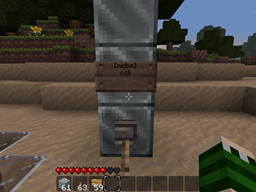
使用方法:玩家必须建造一个由不少于 3 个铁(可配置)方块组成的塔,并将其直接连接到红石电流。当电流激活时,在可配置的半径内、地面之上或之下的目标生物和玩家将被电焦。默认情况下,塔每秒发出一次脉冲,因此追逐你的生物会很快后悔 :p 欢迎提供反馈/建设性意见。
功能:
- 由 3 个以上(可配置)方块组成的塔会在成比例的半径内持续电击生物
- 闪电击中沙子上的生物会将沙子转化为玻璃
- 可配置半径、垂直半径、沙子变玻璃、可切换的目标以及脉冲时间
- 基于告示牌的生物过滤和玩家 targeting。
- 可选择击中所有生物但排除指定的那些。
- 为避免成为被锁定的玩家而被击中,添加了南瓜头盔作为安全物品。
- 命令 /teslareload 允许管理员在不重新加载所有插件的情况下重新加载配置。
- 只有拥有权限 'teslacoil.use' 的用户才能激活线圈,而 'teslacoil.reload' 用于配置。
- 用户可以使用 'teslacoil.limit.#' 以及 'teslacoil.use.mobs' 和 'teslacoil.use.players' 进行限制。特别感谢 Chaznuts,谢啦兄弟!
- 可以为塔设置通用上限,或按组/用户限制。
- 如果用户接近危险距离,可以警告他们。
- 塔可以被构建为发射火球、凋灵骷髅头,或者简单地点燃目标。
- 塔可以构建一个铁栅栏外壳。
配置:
权限:
teslacoil.use | 激活线圈
teslacoil.use.mobs | 能够锁定生物
teslacoil.use.players | 能够锁定玩家
teslacoil.reload | 使用 /teslarelaod
teslacoil.nolimit | 绕过线圈限制
teslacoil.limit.# | # 是每个用户/组应限制的线圈数量
配置属性
coillimit: 3 # 没有 teslacoil.nolimit 权限的用户可以激活的线圈最大数量
sandtoglass: true # 如果为 false,则站在上面的生物被击中时沙不会变成玻璃
vradius: 2 # 设置搜索生物的垂直半径
setping: 1 # 设置塔扫描周围区域的间隔秒数
blocktype: 42 # 塔的方块类型
teslaradius: 8 # 可以是 0(基于塔的高度)或一个数字来设置固定半径。
deathblocktype: 49 # 在凋灵模式下,塔顶应存在的方块类型。
radiusmultiplier: 1 # 仅在 teslaradius 为 0 时使用;每个方块使半径增加这么多。
safelightning: false # 安全闪电只会击中目标而不会造成溅射伤害。
fireblocktype: 89 # 在火球模式下,塔顶应存在的方块类型。
buildcage: false # 当启用普通(非火焰型)线圈时,在其周围构建铁栅栏笼子。
warnthreshold: 10 # 可以是 0(禁用)或一个数字,用于指定从线圈通常的效果半径开始,玩家在多近的距离会受到警告。
igniteblocktype: 20 # 在点燃模式下,塔顶应存在的方块类型。
damage: 0 # 可以是 0(无额外伤害)或一个数字,表示将施加给目标的额外伤害量。
告示牌:
告示牌可以放置在线圈的任何位置,位于电力输入方块的上方。
要过滤玩家:
与下面的方法类似,在电力输入上方的任意一侧放置一个告示牌,第一行为 [players],后续每行包含一个玩家名称。你可以像线圈上能放告示牌的地方一样多地放置这些告示牌。
要过滤生物:
在电力输入的方块上方放置一个告示牌(朝向无关紧要),其中第一行为 [mobs],第二行包含应由线圈锁定的所有生物列表。或者,通过在任意告示牌的顶部包含 'ex'(如 [players]ex),可以将线圈置于排除模式,避免击中指定的生物并击中其他所有生物。字符如下:
c - Creeper
s - Spider
k - Skeleton
z - Zombie
h - Chicken
o - Cow
e - Sheep
w - Angry wolf
p - Cave Spider
b - Blaze
m - Magma Cube
v - Villager
d - Ender Dragon
i - Pig Zombie
n - Enderman
q - Ocelot
r - Wither
t - Witch
l - Slime


线圈运行的视频:
TeslaCoil - Tesla Coil mob control:
Version: v2.6.5
Usage: the player must construct a tower of no less than 3 iron(configurable) blocks, and connect this directly to a redstone current. While the current is active, targetted mobs and players within a configurable radius, above or below ground, will be fried. The towers ping every second by default, so mobs chasing you will quickly regret it :p Feedback/constructive criticism is welcome.
Features:
- Tower of 3> configurable blocks will continually zap mobs in a proportionate radius
- Lightning striking mobs on sand turns the sand into glass
- Configuration for radius, vertical radius, sand-to-glass, toggleable targets, and ping time
- Sign-based mob filtering, and player targeting.
- Option to hit all mobs but those specified.
- To avoid being hit as a targeted player, pumpkin helmets have been added as a safe item.
- Command /teslareload allows ops to reload config without reloading all plugins.
- Only users with the permission 'teslacoil.use' can activate coils, and 'teslacoil.reload' for the config.
- Users can be limited with 'teslacoil.limit.#' as well as 'teslacoil.use.mobs' and 'teslacoil.use.players'. shoutout to Chaznuts thanks buddy!
- Towers may have a general cap set, or be limited per group/user.
- Can warn users if they are approaching dangerously close to a coil.
- The towers can be built to shoot fireballs, wither skulls, or simply ignite targets.
- Towers can construct an iron-fence shell.
Configuration:
Permission:
teslacoil.use | Activate coils
teslacoil.use.mobs | Ability to target mobs
teslacoil.use.players | Ability to target players
teslacoil.reload | Use /teslarelaod
teslacoil.nolimit | Bypass coil restriction
teslacoil.limit.# | # is the number of coils that should be restricted per user/group
Configuration Properties
coillimit: 3 #How many coils users without teslacoil.nolimit can activate, max
sandtoglass: true #If false, sand will not turn into glass if a mob is standing on it
vradius: 2 #Sets veritcal radius to scan for mobs
setping: 1 #Sets seconds the towers wait to ping the area around them
blocktype: 42 #Type of block for tower
teslaradius: 8 #Can be 0(based on tower height) or a number to set a constant radius.
deathblocktype: 49 #Type of block that should be present at the top of the tower for wither mode.
radiusmultiplier: 1 #Used only if teslaradius is 0; for each block, the radius is this much bigger.
safelightning: false #Safe lightning will only hit the target and not cause splash-damage.
fireblocktype: 89 #Type of block that should be present at the top of the tower for fireball mode.
buildcage: false #When a normal (not fire-type) coil is enabled, constructs an iron-fence cage around it.
warnthreshold: 10 #Can be 0(deactivated) or a number to designate, from the coil's usual effect radius, at what point an approaching player is warned.
igniteblocktype: 20 #Type of block that should be present at the top of the tower for ignite mode.
damage: 0 #Can be 0(no additional damage) or a number indicating how much additional damage will be applied to targets.
Signs:
Signs may be placed anywhere on the coil, above the block the power is running in through.
To Filter Players:
Same idea as below, place a sign on any side of the block above where the power is input, with the first line being [players] and the subsequent lines containing a player name per line. You can have as many of these signs as there are places on the coil to put them.
To Filter Mobs:
Place a sign above the block where the power is input (doesn't matter which direction it faces), where the first line is [mobs] and the second line contains a list of all mobs that should be targeted by the coil. Alternatively, by including 'ex' on the top of any sign (like [players]ex) will put the coil in Exclusion mode, avoided the specified mobs and hitting all others. The characters are as follows:
c - Creeper
s - Spider
k - Skeleton
z - Zombie
h - Chicken
o - Cow
e - Sheep
w - Angry wolf
p - Cave Spider
b - Blaze
m - Magma Cube
v - Villager
d - Ender Dragon
i - Pig Zombie
n - Enderman
q - Ocelot
r - Wither
t - Witch
l - Slime
Videos of a coil in action:
下载 TeslaCoil
下载 TeslaCoil
下载 TeslaCoil
下载 TeslaCoil
下载 TeslaCoil
下载 TeslaCoil
下载 TeslaCoil
下载 TeslaCoil
下载 TeslaCoil
下载 TeslaCoil
更新日志:
版本 2.6.5
- 基于 CB 1.5.2-R01 编译
- 修复了错误
版本 2.6.4
- 使用 Bukkit 最新测试版构建,以满足新的安全功能要求。
- 移除了已弃用的异步方法。
版本 2.6.3
- 添加了史莱姆作为目标:l
- 修复了线程 # 错误。
版本 2.6.2
- 修复了服务器重启后线圈瞄准所有目标的故障。
- 修复了导致点燃线圈和自定义伤害无法使用的错误。
- 移除了更多无用代码。
版本 2.6.1
- 修复了两个非常严重的内存泄漏
- 应请求,添加了两个新的权限节点 teslacoil.use.mobs 和 teslacoil.use.players;以防止用户瞄准特定实体。
版本 2.6
- 为 1.4.5-R0.2 进行了更新,使用默认配置系统。
- 添加了凋灵、女巫和豹猫作为可能的目标。
- 添加了会发射凋灵骷髅的“死亡之塔”。
- 实现了线圈建造限制权限。(teslacoil.limit.#)
- 添加了 Plugin-Metrics,可以在 Plugin-Metrics 文件夹中选择退出。
- 修复了许多错误、冗余代码并优化了类。
版本 2.5.5
- 为 1.2.3 进行了更新
- 添加了伤害放大(config 中的 damage:),该效果将叠加在线圈通常造成的伤害之上。
- 修改了告示牌颜色,以便红色表示格式无效的告示牌,蓝色用于怪物,紫色用于玩家。
- 修复了玩家瞄准问题。
版本 2.5.4
- 添加了“点燃类型”塔(config 中的 igniteblocktype),默认情况下,用户在上方放置玻璃块时,它将仅烧毁目标。
- 警告仅在玩家面临线圈迫在眉睫的危险时才发出;如果线圈未瞄准他们,靠近时不会发出警告。
- 修复了警告行为,现在会在靠近时发出警告,并在用户离开警告区域时告知。
版本 2.5.3
- 添加了每人可拥有的线圈数量限制,可通过 coillimit: 进行配置,并提供了相应的权限 teslacoil.nolimit 以通过权限或 OP 绕过此限制。
- 添加了可配置的警告半径修饰符,也可关闭。当玩家靠近活动的特斯拉线圈时会发出警告。
- 修复了铁笼漏洞,防止通过不断生成无限数量的 iron_fence 来滥用。如果其中一块被破坏,其余部分也会随之消失。
版本 2.5.2
- 修复了服务器重启/重载后禁用颜色的告示牌颜色错误,这会导致启用的 teslacoils 在开启/关闭时行为相反。
版本 2.5.1
- 更新了事件系统,以确保插件在后续的 CraftBukkit 版本中不会崩溃。
- 为告示牌添加了颜色;当线圈通电时,玩家目标告示牌变为红色,怪物目标告示牌变为蓝色。
- 添加了在整个线圈上(而不仅仅是在电源上方)放置告示牌的能力。这是为了允许设置多个玩家目标。
版本 2.5
- 为 1.1 进行了更新
- 修复了插件首次运行时配置堆栈跟踪错误
- 添加了 'buildcage' 属性,如果设置为 true,将在激活的闪电型线圈周围构建一个铁笼。
版本 2.4.3
- 添加了火球模式,config 中的一个属性 (fireblocktype) 设置了放置在塔顶时激活所需的方块类型。注意,如果怪物距离较近,火球有几率打破塔顶的脆弱方块,并恢复为闪电攻击。同时也修复了 /teslareload 命令未能实际重新加载配置的问题。
版本 2.4.2
- 为开发版 Build 1566 进行了更新,移除了已弃用的 Configuration 方法,改用新系统。包括新增的怪物支持,以及线圈成功激活时的闪电确认效果。
版本 2.4.1
- 为 RB 1185 进行了更新,彻底修复了 PLAYER_INTERACT 错误,修复了 teslareload 命令使其可由控制台运行,并为缺乏权限尝试激活线圈的用户添加了拒绝消息。
版本 2.4
- 为 1.8.1 进行了更新,包含排除模式,通过在任意告示牌的第一行使用 'ex' 避免指定怪物,并添加了对狼、末影人和洞穴蜘蛛目标的支持。
版本 2.3
- 新功能!玩家和群体现在可以通过告示牌进行瞄准,应用户请求添加了安全闪电选项,佩戴南瓜头盔的玩家可以安全地潜行经过敌方特斯拉线圈。
版本 2.2.3
- 添加了对不使用 Permissions/GroupManager 的用户的支持。
版本 2.2.1
- 修复了 PLAYER_INTERACT 错误的 Bug。
版本 2.2
- 在 config 中添加了基于高度的塔半径乘数选项。
版本 2.1
- 修复了基于高度的半径和 teslareload 命令的 Bug。添加了用于限制可激活线圈的用户以及 reload 命令的权限节点。
版本 2.0
- 在电源上方的线圈上放置一个告示牌,第一行写上 [mobs],下方使用字符代码指定怪物,现在只会打击指定的那些怪物。
版本 2.0a
- 文件转换为 YML 格式,速度大幅提升。
版本 1.4
- 可通过 targetmonsters= 配置目标生物。默认值为 'all',可选值包括 all、creeper、spider、skeleton、zombie、animals、wolf。多个目标之间以逗号分隔。命令 /teslareload 允许管理员重新加载线圈的配置。已移除 targetpeople=,以便后续实现权限支持。
版本 1.3.5
- 新增两个属性:targetpigs= 和 targetpeople=,默认均设为 false。修改了类名,使其更具明确性并符合 Java 标准。
版本 1.3.4
- 新增属性 vradius=,默认值为 2,用于更精确地控制垂直方向的半径,避免一直击中到基岩层。
版本 1.3.3
- 修改了持久化方法,防止 Windows 用户遇到文件删除错误。
版本 1.3.2
- 修复了 blocktype= 的配置 bug。
版本 1.3.1
- 根据反馈重新添加了 teslaradius=;若设为 false,则半径与塔高成比例;若为数字,则该数字即为半径。
版本 1.3
- 配置中的 teslaradius= 已弃用,改为采用与线圈高度成比例的半径。
- 新增 blocktype= 以更改建造线圈所需的方块 ID。
- 修复了持久化问题;即使服务器重启,线圈也会保持“开启”状态。
版本 1.2.3
- 沙子转化为玻璃的功能可在 .config 中通过添加 sandtoglass=true 或 false 进行配置。
版本 1.2.2
- 根据论坛用户的建议,闪电击中沙地上的生物时,会将沙子转化为玻璃。
版本 1.2.1
- 击杀僵尸猪人,作为解决僵尸猪人大军问题的方案。
版本 1.2
- 在 TeslaCoil\TeslaCoil.config 中实现了配置文件;setping= 可设置两次检测之间的秒数,teslaradius= 可设置半径。作为临时修复措施,闪电将不再击中僵尸猪人,因为它们不受影响。
版本 1.1
- 修复 bug:当塔被拆除但电流仍处于激活状态时,生物仍会被电击的问题。
版本 1.0
- 首次发布:D
关于这个资源的讨论、问题反馈与使用心得
还没有讨论,来发第一帖吧
你是这个资源的作者?登录后可认领此资源。
相似资源
 插件
重新定义服务器上的生物运输方式。使用高度可定制的口袋道具,安全地捕获、存储和释放任何实体。
 插件

使床在所有维度中爆炸的模组
 插件
为 Armor Poser 模组添加兼容性
 插件

SkyBlock、OneBlock、Boxed、SkyGrid、AcidIsland、CaveBlock、Poseidon、StrangerRealms——以及更多!这些只是由 BentoBox 支持的基于岛屿的游戏模式之一。来自原版 ASkyBlock 的作者。
 插件
一个高度兼容、功能完善且稳定的 TPA 模组
 插件
AbAcc AbAcc 是一款适用于 Minecraft 服务器的管理插件,可简化玩家作弊检测与举报管理工作。工作人员可以发起并管理对可疑玩家的检查流程,并在检查完成后将其释放。
评论 0
登录后参与评分
还没有评论,来抢沙发吧