TeslaCoil - 特斯拉线圈生物控制:
版本:v2.6.5
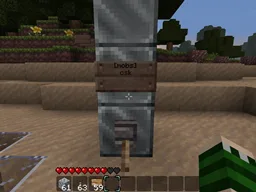
使用方法:玩家必须建造一个由不少于 3 个铁(可配置)方块组成的塔,并将其直接连接到红石电流。当电流激活时,在可配置的半径内、地面之上或之下的目标生物和玩家将被电焦。默认情况下,塔每秒发出一次脉冲,因此追逐你的生物会很快后悔 :p 欢迎提供反馈/建设性意见。
功能:
- 由 3 个以上(可配置)方块组成的塔会在成比例的半径内持续电击生物
- 闪电击中沙子上的生物会将沙子转化为玻璃
- 可配置半径、垂直半径、沙子变玻璃、可切换的目标以及脉冲时间
- 基于告示牌的生物过滤和玩家 targeting。
- 可选择击中所有生物但排除指定的那些。
- 为避免成为被锁定的玩家而被击中,添加了南瓜头盔作为安全物品。
- 命令 /teslareload 允许管理员在不重新加载所有插件的情况下重新加载配置。
- 只有拥有权限 'teslacoil.use' 的用户才能激活线圈,而 'teslacoil.reload' 用于配置。
- 用户可以使用 'teslacoil.limit.#' 以及 'teslacoil.use.mobs' 和 'teslacoil.use.players' 进行限制。特别感谢 Chaznuts,谢啦兄弟!
- 可以为塔设置通用上限,或按组/用户限制。
- 如果用户接近危险距离,可以警告他们。
- 塔可以被构建为发射火球、凋灵骷髅头,或者简单地点燃目标。
- 塔可以构建一个铁栅栏外壳。
配置:
权限:
teslacoil.use | 激活线圈
teslacoil.use.mobs | 能够锁定生物
teslacoil.use.players | 能够锁定玩家
teslacoil.reload | 使用 /teslarelaod
teslacoil.nolimit | 绕过线圈限制
teslacoil.limit.# | # 是每个用户/组应限制的线圈数量
配置属性
coillimit: 3 # 没有 teslacoil.nolimit 权限的用户可以激活的线圈最大数量
sandtoglass: true # 如果为 false,则站在上面的生物被击中时沙不会变成玻璃
vradius: 2 # 设置搜索生物的垂直半径
setping: 1 # 设置塔扫描周围区域的间隔秒数
blocktype: 42 # 塔的方块类型
teslaradius: 8 # 可以是 0(基于塔的高度)或一个数字来设置固定半径。
deathblocktype: 49 # 在凋灵模式下,塔顶应存在的方块类型。
radiusmultiplier: 1 # 仅在 teslaradius 为 0 时使用;每个方块使半径增加这么多。
safelightning: false # 安全闪电只会击中目标而不会造成溅射伤害。
fireblocktype: 89 # 在火球模式下,塔顶应存在的方块类型。
buildcage: false # 当启用普通(非火焰型)线圈时,在其周围构建铁栅栏笼子。
warnthreshold: 10 # 可以是 0(禁用)或一个数字,用于指定从线圈通常的效果半径开始,玩家在多近的距离会受到警告。
igniteblocktype: 20 # 在点燃模式下,塔顶应存在的方块类型。
damage: 0 # 可以是 0(无额外伤害)或一个数字,表示将施加给目标的额外伤害量。
告示牌:
告示牌可以放置在线圈的任何位置,位于电力输入方块的上方。
要过滤玩家:
与下面的方法类似,在电力输入上方的任意一侧放置一个告示牌,第一行为 [players],后续每行包含一个玩家名称。你可以像线圈上能放告示牌的地方一样多地放置这些告示牌。
要过滤生物:
在电力输入的方块上方放置一个告示牌(朝向无关紧要),其中第一行为 [mobs],第二行包含应由线圈锁定的所有生物列表。或者,通过在任意告示牌的顶部包含 'ex'(如 [players]ex),可以将线圈置于排除模式,避免击中指定的生物并击中其他所有生物。字符如下:
c - Creeper
s - Spider
k - Skeleton
z - Zombie
h - Chicken
o - Cow
e - Sheep
w - Angry wolf
p - Cave Spider
b - Blaze
m - Magma Cube
v - Villager
d - Ender Dragon
i - Pig Zombie
n - Enderman
q - Ocelot
r - Wither
t - Witch
l - Slime


线圈运行的视频:
TeslaCoil - Tesla Coil mob control:
Version: v2.6.5
Usage: the player must construct a tower of no less than 3 iron(configurable) blocks, and connect this directly to a redstone current. While the current is active, targetted mobs and players within a configurable radius, above or below ground, will be fried. The towers ping every second by default, so mobs chasing you will quickly regret it :p Feedback/constructive criticism is welcome.
Features:
- Tower of 3> configurable blocks will continually zap mobs in a proportionate radius
- Lightning striking mobs on sand turns the sand into glass
- Configuration for radius, vertical radius, sand-to-glass, toggleable targets, and ping time
- Sign-based mob filtering, and player targeting.
- Option to hit all mobs but those specified.
- To avoid being hit as a targeted player, pumpkin helmets have been added as a safe item.
- Command /teslareload allows ops to reload config without reloading all plugins.
- Only users with the permission 'teslacoil.use' can activate coils, and 'teslacoil.reload' for the config.
- Users can be limited with 'teslacoil.limit.#' as well as 'teslacoil.use.mobs' and 'teslacoil.use.players'. shoutout to Chaznuts thanks buddy!
- Towers may have a general cap set, or be limited per group/user.
- Can warn users if they are approaching dangerously close to a coil.
- The towers can be built to shoot fireballs, wither skulls, or simply ignite targets.
- Towers can construct an iron-fence shell.
Configuration:
Permission:
teslacoil.use | Activate coils
teslacoil.use.mobs | Ability to target mobs
teslacoil.use.players | Ability to target players
teslacoil.reload | Use /teslarelaod
teslacoil.nolimit | Bypass coil restriction
teslacoil.limit.# | # is the number of coils that should be restricted per user/group
Configuration Properties
coillimit: 3 #How many coils users without teslacoil.nolimit can activate, max
sandtoglass: true #If false, sand will not turn into glass if a mob is standing on it
vradius: 2 #Sets veritcal radius to scan for mobs
setping: 1 #Sets seconds the towers wait to ping the area around them
blocktype: 42 #Type of block for tower
teslaradius: 8 #Can be 0(based on tower height) or a number to set a constant radius.
deathblocktype: 49 #Type of block that should be present at the top of the tower for wither mode.
radiusmultiplier: 1 #Used only if teslaradius is 0; for each block, the radius is this much bigger.
safelightning: false #Safe lightning will only hit the target and not cause splash-damage.
fireblocktype: 89 #Type of block that should be present at the top of the tower for fireball mode.
buildcage: false #When a normal (not fire-type) coil is enabled, constructs an iron-fence cage around it.
warnthreshold: 10 #Can be 0(deactivated) or a number to designate, from the coil's usual effect radius, at what point an approaching player is warned.
igniteblocktype: 20 #Type of block that should be present at the top of the tower for ignite mode.
damage: 0 #Can be 0(no additional damage) or a number indicating how much additional damage will be applied to targets.
Signs:
Signs may be placed anywhere on the coil, above the block the power is running in through.
To Filter Players:
Same idea as below, place a sign on any side of the block above where the power is input, with the first line being [players] and the subsequent lines containing a player name per line. You can have as many of these signs as there are places on the coil to put them.
To Filter Mobs:
Place a sign above the block where the power is input (doesn't matter which direction it faces), where the first line is [mobs] and the second line contains a list of all mobs that should be targeted by the coil. Alternatively, by including 'ex' on the top of any sign (like [players]ex) will put the coil in Exclusion mode, avoided the specified mobs and hitting all others. The characters are as follows:
c - Creeper
s - Spider
k - Skeleton
z - Zombie
h - Chicken
o - Cow
e - Sheep
w - Angry wolf
p - Cave Spider
b - Blaze
m - Magma Cube
v - Villager
d - Ender Dragon
i - Pig Zombie
n - Enderman
q - Ocelot
r - Wither
t - Witch
l - Slime
Videos of a coil in action:
 插件

 插件
 插件
 插件

 插件
 插件
评论 0
登录后参与评分
还没有评论,来抢沙发吧