
展示
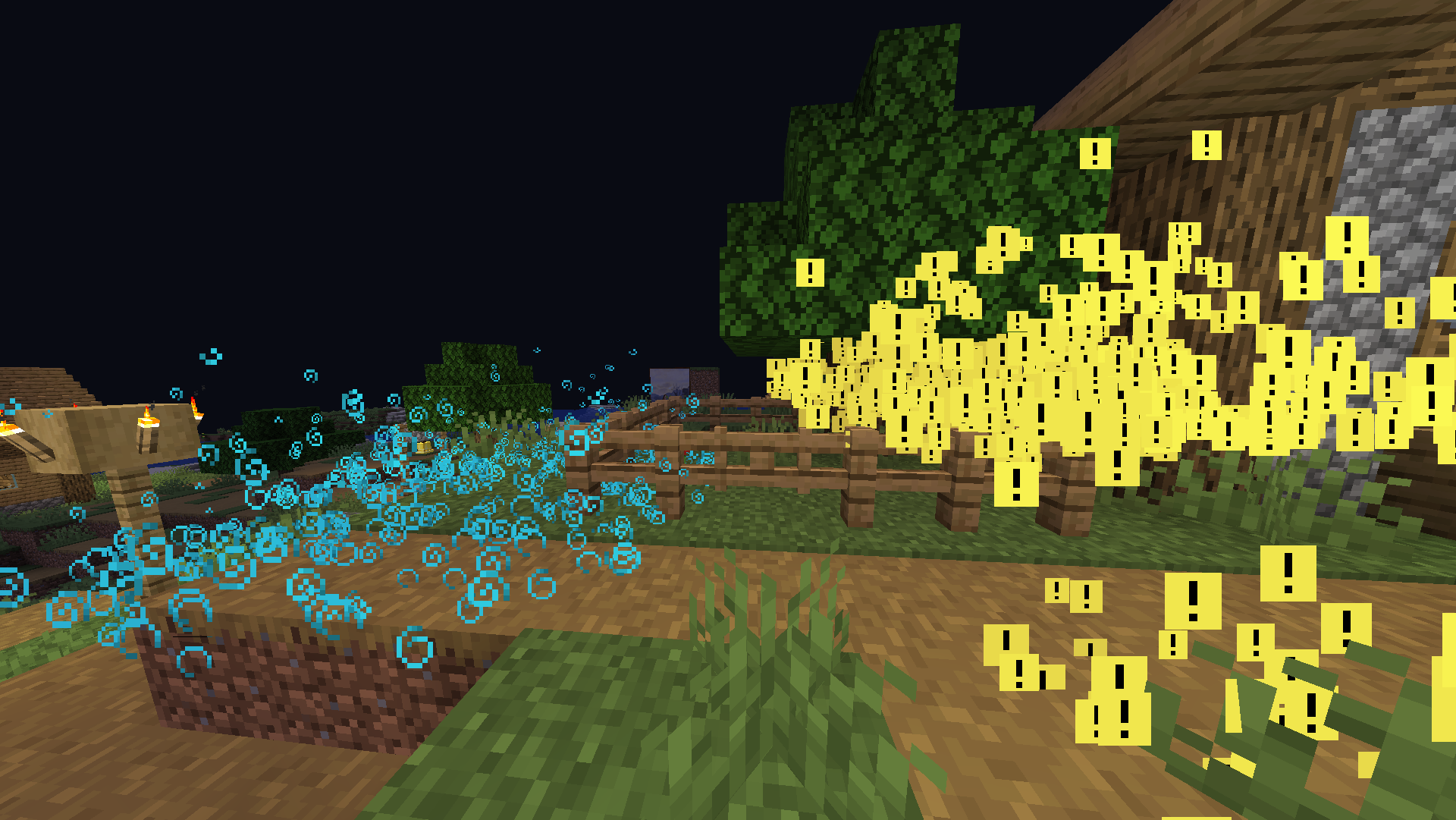
上图左侧显示了大量速度粒子,右侧显示了大量隐形粒子。正如你所见,只有隐形粒子受到该资源包的影响。如需查看更多示例图片,请前往图库。
描述
本资源包利用原版核心光影来更改隐形粒子的纹理。不会更改其他任何粒子,因此如果你只想让隐形的人更引人注目,这是完美的选择。
在此之前,没有任何资源包能够仅更改隐形粒子。截至创建时,这是唯一使用此技术的资源包。如果你安装其他类似的资源包,它会同时更改速度、力量等粒子的纹理,并且所有粒子都会带有奇怪的色调。然而,本资源包移除了这种色调,保留了明亮的黄色以使其更加醒目。
如果你想了解其工作原理,或有关于其他原版光影相关的问题,欢迎加入我的 Discord 并在其中提问 :)
供整合包制作者使用
如果你想为隐形粒子或普通粒子上传自定义纹理,请按照以下说明操作。请注意,这仅适用于 2.0.0 及更高版本。
- 正常创建纹理。隐形粒子应位于纹理的下半部分,而其他所有粒子将使用上半部分的纹理。
- 使所有彩色像素的透明度等于 0.75,即 75/100 的透明度或大约 191.25/255(如果你的透明度值是基于 255 的,则直接使用 191)。
- 使所有背景像素为黑色,并将其透明度设置为 0.25,即 25/100 的透明度或大约 63.75/255(如果你的透明度值是基于 255 的,则直接使用 64)。
- 如果在创建过程中遇到任何问题,请参阅页面底部的支持部分。
完成你的纹理后,它应该看起来像这样(这是该资源的默认 effect_3):
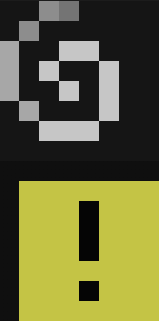
作为参考,你在上图中看到的每个彩色像素([!] 和 @ 纹理)的透明度值均为 191/255,而所有背景颜色的透明度为 64/255。
在为此资源包创建纹理时,以下是一些需要注意的事项:
- 如果你想发布该资源包的不同版本,必须署名并链接回此页面。相反,如果你只想为该资源包制作纹理,可以加入我的 Discord 或直接私信我,我可以将其添加到项目中并将你加入贡献者名单。
- 着色器处理完成后,你的所有纹理将变为 100% 不透明。这是因为否则所有内容都会略微透明,正如你在上述步骤中了解到的那样。
- 你很可能无法制作高清 (HD) 纹理。
- 使用本资源包时,你可以单独更改的唯一纹理是隐形粒子。如果你希望有能力更改所有粒子的纹理,请查看 Unique Particle Effects 资源包。
支持
加入 我的 Discord
- 报告错误
- 提出建议
- 投票决定未来的资源包
- 与社区互动
- 请求有关资源包制作的帮助
- 如果你想在整合包中使用此资源包,这里是提问的地方
查看 代码仓库
- 报告错误
- 提出建议
- 通过创建拉取请求进行贡献
Showcase
The image above shows many speed particles on the left and many invisibility particles on the right. As you can see, only invisibility particles are affected by the pack. For more example images, head to the gallery
Description
This pack uses vanilla's core shaders in order to change the texture of invisibility particles. No other particle is changed, making it the perfect pack if you just want to make people who are invisible stand out to you.
Until now, no pack has been able to only change the invisibility particles. This is the only pack as of the time of creation that makes use of this technique. If you install another similar pack, it would be changing particles for speed, strength, etc. Additionally, it would have a weird tint for every particle. However, this pack removed the tint leaving the bright yellow color to stand out to you.
If you want to know more about how this works, or have questions about other vanilla shader related things, you can join my discord and ask in there :)
For Pack Creators
If you would like to upload your own custom texture for the invisibility particle or normal particles, then follow these directions. Keep in mind this only works on versions 2.0.0 and higher.
- Create the textures as normal. The invisibility particle should be the lower half of the texture, and all other particles will use the top texture.
- Make the transparency of all the colored pixels equal to 0.75, as in 75/100 transparency or around 191.25/255 (if your transparency value is out of 255, then just use 191)
- Make all the background pixels black, and make their transparency equal to 0.25, as in 25/100 transparency or around 63.75/255 (if your transparency value is out of 255, then just use 64)
- If you have any trouble while creating the pack, refer to the support section at the bottom of the page.
After completing your texture, it should look something like this (this is the default effect_3 for the pack):
For reference, each of the colored pixels you see in the image above (the [!] and @ texture) both have transparency values of 191/255, while all the background colors have a transparency of 64/255
Here are some things to keep in mind when creating textures for this pack:
- If you would like to post a different version of this pack, you must credit me and link back to this page. If instead you want to make a texture for this pack specifically, you can join my discord or dm me and I can add it to the project and then add you to the project.
- All your textures will become 100% opaque after the shader is done doing its stuff. This is because otherwise everything would be slightly transparent, as you know from the steps above.
- You most likely cannot make them HD textures.
- With this pack, the only texture you can change individually is the invisibility particle. If you would like the ability to change the texture of all particles, then please check out the Unique Particle Effects texture pack.
Support
Join My Discord
- Report bugs
- Create suggestions
- Vote on future packs
- Interact with the community
- Ask for help with texture packs
- This is the place to ask if you can use this pack in your own pack
Check out The Repository
- Report bugs
- Create suggestions
- Contribute by creating a pull request

下载 Visible Invisibility
需要联机服务器吗?
稳定流畅、一键部署,几分钟即可和朋友联机开服
最低仅需 8 元/月 即可畅快联机
下载 Visible Invisibility
需要联机服务器吗?
稳定流畅、一键部署,几分钟即可和朋友联机开服
最低仅需 8 元/月 即可畅快联机
下载 Visible Invisibility
需要联机服务器吗?
稳定流畅、一键部署,几分钟即可和朋友联机开服
最低仅需 8 元/月 即可畅快联机
下载 Visible Invisibility
需要联机服务器吗?
稳定流畅、一键部署,几分钟即可和朋友联机开服
最低仅需 8 元/月 即可畅快联机
下载 Visible Invisibility
需要联机服务器吗?
稳定流畅、一键部署,几分钟即可和朋友联机开服
最低仅需 8 元/月 即可畅快联机
下载 Visible Invisibility
需要联机服务器吗?
稳定流畅、一键部署,几分钟即可和朋友联机开服
最低仅需 8 元/月 即可畅快联机
下载 Visible Invisibility
下载 Visible Invisibility
- 更新到 1.21.9 和 1.21.10
- 修复了部分粒子显示为不可见的问题
关于这个资源的讨论、问题反馈与使用心得
还没有讨论,来发第一帖吧
你是这个资源的作者?登录后可认领此资源。
相似资源
 光影

以卓越的品质、细节和性能保留 Minecraft 的元素。
 光影

A MakeUp - 超级快的光影编辑版,高度可定制、美观且快速!
 光影
胶片拍摄:变形宽银幕光晕、青橙色调的打印色彩以及可选景深,基于 OMNISHADE 引擎构建。
 光影
自然纯净的光照、稳定的实时阴影、反射水面与温馨的电影感氛围,适合日常游玩。
 光影
LoShades 是终极低配 Minecraft 光影,添加了基础后处理效果和雾效。(平均 FPS 可达 300 到 500,最高约 800!)
 光影
一款次世代、超写实的光影包,旨在通过毫不妥协的电影级画面效果将你的电脑性能推向极限。
评论 0
登录后参与评分
还没有评论,来抢沙发吧