展示
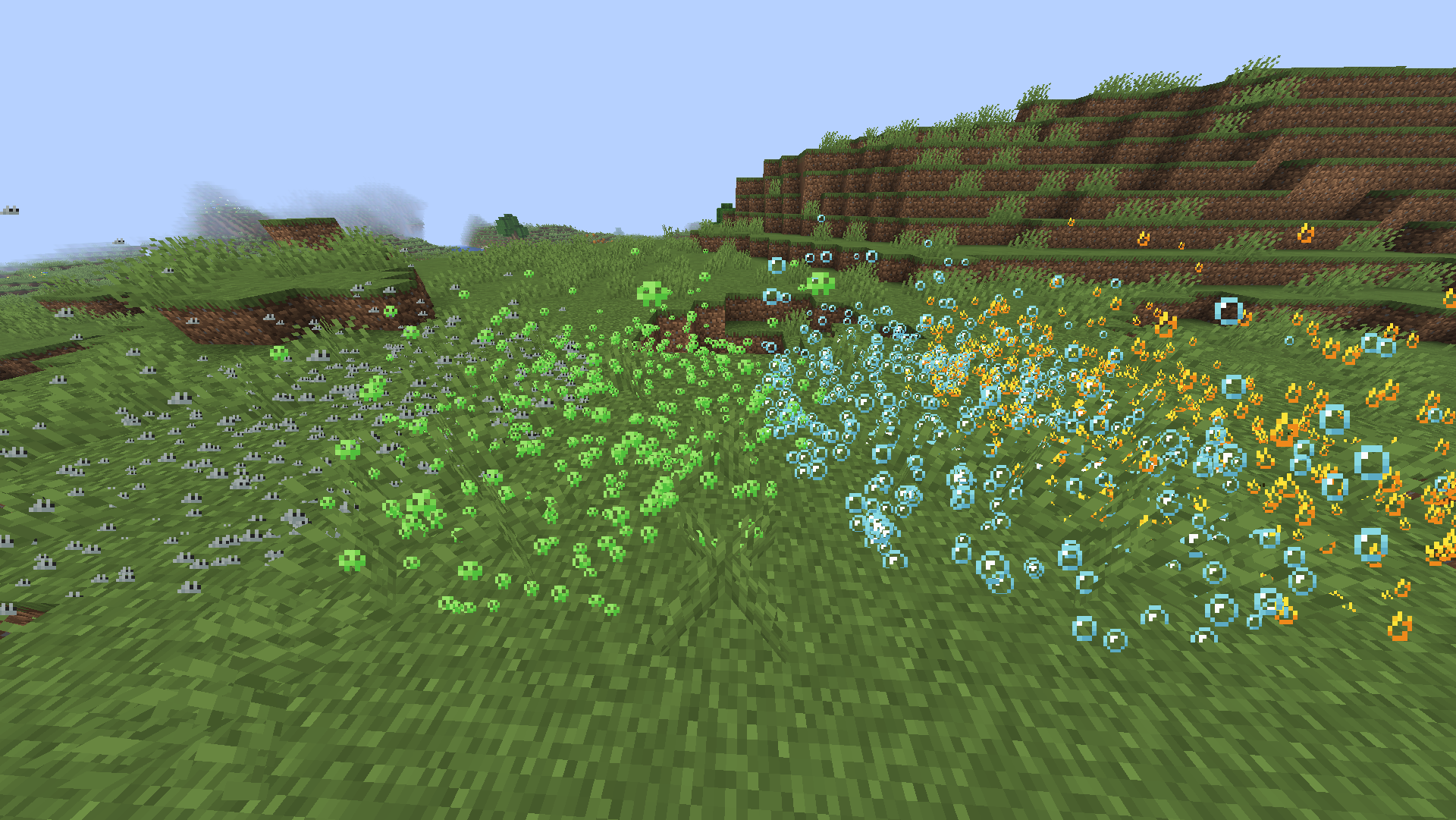
上图展示了 4 种不同的粒子类型。从左到右,这些粒子类型分别是 Infestation、Poison、Water Breathing 和 Fire Resistance(我个人比较喜欢的几种)。
更多示例图片请前往画廊。
描述
本资源包利用原版的核心着色器系统,为创作者提供了一种将每种药水粒子纹理更改为独特样式的方法。它易于使用、快速且轻量,并兼容多个 Minecraft 版本,包括游戏的最新版本。下面有一些关于如何使用它的更多信息。
本资源包中包含的所有纹理均来自 Particle Effects 模组(由 LopyMine 和 KlashRaick 制作),我已获准在本资源包中使用这些纹理。所有包含的纹理均遵循 LGPL-3.0-only 许可证授权,而本资源包中的代码则采用 CC-BY-NC-SA-4.0 许可证。
如果您想了解其工作原理,或有关于其他原版光影相关的问题,欢迎加入我的 Discord 服务器并在其中提问 :)
使用方法
- 像平常一样安装并应用即可
- 无需进行任何配置
- 若要创建自己的纹理,请参阅下方章节。
针对整合包创作者
如果你想创建自己独特的粒子纹理,本指南将为你提供帮助。
- 请务必牢记,你无法使用此资源包创建高分辨率纹理。如果你希望我添加对更高分辨率的支持,请参阅下方的支持部分。这意味着整个纹理必须保持为 64x64,即每个粒子的大小为 8x8。
- 左上角的第一个 8x8 纹理是默认纹理。如果没有找到其他纹理,它将作为回退纹理使用;默认情况下,它仅仅是原版效果纹理。
- 从左到右、从上到下排列,其余药水效果按照其 效果 ID 的顺序排列。
- 最右下角的 8x8 区域被保留,因为右下角的像素具有 RGBA 值:红色 55、绿色 117、蓝色 120 和透明度 97(所有数值范围均为 0-255)。代码中会检查该值,以确定当前采样的是药水粒子纹理还是其他粒子纹理(因为它们都在同一个纹理图中)。
- 底部那些默认为原版的纹理属于技术上不属于“效果”的粒子。从右到左,它们分别控制海龟大师粒子、增强版海龟大师粒子(更强版本的海龟大师)、无效果纹理(如水、平淡无味等)、不可合成药水纹理,以及投掷滞留药水时生成的溅射纹理。最后一个默认是空白的,因此你只能在底部看到 4 个纹理。
- 我提到的最后三种纹理有时可能会出现非常严重的错误。请使用下方的支持部分报告你遇到的任何问题。此外,你无法更改饱和度粒子的纹理,它将改用瞬间治疗粒子的纹理。
以下是资源包中包含的默认 "effect_5" 纹理的样子,仅供参考:
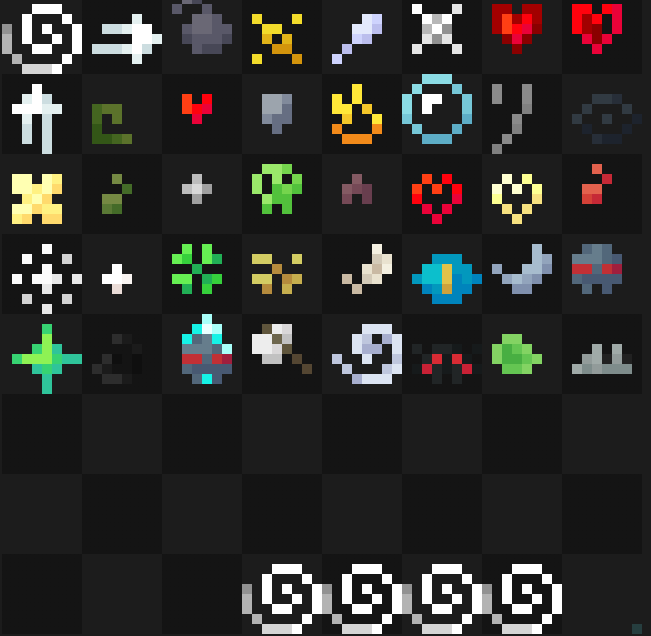
请注意,你不能以上述示例图片作为起点。为此,请下载资源包并使用其中包含的默认纹理。
在为此资源包制作纹理时,请注意以下几点:
- 如果你想发布此资源包的不同版本,必须署名并链接回本页面。如果你希望专门为这个资源包制作纹理,可以加入我的 Discord 或私信我,我可以将其添加到项目中并将你添加为贡献者。
- 所有纹理在经过光影处理后都会变为完全不透明。这是因为如果不这样做,所有元素都会略微透明,正如上述步骤中所知。
- 你很可能无法制作高清(HD)纹理。
- 目前,唯一可以单独更改的纹理是不可见粒子。在不远的将来,我将在此处提供一个资源包,允许你更改所有粒子。
支持
加入 我的 Discord
- 报告错误
- 提出建议
- 对未来的资源包进行投票
- 与社区互动
- 询问有关资源包的问题
- 如果你想在自己的整合包中使用此资源包,请在这里提问
查看 代码仓库
Showcase
The above image shows 4 different particle types. From left to right, the particle types are Infestation, Poison, Water Breathing and Fire Resistance (A few of my favorites).
For more example images, head to the gallery
Description
This pack uses vanilla's core shader system in order to make a way for creators to change the texture of each potion particle to something unique. It is easy to use, fast and lightweight, and is compatible with many Minecraft versions, including the latest versions of the game. Below there is some more information on how to use it.
All textures included in this pack are from the Particle Effects mod (created by LopyMine and KlashRaick), and I have been given permission to use them in this pack. All included textures are licensed under the LGPL-3.0-only license, whereas the code in this texture pack is licensed as CC-BY-NC-SA-4.0
If you want to know more about how this works, or have questions about other vanilla shader related things, you can join my discord and ask in there :)
How to Use
- Install and apply like normal
- No configuration needed
- For creating your own textures, refer to the section below.
For Pack Creators
If you would like to create your own unique particle textures, this is the guide for you.
- It is very important to keep in mind that you cannot create high resolution textures using this pack. If you would like me to add support for higher resolutions, refer to the support section below. This means the entire texture must remain 64x64, meaning each particle is 8x8 in size.
- The very top left 8x8 texture is the default texture. This is the fallback texture if no others are found, and as default it's just the vanilla effect texture.
- Going from left to right top to bottom, the rest of the potion effects are in the order of their Effect IDs
- The very bottom right 8x8 section is reserved, as the pixel in the bottom right has the RGBA values of 55 Red, 117 Green, 120 Blue, and 97 Alpha (All out of 255). This is checked for in the code to determine if it's currently sampling the potion particle texture or another particle texture (since they are all in the same atlas)
- The textures at the bottom that are by default vanilla are particles that aren't technically effects. From right to left, they control the Turtle Master particles, the Turtle Master Enhanced particles (the stronger version of turle master), the No Effects texture (like water, mundane, etc), the Uncraftable Potion texture, and the splash texture that is created when throwing a lingering potion. That last one is by default blank, which is why you only see 4 textures at the bottom.
- The last 3 textures I mentioned can be very buggy at times. Please report any issues you encounter using the support section below. You also cannot change the texture of the Saturation particle, and instead it will use the Instant Health particle.
This is how the default "effect_5" texture looks that is included in the pack, for reference:
Note that you cannot use the example image above for a starting point. For that, download the pack and use the default textures included.
Here are some things to keep in mind when creating textures for this pack:
- If you would like to post a different version of this pack, you must credit me and link back to this page. If instead you want to make a texture for this pack specifically, you can join my discord or dm me and I can add it to the project and then add you to the project.
- All your textures will become 100% opaque after the shader is done doing its stuff. This is because otherwise everything would be slightly transparent, as you know from the steps above.
- You most likely cannot make them HD textures.
- For now, the only texture you can change individually is the invisibility particle. In the not too distant future, I will have a texture pack linked here that will allow you to change all particles.
Support
Join My Discord
- Report bugs
- Create suggestions
- Vote on future packs
- Interact with the community
- Ask for help with texture packs
- This is the place to ask if you can use this pack in your own pack
Check out The Repository
- Report bugs
- Create suggestions
- Contribute by creating a pull request


 光影

 光影

 光影
 光影
 光影
 光影
评论 0
登录后参与评分
还没有评论,来抢沙发吧