
? AnimatedFrames — v1.7
在屏幕上显示 GIF、PNG、JPG、JPEG 和 MP4 视频!
AnimatedFrames 允许你使用命令在 Minecraft 中显示 GIF、PNG、JPG、JPEG 和 MP4 视频。
依赖项
- 加载器支持: Forge • Fabric • NeoForge • Purpur • Spigot • 及衍生版本
- 依赖: WaterMedia
Wiki --- Discord 支持
? 命令
客户端命令 (/mediac) — 仅你自己可见
-
/mediac show <name> [duration] [position] [scale] [volume]从你的本地文件显示媒体。示例:/mediac show sunny.gif 10 center 1.0 80 -
/mediac stop停止屏幕上所有正在播放的媒体。 -
/mediac list列出本地文件夹中的文件。 -
/mediac lang <en|es>更改语言(英文或西班牙文)。
服务端命令 (/medias) — 需要 OP 或管理员权限
-
/medias show <player|@a> <name> [duration] [position] [scale] [volume]将服务器上的文件发送给选定的玩家并播放。玩家无需事先拥有该文件。示例:/medias show @a example.gif 15 topleft 2.0 80 -
/medias showlocal <player|@a> <name> [duration] [position] [scale] [volume]播放已存储在每位选定玩家本地媒体文件夹中的文件。这保留了/medias show之前的行为。示例:/medias showlocal @a example.gif 15 topleft 2.0 80 -
/medias stop <player|@a>停止选定玩家的媒体播放。 -
/medias list列出服务器媒体文件夹中的文件。 -
/medias help显示命令帮助。
重要提示: 玩家始终需要安装 客户端模组和 WaterMedia。使用 /medias show 时,文件来自服务器。使用 /medias showlocal 时,文件必须已经存在于 每个玩家自己的客户端文件夹 中。
⚠️ 文件位置
客户端文件夹: .minecraft/config/animatedframes/media/
带有模组的服务器文件夹: config/animatedframes/media/
带有插件的服务器文件夹: plugins/AnimatedFramesPL/media/
- 支持的文件格式:
.gif,.png,.jpg,.jpeg,.mp4 - 媒体文件夹会在初始化期间自动创建
/mediac show和/medias showlocal使用玩家的客户端文件夹/medias show使用服务器的媒体文件夹并将文件传输给选定的玩家- 接收到的文件会自动存储在单独的客户端缓存中
- 对于具有独立实例启动器的用户,请使用对应实例的文件夹
? 插件支持
AnimatedFrames 还有一个用于服务端控制的 Bukkit/Spigot/Paper/Purpur 插件 版本。通过插件,服务器管理员可以触发玩家屏幕上的媒体,而无需在服务器上安装模组。
将服务器文件放置在 plugins/AnimatedFramesPL/media/ 并使用 /medias show 将它们发送给玩家。
插件使用 animatedframes.admin 权限,默认授予 OP。使用 /medias lang <en|es> 更改插件的语言。
玩家仍然需要 客户端模组和 WaterMedia。仅在
/medias showlocal时,他们需要事先安装媒体文件。
-
本地显示的 GIF、PNG、JPG 或 JPEG(客户端):

-
发送给玩家的 GIF、PNG、JPG 或 JPEG(服务器):
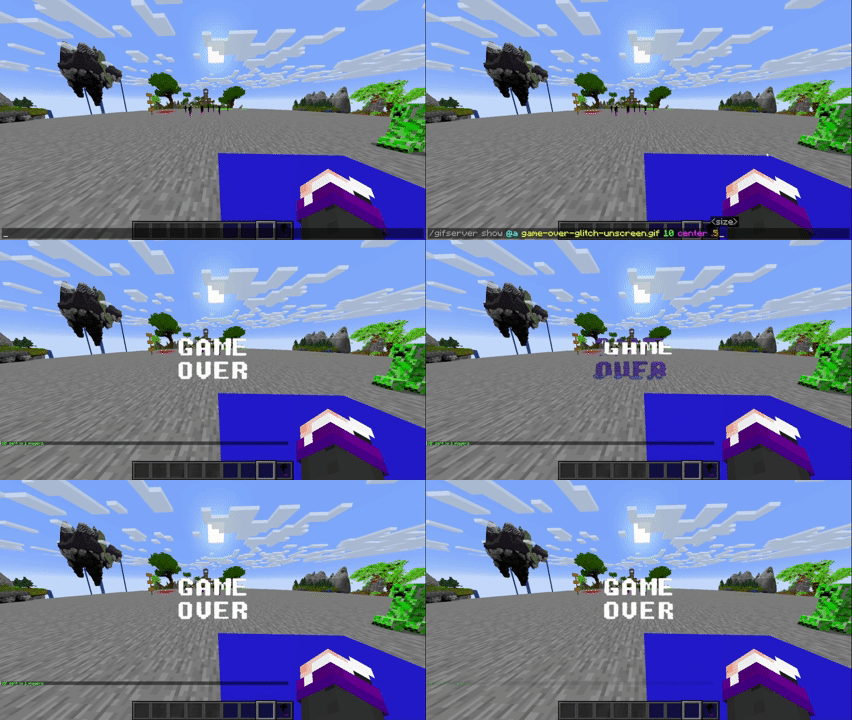
-
发送给玩家的 GIF、PNG、JPG 或 JPEG(插件):
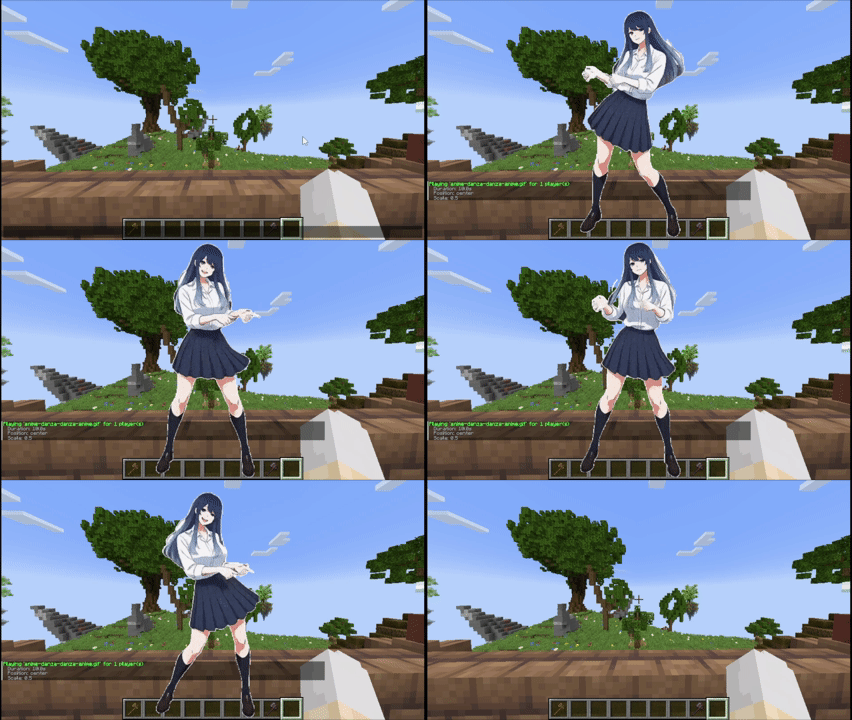
教程
放置文件(客户端和服务器)
客户端文件夹: .minecraft/config/animatedframes/media/
带有模组的服务器文件夹: config/animatedframes/media/
带有插件的服务器文件夹: plugins/AnimatedFramesPL/media/
步骤:
- 将你的 GIF、PNG、JPG、JPEG 或 MP4 文件复制到相应的媒体文件夹中:
/mediac show或/medias showlocal使用客户端文件夹。/medias show使用服务器文件夹。
- 确保文件具有正确的扩展名(
.gif,.png,.jpg,.jpeg,.mp4)。 - 在游戏中显示它:
- 本地(仅你自己):
/mediac show sunny.gif 10 center 1.0 80 - 向其他人发送服务器文件:
/medias show @a sunny.gif 15 center 1.0 80 - 播放已安装在玩家客户端上的文件:
/medias showlocal @a sunny.gif 15 center 1.0 80
- 本地(仅你自己):
备注:
/mediac show→ 仅对你可见/medias show→ 将服务器文件传输给选定玩家 —— 他们需要模组和 WaterMedia,但无需事先拥有该文件/medias showlocal→ 使用每个玩家的本地文件 —— 他们需要模组、WaterMedia 以及位于其客户端文件夹中的文件- 从 1.6.2 更新: 如果你想继续使用已安装在玩家电脑上的文件,请将
/medias show替换为/medias showlocal - 文件名中包含空格时必须使用双引号:
/medias show @a "welcome video.mp4" 10 center 1.0 80 - 大文件在开始播放前可能需要一些时间进行传输
- 如果文件加载失败,请检查聊天或日志
- 使用
/mediac list查看你的本地文件,使用/medias list查看服务器文件 - 持续时间以秒为单位;
0表示没有命令强制的时间限制。视频仍会在结束时自动停止 - 缩放范围:
0.05–10(默认值:1.0) - 音量范围:
0–100(默认值:80) - 断开连接时媒体会自动停止
可用位置(共 10 个选项)
center topleft topright bottomleft bottomright topcenter bottomcenter leftcenter rightcenter fullscreen
fullscreen — 全屏填充整个屏幕以播放视频,同时保持其宽高比,必要时裁剪边缘。省略缩放比例,并在
fullscreen后直接输入音量。示例:/medias show @a intro.mp4 0 fullscreen 80
鸣谢
- 由 @SunnyAim_ 创建
- ? MP4 集成功能得益于 @SoyKatto1 的帮助
- 支持:如需帮助或提问,请联系 @SunnyAim_
📺 AnimatedFrames — v1.7
Display GIFs, PNGs, JPGs, JPEGs and MP4 videos on screen!
AnimatedFrames allows you to display GIFs, PNGs, JPGs, JPEGs and MP4 videos within Minecraft using commands.
Requirements
- Loader support: Forge • Fabric • NeoForge • Purpur • Spigot • & forks
- Dependency: WaterMedia
Wiki --- Discord Support
📝 Commands
Client-side commands (/mediac) — only you see them
-
/mediac show <name> [duration] [position] [scale] [volume]Display media locally from your files. Example:/mediac show sunny.gif 10 center 1.0 80 -
/mediac stopStop all active media on your screen. -
/mediac listList files in your local folder. -
/mediac lang <en|es>Change the language (English or Spanish).
Server-side commands (/medias) — requires OP or admin permission
-
/medias show <player|@a> <name> [duration] [position] [scale] [volume]Send a file from the server to the selected players and play it. Players do not need to have the file beforehand. Example:/medias show @a example.gif 15 topleft 2.0 80 -
/medias showlocal <player|@a> <name> [duration] [position] [scale] [volume]Play a file already stored in each selected player's local media folder. This preserves the previous behavior of/medias show. Example:/medias showlocal @a example.gif 15 topleft 2.0 80 -
/medias stop <player|@a>Stop media for selected players. -
/medias listList files in the server's media folder. -
/medias helpDisplay command help.
Important: Players always need the client mod and WaterMedia. With /medias show, the file comes from the server. With /medias showlocal, the file must already exist in each player's own client folder.
⚠️ File Location
Client folder: .minecraft/config/animatedframes/media/
Server folder with the mod: config/animatedframes/media/
Server folder with the plugin: plugins/AnimatedFramesPL/media/
- Supported files:
.gif,.png,.jpg,.jpeg,.mp4 - Media folders are created automatically during initialization
/mediac showand/medias showlocaluse the player's client folder/medias showuses the server's media folder and transfers the file to the selected players- Received files are stored automatically in a separate client cache
- For launchers with separate instances, use the corresponding instance's folder
🔌 Plugin Support
AnimatedFrames also has a Bukkit/Spigot/Paper/Purpur plugin version for server-side control. With the plugin, server admins can trigger media on players' screens without needing the mod on the server.
Place server files in plugins/AnimatedFramesPL/media/ and use /medias show to send them to players.
The plugin uses the animatedframes.admin permission, granted to OPs by default. Use /medias lang <en|es> to change the plugin's language.
Players still need the client mod and WaterMedia. They only need the media files installed beforehand when using
/medias showlocal.
-
GIF, PNG, JPG or JPEG displayed locally (client):
-
GIF, PNG, JPG or JPEG sent to players (server):
-
GIF, PNG, JPG or JPEG sent to players (plugin):
Tutorial
Placing files (Client and server)
Client folder: .minecraft/config/animatedframes/media/
Server folder with the mod: config/animatedframes/media/
Server folder with the plugin: plugins/AnimatedFramesPL/media/
Steps:
- Copy your GIF, PNG, JPG, JPEG or MP4 file into the appropriate media folder:
- Client folder for
/mediac showor/medias showlocal. - Server folder for
/medias show.
- Client folder for
- Make sure the file has the correct extension (
.gif,.png,.jpg,.jpeg,.mp4). - Display it in-game:
- Local (only you):
/mediac show sunny.gif 10 center 1.0 80 - Send a server file to others:
/medias show @a sunny.gif 15 center 1.0 80 - Play files already installed on players' clients:
/medias showlocal @a sunny.gif 15 center 1.0 80
- Local (only you):
Notes:
/mediac show→ only visible to you/medias show→ transfers a server file to selected players — they need the mod and WaterMedia, but not the file beforehand/medias showlocal→ uses each player's local file — they need the mod, WaterMedia and the file in their client folder- Updating from 1.6.2: replace
/medias showwith/medias showlocalif you want to keep using files already installed on players' computers - Filenames with spaces must use double quotes:
/medias show @a "welcome video.mp4" 10 center 1.0 80 - Large files may take some time to transfer before playback begins
- Check chat or logs if a file fails to load
- Use
/mediac listto see your local files and/medias listto see server files - Duration is measured in seconds;
0means no command-imposed time limit. Videos still stop when they reach the end - Scale range:
0.05–10(default:1.0) - Volume range:
0–100(default:80) - Media stops automatically when you disconnect
Available positions (10 options)
center topleft topright bottomleft bottomright topcenter bottomcenter leftcenter rightcenter fullscreen
fullscreen — fills the entire screen for videos while maintaining their aspect ratio, cropping the edges when necessary. Omit the scale and enter the volume directly after
fullscreen. Example:/medias show @a intro.mp4 0 fullscreen 80
Credits
- Created by @SunnyAim_
- 🎬 MP4 integration made possible with the help of @SoyKatto1
- Support: Contact @SunnyAim_ for help or questions.

下载 Animated Frames
下载 Animated Frames
需要联机服务器吗?
稳定流畅、一键部署,几分钟即可和朋友联机开服
最低仅需 8 元/月 即可畅快联机
下载 Animated Frames
下载 Animated Frames
下载 Animated Frames
下载 Animated Frames
下载 Animated Frames
下载 Animated Frames
下载 Animated Frames
下载 Animated Frames
AnimatedFrames — v1.7
新增从服务器共享文件的选项,以及对内存管理和连接性的改进。
新功能
- 来自服务器的文件:
/medias show现在会将内容发送给玩家进行播放,无需他们事先将其复制到本地计算机。这一功能在 AnimatedFrames 1.3.1 中已经存在。 - 本地播放: 新增
/medias showlocal命令,用于显示玩家已保存的文件,保留/medias show的先前行为。 - 服务器文件列表:
/medias list允许你查看服务器上可用的文件。 - 含空格的文件名: 命令支持使用引号括起文件名,例如
"welcome video.mp4"。自动补全会自动添加引号。
改进
- 通过后台读取优化了文件传输。
- 为从服务器接收的内容提供独立的缓存。
- 播放前进行文件完整性检查。
- 改进了对图片和 GIF 的内存管理,释放不再使用的资源。
修复
- 修复了在切换视频时播放实例累积的问题,这可能导致意外的游戏崩溃。
- 修复了一个问题,该问题阻止了通过命令方块和数据包函数运行命令以自动化多媒体内容。感谢 melmi_melmi 在 Discord 上报告此问题。
关键命令
| 命令 | 功能 |
|---|---|
/medias show <player|@a> <file> [time] [position] [scale] [volume] |
发送并播放来自服务器的文件。 |
/medias showlocal <player|@a> <file> [time] [position] [scale] [volume] |
播放存储在玩家计算机上的本地文件。 |
/medias list |
列出服务器上的文件。 |
/medias stop <player|@a> |
停止播放。 |
从 1.6.2 升级时: 如果你的命令使用了存储在每个玩家 PC 上的文件,请将
/medias show替换为/medias showlocal以保持原有行为。
关于这个资源的讨论、问题反馈与使用心得
还没有讨论,来发第一帖吧
你是这个资源的作者?登录后可认领此资源。
相似资源
 模组

一个用于收集生物掉落物的多区块模组。
 模组

可定制的鞘翅模组,支持装饰纹饰、旗帜图案等更多功能!
 模组

显示你正在注视的方块的信息。(适用于 Minecraft 1.16+ 的 Hwyla/Waila 分支)
 模组

查看物品与配方
 模组
在游戏画面角落显示附近世界地形、玩家、生物和实体的地图。可创建路径点,帮助你找到标记过的位置。
 模组
使用 JavaScript 编辑配方、添加自定义物品、编写世界事件!
评论 0
登录后参与评分
还没有评论,来抢沙发吧