? AnimatedFrames — v1.7
在屏幕上显示 GIF、PNG、JPG、JPEG 和 MP4 视频!
AnimatedFrames 允许你使用命令在 Minecraft 中显示 GIF、PNG、JPG、JPEG 和 MP4 视频。
依赖项
- 加载器支持: Forge • Fabric • NeoForge • Purpur • Spigot • 及衍生版本
- 依赖: WaterMedia
Wiki --- Discord 支持
? 命令
客户端命令 (/mediac) — 仅你自己可见
-
/mediac show <name> [duration] [position] [scale] [volume] 从你的本地文件显示媒体。示例: /mediac show sunny.gif 10 center 1.0 80
-
/mediac stop 停止屏幕上所有正在播放的媒体。
-
/mediac list 列出本地文件夹中的文件。
-
/mediac lang <en|es> 更改语言(英文或西班牙文)。
服务端命令 (/medias) — 需要 OP 或管理员权限
-
/medias show <player|@a> <name> [duration] [position] [scale] [volume] 将服务器上的文件发送给选定的玩家并播放。玩家无需事先拥有该文件。示例: /medias show @a example.gif 15 topleft 2.0 80
-
/medias showlocal <player|@a> <name> [duration] [position] [scale] [volume] 播放已存储在每位选定玩家本地媒体文件夹中的文件。这保留了 /medias show 之前的行为。示例: /medias showlocal @a example.gif 15 topleft 2.0 80
-
/medias stop <player|@a> 停止选定玩家的媒体播放。
-
/medias list 列出服务器媒体文件夹中的文件。
-
/medias help 显示命令帮助。
重要提示: 玩家始终需要安装 客户端模组和 WaterMedia。使用 /medias show 时,文件来自服务器。使用 /medias showlocal 时,文件必须已经存在于 每个玩家自己的客户端文件夹 中。
⚠️ 文件位置
客户端文件夹: .minecraft/config/animatedframes/media/
带有模组的服务器文件夹: config/animatedframes/media/
带有插件的服务器文件夹: plugins/AnimatedFramesPL/media/
- 支持的文件格式:
.gif, .png, .jpg, .jpeg, .mp4
- 媒体文件夹会在初始化期间自动创建
/mediac show 和 /medias showlocal 使用玩家的客户端文件夹/medias show 使用服务器的媒体文件夹并将文件传输给选定的玩家- 接收到的文件会自动存储在单独的客户端缓存中
- 对于具有独立实例启动器的用户,请使用对应实例的文件夹
? 插件支持
AnimatedFrames 还有一个用于服务端控制的 Bukkit/Spigot/Paper/Purpur 插件 版本。通过插件,服务器管理员可以触发玩家屏幕上的媒体,而无需在服务器上安装模组。
将服务器文件放置在 plugins/AnimatedFramesPL/media/ 并使用 /medias show 将它们发送给玩家。
插件使用 animatedframes.admin 权限,默认授予 OP。使用 /medias lang <en|es> 更改插件的语言。
玩家仍然需要 客户端模组和 WaterMedia。仅在 /medias showlocal 时,他们需要事先安装媒体文件。
-
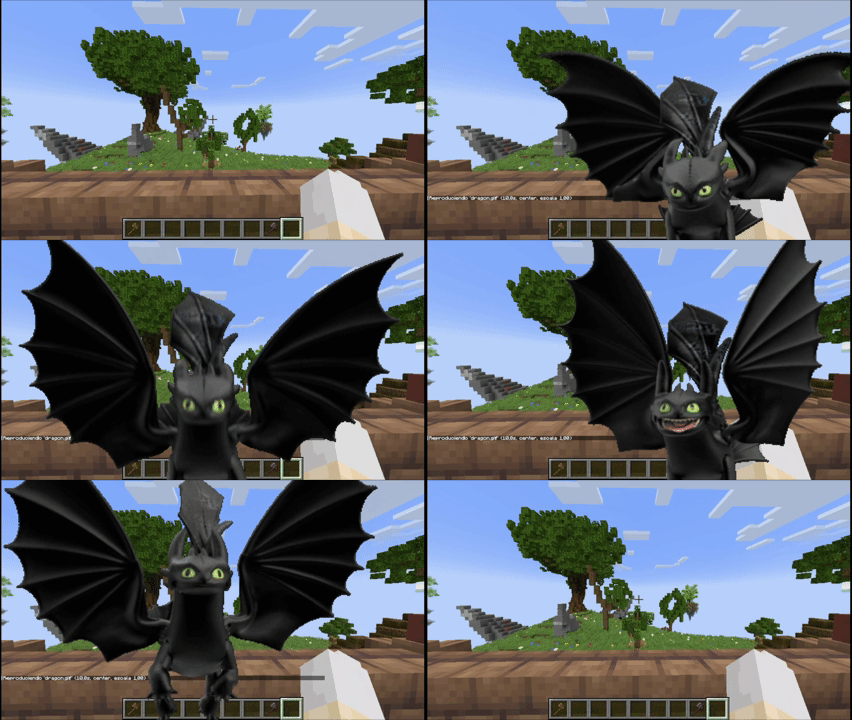
本地显示的 GIF、PNG、JPG 或 JPEG(客户端):
-
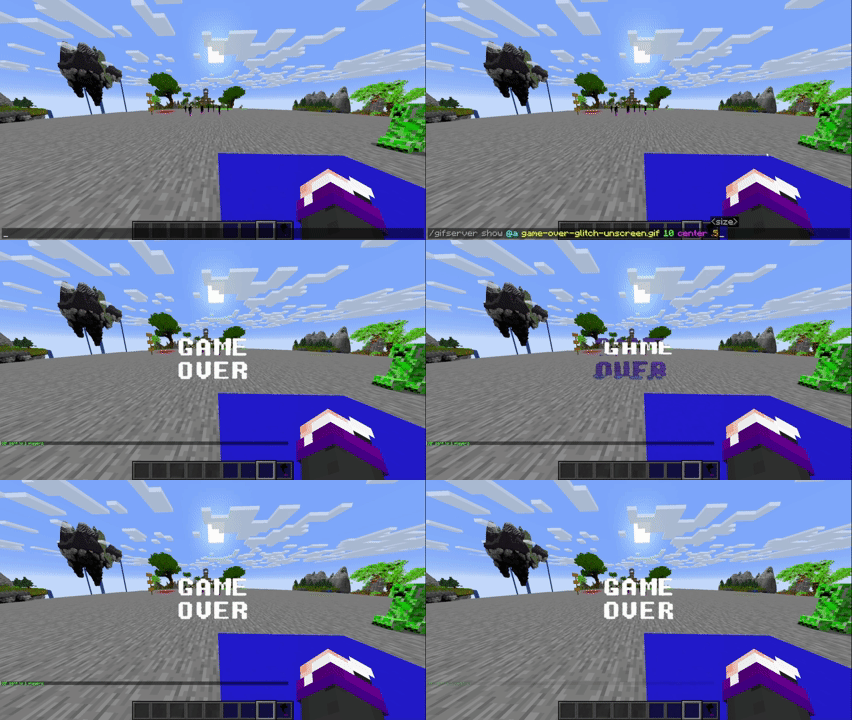
发送给玩家的 GIF、PNG、JPG 或 JPEG(服务器):
-
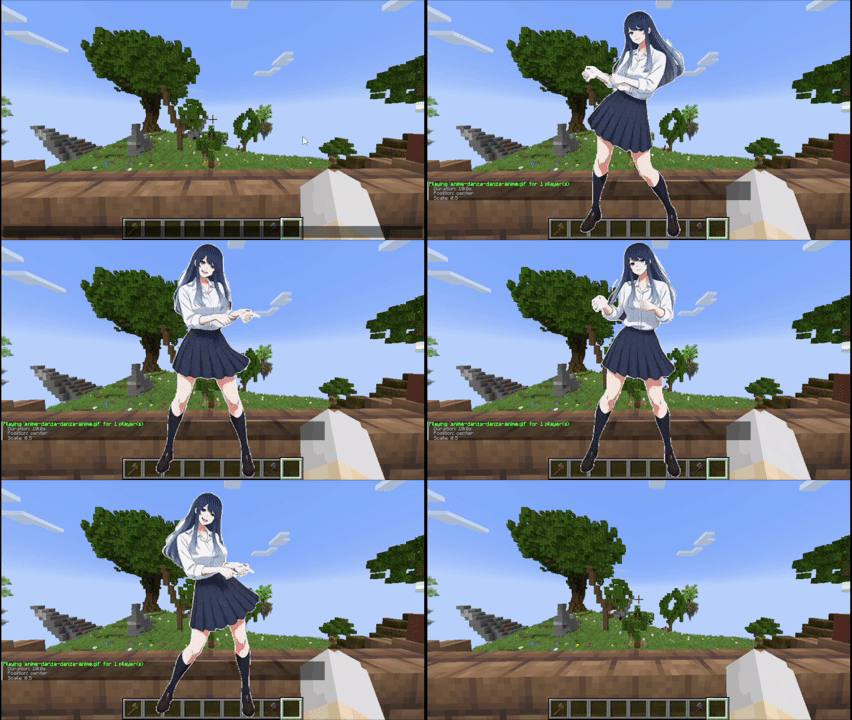
发送给玩家的 GIF、PNG、JPG 或 JPEG(插件):
教程
放置文件(客户端和服务器)
客户端文件夹: .minecraft/config/animatedframes/media/
带有模组的服务器文件夹: config/animatedframes/media/
带有插件的服务器文件夹: plugins/AnimatedFramesPL/media/
步骤:
- 将你的 GIF、PNG、JPG、JPEG 或 MP4 文件复制到相应的媒体文件夹中:
/mediac show 或 /medias showlocal 使用客户端文件夹。/medias show 使用服务器文件夹。
- 确保文件具有正确的扩展名(
.gif, .png, .jpg, .jpeg, .mp4)。
- 在游戏中显示它:
- 本地(仅你自己):
/mediac show sunny.gif 10 center 1.0 80
- 向其他人发送服务器文件:
/medias show @a sunny.gif 15 center 1.0 80
- 播放已安装在玩家客户端上的文件:
/medias showlocal @a sunny.gif 15 center 1.0 80
备注:
/mediac show → 仅对你可见/medias show → 将服务器文件传输给选定玩家 —— 他们需要模组和 WaterMedia,但无需事先拥有该文件/medias showlocal → 使用每个玩家的本地文件 —— 他们需要模组、WaterMedia 以及位于其客户端文件夹中的文件- 从 1.6.2 更新: 如果你想继续使用已安装在玩家电脑上的文件,请将
/medias show 替换为 /medias showlocal
- 文件名中包含空格时必须使用双引号:
/medias show @a "welcome video.mp4" 10 center 1.0 80
- 大文件在开始播放前可能需要一些时间进行传输
- 如果文件加载失败,请检查聊天或日志
- 使用
/mediac list 查看你的本地文件,使用 /medias list 查看服务器文件
- 持续时间以秒为单位;
0 表示没有命令强制的时间限制。视频仍会在结束时自动停止
- 缩放范围:
0.05–10(默认值:1.0)
- 音量范围:
0–100(默认值:80)
- 断开连接时媒体会自动停止
可用位置(共 10 个选项)
center topleft topright bottomleft bottomright topcenter bottomcenter leftcenter rightcenter fullscreen
fullscreen — 全屏填充整个屏幕以播放视频,同时保持其宽高比,必要时裁剪边缘。省略缩放比例,并在 fullscreen 后直接输入音量。示例:/medias show @a intro.mp4 0 fullscreen 80
鸣谢
📺 AnimatedFrames — v1.7
Display GIFs, PNGs, JPGs, JPEGs and MP4 videos on screen!
AnimatedFrames allows you to display GIFs, PNGs, JPGs, JPEGs and MP4 videos within Minecraft using commands.
Requirements
- Loader support: Forge • Fabric • NeoForge • Purpur • Spigot • & forks
- Dependency: WaterMedia
Wiki --- Discord Support
📝 Commands
Client-side commands (/mediac) — only you see them
-
/mediac show <name> [duration] [position] [scale] [volume] Display media locally from your files. Example: /mediac show sunny.gif 10 center 1.0 80
-
/mediac stop Stop all active media on your screen.
-
/mediac list List files in your local folder.
-
/mediac lang <en|es> Change the language (English or Spanish).
Server-side commands (/medias) — requires OP or admin permission
-
/medias show <player|@a> <name> [duration] [position] [scale] [volume] Send a file from the server to the selected players and play it. Players do not need to have the file beforehand. Example: /medias show @a example.gif 15 topleft 2.0 80
-
/medias showlocal <player|@a> <name> [duration] [position] [scale] [volume] Play a file already stored in each selected player's local media folder. This preserves the previous behavior of /medias show. Example: /medias showlocal @a example.gif 15 topleft 2.0 80
-
/medias stop <player|@a> Stop media for selected players.
-
/medias list List files in the server's media folder.
-
/medias help Display command help.
Important: Players always need the client mod and WaterMedia. With /medias show, the file comes from the server. With /medias showlocal, the file must already exist in each player's own client folder.
⚠️ File Location
Client folder: .minecraft/config/animatedframes/media/
Server folder with the mod: config/animatedframes/media/
Server folder with the plugin: plugins/AnimatedFramesPL/media/
- Supported files:
.gif, .png, .jpg, .jpeg, .mp4
- Media folders are created automatically during initialization
/mediac show and /medias showlocal use the player's client folder/medias show uses the server's media folder and transfers the file to the selected players- Received files are stored automatically in a separate client cache
- For launchers with separate instances, use the corresponding instance's folder
🔌 Plugin Support
AnimatedFrames also has a Bukkit/Spigot/Paper/Purpur plugin version for server-side control. With the plugin, server admins can trigger media on players' screens without needing the mod on the server.
Place server files in plugins/AnimatedFramesPL/media/ and use /medias show to send them to players.
The plugin uses the animatedframes.admin permission, granted to OPs by default. Use /medias lang <en|es> to change the plugin's language.
Players still need the client mod and WaterMedia. They only need the media files installed beforehand when using /medias showlocal.
-
GIF, PNG, JPG or JPEG displayed locally (client):
-
GIF, PNG, JPG or JPEG sent to players (server):
-
GIF, PNG, JPG or JPEG sent to players (plugin):
Tutorial
Placing files (Client and server)
Client folder: .minecraft/config/animatedframes/media/
Server folder with the mod: config/animatedframes/media/
Server folder with the plugin: plugins/AnimatedFramesPL/media/
Steps:
- Copy your GIF, PNG, JPG, JPEG or MP4 file into the appropriate media folder:
- Client folder for
/mediac show or /medias showlocal.
- Server folder for
/medias show.
- Make sure the file has the correct extension (
.gif, .png, .jpg, .jpeg, .mp4).
- Display it in-game:
- Local (only you):
/mediac show sunny.gif 10 center 1.0 80
- Send a server file to others:
/medias show @a sunny.gif 15 center 1.0 80
- Play files already installed on players' clients:
/medias showlocal @a sunny.gif 15 center 1.0 80
Notes:
/mediac show → only visible to you/medias show → transfers a server file to selected players — they need the mod and WaterMedia, but not the file beforehand/medias showlocal → uses each player's local file — they need the mod, WaterMedia and the file in their client folder- Updating from 1.6.2: replace
/medias show with /medias showlocal if you want to keep using files already installed on players' computers
- Filenames with spaces must use double quotes:
/medias show @a "welcome video.mp4" 10 center 1.0 80
- Large files may take some time to transfer before playback begins
- Check chat or logs if a file fails to load
- Use
/mediac list to see your local files and /medias list to see server files
- Duration is measured in seconds;
0 means no command-imposed time limit. Videos still stop when they reach the end
- Scale range:
0.05–10 (default: 1.0)
- Volume range:
0–100 (default: 80)
- Media stops automatically when you disconnect
Available positions (10 options)
center topleft topright bottomleft bottomright topcenter bottomcenter leftcenter rightcenter fullscreen
fullscreen — fills the entire screen for videos while maintaining their aspect ratio, cropping the edges when necessary. Omit the scale and enter the volume directly after fullscreen. Example: /medias show @a intro.mp4 0 fullscreen 80
Credits


 模组

 模组

 模组

 模组
 模组

 模组
评论 0
登录后参与评分
还没有评论,来抢沙发吧