Badge It !
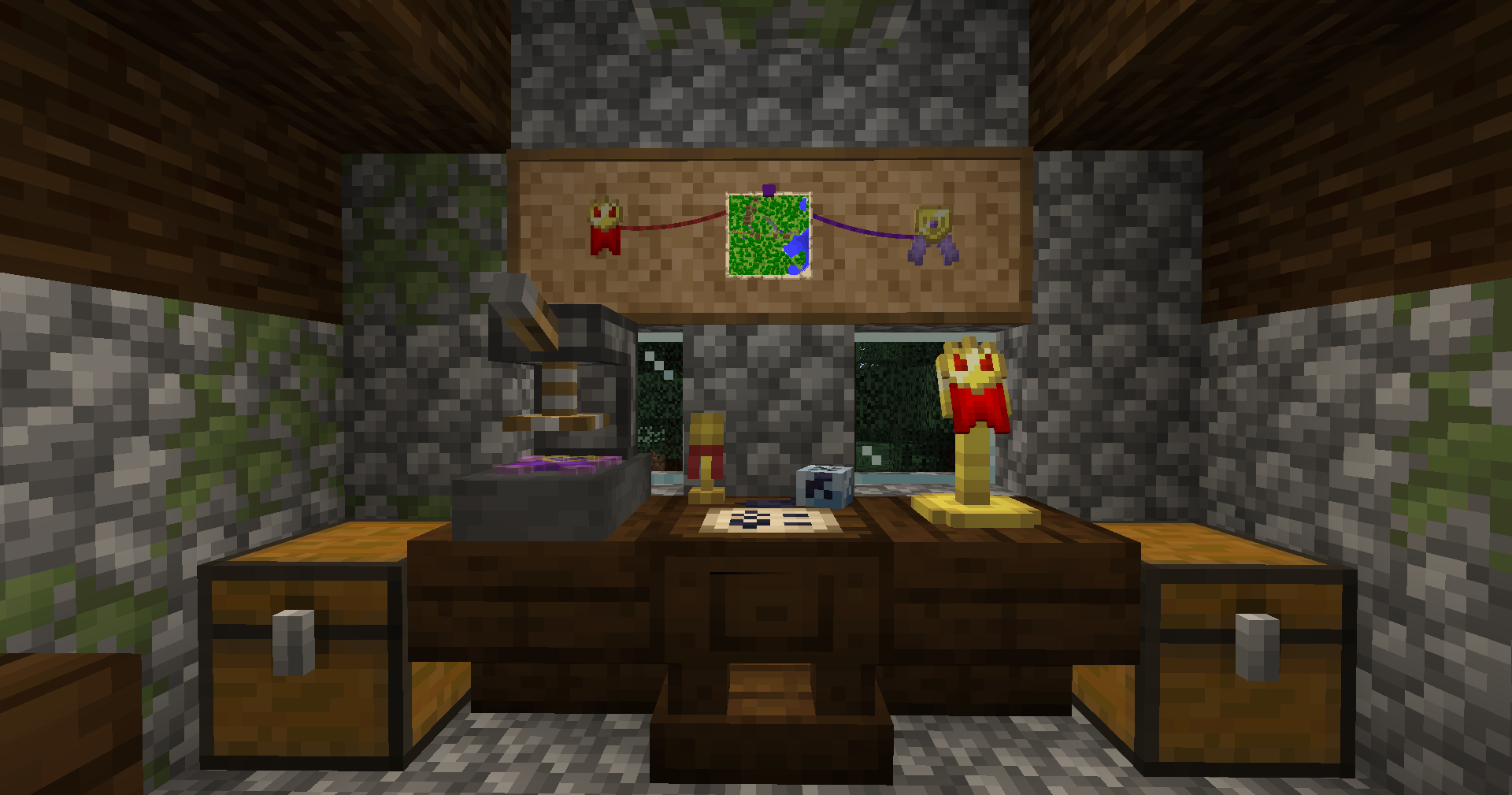
Badge It ! 是一款与原版的 Minecraft 兼容的模组,允许玩家制作自定义徽章,用于佩戴、装饰或作为交易货币!
什么是徽章?
徽章主要是装饰性物品,由不同的徽章部件组合而成。你可以在铁砧上重命名它们,在物品展示框中展示它们,如果你属于那种人,还可以把它们塞满箱子,或者仅仅是向你的朋友展示它们。
每个徽章都有一个唯一的内部 ID,允许服务器管理员检查服务器上创建的每个徽章的详细信息。每个徽章还包含一个创建者(= 制作该徽章的玩家)和一个设计师(= 设计该徽章外观的玩家),以确保没有人能伪造你的徽章!
如何制作徽章?
因为逐个制作各个部件然后再将它们组合起来既麻烦又浪费合成配方,所以徽章采用了一种独特的两步合成方法,这种方法深受 Minecraft 原版旗帜的启发。
第一步:设计台
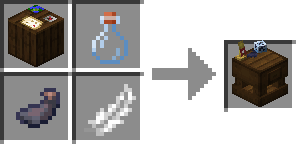
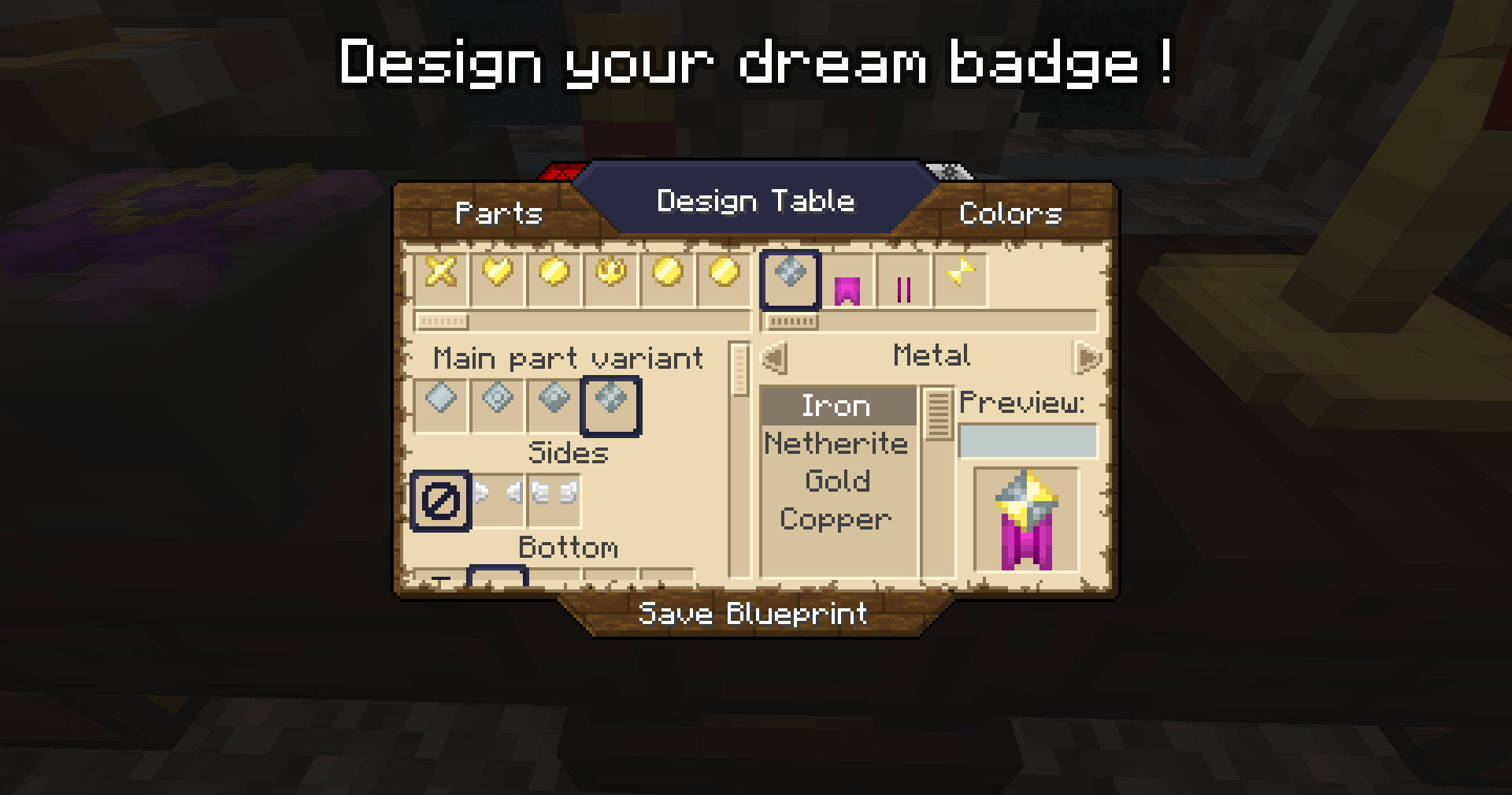
右键点击设计台并使用一张纸,用户就可以设计自己的徽章了!在屏幕左侧选择部件选项,并在右侧调整它们的颜色。设计完成后,按住“保存蓝图”按钮,你的纸张就会变成徽章蓝图!
第二步:徽章锻造台
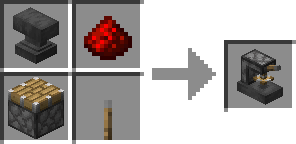
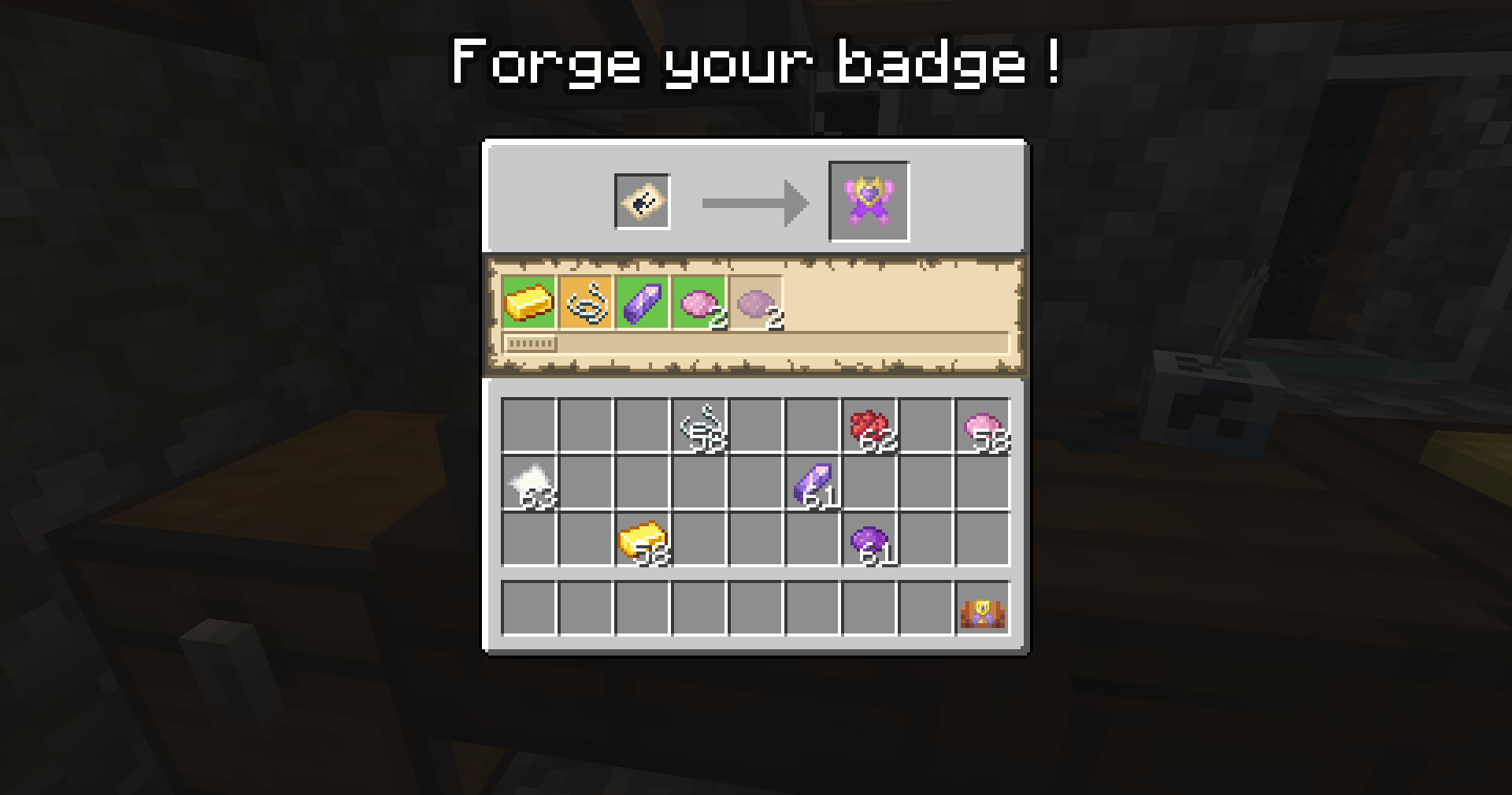
将蓝图放入徽章锻造台将显示制作一个徽章单位所需的材料列表。只需将所需数量的材料填入槽位,你就可以制作徽章了!
锻造台拥有独立的容器功能,这意味着你可以将蓝图和一些材料留在里面,同时去整理那些杂乱的箱子以寻找所需的材料;但请注意,当锻造台内有材料时,你不能取出蓝图。此外,如果你在锻造台顶部使用漏斗,可以向锻造台投入材料。不过请注意,锻造台会尝试以轮询模式每次填充所需数量来构建一个徽章,而不是将一堆单一材料直接倒入锻造台。
关于蓝图的备注:蓝图上印有设计师的名字,只有原始创建者才能编辑他们的蓝图!然而,任何人都可以使用任何蓝图在锻造台中制作徽章;但徽章仍将显示设计师名字以及创建者名字。设计师可以通过手持蓝图右键点击设计台来编辑他们的蓝图,只要尚未使用该设计创建过任何徽章即可。
徽章在哪里使用?
徽章有很多不同的用途!除了原版用法(物品展示框)和基本多人游戏用途(交易、出售)之外,该模组还为你的徽章添加了一些新的用途方式!
饰品栏位
徽章的主要用途是……佩戴它!如果你安装了 Accessories 模组,将会新增一个专用的“徽章”栏位,你可以将徽章放在那里。自豪地向每个人展示你最喜欢的徽章!
软木板问题
正如 wikipedia* 所说:
“软木是人类使用超过 5,000 年的天然材料。其应用早在古代就已为人所知,尤其用于浮具和饮料瓶塞,但如今人们主要知道它是用来插入徽章和图钉的材料。”
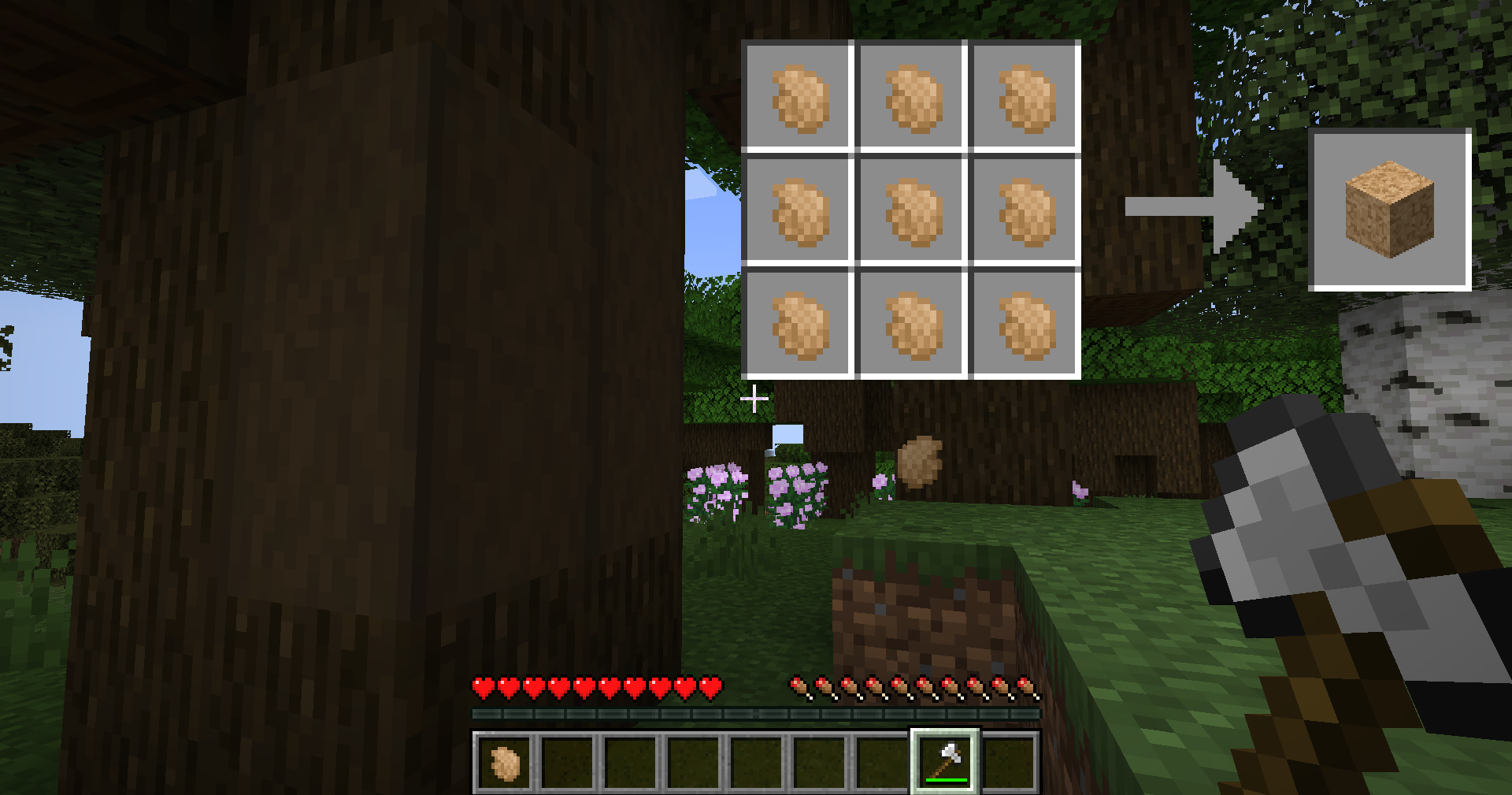
为了制作以下大多数甚至全部与徽章相关的方块和物品,你需要软木。通过剥除深色橡木可以采集软木碎片;剥取一整棵树大约能得到 9 个碎片。使用这 9 个碎片,你可以制作一个软木块。软木块本身用处不大,但在制作其他物品时可能会变得相当有用。
徽章包
我个人已经尝试过在胸前佩戴多个徽章。那太沉重了,几乎把我的衬衫扯破。因此,我必须发明一些东西:一个可以装很多徽章的包!
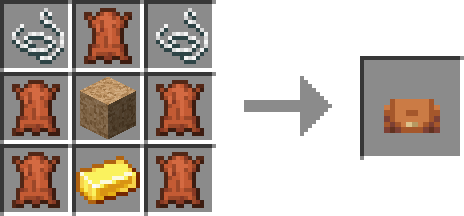
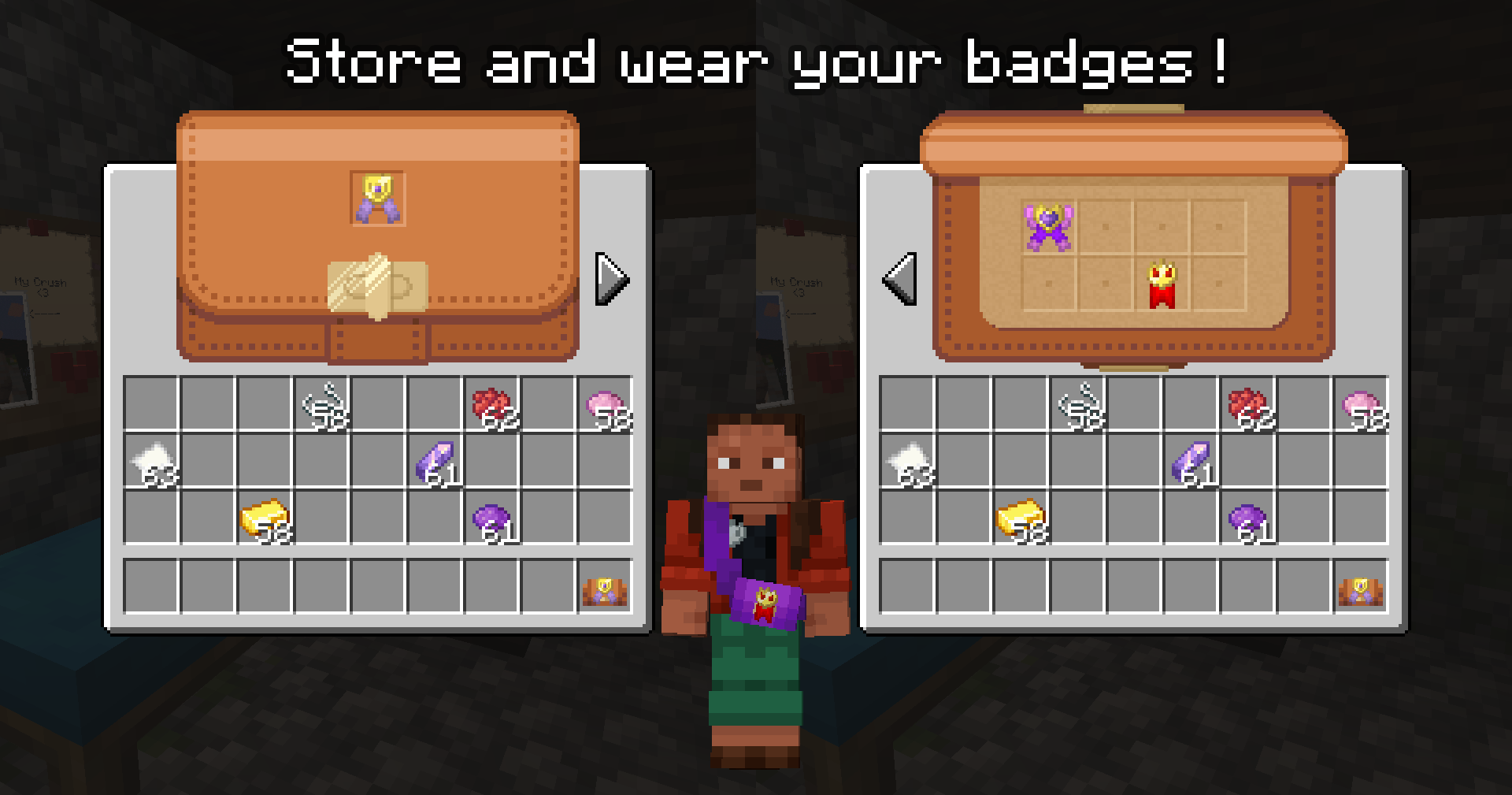
使用 5 张皮革、1 个金锭、2 根线和 1 个软木块,你可以制作一个徽章包!默认情况下,你只能在其中放置 8+1 个徽章:一页放 8 个徽章,外加一个额外的栏位用于在包的顶部展示徽章!
此外,你还可以进一步定制你的包:将包与任何原版染料一起使用以获得染色包;通过将包放置在软木块旁边,你可以为包添加一个新的 8 格页面!如果使用装满水的锅右键点击徽章包,也可以洗掉上面的染料。
如果安装了 Accessories 模组,你也可以在项链栏位中佩戴这个包,将其展示在你身上!它在任何皮肤下都能正确显示,即使在穿着盔甲时也能正常显示,但具有自定义模型的模组盔甲可能会与之冲突。
徽章展示架
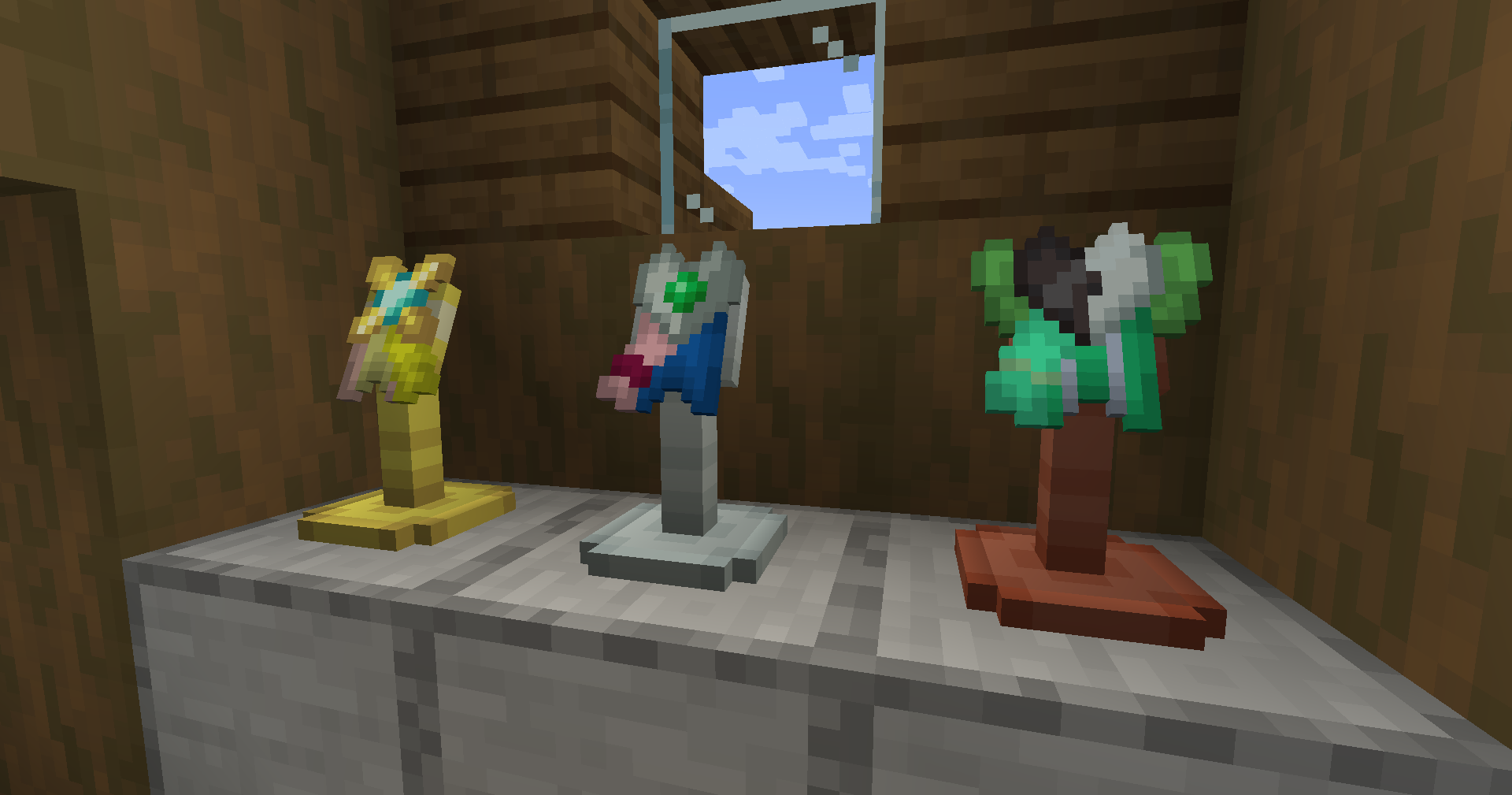
也许你想在床边展示你最喜欢的徽章,或者你想开一家徽章店并拥有一个非常酷炫的展示台。这两种情况的解决方案都是一样的:徽章展示架!
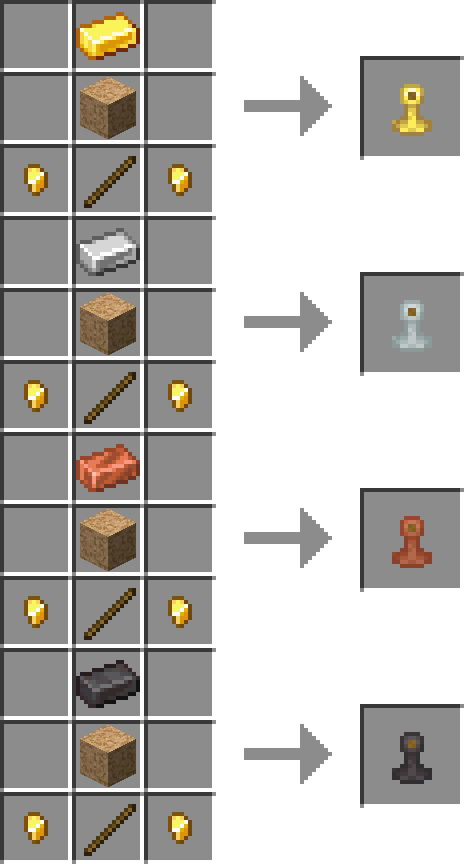
这次不需要任何古老的箭矢,你可以使用一个软木块、四种金属选项之一的锭、一根木棍和两个金粒来制作自己的展示架。
每种变体都有各自的行为特性:
- 金锭:通过右键点击可以将徽章插入插槽,但无法通过右键点击移除(必须破坏方块)。
- 铁锭:通过右键点击可以将徽章插入插槽,并且再次右键点击可以将其取出。
- 铜锭:徽章可以自由插入和拔出。每次有徽章被插入或拔出时,展示架下方的方块会输出满强度的红石信号;只要当前有徽章插在展示架上,它就会输出一个介于 1 到 14 之间的预设随机红石强度值,该值由徽章的设计 ID 决定(因此两个相同的徽章将始终具有相同的值,但两个不同的徽章也有 1/14 的概率具有相同的值,非常适合用于某些谜题!)
- 下界合金锭:徽章只能插入而不能取出。如果玩家右键点击展示架,且该玩家拥有相同的徽章(在手部、背包、配饰槽位或背包内佩戴的包中),则放置展示架的方块会输出红石信号。非常适合用于秘密通道!
软木板
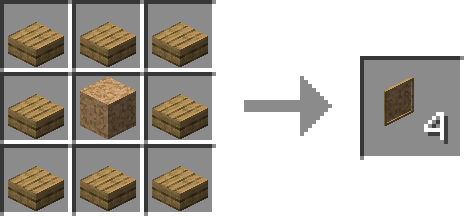
除了软木板,还有什么更好的方式来展示你的胸针呢?使用一个软木块和 8 个特定木材类型的台阶(不能混合搭配!),你可以合成一块软木板!将其放置在任意墙壁上,并将多块软木板并排摆放以创建更大的软木板,其规模可以无限扩展!
要在软木板上放置物品,请手持徽章右键点击板子;手持空手右键点击则可以收回物品。
你还可以使用一根线来“链接”两个物品:手持一根线,右键点击板上已放置的任何元素(线将显示在板子和你的手之间,类似于拴绳),然后右键点击另一个元素以永久固定它;现在你可以让你的软木板看起来像侦探电影中将线索拼凑在一起的场景!如果两个元素中的任意一个被移除,线将会掉落,但你也可以用剪刀剪断线(不过这样你就拿不回线了……)。线可以通过右键点击染料进行染色。
此外,手持发光墨囊右键点击板上的任何元素(徽章、线),可以使该元素发出荧光效果(类似于发光框架的工作原理)。
但是,只能在软木板上放置徽章听起来有点无聊,对吧?只有别着徽章的软木板算什么软木板呢?
隆重推出:图钉!
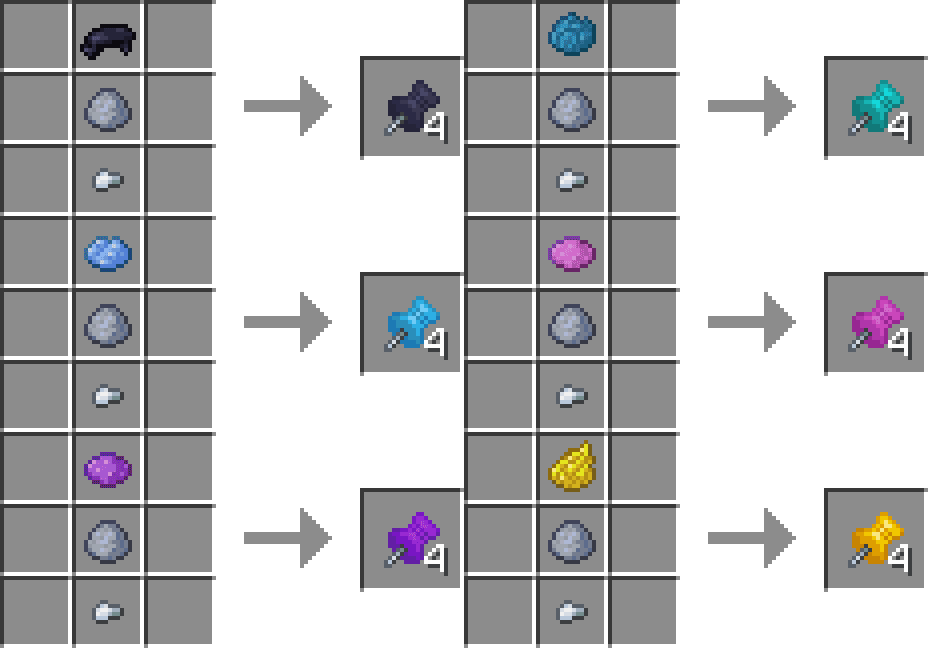
图钉可以像放置徽章一样放置在软木板上,只需简单的右键点击即可;但它允许更多操作:
- 手持地图右键点击图钉,可将地图放置在板上;右键点击该图钉可从图钉上取下地图。
- 手持纸张右键点击图钉,可在图上显示该纸张。右键点击纸张将打开一个 GUI 界面,让你在这张纸上书写!移除纸张会导致上面的文字丢失(类似于告示牌的行为)。按住 Shift 键右键点击可从图钉上移除纸张。
图钉及其附属物品的行为与其他软木板元素类似:你可以将线系在图钉上,也可以使用发光墨囊使图钉或被固定的物品发出荧光效果。
右键点击图钉会将其移除,同时移除所有与其相连的物品(线、地图、纸张等)。
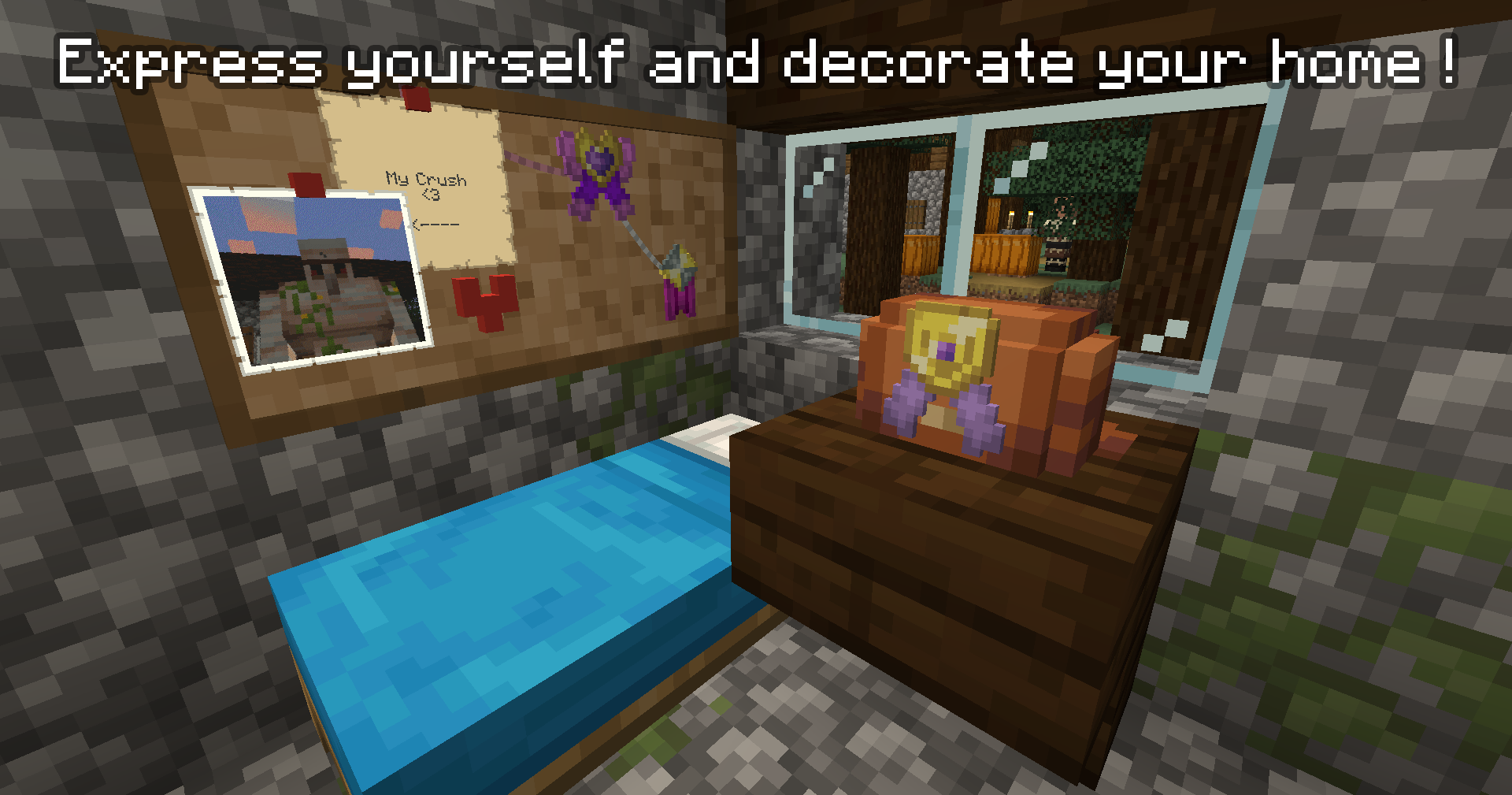
对于技术宅们来说:软木板是具有区块实体(blockentities)的方块,而不是真正的实体;因此它们看起来更像是一个箱子或附魔台,而不是物品展示框;这意味着它们应该比 [原文此处似乎截断] 产生更少的延迟。
徽章检测器
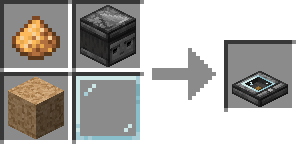
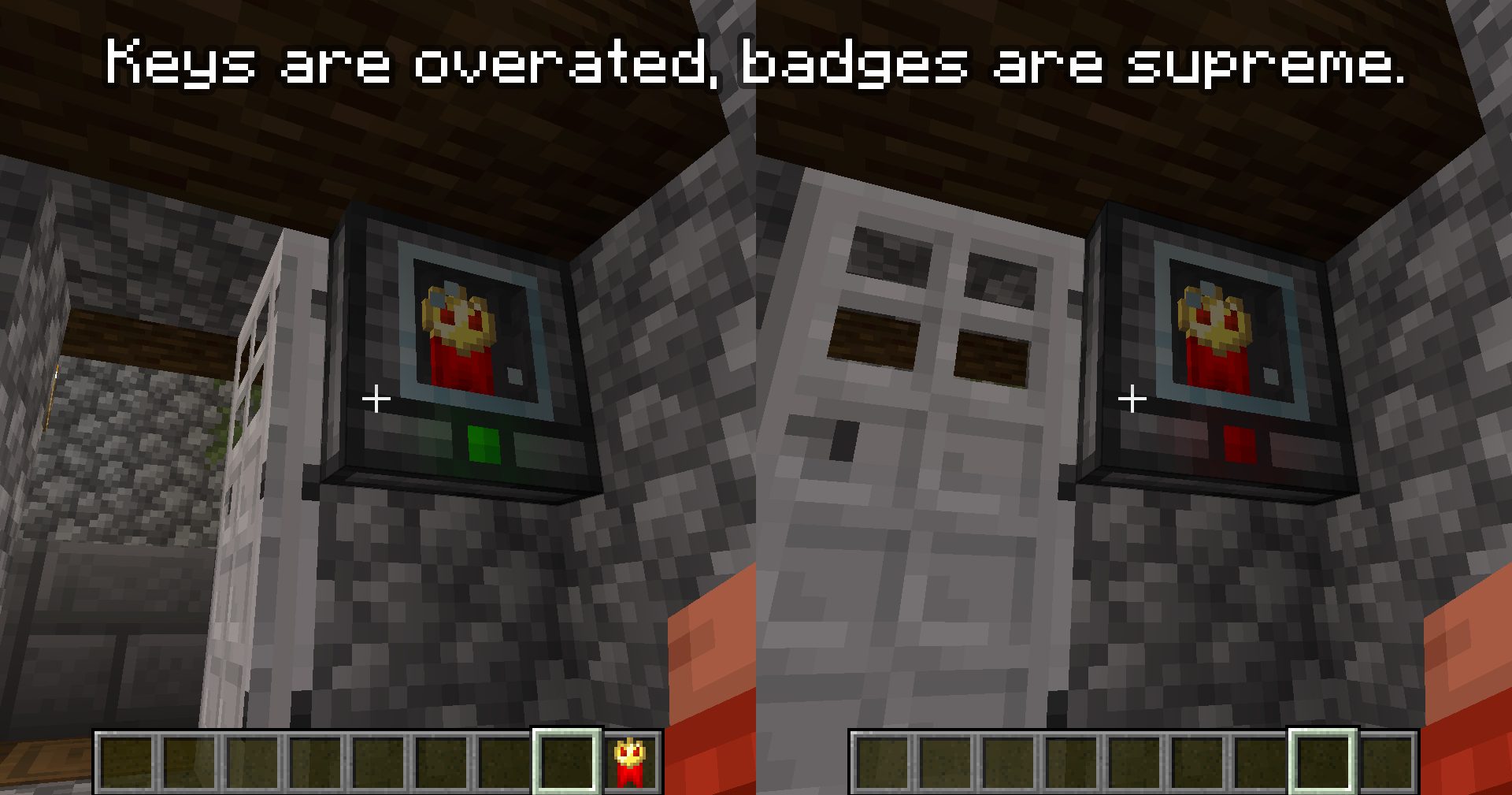
徽章检测器的作用类似于按钮和磁卡读卡器的混合体:将其放置在任意表面(墙壁、地板、天花板)上,它就归你所有了:只有你和创造模式玩家才能移除它。按住 Shift 键并使用任意徽章右键点击它,该徽章将被嵌入方块内部。从现在开始,每当玩家右键点击该方块时,都会进行检查:如果玩家拥有相同徽章的副本(在手部、背包、配饰槽位或所佩戴的包中),灯光会变绿,并且检测器会发出红石信号。如果你没有它,可怕的事情就会发生……灯光变红,什么也不会发生。令人震惊。
使用徽章检测器来限制进入你超级超级秘密读书会的权限,或者简单地锁住你的门。
为什么要有徽章?
这是两件事的结合:
- 首先,我需要从我的 Cobblemon 附属模组中休息一下,Discord 用户 @blueman444444 建议了一种让玩家为 Cobblemon 创建自定义道馆徽章的方法。这个想法让我念念不忘,不知不觉中,我已经制作了一百多种可互换部件并草拟了 GUI 设计。我征求了他们的许可来基于他们的想法制作一个模组,这就是它的由来。
- 不幸的是,我是一个巨大的珐琅徽章收藏者,并且是像《The World Ends With You》这样的版权作品的粉丝,我一直希望某个模组能为其整合包包含那样的收藏品。到目前为止,我觉得符合这一细分领域的唯一类型的模组就是无数的宝可梦 TCG 模组……然而这些模组总是不得不包含与黄牛相关的噱头。
考虑到这一点,我决定不再制作另一个 Cobblemon 附加模组,而是走对原版友好的路线,这样它就可以用于许多田园风、类原版的冒险和整合包,而不是仅限于 Cobblemon 整合包。
徽章什么时候发布?
现在!
其他信息
模组兼容性
Badge-IT 原生兼容多个模组:
数据包兼容性
在下载选项卡中,你可以找到一个 "sample_pack.zip" 文件。这是一个示例数据包,其中包含一个 readme 文件,解释了你所需做的所有事情,包括该模组的所有数据包功能的示例。如果你需要帮助制作自己的数据包,请随时在 Discord 上联系我!
来自维基百科的实际引用可能已被修改。
Badge It !
Badge It ! is a vanilla-friendly minecraft mod that allows player to craft custom badges to use as wearable, decoration, or barter currency !
What is a badge ?
Badge are mainly-decorative item that are a combination of different badge parts put together. You can rename them at an anvil, display them in item frame, fill your chest full of them if you're this kind of person, or simply just show them to your friends.
Each badge has unique internal ID that allows server owners to check the dtails of every created badge on their server. Each badge also have a Creator (= the player who crafted it) and a Designer (= the player that made the design of the badge) to make sure nobody can make counterfeits of your badges !
How to make badges ?
Because having to craft every part individually and the combine them would be a chore (and an honest waste of crafting recipes), badges have an unique two-step crafting method, that is heavily inspired by minecraft vanilla banners.
First step : The Design Table
By right-clicking a Design Table with a piece of paper, an users can design their own badge ! Pick out the parts options on the left side of the screen, and tweak their colors on the right side. Once your design is finished, click and hold the "save blueprint" button, and your paper will turn into a badge blueprint !
Second step : Badge Forge
Inputing the blueprint into the badge forge will display the list of required ingredients to craft one unit of the badge. Simply fill the slots with the required quantity and you'll be able to craft the badge !
The Forge has an inventory, meaning you can leave the blueprint and some of the materials there while you look around your stash of unorganized chests to find the required materials; but note that you cannot take the blueprint out while materials are present inside the forge. On top of that, if you use a hooper on top of the forge, you can feed ingredients to the forge. please note however that the forge will try its best to fill the required quantity to build one badge at a time, in a round-robin mode, instead of dumping a stack of a single material into the forge.
Small note on blueprints : Blueprints have their designer name on them, and only the original creator can edit their blueprint ! However, anyone can create badges in the forge using any blyeprint ; but the badge will still display the designer name alongside the creator's. Designer can edit their blueprints by right-clicking the Design Table whild holding said blueprint anytimle they want as long as no badge has already been created with that design yet.
Where do you use Badges ?
Badges can be used in a lot of different ways ! On top of the vanilla uses (item frames) and basic multiplayer uses (trading, selling), the mod add a few ways to uses your badges !
Accesories Slot
The main use for a badge is... to wear it! IF you have the accesories mod installed, a new dedicated "badge" slot will be added, where you can put you badge on your chest. Proudly show your favorite badge to everyone !
The Cork Issue
As per wikipedia* says :
"Cork is a natural material used by humans for over 5,000 years. It is a material whose applications have been known since antiquity, especially in floating devices and as stoppers for beverages, but is maily known today for being the material you put bagde and pins into"
In order to craft most if not all of the following badge-related blocks and items, you need cork. Cork fragments can be harvested by stripping Dark Oak; stripping a whole three should give you around 9 fragments. With said 9 fragments, you can craft a cork block. Cork block are by themselves pretty useless, but can become quite usefull when used to craft others things.
Badge Bag
I've personally already tried to wear multiple badges on my chest. It was heavy and almost tore down my shirt. Therefore, I had to invent something : a bag where I can put a lot of badges inside !
By using 5 leather, one gold ingot, two string and one cork block, you can make a badge bag ! By default, you can only put 8+1 badges in it : 8 bagdes on a page, and one extra slot to display the badge on top of the bag !
On top of that, you can customize your bag further : put the bag along any of the vanilla dye to get a dyed bag; and by putting your bag next to a cork block, you can add a new 8-space page to your bag ! You can also wash away dye from a pin bag by right-clicking it with a filled cauldron.
If Accesories is installed, you can also wear the bag in the necklace slot* to display it on yourself ! It will display correctly under any skin AND when wearing an armor too, but modded armor with custom models might interfere with it.
Badge Stand
Perhaps you want to display your favorite badge next to your bed, or perhaps you want to open a badge shop and have a very cool looking display. Both have the same answer : badge stands !
This time around, no need for some sort of ancient arrow, you can get your own stand using a cork block, an ingot of one of four metal option, a stick and two gold nugget.
Each variant has its own behaviour :
- Gold Ingot : Badge can be slotted it by right-clicking, but cannot be removed by right clicking (breaking the block is mandatory).
- Iron Ingot : Badge can be slotted it by right-clicking, and can be re-obtained again hby right-clicking it again.
- Copper Ingot : badge can be slotted in and out, and a full strenght redstone current is outputted on the block under the stand every time a badge in slotted in/out, and whenever a badge is currently slotted, it will output a predetermined random current comprised between 1 and 14, whose value is determined via the badge's design ID (so two identical badges will always have the same value, but two different badge have a 1/14 chance of having the same value too, ideal for some puzzles !)
- Netherite Ingot : Badge can be slotted in but not out. If a player right-click the stand, and the player owns the same badge (inventory/accesory slot/bag currently in the inventory), a redstone current is outputed on the block where the stand is placed. Great for secret passages !
Corkboard
What's the best way to display your pin than a corkboard ? Using a block of cork and 8 slabs of a specific wood type (no mix and match !), you can craft a corkboards ! Place it on any wall, and place several of them next to each other to create an even bigger corkboard, that can scale up to infinity !
To place something on the corkboard, right-click the board with your badge; and right-click it with an empty hand to get it back.
You can also use a piece of string to "link" two items : holding a piece of string, right click any element placed on the board (the string will be show between the board and your hand, like a lead), and right click another element to definitively place it down; you can now make your corkboard looks like thoses detective movies where they piece together the truth ! The string will drop if any of the two element get removed, but you can also cut the string with shears (but you won't get it back that way...). string can be dyed by right-clicking them with any dye.
On top of that, right-clicking any element of the board (badge, string) with a glowing ink sack, you can make that element emissive (similar to how glow frames works).
But only being able to place badges on a corkboard kind of sounds lame, right ? What would be a corkboard with only pinned badges ?
Introducing : Drawing Pins !
Drawing pin can be placed on corkboards the same way you place badges, with a simple right click; but they allow a few more tricks :
- Right-clicking the pin with a map will place the map on the board; right click it to remove it from the pin.
- Right-clicking the pin with a piece of paper will display said paper. Right-click the paper will open a GUI that let you write on this piece of paper ! Removing the paper makes you loose the text on it (similar to how signs behave). Shift-right-click it to removes it from the pin.
Drawing Pins and what's attached to them behave like other corkboard elements : you can tie a string to the pin, and you can also use glow ink to make either the pin or the pinned item emissive.
Right-clicking the pin removes it and everything attached to it (string, map, paper, etc).
For the technical folks out there : corkboards are block with blockentities, not actual entities; so they looks more like a chest or an enchanting table rather than an item frame; meaning they should have less lag than
Badge Checker
Badge Checker acts like an hybrid between a button and an Magnetic card reader: place it on any surface (wall, floor, ceiling), and it's now yours: only you and creative mode player can remove it. Shift-right-click it with any badge, and that badge will be slotted inside the block. From now on, any time a player right-click the block, a check will be made: if the player own a copy of the same badge (in its hand, inventory, accesories slot, or inside a bag he's wearing), the light turns green, and the checker emits redstone. If you don't have it however, something terrible happen... The light turns red and nothing happen. Shocking.
Use the badge checker to restring to entry to you super duper secret book club, or simply lock your door.
Why Badges ?
It's a mix of two things :
- First of all, I needed a break on my Cobblemon sidemod, and discord user @blueman444444 suggested a way for player to create custom gym badges for cobblemon. This idea stuck with me, and without relizing it, I had realized a hundread swappables parts and drafted GUIs designs. I asked their permission to create a mod based on their idea, and this is what it is.
- I'm unfortunatly a huge collector of enamel pins, and fan of licences such as The World Ends With You, and I always wished some mod would includes collectibles like that for their modpack. So far, I feel like the only kind of mod that fits this niche are the countless Pokemon TCG mods... which unfortunately always has to have scalper-related gimmick in them.
With that in mind, I decided that instead of making yet another cobblemon addon, I went the vanilla-friendly route, so it can be used in a lot cottage-core, vanilla-like adventures and modpacks, rather than being limited to cobblemon packs.
When Badges ?
Now !
Other Informations
Mod compatibility
Badge-IT contains native compatibility with several mods :
- Biomes O'Plenty, Oh The Biomes We've Gone, Cobblemon & Cobblesafari : corkboard can be made using any type of wood from thoses mod, natively and without any extra work !
- Every Compat (Wood Good) : using this mod, you cna make corkboard using any kind of wood planks slab from any mod ! This also deactivate the hand-made comapt from the mod to replaced them with the Every Compat authored variants, meaning migration will cause issues.
- Exposure : pictures taken (not picture stacks) can be placed on corkbaords using drawing pins, similar to maps and paper.
- Accessories : a specific accesories slot let you equip badges directly on yourself, and badge bag can reuse the existing "necklace" slot (it"s a cross body bag after all)
Datapack Compatibility
In the download tab, you can find a "sample_pack.zip" file. This is a sample datapack that contain a readme file explaining everything you need to do, including examples for all of the mod's datapacked features. Feel free to contact me on discord if you need any help making your own !
*the actual quote from wikipedia might have been altered.


 模组

 模组

 模组

 模组

 模组

 模组

评论 0
登录后参与评分
还没有评论,来抢沙发吧