
打开背包界面,你会发现新增的背部装备栏。装备上背包后,你可以将物品放置在背包上方,并在背后展示出来,让其他玩家看到。 当背包中装有物品时,除非使用疾跑 + 右键将其放置到世界中,否则无法脱下。与背包交互可以查看内部物品,或再次按下疾跑 + 右键重新装备!
展现你的真彩!
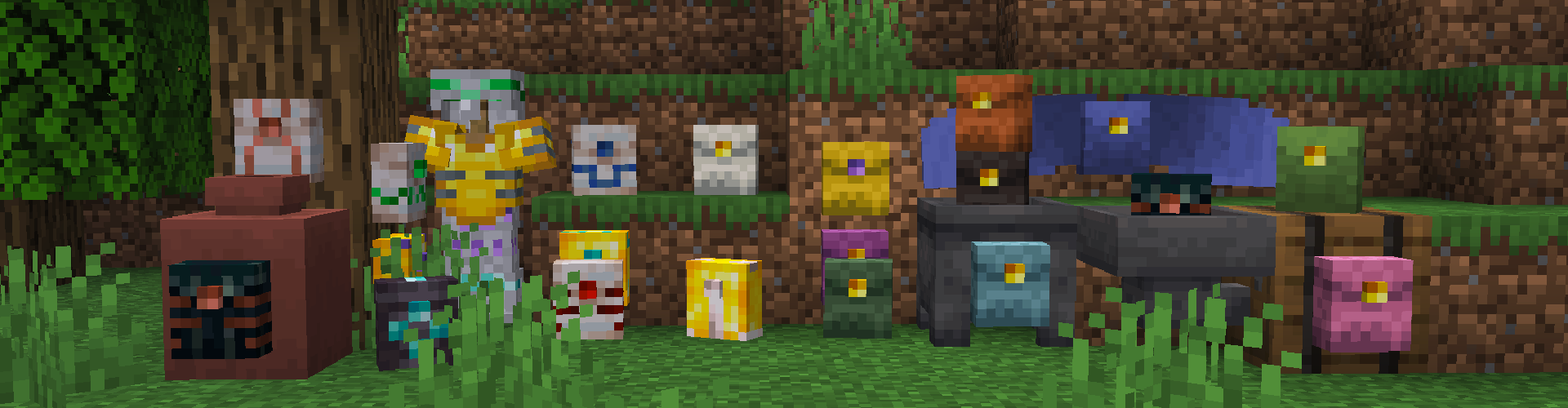 从各种新背包中选择,以整理你的物品栏。皮革背包可以像盔甲一样染成你想象中的任何颜色。金属背包可以在锻造台中进行修饰,或者配合升级模板使用,转换为更大且防火的下界合金背包。末影背包拥有专属的全局物品栏,仅对制作或修饰它的玩家独特;如果你制作了多个末影背包,其他玩家也可以访问该物品栏。
装满它吧!
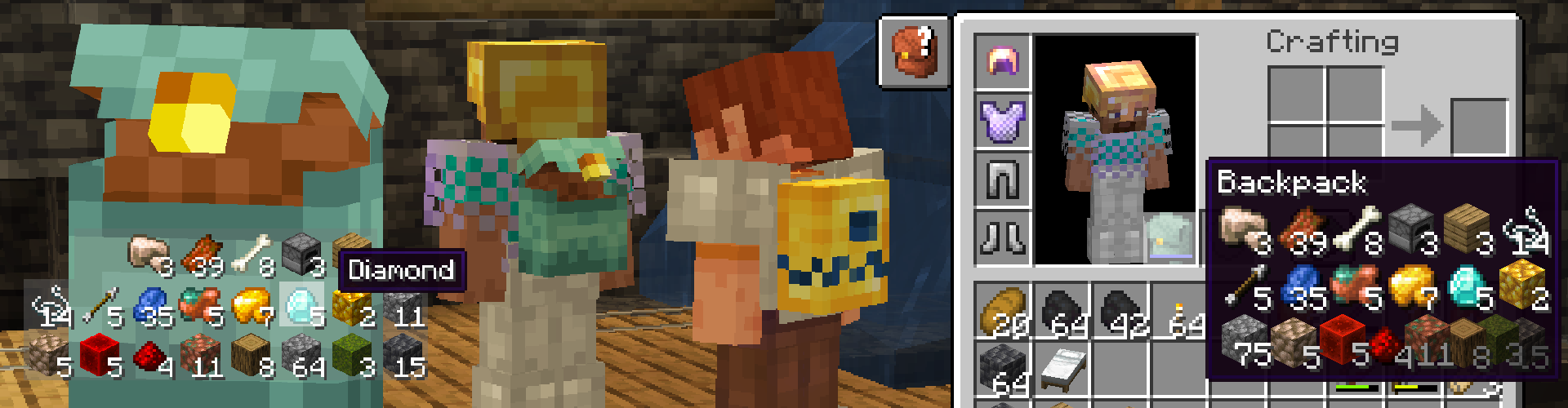 新物品会自动放入背包顶部。悬停在已装备的背包上可预览内部物品。如果需要取出可能掉到底部的润唇膏,可以请朋友帮忙取出来。不过记得在钻石放进去后仔细检查一下哦。
物品栏控制
只需直接点击已装备的背包即可插入或取出物品。为了更方便地移动物品,请使用疾跑键 + 点击,就像在其他物品栏中Shift点击物品一样。此按键可在设置中绑定为其他键位。你可以在方块上按下疾跑键 + 右键来快速放置背包并访问所有物品。
不止于此!
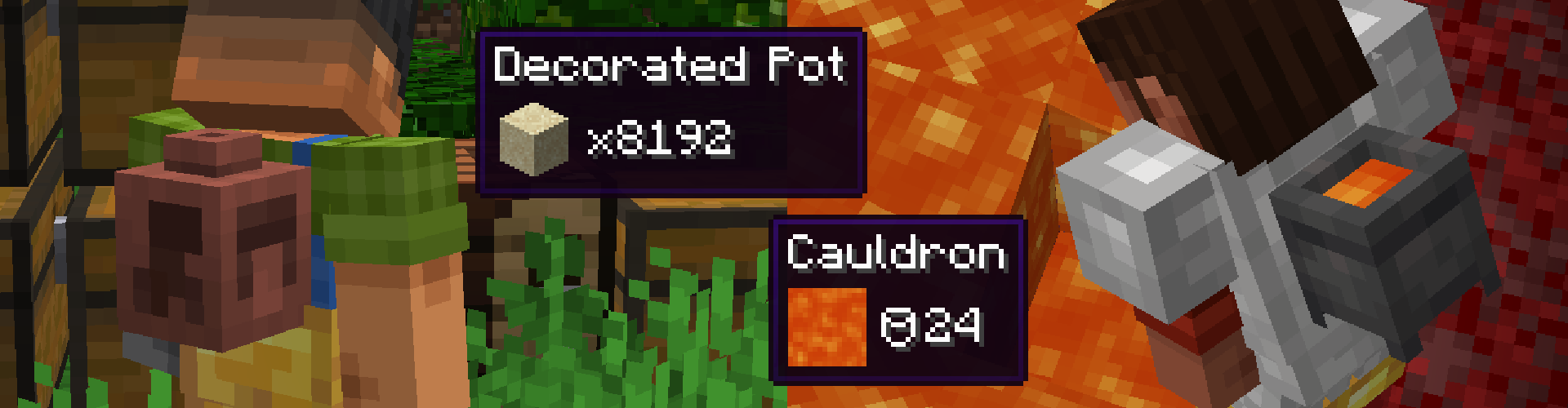 装饰花盆和炼药锅也可以装备。花盆可以存储128组单一类型的物品。炼药锅可以容纳24桶任意流体。这类可穿戴物品太重,无法被放置,只能先清空后才能脱下。
死亡时
你的物品会安全地留在你死亡的地方,即掉落脚下的背包内。花盆和炼药锅会作为物品掉落,但只有在背部装备栏为空时才能拾取。(快回来!)
让你动起来!
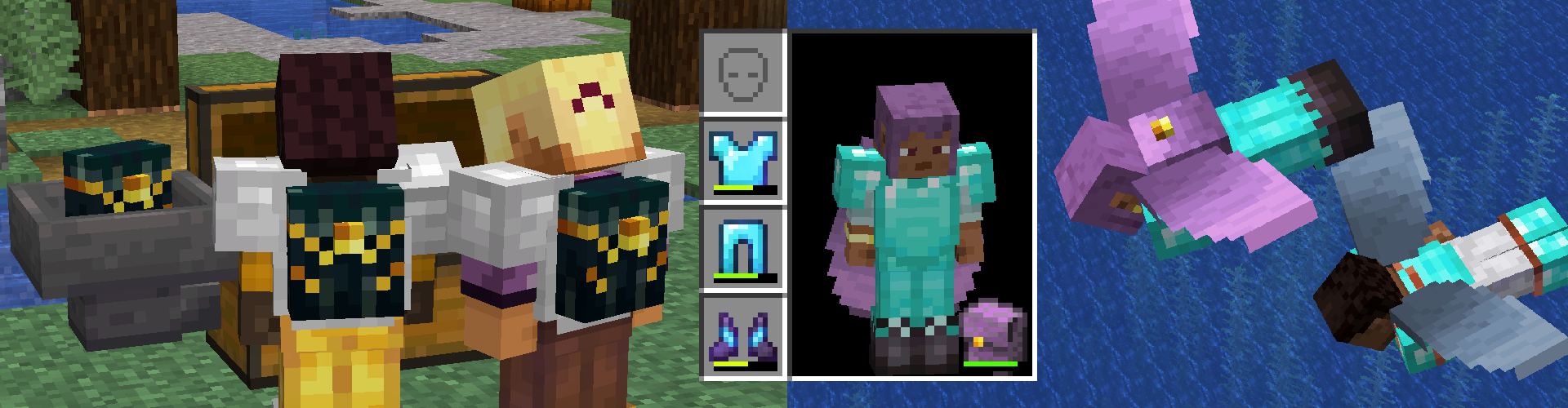 翼装背包允许你在装备背包的同时使用鞘翅。末影背包在制作或重新修饰后与玩家绑定。与末影箱不同,其物品栏仅对该绑定的玩家独特。与朋友共享一个末影背包,可以远程互相发送物品。
红石组件
使用漏斗和比较器,利用背包创建复杂的加载器和装置。使用末影背包可以实现长距离的红石传输,或者在你不再需要时将物品简单地传回基地。
寻找更多?
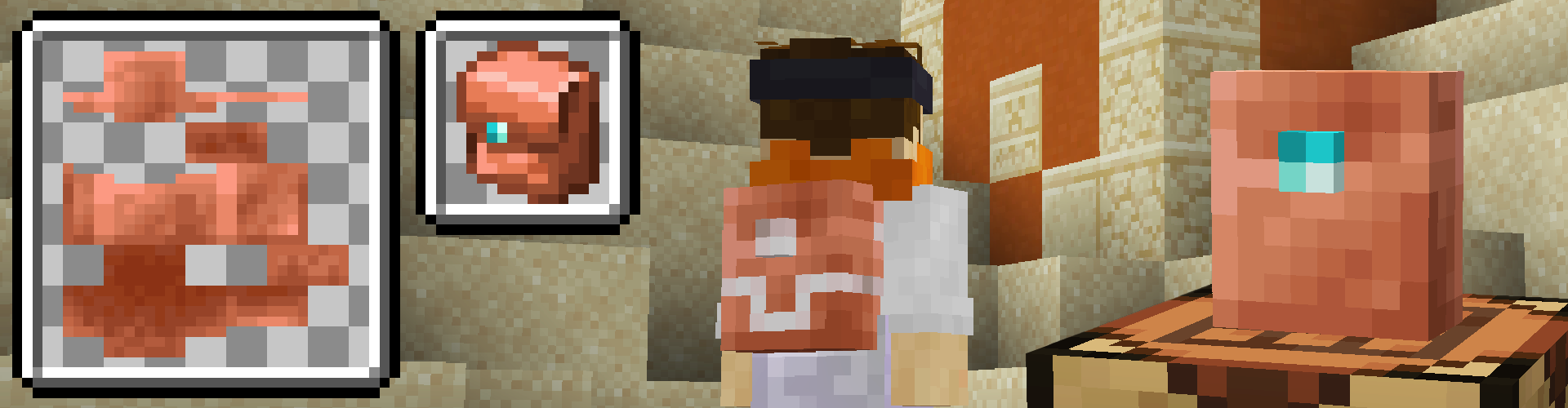 还不够吗?这由你决定!你可以通过数据包和资源包添加任意数量的背包,并自定义其属性。阅读wiki中的自定义背包指南,添加你自己的背包。
整合包
如果你将此模组用于整合包,我非常乐意听到你的反馈!如果需要更改任何配置,请查看wiki中的配置教程。其中详细介绍了如何使用数据包禁用背部装备栏,或将物品加入背包物品栏的黑名单。
反馈
 我很好奇你是如何玩我的模组的!如果你有任何建议或改动,在此创建一个新的讨论。我会真诚地回应对我模组的所有批评,即使想法尚未完全成熟,也请留下你的意见(这正是讨论区的作用)。
如果遇到任何Bug或兼容性问题,你可以在此创建一个新的Issue,我会尽力提供帮助!视频或你的 crash.log/latest.log 日志对于重现和修复Bug非常有帮助。
查看Wiki
如果你是整合包制作者,或者只是好奇的玩家,Wiki 是深入了解此模组的最佳场所。如果在那里找不到你需要的内容,请提交Issue,我可以为你提供帮助。
Opening your inventory you'll find the new Back Slot. After equipping your Backpack, you can store items placing items ontop of it and display it on your back for other players to see. Backpacks holding items cannot be taken off unless you place it into the world using Sprint + RClick. Interact with the backpack to see the items inside or Sprint + RClick agian to re-equip!
Show Your True Colors!
Choose from a variety of new backpacks to clean up your inventory. Leather Backpacks can be dyed any color you can imagine, just like it's armor. Metal Backpacks can be trimmed in a smithing table or used with a Upgrade Template to convert it to a larger and fireproof Netherite Backpack. Ender Backpacks hold a global inventory unique to the player who crafted or trimmed it, and other players can access that inventory if you make extras.
Fill 'er up!
New items are automatically put into the top of the backpack. Hovering over the backpack you
have equipped previews the items you have inside. If you need to get the chapstick
that might've fallen to the bottom, ask your friend to help out and grab it for you.
Double-check your diamonds after they've been in there though.
Inventory Controls
Insert or take items just by clicking directly onto the equipped backpack. To help move you items around use your Sprint Key + Click as if you were shift clicking items into any other inventory. This key can be bound to something different in the settings. You can press Sprint Key + Right Click on a block to quickly place your backpack and access all of your items.
More than Meets the Eye!
Decorated Pots and Cauldrons can also be equipped. Pots can store 128 stacks of a single kind of item. Cauldrons hold 24 buckets of any fluid. These types of wearables are too heavy to be placed and can only be taken off by emptying them first.
On Death
Your items will stay safely where you died inside a backpack dropped at your feet. Pots and Cauldrons will drop as an item that can only be picked up with an empty Back Slot. (Hurry Back!)
Let's See You Move!
Winged Backpacks allow you to use your elytra with a backpack and Ender Backpacks are bound to a player when crafted or re-trimmed. Unlike Ender Chests, their inventory is unique to that bound player. Share a Ender Backpack with a friend to remotely send items to one another.
Redstone Components
Use Hoppers and Comparators to create complex loaders and contraptions with your backpacks. Using Ender Backpacks can be a means for long ranged redstone or to simply send items back to your base when you no longer need them.
Looking for More?
Still not enough? That's up to you! You can add as many backpacks as you'd like with properties you decide through Data and Resouce Packs. Read through Custom Backpacks from the wiki to add your own backpack.
Mod Packs
If you are using this mod in a mod pack I would love to hear your feedback! If you need to change any config, check out Configurations from the wiki for a how-to. There it outlines how to use datapacks to make items disable the backslot, or to blacklist items from the Backpack Inventory.
Feedback
I'm curious how you play with my mod! If you have any suggestions or changes create a new discussion here. I try to respond genuinely to any critisim my mod might get, leave something if it bothers you even if it's not fully thought out (Thats what discussions are for).
If there are any Bugs or Compatibility issues, you can create a new issue here and I'll see what I can do to help! Videos or your crash.log/latest.log help a ton in recreating and squashing bugs.
Check out the Wiki
If you are a mod pack creator, or just a curios player, the wiki is the best place to look deeper into the mod. If you can't find what you're looking for there, leave an issue and I can help you out.

下载 Beans Backpacks (Legacy)
下载 Beans Backpacks (Legacy)
下载 Beans Backpacks (Legacy)
下载 Beans Backpacks (Legacy)
下载 Beans Backpacks (Legacy)
下载 Beans Backpacks (Legacy)
下载 Beans Backpacks (Legacy)
下载 Beans Backpacks (Legacy)
下载 Beans Backpacks (Legacy)
下载 Beans Backpacks (Legacy)
- 修复了背包无法确定其大小时导致的崩溃问题。
- 修复了使用炼药锅快速拾取流体时导致的崩溃问题。
- 修复了炼药锅找不到其所存储液体的纹理时导致的崩溃问题。
- 修复了放置的背包在其菜单中点击某个槽位之前显示为空的问题。
关于这个资源的讨论、问题反馈与使用心得
还没有讨论,来发第一帖吧
你是这个资源的作者?登录后可认领此资源。
相似资源
 模组

可定制的鞘翅模组,支持装饰纹饰、旗帜图案等更多功能!
 模组
在游戏画面角落显示附近世界地形、玩家、生物和实体的地图。可创建路径点,帮助你找到标记过的位置。
 模组
AE2:一款流行的自动化与存储模组
 模组

新增 50+ 个独特生物群系,为你的世界增添新树木、花卉等更多元素!
 模组
添加全屏世界地图,显示你在世界中已探索的区域。与 Xaero's Minimap 搭配使用效果极佳。
 模组

基于 GTCEu 1.12.2 的现代 GregTech
评论 0
登录后参与评分
还没有评论,来抢沙发吧