
BoxHud
BoxHud 是一款 Minecraft 模组,提供了一套强大且高度可定制的 PvP 风格 HUD 组件。支持 Fabric、Forge 和 NeoForge,BoxHud 让你完全掌控界面——无论是为了优化战斗体验还是追求美观。
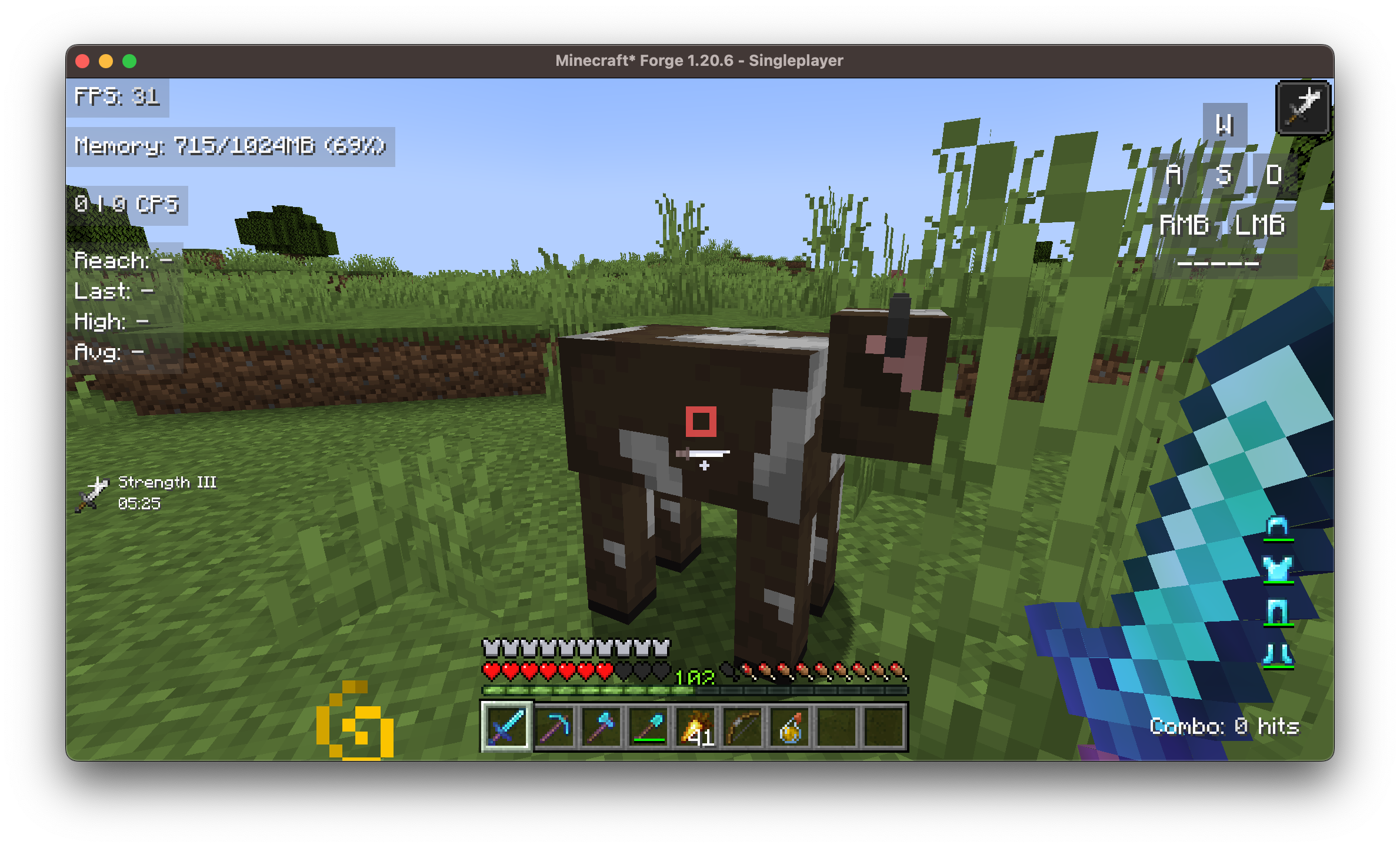
✨ 功能特性
? 跨加载器支持
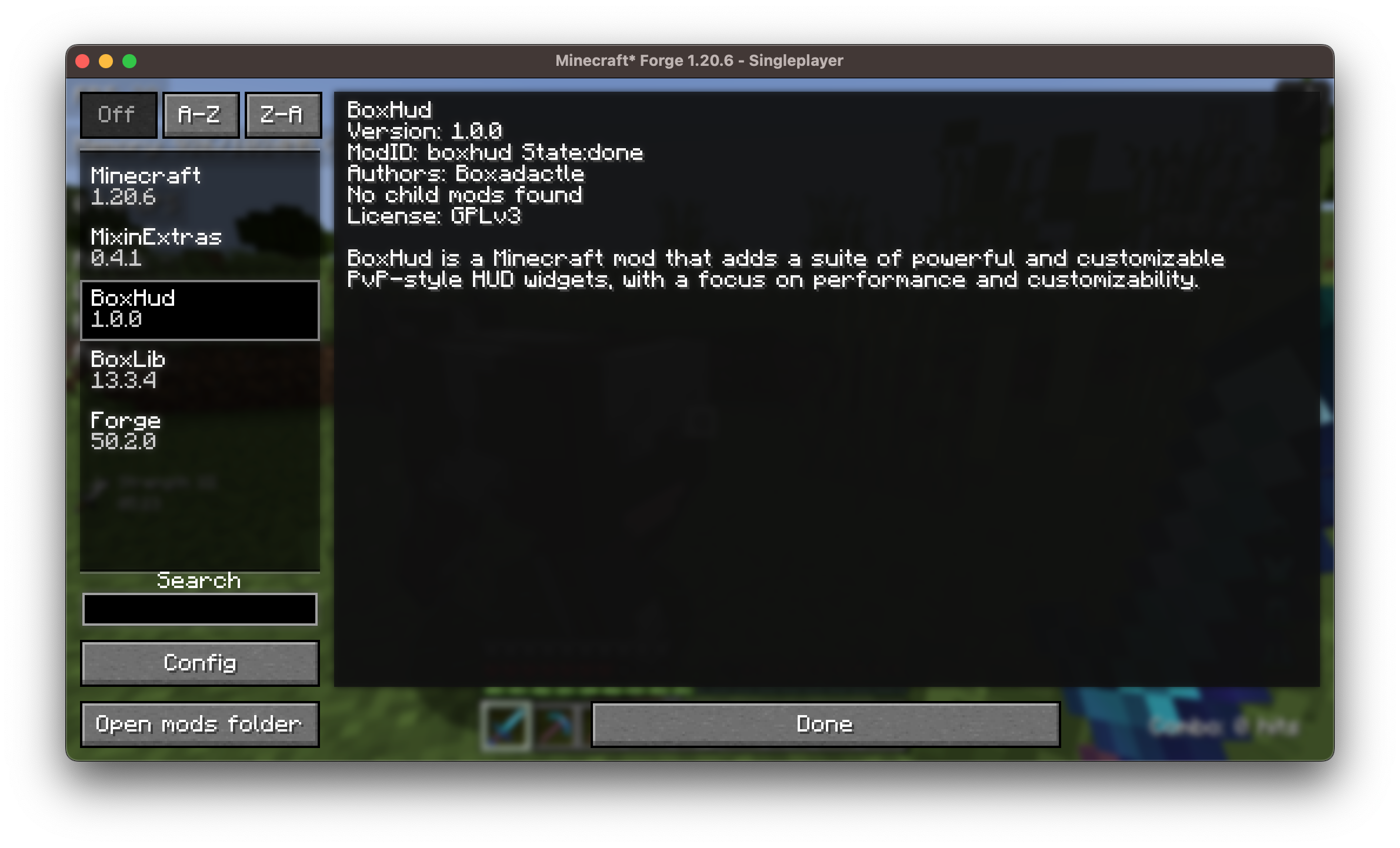
BoxHud 开箱即用,完美兼容 Fabric、Forge 和 NeoForge,让你几乎可以在任何现代 Minecraft 环境中使用它,无需担心兼容性问题。
?️ 原版 HUD 自定义
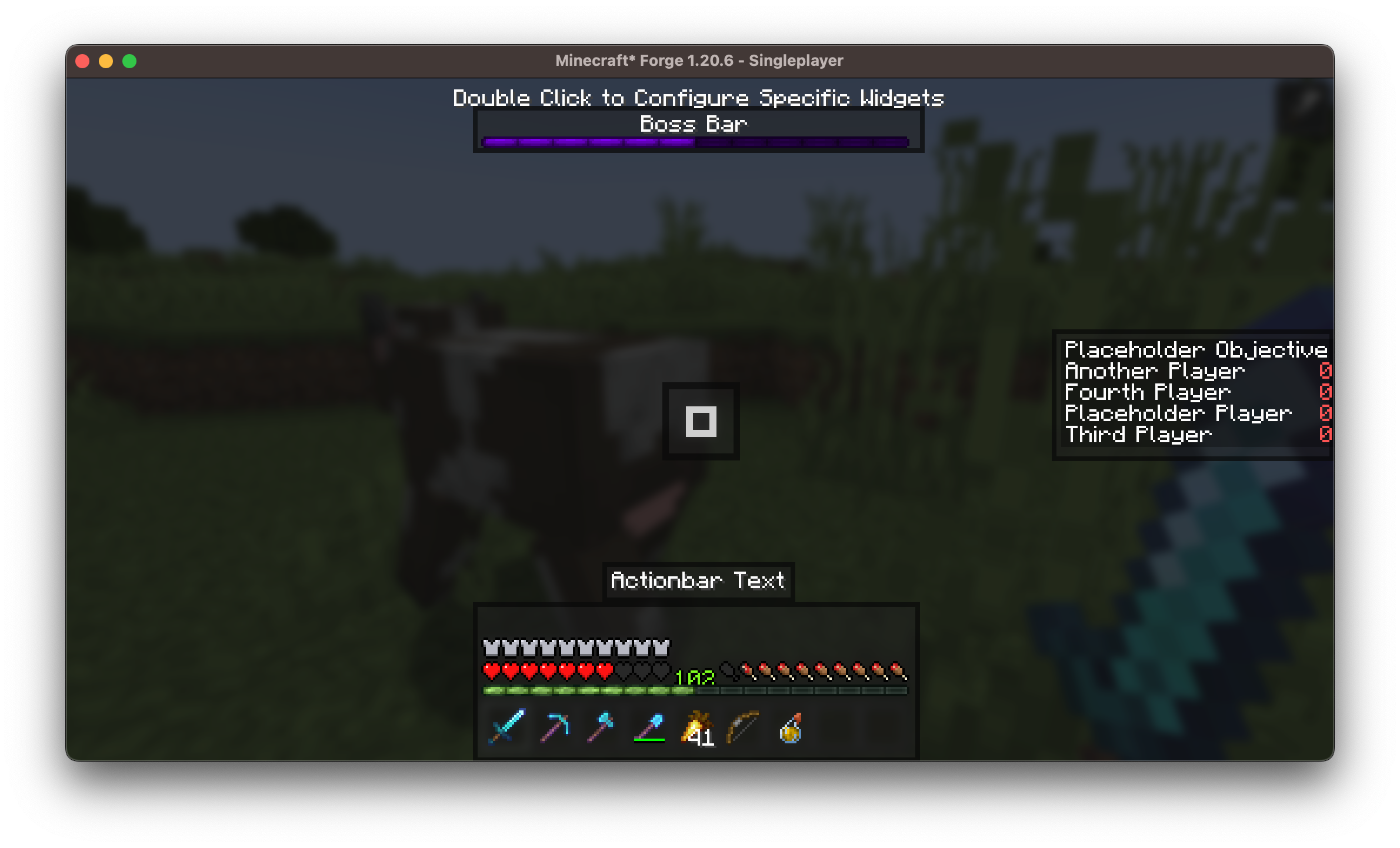
移动或隐藏默认 Minecraft HUD 组件,例如:
- 快捷栏:可将其放置在屏幕任意位置
- Boss 血条:可移开或禁用
- 计分板:自定义对齐方式
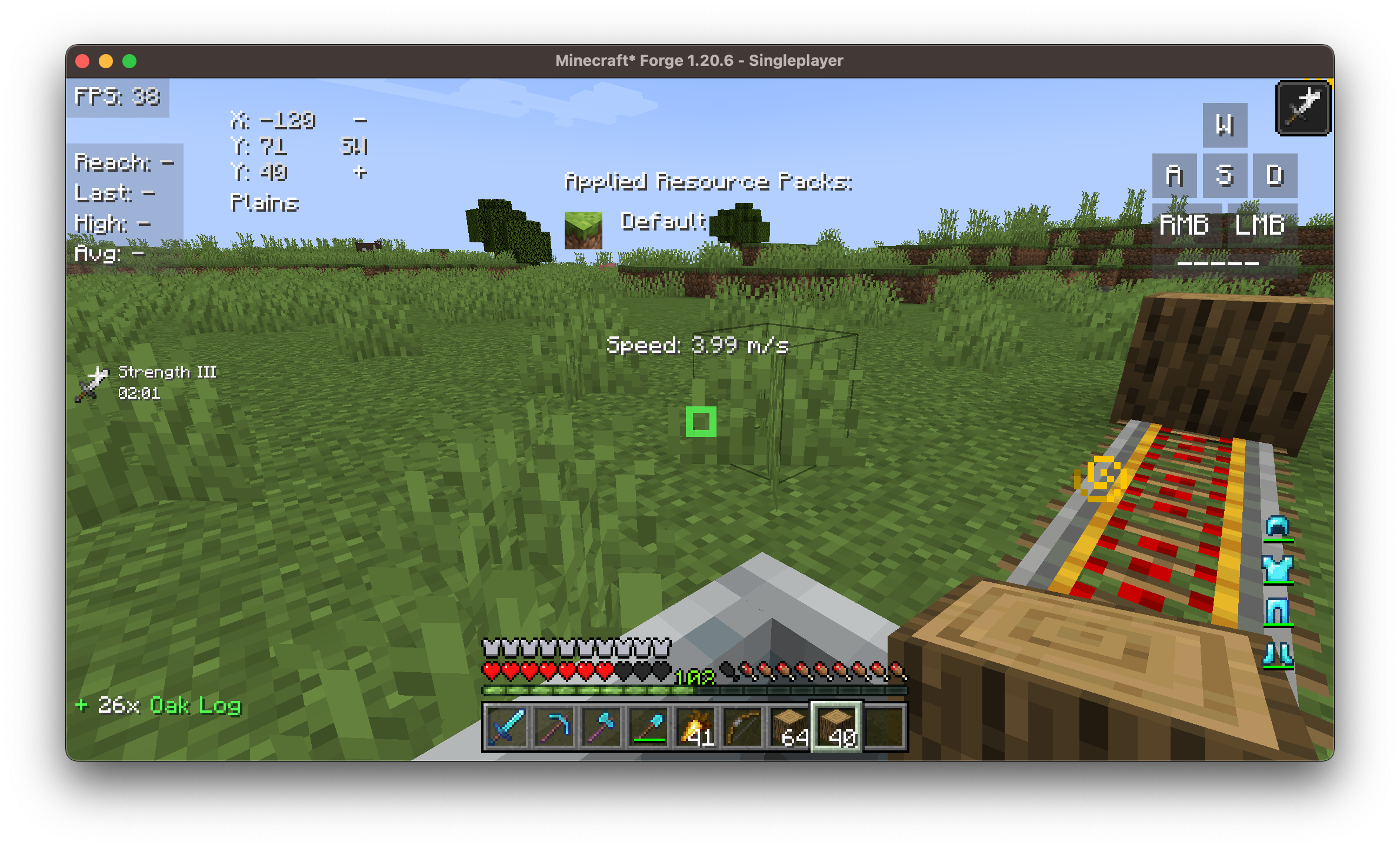
? 25 个完全可定制的小部件
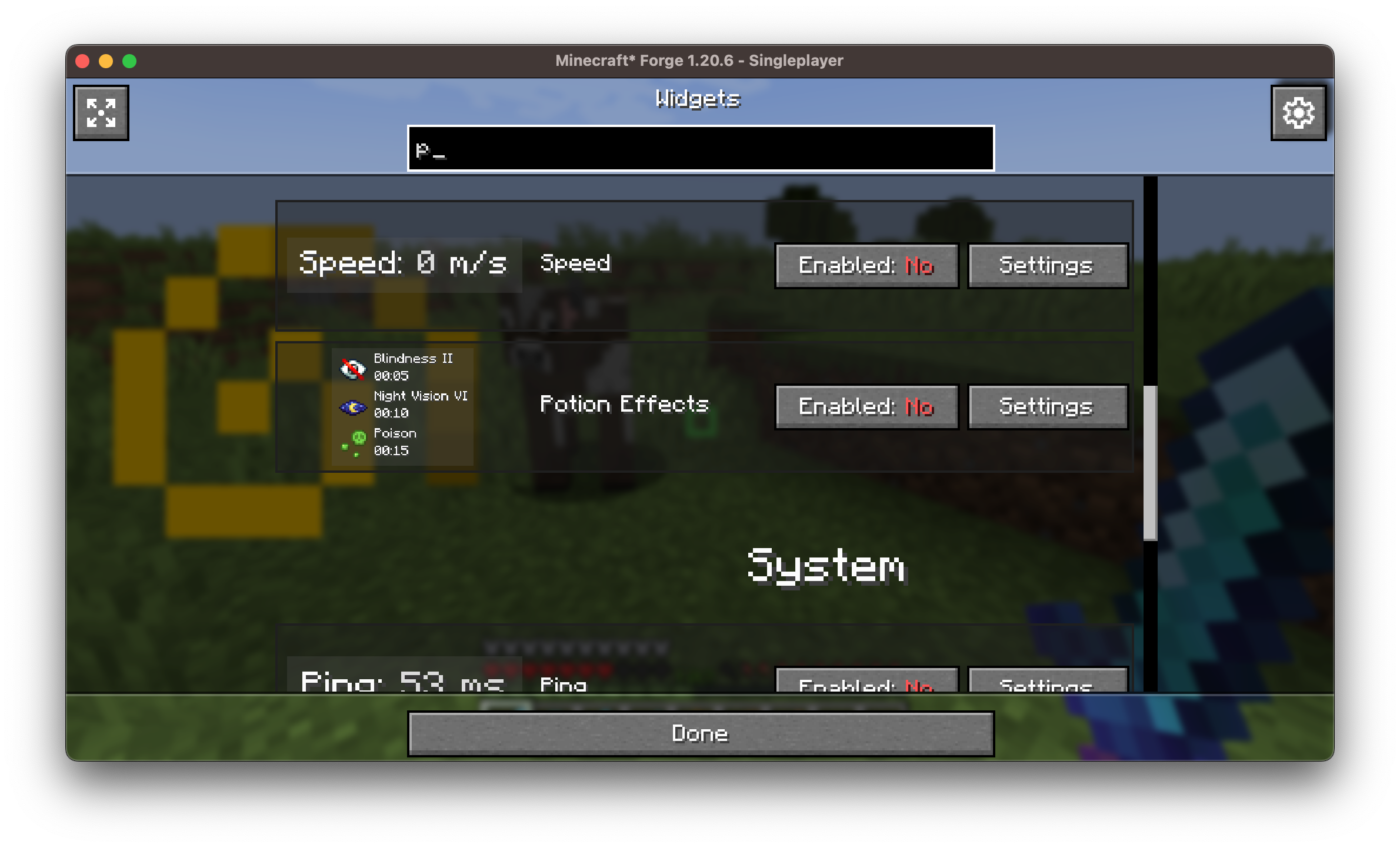
每个小部件均可单独配置。你可以:
- 拖拽以重新定位它们
- 调整缩放比例、颜色、轮廓、背景和对其方式
- 一键启用或禁用任意小部件
?️ Coordinates Display 兼容性
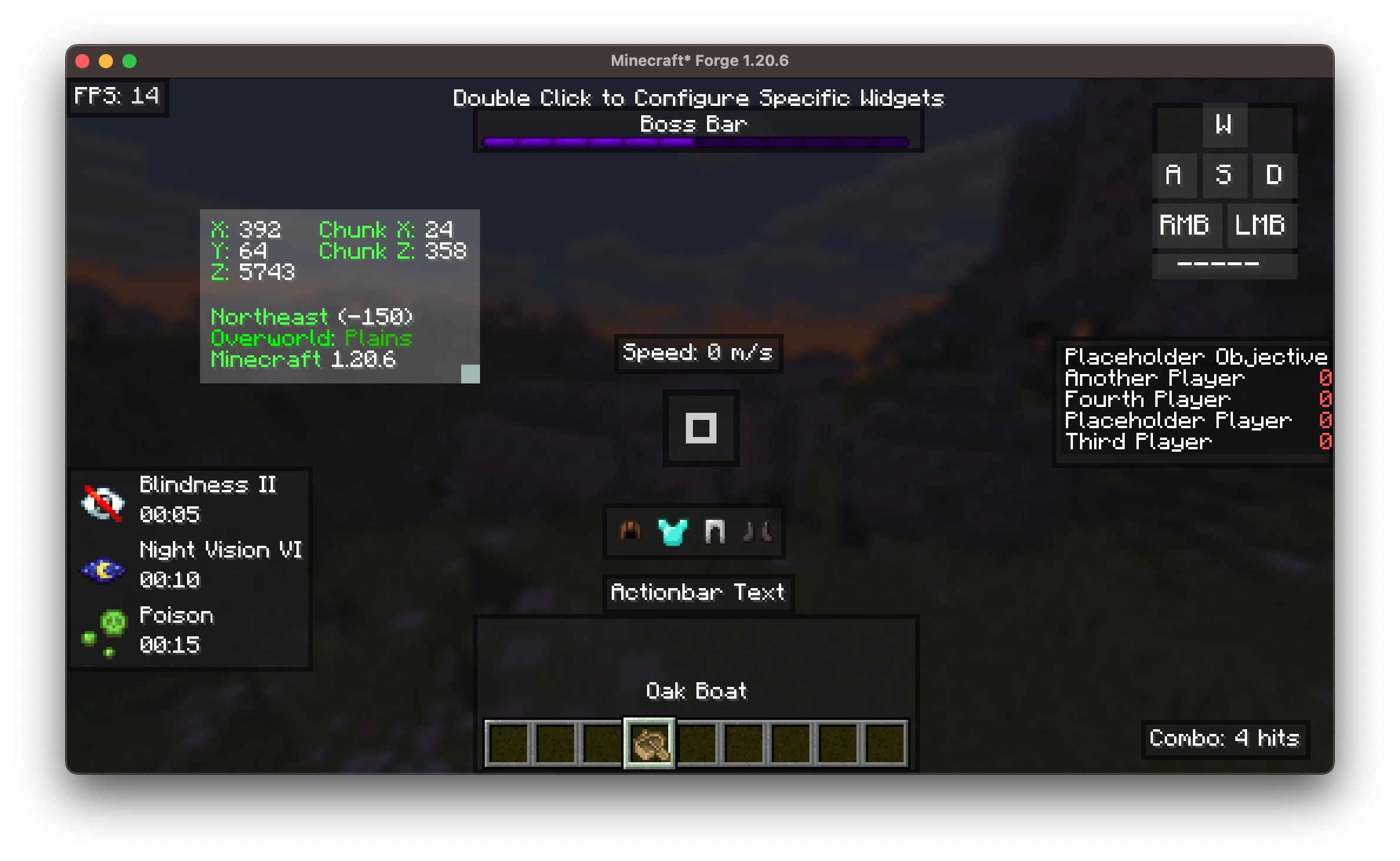
BoxHud 内置坐标小部件,用于在屏幕上显示你的 X、Y、Z 坐标。但如果你喜欢 Coordinates Display 模组的功能,BoxHud 会自动升级该小部件:
- 小部件的外观和行为将与 Coordinates Display 中一致。
- 当你在 BoxHud 中尝试自定义它时,会自动跳转到 Coordinates Display 的设置界面。
- 你还将获得额外功能,如维度缩放和更佳的格式化效果。
两个模组均使用 Boxlib,因此可以无缝协作。
只需将 Coordinates Display 放入你的 mods 文件夹,BoxHud 将自动处理其余部分。
? 高级准星自定义
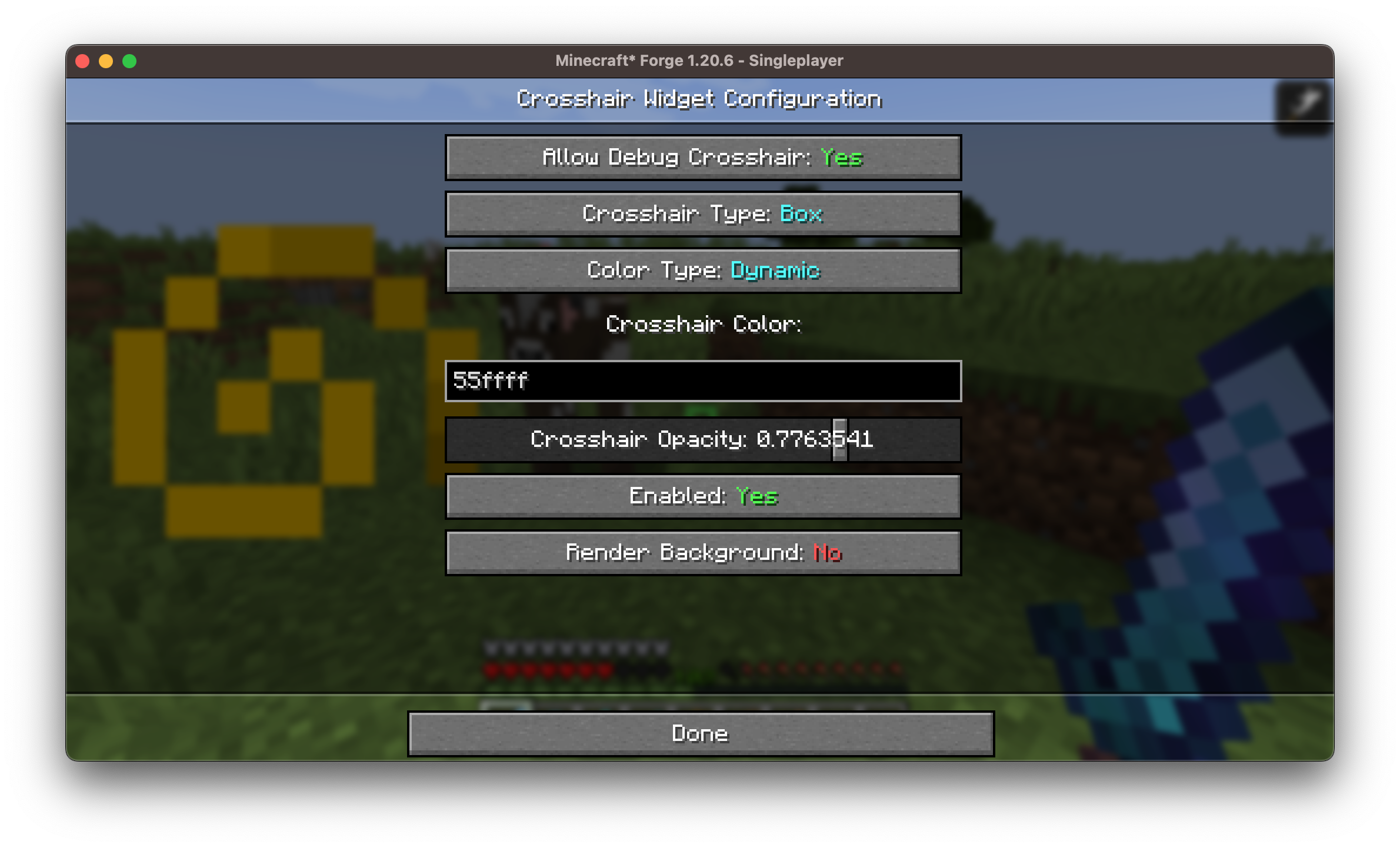
提供 10 种准星样式,并支持完全的颜色控制。
包含 动态准星模式,可根据以下情况改变颜色:
- 目标实体是否在射程内(红色)
- 是否即将造成暴击(深红色)
- 方块是否在交互范围内(绿色)
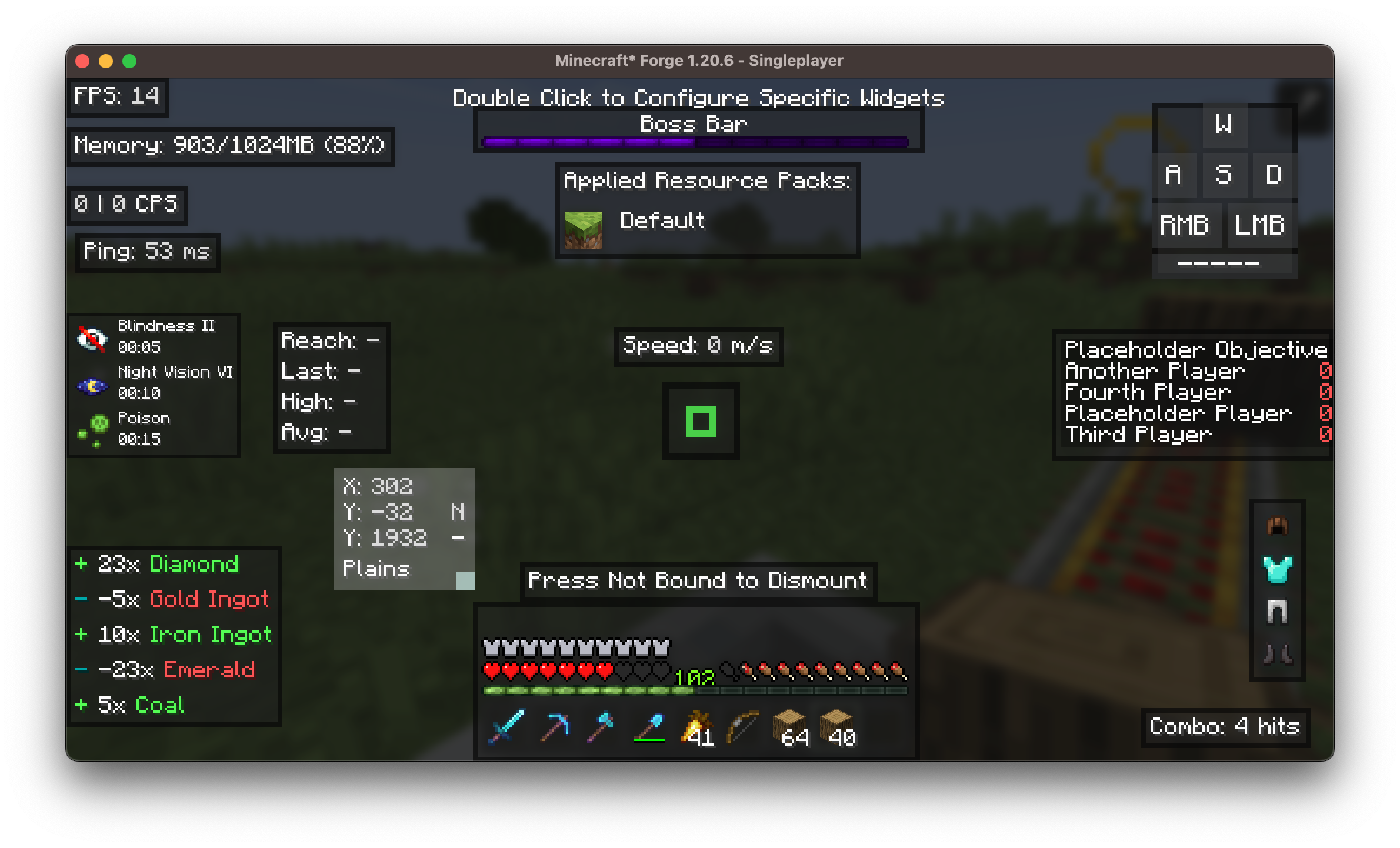
?️ 用户友好型小部件 GUI

简洁直观的内置游戏内界面,让你能够:
- 在定位界面双击任意小部件进行自定义
- 无需编辑配置文件即可访问所有自定义选项
- 在配置时实时预览小部件
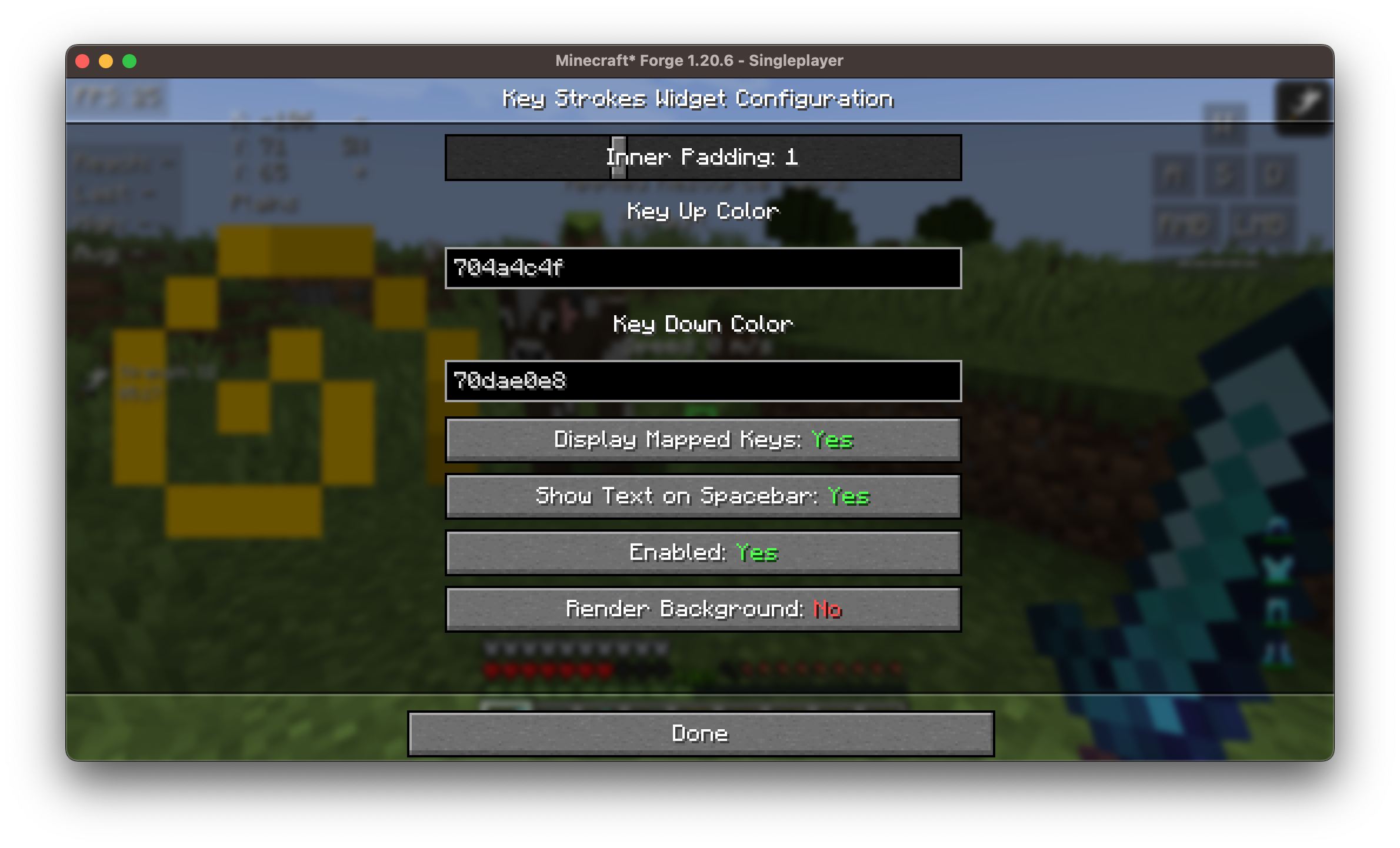
以下是 25+ 个小部件自定义界面的示例:
? 内置快捷键
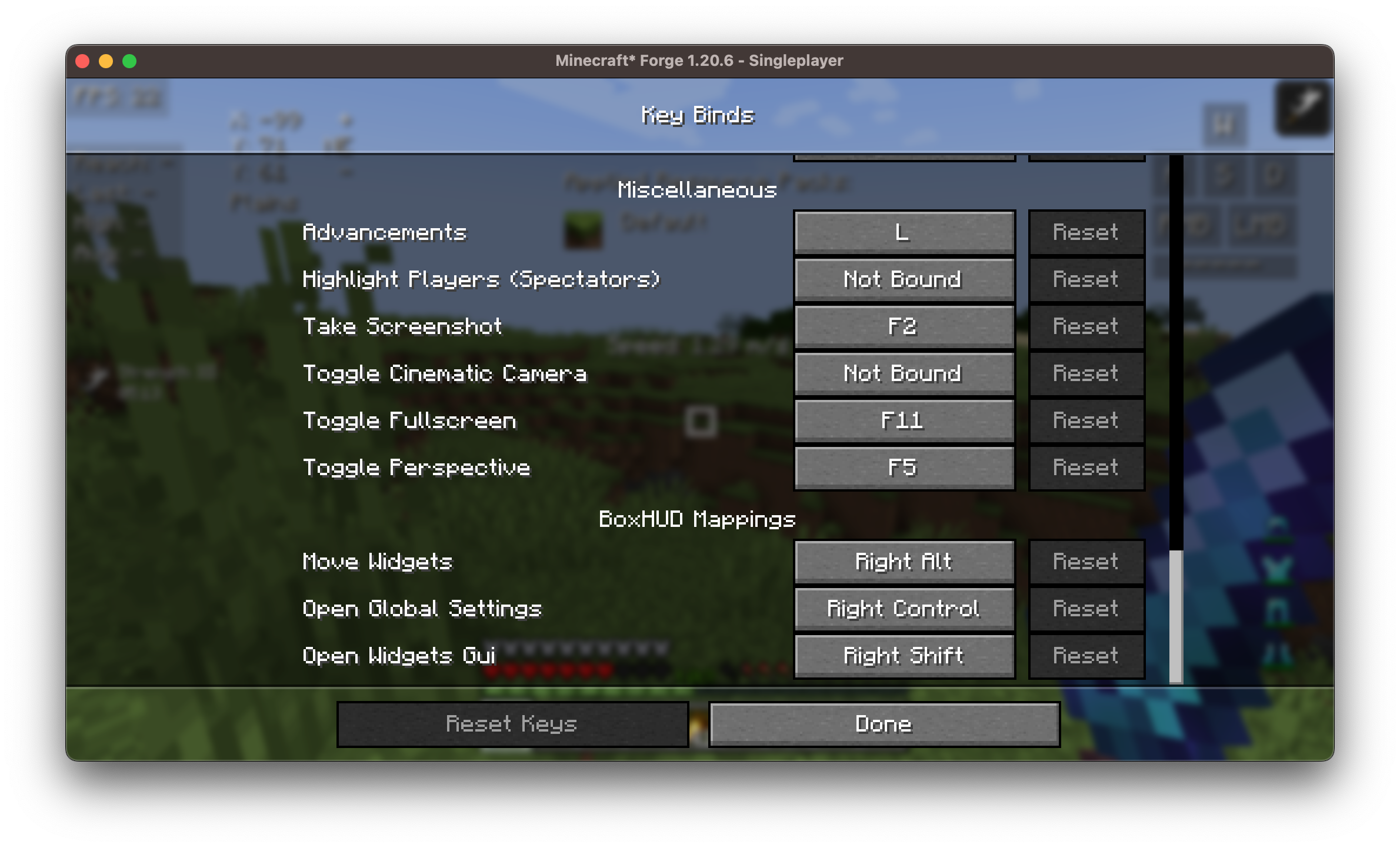
BoxHud 添加了多个实用的快捷键,使在游戏内快速轻松地进行自定义成为可能。你可以在 Minecraft 的控制菜单中设置或更改这些快捷键。
? 可用小部件列表
以下是 BoxHud 包含的所有可用小部件:
| 小部件 | 描述 |
|---|---|
| Ping | 显示网络连接延迟 |
| FPS | 每秒帧数计数器 |
| CPS | 每秒点击次数追踪器 |
| Armor | 可视化当前护甲耐久度 |
| Potions | 列出激活的药水效果 |
| Keystrokes | 显示按下的移动键(WASD 等) |
| Server IP | 显示当前服务器地址 |
| Speed | 移动速度(方块/秒) |
| Scoreboard | 替换或自定义原版计分板 |
| Crosshair | 带有 10 种预设的动态准星 |
| Coordinates | 玩家实时的 XYZ 坐标 |
| ActionBar | 自定义或隐藏动作栏 |
| BossBar | 移动/调整 Boss 血条大小 |
| Arrow | 追踪背包中的箭矢数量 |
| Item Update | 显示物品更新信息 |
| Pack Display | 显示活动的资源/纹理包信息 |
| Real Time | 本地系统时间 |
| Reach | 显示攻击距离 |
| Hotbar | 自定义快捷栏位置 |
| Memory | JVM 内存使用情况 |
| PlayerCount | 服务器上在线玩家数量 |
| Compass | 显示基本方向(东南西北) |
| TPS | 每秒刻数(服务器性能指标) |
| Combo | PvP 连击计数器 |
| Game Clock | 游戏内时间(刻/昼夜时钟) |
⚙️ 自定义选项
每个小部件均支持:
- ✅ 拖拽与缩放
- ? 调整颜色与缩放比例
- ? 内边距与对齐方式
- ?️ 可选背景
安装/依赖项
本模组需要 BoxLib,这是一款由我开发的客户端库模组。
- 安装 Minecraft Forge/Fabric/NeoForge: 下载并安装适用于你 Minecraft 版本的相应模组加载器。
- 下载模组: 下载与你特定模组加载器和 Minecraft 版本相匹配的 Coordinates Display 最新版本。
- 下载 BoxLib: 下载与你特定模组加载器和 Minecraft 版本相匹配的 BoxLib 最新版本。
- 放置模组 jar 文件: 将下载的 jar 文件放入你的 Minecraft
mods文件夹中。该文件夹的位置因操作系统而异。
Fabric 依赖项
推荐使用 Mod Menu 进行配置。
Forge/NeoForge 依赖项
此模组需要 BoxLib,这是一个由我开发的客户端库模组。
贡献
我们欢迎贡献!请随时通过我们的 GitHub 仓库 提交问题或拉取请求。你的反馈有助于我们改进和迭代。
翻译
我们欢迎翻译!如果您有兴趣翻译此模组,请找到 本地化文件 并提交拉取请求。您的贡献将使更多全球用户能够使用该模组。
支持
如果您遇到任何问题,请在 GitHub 仓库中 提交问题。
构建
如果您想在本地机器上构建此模组,请按照以下步骤操作。
- 从 GitHub 下载源代码(Code -> Download zip)
- 确保已安装 Java
- 将 zip 文件解压到本地机器并打开文件夹。
- 在该文件夹中打开终端提示符
- 运行命令 "gradlew build"
- fabric 构建产物位于 "fabric/build/libs"
- forge 构建产物位于 "forge/build/libs"
- neoforge 构建产物位于 "neoforge/build/libs"
BoxHud
BoxHud is a Minecraft mod that adds a suite of powerful and customizable PvP-style HUD widgets. With support for Fabric, Forge, and NeoForge, BoxHud gives you complete control over your interface—whether you're optimizing for combat or aesthetics.
✨ Features
? Cross-Modloader Support
BoxHud works out of the box with Fabric, Forge, and NeoForge, allowing you to use it in nearly any modern Minecraft setup without compatibility issues.
?️ Vanilla HUD Customization
Move or hide default Minecraft HUD components such as:
- The hotbar: reposition it anywhere on screen
- The bossbar: move it out of the way or disable it
- The scoreboard: customize alignment
? 25 Fully Customizable Widgets
Each widget is individually configurable. You can:
- Drag and drop to reposition them
- Adjust scale, color, outline, background, and alignment
- Enable or disable any widget with a click
?️ Coordinates Display Compatibility
BoxHud includes its own coordinates widget to show your X, Y, Z position on screen. But if you enjoy the features in the Coordinates Display mod, BoxHud upgrades the widget automatically:
- The widget will look and behave just like it does in Coordinates Display.
- When you try to customize it in BoxHud, you’ll be taken to Coordinates Display’s settings screen instead.
- You’ll also get bonus features like dimension scaling and better formatting.
Both mods use Boxlib, so they work together seemlessly.
Just drop Coordinates Display into your mods folder and BoxHud will handle the rest.
? Advanced Crosshair Customization
Choose from 10 crosshair styles with full color control.
Includes a Dynamic Crosshair Mode that changes color based on:
- Whether an entity is in range (red)
- If you're about to land a critical hit (dark red)
- Whether a block is within range for interaction (green)
?️ User-Friendly Widget GUIs
A clean and intuitive in-game interface lets you:
- Double click any widget in the positioning screen to customize it
- Access all customization options without editing config files
- Preview widgets live while configuring
An example of the 25+ widget customization screens is shown below:
? Built-In Keybinds
BoxHud adds several useful keybinds to make customization fast and easy in-game. You can set or change these in the Minecraft controls menu.
? Available Widgets
Here’s a list of all available widgets included with BoxHud:
| Widget | Description |
|---|---|
| Ping | Shows your connection latency |
| FPS | Frames per second counter |
| CPS | Clicks per second tracker |
| Armor | Visualizes current armor durability |
| Potions | Lists active potion effects |
| Keystrokes | Shows pressed movement keys (WASD, etc.) |
| Server IP | Displays current server's address |
| Speed | Movement speed in blocks/sec |
| Scoreboard | Replaces or customizes vanilla board |
| Crosshair | Dynamic crosshair with 10 presets |
| Coordinates | Real-time player XYZ position |
| ActionBar | Customize or hide the action bar |
| BossBar | Move/resize the bossbar |
| Arrow | Tracks arrow count in inventory |
| Item Update | Shows item update information |
| Pack Display | Active resource/texture pack info |
| Real Time | Local system time |
| Reach | Displays attack reach distance |
| Hotbar | Custom positioning of the hotbar |
| Memory | JVM memory usage |
| PlayerCount | Online player count on server |
| Compass | Cardinal direction display |
| TPS | Ticks per second (server performance) |
| Combo | PvP combo counter |
| Game Clock | In-game time (tick/daylight clock) |
⚙️ Customization
Each widget supports:
- ✅ Dragging and scaling
- ? Adjustable color, scale
- ? Padding, and alignment
- ?️ Optional background
Installation/Dependencies
This mod requires BoxLib a Client-side library mod developed by me.
- Install Minecraft Forge/Fabric/Neoforge: Download and install the appropriate modloader for your Minecraft version.
- Download the mod: Download the latest release of Coordinates Display for your specific modloader and Minecraft version
- Download BoxLib: Download the latest release of BoxLib for your specific modloader and Minecaft version
- Place the mod jars: Drop the downloaded jar files into your Minecraft mods folder. The location of this folder varies depending on your operating system.
Fabric Dependencies
Mod Menu is recommended for configuration purposes.
Forge/NeoForge Dependencies
This mod requires BoxLib a Client-side library mod developed by me.
Contributing
We encourage contributions! Don't hesitate to open issues or pull requests through our GitHub Repository. Your input helps us improve and evolve.
Translations
We welcome translations! If you're interested in translating this mod, please locate the localization files and submit a pull request. Your contributions help make the mod accessible to more users worldwide.
Support
If you encounter any issues, please open an issue on the GitHub repository.
Building
If you'd like to build this mod on your own machine, follow these steps.
- Download the source code from GitHub (Code -> Download zip)
- Make sure Java is installed
- Extract the zip file onto your local machine, and open the folder.
- Open a terminal prompt in said folder
- Run the command "gradlew build"
- The fabric build will be in "fabric/build/libs"
- The forge build will be in "forge/build/libs"
- The neoforge build will be in "neoforge/build/libs"
下载 BoxHud
下载 BoxHud
下载 BoxHud
需要联机服务器吗?
稳定流畅、一键部署,几分钟即可和朋友联机开服
最低仅需 8 元/月 即可畅快联机
下载 BoxHud
需要联机服务器吗?
稳定流畅、一键部署,几分钟即可和朋友联机开服
最低仅需 8 元/月 即可畅快联机
下载 BoxHud
需要联机服务器吗?
稳定流畅、一键部署,几分钟即可和朋友联机开服
最低仅需 8 元/月 即可畅快联机
下载 BoxHud
需要联机服务器吗?
稳定流畅、一键部署,几分钟即可和朋友联机开服
最低仅需 8 元/月 即可畅快联机
下载 BoxHud
需要联机服务器吗?
稳定流畅、一键部署,几分钟即可和朋友联机开服
最低仅需 8 元/月 即可畅快联机
下载 BoxHud
需要联机服务器吗?
稳定流畅、一键部署,几分钟即可和朋友联机开服
最低仅需 8 元/月 即可畅快联机
下载 BoxHud
下载 BoxHud
需要联机服务器吗?
稳定流畅、一键部署,几分钟即可和朋友联机开服
最低仅需 8 元/月 即可畅快联机
更新日志
- 更新至 26.2
- 在时间组件中添加了天数计数
- 修复了资源包组件的崩溃问题
关于这个资源的讨论、问题反馈与使用心得
还没有讨论,来发第一帖吧
你是这个资源的作者?登录后可认领此资源。
相似资源
 模组
缓冲的原始输入和线程化的事件轮询
 模组

可定制的鞘翅模组,支持装饰纹饰、旗帜图案等更多功能!
 模组

一个用于收集生物掉落物的多区块模组。
 模组

显示你正在注视的方块的信息。(适用于 Minecraft 1.16+ 的 Hwyla/Waila 分支)
 模组

原版世界生成优化模组
 模组
使用 JavaScript 编辑配方、添加自定义物品、编写世界事件!
评论 0
登录后参与评分
还没有评论,来抢沙发吧