
概述
为公告板添加了公告、笔记或订单的交换功能,供玩家之间使用。这个模组适合哪些玩家?希望在其服务器上营造特殊氛围的玩家、不想使用聊天频道(例如聊天被禁用时)进行消息交换的玩家、为离线玩家留下便条以便他们在你不在游戏内时也能阅读的玩家、向玩家发布公告以及发布任务/委托的玩家。本模组并非专为单人游戏设计(至少目前如此),除非仅用于装饰目的。该模组也非常适合那些制作自定义地图、整合包或带有剧情推进机制地图的玩家。
功能
公告板
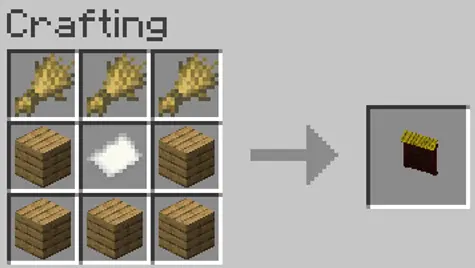
游戏中现包含一种可制作的公告板,可以放置在墙上。从版本 1.2 开始,公告板实际上拥有五个插槽:一个大插槽(只能放置整张尺寸的便条)和四个小插槽,每个小插槽适合放置较小的便条。不过,如果在大插槽位置放置一张整张尺寸的便条,两个小插槽可以合并为一个完整的大插槽。当手持已签名的便条悬停在空插槽上时,该插槽会显示绿色边框,表示可以将便条放置于此。如果悬停在已有便条的插槽上,则会显示红色边框,表示无法在此处放置你自己的便条。当手持空手悬停在便条上时,会显示黄色边框,表示可以进行交互:右键点击会打开一个图形窗口,显示便条的标题、正文和作者信息(除非便条是匿名撰写的——参见“便条”部分)。玩家在阅读便条时有两种选择:关闭窗口并保留便条在原位,或者取走便条,此时便条会被放入玩家的背包中,公告板上的相应空间也会被释放。
便条
整张尺寸便条
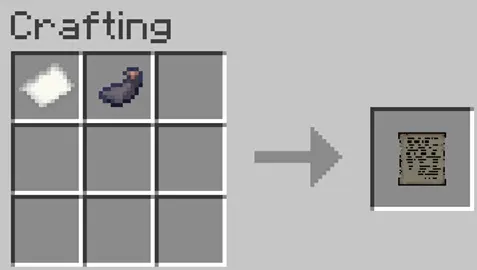
便条由纸张和墨囊制成。初始状态下,它是空白的,没有任何文字或其他内容。它无法直接放置,也无法加盖印章(参见“印章”部分)。在手持便条的情况下右键点击会打开便条编辑器,玩家可以在其中输入便条的标题和正文,并勾选匿名选项(勾选后,便条的作者名将变为“Anonymous”)。一旦便条签名,便不可重写。已签名的便条可以通过右键点击查看,或张贴在公告板上。
小型便条
两张小型便条由一张整张尺寸的便条拆分而成。小型便条的功能与整张尺寸便条完全相同,仅有几点例外。首先,字符限制减半,最多支持 256 个字符。其次,公告板上可以张贴更多的小型便条,因为两个整张尺寸的插槽相当于四个小型便条插槽。
时间更新
在 1.1.1 “时间更新”之后,未加盖印章的便条将在张贴一小时后消失。
印章
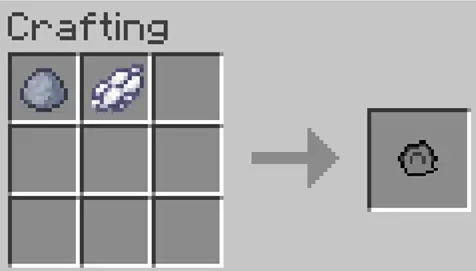
印章仅是一种装饰元素,并非创建或附着便条所必需。然而,它有助于识别便条的制作者(如果玩家们已经约定了便条的颜色)或吸引注意力。要为便条加盖印章,请将便条装备在副手,将所需颜色的印章装备在主手,然后右键点击。印章会从玩家背包中消失,而便条将获得专属印章(印章不会出现在物品栏中,但在悬停于便条上方时会显示签名)。一旦便条张贴在公告板上,印章就会变得可见。
时间更新
在 1.1 “时间更新”之后,拥有印章的便条将一直保留在公告板上,直到被玩家移除或公告板被破坏为止。
未来计划
未来,我们计划扩展模组的功能:
v1.0 - 正式版 ✅
v1.1 - 时间更新 ✅
v1.2 - 紧凑便条 ✅
1.21.1 移植版 ✅
Forge 移植版 ?
v1.3 - 鲜活世界 ?
v1.4 - 任务更新
v1.5 - 优化改进(QoL 提升)
搭配建议…
本模组在与限制玩家交流方式的游戏玩法结合时效果更佳。例如,你可以添加此模组、任何语音聊天模组,或禁用游戏内聊天功能的模组(如 Simple Chat Disabler),从而在一定程度上削弱原版游戏中某些社交设计的影响。
General
Adds bulletin boards for exchanging announcements, notes or orders between players. Who might this mod be for? Players who want to create a special atmosphere on their server, exchange messages without using chat (for example, if it's disabled), leave notes for offline players (so they can read them even when you're not in the game), make announcements to players, and place orders. This mod is not intended for single-player play (at least for now), except perhaps for some decorative purposes. The mod is also well suited for players who create their own maps, modpacks, or maps with story-driven progression.
Features
Bulletin Board
The game now features a craftable notice board that can be placed on the wall. Starting with version 1.2, the board actually has five slots: one large one (which can only hold a full-size note) and four small slots, each suitable for smaller notes. However, two small slots can be combined into one full-size slot by placing a full-size note there. When hovering over an empty slot with a signed note in hand, the slot will be outlined with a green border, indicating that the note can be placed there. If hovering over a slot with an existing note, the slot will be outlined with a red border, indicating that you cannot place your own note there. When hovering over a note with an empty hand, it will be outlined with a yellow border, indicating that it can be interacted with: right-clicking opens a graphical window containing the note's title, text, and author (unless the note was written anonymously – see "Note" below). The player has two options when reading a note: close the window, leaving the note in place, or take the note, after which it is placed in the player's inventory and the space on the board is freed up.
Notes
Full-size note
A note is made from paper and an ink sac. Initially, it is blank, with no text or anything else. It cannot be placed, nor can it be stamped (see "Seal" below). Right-clicking with a note in hand opens the note editor, where the player can enter the note's title and text, as well as check the anonymity box (checking this box changes the note's nickname to "Anonymous"). Once a note is signed, it cannot be rewritten. A signed note can be viewed by right-clicking or posted on the board.
Small note
Two small notes are made from one full-size note. The functionality of the small note is identical to that of the full-size note, with a couple of exceptions. First, the character count is halved, reaching 256 characters. Second, more small notes can be posted on the board, as two full-size slots equal four slots for small notes.
Time Update
After the 1.1.1 "Time Update" update, notes without a seal will disappear an hour after they were posted.
Seal
A seal is merely a decorative element and is not required for creating and attaching a note. However, it makes it easier to identify the player who created it (if players have agreed on the colors for the notes) or to attract attention. To apply a seal to a note, equip the note in your off-hand, equip a seal of the desired color in your main hand, and right-click. The seal will then disappear from the player's inventory, and the note will receive its own seal (it won't appear in the inventory, but a signature is added when you hover over the note). Once the note is placed on the board, the seal will be visible.
Time Update
After the 1.1 "Time Update", the presence of a seal ensures that the note will remain on the board until the note is removed by a player or until the notice board is destroyed.
What's next?
In the future, we plan to expand the mod's functionality:
v1.0 - Release ✅
v1.1 - Time Update ✅
v1.2 - Compact Notes✅
1.21.1 port✅
Forge port ?
v1.3 - Living World ?
v1.4 - Quest Update
v1.5 - Polish (QoL improvements)
Try with…
This mod works even better with gameplay that limits players' communication methods. For example, you can add this mod, any voice chat mod, or a mod that disables the ability to write in-game chat (Simple Chat Disabler), which somewhat undermines the social aspect of some of the game's original designs.

下载 Bulletin Board
下载 Bulletin Board
下载 Bulletin Board
下载 Bulletin Board
下载 Bulletin Board
下载 Bulletin Board
下载 Bulletin Board
下载 Bulletin Board
- 完全重新设计的笔记编辑器界面。
- 自动换行。
- 按 Enter 键进行换行。
- 支持长文本滚动。
- 改进的界面定位。
关于这个资源的讨论、问题反馈与使用心得
还没有讨论,来发第一帖吧
你是这个资源的作者?登录后可认领此资源。
相似资源
 模组

可定制的鞘翅模组,支持装饰纹饰、旗帜图案等更多功能!
 模组
在游戏画面角落显示附近世界地形、玩家、生物和实体的地图。可创建路径点,帮助你找到标记过的位置。
 模组

适用于 MC 1.18+ 的 Effekseer 加载器
 模组

新增 50+ 个独特生物群系,为你的世界增添新树木、花卉等更多元素!
 模组
添加全屏世界地图,显示你在世界中已探索的区域。与 Xaero's Minimap 搭配使用效果极佳。
 模组

基于 GTCEu 1.12.2 的现代 GregTech
评论 0
登录后参与评分
还没有评论,来抢沙发吧