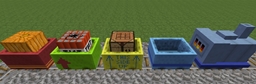
你是否受够了千篇一律的灰色矿车?你是否曾希望能为矿车上色,使其与闪亮的新型蒸汽机车相配?或者只是想从人群中脱颖而出?
现在,你可以做到了!Cart Livery 是一个模组,允许你将矿车涂成16种绚丽的羊群颜色,并为它们贴上彩色贴纸。
用法
- 在普通的 3x3 合成台中合成一个“涂装切割工具”,方式如下:
- 左上角有一个预览区域,你可以在这里测试你的涂装效果
- 可以使用染料左键或右键点击预览区,分别更改贴纸的主色调和副色调
- 使用箭头按钮切换要制作的贴纸。预览中的颜色仅供参考,你实际获得的始终是白色贴纸
- 在左侧槽位放入一些纸张,即可从右侧槽位取出“涂装贴纸”
- 该工具拥有 100 次使用次数
- 将贴纸放置在 3x3 合成台的中心槽位,然后将主色调染料放在上方,副色调染料放在下方。
- 这将制作出一个包含两种颜色的贴纸(类似于 Railcraft 机车着色)。
- 潜行 + 右键点击矿车并使用“涂装贴纸”将其应用。如果矿车上已有贴纸,旧贴纸会自动脱落以便回收。
- 潜行 + 右键点击矿车并使用“涂装切割工具”移除其上的贴纸。贴纸会自动脱落以便回收。
- 如果你安装了 Railcraft 并启用了相关配置选项,你可以为矿车应用 Railcraft 徽章。只需潜行 + 右键点击徽章在矿车上即可应用。如果矿车上已有徽章,旧徽章会自动脱落以便回收。
- 潜行 + 右键点击矿车并使用“涂装切割工具”移除其上的徽章。徽章会自动脱落以便回收。
- 如果你是自动化导向的玩家,可以在 3x3 合成台中合成“涂装切割压机”,方式如下:
- 要使用“涂装切割压机”,请在左侧槽位放入纸张,并在中间槽位放入一张预制好的贴纸作为模板。
- “涂装切割压机”将制作一张与模板图案相同的白色贴纸,并将其放入右侧槽位。
- 除非你禁用了配置选项,“涂装切割压机”在制作贴纸时需要消耗 RF(红石通量)。
贴纸
Cart Livery 在设计时考虑了可扩展性。模组本身仅包含少量涂装贴纸,但可以通过资源包轻松添加新贴纸。其他模组也可以选择定义自己的内置贴纸集。
你能制作的贴纸完全由你的客户端决定——即当前激活的所有资源包的总和。在多人游戏(SMP)中,没有特定贴纸来源资源包的其他玩家将无法看到它;但其他一切功能仍然正常(他们可以正常着色和应用贴纸)。
创建资源包
我的贴图可能很糟糕,但我希望更有艺术天赋的人能在此基础上发挥创意。创建一个资源包非常简单,可以参考提供的资源包——它是内置可用贴图的子集——来了解具体做法。
基本上你需要三样东西:
- 一个 pack.mcmeta 文件(一如既往),其中包含额外的元数据以列出其添加的贴纸
- 位于 /assets/cartlivery/lang 中的一个或多个语言文件,用于定义贴纸的名称(是的,你可以对其进行本地化)
- 位于 /assets/cartlivery/textures/livery 中的贴图本身(PNG 格式)
模组只是在矿车周围绘制一个带有纹理的方框,该纹理大部分是透明的。制作贴图最简单的方法是从我的资源包中的 test.png 贴图开始。虽然技术上没有限制只能使用白色,但彩色贴图在被染色后可能会看起来很奇怪。
兼容性与支持
无论是否安装 Railcraft,该模组都能正常工作(测试版本为 MC 1.7.10 的 RC 9.5.0.1 和 MC 1.6.4 的 RC 8.3.2.0)。它也完美兼容 Extra Carts 和 Steve's Carts。
默认包含了 Waila 1.5.0 及更高版本的支持,它可以显示矿车上贴纸的名称、来源资源包(如果你有)、颜色以及矿车上的徽章。这些显示项可以单独开关。
目前,NEI 中不显示贴纸着色配方。
许可证
你可以在任何公共或私人整合包中使用 Cart Livery,无任何限制。
你可以将 Cart Livery 作为公共或私人整合包的一部分进行分发,但禁止任何形式的下载货币化行为(这仅指分发:你可以按自己的喜好运营服务器)。
不得公开独立分发 Cart Livery,或直接链接到其底层文件。请使用提供的 goo.gl 重定向链接,或直接链接到此主题。
如果你在整合包中使用它,欢迎提供对此主题或我 GitHub 页面的链接。
更新日志
0.11.1 - 更多精彩!
- 添加了配置选项
- 涂装切割压床现在使用 RF(红石流体)来运行(可在配置中禁用)
- 添加了 Redstone Flux API(没错,就是它)
- 添加了自定义音效以替换上一版本中使用的原版音效
- 更新了 Sphax 贴图补丁
- CartLivery 在有无 Railcraft 的情况下均可正常工作
- 涂装切割压床已移至运输创造标签页
- 修复了一些小错误
- 尝试补全德语语言文件中的缺失内容(需要一位真正懂德语的人……也许是 Vexatos?)
0.10.8 - 贴图与音效!
- 更改了涂装切割压床的贴图
- 涂装切割压床在工作时添加了动画和音效
- 添加贴纸和徽章应用及移除时的音效
- 添加了 Sphax PureBDcraft 贴图补丁
0.10.7a
0.10.6
- 在涂装切割工具图形界面中添加了按住 Shift 键点击的功能
- 使用涂装切割工具移除车厢自定义部件时,该工具会受到损坏
- 移除了“MysteryDump”涂装贴纸,因为已添加 Railcraft 徽章
(要获取 MysteryDump 徽章,请使用解锁码“MysteryDump”)
0.10.4 - 徽章!
- 新增在矿车上放置 Railcraft 徽章的功能——只需手持徽章对矿车执行Shift+右键即可;使用涂装切割工具对矿车执行Shift+右键时,会先移除徽章并将其作为物品返还给你;若要取回贴纸,再次执行该操作即可将徽章作为物品收回。
0.10.2 - 新功能!
- 添加了自动涂装切割工具:
将纸张放入左上角槽位,并将预制的贴纸放入中间
槽位作为模板。成品贴纸会从右上角槽位输出。可与漏斗、BuildCraft 管道及其他物品传输设备配合使用。
- 更新并修复了 mcmod.info 文件
- 添加了模组图标
0.10.0 - 大量改动
- 更新至 1.7.10、Forge 10.13.2.1277 以及 Waila 1.5.8a
- 为 Livery Cutting Tool 添加了新材质与合成配方
- 更改贴纸的合成配方,需同时包含主色与副色
- 贴纸物品的渲染效果现支持双色调显示,类似 Railcraft 的机车
- 优化了贴纸的物品提示文本
0.9.3-beta
0.9.2-beta
0.9.1-beta
- 模组可定义内置涂装(无需资源包)
- 默认涂装集现已包含在模组内
- 新增德语本地化(感谢 Vexatos)
- 更多涂装
0.9-beta
安装方法
将 JAR 文件放入你的 /mods 文件夹,你懂的。
Bug 报告
请访问我的 GitHub 项目页面
欢迎随时评论与反馈!
请提供需要翻译的文本内容。
你也可以在以下平台找到我,用户名均为“kuenzign”:Github、Minecraft Forum、Curseforge、FTB Forum、BDcraft Forums 以及 DeviantArt。
Are you fed up with standard-issue gray minecarts? Have you ever wished you could color your carts so they match your shiny new steam locomotive? Or just stand out from the crowd?
Well, now you can! Cart Livery is a mod that allows you to paint your carts in all 16 glorious sheep colors, and apply colored stickers to them.
Usage
- Craft a Livery Cutting Tool in a normal 3x3 crafting table like this:
- Right-click with the Livery Cutting Tool to bring up its GUI
- There is a preview in the top left, where you can test how your livery will appear
- You can left- or right-click on the preview with a piece of dye to change the primary color and secondary color of the sticker, respectively
- Change which sticker to craft with the arrow buttons. The colors in the preview are for show only, you will always get white stickers
- Put some paper in the left slot, and you can pull out the Livery Sticker from the right
- The Tool has 100 uses
- Place your sticker in the center slot of a 3x3 crafting table, then place the primary color dye on top, and the secondary color dye on bottom.
- This crafts a sticker with the two colors (similar to coloring Railcraft locomotives).
- Sneak + right-click with a Livery Sticker on a cart to apply it. If the cart already has a sticker on it, the old sticker will pop off of it so you can recollect it.
- Sneak + right-click with the Livery Cutting Tool on a cart to remove the sticker from it. The sticker will pop off of it so you can recollect it.
- If you have Railcraft installed and the config option enabled, you can apply Railcraft emblems to carts. Just sneak + right-click with an emblem on a cart to apply it. If the cart already has an emblem on it, the old emblem will pop off of it so you can recollect it.
- Sneak + right-click with the Livery Cutting Tool on a cart to remove the emblem from it. The emblem will pop off of it so you can recollect it.
- If you are someone that is automation-oriented, you can craft the Livery Cutting Press in a 3x3 crafting table like this:
- To use the Livery Cutting Press, place paper in the left slot and a pre-made sticker in the middle slot as a template.
- The Livery Cutting Press will craft a white sticker with the same pattern as the template and put it in the right slot.
- Unless you disable the config option, the Livery Cutting Press will require RF (redstone flux) in order to craft stickers.
Stickers
Cart Livery is designed with extensibility in mind. The mod itself contains only a few livery stickers, but new ones can be easily added with resource packs. Other mods may also define their own built-in set of stickers if they wish.
The stickers you are able to craft are determined solely by your client - i.e. the sum of all resource packs you have active at the moment. In SMP, other players who don't have the particular pack a sticker comes from will not be able to see it; everything else however will still work (they can color and apply the stickers normally).
Creating a Resource Pack
My own textures may be bad, but it's my hope that some more artistically minded people will take off with this idea. Creating a pack is quite easy, take a look at the provided pack - which is a subset of those available built-in - to get an idea how it's done.
Basically you need 3 things:
- A pack.mcmeta file (as always), with some extra metadata to list the stickers it adds
- One or more language files in /assets/cartlivery/lang to define the names of the stickers (yes, you can localize them)
- The textures themselves in /assets/cartlivery/textures/livery (PNG format)
The mod simply draws a textured box around the minecart, with a texture that's mostly transparent. The easiest way to make a texture is to start off from the test.png texture in my pack. There are no technical reasons to use only white, however colored textures may look weird when dyed.
Compatibility & Support
The mod works fine both with and without Railcraft installed (tested version is RC 9.5.0.1 for MC 1.7.10, RC 8.3.2.0 for MC 1.6.4). It also works fine with Extra Carts and Steve's Carts installed.
Support for Waila versions 1.5.0 and higher is included out-of-the-box, it can show you the name of the sticker on a cart, the resource pack it is from (if you have it), the colors, and the emblem on the cart. These may be switched on and off separately.
Sticker coloring recipes do not show up in NEI at the moment.
License
You may use Cart Livery in any public or private modpacks without any limitation.
You may distribute Cart Livery as part of a public or private modpack, but any form of monetization on the download is forbidden (this refers only to distribution: you may run your servers however you like).
You may not publicly distribute Cart Livery standalone, or hotlink to the underlying files. Use the provided goo.gl redirector link, or simply link to this topic.
If you use it in your pack, a link to this topic or my GitHub page would be much appreciated.
Changelog
0.11.1 - More Awesomeness!
- Added config options
- Livery cutting press now uses RF to function (can be disabled in config)
- Added Redstone Flux API (duh)
- Added custom sounds to replace vanilla sounds used in previous update
- Updated Sphax patches
- CartLivery works with and without Railcraft
- Livery cutting press moved to transportation creative tab
- Fix small bugs
- Attempted to add missing pieces to German language file (need someone who actually speaks German... maybe Vexatos?)
0.10.8 - Textures and Sounds!
- Changed Livery Cutting Press texture
- Added animation and sound when Livery Cutting Press crafts
- Added sounds when stickers and emblems are applied and removed
- Added Sphax PureBDcraft patches
0.10.7a
- Hopefully fixed multiplayer
0.10.6
- Added shift-click to Livery Cutting Tool GUI
- Livery Cutting Tool takes damage when used to remove customizations to carts
- Removed "MysteryDump" Livery Sticker because Railcraft Emblems have been added
(To get the MysteryDump emblem, use the unlock code "MysteryDump")
0.10.4 - Emblems!
- Added the ability to place Railcraft emblems on carts - All you have to
do is shift right click on the cart with an emblem in your hand,
When you shift right click on a cart with the Livery Cutting Tool, the
emblem is removed first and you get it back as an item,
To retrieve the sticker, just do it again and you will receive it back
as an item
0.10.2 - Features!
- Added Automatic Livery Cutting Tool:
Insert Paper in the top left slot and a premade sticker in the middle
slot as a template. Stickers are output into the top right slot. Works
with hoppers, buildcraft pipes, and anything else that transports items.
- Updated and fixed the mcmod.info file
- Added mod logo
0.10.0 - Lots of Changes
- Updated to 1.7.10, Forge 10.13.2.1277, and Waila 1.5.8a
- Added new texture and recipe for Livery Cutting Tool
- Changed dying recipe of stickers to include both primary and secondary colors
- Sticker item renders with both colors like Railcraft locomotives
- Improved sticker tooltip
0.9.3-beta
- fixed rendering without Railcraft installed
0.9.2-beta
- fixed network handling bug
0.9.1-beta
- mods may define built-in liveries (without resource packs)
- default livery set is now included in mod
- added german localization (thanks Vexatos)
- more liveries
0.9-beta
Installation
Put the JAR in yout /mods folder, you know the drill.
Bug Reports
Head to my GitHub project page
Comments & feedback are always welcome!
You can also find me on Github, Minecraft Forum, Curseforge, FTB Forum, BDcraft Forums, and DeviantArt all with the username "kuenzign".

 模组

 模组
 模组

 模组

 模组
 模组

评论 0
登录后参与评分
还没有评论,来抢沙发吧