Coasters Simulated: Track Styles
这是 Create: Coasters Simulated 的一个非官方 NeoForge 模组,它添加了基于现实制造商轨道的自定义、逼真轨道模型,支持通过 HEX 代码独立定制铁轨和脊柱颜色,并提供一个游戏内工具以轻松配置轨道样式。
目前该模组仍处于实验阶段,但如果您想要构建更逼真的现实过山车布局或尝试不同的轨道样式,它是可用的。
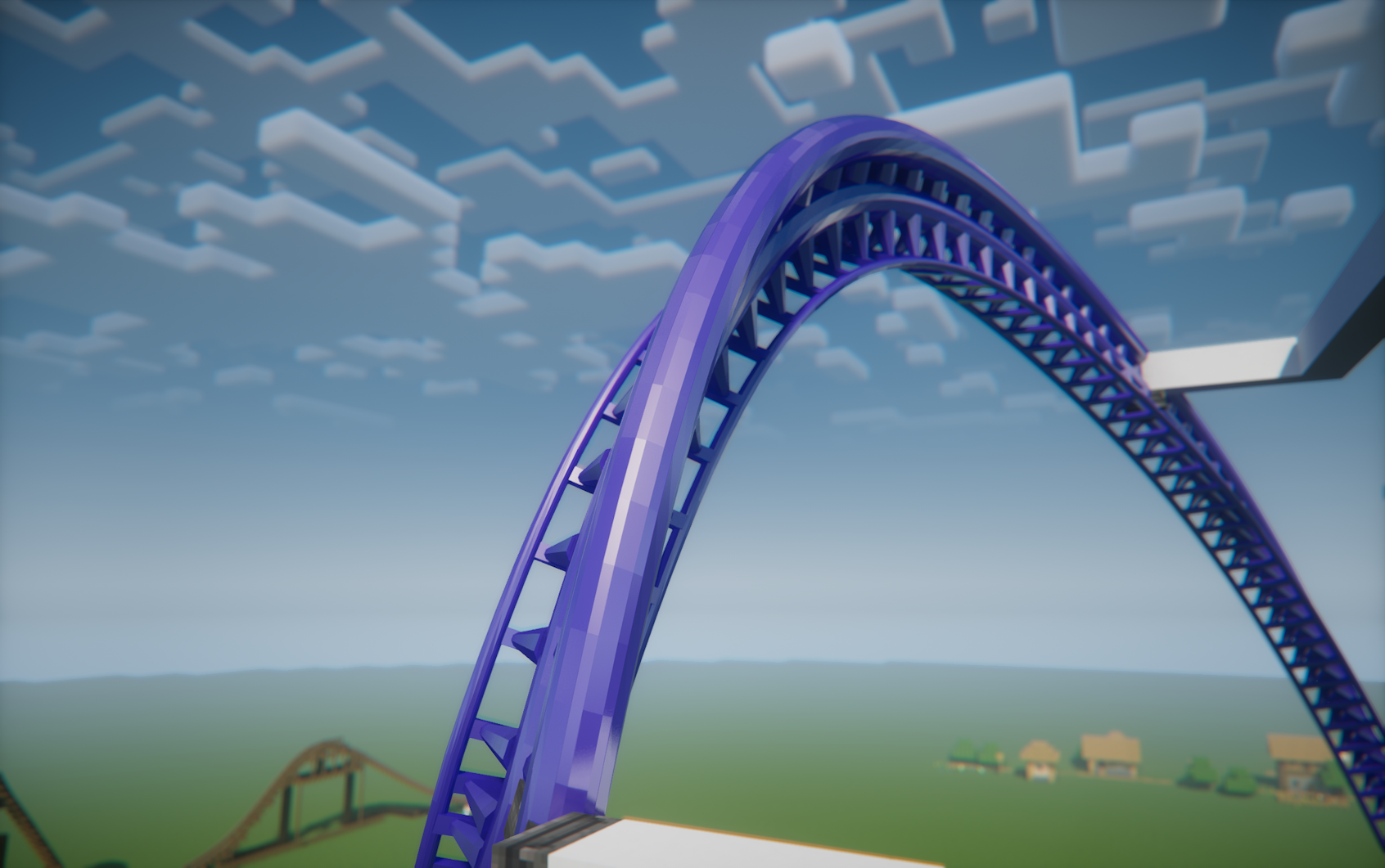
新增内容
- 自定义轨道模型: 添加了 15 种以上的轨道类型,涵盖 B&M、Intamin、Vekoma、Arrow、RMC 以及木质风格。
- 中样条过渡: 您可以在同一段曲线中切换轨道类型(例如,从单脊柱轨道过渡到双脊柱轨道)。
- 游戏内样式工具与 GUI: 带有图形用户界面的自定义工具,用于设置样式并输入 HEX 颜色值。
- 独立的铁轨与脊柱颜色: 使用 HEX 代码(
#RRGGBB)分别设置铁轨颜色和脊柱/枕木颜色。
- 批量应用与取色器: 一键将整个连接轨道回路中的样式应用到所有轨道,或者从现有的锚点采样样式。
- labPBR 支持: 内置 PBR 纹理,在启用 PBR 的光影下运行时可实现逼真的光泽和反射效果。
- (实验性)锚点样式工具: 带有图形用户界面的自定义工具,用于为连接轨道的过山车锚点方块及其桁架进行样式设置。
- 不可见样式有效,但如果您的整合包中包含 Forgified Fabric API,锚点方块的自定义样式可能会出现一些视觉问题。
包含的轨道样式
- B&M Steel
- Intamin Box Truss
- Intamin Tri Truss
- Intamin Heavy
- Intamin Heavy Double Spine
- Intamin BB
- Intamin BB Double Spine
- Steel Flat
- Steel Flat Truss
- Wooden (all wood types + white)
- Vekoma New-Gen
- Premier Rides (Steel, Tri, Tri Tall Spine, LSM)
- Arrow Tubular
- RMC I-Box
- RMC I-Box (Mixed Rail Test)
- (可用,但有时两种铁轨颜色会翻转,只需制作第二个样式并将两种颜色互换即可)
未来计划:
使用方法
从新的创造模式标签页获取 Coaster Style Tool:
- 在空中右键点击: 打开 GUI 以选择样式、输入基础/铁轨 HEX 代码,或切换“匹配基础颜色”。
- 右键点击锚点: 将工具的设置应用于该特定锚点。
- Shift + 右键点击锚点: 将该轨道回路上所有连接的锚点应用设置。
- Alt + 右键点击锚点: 从锚点复制样式和颜色到您的工具中。
- Shift(在物品栏悬停): 显示快速控制参考。
注意
由于某些限制,您必须右键点击轨道锚点来应用样式,而不是直接点击轨道本身。如果没有任何变化,请点击另一个锚点。
渲染与光影设置
此模组依赖 Flywheel 实例渲染来显示自定义轨道模型:
- Flywheel 必须开启: 将 Flywheel 设置为 Indirect(默认)或 Instancing。如果禁用了 Flywheel,自定义轨道模型将无法渲染。
- 如果使用光影: 您需要以下兼容模组之一,以便 Flywheel 实例能在光影中正确渲染:
(已与 EminGT 的 Complementary 在 labPBR 模式下以及 RRe36 的 Nostalgia 配合测试,资源包反射已开启)。
资源包
所有模型都可以通过资源包进行覆盖。提取模组 .jar 文件以检查资产路径结构(assets/coasterssimulatedextratypes/...)和模型命名约定。
要求与许可证
免责声明:这是一个非官方模组。它与 Mojang、Create Team、Sable / Aeronautics 或 SilverGold(Create: Coasters Simulated 的创作者)均无关联。
- 商标: 所有制造商名称(Intamin、Vekoma、Arrow Dynamics、B&M、RMC 等)仅用于描述目的,以识别轨道几何样式,并属于其各自的商标所有者。
Coasters Simulated: Track Styles
This is an unofficial NeoForge addon for Create: Coasters Simulated that adds custom, realistic track models based off real life manufacturer track, independent rail and spine color customization by HEX code, and an in-game tool to easily configure track styles.
It's currently pretty experimental, but functional if you want to build more realistic real-life roller coaster layouts or experiment with different track styles.
What It Adds
- Custom Track Models: Adds 15+ track types covering B&M, Intamin, Vekoma, Arrow, RMC, and Wooden styles.
- Mid-Spline Transitions: You can switch track types along the same curve (e.g., transitioning from single-spine to double-spine track).
- In-Game Style Tool & GUI: A custom tool with a GUI for setting styles and entering hex colors.
- Independent Rail & Spine Colors: Set rail colors and spine/tie colors separately using Hex codes (
#RRGGBB).
- Bulk Apply & Picker: Apply styles down the entire connected track circuit in one click, or sample styles off an existing anchor.
- labPBR Support: Built-in PBR textures for realistic shine/reflections when running shaders with PBR enabled.
- (Experimental) Anchor Style Tool: A custom tool with GUI for styling the coaster anchorpoint block along with the girder that connects it to the track.
- Invisible style works, but the custom style can have some visual issues for the anchorpoint block when Forgified Fabric API is in your pack.
Included Track Styles
- B&M Steel
- Intamin Box Truss
- Intamin Tri Truss
- Intamin Heavy
- Intamin Heavy Double Spine
- Intamin BB
- Intamin BB Double Spine
- Steel Flat
- Steel Flat Truss
- Wooden (all wood types + white)
- Vekoma New-Gen
- Premier Rides (Steel, Tri, Tri Tall Spine, LSM)
- Arrow Tubular
- RMC I-Box
- RMC I-Box (Mixed Rail Test)
- (works, but sometimes the two rail colors get flipped, just make a second style with the two colors flipped)
For the future:
How to Use
Get the Coaster Style Tool from the new creative tab:
- Right-Click in air: Opens the GUI to pick a style, enter base/rail hex codes, or toggle "Match Base Color".
- Right-Click anchor: Applies the tool's settings to that specific anchor.
- Shift + Right-Click anchor: Applies settings to all connected anchors along that track circuit.
- Alt + Right-Click anchor: Copies the style and colors off the anchor into your tool.
- Shift (Hover in inventory): Shows a quick control reference.
Note
Due to some limitations, You must right click the track anchor to apply a style, not the track itself. If nothing is changing, click another anchor.
Rendering & Shaders Setup
This mod relies on Flywheel instance rendering to display custom track models:
- Flywheel must be ON: Set Flywheel to Indirect (Default) or Instancing. If Flywheel is disabled, custom track models will not render.
- If using shaders: You need one of these compatibility mods so Flywheel instances render properly through shaders:
(Tested with Complementary by EminGT in labPBR mode and Nostalgia by RRe36 with resource pack reflections turned on).
Resource Packs
All models can be overridden using a resource pack. Extract the mod .jar file to check the asset path structure (assets/coasterssimulatedextratypes/...) and model naming conventions.
Requirements & License
Disclaimer: This is an unofficial addon. It is not affiliated with Mojang, the Create Team, Sable / Aeronautics, or SilverGold (creator of Create: Coasters Simulated).
- Trademarks: All manufacturer names (Intamin, Vekoma, Arrow Dynamics, B&M, RMC, etc.) are used purely for descriptive purposes to identify track geometry styles and belong to their respective trademark owners.


 模组

 模组
 模组

 模组

 模组
 模组

评论 0
登录后参与评分
还没有评论,来抢沙发吧