
CommandKeys
一款强大的命令宏模组。
功能
- 每个宏可包含多个命令
- 每个按键绑定可关联多个宏
- 命令之间可选延迟时间
- 支持修饰键的高效按键冲突管理
- 五种模式:
- 按下按键时发送所有命令
- 循环执行命令,每次按键执行一条
- 按可配置的间隔重复执行
- 随机选择一条消息并发送
- 在聊天栏输入命令,但不发送
- 配置文件支持基于服务器地址或世界名称自动切换
- 完全自定义的图形界面,便于配置
使用方法
配置文件
自动切换
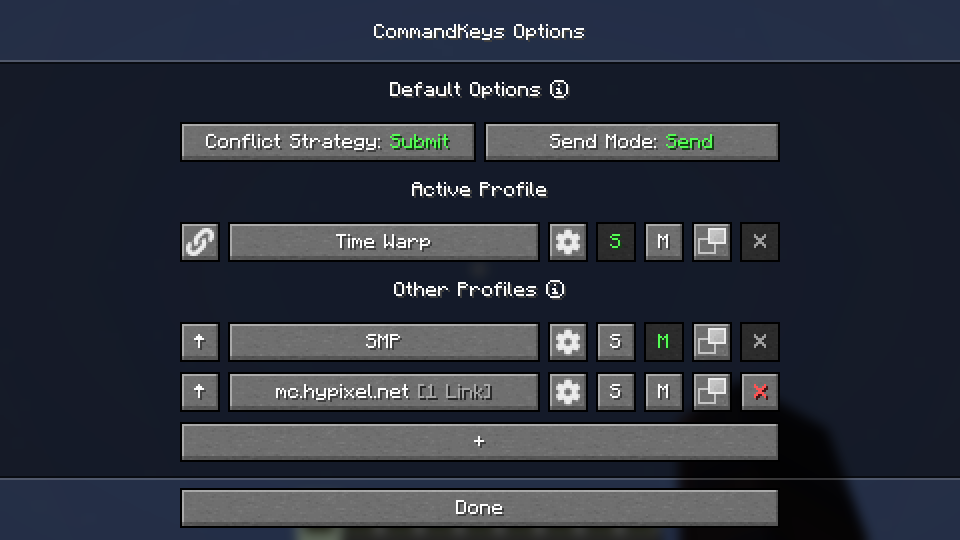
- 当你加入世界/服务器时,其名称/地址将与配置文件列表进行比对。如果存在与该世界/服务器关联的配置文件,则该配置将被激活。否则,将使用默认配置文件。
- 使用
S 和 M 按钮将某个配置文件设为单人游戏或多人游戏的默认配置。
手动切换
- 要手动激活配置文件,请点击左侧的上箭头按钮。
- 点击链接按钮可将该配置文件与当前世界/服务器关联,以便未来自动激活。
- 点击设置按钮可重命名配置文件或删除关联。
宏
访问方式
- 在配置文件选择界面上点击大按钮,或在游戏内按下编辑键(默认:
K)来编辑配置文件。
绑定按键
- 你可以将几乎任何键盘按键或鼠标按钮绑定到宏,类似于 Minecraft 自带的控制设置。此外,你还可以绑定任意一对按键;只需按住其中一个键的同时按下另一个键即可(例如,按住 'Shift' 的同时按下 'T')。
冲突策略
- 如果某个按键已被 Minecraft 占用,你可以选择冲突处理策略:
Submit(提交):宏将被忽略,Minecraft 的按键绑定将正常生效。Assert(强制):宏和 Minecraft 的按键绑定都将生效。Veto(否决):宏将生效,Minecraft 的按键绑定将被取消(如果可能)。Avoid(避免):宏在游戏中将无法工作,但你仍可以通过在编辑界面(未选中任何内容时)按下相应按键来激活它。例如,如果你已将宏绑定到 W,则按下 K 再按下 W 即可激活它。
发送模式
Send(发送):将发送宏中的所有命令。你可以配置命令之间的延迟。Type(输入):第一条命令将被输入到聊天框中,但不会发送。Edit(编辑):将显示一个图形界面,允许你为 %edit% 占位符输入替换内容,然后发送第一条消息。Cycle(循环):将循环执行命令,每次按键发送一条命令。- 注意:在
Cycle 模式下,如果需要单次按键发送多条命令,请将它们放入同一个输入框中,并用双逗号分隔(例如 /tick freeze,,/say Stopped)。
Random(随机):每次按键时将随机选择一条消息并发送。Repeat(重复):与 Send 类似,但宏会重复执行(延迟可配置),直到你再次按下该按键为止。
占位符
-
简单占位符
%lastsent%:历史记录中最近发送的消息或命令(如果有)。%lastcmd%:历史记录中最近发送的命令(如果有)。%clipboard%:剪贴板的内容(如果有)。%myname%:Minecraft 用户名。%pmsender%:最近收到的私人消息的发件人名称(如果有)。(最多搜索 50 条记录)。%pos%:玩家的整数坐标(x y z)。%x%:玩家的整数 X 坐标。Y 和 Z 坐标也可用。%lpos%:玩家视线所注视方块的整数坐标(如果有)。同时提供 %lx%、%ly%、%lz%。
-
正则表达式占位符
%#(.*)%:从最近收到的匹配 # 后正则表达式的消息中提取的第 1 组正则捕获组内容(如果有)。注意:正则模式必须至少包含 1 个捕获组。%clipboard#(.*)%:剪贴板的内容(如果有),并验证其是否匹配 # 后的正则表达式模式。这可用于防止意外暴露剪贴板内容。例如,使用 %clipboard#^-?\d+ -?\d+ -?\d+$% 仅在剪贴板内容格式为一组坐标时才发送。%pos([FBLR])(\d+)%:类似于 %pos%,但会根据玩家最接近朝向的基本方向(前/后/左/右)偏移若干方块。例如,使用 %posL20% 获取玩家左侧 20 个方块的坐标。%x([+-]\d+)%:类似于 %x%,但会偏移若干方块。例如,使用 %x-10% 获取玩家西方 10 个方块的 X 坐标。Y 和 Z 坐标也可用。%lpos([FBLR])(\d+)%:如上所述,但针对玩家视线所注视的方块(如果有)。%lx([+-]\d+)%:如上所述,但针对玩家视线所注视的方块(如果有)。
依赖项
Fabric: Fabric API, ModMenu
NeoForge: 无
兼容性
如果遇到任何问题,请在 Discord 或 GitHub 上报告。
联系方式
CommandKeys
A powerful command macro mod.
Features
- Multiple commands per macro
- Multiple macros per keybind
- Optional delay timing between commands
- Efficient keybind conflict management with modifier key support
- Five modes:
- Send all commands when the key is pressed
- Cycle through commands, one per keypress
- Repeat on a configurable interval
- Select a random message and send
- Type the command in chat, but don't send it
- Profiles with automatic switching based on server address or world name
- Fully custom GUI for easy configuration
Usage
Profiles
Automatic Switching
- When you join a world/server, the name/address will be checked against the list of profiles. If
there is a profile linked to that world/server, it will be activated. Otherwise, the default
profile will be used.
- Use the
S and M buttons to make a profile the default for singleplayer or multiplayer.
Manual Switching
- To activate a profile manually, click the up-arrow button on the left.
- Click the link button to link the profile to the world/server for future automatic activation.
- Click the settings button to rename the profile or remove links.
Macros
Access
- Edit a profile by clicking the large button on the profile selection screen, or by pressing the
edit key
(default:
K) in-game.
Binding Keys
- You can bind almost any keyboard key or mouse button to a macro, similar to Minecraft's own
Controls. However, you can also bind any pair of keys; just press one while holding the other (
e.g. press 'T' while holding
'Shift').
Conflict Strategy
- If a key is already in use by Minecraft, you can choose a conflict strategy;
Submit: The macro will be ignored, the Minecraft keybind will function normally.Assert: The macro and the Minecraft keybind will both function.Veto: The macro will function, the Minecraft keybind will be cancelled (if possible).Avoid: The macro will not work in-game, but you can still activate it by pressing the key
while on the edit screen (with nothing selected). For example, if you have a macro bound to W,
press K then W to activate it.
Send Mode
Send: All commands for the macro will be sent. You can configure delays between commands.Type: The first command will be typed into the chat box, but not sent.Edit: A GUI will be shown to allow you to enter a replacement for the %edit% placeholder, then
the first message will be sent.Cycle: The commands will be cycled through, with one command sent each time you press the key.- Note: In
Cycle mode, if you need more than one command to be sent for a single key-press, enter
those commands into a single box, separated by pairs of commas (e.g.
/tick freeze,,/say Stopped).
Random: A message will be chosen at random and sent each time the key is pressed.Repeat: Like Send, but the macro will be repeated (delay is configurable) until you press the
key again.
Placeholders
-
Simple Placeholders
%lastsent%: The most recently-sent message or command in history, if any.%lastcmd%: The most recently-sent command in history, if any.%clipboard%: The contents of the clipboard, if any.%myname%: Minecraft username.%pmsender%: The name of the sender of the most recently-received private message, if any. (
Searches max of 50).%pos%: The integer coordinates of the player (x y z).%x%: The integer X coordinate of the player. Also available for Y and Z.%lpos%: The integer coordinates of the block the player is looking at, if any. Also provides
%lx%, %ly%,
%lz%.
-
Regex Placeholders
%#(.*)%: Regex Group 1 from the most recently-received message matching the regex following
the #, if any. Note: regex pattern must have at least 1 capturing group.%clipboard#(.*)%: The contents of the clipboard, if any, verified to match a regex pattern
following the
#. This can be used to prevent unintentional exposure of clipboard contents. E.g. use
%clipboard#^-?\d+ -?\d+ -?\d+$% to only send the clipboard contents if it's formatted like a
set of coordinates.%pos([FBLR])(\d+)%: %pos% but offset some number of blocks in a direction relative to the
cardinal direction that the player is nearest to facing. E.g. use %posL20% to get the
coordinates 20 blocks to the player's left.%x([+-]\d+)%: %x% but offset some number of blocks. E.g. use %x-10% to get the X
coordinate 10 blocks to the player's West. Also available for Y and Z.%lpos([FBLR])(\d+)%: As per pos above but for the block the player is looking at, if any.%lx([+-]\d+)%: As per x above but for the block the player is looking at, if any.
Dependencies
Fabric: Fabric API, ModMenu
NeoForge: None
Compatibility
If you encounter issues, please report on Discord or GitHub.
Contact



 模组

 模组

 模组
 模组
 模组
 模组
评论 0
登录后参与评分
还没有评论,来抢沙发吧