Construction Wand Revived
这是 ThetaDev 制作的 原版 的 1.21.1 非官方移植版本。
由于该模组采用 MIT 许可证,我有权对其进行分支和更新。
使用 Construction Wand(建筑法杖)可以一次性放置多个方块(最多 1024 个),在你面朝的方向延伸你的建筑。如果这还不够:你可以通过安装额外的核心来升级法杖,允许你在所朝方块的后面放置方块、在空中召唤方块或快速破坏大量方块。

法杖
有由石头、铁和钻石制成的基础法杖以及 Infinity 法杖。更高级别的法杖功能更强大且耐久度更高。这些属性可以在配置文件中更改。
| 法杖类型 |
耐久度 |
最大方块数 |
可升级 |
天使模式距离 |
最大破坏方块数 |
| 石头 |
131 |
9 |
否 |
- |
- |
| 铁 |
250 |
27 |
是 |
1 |
9 |
| 钻石 |
1561 |
128 |
是 |
4 |
25 |
| 下界合金 |
|
512 |
是 |
15 |
75 |
| Infinity |
不可破坏 |
1024 |
是 |
8 |
81 |
合成
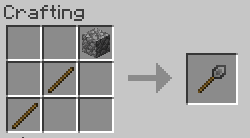
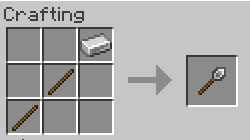
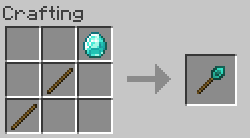
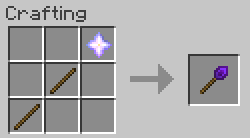
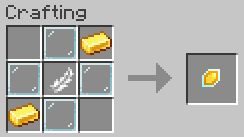
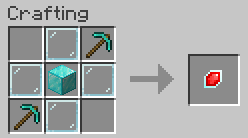
OPTKEY
要更改法杖的核心和选项或撤销你的放置操作,你需要按住法杖选项键(称为 OPTKEY)。默认情况下,这是 CTRL,但可以在客户端配置文件中更改。为了防止意外更改选项,你可以配置为必须同时按住 SNEAK(潜行)才能更改选项或打开 GUI。
法杖核心
法杖核心是使法杖发挥作用的魔法宝石。
每根法杖都附带一个 Construction(建造)核心。通过将额外的核心放入法杖中,可以让你的法杖变得更好。将新核心与法杖一起放入合成网格中以安装它。要在核心之间切换,按住 OPTKEY 并用右击空地处点击法杖。石头法杖无法升级。
Construction core(建造核心)
在你面朝的一侧延伸你的建筑。最大方块数取决于法杖等级。按住 OPTKEY 并滚动以更改放置限制(水平、垂直、北/南、东/西、无锁定)。
Angel core(天使核心)
在你所朝方块(或一行方块)的对面放置一个方块。最大距离取决于法杖等级。右击空地处可以在半空中放置一个方块(类似于天使方块,因此得名)。要做到这一点,你需要在副手持有想要放置的方块。如果你下落超过 10 格深,则无法在半空中放置方块(不能轻松地从掉入虚空时救援)。
Destruction core(破坏核心)
在你面朝的一侧破坏方块(不含实体方块)。最大方块数取决于法杖等级。限制方式与建造核心相同。被破坏的方块会消失到虚空中,如果犯了错误可以使用撤销功能。
选项
SNEAK+OPTKEY+右击空地处会打开法杖的选项屏幕。
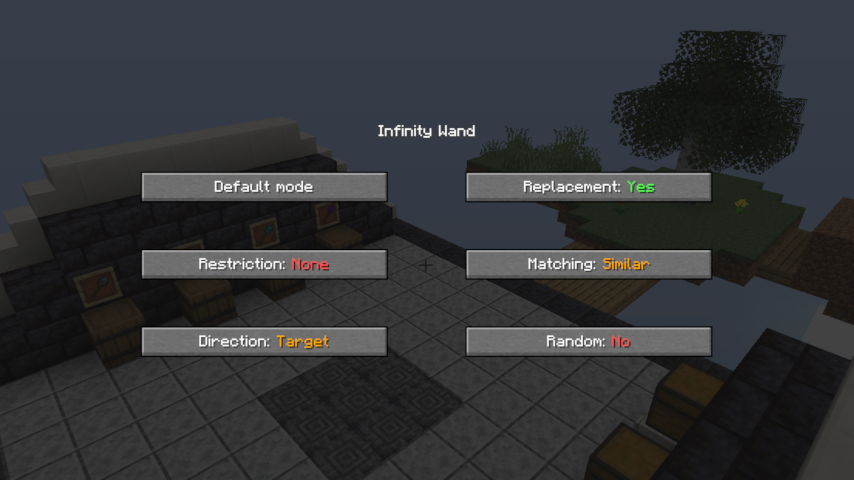
Restriction(限制): 如果启用限制,法杖只会在一行或一列中放置方块(在水平平面上选择北/南、东/西,在垂直平面上选择水平、垂直)。如果方向锁定关闭,法杖将扩展其指向的建筑的整个面。此选项在天使模式下无效。
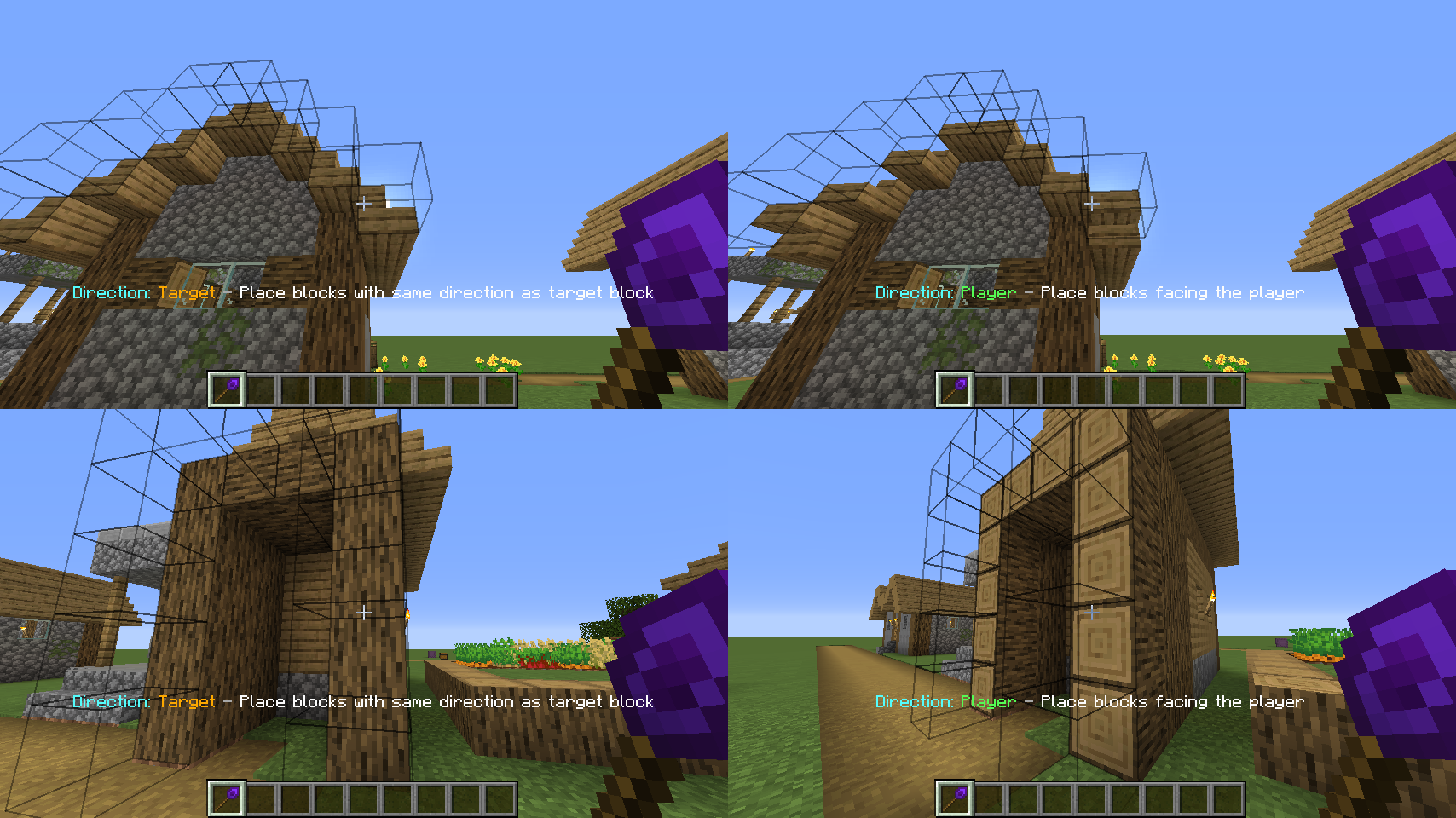
Direction(方向): 如果设置为 "Player",法杖放置方块的方向与你亲自放置时的方向相同。Target mode(目标模式)将方块放置在与支撑方块相同的方向上。见下图:
Replacement(替换): 启用/禁用可替换方块(流体、雪、高草)的替换。
Matching(匹配): 选择法杖扩展哪些方块。如果设置为 "EXACT",它将仅扩展与所选方块完全相同的方块。
"SIMILAR" 会将相似的方块视为同等对待(例如扩展泥土和草方块)。
"ANY" 将扩展你所注视的建筑面上的任何方块。
Random(随机): 如果启用随机模式,法杖会从你的快捷栏中放置随机方块。
无耻地窃取 灵感来源于 Quark 中的 Trowel(抹刀)。
撤销
按住 SHIFT+CTRL 并注视某个方块时,会以绿色边框显示你最后放置的方块。SHIFT+CTRL+右击其中任何一个方块将撤销该操作,归还所有物品。如果你使用了破坏核心,它将恢复这些方块。
其他特性
- 如果你的物品栏中有装满方块的潜影盒,法杖可以将它们取出并放置
- Botania(植物魔法)兼容性:黑洞护符可以像潜影盒一样提供方块。如果你的物品栏中有大地之杖/深海之杖,消耗魔力即可无限获得泥土/圆石。
- 副手持有方块时,会放置该方块而不是你正看向的方块
- 查看你的统计数据,了解你使用法杖放置了多少方块
- 仅适用于 1.16+: 无限法杖不会像下界合金装备那样在岩浆中燃烧。
TileEntity 黑名单
某些模组添加的 TileEntity(区块实体)在使用法杖放置时可能会导致问题。它们可能会变成不可见且无法移除的幽灵方块、变得无法破坏或引发其他不良效果。
因此,我在 CW 版本 1.7 中为 TileEntities 添加了黑/白名单系统。Chisels&Bits 的方块默认被列入黑名单。可能还有其他模组的 TileEntities 也会引起问题。如果你发现了这类情况,可以通过提交 Issue、在 Curse 上评论或自行编辑默认黑名单来告诉我(位于 并提交 PR)。
Construction Wand Revived
This is an unofficial 1.21.1 port of the original version by ThetaDev.
Since the mod is licensed under MIT, I am allowed to fork and update it.
With a Construction Wand you can place multiple blocks (up to 1024) at once, extending your build on the side you're facing. If that's not enough: you can upgrade your wand with additional cores, allowing you to place a block behind the block you are facing, conjure blocks in mid air or destroy lots of blocks very fast.
Wands
There are basic wands made from stone, iron and diamond and the Infinity wand. Wands from higher tiers are more powerful and last longer. These properties can be changed in the config.
| Wand |
Durability |
Max. Blocks |
Upgradeable |
Angel distance |
Max. Blocks (Destroy) |
| Stone |
131 |
9 |
No |
- |
- |
| Iron |
250 |
27 |
Yes |
1 |
9 |
| Diamond |
1561 |
128 |
Yes |
4 |
25 |
| Netherite |
|
512 |
Yes |
15 |
75 |
| Infinity |
Unbreakable |
1024 |
Yes |
8 |
81 |
Crafting
OPTKEY
To change a wand's core and options or undo your placement you need to hold down the wand option key (refered as OPTKEY). By default, this is CTRL, but it can be changed in the client config file. To prevent unwanted changes to your options, you can configure that you have to hold down SNEAK as well to change options or open up the GUI.
Wand cores
Wand cores are magical gemstones that make your wand do its thing.
Every wand comes with a Construction core. You can make your wand even better by putting aditional cores into it. Put your new core together with your wand in a crafting grid to install it. To switch between cores, hold down OPTKEY and left click empty space with your wand. Stone wands can't be upgraded.
Construction core
Extend your build on the side facing you. Maximum number of blocks depends on wand tier. Hold down OPTKEY and scroll to change placement restriction (Horizontal, Vertical, North/South, East/West, No lock).
Angel core
Place a block on the opposite side of the block (or row of blocks) you are facing. Maximum distance depends on wand tier. Right click empty space to place a block in midair (similar to angel blocks, hence the name). To do that, you'll need to have the block you want to place in your offhand. You can't place a block in midair if you've fallen more than 10 blocks deep (no easy rescue tool from falling into the void).
Destruction core
Destroy blocks (no tile entities) on the side facing you. Maximum number of blocks depends on wand tier. Restrictions work just like with the Construction core. Destroyed blocks disappear into the void, you can use the undo feature if you've made a mistake.
Options
SNEAK+OPTKEY+Right clicking empty space opens the option screen of your wand.
Restriction: If restriction is enabled the wand will only place blocks in one row or column (choose between North/South, East/West on a horizontal plane and Horizontal, Vertical on a vertical plane). If the direction lock is switched off, the wand will extend the entire face of the building it's pointed at. This option has no effect in Angel mode.
Direction: If set to "Player" the wand places blocks in the same direction as if they were placed by yourself. Target mode places the blocks in the same direction as their supporting block. See the picture below:
Replacement: Enables/disables the replacement of replaceable blocks (Fluids, snow, tallgrass).
Matching: Select which blocks are extended by the wand. If set to "EXACT" it will only extend blocks that are exactly the same as the selected block.
"SIMILAR" will treat similar blocks equally (e.g. extend dirt and grass blocks).
"ANY" will extend any block on the face of the building you're looking at.
Random: If random mode is enabled, the wand places random blocks from your hotbar.
Shamelessly stolen Inspired by the Trowel from Quark.
Undo
Holding down SHIFT+CTRL while looking at a blocks will show you the last blocks you placed with a green border around them. SHIFT+CTRL+Right clickking any of them will undo the operation, giving you all the items back. If you used the Destruction core, it will restore the blocks.
Additional features
- If you have shulker boxes in your inventory filled with blocks, the wand can pull them out and place them
- Botania compatibility: The Black Hole Talisman can supply blocks just like shulker boxes can. Having a Rod of the Lands / Rod of the Depths in your inventory will provide you with infinite dirt/cobble at the cost of Mana.
- Having blocks in your offhand will place them instead of the block you're looking at
- Look at your statisics to see how many blocks you have placed using your wand
- 1.16+ only: The Infinity Wand won't burn in lava just like netherite gear.
TileEntity Blacklist
Some modded TileEntitys can cause issues when placed using a wand. They may turn into invisible and unremovable ghost blocks, become unbreakable or cause other unwanted effects.
That's why I've included a Black/Whitelist system for TileEntities in CW Version 1.7. Chisels&Bits blocks are blacklisted by default. There are probably a few other tile entities from other mods out there which may cause issues as well. If you find some of them you can tell me by creating an issue, commenting on Curse or editing the default blacklist yourself (it is located at and making a PR.


 模组
 模组

 模组

 模组

 模组

 模组
评论 0
登录后参与评分
还没有评论,来抢沙发吧