一款简洁、极简主义的 HUD,在飞行时始终将最重要的信息——剩余鞘翅耐久度——显示在你视线所及之处,且不杂乱无章。一眼即可看到你的鞘翅耐久度、携带的火药火箭数量以及当前飞行速度,所有信息均紧凑地排列在一行中。
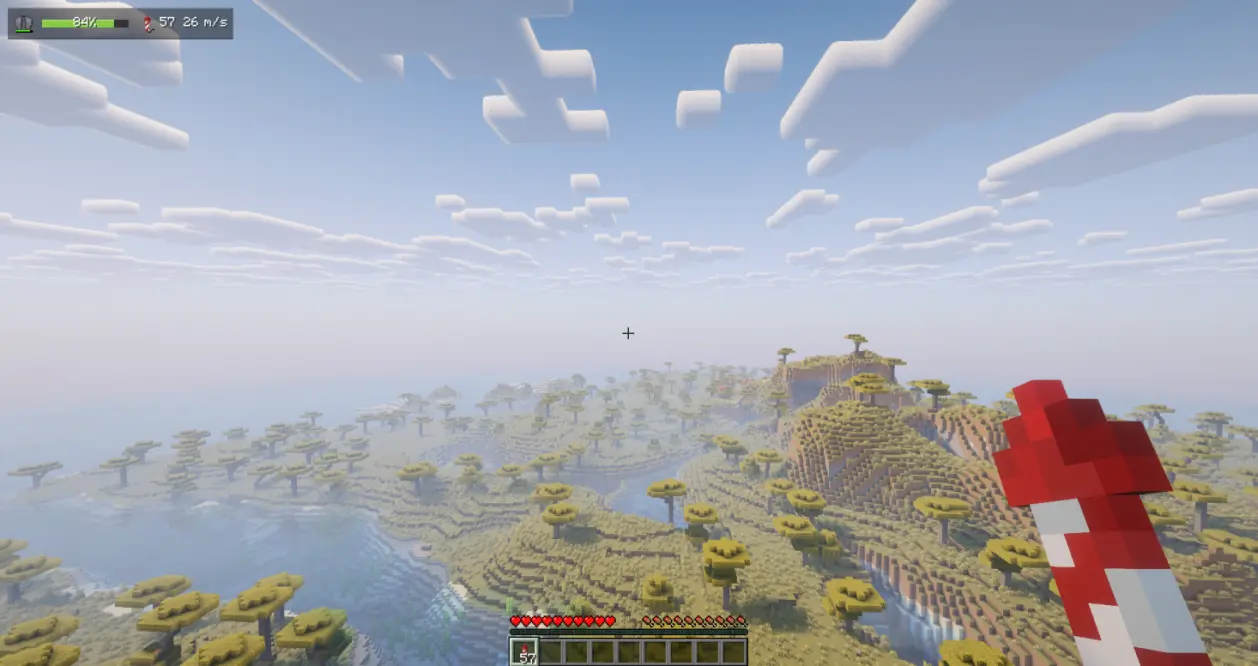
仅客户端(无需安装服务端)。完全兼容单人游戏和多人游戏。
依赖项: Fabric 需要 Fabric API 和 Architectury API。NeoForge 需要 Architectury API。Forge 无需额外依赖。
可自由用于任何整合包——无论公开或私有,均无需许可。
功能介绍
- 耐久度条 — 一条动态进度条,随着鞘翅磨损平滑地从绿色变为琥珀色再变为红色,并显示剩余百分比或具体数值。
- 低耐久度警告 — 脉冲式警告,提示你何时应着陆或更换鞘翅(阈值可配置)。
- 火箭数量 — 显示背包副手栏中的火药火箭数量。
- 飞行速度 — 显示当前的飞行速度。
- 物品图标 — 使用游戏中真实的鞘翅和火箭物品图标。
- 配件槽位支持 — 可选支持 Trinkets、Accessories、Curios 或 Trinkets Updated 模组中的鞘翅穿戴槽位。
- 模组化滑翔翼支持 — 可选支持位于胸部的模组化滑翔翼(如下界合金、木质等)。
配置
所有 HUD 元素均可通过实时预览进行完全自定义——你在设置中配置的即在游戏中所见。选择其出现时机(始终显示、仅装备时显示、或仅滑翔时显示),从可视化网格中选择六个屏幕位置之一,支持自由偏移量和 50–200% 缩放比例,可切换各个元素(图标、进度条、火箭、速度)的显示状态,可将耐久度文本设置为百分比、具体数值或隐藏,并可调整背景不透明度、按耐久度变色以及低耐久度警告效果。
使用 /elytrahud 命令(别名 /ehud)或可自定义的热键打开设置界面。在 NeoForge 上,你也可以从游戏内模组列表打开设置。
详情
- 作为游戏内 HUD 的一部分绘制,位于聊天栏上方,因此绝不会遮挡玩家列表、字幕或打开的界面。
- 所有设置均本地存储在
config/elytrahud.json 中。在写入默认值之前,会保留一个不可读的备份文件 config/elytrahud.json.bak。
- 已完整翻译为 10 种语言:英语、俄语、简体中文、西班牙语、法语、德语、日语、巴西葡萄牙语、韩语和意大利语。
反馈
请在 Discord 上报告任何错误、报错或功能建议:
我推荐的其他模组。
A clean, minimalist HUD that keeps the one thing that matters while flying — how much elytra you have left — right where you can see it, without cluttering your screen. At a glance it shows your elytra durability, how many firework rockets you are carrying, and your current flight speed, all in a single compact row.

Client-side only (no server installation required). Fully compatible with singleplayer and multiplayer.
Dependencies: Fabric needs Fabric API and Architectury API. NeoForge needs Architectury API. Forge needs no additional dependencies.
Free to use in any modpack — public or private, no permission needed.
What it does
- Durability Bar — a live bar that smoothly shifts green → amber → red as your elytra wears down, with the remaining percentage or the exact value.
- Low-Durability Warning — a pulsing warning so you know when to land or swap wings (configurable threshold).
- Rocket Count — firework rockets in your inventory and offhand.
- Flight Speed — your current flight speed.
- Item Icons — real elytra and rocket item icons, drawn straight from the game.
- Accessory Slots — optional support for elytra worn in Trinkets, Accessories, Curios, or Trinkets Updated slots.
- Modded Gliders — optional support for chest-slot gliders (netherite, wooden, etc.).
Configuration
All HUD elements are fully customizable with a live in-settings preview — what you configure is exactly what you get in game. Choose when it appears (Always, only When Equipped, or only While Gliding), place it in any of six screen positions from a visual grid, with free offsets and 50–200% scaling, toggle each element (icon, bar, rockets, speed), switch durability text between percent, value, or hidden, and tune background opacity, color-by-durability, and the low-durability warning.
Open the settings screen with the /elytrahud command (alias /ehud) or a customizable hotkey. On NeoForge you can also open it from the in-game mod list.
Details
- Drawn as part of the in-game HUD, just above the chat, so it never covers the player list, subtitles, or open screens.
- All settings are stored locally in
config/elytrahud.json. An unreadable file is kept as config/elytrahud.json.bak before defaults are written.
- Fully translated into 10 languages: English, Russian, Simplified Chinese, Spanish, French, German, Japanese, Brazilian Portuguese, Korean, and Italian.
Feedback
Please report any bugs, errors, or feature suggestions on Discord:
My other mods that I recommend.
评论 0
登录后参与评分
还没有评论,来抢沙发吧
