
铺就通往更美好世界的道路
Fureniku's Roads 是一款模组,其目标只有一个:为你的 Minecraft 世界添加高度可自定义的道路!
该模组此前名为 FlenixRoads,它添加了 19 种不同类型的道路,支持自定义高度,并提供超过 80 种不同图案的油漆,涵盖 3 种颜色。你可以根据需要自由组合道路和油漆图案。更多用于装饰街道的方块也将陆续推出!
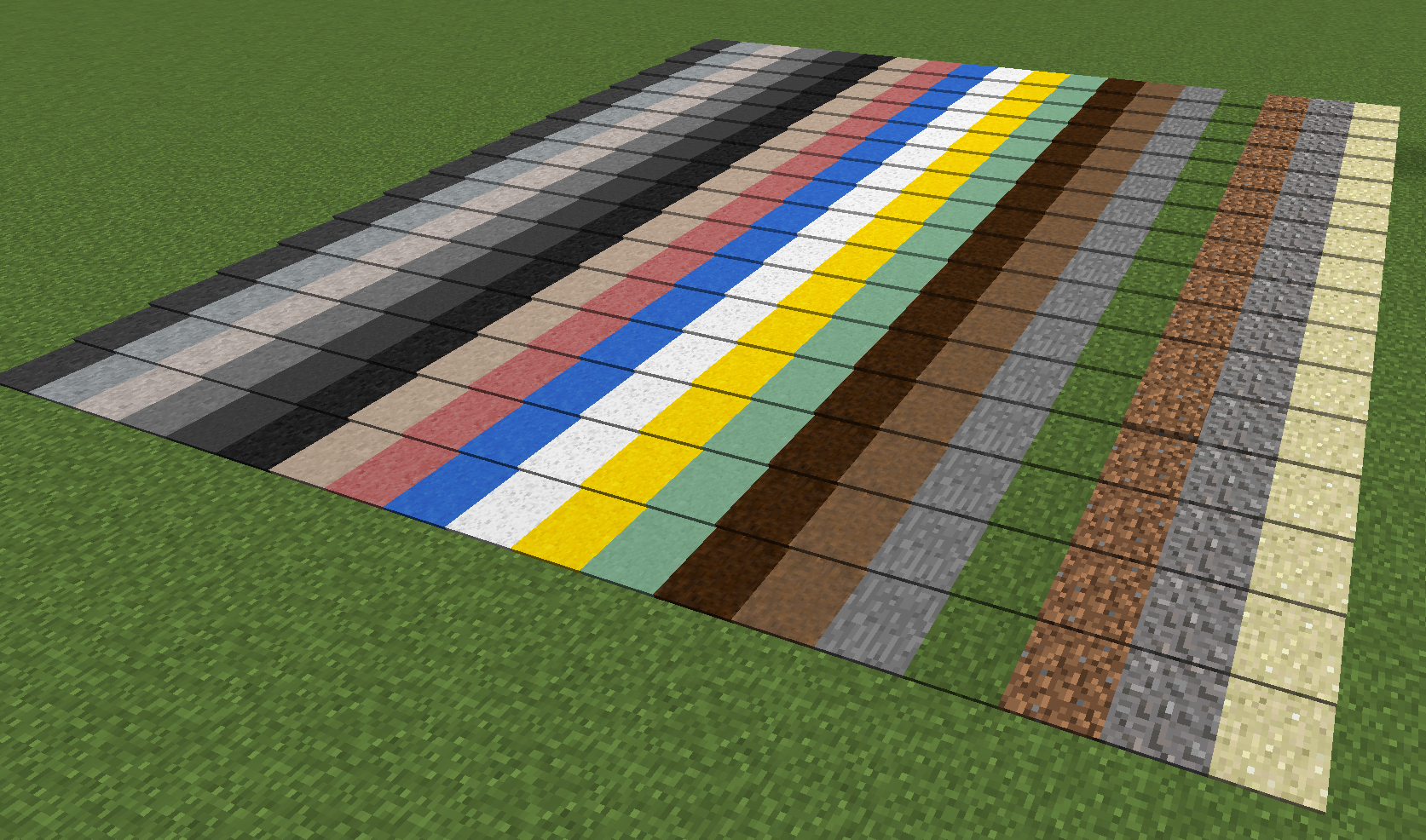 14 种专属道路类型,以及 5 种原版材质(石头、草方、砾石、泥土、沙子)。提供 16 种高度选项。
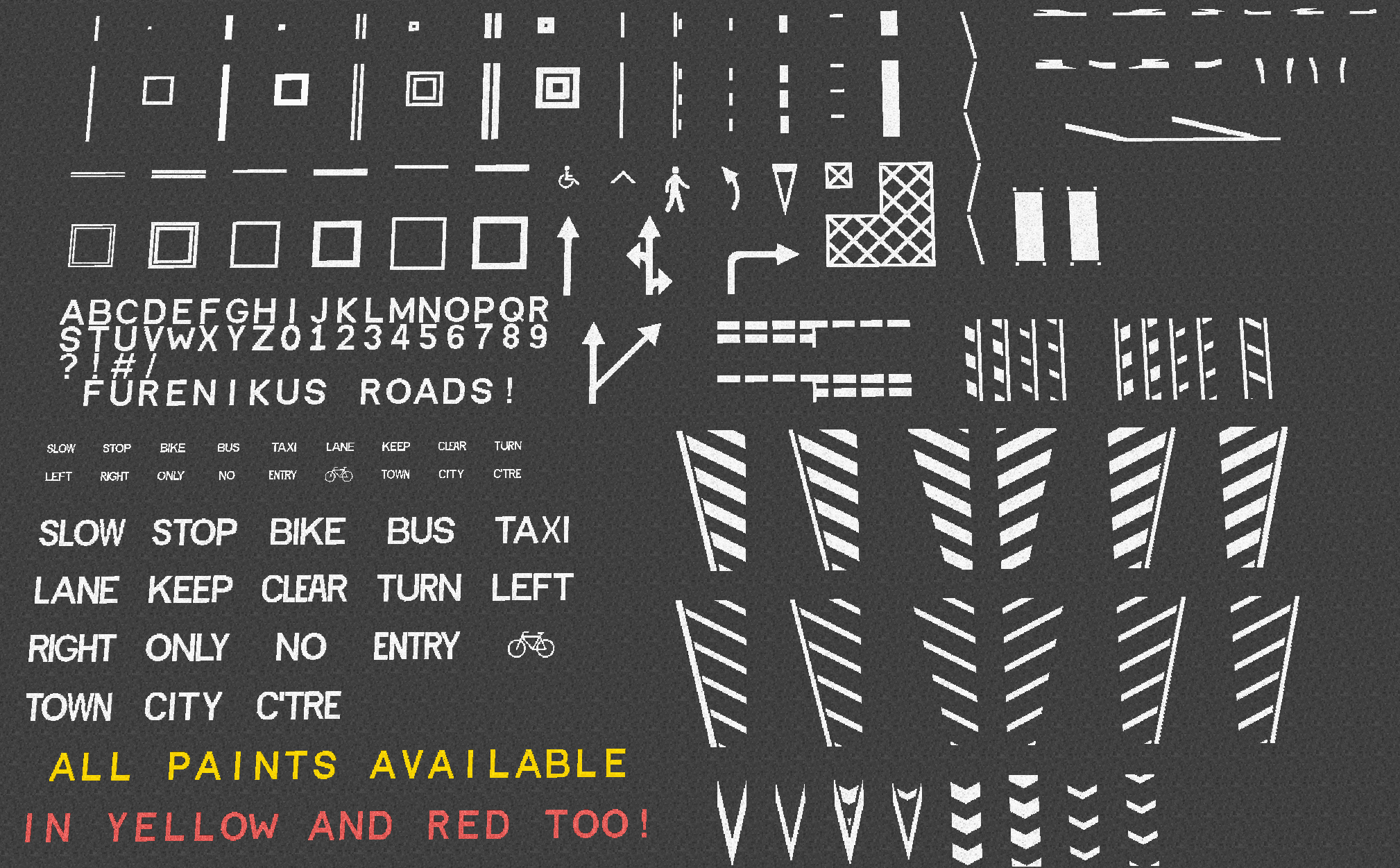 所有油漆也提供黄色和红色版本。你可以将油漆放置在任意方块上,字母也可以涂在墙壁上!
那么,它具体能做什么呢...?
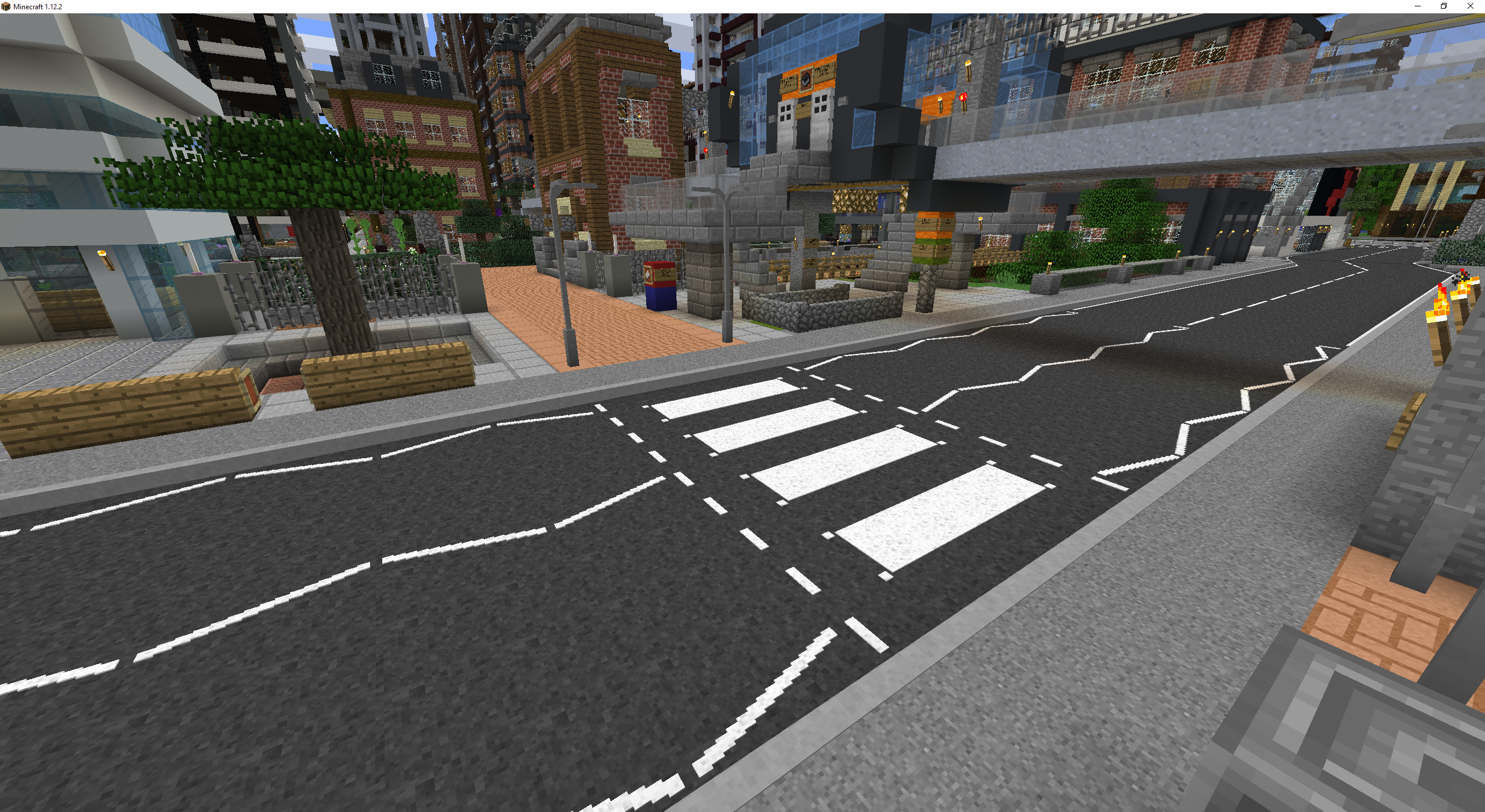
这主要是一个装饰性模组,因此单独使用时“功能”并不多。它允许你用一种全新的方式发挥创意,也非常适合城市角色扮演类的建筑项目。展示它的最佳方式莫过于看一些截图了!这里展示的所有道路均构建于修改版的 City of Newisle (由 Blip Noir 制作)之上
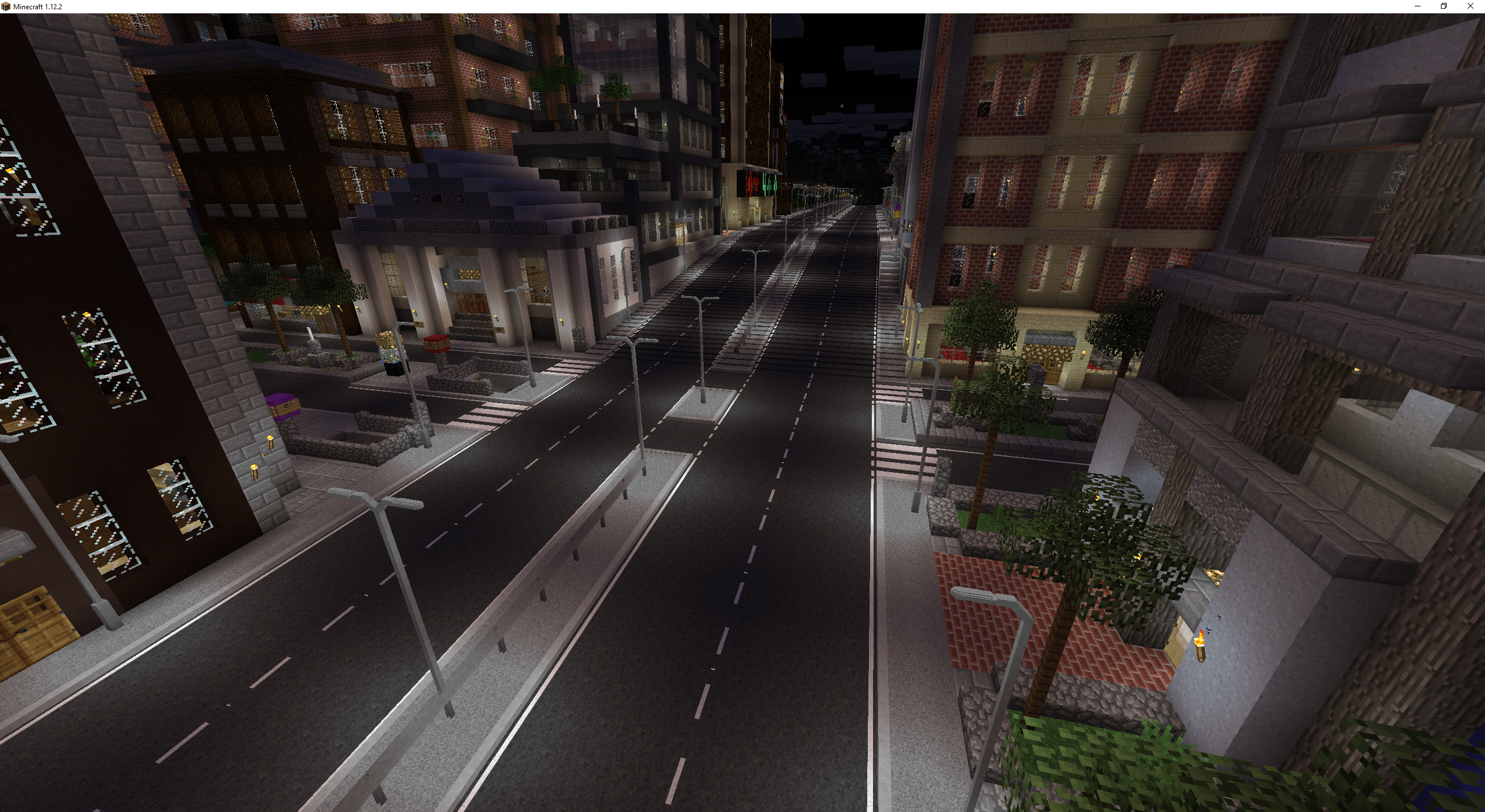
当然,道路只是 1.0 版本的内容!在未来的更新中,我计划添加更多用于装饰道路的元素,例如标志牌、照明设施等!在本次 1.0 版本中,我也包含了一些未来内容的示例,如首批路灯、路障和反光镜。
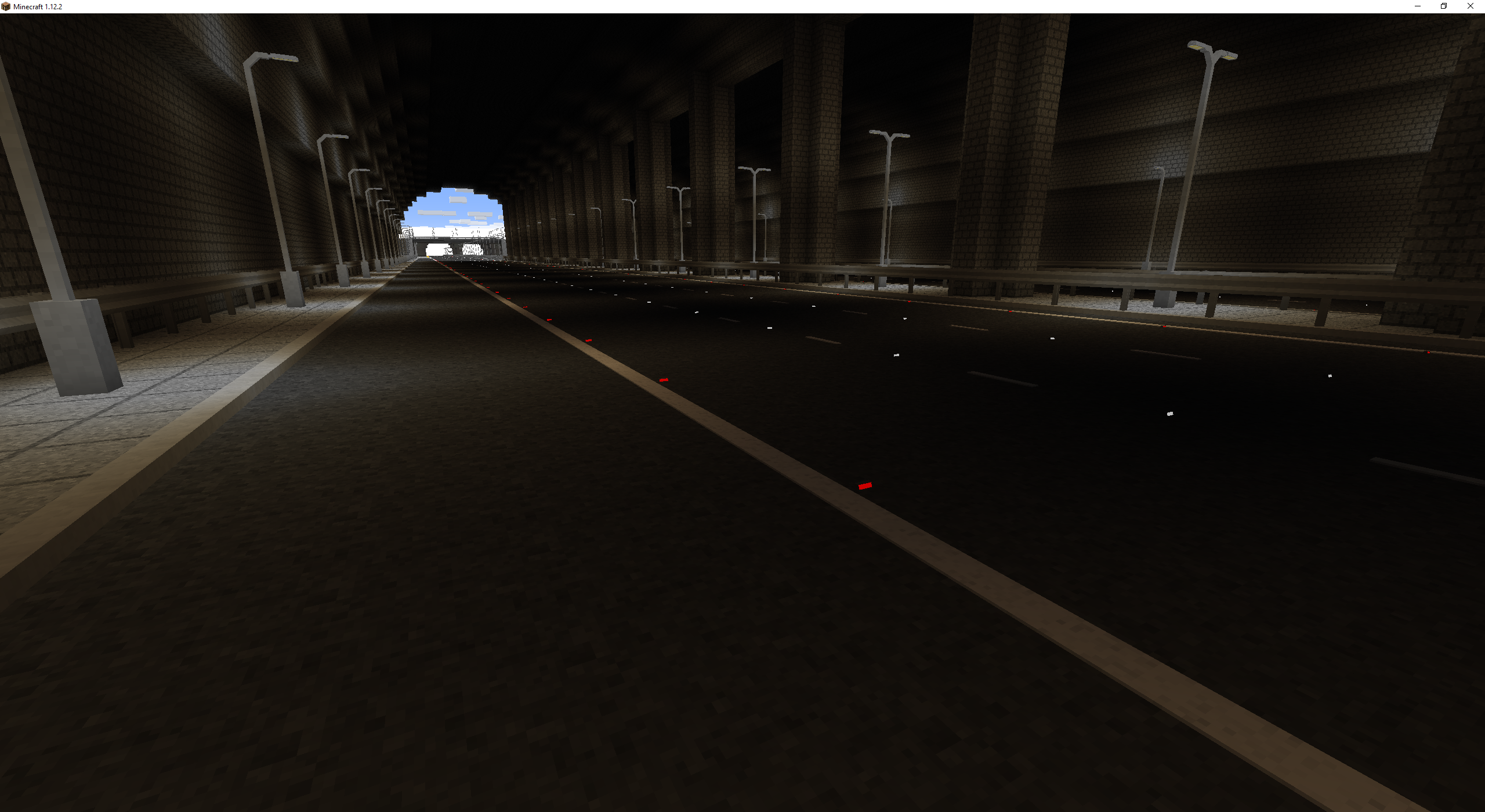 免责声明:此处显示的反光镜在安装 Optifine 后渲染效果会有所不同。
Fureniku's Roads 中的照明系统也相当精致。以下是一张高速公路的昼夜对比图:
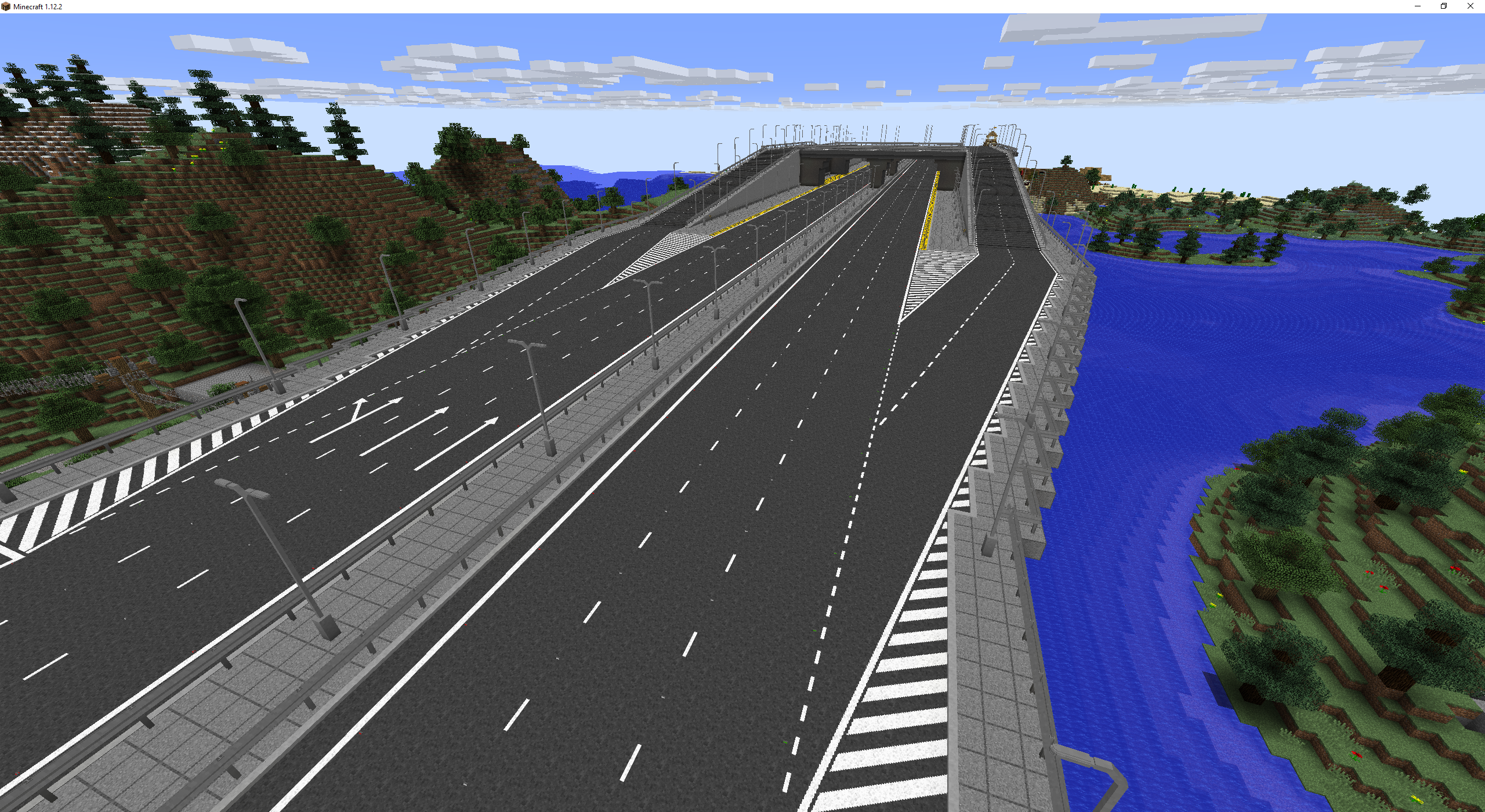
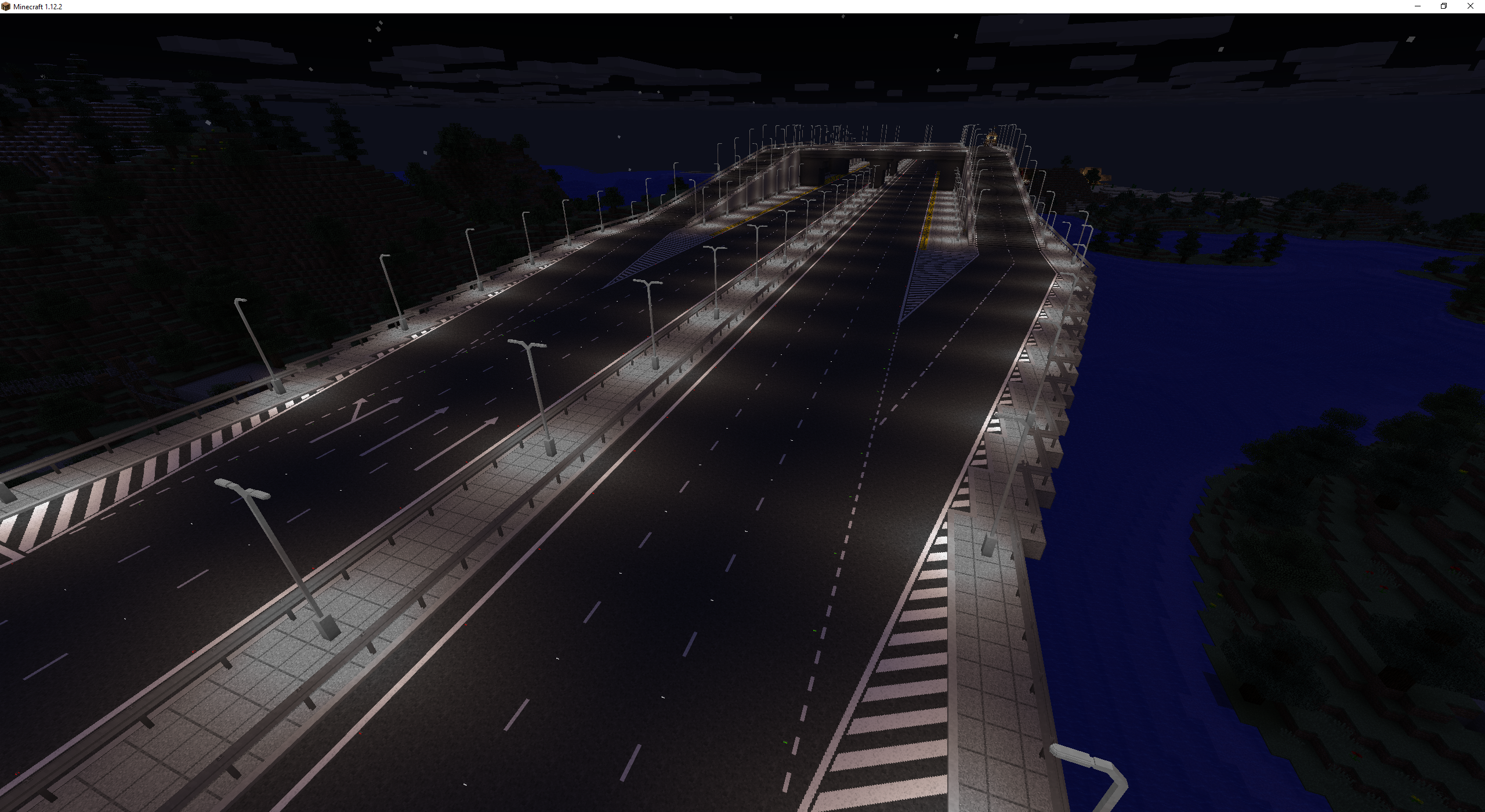
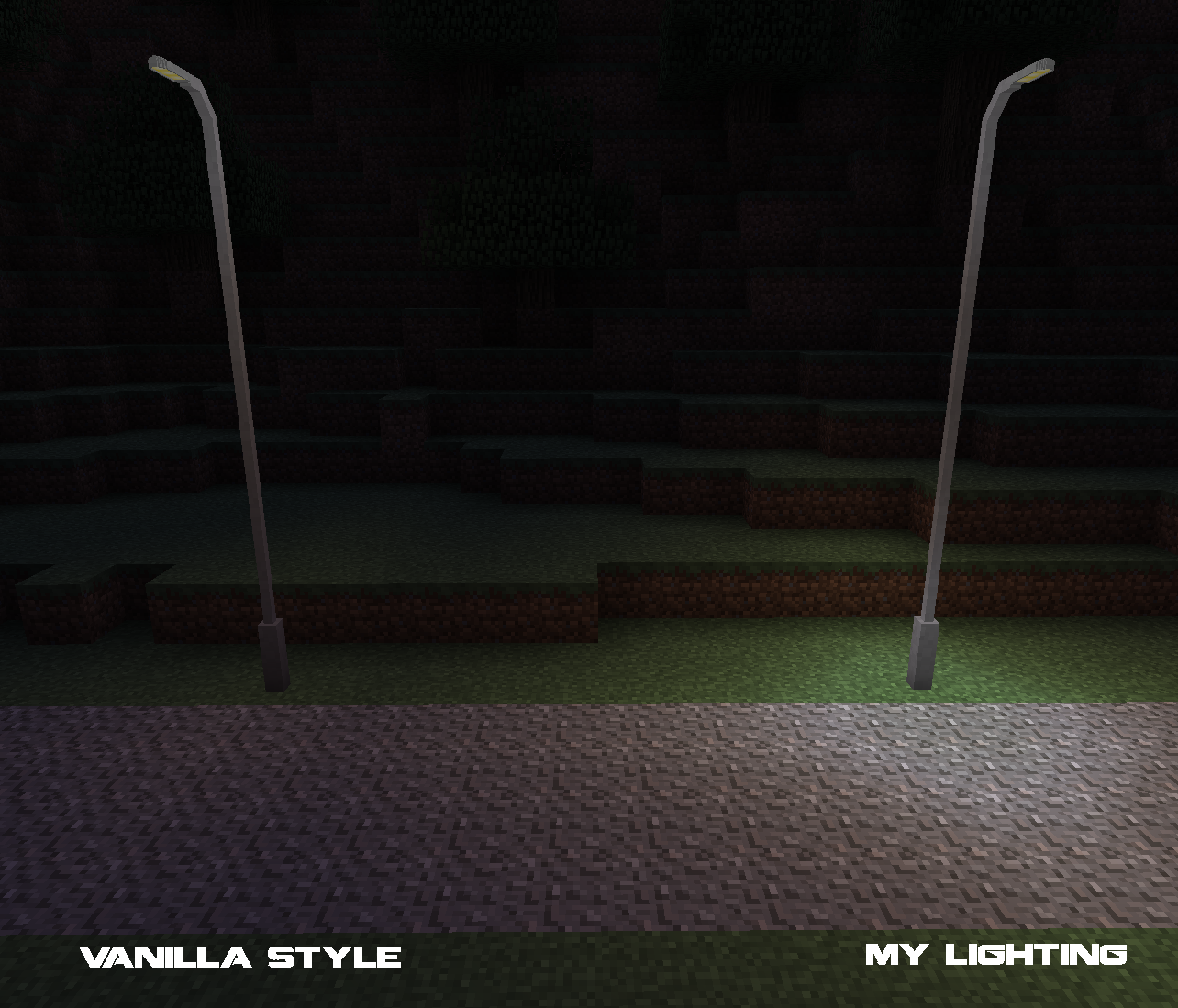
我的路灯使用了一套自定义系统,在底部生成一个虚拟光源,从而提供比 Minecraft 默认光照更自然的光照效果。
合成
熟悉我 1.6 和 1.7 版本模组的玩家可能记得,我之前不太喜欢设计合成配方。不过,那已经是过去式了!现在 Fureniku's Roads 中的所有物品均可合成,并且该模组可以完全在生存模式下游玩。
合成配方和使用指南可通过 我的网站 获取,或者安装 JEI 插件查看。
喷漆枪
为了扩展合成系统,我们加入了喷漆枪!这是你用来给道路上色的工具,对生存模式和创造模式玩家都很有用。只需装满油漆(如果你在生存模式中),选择油漆图案和颜色,即可开始创作!喷漆枪非常适合管理不同的油漆类型,避免占用快捷栏。你还可以使用“拾取方块”功能(默认鼠标中键)来选择当前瞄准的油漆并将其加载到枪中。
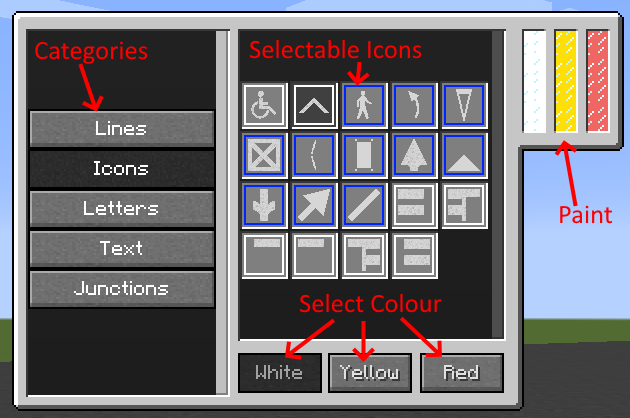
选项周围的蓝色边框表示这是一个多方块油漆图案,会与周围的图案连接。 喷漆枪模型上的显示屏和油箱均具有实际功能!
自定义油漆
从 1.2 版本开始,你现在可以制作自己的自定义油漆了!无需任何模组开发或建模经验!
要将新油漆添加到你的世界中,请先访问我的精美编辑器: (由于技术问题,目前暂时离线!请加入 Discord 以获取更多信息)
接下来,绘制任何你想要的图案!向下滚动可以看到一些选项,例如添加辅助网格线或更改分辨率——油漆可以是 16x16、32x32 或 64x64 尺寸。如果你想保持风格统一,模组中包含的大多数油漆都是 32x32 尺寸。
完成你的杰作后,确保填写好名称,然后点击导出按钮,你将获得一个 .json 文件!如果你尚未运行过游戏,请先运行一次,然后在你的 Mods 文件夹中找到一个名为 “RoadPaints” 的文件夹。将你的 JSON 文件放入其中,它就会在游戏中出现!
以下是编辑器中各选项的快速说明:
- 内部名称 (Internal Name):必须在所有油漆中完全唯一,且必须为单个单词。如果不确定,可以命名为 yourUserNamePaintName。可以使用下划线 _ 和连字符 -,但不能使用其他标点符号。
- 显示名称 (Display name):这是玩家在物品栏悬停时看到的名称,以及 WAILA 等插件显示的名称。遗憾的是,它无法本地化,因此在所有语言中都会显示相同的内容。
- 类别 (Category):这是油漆枪中显示的标签页。命名五个默认类别之一将其归入该类,或输入其他名称以创建你自己的新类别!
- 类型 (Type):你要制作的油漆类型!更改此项会清除你的进度!
1x1 图标: 简单、日常的标准油漆
1x1 墙壁图标: 与字母类似,这种油漆既可以画在地面上,也可以画在墙壁上
2x1、3x1 和 4x1 图标: 这些可以并排放置以创建更大的图像,如果可以的话,会自动放置正确的部分
3x1 + 1x1 文本: 这些类似于模组中包含的文本预制件。你将同时制作小型和大型变体。
你的自定义油漆将在油漆枪中你选择的类别中出现,也会出现在专门用于自定义油漆的创造模式标签页中。
制作了酷炫的作品?来我的 Discord 分享吧!
Discord
加入我的 Discord 服务器以获取最新动态!记得给自己添加 Minecraft 角色(!rank minecraft),这样你就能收到新版本发布等通知了!
Paving the way to a better world
Fureniku's Roads is a mod with one goal in mind: to add highly customizable roads to your Minecraft world!
Formally known as FlenixRoads, this mod adds 19 different types of road, with customizable height, and over 80 different paint patterns in 3 different colours. You can combine the roads and paint as you see fit. More blocks to decorate your streets are coming too!
14 exclusive road types, with 5 vanilla (stone, grass, gravel, dirt, sand). 16 height options.
All paints are available in Yellow and Red too. You can place paint on any block, and letters can be placed on walls too!
So, what does it do exactly...?
This is mostly a decorative mod, so alone it doesn't "do" much. It allows you to express your creativity in a new way, and it's great for city roleplay builds too. I guess the best way to show it off is to show some screenshots! All roads shown here are built in a modified version of City of Newisle by Blip Noir
Roads are of course just the 1.0 release though! With future releases I plan to add more things to decorate your roads with, such as signs, lighting and more! I've included a few examples of things to come in this 1.0 release, such as the first street lights, barrier, and a reflector.
Disclaimer: The reflectors shown here will not render like this with Optifine installed.
The lighting in Fureniku's Roads is a bit fancy too. Here's a day/night comparison of a highway:
My street lights use a custom system which creates a fake light source at the base, giving them a more natural lighting feel than Minecraft would normally offer.
Crafting
Those of you who are familiar with my mods from 1.6 and 1.7 probably remember I didn't like making crafting recipes. Well, that is a thing of the past! Everything in Fureniku's Roads is now craftable and the mod can be played completely survival.
Crafting recipes and guides are available through my website, or by installing JEI.
Paint Gun
To extend the crafting system, is the paint gun! This is what you'll use to paint your roads and is useful for both survival and creative players. Just fill it up (if you're in Survival), pick your paint, pick your colour and off you go! The Paint Gun is great to manage your different paint types without filling up the hotbar. You can also use the "pick block" function (middle mouse by default) to select the paint you're currently targeting and load it up on the gun.
A blue border around an option suggests its a mutli-block paint and will connect to others around it. The display and tanks on the paint gun model are fully functioning!
Custom Paints
As of version 1.2, you can now make your own custom paints! No modding or modelling experience required!
To add new paints to your world, first head over to my fancy editor: (Currently offline due to technical issues! Please join the discord for more info)
Next, draw anything you like! Scroll down to see some options such as adding helpful grid lines or changing the resolution - paints can be 16x16, 32x32 or 64x64. Most paints included in the mod are 32x32 if you want to keep on theme.
Once your glorious artwork is completed, make sure you fill in the names and then hit the Export button and you'll get a .json download! Run the game once if you haven't already, then in your Mods folder you'll find a "RoadPaints" folder. Drop your JSON in there and it'll appear in-game!
A quick summary of the options on the editor:
- Internal Name: this must be completely unique amongst all paints, and must be all one word. If you're unsure, just call it yourUserNamePaintName. You can use underscores _ and hyphens - too, but no other punctuation.
- Display name: This is the name shown to players when they hover over it in their inventory, with WAILA, etc. Unfortunately it cannot be localised, so it will be the same in all languages.
- Category: This is the tab it will appear in within the paint gun. Naming one of the five defaults will add it to those, or enter any other name to make your own new category!
- Type: The type of paint you're making! Changing this will wipe your progress!
1x1 Icon: Simple, every-day standard paint
1x1 Wall Icon: Similar to letters, this can be drawn on walls as well as the floor
2x1, 3x1 and 4x1 Icon: These can be placed side-by-side to create larger images, and will automatically place the correct one if it can
3x1 + 1x1 Text: These are just like the Text prefabs included in the mod. You'll make a small and large variant together.
Your custom paints will be available in the paint gun in your selected category, and also in a Creative tab dedicated to custom paints.
Made something cool? Come share it in my Discord!
Discord
Join my discord server to keep up-to-date! Make sure to give yourself the Minecraft role (!rank minecraft) so you'll be notified of new releases and so on!

下载 Fureniku's Roads
下载 Fureniku's Roads
下载 Fureniku's Roads
下载 Fureniku's Roads
下载 Fureniku's Roads
下载 Fureniku's Roads
下载 Fureniku's Roads
下载 Fureniku's Roads
暂无更新日志
关于这个资源的讨论、问题反馈与使用心得
还没有讨论,来发第一帖吧
你是这个资源的作者?登录后可认领此资源。
相似资源
 模组

可定制的鞘翅模组,支持装饰纹饰、旗帜图案等更多功能!
 模组
在游戏画面角落显示附近世界地形、玩家、生物和实体的地图。可创建路径点,帮助你找到标记过的位置。
 模组

适用于 MC 1.18+ 的 Effekseer 加载器
 模组

新增 50+ 个独特生物群系,为你的世界增添新树木、花卉等更多元素!
 模组
添加全屏世界地图,显示你在世界中已探索的区域。与 Xaero's Minimap 搭配使用效果极佳。
 模组

基于 GTCEu 1.12.2 的现代 GregTech
评论 0
登录后参与评分
还没有评论,来抢沙发吧