
IRLights
一款独立的 Minecraft 内置实时光照编辑器
专为 Fabric 1.20.1-1.21.11 制作。不过,1.20.1 版本构建也可在 Forge 和 NeoForge (1.21.1) 上使用(需搭配 Sinytra Connector 模组)
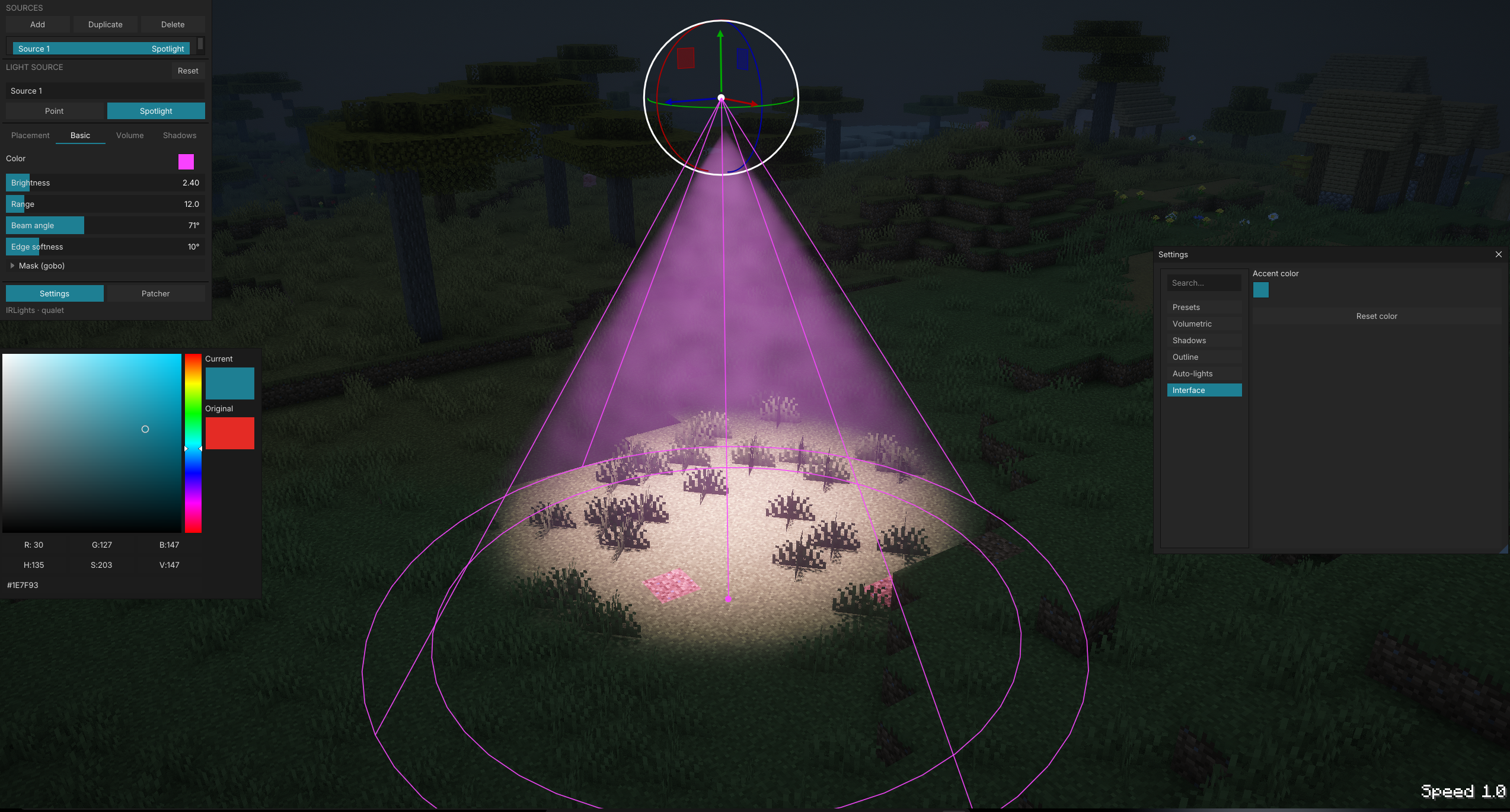
IRLights 允许你通过内置的 ImGui 编辑器直接在世界中放置和塑造动态点光源和聚光灯。它支持实时阴影、体积光和投影光图案(Gobo/Cookie)。所有渲染均通过 Iris 光影管线完成,且该模组完全独立运行:无需 BBS,除了 Fabric 和 Iris 外无其他依赖。
功能特性
- 游戏内 ImGui 光照编辑器。按下按键即可在世界上方打开浮动面板。使用 3D 操纵杆(拖拽以平移/旋转)或精确的数字字段来添加、选择和编辑光源。
- 点光源与聚光灯。全面控制颜色、强度、范围/半径、锥形角度(内/外)、灯泡大小(阴影柔和度),以及独立的方块/实体光照屏蔽。
- 实时阴影。世界中的方块和实体均可投射阴影。质量预设从低到高,场景感知缓存仅重新烘焙实际发生变化的部分。
- 体积光。可配置光束强度、密度和各向异性,实现穿过雾、烟和灰尘的神圣光线效果。
- Gobo / Cookie 投影。将黑白 PNG 图案从聚光灯的锥形中投射到表面及体积光束中,并支持旋转、缩放和反转控制。
- 自由飞行相机。当编辑器打开时,你可以围绕场景自由飞行以对齐光源,而不受玩家移动的限制。
- 世界内引导线:交互式线框叠加层显示每个光源的覆盖范围、锥形区域和衰减情况,并在选定的光源上提供拖动手柄。
- 自动方块光照(实验性功能,可选开启)。自动将火把、灯笼和萤石等原版发光方块转换为真实的点光源,使现有建筑无需手动放置即可照亮。
- 持久化场景。光源按世界/服务器保存并自动重载。
- Replay Mod 支持。编辑器叠加层既适用于自由飞行模式,也适用于时间轴模式,因此你可以为电影回放设置光照场景。
- 本地化用户界面。开箱即用,支持英文和俄文。
支持的光影包
IRLights 自带一个源文件修补器,可直接将其光照代码注入流行的 Iris 光影包中:
- Photon
- Complementary Reimagined
- BSL
- Bliss
- Solas
- IterationRP
- Rethinking Voxels
从编辑器内的修补器面板选择一个光影包,只需修补一次,即可渲染带有完整阴影和体积支持的光照。
要求
- Fabric Loader
- Fabric API
- Iris Shaders 以及上述列表中的某个支持的光影包(没有光影包将无法看到任何光照效果)
无需 BBS,无需其他内容模组。IRLights 是完全独立的。
安装步骤
- 安装 Fabric Loader、Fabric API 和 Iris。
- 将 IRLights jar 文件放入你的
mods文件夹。 - 启动游戏一次,以便 IRLights 提取其捆绑的光影修补文件。
- 打开编辑器,在修补器面板中选择你的光影包并进行修补。
- 在 Iris 中启用该光影包,再次打开编辑器,开始放置光源。
致谢
由 qualet 创建。
许可证
采用 MIT 许可证授权。
IRLights
A standalone, in-game real-time lighting editor for Minecraft
It's made for Fabric 1.20.1-1.21.11. However, 1.20.1 build can be used on Forge and NeoForge (1.21.1) with Sinytra Connector mod
IRLights lets you place and sculpt dynamic point lights and spotlights directly in your world through a built-in ImGui editor. It comes with real-time shadows, volumetric light, and projected light patterns (gobo/cookie). Everything renders through the Iris shader pipeline, and the mod works entirely on its own: no BBS, nothing beyond Fabric and Iris.
Features
- In-game ImGui light editor. Press a key and a floating panel opens over your world. Add, select, and edit lights with a 3D gizmo (drag to translate/rotate) or with precise numeric fields.
- Point lights & spotlights with full control over color, intensity, range/radius, cone angle (inner/outer), bulb size (shadow softness), and independent block/entity light masking.
- Real-time shadows. Both world blocks and entities cast shadows. Quality presets go from Low to Ultra, and a scene-aware cache only re-bakes what actually changed.
- Volumetric lighting with configurable beam strength, density, and anisotropy, for god-rays through fog, smoke, and dust.
- Gobo / cookie projection. Project a black-and-white PNG pattern out of a spotlight's cone, onto surfaces and through the volumetric beam, with rotation, scale, and invert controls.
- Free-fly camera. While the editor is open, fly freely around the scene to line up lights without being tied to your player's movement.
- In-world guides: interactive wireframe overlays showing each light's reach, cone, and falloff, with drag handles on the selected light.
- Auto block-lights (experimental, opt-in). Turns emissive vanilla blocks like torches, lanterns, and glowstone into real point lights automatically, so existing builds light up without placing anything by hand.
- Persistent scenes. Lights are saved per world/server and reload automatically.
- Replay Mod support. The editor overlay works both in free-fly and in timeline mode, so you can light scenes for cinematic playback.
- Localized UI in English and Russian out of the box.
Supported shader packs
IRLights ships a source patcher that injects its lighting code directly into popular Iris shader packs:
- Photon
- Complementary Reimagined
- BSL
- Bliss
- Solas
- IterationRP
- Rethinking Voxels
Pick a pack from the in-editor patcher panel, patch it once, and lights render with full shadow and volumetric support.
Requirements
- Fabric Loader
- Fabric API
- Iris Shaders plus a supported shader pack from the list above (you won't see any lighting without it)
No BBS, no other content mods. IRLights is fully standalone.
Installing
- Install Fabric Loader, Fabric API, and Iris.
- Drop the IRLights jar into your
modsfolder. - Launch the game once so IRLights can extract its bundled shader patches.
- Open the editor, pick your shader pack in the patcher panel, and patch it.
- Enable that shader pack in Iris, open the editor again, and start placing lights.
Credits
Created by qualet.
License
Licensed under MIT.

下载 IRLights
下载 IRLights
下载 IRLights
需要联机服务器吗?
稳定流畅、一键部署,几分钟即可和朋友联机开服
最低仅需 8 元/月 即可畅快联机
下载 IRLights
下载 IRLights
需要联机服务器吗?
稳定流畅、一键部署,几分钟即可和朋友联机开服
最低仅需 8 元/月 即可畅快联机
下载 IRLights
下载 IRLights
下载 IRLights
需要联机服务器吗?
稳定流畅、一键部署,几分钟即可和朋友联机开服
最低仅需 8 元/月 即可畅快联机
下载 IRLights
下载 IRLights
需要联机服务器吗?
稳定流畅、一键部署,几分钟即可和朋友联机开服
最低仅需 8 元/月 即可畅快联机
更新日志
- 修复了 AMD 和 Intel 显卡无法加载光影包的问题(Complementary Reimagined、Rethinking Voxels、Solas)。
重要提示: 更新后,请从原始包重新修补您的光影包。使用旧版本修补的光影包仍然存在 AMD/Intel 兼容性问题。
关于这个资源的讨论、问题反馈与使用心得
还没有讨论,来发第一帖吧
你是这个资源的作者?登录后可认领此资源。
相似资源
 模组

可定制的鞘翅模组,支持装饰纹饰、旗帜图案等更多功能!
 模组

显示你正在注视的方块的信息。(适用于 Minecraft 1.16+ 的 Hwyla/Waila 分支)
 模组
使用 JavaScript 编辑配方、添加自定义物品、编写世界事件!
 模组

查看物品与配方
 模组
在游戏画面角落显示附近世界地形、玩家、生物和实体的地图。可创建路径点,帮助你找到标记过的位置。
 模组
AE2:一款流行的自动化与存储模组
评论 0
登录后参与评分
还没有评论,来抢沙发吧