IRLights
一款独立的 Minecraft 内置实时光照编辑器
专为 Fabric 1.20.1-1.21.11 制作。不过,1.20.1 版本构建也可在 Forge 和 NeoForge (1.21.1) 上使用(需搭配 Sinytra Connector 模组)
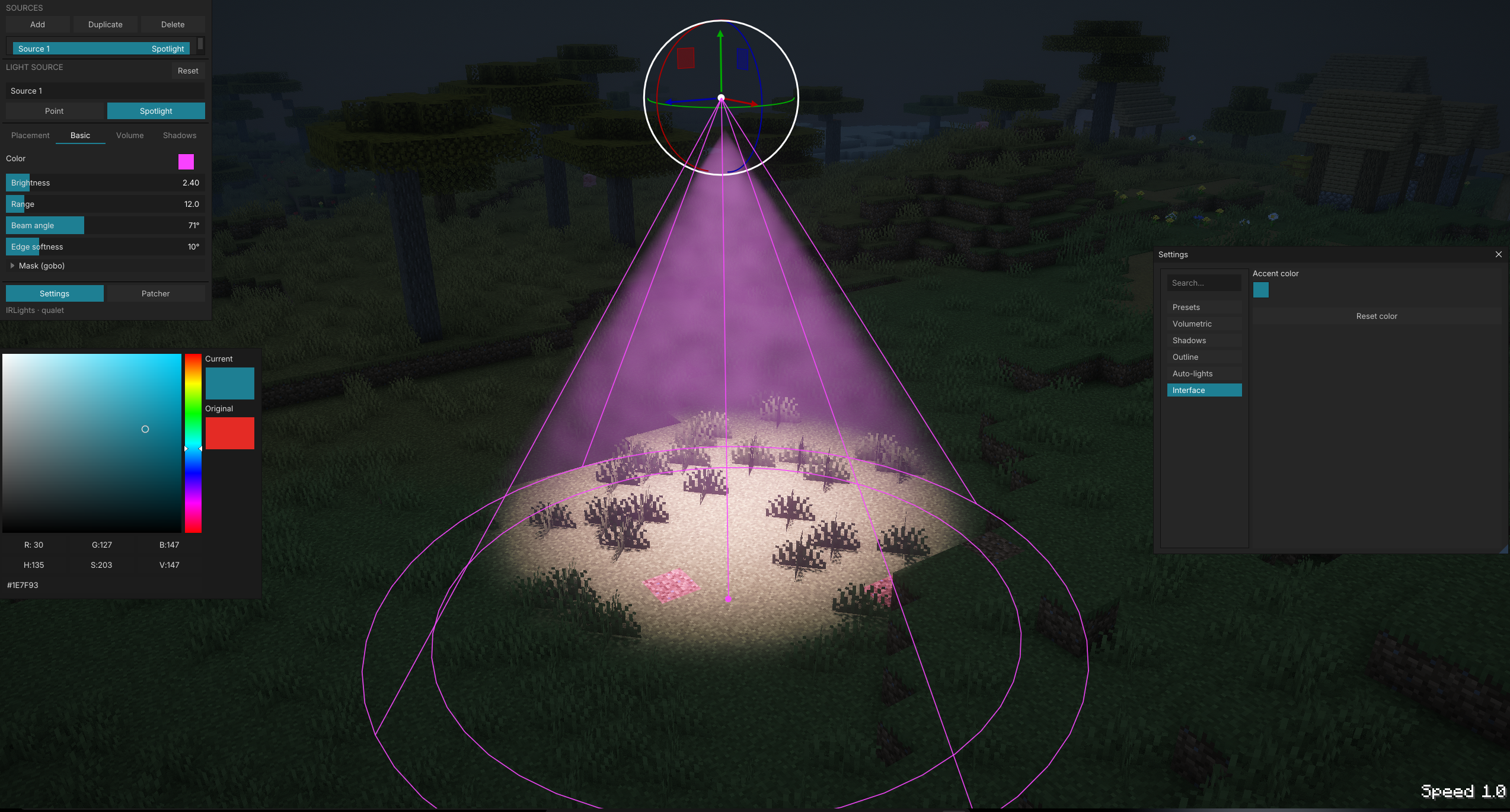
IRLights 允许你通过内置的 ImGui 编辑器直接在世界中放置和塑造动态点光源和聚光灯。它支持实时阴影、体积光和投影光图案(Gobo/Cookie)。所有渲染均通过 Iris 光影管线完成,且该模组完全独立运行:无需 BBS,除了 Fabric 和 Iris 外无其他依赖。
功能特性
- 游戏内 ImGui 光照编辑器。按下按键即可在世界上方打开浮动面板。使用 3D 操纵杆(拖拽以平移/旋转)或精确的数字字段来添加、选择和编辑光源。
- 点光源与聚光灯。全面控制颜色、强度、范围/半径、锥形角度(内/外)、灯泡大小(阴影柔和度),以及独立的方块/实体光照屏蔽。
- 实时阴影。世界中的方块和实体均可投射阴影。质量预设从低到高,场景感知缓存仅重新烘焙实际发生变化的部分。
- 体积光。可配置光束强度、密度和各向异性,实现穿过雾、烟和灰尘的神圣光线效果。
- Gobo / Cookie 投影。将黑白 PNG 图案从聚光灯的锥形中投射到表面及体积光束中,并支持旋转、缩放和反转控制。
- 自由飞行相机。当编辑器打开时,你可以围绕场景自由飞行以对齐光源,而不受玩家移动的限制。
- 世界内引导线:交互式线框叠加层显示每个光源的覆盖范围、锥形区域和衰减情况,并在选定的光源上提供拖动手柄。
- 自动方块光照(实验性功能,可选开启)。自动将火把、灯笼和萤石等原版发光方块转换为真实的点光源,使现有建筑无需手动放置即可照亮。
- 持久化场景。光源按世界/服务器保存并自动重载。
- Replay Mod 支持。编辑器叠加层既适用于自由飞行模式,也适用于时间轴模式,因此你可以为电影回放设置光照场景。
- 本地化用户界面。开箱即用,支持英文和俄文。
支持的光影包
IRLights 自带一个源文件修补器,可直接将其光照代码注入流行的 Iris 光影包中:
- Photon
- Complementary Reimagined
- BSL
- Bliss
- Solas
- IterationRP
- Rethinking Voxels
从编辑器内的修补器面板选择一个光影包,只需修补一次,即可渲染带有完整阴影和体积支持的光照。
要求
无需 BBS,无需其他内容模组。IRLights 是完全独立的。
安装步骤
- 安装 Fabric Loader、Fabric API 和 Iris。
- 将 IRLights jar 文件放入你的
mods 文件夹。
- 启动游戏一次,以便 IRLights 提取其捆绑的光影修补文件。
- 打开编辑器,在修补器面板中选择你的光影包并进行修补。
- 在 Iris 中启用该光影包,再次打开编辑器,开始放置光源。
致谢
由 qualet 创建。
许可证
采用 MIT 许可证授权。
IRLights
A standalone, in-game real-time lighting editor for Minecraft
It's made for Fabric 1.20.1-1.21.11. However, 1.20.1 build can be used on Forge and NeoForge (1.21.1) with Sinytra Connector mod
IRLights lets you place and sculpt dynamic point lights and spotlights directly in your world through a built-in ImGui editor. It comes with real-time shadows, volumetric light, and projected light patterns (gobo/cookie). Everything renders through the Iris shader pipeline, and the mod works entirely on its own: no BBS, nothing beyond Fabric and Iris.
Features
- In-game ImGui light editor. Press a key and a floating panel opens over your world. Add, select, and edit lights with a 3D gizmo (drag to translate/rotate) or with precise numeric fields.
- Point lights & spotlights with full control over color, intensity, range/radius, cone angle (inner/outer), bulb size (shadow softness), and independent block/entity light masking.
- Real-time shadows. Both world blocks and entities cast shadows. Quality presets go from Low to Ultra, and a scene-aware cache only re-bakes what actually changed.
- Volumetric lighting with configurable beam strength, density, and anisotropy, for god-rays through fog, smoke, and dust.
- Gobo / cookie projection. Project a black-and-white PNG pattern out of a spotlight's cone, onto surfaces and through the volumetric beam, with rotation, scale, and invert controls.
- Free-fly camera. While the editor is open, fly freely around the scene to line up lights without being tied to your player's movement.
- In-world guides: interactive wireframe overlays showing each light's reach, cone, and falloff, with drag handles on the selected light.
- Auto block-lights (experimental, opt-in). Turns emissive vanilla blocks like torches, lanterns, and glowstone into real point lights automatically, so existing builds light up without placing anything by hand.
- Persistent scenes. Lights are saved per world/server and reload automatically.
- Replay Mod support. The editor overlay works both in free-fly and in timeline mode, so you can light scenes for cinematic playback.
- Localized UI in English and Russian out of the box.

Supported shader packs
IRLights ships a source patcher that injects its lighting code directly into popular Iris shader packs:
- Photon
- Complementary Reimagined
- BSL
- Bliss
- Solas
- IterationRP
- Rethinking Voxels
Pick a pack from the in-editor patcher panel, patch it once, and lights render with full shadow and volumetric support.
Requirements
No BBS, no other content mods. IRLights is fully standalone.
Installing
- Install Fabric Loader, Fabric API, and Iris.
- Drop the IRLights jar into your
mods folder.
- Launch the game once so IRLights can extract its bundled shader patches.
- Open the editor, pick your shader pack in the patcher panel, and patch it.
- Enable that shader pack in Iris, open the editor again, and start placing lights.
Credits
Created by qualet.
License
Licensed under MIT.
评论 0
登录后参与评分
还没有评论,来抢沙发吧
