
Litematica Zone Focus 是一个面向 Fabric 的客户端 Litematica 插件,让你可以分块构建图纸。
已放置的图纸会被划分为多个区域(zones)。你可以选择当前正在工作的区域,图纸的渲染、计数和校验将仅在该区域内进行——其余部分会暂时隐藏,直到你处理到它们为止。
要求: Fabric Loader、Fabric API、MaLiLib 和 Litematica。仅限客户端使用——服务器端无需安装,且兼容原版服务器。
功能介绍
- 将图纸划分为区域 —— 支持网格划分(可设置每个轴上的区域数量,或单个区域的方块尺寸,并提供实时预览以显示你将获得多少个区域以及它们的大小)、通过鼠标拖拽划定区域,或从 Litematica 的选择框生成。
- 仅在活跃区域内工作 —— 渲染、 misplaced-block(错位方块)检测、逐层建造以及所有其他计算都限制在你所选的区域内。
- 追踪每个区域的进度 —— 包括百分比、剩余方块数以及与该区域的距离。列表可按任意指标排序,也可按区域编号排序。
- 降低大型图纸的渲染负载 —— 处于活跃区域之外的几何结构完全不予绘制,从而减少渲染量和区块重建次数。具体收益取决于图纸大小和你的区域尺寸。
- 允许用鼠标标记区域 —— 新增一个快捷栏槽位:按住 攻击键(默认为鼠标左键)并拖拽以划定区域,松开即保存。
- 在区域内校验图纸 —— 与 Litematica 的“图纸校验器”相同的分类方式:缺失(红色)、错误方块(橙色)、错误状态(黄色)、多余(浅蓝色)、穿墙绘制。可通过按键绑定切换。
- 实时更新 —— 放置一个方块后其标记立即消失,进度条即时更新。
- 记住你的区域 —— 离开服务器或切换维度时,区域布局和进度都会保留。
使用方法
- 像往常一样使用 Litematica 放置图纸。
- 打开区域界面,将放置区域划分为网格 —— 或通过鼠标拖拽划定单个区域。
- 选择一个区域。此时仅渲染并统计该部分的图纸。
- 开始建造,观察进度条,然后手动或自动进入下一个区域。
设置项
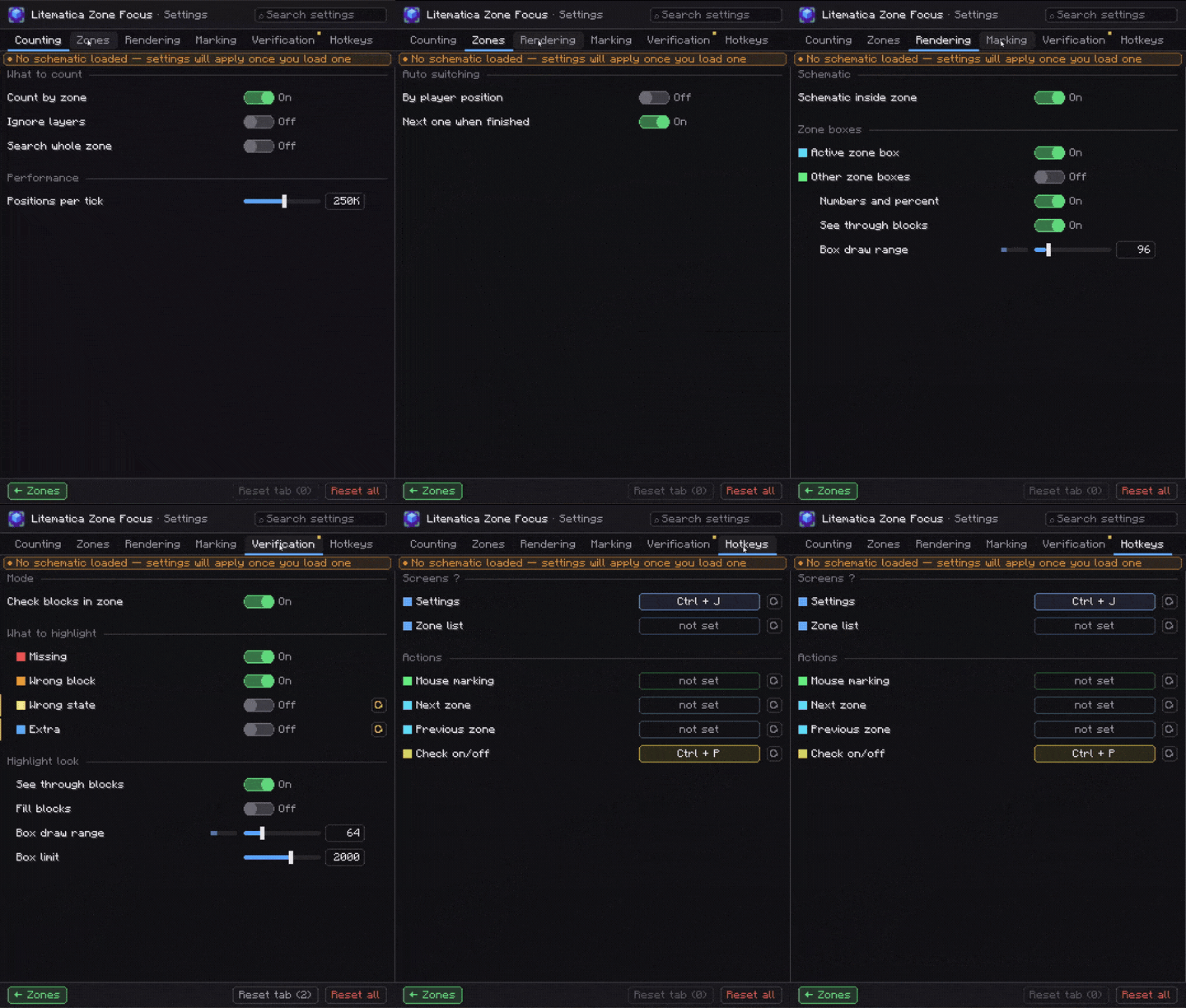
按 Ctrl + J 打开,或从区域界面进入。上述所有功能均可单独关闭;此外还有以下选项:
| 部分 | 可调参数 |
|---|---|
| 区域自动化 | 使你所处的区域成为活跃区域;当当前区域无可放置方块时,自动进入下一个区域。 |
| 整区模式 | 忽略 Litematica 的层级范围,统计整个区域。 |
| 渲染 | 活跃区域及网格其余部分的轮廓线(已完成区域显示为绿色)、世界中显示带百分比的区域编号、穿透方块可见性、轮廓绘制距离 16–512。 |
| 标记 | 将标记区域限制在图纸边界内,射线距离 8–512。 |
| 校验 | 半透明方块填充、高亮距离 8–256、每类标记上限 50–20000 —— 避免超大区域导致帧率下降。 |
| 扫描预算 | 计算进度时每秒检查的位置数量,10k–4M。 |
按键绑定
默认仅绑定了一个 —— 其余由你自定义。
| 操作 | 默认值 |
|---|---|
| 打开设置 | Ctrl + J |
| 区域界面 | 未绑定 |
| 上一个 / 下一个区域 | 未绑定 |
| 鼠标标记 | 未绑定 |
| 校验区域 | 未绑定 |
完美搭配
Litematica Material HUD & Chest Finder —— 为你正在建造的层级提供材料列表 HUD,并在存放这些方块的箱子上添加彩色标记。Zone Focus 告诉你 在哪里 建造;Material HUD 告诉你 带什么来。

? 有问题、Bug 或建议?加入 Discord
Litematica Zone Focus is a client-side Litematica addon for Fabric that lets you build a schematic piece by piece.
A placed schematic is split into zones. You pick the zone you're working on right now, and the schematic is rendered, counted and verified only inside that zone — the rest stays out of the way until you get to it.
Requirements: Fabric Loader, Fabric API, MaLiLib and Litematica. Client-side only — nothing to install on the server, and it works on vanilla servers.
What it does
- Splits a schematic into zones — as a grid (set either the number of zones per axis or the size of one zone in blocks, with a live preview of how many zones you'll get and how big they'll be), by dragging out a zone with your mouse, or from a Litematica selection.
- Works inside the active zone only — rendering, misplaced-block detection, layer-by-layer building and every other calculation are limited to the zone you selected.
- Tracks progress for every zone — percentage, blocks remaining and distance to the zone. The list can be sorted by any of them, or by zone number.
- Reduces the rendering load on large schematics — geometry outside the active zone isn't built at all, so there's less to draw and fewer chunk rebuilds. How much you gain depends on the schematic and your zone size.
- Lets you mark zones with the mouse — a new hotbar slot: hold Attack (left mouse button by default) and drag to mark out a zone, release to save it.
- Verifies the schematic within the zone — the same breakdown as Litematica's Schematic Verifier: missing (red), wrong block (orange), wrong state (yellow), extra (light blue), drawn through walls. Toggled with a keybind.
- Updates in real time — place a block and its marker disappears, the progress bar moves instantly.
- Remembers your zones — zone layout and progress survive leaving a server or switching dimensions.
How to use it
- Place a schematic with Litematica as usual.
- Open the zones screen and split the placement into a grid — or mark a single zone by dragging with the mouse.
- Select a zone. Only that part of the schematic is rendered and counted.
- Build it, watch the progress bar, then move on to the next zone — manually or automatically.
Settings
Open with Ctrl + J, or from the zones screen. Everything above can be turned off individually; on top of that:
| Section | What you can tweak |
|---|---|
| Zone automation | Make the zone you're standing in the active one; move on to the next zone once there's nothing left to place in the current one. |
| Whole zone | Ignore Litematica's layer range and count the entire zone. |
| Rendering | Outlines for the active zone and for the rest of the grid (completed zones turn green), zone numbers with percentages in the world, visibility through blocks, outline draw distance 16–512. |
| Marking | Clamp a marked zone to the schematic's bounds, ray distance 8–512. |
| Verification | Semi-transparent block fill, highlight distance 8–256, marker limit per category 50–20000 — so a huge zone doesn't cost you frames. |
| Scan budget | How many positions are checked per tick while calculating progress, 10k–4M. |
Keybinds
Only one is bound by default — the rest are up to you.
| Action | Default |
|---|---|
| Open settings | Ctrl + J |
| Zones screen | unbound |
| Next / previous zone | unbound |
| Mouse marking | unbound |
| Verify zone | unbound |
Pairs well with
Litematica Material HUD & Chest Finder — a material list HUD for the layer you're building, plus colored markers on the chests holding those blocks. Zone Focus tells you where to build; Material HUD tells you what to bring.
? Questions, bugs or ideas? Join the Discord

下载 Litematica Zone Focus
下载 Litematica Zone Focus
下载 Litematica Zone Focus
下载 Litematica Zone Focus
下载 Litematica Zone Focus
下载 Litematica Zone Focus
下载 Litematica Zone Focus
下载 Litematica Zone Focus
下载 Litematica Zone Focus
下载 Litematica Zone Focus
0.1.2 · Minecraft 1.21.11 — 区块(Sections)
适用于 Minecraft 1.21.11 的 Zone Focus 首个构建版本。
新增
- 区块(Sections)—— 多个结构图,每个以不同方式拆分。 一个区块由一个或多个结构图加上一个规则组成:网格、结构图的子区域,或手动绘制的区域。新建区块窗口,多个结构图的合并边界,管理区域中的区块列表(重命名、隐藏、再次拆分、删除),HUD 上的 S2 · Z7/24 标签,以及上一区块 / 下一区块按键。
- 其他区块不会造成干扰: 隐藏其他区块(默认开启)和 其他区块的框架。
- 在 2D 地图上用鼠标切割,每步一个方块;右键点击可执行 在此处切割 / 移除切割。支持从顶部、正面和侧面查看 2D 地图。
- 外观:Aell UI、原版或原版+(计数 → 界面风格)。
- 聊天消息默认关闭 —— 反馈信息显示在快捷栏上方。
修复
- 修复 —— 使用旧版 Fabric Loader 加入世界时出现崩溃,改为显示清晰的 Fabric 窗口。
- 修复 —— 启用、移动或关闭区域内的第二个结构图时,材质 HUD 数字未刷新;手动区域与网格对重叠结构图的计算方式不同;两个区域重叠时自动切换存在抖动。
尚不支持 1.21.11
由多个结构图组成的区块的 3D 视图、3D 切割手柄以及高度滑块需要比 1.21.11 可用版本更新的 Material HUD。Zone Focus 会自动检测此情况:如以前一样,单结构图区块的 3D 功能仍可正常工作。
? 你需要
Minecraft 1.21.11 · Fabric Loader 0.19.3+ · Fabric API · malilib · Litematica · Java 21 · Litematica Material HUD(可选)
关于这个资源的讨论、问题反馈与使用心得
还没有讨论,来发第一帖吧
你是这个资源的作者?登录后可认领此资源。
相似资源
 模组

显示你正在注视的方块的信息。(适用于 Minecraft 1.16+ 的 Hwyla/Waila 分支)
 模组
使用 JavaScript 编辑配方、添加自定义物品、编写世界事件!
 模组

查看物品与配方
 模组
在游戏画面角落显示附近世界地形、玩家、生物和实体的地图。可创建路径点,帮助你找到标记过的位置。
 模组
AE2:一款流行的自动化与存储模组
 模组
那是什么?一个 Waila/Hwyla 的分支。
评论 0
登录后参与评分
还没有评论,来抢沙发吧