
用于在服务器生存模式下通过结构图进行建造的一体化模组。
它显示建造所需的内容以及哪些箱子存放了这些物品,检查你的工作成果,并添加结构图库、放置编辑器、团队材料表以及 Easy Place 修复功能。所有你需要的东西都集中在一处。
完全客户端侧:无需在服务器上安装任何东西,Litematica 的协议保持不变,因此不需要进行服务器端设置。

⚡ 快速开始
- 在 Litematica 中加载结构图并选择一种渲染层模式。
- 按下 Y 查看该层的材料列表。
- U 标记所有存放这些方块的箱子、 barrel 和潜影盒。Ctrl + U 清除标记。
- Ctrl + B 高亮显示缺失、错误或多余的方块。
? 材料列表
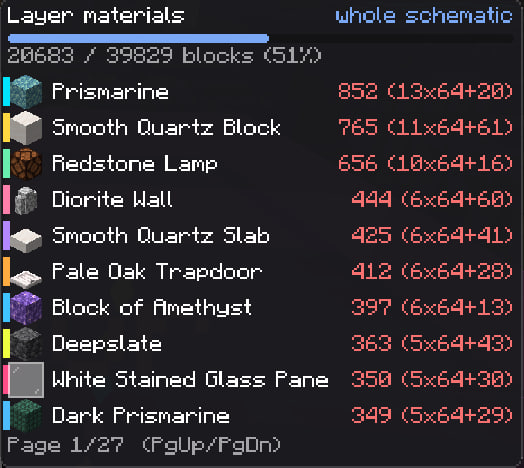
当前层的列表,带有进度条,并以方块、组块和潜影盒为单位计数。放置一个方块后,它会自动从列表中移除。名称旁显示 ? 充足 · ? 部分拥有 · ? 无。使用 Page Up / Page Down 翻页,即使打开着箱子也可以操作。
? 箱子查找器
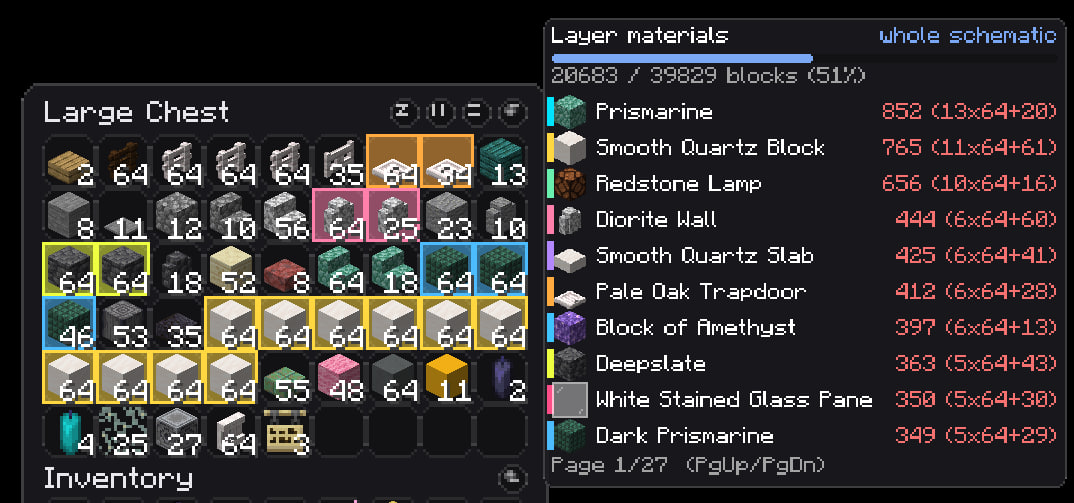
模组会记住你在每个世界和服务器中打开过的容器里的物品,容器上的物品展示框也算在内。按下 U,96 格范围内(最多 256 个)存放了你所需物品的储物柜会通过墙壁发光,颜色与 HUD 一致。打开箱子时,匹配的槽位会发光,包括潜影盒和包裹。如果你已经携带足够的物品,则会被跳过。

✅ 验证
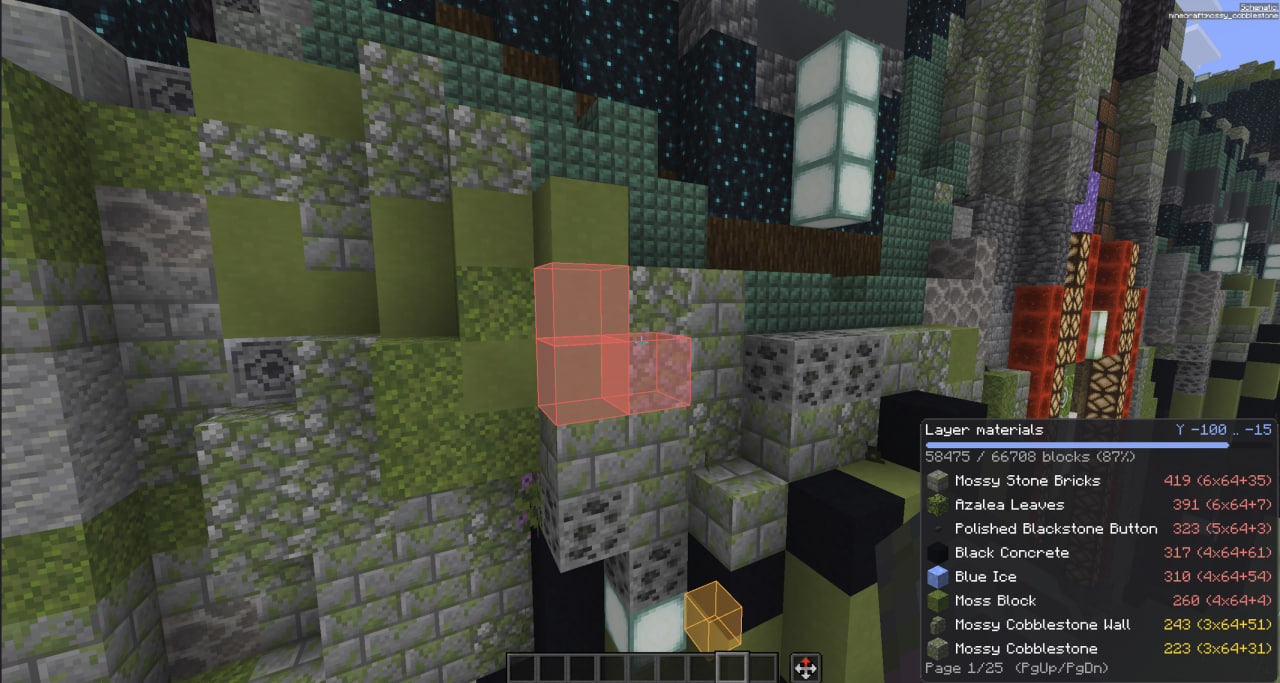
即使透过墙壁也能发现错误的方块:? 缺失 · ? 错误方块 · ? 错误状态(楼梯方向、比较器延迟、门等)· ? 多余。绘制范围和盒子上限确保在大型建造中保持稳定的帧率。
?️ 结构图
在一个屏幕中管理你的所有结构图相关信息。可以从设置中的 Schematics › 标签页或 Litematica 主菜单中的 Material HUD 按钮打开。
- 图库: 你的结构图文件夹,支持搜索、排序、缩略图和详细信息。将文件拖入窗口即可添加。
- 3D 预览: 具有真实纹理方块的建造预览,支持等轴测、顶部或正面视图,并可裁剪高度。巨大的结构图会以简化方式绘制;如果你有足够内存,Schematic display → Quality 可以全精度绘制它们。
- 放置: Place here 打开俯视图。拖动、旋转、镜像、放置到地面或吸附到区块网格,使用箭头键微调或按 − / + 调整,拖动角落可提升高度。Ctrl + Z 撤销。
- Placements 列出世界中已放置的所有内容。Materials 显示结构图需要什么、你携带了什么、箱子里有什么以及缺少什么。


? 替换方块
方块是在结构图本身中被替换,而不仅仅是在列表中。 在 Materials 中点击方块名称,选择另一个方块(例如将泥土变为深色橡木木板),加载的结构图中的每个此类方块都会改变:世界中的全息图、材料列表和 Easy Place 此后都将使用新方块。朝向、半砖等类似属性会被保留。
磁盘上的结构图文件不会被修改。更改会在重启后记住,行旁边的箭头可通过单击一键恢复原始方块。

? 导出供团队使用
- Excel: 现成的表格,玩家可以选择自己的名字并标记 Collecting / Collected,附带 Who collected what 图表。
- Google Sheets: 相同的表格,或直接发送到你团队的共享表格。
- 图片: 包含列表和建造预览海报的 PNG 页面。
- CSV、Discord(拆分为多条消息)、JSON 以及 Litematica 列表。
文件以结构图命名,且永远不会互相覆盖。

?️ 回收站
在 Library 中删除结构图会将其移至 Trash 标签页保留 30 天。你可以一键恢复它或永久删除。
? Easy Place 修复
- 精确点击。 蜡烛、海泡菜、鸡蛋、花瓣、苔藓和雪获得的点击次数与结构图要求的一致。
- 首次尝试即正确状态。 旋转、半块、门铰链、楼梯侧面、告示牌和头颅会与结构图进行检查。如果无法匹配状态,则该位置会被跳过而不是错误地建造。
- 观察者、活塞和发射器 面向正确的方向。
- 仅交互的物品: 点燃蜡烛、扑灭营火、水培、开门和陷阱门以匹配状态。
- 旗帜、装饰陶罐和玩家头颅 会生成正确的图案,如果你没有相应的图案则会被跳过。
- 可选额外项: 不均匀节奏、不挖掘错误的方块、选择挖掘工具、替换土壤(默认关闭,它会破坏方块)。
- 如果安装了独立的 EasyPlaceFix,当此模块启用时它将被禁用,并在你关闭模块时恢复。
⌨️ 按键
| 按键 | 操作 |
|---|---|
| Y | 显示/隐藏列表 |
| Page Up / Page Down | 翻页 |
| U | 标记需要方块的存储位置 |
| Ctrl + B | 验证 |
| Ctrl + Y | 设置 |
| Alt + Y | 使用鼠标移动面板 |
| 未绑定 | 打开 Schematics 菜单 |
⚙️ 设置
通过 Ctrl + Y、Litematica 屏幕上的 Material HUD 按钮或 Mod Menu 打开。设有搜索框,每行都有一个重置按钮,颜色与世界中对应设置的视觉效果相匹配。当你没有安装独立的 Ghost Alpha 和 Easy Place 模组时,这两个选项卡不会显示。

? 与 Zone Focus 兼容
Litematica Zone Focus 将蓝图缩小到你正在建造的部分。两者结合后,列表和箱子标记会跟随该区域变化,且两个模组共用一个设置界面。

? 依赖项
| Minecraft | 26.3(旧版模组版本适用于 26.2 · 26.1.x · 1.21.11,请查看 Versions) |
| Fabric Loader | 0.18.2+ |
| Java | 25+ |
| 必需 | Litematica · malilib · Fabric API |
| 可选 | Mod Menu |
? 有问题、发现 bug 或有想法?加入 Discord
The all-in-one mod for building from schematics in survival on a server.
It shows what the build needs and which chests hold it, checks your work, and adds a schematic library, a placement editor, material sheets for your team and Easy Place fixes. Everything you need is in one place.
Fully client-side: nothing to install on the server, Litematica's protocol untouched, so no server setup is needed.
⚡ Quick start
- Load a schematic in Litematica and pick a Render Layers mode.
- Y shows the material list for that layer.
- U marks every chest, barrel and shulker that holds those blocks. Ctrl + U clears the marks.
- Ctrl + B highlights what is missing, wrong or extra.
📋 Material list
The list for the current layer, with a progress bar and counts in blocks, stacks and shulker boxes. Place a block and it drops off the list. Names are 🟢 enough · 🟡 some · 🔴 none. Flip pages with Page Up / Page Down, even with a chest open.
🔎 Chest Finder
The mod remembers what is in every container you open, per world and server, and item frames on containers count too. Press U and storages within 96 blocks (up to 256) that hold something you need light up through walls, in the same colors as the HUD. Open a chest and the matching slots glow, shulker boxes and bundles included. Items you already carry enough of are skipped.
✅ Verification
Finds wrong blocks even through walls: 🔴 missing · 🟠 wrong block · 🟡 wrong state (stair direction, repeater delay, door) · 🔵 extra. A draw range and a box cap keep FPS steady on huge builds.
🗂️ Schematics
Everything about your schematics in one screen. Open it from the Schematics › tab in the settings or the Material HUD button in Litematica's main menu.
- Library: your schematics folder with search, sorting, thumbnails and details. Drop a file into the window to add it.
- 3D preview: the build with real textured blocks, in isometric, top or front view, with a height cut. Huge schematics are drawn simplified; Schematic display → Quality draws them in full if you have the memory.
- Placing: Place here opens a top view. Drag, rotate, mirror, drop to the ground or snap to the chunk grid, nudge with arrows or − / +, lift by dragging a corner. Ctrl + Z undoes.
- Placements lists everything placed in the world. Materials shows what a schematic needs, what you carry, what is in chests and what is missing.
🔁 Replace a block
The block is replaced in the schematic itself, not only in the list. Click a block's name in Materials, pick another one (here dirt becomes dark oak planks) and every such block changes in the loaded schematic: the holograms in the world, the material list and Easy Place all use the new block from then on. Facing, slab half and similar properties are kept.
Your schematic file on disk is not touched. The change is remembered after a restart, and the arrow next to the row restores the original block with one click.
📤 Export for your team
- Excel: a ready sheet where players pick their name and mark Collecting / Collected, with a Who collected what chart.
- Google Sheets: the same sheet, or sent straight to your team's shared sheet.
- Picture: PNG pages with the list plus a preview poster of the build.
- CSV, Discord (split into messages), JSON and a list for Litematica.
Files are named after the schematic and never overwrite each other.
🗑️ Trash
Deleting a schematic in the Library moves it to the Trash tab for 30 days. Restore it with one click or delete it for good.
🔧 Easy Place fixes
- Exact clicks. Candles, sea pickles, eggs, petals, moss and snow get exactly as many clicks as the schematic asks.
- Right state, first try. Rotation, half, door hinge, stair side, signs and heads are checked against the schematic. If the state can't be matched, the spot is skipped instead of built crooked.
- Observers, pistons and droppers face the right way.
- Things you only interact with: lighting candles, putting out campfires, waterlogging, opening doors and trapdoors to match.
- Banners, decorated pots and player heads come out with the right pattern, or are skipped if you lack it.
- Optional extras: uneven pace, don't dig the wrong block, pick the tool for digging, replace soil (off by default, it breaks blocks).
- If the standalone EasyPlaceFix is installed, it is switched off while this module is on, and restored when you turn the module off.
⌨️ Keys
| Key | Action |
|---|---|
| Y | Show / hide the list |
| Page Up / Page Down | Flip pages |
| U | Mark storage with needed blocks |
| Ctrl + B | Verification |
| Ctrl + Y | Settings |
| Alt + Y | Move panels with the mouse |
| unbound | Open the Schematics menu |
⚙️ Settings
Open with Ctrl + Y, the Material HUD button on Litematica's screens, or Mod Menu. There is a search box, a reset button on every row and colors that match what a setting controls in the world. The Ghost Alpha and Easy Place tabs show up when you don't have those standalone mods.
🧩 Works with Zone Focus
Litematica Zone Focus narrows a schematic to the part you are building. Together, the list and chest marks follow that zone, and both mods share one settings screen.
📦 Requirements
| Minecraft | 26.3 (older mod versions for 26.2 · 26.1.x · 1.21.11 stay in Versions) |
| Fabric Loader | 0.18.2+ |
| Java | 25+ |
| Required | Litematica · malilib · Fabric API |
| Optional | Mod Menu |
💬 Questions, bugs or ideas? Join the Discord

下载 Litematica Material HUD & Chest Finder
下载 Litematica Material HUD & Chest Finder
下载 Litematica Material HUD & Chest Finder
下载 Litematica Material HUD & Chest Finder
下载 Litematica Material HUD & Chest Finder
下载 Litematica Material HUD & Chest Finder
下载 Litematica Material HUD & Chest Finder
下载 Litematica Material HUD & Chest Finder
下载 Litematica Material HUD & Chest Finder
下载 Litematica Material HUD & Chest Finder
1.0.30 · Minecraft 1.21.11
修复
- 修复 — 放置的盔甲架、物品展示框和画作在远距离下被错误地计为缺失。 服务器仅发送玩家自身半径内的实体,该范围小于区块距离。超出此范围后,模组无法找到该实体,并在 Ctrl+B 检查及材料列表中将其显示为未放置。现在,在此半径之外,模组将使用最近一次近距离检查的结果;若此前无检查记录,则该实体不会被计为缺失。
- 修复 — 在“仅显示背包中的方块”模式下,盔甲架及其他实体在没有手持对应物品时仍会被显示。实体的全息投影、Ctrl+B 检查中的框架及其高亮效果,现在仅在手持对应物品时才会显示,与方块的行为保持一致。
新增
- 高亮显示实体(Ghost Alpha 标签页,默认开启)。尚未加入世界的盔甲架、物品展示框、画作及其他图纸实体,将以相同的 Litematica 颜色进行高亮显示,如同缺失的方块一样。
📦 你需要
Minecraft 1.21.11 · Fabric Loader · Fabric API · malilib · Litematica · Java 21 · Syncmatica — 可选 · Voxy — 可选
1.0.29 · Minecraft 1.21.11
新增
- 隐藏传送门(Ghost Alpha 选项卡,默认关闭)。末地传送门框架以及传送门本身——下界传送门、末地传送门、末地网关——的全息影像不再渲染,准星可以穿透这些位置看到后面的方块。黑曜石及其他结构蓝图显示正常。传送门仍保留在材质列表中,并受 Ctrl+B 检查的影响。开启此选项时,Easy Place 无法将末影之眼放入框架中——若需放置,请关闭此选项。
📦 你需要
Minecraft 1.21.11 · Fabric Loader · Fabric API · malilib · Litematica · Java 21 · Syncmatica —— 可选 · Voxy —— 可选
1.0.28 · Minecraft 1.21.11
新增
- 全息图中的生物(Ghost Alpha 标签页,默认关闭)。保存在结构图(schematic)中的鸡、村民、马等生物不再在其全息预览中显示。开启此选项可重新查看它们。盔甲架、物品展示框和画作始终会显示。选项旁有一个小型的 3D 鸡模型。
修复
- 修复 —— 当方块位置被雪覆盖时,该方块会从 HUD 中消失。 落雪填满了该位置,导致其被计为“错误方块”,而在启用 仅空位(默认设置)的情况下,该方块会从列表中剔除。现在,无论雪层有多少层,只要结构图需要其他方块,该位置的雪层都被视为空位。当结构图本身要求放置雪层时,检查逻辑仍如之前一样工作。
- 修复 —— 移动所有所需物品 将带图案的旗帜误认为普通旗帜。 当结构图中同时存在普通旗帜和同色带图案的旗帜时,箱子传输会将带图案的旗帜当作普通行所需的物品,从而反复取出又放回;背包中带图案的旗帜也会被算作普通旗帜。现在,普通行仅接受无图案的旗帜,而带图案的行仅接受相同图案的旗帜。装饰陶罐和头颅也适用同样的逻辑。
📦 你需要
Minecraft 1.21.11 · Fabric Loader · Fabric API · malilib · Litematica · Java 21 · Syncmaticica — 可选 · Voxy — 可选
1.0.27 · Minecraft 1.21.11 · 热修复
已修复
- 修复了——在安装 VoxyMap 附加组件时,选择区域的 3D 预览可能为空——仅有边框,没有世界画面的问题。Voxy 负责绘制此预览,而地图为了节省游戏资源会在自身范围外关闭 Voxy,这同时也导致我们的图片无法显示。现在该预览不再依赖任何其他模组:它会检查 Voxy 是否真正绘制了画面,如果有任何阻碍因素(其他模组干扰,或 Voxy 尚未加载任何内容),它将自行绘制预览,直到你重新打开该界面。Zone Focus 的区域管理器的 3D 视图也获得了相同的修复。
📦 你需要
Minecraft 1.21.11 · Fabric Loader · Fabric API · malilib · Litematica · Java 21 · Syncmatica — 可选 · Voxy — 可选
1.0.26 · Minecraft 1.21.11 · 热修复
已修复
- 修复 — 按 Esc 离开放置编辑器会导致方案重新回到原位。 现在所有退出方式都会保留你设置的值:Esc、Enter、完成,以及通过其他方式关闭窗口——包括未完成的拖拽操作和在 X/Y/Z 字段中输入的数字。刚刚创建的放置不再被 Esc 移除。只有 取消 按钮才会将一切恢复原状。
- 修复 — 在“观察世界”模式下,放置在卡片上输入的数字在其他操作关闭光标屏幕时会丢失。 现在该数字会正确应用。
📦 你需要
Minecraft 1.21.11 · Fabric Loader · Fabric API · malilib · Litematica · Java 21 · Syncmatica(可选)· Voxy(可选)
关于这个资源的讨论、问题反馈与使用心得
还没有讨论,来发第一帖吧
你是这个资源的作者?登录后可认领此资源。
相似资源
 模组

显示你正在注视的方块的信息。(适用于 Minecraft 1.16+ 的 Hwyla/Waila 分支)
 模组
使用 JavaScript 编辑配方、添加自定义物品、编写世界事件!
 模组

查看物品与配方
 模组
在游戏画面角落显示附近世界地形、玩家、生物和实体的地图。可创建路径点,帮助你找到标记过的位置。
 模组
AE2:一款流行的自动化与存储模组
 模组
那是什么?一个 Waila/Hwyla 的分支。
评论 0
登录后参与评分
还没有评论,来抢沙发吧