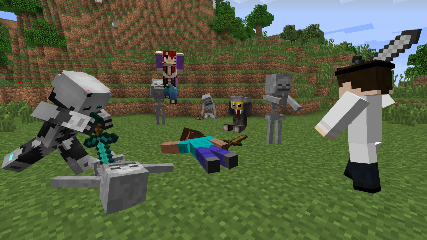
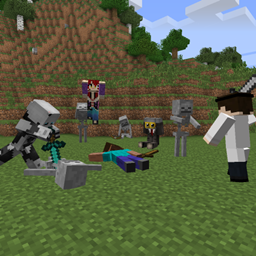
Model Citizens 允许你将玩家或骷髅角色模型放置到世界中。这些模型可以完全摆出姿势、穿戴盔甲、手持物品,并拥有完整的背包供玩家拾取。你可以使用自定义纹理,也可以使用上传至 Mojang 服务器的标准玩家纹理。
它最初是为自定义地图设计的,你可以在其中让玩家在倒下的英雄身上找到物品和背景故事,但你几乎可以在任何场景中使用它!
可以通过使用“模型放置器”(Model Placer)来生成模型,其合成配方如下:
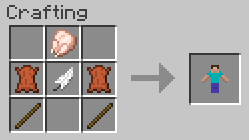
如果需要,可以在配置文件中禁用模型放置器的合成。使用新合成的模型放置器默认会生成一个面向你当前视角的 Steve 模型。
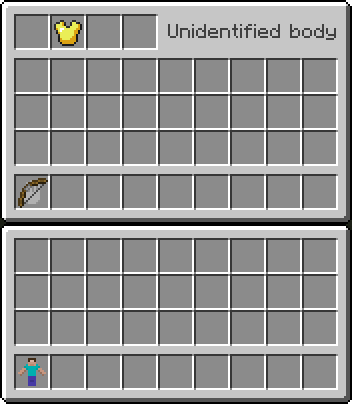
右键点击模型可访问其背包界面。左上角为标准盔甲槽位,会在模型上正确渲染。右上角区域将显示模型的名称。下方是标准的玩家背包布局,左下角格位带有手形图标。放入该格位的任何物品都会在模型手中进行渲染。
如果你希望在生存模式下禁用玩家将物品放回模型背包的功能,则有一个相应的配置选项可用。
当禁用“无敌”配置选项时,模型对铲子较为脆弱,但仍对爆炸伤害免疫。这可以防止意外移除地图中的重要模型(及其背包内容)。模型被破坏后,会掉落其完整背包中的所有物品,以及可选的一个模型放置器物品(默认启用)。该物品会保留其原有信息,并可再次放置到世界中,仅放置时的朝向会发生变化。
在创造模式下,使用中键拾取方块同样会复制一个模型及其整个背包。这使得你可以快速在世界中放置许多相似的副本。
要调整姿势并自定义模型,请在创造模式下用空手 Shift+右键点击其基座以打开配置 GUI(可通过配置文件在生存模式下对此功能进行限制)。设置分为多个页面。初始页面允许你指定模型类型(标准型或骷髅型),并输入用于纹理的用户名。其他页面则允许你设置模型的朝向。
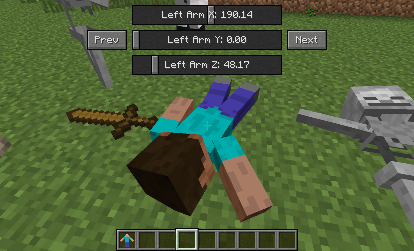
在配置 GUI 中滚动鼠标滚轮,会根据你悬停的内容切换页面或微调滑块控制。在此操作时按住 Shift 键可以实现更精确的调整。
在配置 GUI 中右键点击可以上下翻转控件位置,方便你在调整姿势时将控件移开。如果你退出 GUI,模型的位置和当前页面都会被记住,以便你在需要移动角色以获得更好的视角时,能轻松接续之前的工作。
如果你希望使用与纹理名称不同的显示名称,或者希望在使用默认的 Steve 或骷髅纹理的同时搭配自定义名称,可以使用感叹号(!)作为分隔符。纹理名称在前,显示名称在后。如果留空纹理名称,则将使用默认的 Steve 或骷髅纹理。
模型纹理首先会在本地搜索,路径为 config/modelcitizens 文件夹内。如果未找到,则会从 Mojang 服务器获取该玩家的标准模型。你的自定义纹理应为 PNG 格式,且文件名全部小写。
Model Citizens allows you to place player or skeleton character models into the world which can be fully posed, wear armor, hold items, and have a complete inventory that players can loot. You can use your own custom textures, or use the standard player textures uploaded to Mojang.
It was intended for custom maps where you want players to find items and lore on fallen heroes, but you can use it for pretty much anything!
Models can be spawned by using a Model Placer item, craftable using the recipe:
Crafting of the Model Placer can be disabled in the config if desired. Using a newly crafted Model Placer produces a Steve model by default, facing your orientation.
Right-clicking a model provides you access to its inventory. At the top left are standard armor slots, which will render on the model. The top right area will display the model's name. Below is a standard player inventory arrangement, with the bottom-left slot having a hand icon. Any object you place in this slot will render in the model's hand.
There's a config option available if you wish to disable the player's ability to place items back into the inventory in survival mode.
When invulnerability config option is disabled, models are weak against shovels, but are still invulnerable to explosion damage. This prevents accidental removal of important models (and their inventories) from your maps. When broken, the model drops its full inventory and optionally a Model Placer item (enabled by default). The item will retain its information and can be placed again in the world, with only its orientation changing when placed.
When in creative mode, using middle-click to pick the block will similarly duplicate a model, as well as its entire inventory. This allows you to quickly place many similar copies in the world.
To pose and customize a model, shift-right click its base with an empty hand while in creative mode to get its configuration GUI (can be disabled for players in survival mode via the config). There are several pages of settings. The initial page allows you to specify the model type (either standard or skeleton), and to enter a username to use for the texture. The other pages allow you to set the model's orientation.
Using the mouse wheel in the configuration GUI will either flip through the pages or finely tune a slider control depending on what you're hovering over. Holding shift while doing this will adjust a slider even more precisely.
Right-clicking in the configuration GUI will toggle the controls up and down, allowing you to move it out of the way while posing it. Both the position and the page will be remembered if you exit the GUI, making it easy to pick up where you left off if you have to move your character for a better view while posing.
If you wish to use a different display name than the texture name, or want to use a default Steve or skeleton texture along with a custom name, then the exclamation mark can be used as a separator. Texture name goes first, then display name. Leave the texture name blank to use the default Steve or skeleton ones.
Model textures are searched for locally first, from within the config/modelcitizens folder. If not found there it will pull the standard model for that player from Mojang's servers. Your custom textures should be in PNG format, and the filenames all lowercase.

 模组

 模组
 模组
 模组

 模组

 模组
评论 0
登录后参与评分
还没有评论,来抢沙发吧