
“我想去探索世界,但我所有的东西都留在家里。我该怎么办?”
答案:把你的家随身携带!建造一座蒙古包(Yurt)、圆锥帐篷(Tepee)、贝都因帐篷(Bedouin)、因杜屋(Indlu)或夏米亚纳凉亭(Shamiyana)——搭建它,拆卸它,从此再也不用担心离家乡太远。
帐篷有多种尺寸:从微型(Tiny,5x5)、小型(Small,7x7)和中型(Medium,9x9)到大型(Large,11x11)、巨型(Giant,13x13)和超巨型(Mega,15x15)。以下是入门指南:
第一步:制作帐篷
目前你有 5 种帐篷选项:蒙古包(Yurt)、圆锥帐篷(Tepee)、贝都因帐篷(Bedouin)、因杜屋(Indlu)或夏米亚纳凉亭(Shamiyana)。
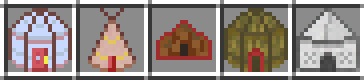
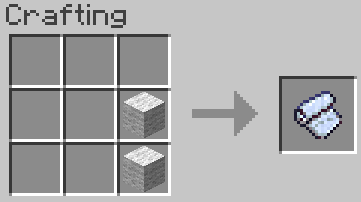
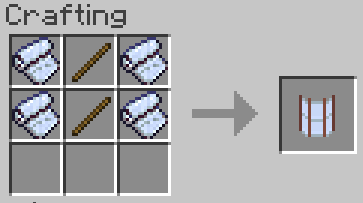
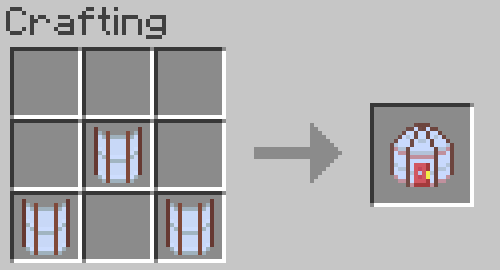
要建造蒙古包,请制作帐篷帆布和蒙古包墙块。
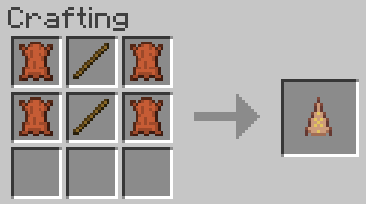
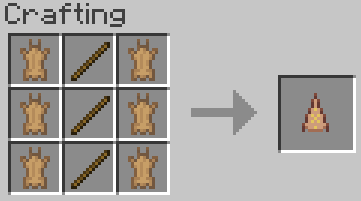
要建造圆锥帐篷,请使用 4 张皮革(或 6 张兔皮)制作圆锥帐篷墙块。
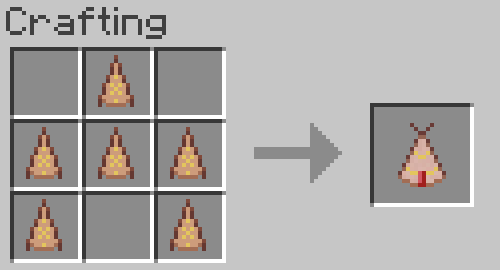
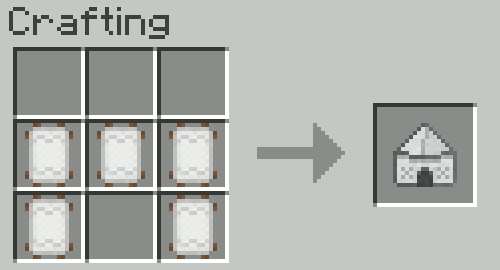
要建造贝都因帐篷,请使用任意羊毛制作贝都因帐篷墙块:
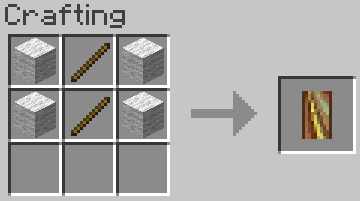
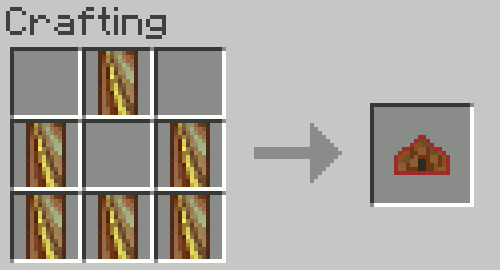
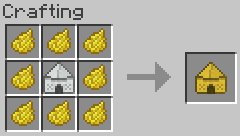
要建造因杜屋,请使用木棍和树叶制作因杜屋墙块:
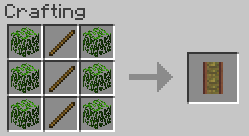
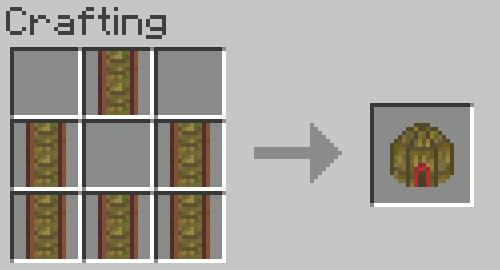
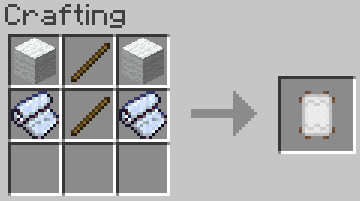
最后,要建造夏米亚纳凉亭,请将木棍、羊毛和帐篷帆布一起合成制作夏米亚纳墙块:
在合成台中用染料围绕夏米亚纳凉亭即可为其上色!这适用于所有 16 种颜色的染料。你可以使用注满水的炼药锅洗掉颜色。~ 由 scribbler957 建议 ~
第二步:升级帐篷
尺寸升级:可以通过使用上一级配方合成来升级帐篷的尺寸。
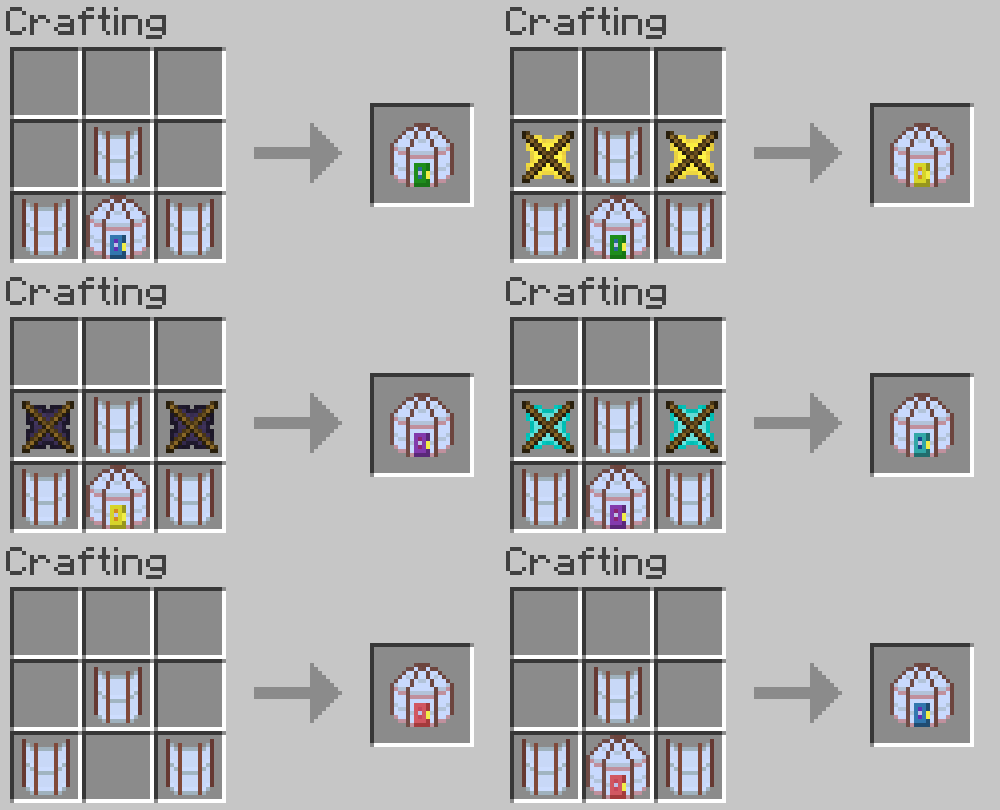
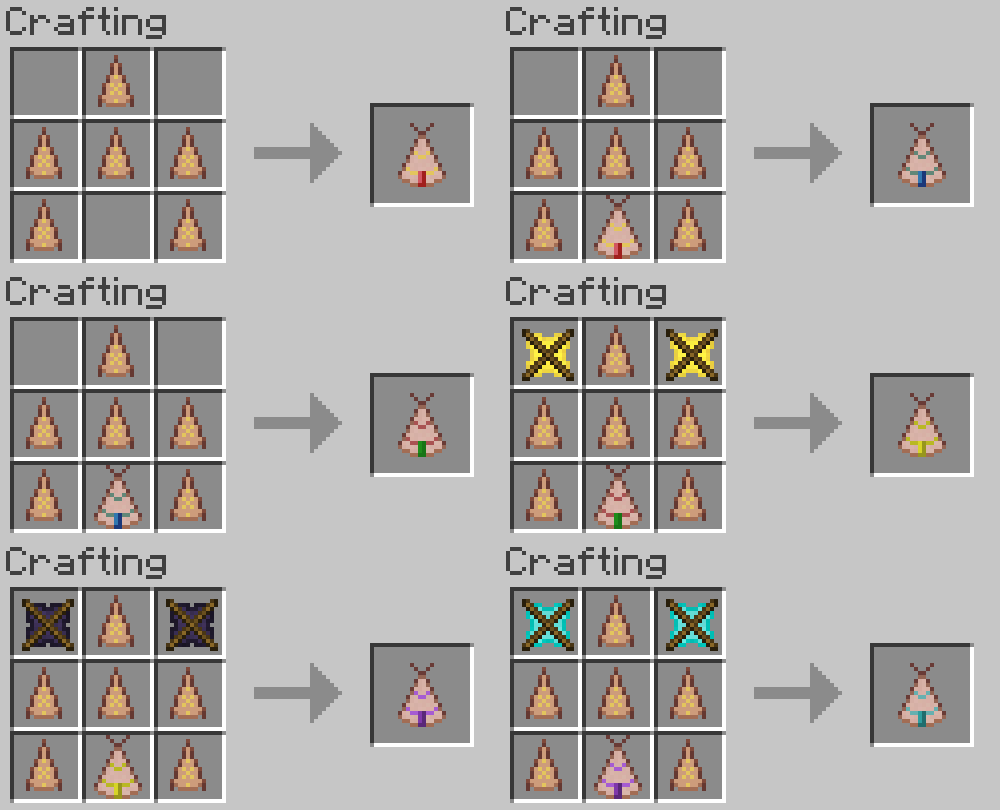
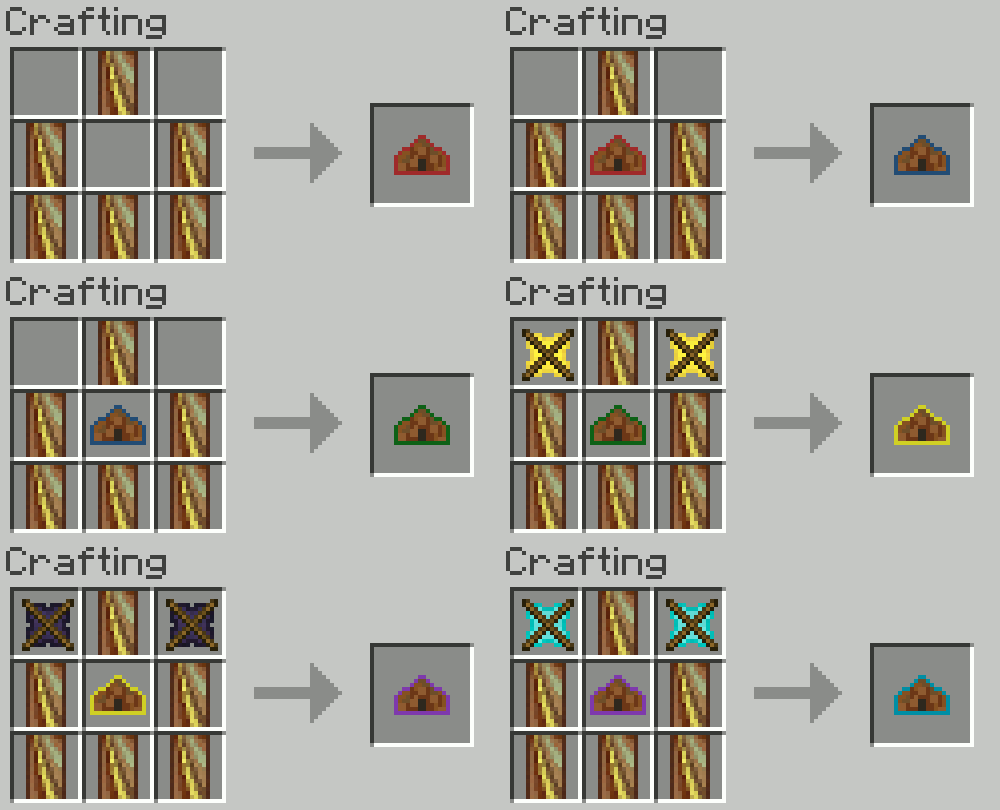
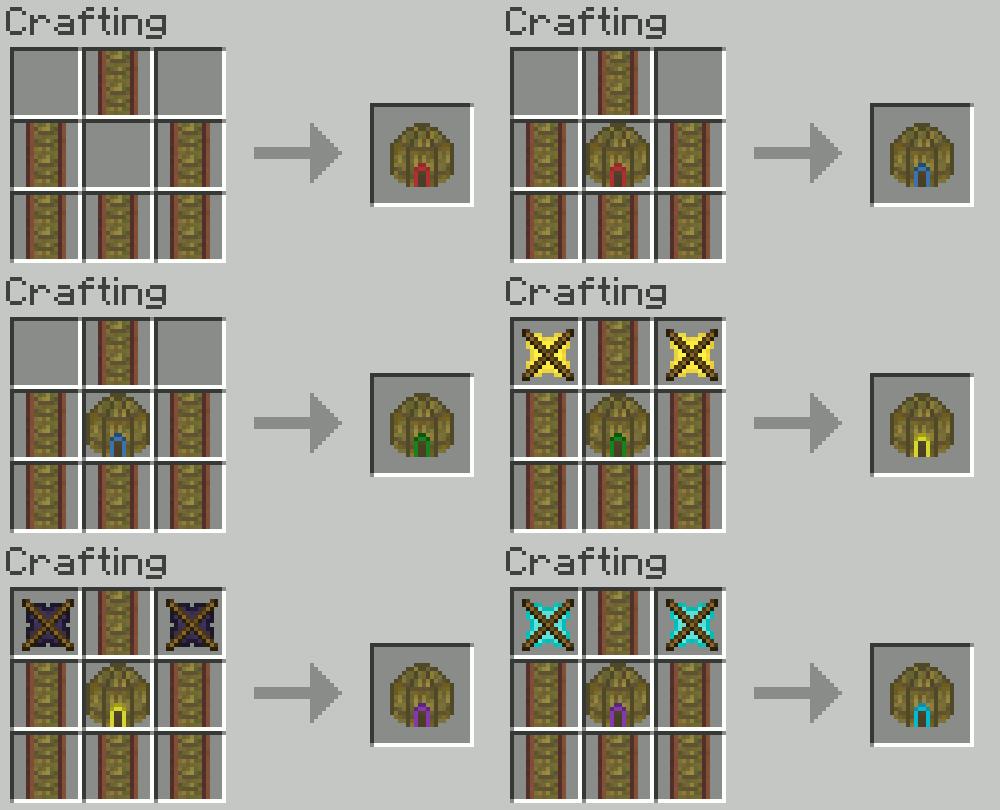
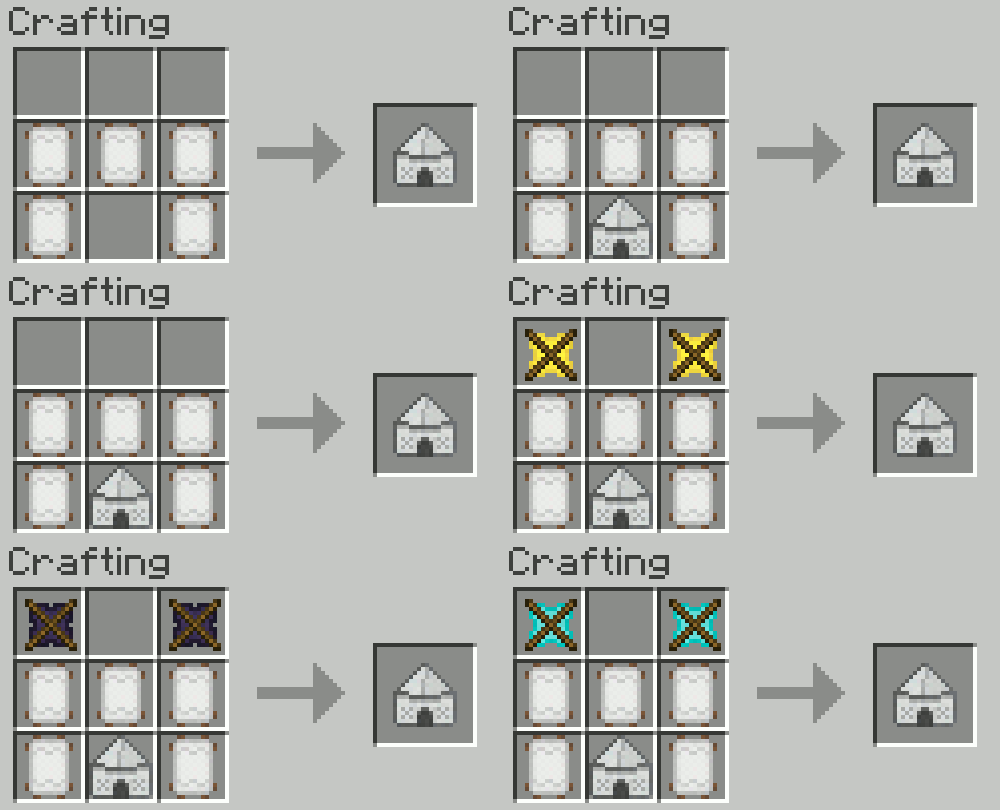
对帐篷进行后 3 次尺寸升级需要额外的物品:金横梁、黑曜石横梁和钻石横梁。
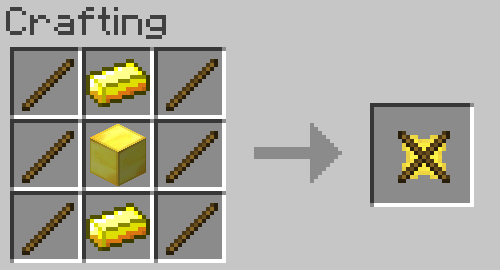
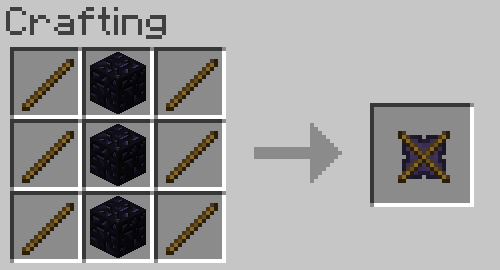
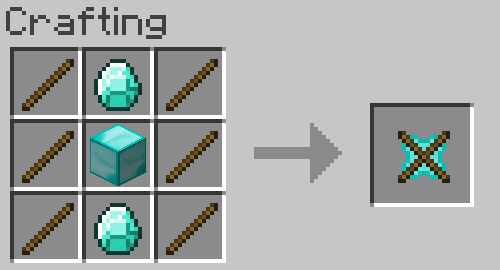
层级升级: 这允许你增加帐篷下方的泥土层数。最终,你可以拥有梦寐以求的……证书监狱——我是说,水果储藏室!
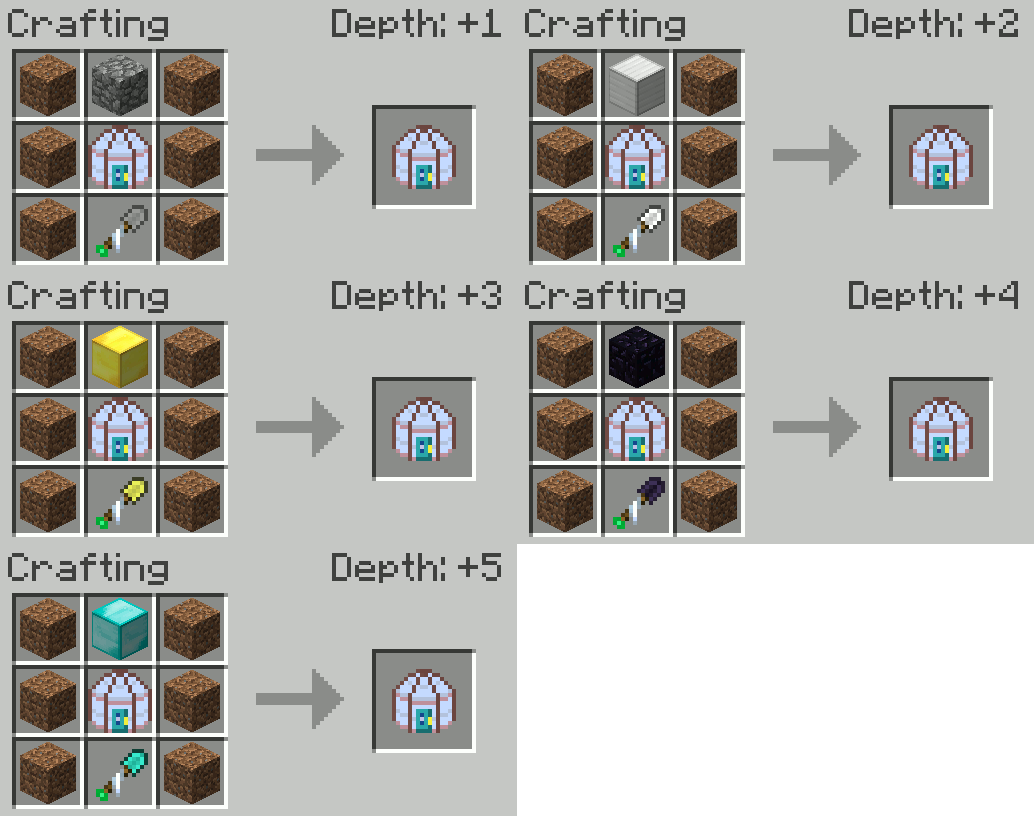
层级升级必须按顺序添加。将石制帐篷铲 与中型或更大尺寸的帐篷结合使用以进行第 1 层升级。升级到更大尺寸的帐篷后,你可以对铁制帐篷铲 执行相同操作以进行第 2 层升级。后续模式依次为金、黑曜石和钻石帐篷铲。每种尺寸的帐篷可进行的升级次数可能不同。
提示: 注视帐篷物品时按住 SHIFT 键,可查看该帐篷最多可升级的次数。微型帐篷可为 0 次,小型为 1 次,以此类推,直至巨型帐篷最多可达 5 次。
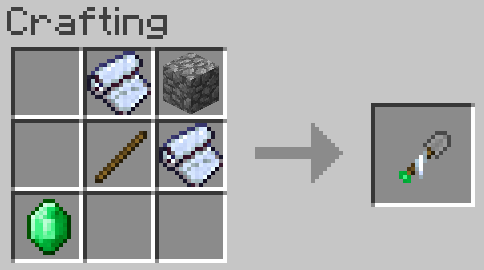
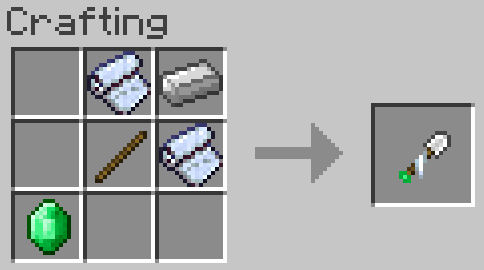
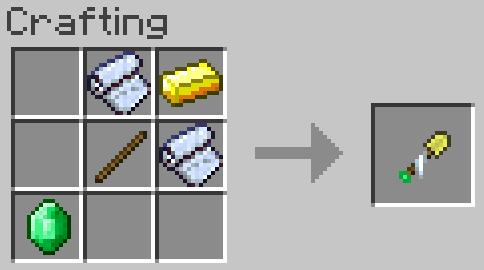
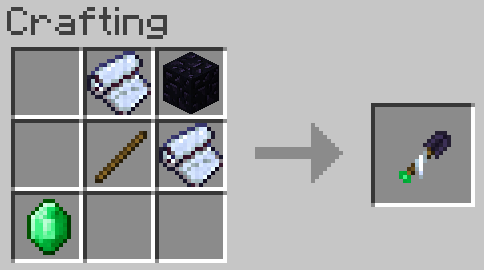
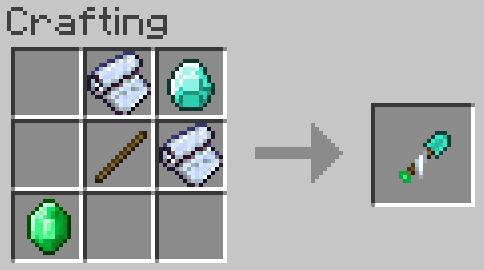
在合成台中添加升级。将帐篷放在合成网格中央,帐篷铲置于其下方,泥土放在两侧,顶部放置对应材质的方块。
~ 由 SureinDragon29800 建议 ~
步骤 3:搭建帐篷
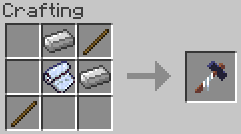
首先制作一把帐篷锤。帐篷可不会自己建造!
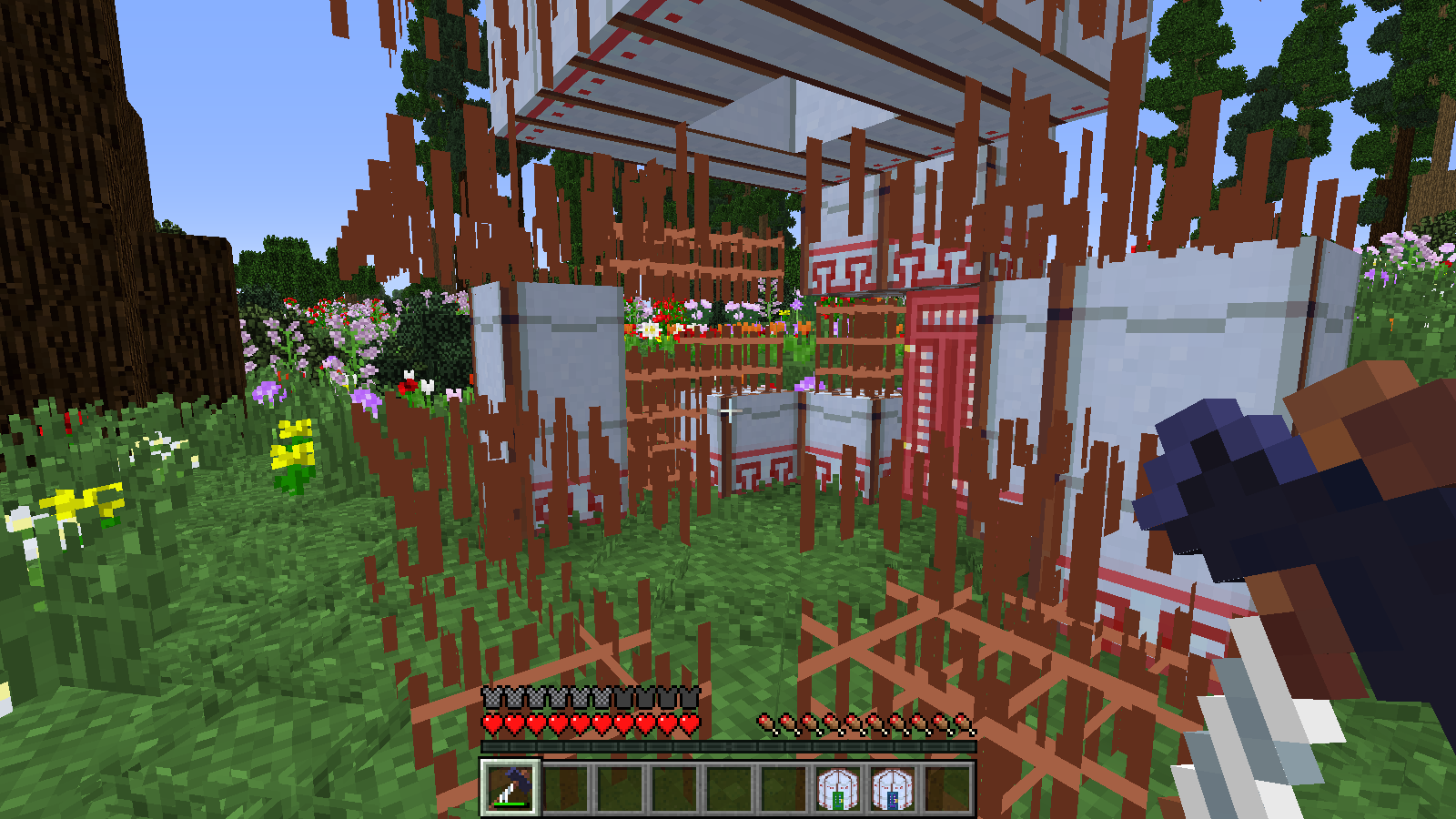
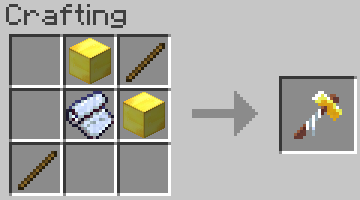
金色帐篷锤只需单击一次即可完成此操作!
步骤 4:享受你的帐篷吧!
当你完成帐篷搭建后,点击门即可进入(最好空手操作)。
这是怎么回事?我建好的帐篷是 5x5 的大小,但内部空间却大得多!
这就是 Nomadic Tents 的魔力所在:帐篷外部尺寸可以相同(且搭建耗时也一样),但内部可以豪华宽敞!当然,前提是你进行了升级。
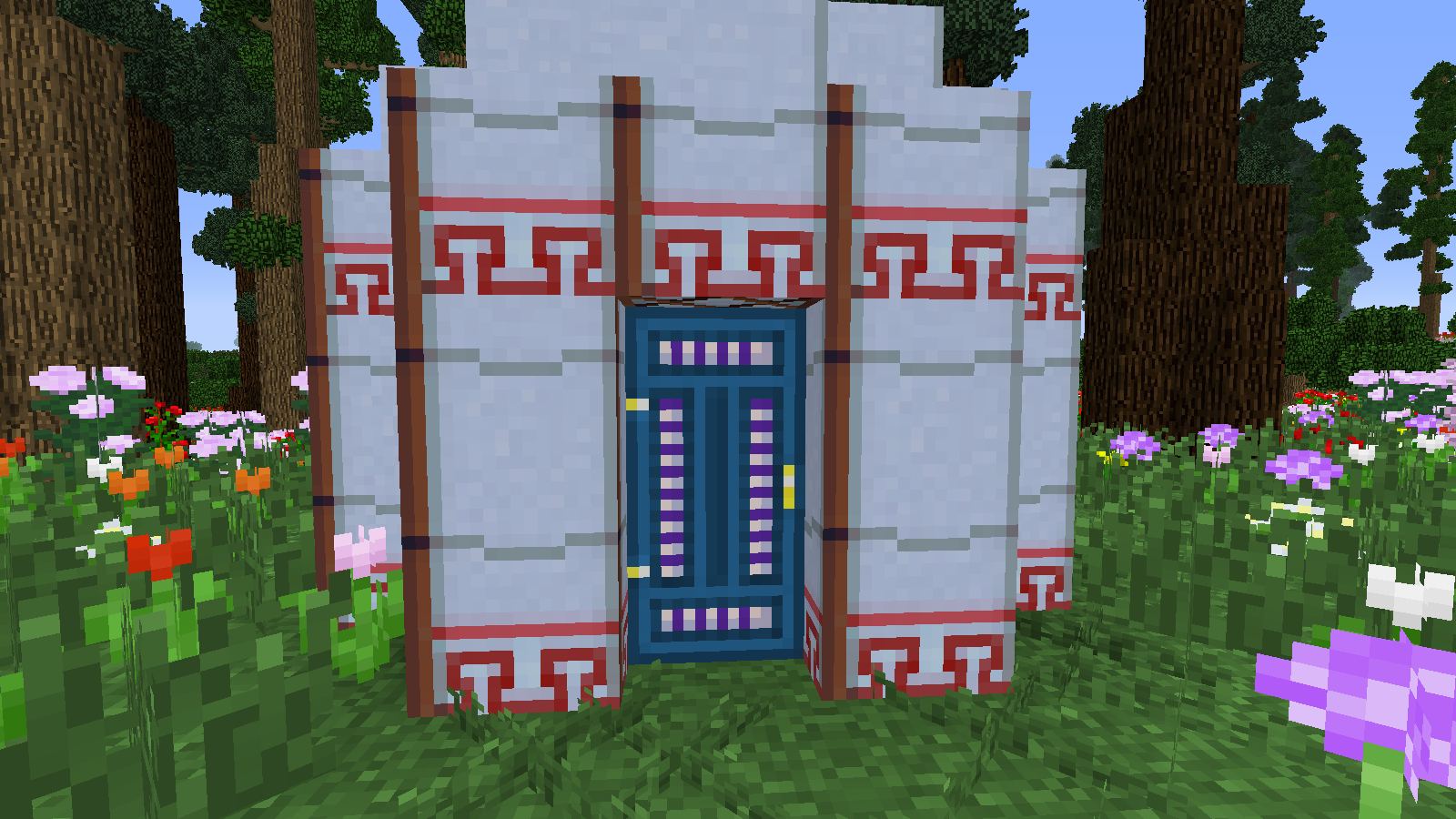
蒙古包外观:
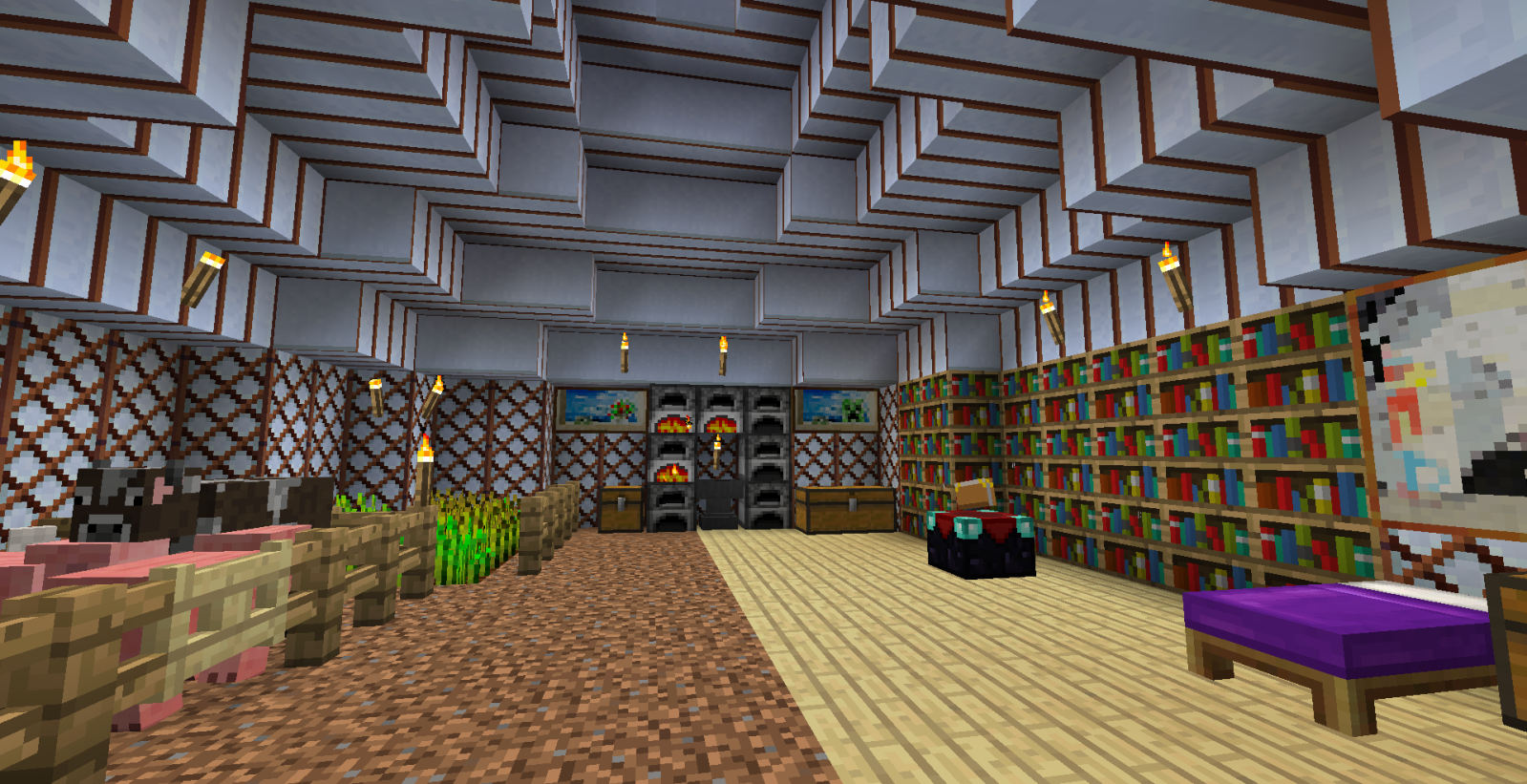
巨型蒙古包内部:
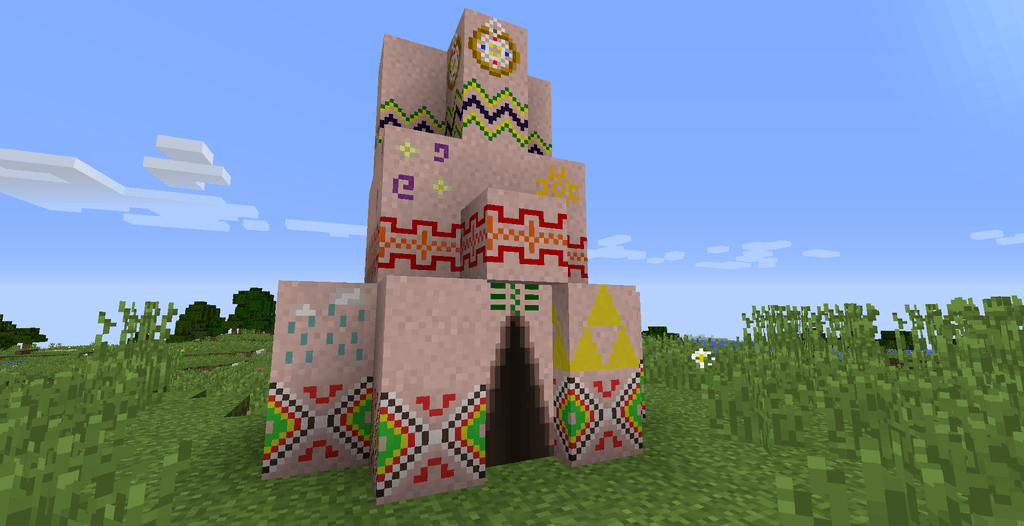
圆锥形帐篷外观:
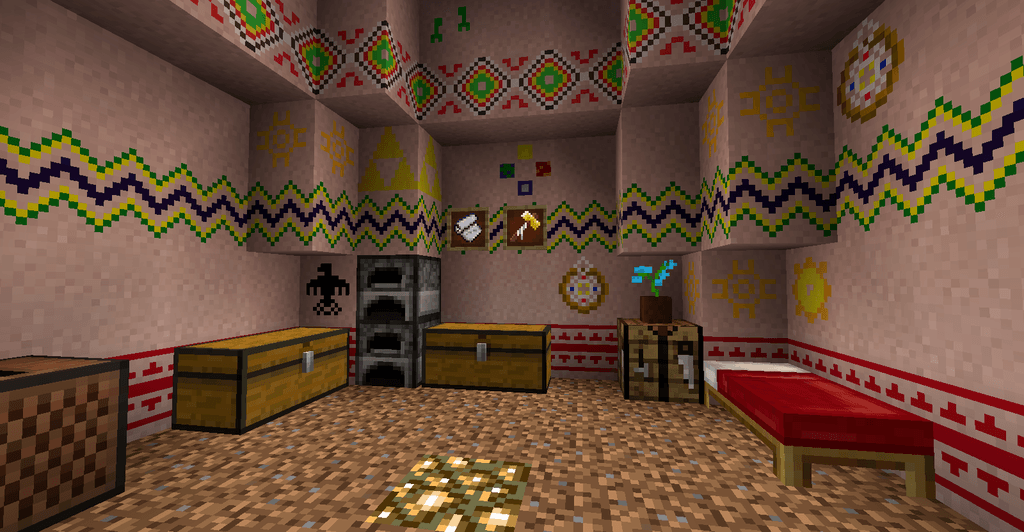
大型圆锥形帐篷内部:
贝都因帐篷外观:
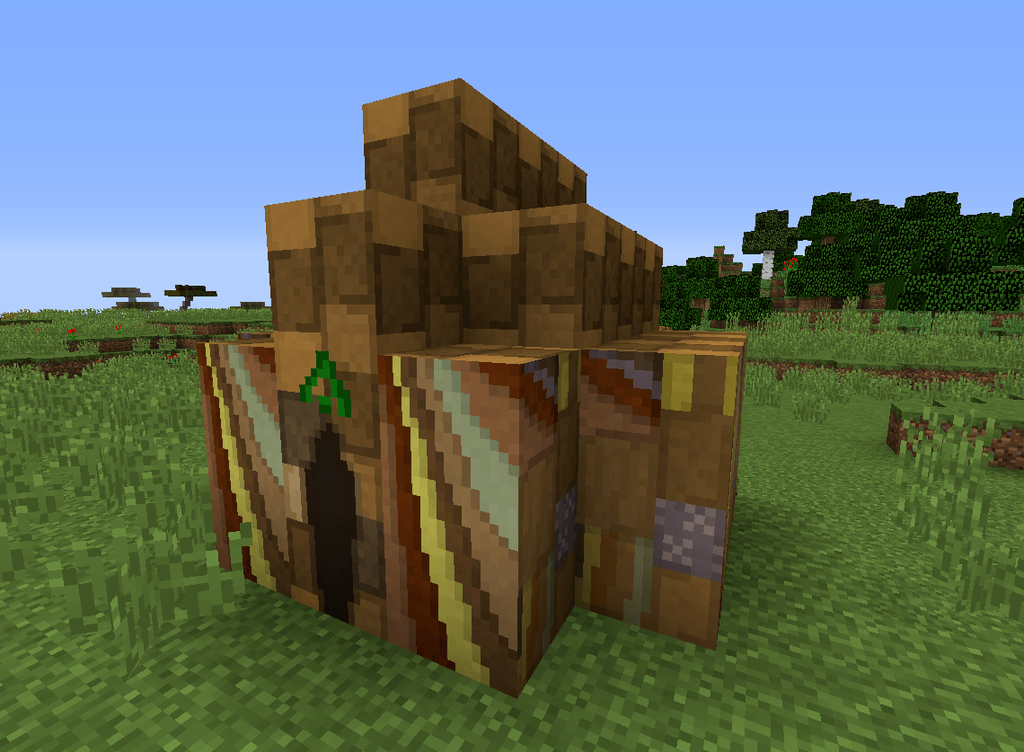
Indlu 外观:
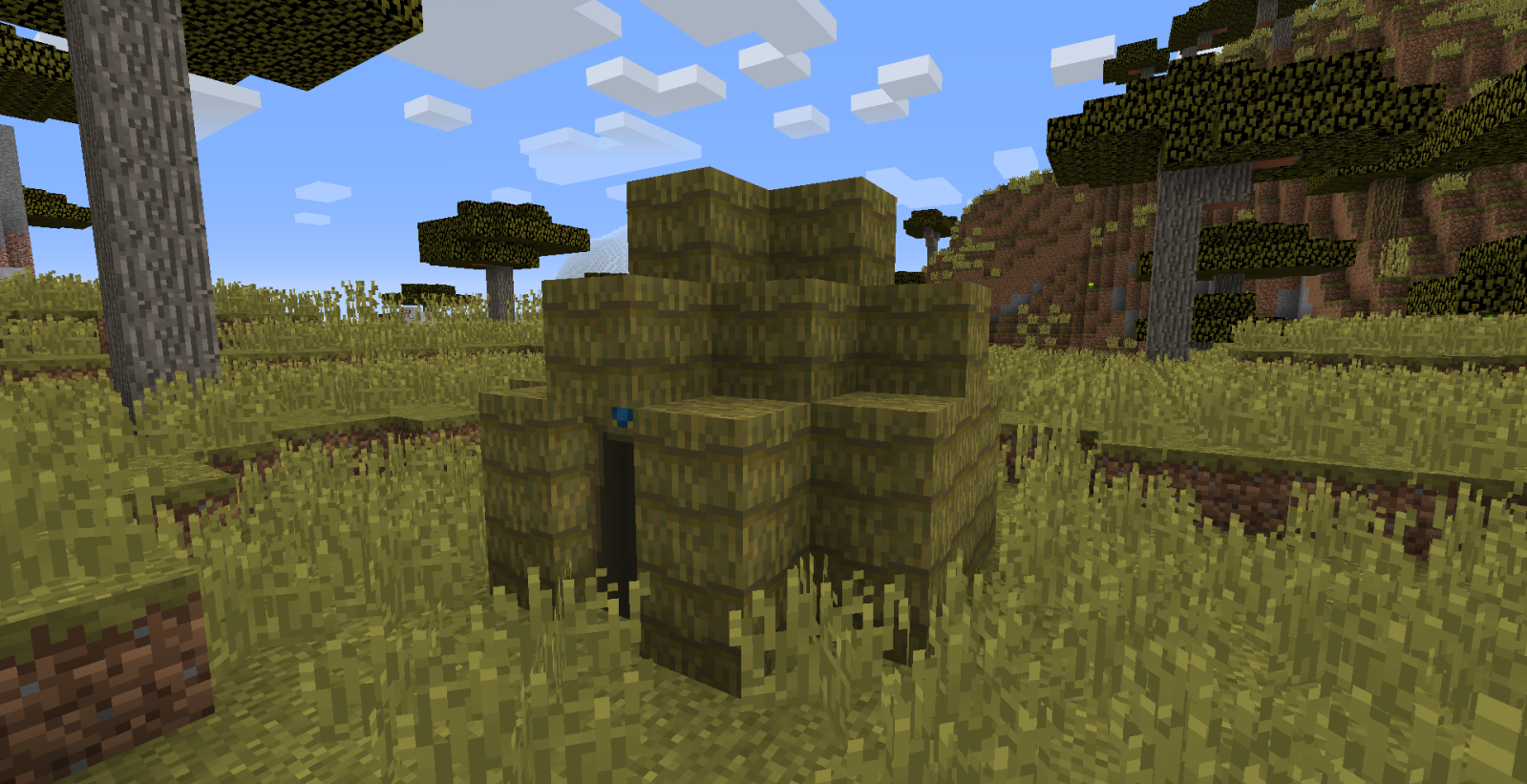
Shamiyana 外观:
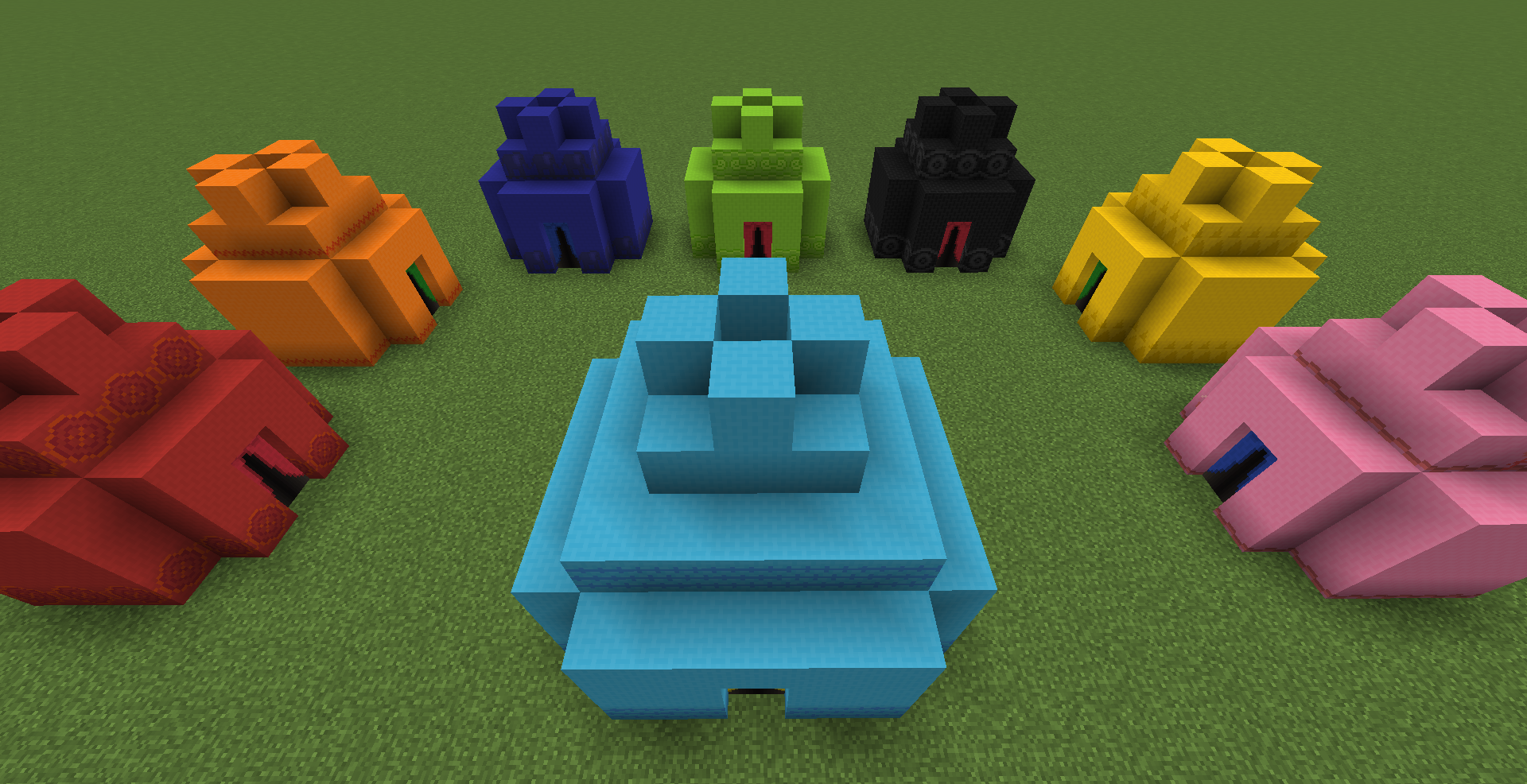
Shamiyana 内部:
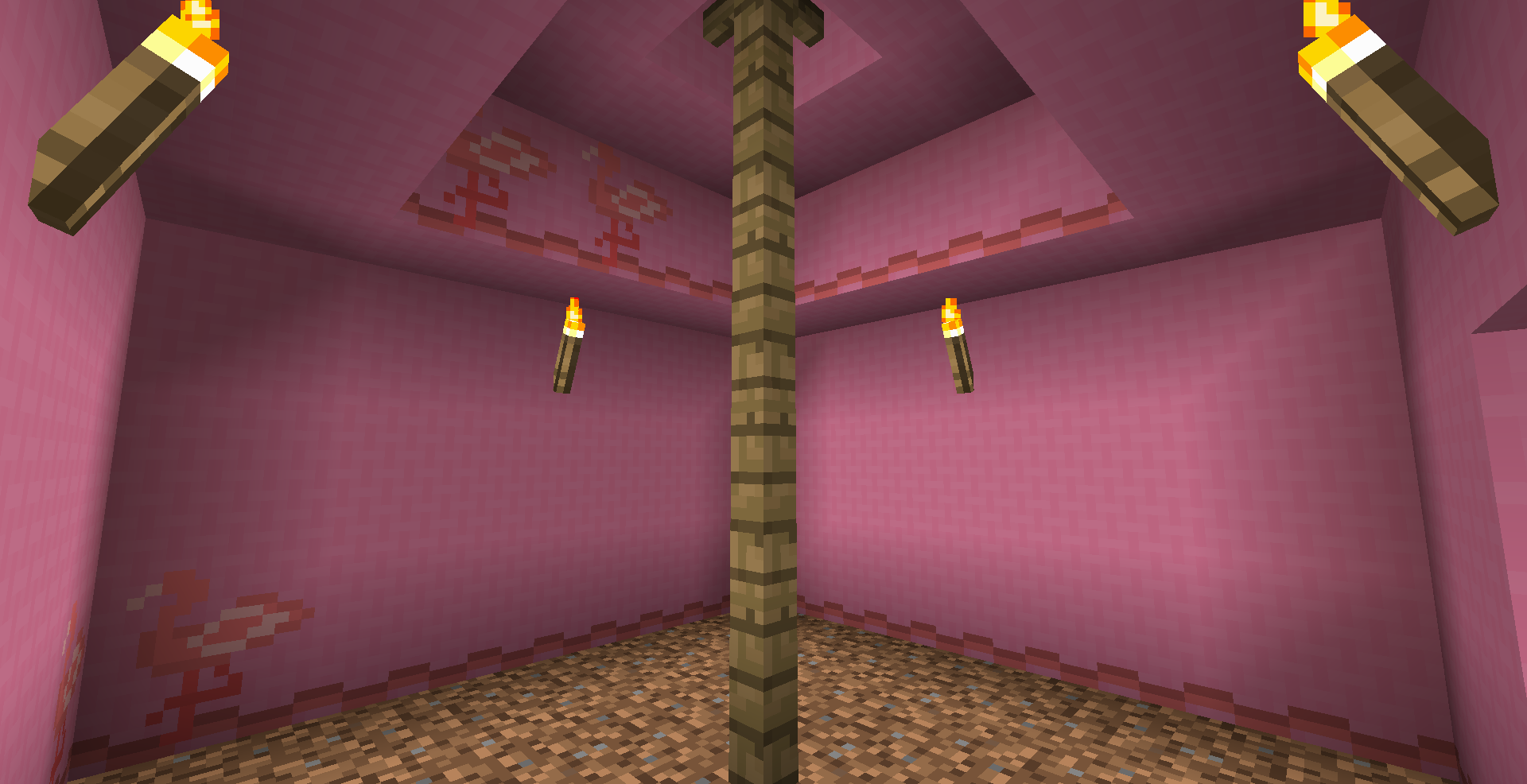
步骤 5:移动帐篷
一个无法移动的房子有多实用?不太实用,这也正是 Nomadic Tents 这个模组存在的原因!
只需使用帐篷锤(Tent Mallet)对着门右键,即可拆解你的帐篷。将其在别处重新搭建后,里面的物品依然完好无损。
查看 TitaniumGamingMedia 的评测 (1.9.4) --
常见问题解答:
问:支持 xyz 加载器吗?
答:1.21 及之前版本仅支持 Forge,之后版本将仅支持 NeoForge(目前受限于另一个仅支持 NeoForge 的库)
问:我在帐篷里时,朋友把它变回了物品形态。我会被困住吗?
答:不会。点击门退出时,你会出现在你进入时的位置,无论门是否还存在。
问:我可以在帐篷里睡觉来度过夜晚吗?
答:可以 :)
问:如果我在帐篷里设置重生点(即睡觉),每次死亡后会在那里复活吗?
答:会
问:我的帐篷丢了。我的东西永远丢失了吗?
答:并非如此。不过解决方案比较复杂,请参阅 此 Issue。
问:我有一个关于帐篷的想法!或者我发现了一个 Bug。我怎么反馈给你?
答:在评论区发帖、提交 Issue、给我发消息——任何方式都可以。我很乐意听取你的想法!
问:你有 Discord 服务器吗?
答:你可以在 MMD Discord 服务器 的 #skyjay-mods 频道(位于“Community Mods”下)找到我
特别感谢 chanicle 贡献了最初的圆顶帐篷(Yurt)纹理!同时也感谢所有提出建议并提供反馈以改进此模组的人。你们帮了大忙!
"I want to explore the world, but all my stuff is at my house. What should I do?"
Answer: take your house with you! Build a Yurt, Tepee, Bedouin, Indlu, or Shamiyana - set it up, take it down, and never worry about being too far from home again.
Tents come in various sizes: from Tiny (5x5), Small (7x7), and Medium (9x9) to Large (11x11), Giant (13x13), and Mega (15x15). Here's how you get started:
Step 1: make the tent
You have 5 options for your tent so far: Yurt, Tepee, Bedouin, Indlu, or Shamiyana.
To build a Yurt, make Tent Canvas and Yurt Wall Pieces.
To build a Tepee, make Tepee Wall Pieces using 4 leather (or 6 rabbit hide)
To build a Bedouin, make Bedouin Wall Pieces using any wool:
To build an Indlu, make Indlu Wall Pieces using sticks and leaves:
Finally, to build a Shamiyana, make Shamiyana Wall Pieces using sticks, wool, and tent canvas together:
The Shamiyana can be colored by surrounding it with dye in a crafting table! This works for all 16 colors of dye. You can wash out dye using a cauldron. ~ Suggested by scribbler957 ~
Step 2: upgrade the tent
Size upgrades: Tents can be upgraded in size by crafting them with their previous recipe.
The last 3 size upgrades to your tent require additional items: Golden Crossbeams, Obsidian Crossbeams, and Diamond Crossbeams.
Layer upgrades: These allow you to increase the layers of dirt underneath your tent. Finally, you can have the testificate prison - I mean, fruit cellar - of your dreams!
Layer upgrades must be added in order. Combine a Stone Tent Shovel with a Medium or larger tent for layer 1. After upgrading to a larger tent, you can do the same with an Iron Tent Shovel for layer 2. The pattern continues for Gold, Obsidian, and Diamond Tent Shovels. Each size of tent can have a different number of upgrades.
Tip: hold SHIFT while looking at the tent item to see how many times the tent can be upgraded. Tiny tents can have 0, small can have 1, etc. up to mega tents, which can have 5.
Add upgrades in a crafting table. Place the tent in the middle of a crafting grid, the Tent Shovel below it, dirt on the sides and a block of the corresponding material at the top.
~ Suggested by SureinDragon29800 ~
Step 3: build the tent
First make a Tent Mallet. The tent is not going to construct itself!
Use the tent item to place frame blocks in the shape of your tent. Then hit each piece with the Tent Mallet to build. This will take a couple minutes in real-time, so don't wait until night falls to start!
The Golden Tent Mallet can do this with just one click!
Step 4: enjoy the tent!
When you finish building the tent, click on the door to enter (preferably with an empty hand).
What's this? My tent was 5x5 when I built it, but the inside is much bigger!
That is the magic of Nomadic Tents: Tents can be the same size on the outside (and take the same amount of time to set up), but the inside can be luxurious and roomy! If you upgrade it, that is.
Yurt Outside:
Mega Yurt Inside:
Tepee Outside:
Large Tepee Inside:
Bedouin Outside:
Indlu Outside:
Shamiyana Outside:
Shamiyana Inside:
Step 5: move the tent
How useful is a house when it's stuck in one spot? Not very useful, which is why Nomadic Tents exists in the first place!
Simply use the Tent Mallet on the door to de-construct your tent. Set it up somewhere else and everything will still be inside.
Check out this review by TitaniumGamingMedia (1.9.4) --
FAQs:
Q: How about modloader xyz?
A: Forge only up until 1.21, after that it will be NeoForge only (Currently limited by another library that is NeoForge only)
Q: I was in my tent when my friend turned it into an item again. Am I stuck?
A: Nope. Clicking on the door to exit will pop you out exactly where you went in, whether or not a door is still there.
Q: Can I sleep in my tent to pass the night away?
A: Yes :)
Q: If I set my spawn point in my tent (ie, sleeping) will I respawn there whenever I die?
A: Yes
Q: I lost my tent. Is my stuff lost forever?
A: Not quite. The solution is pretty complicated, though, so look at this Issue.
Q: I have an idea for a tent! Or maybe I found a bug. How do I let you know?
A: Post in the comments, open an Issue, send me a message - anything works. I'd love to hear your idea!
Q: Do you have a Discord?
A: You can find me on the MMD Discord server in the #skyjay-mods channel (under "Community Mods")
A big thanks to chanicle for contributing the original Yurt textures! Also, thank you to all those who have made suggestions and given feedback to improve this mod. You've been a great help!

下载 Nomadic Tents
需要联机服务器吗?
稳定流畅、一键部署,几分钟即可和朋友联机开服
最低仅需 8 元/月 即可畅快联机
下载 Nomadic Tents
需要联机服务器吗?
稳定流畅、一键部署,几分钟即可和朋友联机开服
最低仅需 8 元/月 即可畅快联机
下载 Nomadic Tents
需要联机服务器吗?
稳定流畅、一键部署,几分钟即可和朋友联机开服
最低仅需 8 元/月 即可畅快联机
下载 Nomadic Tents
需要联机服务器吗?
稳定流畅、一键部署,几分钟即可和朋友联机开服
最低仅需 8 元/月 即可畅快联机
下载 Nomadic Tents
需要联机服务器吗?
稳定流畅、一键部署,几分钟即可和朋友联机开服
最低仅需 8 元/月 即可畅快联机
下载 Nomadic Tents
下载 Nomadic Tents
需要联机服务器吗?
稳定流畅、一键部署,几分钟即可和朋友联机开服
最低仅需 8 元/月 即可畅快联机
下载 Nomadic Tents
需要联机服务器吗?
稳定流畅、一键部署,几分钟即可和朋友联机开服
最低仅需 8 元/月 即可畅快联机
下载 Nomadic Tents
需要联机服务器吗?
稳定流畅、一键部署,几分钟即可和朋友联机开服
最低仅需 8 元/月 即可畅快联机
下载 Nomadic Tents
需要联机服务器吗?
稳定流畅、一键部署,几分钟即可和朋友联机开服
最低仅需 8 元/月 即可畅快联机
移植至 NeoForge,适用于 Minecraft 1.21.1 版本!
关于这个资源的讨论、问题反馈与使用心得
还没有讨论,来发第一帖吧
你是这个资源的作者?登录后可认领此资源。
相似资源
 模组

可定制的鞘翅模组,支持装饰纹饰、旗帜图案等更多功能!
 模组

原版世界生成优化模组
 模组
在游戏画面角落显示附近世界地形、玩家、生物和实体的地图。可创建路径点,帮助你找到标记过的位置。
 模组

适用于 MC 1.18+ 的 Effekseer 加载器
 模组

新增 50+ 个独特生物群系,为你的世界增添新树木、花卉等更多元素!
 模组
添加全屏世界地图,显示你在世界中已探索的区域。与 Xaero's Minimap 搭配使用效果极佳。
评论 0
登录后参与评分
还没有评论,来抢沙发吧