
NotEnoughMinecraft
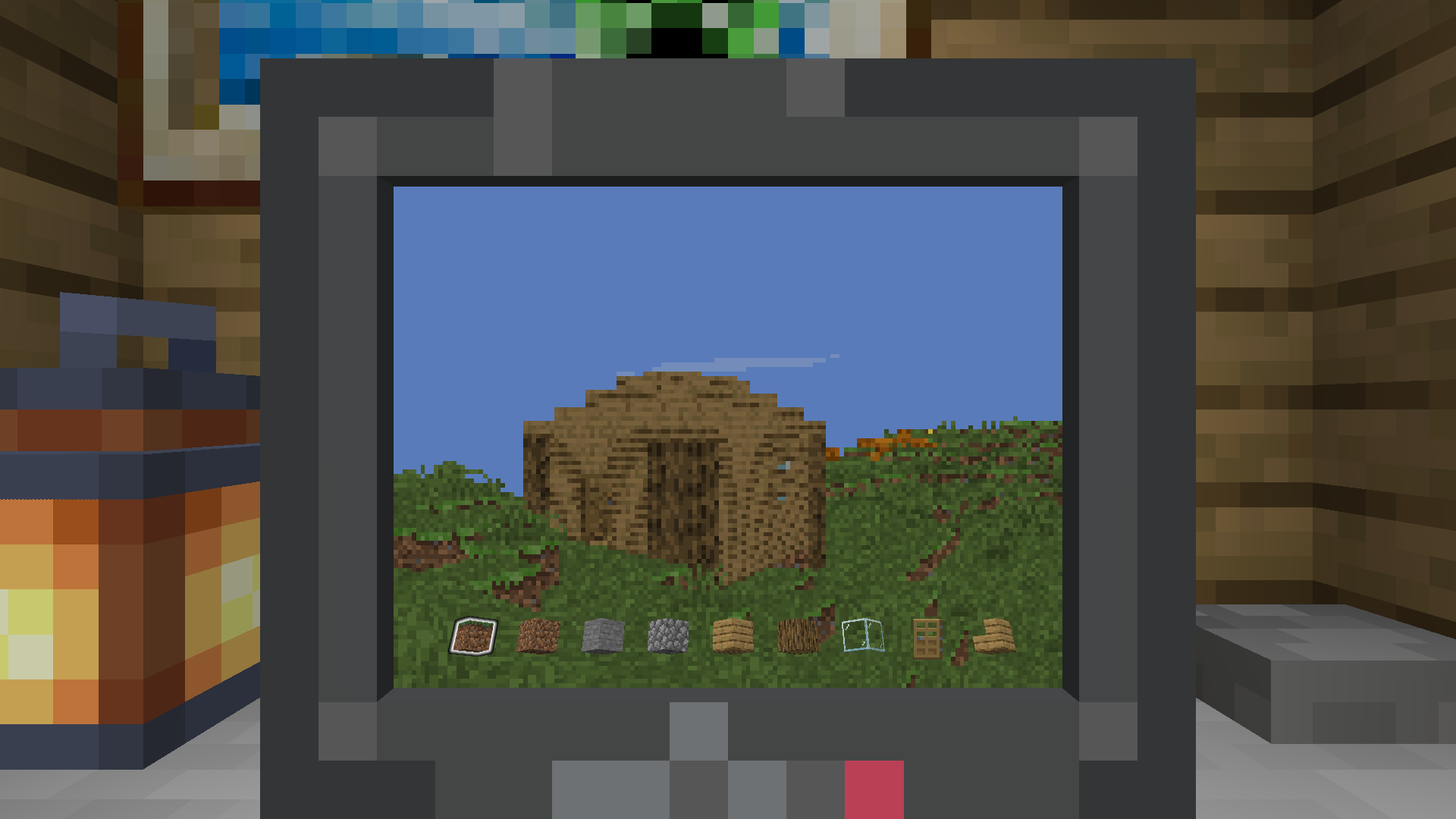
你是否曾经想过在不安装任何客户端模组的情况下,在 Minecraft 中玩 Minecraft?不???无论如何,现在你可以了!
设置
- 安装 fabric-api 和 polymer。
- 此模组需要一个服务器资源包。托管它的最简单方法是启用 polymer 的自动托管功能。
- 给自己一台电脑
/give @s not-enough-minecraft:computer并将其放置下来。 - 右键点击电脑开始游玩。
控制
- 移动、跳跃和冲刺的输入与默认输入相同。
- 破坏、放置、丢弃和拾取方块也使用你的默认输入。
- 使用滚轮或数字键导航快捷栏。
- 你可以右键点击 (开始) 使用物品。再次右键点击可结束使用物品。
- 你可以潜行来停止游玩并退出电脑。
- 你可以按背包键切换显示 FPS 计数器。
由于这是一个仅服务器端的模组,它仅限于客户端发送给它的输入!
工作原理
游玩时,会创建一个假玩家并将其添加到服务器。每个刻都会使用来自 tomalbrc 的 服务端光线投射渲染器 渲染一张图像。 然后,通过自定义屏幕物品将渲染后的图像显示给客户端,其中每个像素都可以使用 自定义模型数据 颜色进行着色。
配置
配置文件位于 config/not-enough-minecraft.json。
{
  // 渲染距离(以方块为单位)
  "renderDistance": 64,
  // 实验性实体渲染的标志
  "renderEntities": false,
  // 启用实体渲染时要渲染的实体数量
  "renderEntitiesAmount": 20,
  // 是否应忽略光照等级,将所有内容以最高光照等级渲染。
  "fullbright": false,
  // 视野范围,工作方式与原版客户端 FOV 相同,最小值为 30,最大值为 110(quake pro)。
  "fov": 70,
  // 生物群系混合值
  "biomeBlend": 1,
  // 应该有多少个线程来渲染所有实例。这可以用来增加或减少服务器上的 CPU 使用量,并对 FPS 计数产生直接影响。
  "renderThreadCount": 4,
  // 当生成假玩家实体时执行的一组命令。
  // 例如,这可以用于给予自定义物品或移动到特定位置。
  "spawnCommands": [
    "item replace entity @s hotbar.0 with minecraft:grass_block",
    "item replace entity @s hotbar.1 with minecraft:dirt",
    "item replace entity @s hotbar.2 with minecraft:stone",
    "item replace entity @s hotbar.3 with minecraft:cobblestone",
    "item replace entity @s hotbar.4 with minecraft:oak_planks",
    "item replace entity @s hotbar.5 with minecraft:oak_log",
    "item replace entity @s hotbar.6 with minecraft:glass",
    "item replace entity @s hotbar.7 with minecraft:oak_door",
    "item replace entity @s hotbar.8 with minecraft:oak_stairs"
  ],
  // 是否允许假玩家放置方块
  "allowPlacing": true,
  // 是否允许假玩家破坏方块
  "allowBreaking": true,
  // 是否允许假玩家使用物品
  "allowItemUsage": true,
  // 是否允许假玩家丢弃物品
  "allowDropping": false,
  // 是否允许假玩家从方块上拾取物品
  "allowPicking": true
}
许可证
此模组使用了来自 的渲染代码。de.tomalbrc.cameraobscura 包中的所有代码均根据 LGPL-3.0-only 许可。
使用自定义屏幕物品来显示渲染图像的想法取自 ,该代码根据 MIT 许可。
限制
这是一个相当诡异/hacky 的周末项目。
像这样在服务端进行渲染效率很低,并且会显著增加 CPU 使用量,这可能会在低端设备上导致问题。
我们没有压缩或优化屏幕数据以通过网络发送的方法,因此我们必须每帧发送原始像素。这可能会导致查看电脑屏幕时网络负载增加。 在默认的 Minecraft 网络压缩下,每个屏幕预计会增加 300-400 KiB/s 的流量。
假玩家在几乎所有方面都会表现得像普通玩家,例如世界交互、命令、玩家列表、玩家数据等。 每个玩家都有一个独特的假玩家伴侣,它具有相同的 UUID,但最低位增加了一。
NotEnoughMinecraft
Did you ever want to play Minecraft inside of Minecraft without installing any mods on the client? NO??? Anyways, now you can!
Setup
- Install fabric-api and polymer.
- This mod requires a server resource pack. The easiest way to host this is by enabling polymers autohost
- Give yourself a computer
/give @s not-enough-minecraft:computerand place it down. - Right-click on a computer to start playing
Controls
- The input for movement, jumping and sprinting is the same as your default inputs
- Breaking, placing, dropping and picking blocks also use your default inputs
- Use the scroll wheel or number keys to navigate the hotbar
- You can right-click (to start) using an item. You can right-click again to finish using the item.
- You can sneak to stop playing and exit the computer
- You can press your inventory key to toggle a fps counter
Because this is a serverside-only mod, it is limited to inputs the client sends to it!
How it works
When playing, a fake player is created and added to the server. Each tick an image is rendered using a server-side raycasting renderer from tomalbrc. The rendered image is then displayed to the client using a custom screen item, where each pixel can be colored using custom model data colors.
Config
The config is located at config/not-enough-minecraft.json.
{
  // Render distance in blocks
  "renderDistance": 64,
  // Flag for experimental entity rendering
  "renderEntities": false,
  // Amount of entities to render when entity rendering is enabled
  "renderEntitiesAmount": 20,
  // Flag wether light levels should be ignored, rendering everything with the highest light level.
  "fullbright": false,
  // Field of View, functions the same way the vanilla client FOV works, minimum value is 30, maximum 110 (Quake Pro).
  "fov": 70,
  // Biome blend value
  "biomeBlend": 1,
  // How many threads should be render all instances. This can be used to increase or reduce the amount of CPU usage on
  // the server and has a direct impact on FPS count
  "renderThreadCount": 4,
  // A list of commands that get executed when a fake player entity is spawned
  // This can for example be used to give custom items or move to specific locations
  "spawnCommands": [
    "item replace entity @s hotbar.0 with minecraft:grass_block",
    "item replace entity @s hotbar.1 with minecraft:dirt",
    "item replace entity @s hotbar.2 with minecraft:stone",
    "item replace entity @s hotbar.3 with minecraft:cobblestone",
    "item replace entity @s hotbar.4 with minecraft:oak_planks",
    "item replace entity @s hotbar.5 with minecraft:oak_log",
    "item replace entity @s hotbar.6 with minecraft:glass",
    "item replace entity @s hotbar.7 with minecraft:oak_door",
    "item replace entity @s hotbar.8 with minecraft:oak_stairs"
  ],
  // Should fake player be allowed to place blocks
  "allowPlacing": true,
  // Should fake player be allowed to break blocks
  "allowBreaking": true,
  // Should fake player be allowed to use items
  "allowItemUsage": true,
  // Should fake player be allowed to drop items
  "allowDropping": false,
  // Should fake player be allowed to pick items from block
  "allowPicking": true
}
Licenses
This mod uses the rendering code from . All code in the
de.tomalbrc.cameraobscura package is licensed under LGPL-3.0-only.
The idea of using a custom screen item to display the rendered image is taken from ,
which is licensed under MIT
Limitations
This is a quite cursed/hacky weekend project.
Rendering on the server like this is quite inefficient and will increase CPU usage significantly, which can cause issues on lower end setups.
We don't have any way to compress or optimize the screen data for sending it over the network, so we have to send the raw pixels each frame. This can lead to an increased network load when viewing computer screens. You can expect 300-400 KiB/s increase per screen with default minecraft network compression.
Fake players will behave like regular players in almost all aspects, such as world interactions, commands, player list, player data and more. Each player gets their own unique fake player companion, which has the same UUID, but with the lowest bit increase by one.

下载 NotEnoughMinecraft
需要联机服务器吗?
稳定流畅、一键部署,几分钟即可和朋友联机开服
最低仅需 8 元/月 即可畅快联机
下载 NotEnoughMinecraft
下载 NotEnoughMinecraft
下载 NotEnoughMinecraft
下载 NotEnoughMinecraft
下载 NotEnoughMinecraft
下载 NotEnoughMinecraft
下载 NotEnoughMinecraft
下载 NotEnoughMinecraft
下载 NotEnoughMinecraft
新增
spawnCommands配置中添加了${controller}和${fake_player}占位符
关于这个资源的讨论、问题反馈与使用心得
还没有讨论,来发第一帖吧
你是这个资源的作者?登录后可认领此资源。
相似资源
 模组

可定制的鞘翅模组,支持装饰纹饰、旗帜图案等更多功能!
 模组
在游戏画面角落显示附近世界地形、玩家、生物和实体的地图。可创建路径点,帮助你找到标记过的位置。
 模组

适用于 MC 1.18+ 的 Effekseer 加载器
 模组
添加全屏世界地图,显示你在世界中已探索的区域。与 Xaero's Minimap 搭配使用效果极佳。
 模组

让你能够在世界中的任何位置定位结构。
 模组

对 Minecraft 的沙漠神殿进行了全面重新设计!
评论 0
登录后参与评分
还没有评论,来抢沙发吧