
 此模组将 Nyctography(暗写)替换密码作为 Minecraft 字体加入!该字体可用于书籍、告示牌、聊天消息、工具提示以及大多数游戏内文本形式。
历史
Nyctography 书写系统由刘易斯·卡罗尔(Lewis Carroll)于 1891 年发明。该系统旨在让在黑暗中写字变得更加容易,这也是其名称的由来。文本是使用一种名为“暗写板”(nyctograph)的工具书写的,这是一种带有方形孔洞的模板,用于对齐和书写字符。在现代,这种书写系统被用于游戏中的谜题、桌面角色扮演游戏(D&D)战役以及地理寻宝活动(geocaches)。
理解 Nyctography
这种书写系统使用一系列围绕正方形边缘排列的点线组合。例如,字母 E 在左上角有一个点,上方有一条线。每个符号大致类似于其拉丁字母对应物。例如,字母 O 在左上角有一个点,然后在盒子的所有侧边都有线条,形成一个闭合的环。
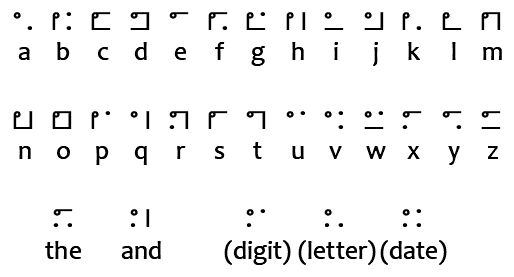
与盲文类似,数字也是使用字母来书写的。此模组在书写文本时会自动处理这一点,但你仍然需要知道如何阅读它们。仅使用辅音以避免与实际单词混淆。
- 0 = Z
- 1 = B(字母表中第一个辅音)
- 2 = D(拉丁语中“二”是 Duo)
- 3 = T
- 4 = F
- 5 = L(罗马数字中的 50)
- 6 = S
- 7 = M(源自拉丁语 Septem,意为 Seven)
- 8 = H(法语中“八”是 huit)
- 9 = N
除了字母和数字外,还有五个特殊字符。
- 连字符 (-) - 在此模组中使用短横线(-)书写。显示为左上角一个点,上方一条线,底部两个点。
- And(和)- 在此模组中使用与号(&)书写。显示为左上角和左下角各一个点,右侧一条线。
- Digit(数字)- 在此模组中使用井号(#)书写。指示后续字符应作为数字读取。显示为字母 F 的四个角,代表“figures”。
- Letter(字母)- 在此模组中使用星号(*)书写。指示后续字符为字母。显示为字母 L 的四个角,代表“letters”。
- Date(日期)- 在此模组中使用 @ 符号书写。指示后续字符为 DDMMYY 格式的日期。显示为字母 D 的四个角,代表“date”。
技术用法
可以使用 Mojang 的文本组件系统将此字体应用于任何文本,包括接受原始 JSON 文本的所有命令和数据包功能。这是通过将文本的 font 属性设置为 nyctography:nyctography 来实现的。
原版命令
原版命令通常允许你使用原始 JSON 格式定义文本。font 属性控制渲染该文本时将使用的字体。这适用于所有字体,并非此模组添加的字体所独有。
/give @a stone[custom_name='["",{"text":"Stone","font":"nyctography:nyctography",italic:false}]']/title @a title {"text":"Hello","font":"nyctography:nyctography"}/give @a written_book[written_book_content={pages:['[["",{"text":"Test book","font":"nyctography:nyctography"}]]'],title:"aaa",author:"bbb"}]
Bookshelf 命令
此模组依赖于 Bookshelf 库,该库提供了几条命令来帮助处理字体。下面给出了一些这些命令的示例。
- /bookshelf font say nyctography:nyctography <text_here> - 发布一条使用该字体样式的聊天消息。
- /bookshelf font item nyctography:nyctography - 重命名手持物品以使用该字体。
- /bookshelf font block nyctography:nyctography X Y Z - 将字体应用于方块。这将更改告示牌文本,或重命名可命名的方块如箱子。
脚本、插件和模组
如果你有代码或脚本工具的访问权限,你可以将字体应用于任何可变文本组件。这是通过在文本组件的样式上设置字体 ID 来完成的。你可以在我的代码 这里 找到我是如何做到这一点的示例。
本项目由 Nodecraft 赞助。使用代码 DARKHAX 可获得首月服务 30% 的折扣!
This mod adds the Nyctography substitution cipher as a Minecraft font! This font can be used for books, signs, chat messages, tooltips, and most forms of ingame text.
History
The nyctography writing system was invented in 1891 by Lewis Carrol. The goal of this system was to make writing in the dark easier, which is where the system gets its name. Text was written using a nyctograph, a stencil with squre holes that were used to align and write the characters. In modern times this writing system has been used for puzzles in games, DnD campaigns, and geocaches.
Understanding Nyctography
This writing system uses a series of dots and lines aranged around the edges of a square. For example the letter E has a dot in the top left corner and a line on the top. Each symbol loosely resembles its latin alphabet counterpart. For example the letter O has a dot in the top left corner and then a line on all sides of the box, creating a closed loop.
Similarly to braille, numbers are written using a letter. This mod will automatically handle this when writing text with the font but you will still need to know how to read them. Only consonants are used to avoid confusion with actual words.
- 0 = Z
- 1 = B (First consonant in the alphabet)
- 2 = D (Two in Latin is Duo)
- 3 = T
- 4 = F
- 5 = L (Roman for 50)
- 6 = S
- 7 = M (From Septem which is Seven in Latin)
- 8 = H (Eight in french is huit)
- 9 = N
There are five special characters in addition to the letters and numbers.
- The - Written in this mod using a dash (-). Appears as a dot in the top left, a line on the top, and two dots on the bottom.
- And - Written in this mod using an ampersand (&). Appears as a dot in the top and bottom left, and a line on the right.
- Digit - Written in this mod using a hashtag (#). Indicates that the following characters should be read as a number. Appears as only the corners of the letter F for "figures".
- Letter - Written in this mod using an asterisk (*). Indicates that the following characters are letters. Appears as only the corners of the letter L for "letters".
- Date - Written in this mod using an at (@). Indicates the following characters are a date in DDMMYY format. Appears as corners of the letter D for "date".
Technical Usage
This font can be applied to any text using Mojang's text component system, including all commands and datapack features that accept raw JSON text. This is done by setting the font property of the text to nyctography:nyctography.
Vanilla Commands
Vanilla commands will often allow you to define text using the raw JSON format. The font property controls which font will be used when rendering that text. This can be done for all fonts and is not unique to fonts added by this mod.
/give @a stone[custom_name='["",{"text":"Stone","font":"nyctography:nyctography",italic:false}]']/title @a title {"text":"Hello","font":"nyctography:nyctography"}/give @a written_book[written_book_content={pages:['[["",{"text":"Test book","font":"nyctography:nyctography"}]]'],title:"aaa",author:"bbb"}]
Bookshelf Commands
This mod depends on the Bookshelf library which offers several commands to help work with fonts. A few examples of these commands are given below.
- /bookshelf font say nyctography:nyctography <text_here> - Posts a chat message styled with the font.
- /bookshelf font item nyctography:nyctography - Renames the held item to use the font.
- /bookshelf font block nyctography:nyctography X Y Z - Applies the font to the block. This will change sign text, or rename namable blocks like chests.
Scripts, Plugins, and Mods
If you have access to code or scripting tools you can apply the font to any mutable text component. This is done by setting the font ID on the style of the text component. You can find an example of how I do this in my code here.
This project is sponsored by Nodecraft. Use code DARKHAX for 30% off your first month of service!

下载 Nyctography
下载 Nyctography
下载 Nyctography
下载 Nyctography
下载 Nyctography
需要联机服务器吗?
稳定流畅、一键部署,几分钟即可和朋友联机开服
最低仅需 8 元/月 即可畅快联机
下载 Nyctography
需要联机服务器吗?
稳定流畅、一键部署,几分钟即可和朋友联机开服
最低仅需 8 元/月 即可畅快联机
下载 Nyctography
需要联机服务器吗?
稳定流畅、一键部署,几分钟即可和朋友联机开服
最低仅需 8 元/月 即可畅快联机
下载 Nyctography
需要联机服务器吗?
稳定流畅、一键部署,几分钟即可和朋友联机开服
最低仅需 8 元/月 即可畅快联机
下载 Nyctography
需要联机服务器吗?
稳定流畅、一键部署,几分钟即可和朋友联机开服
最低仅需 8 元/月 即可畅快联机
下载 Nyctography
需要联机服务器吗?
稳定流畅、一键部署,几分钟即可和朋友联机开服
最低仅需 8 元/月 即可畅快联机
这是 26.3 版本的第一个成功构建。你可以在此处了解更多信息 here。
本项目得以实现,得益于像你这样的玩家通过 Patreon 提供的支持!感谢你们!
- lothrazar
- techsquirrel
- Tobias Ward
- noobanidus
关于这个资源的讨论、问题反馈与使用心得
还没有讨论,来发第一帖吧
你是这个资源的作者?登录后可认领此资源。
相似资源
 模组

可定制的鞘翅模组,支持装饰纹饰、旗帜图案等更多功能!
 模组
在游戏画面角落显示附近世界地形、玩家、生物和实体的地图。可创建路径点,帮助你找到标记过的位置。
 模组

适用于 MC 1.18+ 的 Effekseer 加载器
 模组

新增 50+ 个独特生物群系,为你的世界增添新树木、花卉等更多元素!
 模组
添加全屏世界地图,显示你在世界中已探索的区域。与 Xaero's Minimap 搭配使用效果极佳。
 模组

基于 GTCEu 1.12.2 的现代 GregTech
评论 0
登录后参与评分
还没有评论,来抢沙发吧