

? 关于 ?
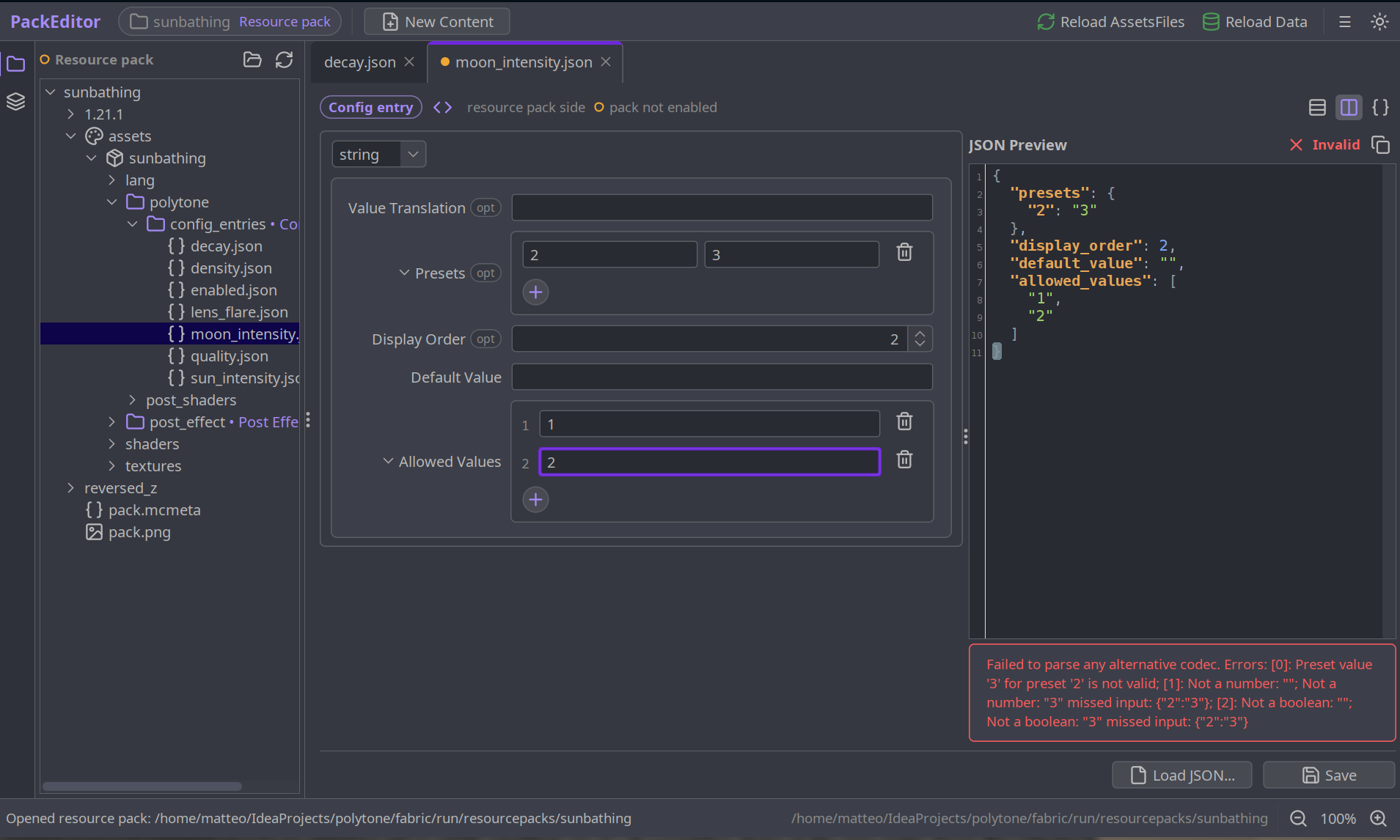
Nautilus Studio 是一款游戏内的数据包和资源包工作台。它无需手动编写 JSON 并猜测正确的字段,而是会在游戏旁打开一个完整的编辑器:选择一个文件,填写生成的表单,点击重载,更改便会立即反映在运行的世界中。
这些表单是根据游戏自身的内容定义自动构建的,因此它既支持原版内容,也兼容模组内容。
?️ 截图 ?️
? 功能特性 ?
可编辑内容
- 世界生成:已配置和放置的特性、切割器、生物群系、噪声设置、密度函数、世界预设
- 结构:结构、结构集、拼凑池(jigsaw pools)
- 战利品与谓词:战利品表、物品修饰符、谓词
- 配方与进度
- 附魔
- 世界与维度:维度、维度类型
- 生物变体、装饰与修剪、物品与音效等更多内容
- 任何模组注册的内容。例如 Polytone 会注册其颜色贴图、粒子效果和自定义模型
- 任何通过类名指向的自定义编解码器(Codec),即使编辑器从未见过该内容
- 无法解析的内容将回退到具有语法高亮的实时验证原始 JSON 编辑器
使用方法
- 首先加入一个世界:编辑器需要实时的注册表来构建表单并进行重载
- 在 Fabric 上通过 Mod Menu 中的条目打开,或在 NeoForge 上的模组列表配置屏幕按钮中打开
- 工作台会在游戏旁边的独立窗口中打开
- 点击重载即可将更改推送到正在运行的世界中
Nautilus Studio 在 Fabric 上运行效果最佳。在 NeoForge 上,由于 Java 无头窗口(headless-window)的限制,编辑器窗口偶尔可能无法打开。
?️ 供模组开发者使用 ?️
对于大多数情况,模组只需正常工作即可。但如果您希望获得完善的兼容性,您可以执行以下操作:
要注册您的编解码器以便它们默认显示在编辑器中,您可以这样注册:
NautilusStudioApi.register(
    "My Mod",                  // 组名称,显示在“Minecraft”旁边
    "Widget Layout",           // 此内容类型的标签
    MY_CODEC,                  // 您针对每个文件的 Codec(DIRECT_CODEC)
    Side.CLIENT_RESOURCES,     // CLIENT_RESOURCES (assets/) 或 SERVER_DATA (data/)
    "mymod/widgets"            // 文件所在的文件夹
);
为了获得更美观的小部件、颜色选择器、滑块以及用于联合类型(sum type)的下拉菜单,请将您的编解码器构建为 CodecUI SchemaCodec 并传递该对象。它仍然是一个真正的 Codec,并具有相同的 wire format。CodecUI 无法读取的任何内容都将回退到经过验证的原始 JSON 编辑器,因此注册始终是安全的。
只需添加以下代码行(jar-in-jar,即 CodecUI 打包在您模组内部),并按照该类中的 API 将您的 Codec 调用替换为 SchemaCodec 调用:
repositories {
    maven { url "https://registry.somethingcatchy.net/repository/maven-public/" }
}

dependencies {
    // Fabric (Loom)
    modImplementation "net.mehvahdjukaar:codecui-fabric:1.21.11-0.4.0"
    include           "net.mehvahdjukaar:codecui-fabric:1.21.11-0.4.0"

    // NeoForge (ModDevGradle)
    implementation "net.mehvahdjukaar:codecui-neoforge:1.21.11-0.4.0"
    jarJar         "net.mehvahdjukaar:codecui-neoforge:1.21.11-0.4.0"
}
请参阅 CodecUI 仓库 以获取完整的 DSL 和示例。
❓ 常见问题 ❓
问:这是仅客户端的吗?
答: 是的。编辑器是一个客户端工具:它编辑磁盘上的包文件并重新加载您的客户端。您在服务器上不需要它。
问:玩家是否需要此模组才能使用我的包/模组?
答: 不需要。Nautilus Studio 是一个创作工具。您使用它制作的包是普通的原版数据包/资源包,所有人都可以使用。
问:它是否与模组内容兼容?
答: 是的。任何注册了其编解码器的模组(只需一行代码,得益于 CodecUI)都会自动显示出来。您也可以通过类名自行添加自定义编解码器。
问:如果 Nautilus Studio 不理解某个文件怎么办?
答: 它将回退到具有语法高亮的实时验证原始 JSON 编辑器,因此您仍然可以编辑任何内容。
问:我需要将 CodecUI 作为依赖项吗?
答: 不需要。Nautilus Studio 已将其捆绑。只有当您想要手动微调编辑器的组件时,才需要直接处理 CodecUI。
问:Fabric 还是 NeoForge?
答: 两者都支持。Fabric 的体验更流畅;在 NeoForge 上,外部窗口偶尔会遇到 AWT 无头限制。
❤️ 支持我 ❤️
制作模组花费了我大量时间。如果你喜欢我的作品并希望支持我,你将获得专属定制的地球仪和/或雕像——如果你使用下方代码从 Akliz 购买服务器,同样适用此优惠。
需要服务器?Akliz 提供专为模组版 Minecraft 打造的高端服务器,拥有优秀的社区和支持团队。
使用代码 "supplementaries" 可享 8折优惠,同时支持我!
? 我们的模组 ?
















📖 About 📖
Nautilus Studio is an in-game data and resource pack workbench. Instead of hand-writing JSON and guessing at the right fields, it opens a full editor alongside the game: pick a file, fill in a generated form, hit reload, and the change appears in the running world.
The forms are built automatically from the game's own content definitions, so it works with modded content as well as vanilla.
🖼️ Media 🖼️
📦 Features 📦
What It Can Edit
- Worldgen: configured and placed features, carvers, biomes, noise settings, density functions, world presets
- Structures: structures, structure sets, jigsaw pools
- Loot and Predicates: loot tables, item modifiers, predicates
- Recipes and Advancements
- Enchantments
- World and Dimension: dimensions, dimension types
- Mob Variants, Decoration and Trims, Items and Sound, and more
- Anything a mod registers. Polytone registers its colormaps, particle effects and custom models, for example
- Any custom codec, pointed at by class name, even for content the editor has never seen
- Anything it cannot parse falls back to a live-validated raw JSON editor with syntax highlighting
Using It
- Join a world first: the editor needs live registries to build its forms and to reload
- Open it from the Mod Menu entry on Fabric, or the config-screen button in the mods list on NeoForge
- The workbench opens in its own window beside the game
- Hit reload to push changes into the running world
Nautilus Studio runs best on Fabric. On NeoForge the editor window can occasionally fail to open, due to Java's headless-window restrictions.
🛠️ For Mod Developers 🛠️
For most things the mod should just work. However if you want proper compat here is what you can do:
To register your codec so they appear by default in the editor you can register them like such:
NautilusStudioApi.register(
    "My Mod",                  // group name, shown next to "Minecraft"
    "Widget Layout",           // this content type's label
    MY_CODEC,                  // your per-file Codec (the DIRECT_CODEC)
    Side.CLIENT_RESOURCES,     // CLIENT_RESOURCES (assets/) or SERVER_DATA (data/)
    "mymod/widgets"            // folder the files live in
);
To get nicer widgets, a color picker, a slider, a dropdown for a sum type, build your codec as a CodecUI SchemaCodec and pass that instead. It stays a real Codec with the same wire format. Anything CodecUI can't read falls back to a validated raw-JSON editor, so registering is always safe.
Simply add these lines (jar-in-jar, so CodecUI ships inside your mod) and replace your Codec calls with SchemaCodec calls, following the API in that class:
repositories {
    maven { url "https://registry.somethingcatchy.net/repository/maven-public/" }
}

dependencies {
    // Fabric (Loom)
    modImplementation "net.mehvahdjukaar:codecui-fabric:1.21.11-0.4.0"
    include           "net.mehvahdjukaar:codecui-fabric:1.21.11-0.4.0"

    // NeoForge (ModDevGradle)
    implementation "net.mehvahdjukaar:codecui-neoforge:1.21.11-0.4.0"
    jarJar         "net.mehvahdjukaar:codecui-neoforge:1.21.11-0.4.0"
}
See the CodecUI repo for the full DSL and examples.
❓ F.A.Q. ❓
Q: Is this client-side only?
A: Yes. The editor is a client tool: it edits pack files on disk and reloads your client. You don't need it on a server.
Q: Do players need this to use my pack/mod?
A: No. Nautilus Studio is a creation tool. The packs you make with it are plain vanilla data/resource packs that work for everyone.
Q: Does it work with modded content?
A: Yes. Any mod that registers its codec (a one-liner, thanks to CodecUI) shows up automatically. You can also add custom codecs yourself by class name.
Q: What if Nautilus Studio doesn't understand a file?
A: It falls back to a live-validated raw JSON editor with syntax highlighting, so you can still edit anything.
Q: Do I need CodecUI as a dependency?
A: No. Nautilus Studio bundles it. You only touch CodecUI directly if you want to hand-tune your editor's widgets.
Q: Fabric or NeoForge?
A: Both are supported. Fabric is the smoother experience; on NeoForge the external window can occasionally hit AWT headless limitations.
❤️ Support Me ❤️
Modding takes a lot of my time. If you like what I do and want to support me, you'll receive a custom Globe and/or Statue just for you - this also applies if you buy a server from Akliz using the code below.
Need a server? Akliz offers top-tier servers built for modded Minecraft, with a great community and support team.
Use code "supplementaries" to get 20% off and support me at the same time!
🦉 Our Mods 🦉

下载 Nautilus Studio - Packs Editor IDE
下载 Nautilus Studio - Packs Editor IDE
下载 Nautilus Studio - Packs Editor IDE
下载 Nautilus Studio - Packs Editor IDE
下载 Nautilus Studio - Packs Editor IDE
下载 Nautilus Studio - Packs Editor IDE
下载 Nautilus Studio - Packs Editor IDE
下载 Nautilus Studio - Packs Editor IDE
下载 Nautilus Studio - Packs Editor IDE
下载 Nautilus Studio - Packs Editor IDE
- 现在可以轻松浏览模组包含的所有文件
- 改进了 NBT 结构编辑功能,新增实时面板并优化了保存机制
- 修复了配方和战利品表的问题
移植了 1.21.1 的更改
- 为 PNG 文件添加了在 Aseprite、GIMP、Photoshop 及类似软件中打开的选项
关于这个资源的讨论、问题反馈与使用心得
还没有讨论,来发第一帖吧
你是这个资源的作者?登录后可认领此资源。
相似资源
 模组
缓冲的原始输入和线程化的事件轮询
 模组

可定制的鞘翅模组,支持装饰纹饰、旗帜图案等更多功能!
 模组

一个用于收集生物掉落物的多区块模组。
 模组

显示你正在注视的方块的信息。(适用于 Minecraft 1.16+ 的 Hwyla/Waila 分支)
 模组

原版世界生成优化模组
 模组
使用 JavaScript 编辑配方、添加自定义物品、编写世界事件!
评论 0
登录后参与评分
还没有评论,来抢沙发吧