
Random Loot
带来前所未有的掠夺体验!你是否曾觉得 Minecraft 中的工具和武器不够多,无法让你感到满意?是否对每件工具缺乏个性而感到不满?是否曾希望你的工具能随着使用而变强?是的?!那么这款模组正是为你准备的!
Random Loot 已从头重写,旨在创建一个更易于维护的代码库,并具备可扩展的修饰符系统。
物品
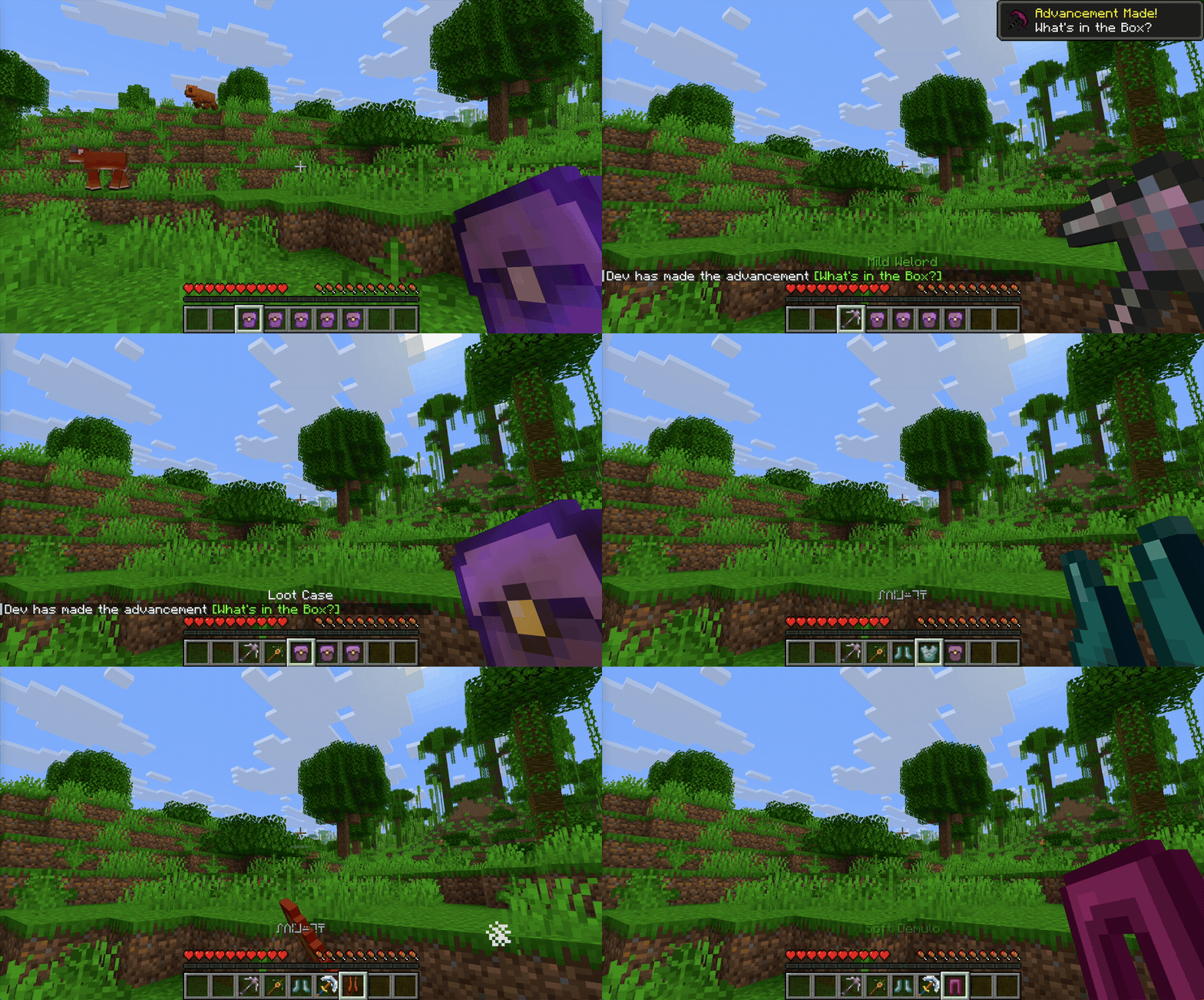
本模组以战利品箱为核心,开启后会随机获得一件工具或一套护甲。由于所有物品均为随机生成并拥有独特名称,你在游戏中永远不会看到它们被直接称为“Random Tool”或“Random Armor”。
战利品箱
你可以在任何结构(例如地牢、矿洞、埋藏的宝藏)生成的箱子中找到这种箱子。默认情况下,结构箱中有 25% 的概率包含一个战利品箱(此概率可配置,请参阅 配置指南)。右键点击该战利品箱会生成一件新的工具或护甲,并将战利品箱从你的背包中移除。
随机工具
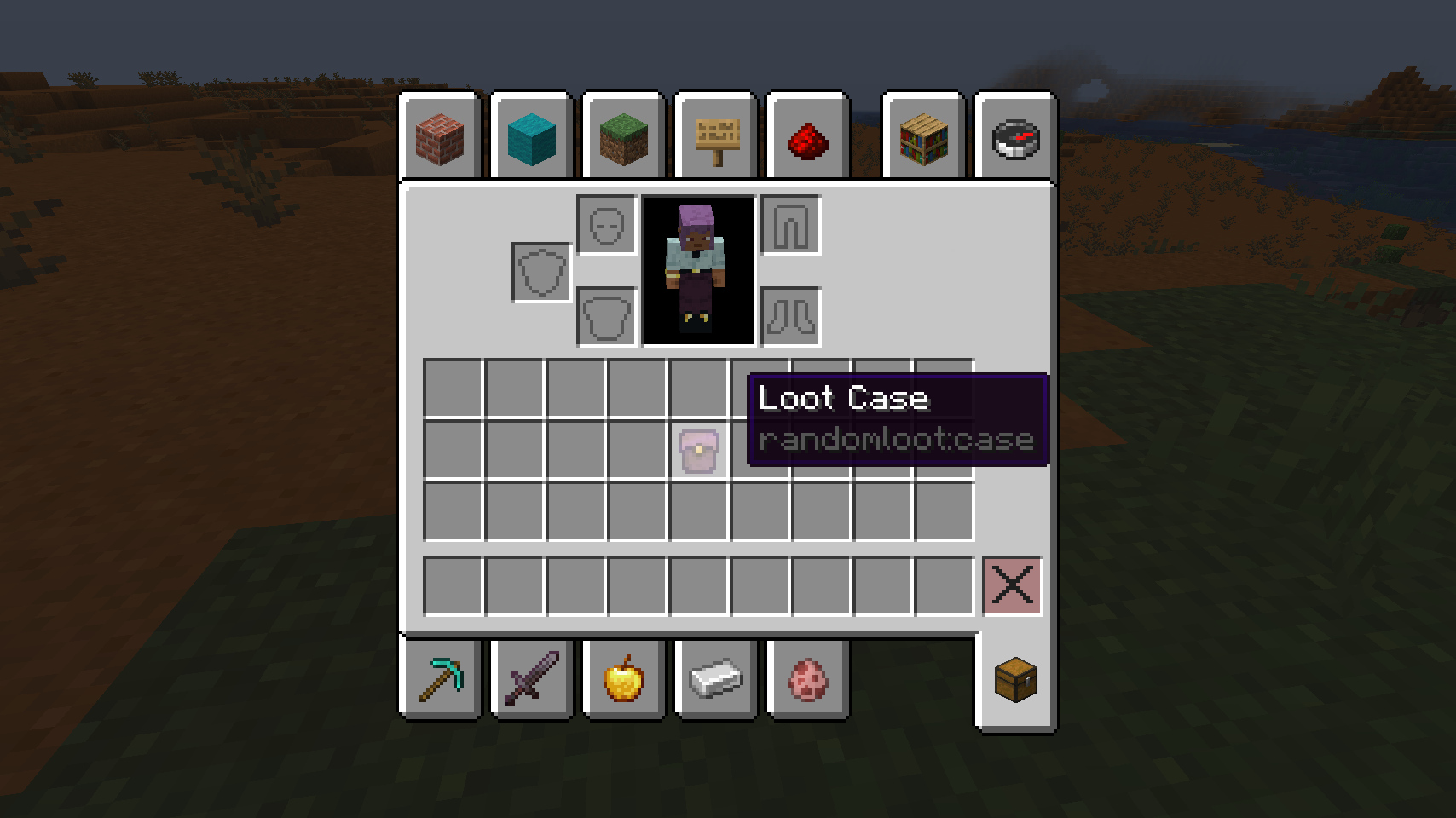
随机工具外观类似于多种类型的工具,可以是:镐子、铲子、斧头或剑。这些工具在生成时都会附带随机的特性。每次通过开启战利品箱生成工具时,新获得的工具将拥有更好的属性和更多的特性。
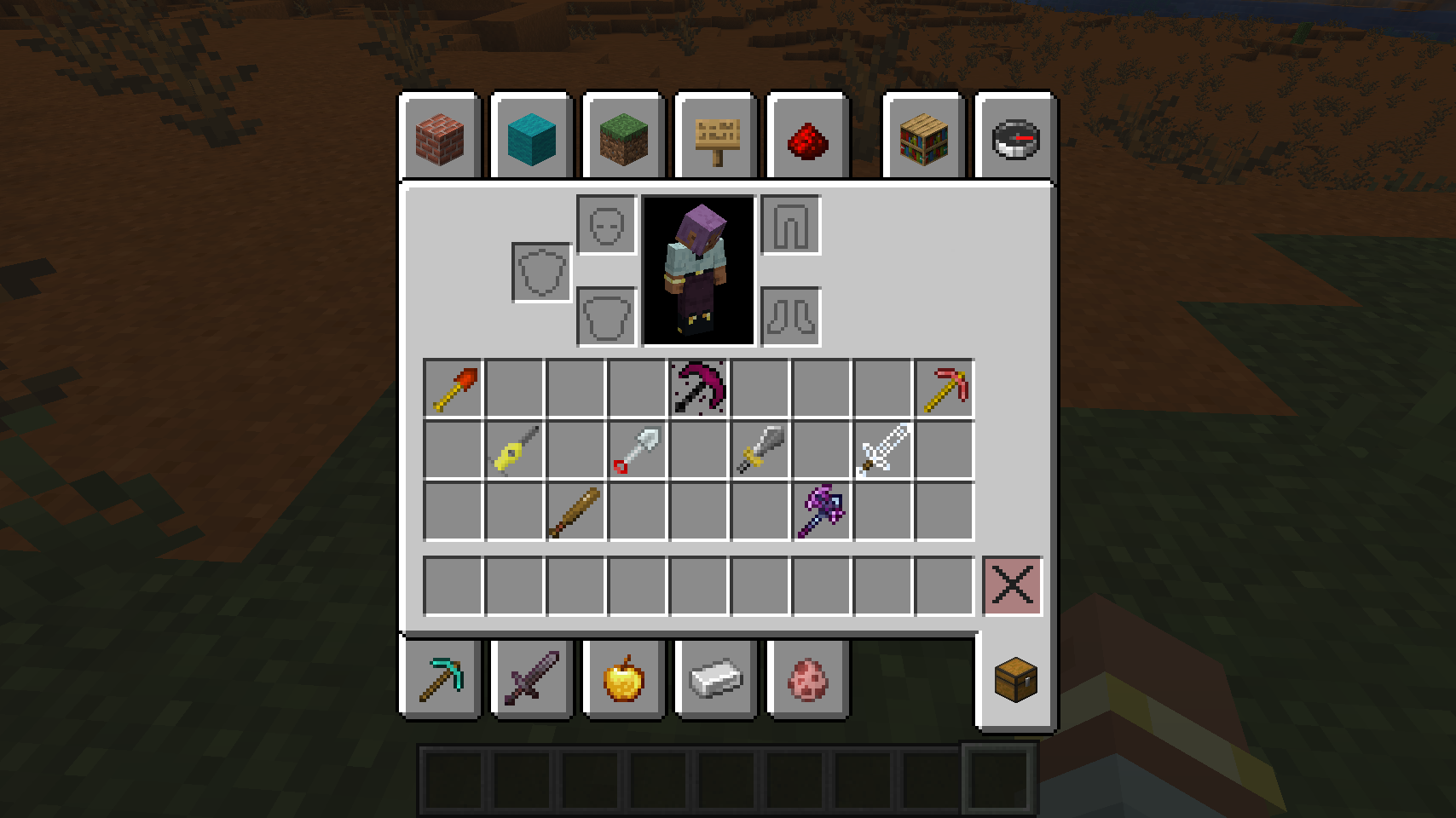
将鼠标悬停在工具上时按住 Shift 键,可以查看该工具的详细信息以及当前特质状态。
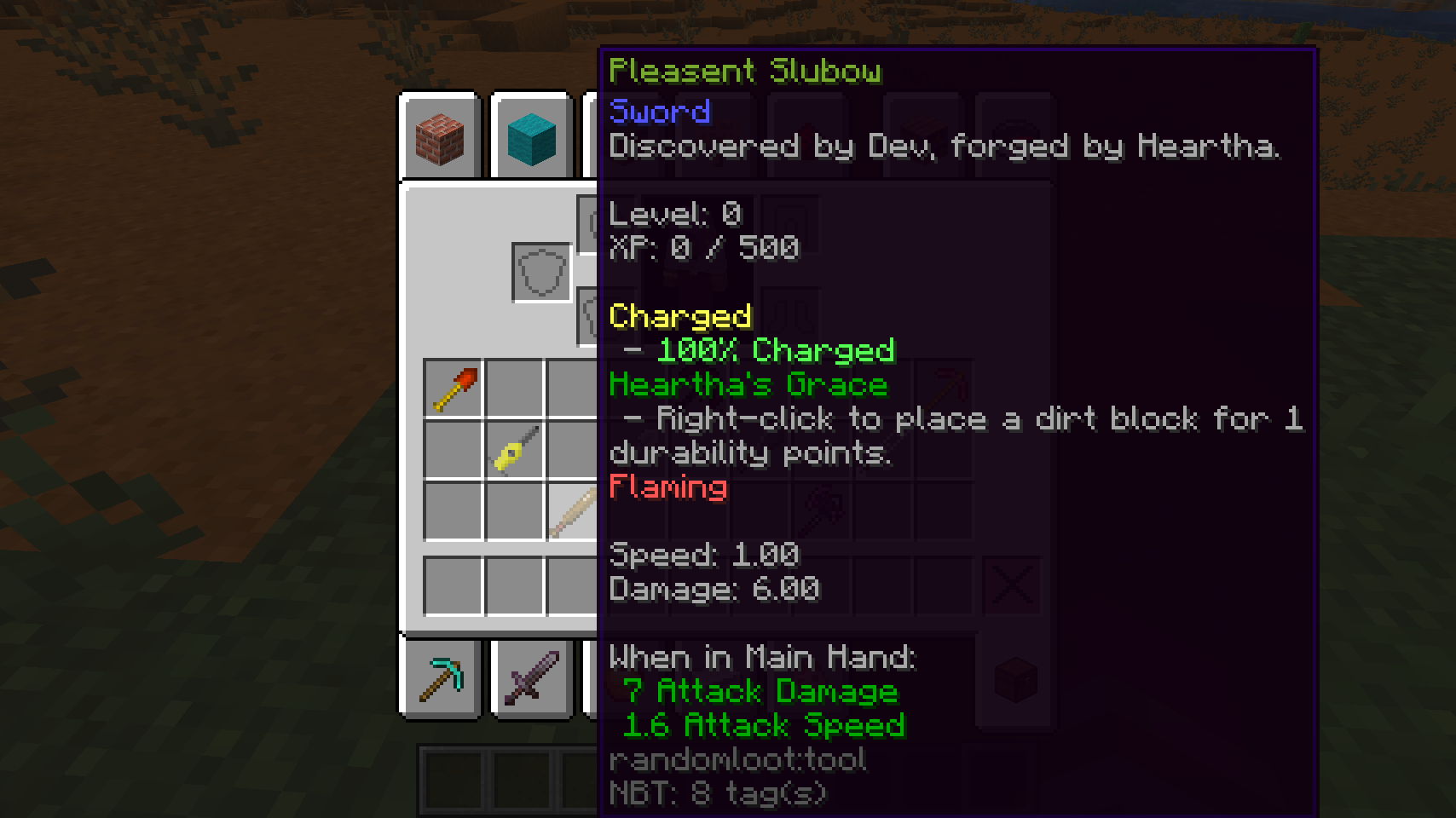
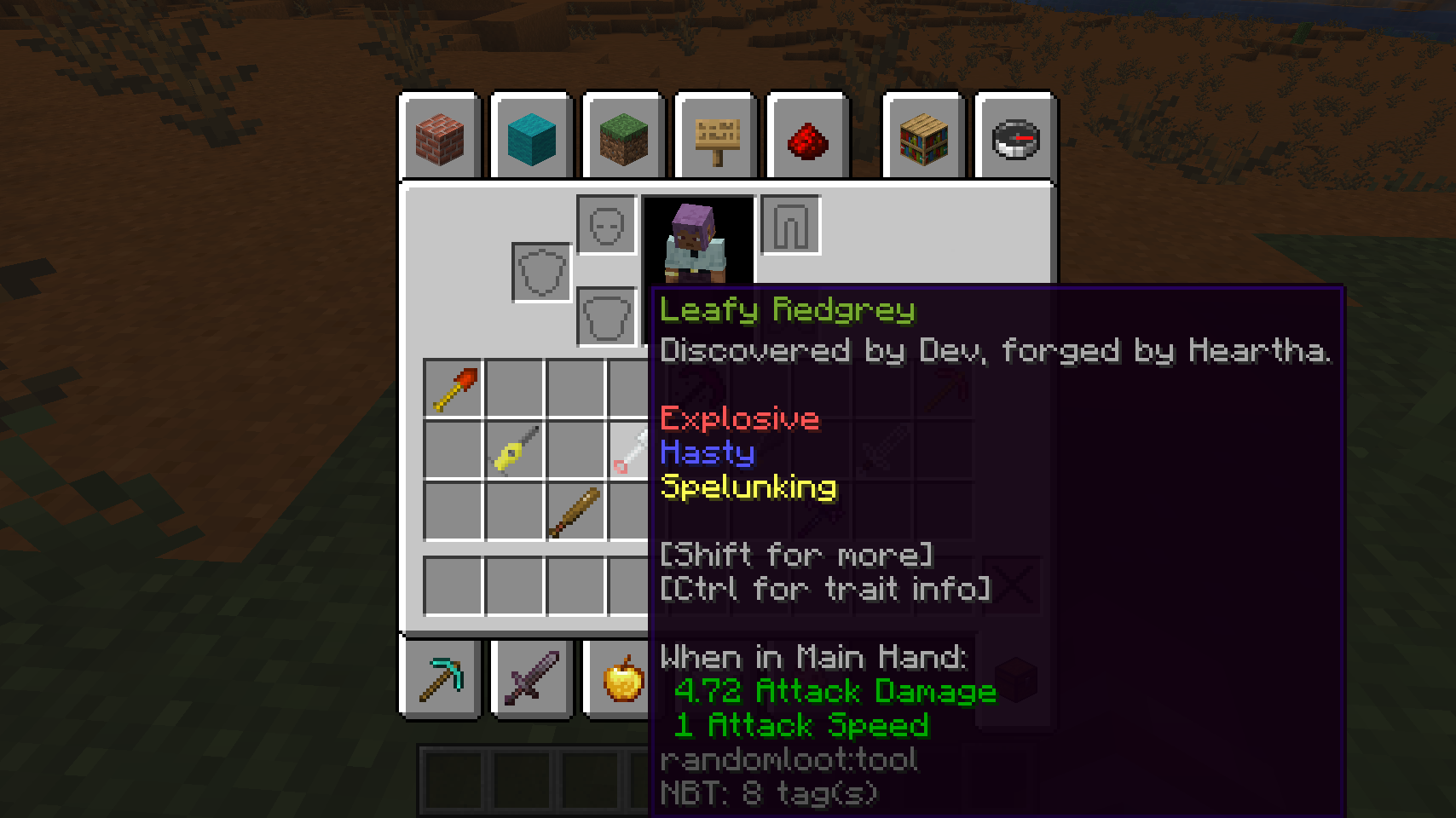
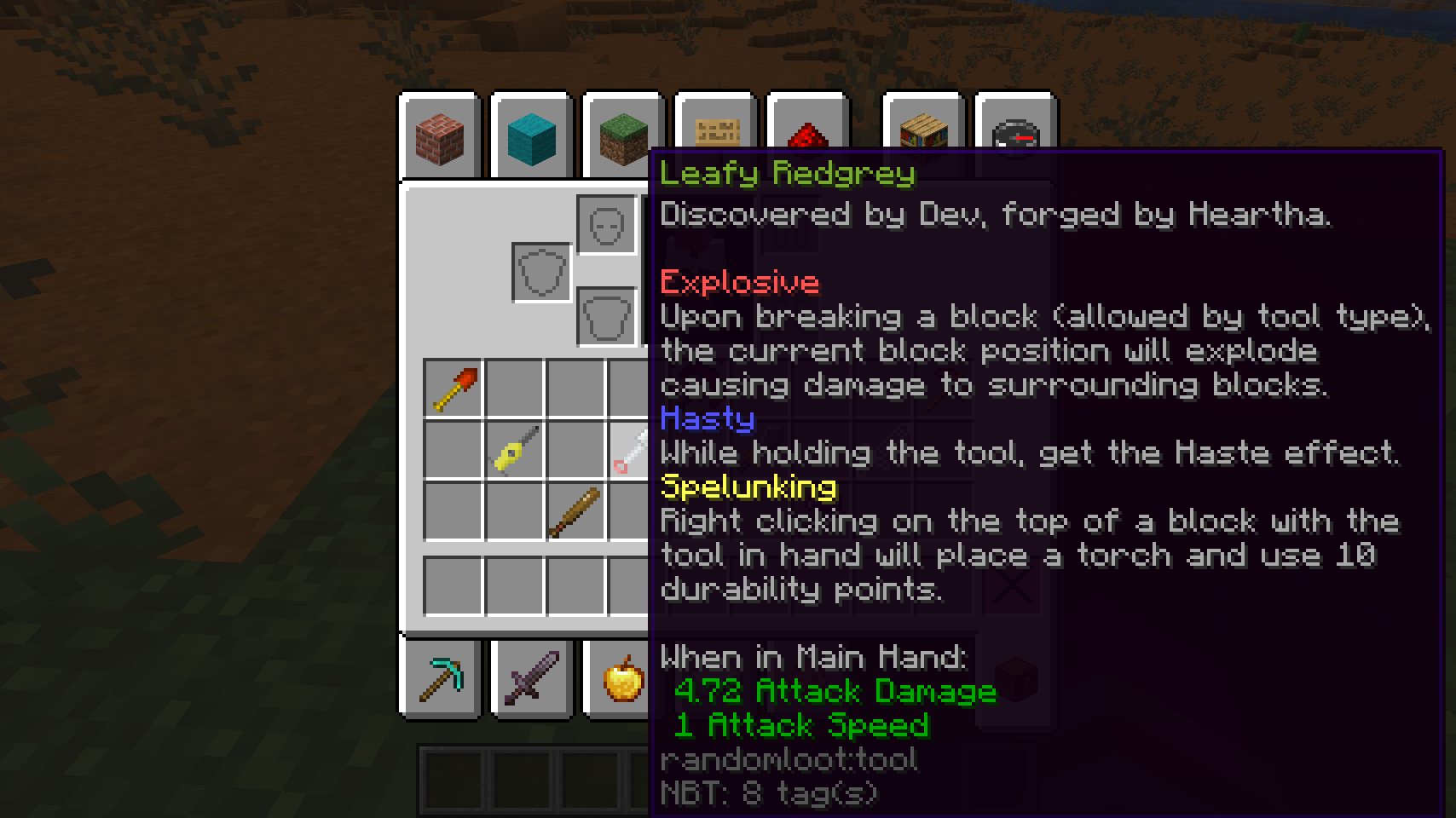
在将鼠标悬停在工具上时按住 Control(Mac 上为 command)键,即可查看当前施加于该工具的所有特性描述。
随机护甲
战利品箱还可以包含随机护甲——头盔、胸甲、护腿和靴子。默认情况下,箱子有 15% 的概率生成一件护甲而非工具(可配置)。护甲拥有独立特性池,并遵循与工具相同的进阶、命名和提示词规则。
工具和护甲均可附魔,并可在铁砧中使用可配置的修复材料(默认:钻石)进行修复——详情请参阅 战利品与合成指南。
工具修饰符
如需查看修饰符完整列表,请查阅 修饰符列表。
特性添加/移除模板
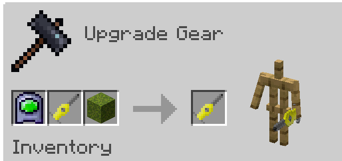
特性添加/移除模板是允许你对工具的已有特性进行添加或移除的物品。使用方法如下:将添加模板或移除模板放入锻造台以添加或移除一个特性;然后放入你的工具以及 修饰符 列表中对应的物品。之后你可以预览该操作对工具产生的效果。
你可以在地牢宝箱中找到特性添加模板,其获取方式与战利品箱类似(默认概率为 15%)。要获得移除模板,只需手持添加模板右键点击即可。它们可以在添加与移除状态之间无限次切换,但一旦使用便会消失。
在本示例中,我们正使用添加模板向工具添加 Living 特性。
随机精华与拆解
不喜欢你生成的工具或护甲?将其放入熔炉拆解为随机精华。在合成网格中将随机工具或随机护甲与随机精华组合,可以改变物品的纹理——每增加一份精华会使纹理循环变化一次,从而让你在不丢失任何特性、等级或属性的前提下重新定制装备外观。你还可以将 9 份随机精华合成为全新的战利品箱,因此即使抽到烂货也能最终物有所值。
自动化
你可以将箱子放入发射器中以自动开启。发射器产出的装备品质约为当前进度最高玩家水平的某个比例(默认为 75%,可通过 dispenserGoodness 配置),并且会像玩家亲自开启一样,记录发射器所在的真实生物群系和维度。使用发射器开启箱子不会推进任何人的进度,因此无法用于刷取更好的战利品。
命令
拥有操作者权限(权限等级 2,与 /give 相同)的玩家可以使用 /randomloot 命令树来直接生成和编辑装备:
| 命令 | 功能说明 |
|---|---|
/randomloot give <type> |
在你的物品栏中生成一件具有基础属性、无特性的全新工具或护甲部件(类型为 pickaxe、shovel、axe、sword、helmet、chestplate、leggings、boots)。 |
/randomloot trait add <trait> |
为手中主手持有的装备添加一个特性;如果该装备已拥有此特性,则提升其等级。遵循与锻造相同的规则(部件类型、生物群系限制、特性兼容性),且标签补全仅显示你当前手持物品可以接受的特性。 |
/randomloot trait remove <trait> |
移除手中主手持有装备上的一个特性。标签补全会列出该物品当前拥有的所有特性。 |
/randomloot xp <amount> |
为主手持有的装备添加经验值,并随之升级。 |
文档
- Modifier List - 所有可用的修饰符及配方
- Biome-Specific Traits - 绑定特定生物群系的特性
- Configuration Guide - 服务器/整合包配置选项
- Tool Progression - 升级、属性与进阶系统
- Name Generation - 工具名称的生成机制
- Loot & Crafting - 物品获取途径与合成指南
又一次重写?
从 1.12 到 1.16 的版本跳跃是 Forge 和 Minecraft 代码库的重大变更之一,这使得对模组进行完全重写变得非常必要。然而,从 1.16 到 1.20 再次发生了巨大的变化,我对 1.16 版本的模组代码库以及当时粗糙的规划总体并不满意。因此,针对 1.20 版本,Random Loot 进行了彻底的重写,以使模组更加协调一致,减少杂乱感。这次重写形成的代码库沿用至今,现在运行在 NeoForge 上以支持现代 Minecraft 版本。
更新日志
请查看 GitHub releases 以获取每个版本的详细更新日志。
鸣谢
感谢 Sprucefence、Xiruen、Victorium 和 Zorbyn 捐赠的工具纹理。
Random Loot
Introducing Looting like you've never seen it before! Have you ever felt that Minecraft didn't have enough tools and weapons to make you happy? Are you dissatisfied with the low amount of character each tool has? Ever wanted your tools to get better as you use them? Yes?!? Well then this is the mod for you!
Random Loot was rewritten from the ground up with the goals of creating an easier to maintain code-base with an expandable modifier system.
Items
This mod is built around the Loot Case, which opens into a Random Tool or a piece of Random Armor. You'll never see them called that in game since every item is randomly generated and uniquely named.
Loot Case
You can find cases in any chest that generated in a structure of some kind (ex: dungeons, mineshafts, buried treasure). By default there is a 25% chance that a structure chest contains a case (configurable, see the Configuration Guide). Right-clicking with this case generates a new tool or armor piece and removes the case from your inventory.
Random Tool
Random Tools look like a variety of tool types and can be one of: pickaxes, shovels, axes, swords. These tools all generate with random traits. For every tool you generate by opening a case, the tool you generate will come with better stats and more traits.
Holding Shift while hovering over tools will give you an expanded view on details about the tool and current status of traits.
Holding Control (command on a mac) while hovering over tools will give you a description of every trait currently applied to the tool.
Random Armor
Loot Cases can also contain Random Armor — helmets, chestplates, leggings, and boots. By default a case has a 15% chance to hold an armor piece instead of a tool (configurable). Armor generates with its own pool of traits and follows the same progression, naming, and tooltip rules as tools.
Both tools and armor are enchantable and can be repaired in an anvil with a configurable repair material (default: diamond) — see the Loot & Crafting guide for details.
Tool Modifiers
For a complete list of modifiers check out the modifier list.
Trait Addition/Subtraction Template
Trait Addition/Subtraction Templates are items that allow you to add and remove traits from your tools. To do this, place either an addition template or subtraction template inside a Smithing Table, to add or remove a trait. Then place in your tool and the corresponding item listed in the Modifiers list. Then You can preview what will happen to your tool.
You can find Trait Addition Templates in dungeon chests similarly to loot cases (15% chance by default). To get Subtraction Templates, right click with an addition template in your hand. They can be swapped back and forth as many times as you'd like but once you use them they're gone.
In this example, we're adding Living to the tool using an addition template.
Random Essence & Salvaging
Don't want a tool or armor piece you generated? Smelt it in a furnace to salvage it into Random Essence. Combining a Random Tool or Random Armor with Random Essence in a crafting grid changes the item's texture — each additional Essence cycles one texture further, so you can re-style your gear without losing any traits, levels, or stats. You can also craft 9 Random Essence into a brand new Loot Case, so even bad rolls eventually pay off.
Automation
You can place cases in dispensers to be opened automatically. Dispensed gear rolls at a fraction of the goodness of the most progressed online player (75% by default, configurable via dispenserGoodness), and records the dispenser's real biome and dimension just like a player opening the case there. Opening cases with a dispenser does not advance anyone's progression, so it can't be used to farm better loot.
Commands
Operators (permission level 2, the same as /give) get a /randomloot command tree for spawning and editing gear directly:
| Command | What it does |
|---|---|
/randomloot give <type> |
Spawns a fresh, trait-less tool or armor piece of the given type (pickaxe, shovel, axe, sword, helmet, chestplate, leggings, boots) into your inventory at base stats. |
/randomloot trait add <trait> |
Adds a trait to the gear in your main hand, or levels it up if the gear already has it. The same rules as smithing apply (piece type, biome restrictions, trait compatibility), and tab-completion only offers traits your held item can actually take. |
/randomloot trait remove <trait> |
Removes a trait from the gear in your main hand. Tab-completion lists the traits currently on the item. |
/randomloot xp <amount> |
Adds XP to the gear in your main hand, leveling it up along the way. |
Documentation
- Modifier List - All available modifiers and recipes
- Biome-Specific Traits - Traits tied to specific biomes
- Configuration Guide - Server/modpack configuration options
- Tool Progression - Leveling, stats, and advancement
- Name Generation - How tool names are created
- Loot & Crafting - Where to find items and crafting guide
Another Rewrite?
The jump from 1.12 to 1.16 was one of the biggest changes to Forge & the Minecraft codebase making a complete rewrite of the mod very welcome. However, the 1.16 to 1.20 was again, a massive change and I was overall dissatisfied with the 1.16 version of the mods codebase and sloppy planning. As such, 1.20 was a complete rewrite of Random Loot to make the mod feel more cohesive and less janky. That rewrite is the codebase that lives on today, now running on NeoForge for modern Minecraft versions.
Changelog
Check the GitHub releases for the changelog of each version.
Credits
Thank you to Sprucefence, Xiruen, Victorium and Zorbyn for donating tool textures.

下载 Random Loot Mod
需要联机服务器吗?
稳定流畅、一键部署,几分钟即可和朋友联机开服
最低仅需 8 元/月 即可畅快联机
下载 Random Loot Mod
需要联机服务器吗?
稳定流畅、一键部署,几分钟即可和朋友联机开服
最低仅需 8 元/月 即可畅快联机
下载 Random Loot Mod
需要联机服务器吗?
稳定流畅、一键部署,几分钟即可和朋友联机开服
最低仅需 8 元/月 即可畅快联机
下载 Random Loot Mod
需要联机服务器吗?
稳定流畅、一键部署,几分钟即可和朋友联机开服
最低仅需 8 元/月 即可畅快联机
下载 Random Loot Mod
需要联机服务器吗?
稳定流畅、一键部署,几分钟即可和朋友联机开服
最低仅需 8 元/月 即可畅快联机
下载 Random Loot Mod
需要联机服务器吗?
稳定流畅、一键部署,几分钟即可和朋友联机开服
最低仅需 8 元/月 即可畅快联机
下载 Random Loot Mod
需要联机服务器吗?
稳定流畅、一键部署,几分钟即可和朋友联机开服
最低仅需 8 元/月 即可畅快联机
下载 Random Loot Mod
需要联机服务器吗?
稳定流畅、一键部署,几分钟即可和朋友联机开服
最低仅需 8 元/月 即可畅快联机
下载 Random Loot Mod
需要联机服务器吗?
稳定流畅、一键部署,几分钟即可和朋友联机开服
最低仅需 8 元/月 即可畅快联机
下载 Random Loot Mod
需要联机服务器吗?
稳定流畅、一键部署,几分钟即可和朋友联机开服
最低仅需 8 元/月 即可畅快联机
关于这个资源的讨论、问题反馈与使用心得
还没有讨论,来发第一帖吧
你是这个资源的作者?登录后可认领此资源。
相似资源
 模组

可定制的鞘翅模组,支持装饰纹饰、旗帜图案等更多功能!
 模组
在游戏画面角落显示附近世界地形、玩家、生物和实体的地图。可创建路径点,帮助你找到标记过的位置。
 模组

适用于 MC 1.18+ 的 Effekseer 加载器
 模组

新增 50+ 个独特生物群系,为你的世界增添新树木、花卉等更多元素!
 模组
添加全屏世界地图,显示你在世界中已探索的区域。与 Xaero's Minimap 搭配使用效果极佳。
 模组

基于 GTCEu 1.12.2 的现代 GregTech
评论 0
登录后参与评分
还没有评论,来抢沙发吧