
Server Notify
Server Notify 是一款 Minecraft 模组,允许你向加入服务器的玩家显示通知。你可以使用命令轻松设置通知,支持纹理、文本或基于 URL 的图片通知。
客户端和服务器端都需要安装!
通知类型
- 纹理通知:显示来自任何已加载资源包的纹理。
- 纯文本通知:显示简单的消息。
- URL 图片通知:显示指定 URL 中的图片。
快速开始
- 基于命令:所有功能均通过游戏内的命令访问。
- 命令:输入
/server-notify查看可用选项。
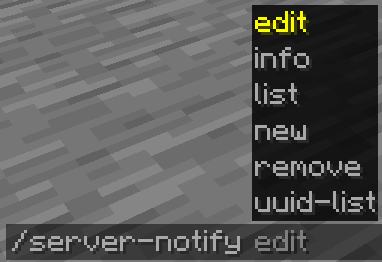
命令选项:
- Edit(编辑):修改通知的属性。
- Info(信息):查看特定通知的详细信息。
- List(列表):显示所有通知。
- New(新建):创建新通知。
- Remove(删除):删除通知。
- UUID-List(UUID 列表):显示所有通知及其 UUID。
创建通知
使用命令 /server-notify new type "Notification Name" 创建通知,将 "Notification Name" 替换为你喜欢的名称,并将 type 替换为 texture(纹理)、text(文本)或 url(URL)。
通知类型及命令
纯文本通知
文本通知允许你将任意消息显示为通知。示例命令如下:
/server-notify new text "Notification Name" <sound_namespace> <sound_path> <message> <dismissButton> <dismissMessage> <alwaysShow>
"Notification Name" 可以是任意内容,但必须用引号括起来。它用于你在稍后识别该通知。
<sound_namespace> 是你希望在显示通知时播放的声音的名称空间。
<sound_path> 是你希望在显示通知时播放的声音的路径。
<message> 是你的消息内容,需用引号括起来。
<dismissButton> 在屏幕上显示一个“关闭”按钮。
<dismissMessage> 在屏幕底部显示“按 ESC 键关闭”的文字。
<alwaysShow> 即使玩家已经看过该通知,也在他们加入时再次显示。
另一个文本通知示例:
/server-notify new text "Notification Test" minecraft "ambient.cave" "hey, testing" false true true
URL 图片通知
图片通知允许你显示来自任意 URL 的图片。示例命令如下:
/server-notify new url "Notification Name" <sound_namespace> <sound_path> <url> <width> <height> <dismissMessage> <alwaysShow>
"Notification Name" 可以是任意内容,但必须用引号括起来。它用于你在稍后识别该通知。
<sound_namespace> 是你希望在显示通知时播放的声音的名称空间。
<sound_path> 是你希望在显示通知时播放的声音的路径。
<url> 是你的图片 URL,需用引号括起来。
<width> 是你图片的宽度(你可能需要使用缩放后的分辨率以适应 Minecraft 的 GUI 缩放比例,例如对于一张 1920x1080 的图片,在保持宽高比的同时缩小尺寸应为 480x270)。
<height> 是你图片的高度(你可能需要使用缩放后的分辨率以适应 Minecraft 的 GUI 缩放比例,例如对于一张 1920x1080 的图片,在保持宽高比的同时缩小尺寸应为 480x270)。
<dismissMessage> 在屏幕底部显示“按 ESC 键关闭”的文字。
<alwaysShow> 即使玩家已经看过该通知,也在他们加入时再次显示。
另一个图片通知示例:
/server-notify new url "Image Test" minecraft "ambient.cave" "https://some_direct_image_url" 480 270 true true
Server Notify
Server Notify is a Minecraft mod that lets you display notifications to players joining your Minecraft server. Easily set up notifications using commands, with options for texture, text, or URL-based notifications.
Required on Client and Server!
Notification Types
- Texture Notifications: Display textures from any loaded resource pack.
- Text-only Notifications: Display simple messages.
- Image from URL: Display images from a specified URL.
Getting Started
- Command-based: All features are accessed via commands in-game.
- Commands: Type
/server-notifyto view available options.
Command Options:
- Edit: Modify a notification's properties.
- Info: View details of a specific notification.
- List: Display all notifications.
- New: Create a new notification.
- Remove: Delete a notification.
- UUID-List: Show all notifications with their UUIDs.
Creating Notifications
Use the command /server-notify new type "Notification Name" to create a notification, replacing "Notification Name" with your preferred name and type with texture, text, or url.
Notification Types and Commands
Text-only Notification
A text notification lets you display any message as a notification.An example command would be:
/server-notify new text "Notification Name" <sound_namespace> <sound_path> <message> <dismissButton> <dismissMessage> <alwaysShow>
"Notification Name" can be anything, however it must be in quotation marks. It is for you to identify the notification later on.
<sound_namespace> is the namespace of the sound you'd like to play when the notification is shown.
<sound_path> is the path of the sound you'd like to play when the notification is shown.
<message> is your message in quotation marks.
<dismissButton> displays a "Dismiss" button on the screen.
<dismissMessage> displays a "Press ESC to dismiss" text at the bottom of the screen.
<alwaysShow> shows the notification to a player when they join even if they have already seen it.
Another Text Notification example would be:
/server-notify new text "Notification Test" minecraft "ambient.cave" "hey, testing" false true true
Image from URL Notification
An image notification lets you display any image from a URL.An example command would be:
/server-notify new url "Notification Name" <sound_namespace> <sound_path> <url> <width> <height> <dismissMessage> <alwaysShow>
"Notification Name" can be anything, however it must be in quotation marks. It is for you to identify the notification later on.
<sound_namespace> is the namespace of the sound you'd like to play when the notification is shown.
<sound_path> is the path of the sound you'd like to play when the notification is shown.
<url> is your image URL in quotation marks.
<width> is the width of your image (you might have to use a scaled down resolution to accomodate for Minecraft's GUI scale, for example for an image that's 1920x1080, scaled down while also keeping the aspect ratio would be 480 by 270).
<height> is the height of your image (you might have to use a scaled down resolution to accomodate for Minecraft's GUI scale, for example for an image that's 1920x1080, scaled down while also keeping the aspect ratio would be 480 by 270).
<dismissMessage> displays a "Press ESC to dismiss" text at the bottom of the screen.
<alwaysShow> shows the notification to a player when they join even if they have already seen it.
Another Image Notification example would be:
/server-notify new url "Image Test" minecraft "ambient.cave" "https://some_direct_image_url" 480 270 true true

下载 Server Notify
下载 Server Notify
下载 Server Notify
下载 Server Notify
下载 Server Notify
下载 Server Notify
下载 Server Notify
下载 Server Notify
下载 Server Notify
更新前请阅读!
此更新更改了 Server Notify 保存通知数据的位置。
在服务器端:config/notifications.json -> config/Server Notify/notifications.json
在客户端:config/Server Notify/Server Notify/notifications.json -> config/Server Notify/seen_notifications.json
- 添加了更完善的错误提示界面
- 改进了命令语法(请参阅模组页面获取更新后的说明)
- 修复了“忽略”按钮位置错误的问题
关于这个资源的讨论、问题反馈与使用心得
还没有讨论,来发第一帖吧
你是这个资源的作者?登录后可认领此资源。
相似资源
 模组

可定制的鞘翅模组,支持装饰纹饰、旗帜图案等更多功能!
 模组

显示你正在注视的方块的信息。(适用于 Minecraft 1.16+ 的 Hwyla/Waila 分支)
 模组

查看物品与配方
 模组
在游戏画面角落显示附近世界地形、玩家、生物和实体的地图。可创建路径点,帮助你找到标记过的位置。
 模组
使用 JavaScript 编辑配方、添加自定义物品、编写世界事件!
 模组

适用于 MC 1.18+ 的 Effekseer 加载器
评论 0
登录后参与评分
还没有评论,来抢沙发吧