
终于!可以在半砖上放置物品了!
在半砖上挂灯笼!在半砖上堆叠方块!在那些半砖上的方块上继续堆叠! 你的半砖终于得到了它们应得的关爱 ?
Slabbed 的功能
半砖是 Minecraft 建筑中被忽视的“中间孩子”。它们看起来应该能支撑物体、连接物体,并像真实的建筑表面一样运作,但游戏往往把它们当作尴尬的、不完整的方块来处理。
Slabbed 改变了这一点。被支持的方块和物体会将半砖视为真正的建筑表面。火把、悬挂物、零碎装饰、方块等等!它们会停留在_半砖表面的实际位置_,而不是漂浮着、拒绝放置或落在你明显没有瞄准的地方。每个人都爱半砖,而现在有了 Slabbed,它们真正变得实用了!早就该这样了。
| 原版 Minecraft | ✨使用 Slabbed✨ |
|---|---|
| ❌ 许多方块需要其下方有完整的方块。半砖并不总是算作完整方块,这很糟糕。 | ✅ 被支持的方块和物体可以使用半砖表面,并处于正确的高度。 |
| ❌ 灯笼、火把、告示牌和其他物体可能会漂浮、拒绝附着或落在完整方块的高度。 | ✅ 常见的站立和悬挂物体与支持它们的半砖表面对齐。 |
| ❌ 从半砖向上建造会变得漂浮且令人沮丧。 | ✅ 方块可以通过半砖支持的结构自然堆叠。 |
| ❌ 你看到的和 Minecraft 认为存在的可能会不一致。 | ✅ 方块、其轮廓以及准星实际锁定的目标保持一致。 |
| ❌ 当附近某个方块更新时,方块的高度可能会发生变化。 | ✅ 较新的 Slabbed 文件会记录其放置高度并保持不变。 |
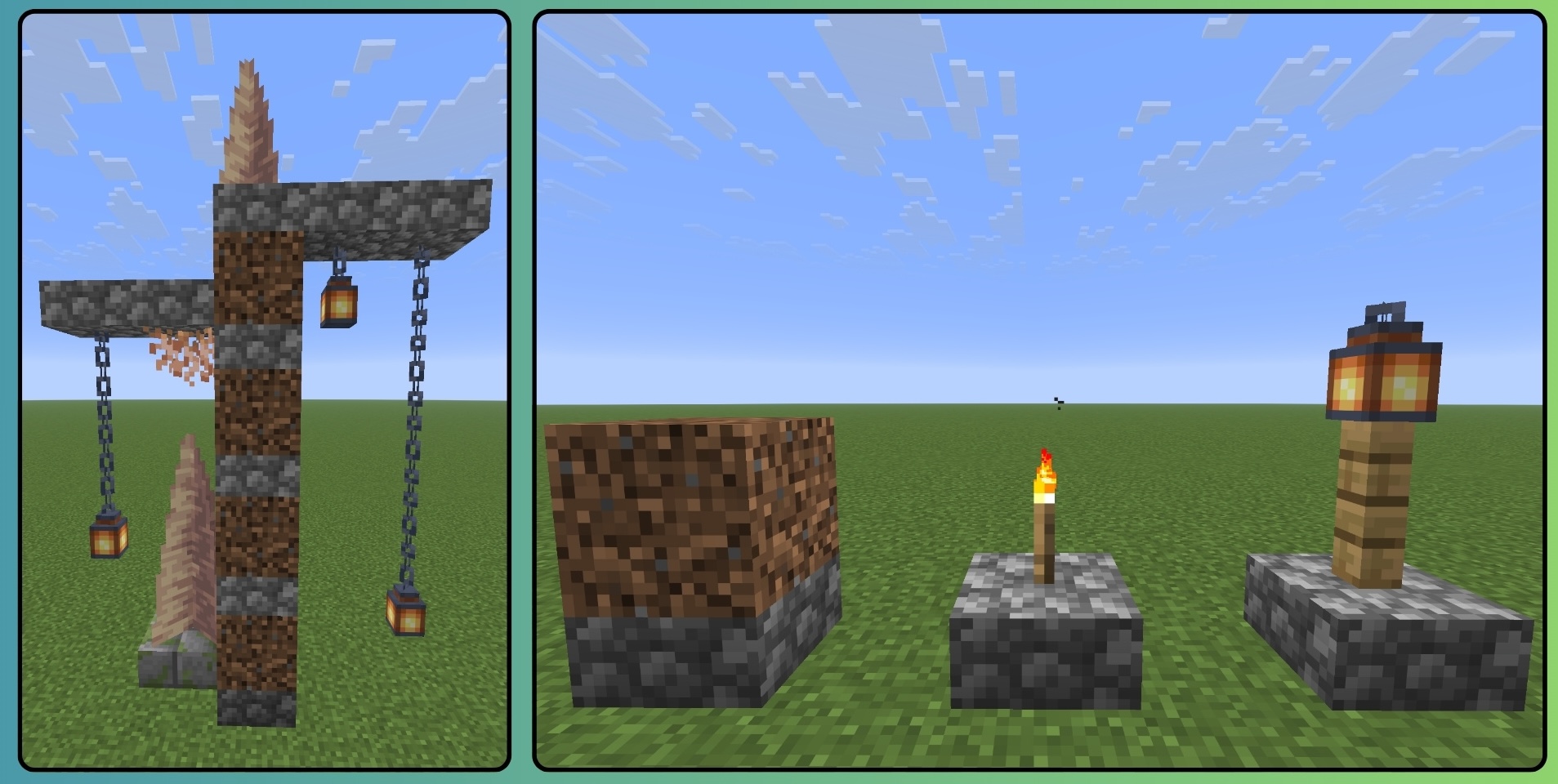
? 新增:你的方块会停留在你放置的位置
旧版本的 Slabbed 是在你注视它时计算方块的高度。大部分情况下没问题!但有时并非如此:打破附近的方块、在旁边放置东西、让区块重新加载,你很久之前放置的方块可能会悄悄地决定坐在别的地方。没人问它同意吗?它就那么做了。
现在高度在你放置方块的瞬间决定一次,然后就被锁定。邻居可以来来去去。区块可以重新加载。方块不在乎。它会 exactly 停在你放置的地方。
⚠️ 有一个限制... 这种锁定的高度仅适用于使用 Slabbed 0.5 或更高版本放置的方块。如果你打开一个用 0.5 之前版本构建的世界,你已经降低的方块将没有该记录,它们会恢复到正常高度。没有任何内容被删除或损坏——但在用新版本打开任何你在意的世界之前,请备份,并先尝试副本。自动转换旧世界在我的计划列表中。
0.6.x 版本还包括 /slabdy settings 命令,以及在选项 > 控制 > Slabbed 中两个初始未绑定的高度调整键。这些键用于调整具有记录高度的玩家放置方块;在共享世界中,这需要创造模式或至少 2 级权限。
Countered’s Terrain Slabs 兼容性
Countered's Terrain Slabs 是可选的,但如果你喜欢更自然、分层的地形,强烈建议安装。
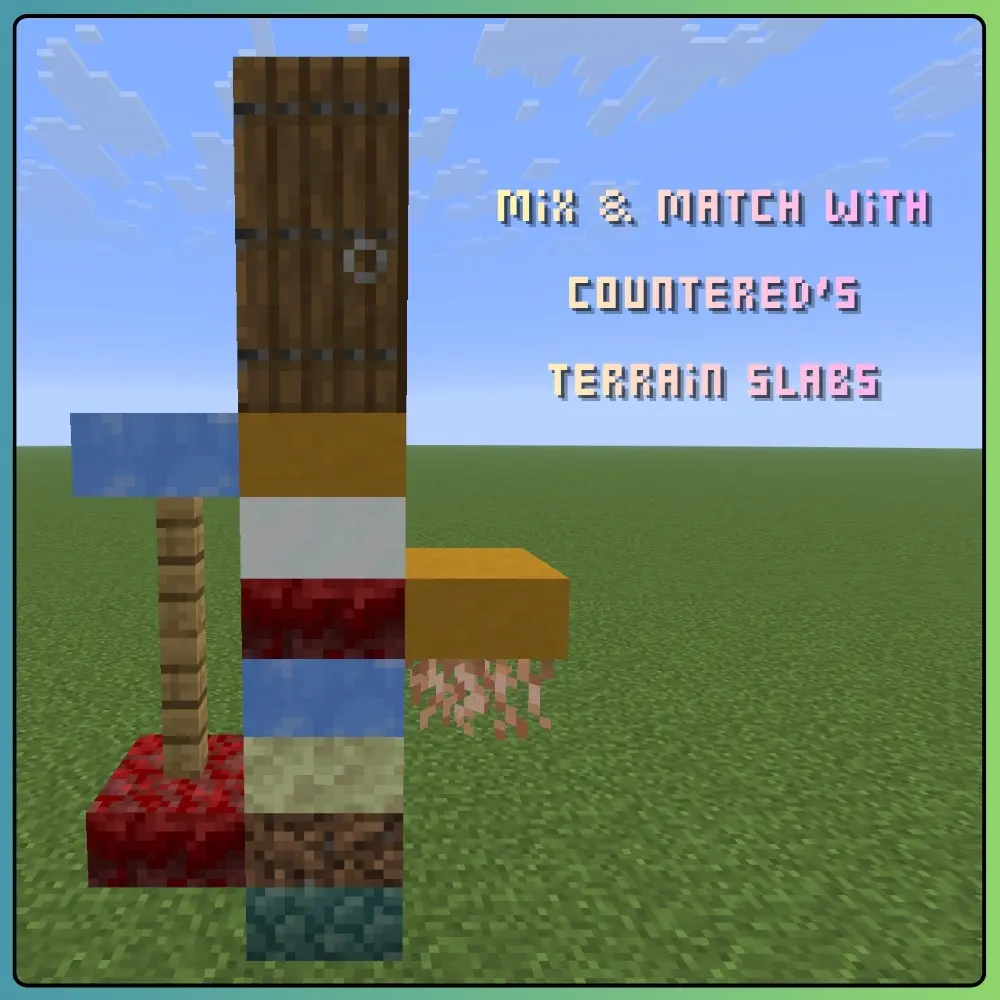
在较新的 0.5.2 文件中,Terrain Slabs 的半砖由玩家放置时表现得更像原版半砖:
- 它们可以坐落在下沉的支持物上。
- 它们可以在匹配高度处悬挑。
- 它们随结构堆叠和下降。
- 它们支持放置在其上的方块和物体。
- 它们不再在支持的布局中被无声拒绝或悬浮在网格高度。
自然生成的 Terrain Slabs 地形故意保留给 Terrain Slabs 控制。Slabbed 不会将保存的放置高度应用到世界生成中,也不会将景观变成充满透明接缝的节日。
不同 Slabbed 文件的兼容性有所不同,非常深或混合程度很高的布局仍可能有特定版本的限制。请检查你所使用的确切文件的发行说明。
Slabby 植被显然仍然很重要。
✧ 仍处于预发布阶段
Slabbed 文件目前根据 Minecraft 和加载器系列分为 alpha 或 beta 阶段。
常见行为已经经过了相当不合理的大量专注测试,但高度定制的模组方块可能仍需要专门的兼容性工作——特别是那些替换渲染、碰撞、放置、模型或世界移动的模组。
较旧的 Minecraft 系列也不会自动继承最新版本中的每一项改进。如果某项功能对你的建筑很重要,请查看该确切下载的更新日志,而不是假设每个时间线上的每个半砖都达到了开悟状态。
如果看起来不对劲,那很可能就是不对的,而且很可能值得报告。
只是请先检查一下是否有人已经报告过了,求求了。
兼容性
| Minecraft | Loader |
|---|---|
| 26.2–26.3 | Fabric (0.6.3-alpha, 统一文件) |
| 26.2 / 26.3 | NeoForge (0.6.2-alpha, 独立文件) |
| 26.1 / 26.1.2 | Fabric |
| 1.21.11 | Fabric |
| 1.21.1 | Fabric 和 NeoForge |
| 1.20.1 | Forge |
Fabric 26.1.2 系列收到了一次性的 0.6.2-alpha 刷新,除非需求回归,否则将冻结。较旧的 26.1 文件保持独立。
- Fabric 构建需要 Fabric API。
- Slabbed 支持单人游戏和多人游戏。
- 在多人游戏中,请在客户端和服务端都安装 Slabbed,以确保放置数据、视觉效果、轮廓和目标判定保持一致。这对于 NeoForge 26.2 和 26.3 的构建是必需的。
- 并非所有 Minecraft 版本和加载器版本的 Slabbed 功能集都相同。请务必选择与您确切游戏版本匹配的文件,并阅读其 Versions page 上的说明。
报告错误
错误报告非常非常有帮助!最有用的报告包括:
- 您的 Minecraft 和 Slabbed 版本
- 您的加载器版本和 Fabric API 版本(如适用)
- 您的其他模组,尤其是 Terrain Slabs、Lithium 或更改渲染和移动的模组
- 使用的具体方块以及您放置它们的顺序
- 您预期的结果与实际发生的情况之间的对比
- 截图或短视频,特别是针对视觉高度、轮廓、准星或放置问题
0.5.x 和 0.6.x 文件包含 /slabdy 高度读数,默认关闭,直到您主动开启。输入 /slabdy 以切换它。在报告中包含该读数可以使神秘的半方块问题变得不那么神秘。
对于卡顿报告,将启用 Slabbed 和禁用 Slabbed 时的同一场景进行比较,比单纯说“卡顿”要有用得多。两者 technically 都是句子,但只有一个能让我找到排查的起点。
Slabbed 的开发日志
好奇“在台阶上放火把”是如何变成这一切的吗?
Slabbed Field Guide 记录了项目的开发过程、背后的决策,以及当方块移动半米时涉及的奇怪 Minecraft 系统集合。
由 Codex 更新,由我设计并监督。
Slabbed 的目标很简单:
物体应该停留在它们看起来应该停留的地方。
Minecraft 让这件事变得出奇地复杂。
感谢!
如果您发现可以改进的代码,欢迎提交 Pull Request。同样欢迎错误报告、截图、视频以及各种奇怪的边缘案例。它们已经让 Slabbed 变得更好了。
感谢您游玩 Slabbed 并帮助我将其打造为现在的样子!
:3 Peetsa
? Modrinth 上的 Slabbed
您是台阶爱好者吗???请在 Modrinth 上给 Slabbed 投一个 ❤️ 吧!?✨
与 Slabbed 搭配效果极佳: Countered's Terrain Slabs
FINALLY! Put stuff on slabs!
Hang lanterns from slabs! Stack blocks on slabs! Stack blocks on those blocks on those slabs! Your slabs finally get the love they deserve 💖
What Slabbed does
Slabs are the overlooked middle child of Minecraft building. They look like they should support things, connect to things, and behave like real building surfaces, but the game often treats them like awkward not-quite-blocks instead.
Slabbed changes that. Supported blocks and objects treat slabs like actual building surfaces. Torches, hanging things, bits and bobbles, blocks, and more! They sit where the slab surface really is instead of floating, refusing to place or landing somewhere you very obviously did not aim. Errybody loves slabs, and now with Slabbed they're truly functional! 'Bout time.
| In vanilla Minecraft | ✨With Slabbed✨ |
|---|---|
| ❌ Many blocks want a full block underneath them. Slabs do not always count, which is lame. | ✅ Supported blocks and objects can use slab surfaces and sit at the correct height. |
| ❌ Lanterns, torches, signs and other objects may float, refuse to attach or land at full-block height. | ✅ Common standing and hanging objects line up with the slab surface supporting them. |
| ❌ Building upward from slabs gets floaty and sad. | ✅ Blocks can stack naturally through slab-supported structures. |
| ❌ What you see and what Minecraft thinks is there may disagree. | ✅ The block, its outline and what your crosshair actually targets stay together. |
| ❌ A block may change height after something nearby updates. | ✅ Newer Slabbed files record its placement height and keep it there. |
🔒 New: your blocks stay where you put them
Older Slabbed builds worked out a block's height while you looked at it. Mostly fine! Except when it wasn't: break something nearby, place something next to it, let a chunk reload, and a block you placed ages ago could quietly decide to sit somewhere else. Nobody asked it to. It just did.
Now the height is decided once, at the moment you place the block, and then it is locked. Neighbors can come and go. Chunks can reload. The block does not care. It stays exactly where you put it.
⚠️ One catch... That locked-in height only exists for blocks placed with Slabbed 0.5 or later. If you open a world built with a version before 0.5, things you already lowered won't have that record, and they'll sit at normal height instead. Nothing is deleted or corrupted — but back up any world you care about before opening it in a new build, and try a copy first. Automatic conversion for old worlds is on my list.
The 0.6.x builds also include /slabdy settings and two initially unbound height-adjustment keys in Options > Controls > Slabbed. The keys adjust player-placed blocks with recorded heights; on shared worlds they require creative mode or op level 2.
Countered’s Terrain Slabs compatibility
Countered's Terrain Slabs is optional but highly recommended if you enjoy more natural, layered terrain.
In newer 0.5.2 files, Terrain Slabs slabs placed by a player behave much more like vanilla slabs:
- They can seat on lowered supports.
- They can cantilever at the matching height.
- They stack and descend with the structure.
- They support the blocks and objects placed on them.
- They are no longer silently refused or left floating at grid height in supported arrangements.
Naturally generated Terrain Slabs terrain is deliberately left under Terrain Slabs’ control. Slabbed does not stamp saved placement heights onto world generation and turn the landscape into a festival of see-through seams.
Compatibility differs between Slabbed files, and very deep or heavily mixed arrangements can still have version-specific limits. Check the release notes for the exact file you use.
Slabby foliage remains important, obviously.
✧ Still pre-release
Slabbed files are currently alpha or beta, depending on the Minecraft and loader line.
The common behavior has received a frankly unreasonable amount of focused testing, but heavily customized modded blocks can still need dedicated compatibility work—especially mods that replace rendering, collision, placement, models or world movement.
Older Minecraft lines also do not automatically inherit every improvement from the newest file. If a feature matters to your build, check the changelog for that exact download rather than assuming every slab in every timeline has achieved enlightenment.
If something looks wrong, it probably is, and it is probably worth reporting.
Just check whether somebody has already reported it first, pleeease.
Compatibility
| Minecraft | Loader |
|---|---|
| 26.2–26.3 | Fabric (0.6.3-alpha, one unified file) |
| 26.2 / 26.3 | NeoForge (0.6.2-alpha, separate files) |
| 26.1 / 26.1.2 | Fabric |
| 1.21.11 | Fabric |
| 1.21.1 | Fabric and NeoForge |
| 1.20.1 | Forge |
The Fabric 26.1.2 line received a one-time 0.6.2-alpha refresh and is frozen unless demand returns. The older 26.1 files remain separate.
- Fabric builds require Fabric API.
- Slabbed supports singleplayer and multiplayer.
- For multiplayer, install Slabbed on both the client and server so placement data, visuals, outlines and targeting all agree. This is required for the NeoForge 26.2 and 26.3 builds.
- Not every Minecraft and loader line has the same Slabbed feature set yet. Always choose the file made for your exact game version and read its notes on the Versions page.
Reporting bugs
Bug reports are super duper helpful! The most useful reports include:
- Your Minecraft and Slabbed versions
- Your loader version and Fabric API version, where applicable
- Your other mods, especially Terrain Slabs, Lithium or mods that change rendering and movement
- The exact blocks used and the order you placed them
- What you expected versus what actually happened
- A screenshot or short video, especially for visual height, outline, crosshair or placement problems
The 0.5.x and 0.6.x files include the /slabdy height readout, switched off until you ask for it. Type /slabdy to toggle it. Including that readout in a report makes mysterious half-block problems considerably less mysterious.
For lag reports, comparing the same scene with Slabbed enabled and disabled is much more useful than “it lags.” Both are technically sentences, but only one gives me somewhere to start.
Report a Slabbed bug on GitHub
A development journal for Slabbed
Curious how “put a torch on a slab” became all of this?
The Slabbed Field Guide follows the project’s development, the decisions behind it and the strange collection of Minecraft systems that become involved when a block moves half a meter.
Updated with Codex, designed and overseen by me.
Slabbed's goal is simple:
Things should sit where they look like they sit.
Minecraft makes that surprisingly complicated.
Thanks!
If you find wonky code that could be improved, pull requests are welcome. Bug reports, screenshots, videos and bizarre little edge cases are welcome too. They have already made Slabbed much better.
Thank you for playing with Slabbed and helping me make it what it is!
:3 Peetsa
💙 Slabbed on Modrinth
Are you a slab fan??? Throw Slabbed a ❤️ on Modrinth! 🧱✨
Pairs wonderfully with Slabbed: Countered's Terrain Slabs

下载 Slabbed
需要联机服务器吗?
稳定流畅、一键部署,几分钟即可和朋友联机开服
最低仅需 8 元/月 即可畅快联机
下载 Slabbed
需要联机服务器吗?
稳定流畅、一键部署,几分钟即可和朋友联机开服
最低仅需 8 元/月 即可畅快联机
下载 Slabbed
需要联机服务器吗?
稳定流畅、一键部署,几分钟即可和朋友联机开服
最低仅需 8 元/月 即可畅快联机
下载 Slabbed
需要联机服务器吗?
稳定流畅、一键部署,几分钟即可和朋友联机开服
最低仅需 8 元/月 即可畅快联机
下载 Slabbed
需要联机服务器吗?
稳定流畅、一键部署,几分钟即可和朋友联机开服
最低仅需 8 元/月 即可畅快联机
下载 Slabbed
需要联机服务器吗?
稳定流畅、一键部署,几分钟即可和朋友联机开服
最低仅需 8 元/月 即可畅快联机
下载 Slabbed
需要联机服务器吗?
稳定流畅、一键部署,几分钟即可和朋友联机开服
最低仅需 8 元/月 即可畅快联机
下载 Slabbed
需要联机服务器吗?
稳定流畅、一键部署,几分钟即可和朋友联机开服
最低仅需 8 元/月 即可畅快联机
下载 Slabbed
需要联机服务器吗?
稳定流畅、一键部署,几分钟即可和朋友联机开服
最低仅需 8 元/月 即可畅快联机
下载 Slabbed
Slabbed 0.7.1-alpha+26.2-26.3
适用于 Minecraft 26.2 和 26.3 的 Fabric 版本。自 0.7.0-alpha+26.2-26.3 以来的更改。
已修复
- 修复了当降低后的方块在视觉上处于可破坏范围内,但其原始网格单元不在范围内时,服务器拒绝方块破坏的问题。正常的挖掘距离限制仍然有效。解决了 #149 中关于破坏部分的问题;单独报告的方块和手持物品视觉症状仍在调查中。
- 修复了地形破坏粒子从降低后方块上方的空空间中采样黑暗效果的问题。真实的不透明表面仍正常为粒子提供阴影。#150
- 修复了拴绳结和绳索端点位于降低后的栅栏上方的问题。现在通过同步、保存和重新加载,拴绳结的高度保持一致。#152
- 修复了地毯碰撞形状在客户端运行时被双重降低的问题,这导致苔藓地毯和羊毛地毯低于其预期的行走表面。#154
兼容性
- 增加了对 Minecraft 26.2 上 Fancy World Animations 1.3.7 的支持,包括其区块剔除更改,同时保留对 1.3.4 的支持。#151
兼容性说明:Fancy World Animations 支持仅限于测试过的 Minecraft 26.2 上的 1.3.4 和 1.3.7 版本。Relatively Placed Blocks 和 Offgrid 在某些组合放置设置中仍然存在冲突。尚未测试确切的报告整合包以及每种渲染器组合;地毯校正并未确保所有远程服务器移动问题都已解决。
Slabbed 0.6.13-alpha+1.21.1-neoforge
适用于 NeoForge 上的 Minecraft 1.21.1。此为独立构建版本,与 Fabric 发布版不同。
已修复
- 修正了在已测试的 Continuity 和 Sinytra Connector 渲染路径中降低方块模型的高度,包括资源重载。感谢 Askime2233 提供 #142。
改进
- 减少了邻近区块附件轮询中的哈希冲突。这减少了冗余的查找比较;尚未证实对游戏内 FPS 有提升效果。感谢 gggggab 提供 #128。
兼容性检查涵盖了已测试的 Sodium 和 Indigo 配置、连接纹理启用与禁用状态,以及在不安装可选兼容模组情况下的启动。Embeddium、报告者使用的完整整合包、任意模型包装器及发光链仍未经验证。本版本不保证解决所有卡顿或渲染问题。
适用于 Minecraft 1.21.1,需 NeoForge 21.1.233 或更高版本。需要 Java 21。
改进
- 区块段重建时对静态列复用检查。在聚焦移动光源的测试中,区块编译器比 0.6.7-alpha 版本少使用约 30% 的 CPU 资源。在该测试中帧时间保持接近。这是对 #92 的部分改进。感谢 sewzrat 报告卡顿问题。
- 普通区块渲染和已测试的 Relatively Placed Blocks 合成体在资源重载后仍保留接缝面。强制嵌套模型包装器或回退上下文的诊断用例仍可能丢失面。其他渲染路径尚未经过验证。
[0.6.11-alpha+26.2-26.3]
参见 LAW.md —— 本更新日志不会重新定义该规范。
适用于 Fabric 平台的 Minecraft 26.2 和 26.3。需要 Fabric API 和 Java 25。
已修复
- 防止在方块高度降低或与不同存储高度的方块相邻时,与 Sodium 和 Continuity 一起出现区块渲染崩溃。现有的玻璃模型高度修正功能得以保留。感谢 Skwishyat 提供的崩溃日志及详细信息(#126)。
此修复解决了可复现的 Sodium/Continuity 渲染失败问题。关于原始 Minecraft 26.2 世界进入冻结报告的真正原因仍未确认。
[0.6.10-alpha+26.2-26.3]
请参阅 LAW.md —— 本更新日志不对规则进行重新定义。
适用于 Minecraft 26.2 和 26.3 的 Fabric 版本。需要 Fabric API 和 Java 25。
已修复
- Clean and Clear Glass 绘制的玻璃在台阶上能保留其存储的高度,使模型与选择框对齐。该高度偏移会在晚期模型替换后运行一次。感谢 W0lvif(#122)提交的问题报告。
改进
- 问题报告表单在您能够审核报告之前,会要求提供简短标题、操作内容、发生的情况以及发生地点。未修改的初始文本无法打开草稿。
- 在打开 GitHub 之前,请查阅完整的报告。屏幕说明指出,打开预填链接会将文本发送到 GitHub,且在问题提交后,这些问题将是公开的。
- 当报告长度超过 2048 个字符的链接限制时,复制完整报告文本,然后打开一个空白问题并粘贴进去。长报告不会被静默截断。
新增
- 可选择在报告中包含客户端模组 ID 和版本。默认处于关闭状态,仅在选中时才读取列表,并允许您在打开 GitHub 之前编辑条目或移除整个列表。不会自动收集日志、本地路径、玩家标识符、服务器地址、世界数据、资源包、光影和设置。
玻璃相关的更改已在 Minecraft 26.3 中使用常规玻璃、染色玻璃和混合台阶堆叠,配合 Clean and Clear Glass 26.3.0 进行了检查。自动化替换模型检查覆盖了这两个游戏版本。玻璃板、染色玻璃以及报告者使用的完整渲染器、光影和资源包组合仍未验证。
Slabbed 0.6.9-alpha+26.2-26.3
适用于 Minecraft 26.2 和 26.3(Fabric 版)。需要 Fabric API 以及 Java 25。
已修复
- 从半砖下方起跳并在自身下方放置方块时,现在可以在清除方块的半截模型后正常生效。如果新放置的方块的实体部分与玩家或其他实体重叠,放置操作仍会被拒绝。感谢 Crownsync 提交报告(#120)。
- 射在半截方块上的箭矢现在会落在其可见表面上并正常消失,而不会再悬在空中且不断重置消失计时器。感谢 bluegamer1166 提交报告和截图(#121)。
已在 Minecraft 26.2 中使用发射器发射箭矢在原版树叶和石头上进行测试验证。报告者使用的 Soft Leaves 模组配置尚未验证。
Slabbed 0.6.6-alpha+26.2-26.3
适用于 Fabric 平台的 Minecraft 26.2 和 26.3。需要 Fabric API 和 Java 25。
已修复
- 当 Fusion 替换或附加方块模型时,半砖方块会保持其绘制高度。感谢 lilonkish (#112) 和 EnormeKartoffel (#116) 提供的报告。在 Minecraft 26.2 上使用聚焦资源包配合 Fusion 1.3.16 进行了测试;报告者使用的确切资源包尚未验证。此处并不表示支持在 26.3 上使用 Fusion,因为当时没有官方兼容的 Fusion 构建版本可用。
- 由 Stupid Block Animations 动画化的方块现在从其存储的高度开始,并围绕正确的降低位置旋转,从而避免动画结束时出现半砖方块的吸附现象。感谢 bluegamer1166 (#115)。已在两个游戏版本中使用 Stupid Block Animations 0.1.3 进行测试。
- F3 目标方块信息和方块标签读取会跟随准星下方的半砖方块显示。流体读取内容保持不变;此修复不会改变该游戏版本中 Jade 的行为。感谢 NSSCaptain 最初在 Fabric 1.20.1 分支上提交的报告 (#100)。
适用于 NeoForge 的 Minecraft 26.3。需要 Java 25。(26.2 jar 是一个独立的版本。)
- 修复了当 Lootr 在区块仍在加载时设置装有宝箱的矿车,导致区块生成冻结的问题。矿车当时正在读取其下方的铁轨,并等待服务器正在加载的那个区块完成加载。现在,矿车改为在其第一个正常刻(tick)时获取其所在铁轨的高度。这与 Fabric 26.2/26.3 构建在 0.6.3 版本中获得的修复相同。感谢 1unarea 的报告以及直接指向该问题的线程转储(thread dumps),并感谢 iSeoull 提供的服务器报告(GitHub issues #102 和 #105)。
这是一个仅包含此项修复的小型补丁。来自 Fabric 26.2/26.3 0.6.3 构建中的另外两项修复(渲染快照以及栅栏上方的陷阱门)仍在移植到 NeoForge。
关于这个资源的讨论、问题反馈与使用心得
还没有讨论,来发第一帖吧
你是这个资源的作者?登录后可认领此资源。
相似资源
 模组

显示你正在注视的方块的信息。(适用于 Minecraft 1.16+ 的 Hwyla/Waila 分支)
 模组

可定制的鞘翅模组,支持装饰纹饰、旗帜图案等更多功能!
 模组
使用 JavaScript 编辑配方、添加自定义物品、编写世界事件!
 模组

查看物品与配方
 模组
在游戏画面角落显示附近世界地形、玩家、生物和实体的地图。可创建路径点,帮助你找到标记过的位置。
 模组

适用于 MC 1.18+ 的 Effekseer 加载器
评论 0
登录后参与评分
还没有评论,来抢沙发吧