终于!可以在半砖上放置物品了!
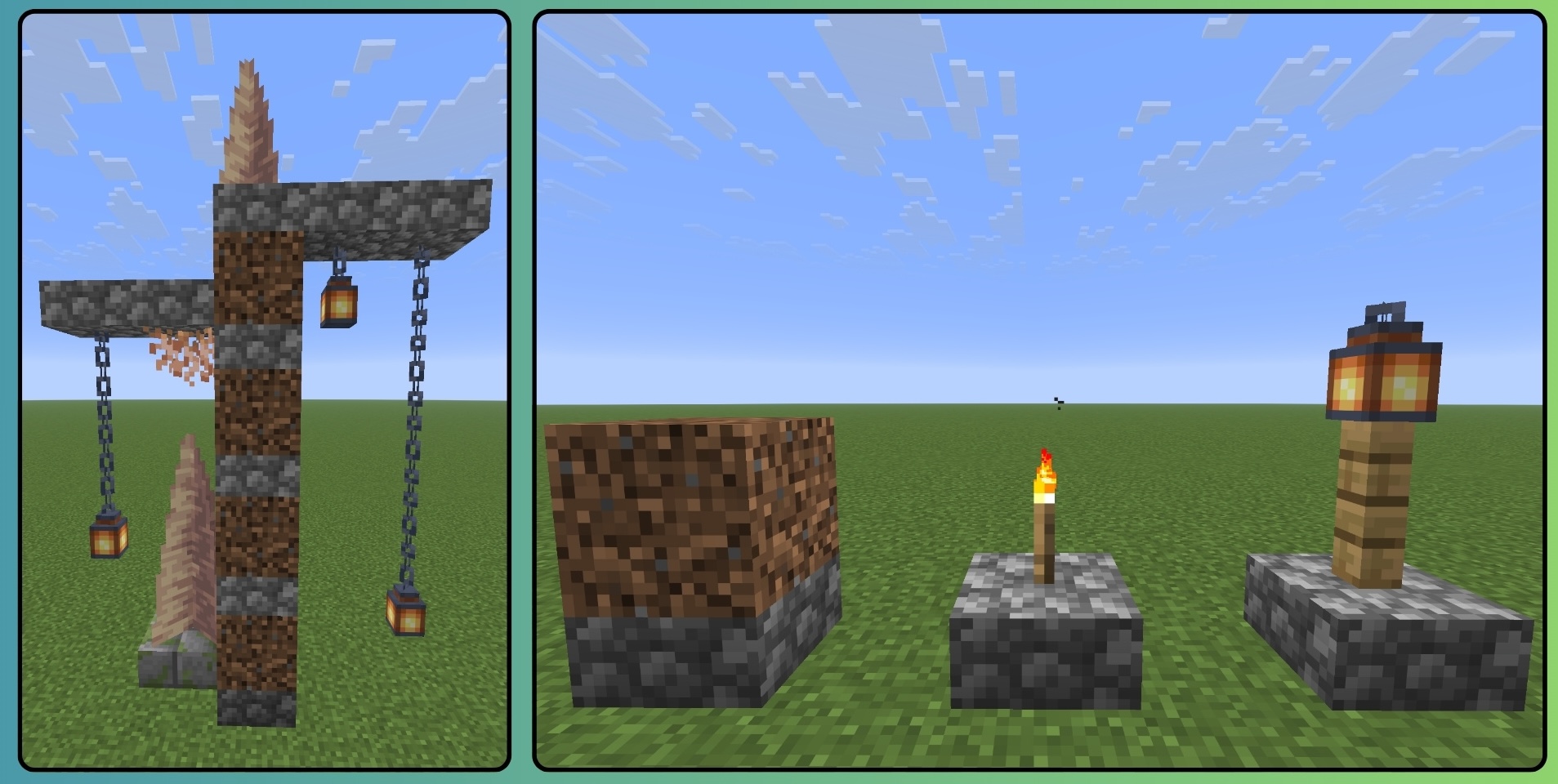
在半砖上挂灯笼!在半砖上堆叠方块!在那些半砖上的方块上继续堆叠!
你的半砖终于得到了它们应得的关爱 ?
Slabbed 的功能
半砖是 Minecraft 建筑中被忽视的“中间孩子”。它们看起来应该能支撑物体、连接物体,并像真实的建筑表面一样运作,但游戏往往把它们当作尴尬的、不完整的方块来处理。
Slabbed 改变了这一点。被支持的方块和物体会将半砖视为真正的建筑表面。火把、悬挂物、零碎装饰、方块等等!它们会停留在_半砖表面的实际位置_,而不是漂浮着、拒绝放置或落在你明显没有瞄准的地方。每个人都爱半砖,而现在有了 Slabbed,它们真正变得实用了!早就该这样了。
| 原版 Minecraft |
✨使用 Slabbed✨ |
| ❌ 许多方块需要其下方有完整的方块。半砖并不总是算作完整方块,这很糟糕。 |
✅ 被支持的方块和物体可以使用半砖表面,并处于正确的高度。 |
| ❌ 灯笼、火把、告示牌和其他物体可能会漂浮、拒绝附着或落在完整方块的高度。 |
✅ 常见的站立和悬挂物体与支持它们的半砖表面对齐。 |
| ❌ 从半砖向上建造会变得漂浮且令人沮丧。 |
✅ 方块可以通过半砖支持的结构自然堆叠。 |
| ❌ 你看到的和 Minecraft 认为存在的可能会不一致。 |
✅ 方块、其轮廓以及准星实际锁定的目标保持一致。 |
| ❌ 当附近某个方块更新时,方块的高度可能会发生变化。 |
✅ 较新的 Slabbed 文件会记录其放置高度并保持不变。 |
? 新增:你的方块会停留在你放置的位置
旧版本的 Slabbed 是在你注视它时计算方块的高度。大部分情况下没问题!但有时并非如此:打破附近的方块、在旁边放置东西、让区块重新加载,你很久之前放置的方块可能会悄悄地决定坐在别的地方。没人问它同意吗?它就那么做了。
现在高度在你放置方块的瞬间决定一次,然后就被锁定。邻居可以来来去去。区块可以重新加载。方块不在乎。它会 exactly 停在你放置的地方。
⚠️ 有一个限制... 这种锁定的高度仅适用于使用 Slabbed 0.5 或更高版本放置的方块。如果你打开一个用 0.5 之前版本构建的世界,你已经降低的方块将没有该记录,它们会恢复到正常高度。没有任何内容被删除或损坏——但在用新版本打开任何你在意的世界之前,请备份,并先尝试副本。自动转换旧世界在我的计划列表中。
0.6.x 版本还包括 /slabdy settings 命令,以及在选项 > 控制 > Slabbed 中两个初始未绑定的高度调整键。这些键用于调整具有记录高度的玩家放置方块;在共享世界中,这需要创造模式或至少 2 级权限。
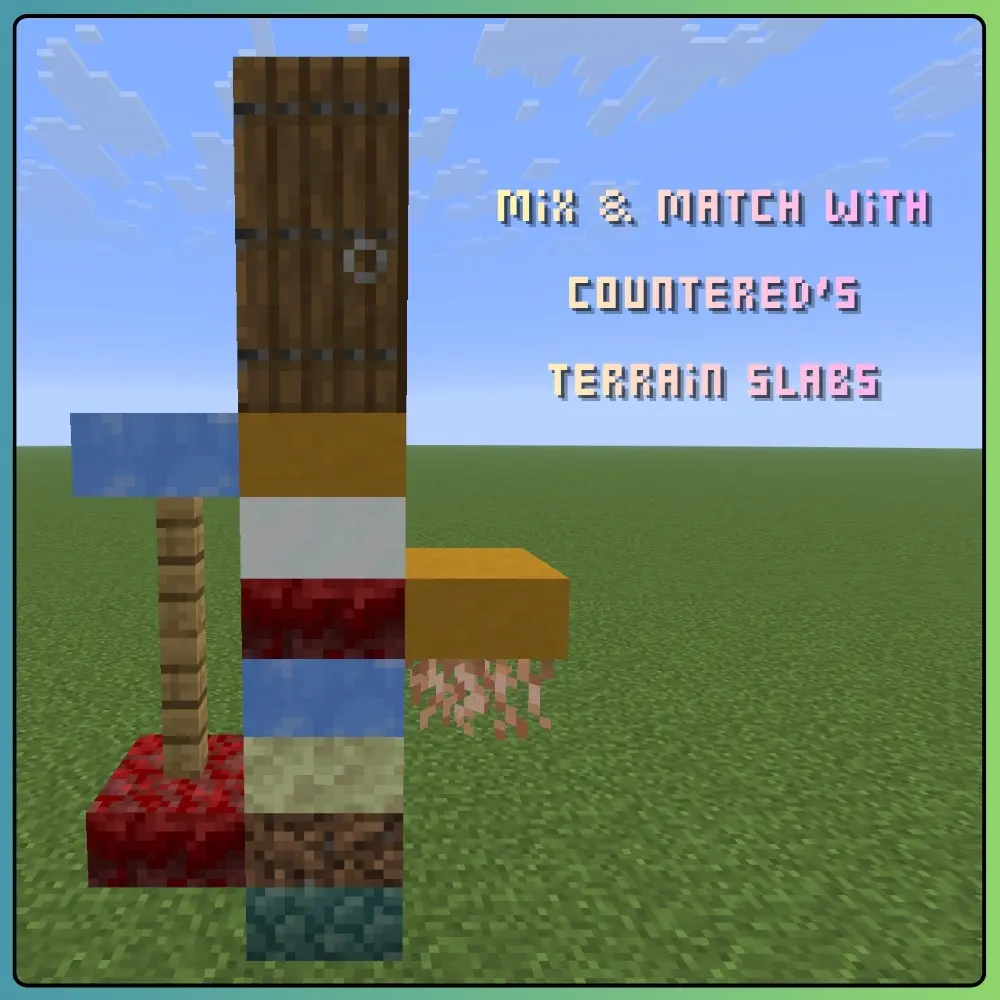
Countered's Terrain Slabs 是可选的,但如果你喜欢更自然、分层的地形,强烈建议安装。
在较新的 0.5.2 文件中,Terrain Slabs 的半砖由玩家放置时表现得更像原版半砖:
- 它们可以坐落在下沉的支持物上。
- 它们可以在匹配高度处悬挑。
- 它们随结构堆叠和下降。
- 它们支持放置在其上的方块和物体。
- 它们不再在支持的布局中被无声拒绝或悬浮在网格高度。
自然生成的 Terrain Slabs 地形故意保留给 Terrain Slabs 控制。Slabbed 不会将保存的放置高度应用到世界生成中,也不会将景观变成充满透明接缝的节日。
不同 Slabbed 文件的兼容性有所不同,非常深或混合程度很高的布局仍可能有特定版本的限制。请检查你所使用的确切文件的发行说明。
Slabby 植被显然仍然很重要。
✧ 仍处于预发布阶段
Slabbed 文件目前根据 Minecraft 和加载器系列分为 alpha 或 beta 阶段。
常见行为已经经过了相当不合理的大量专注测试,但高度定制的模组方块可能仍需要专门的兼容性工作——特别是那些替换渲染、碰撞、放置、模型或世界移动的模组。
较旧的 Minecraft 系列也不会自动继承最新版本中的每一项改进。如果某项功能对你的建筑很重要,请查看该确切下载的更新日志,而不是假设每个时间线上的每个半砖都达到了开悟状态。
如果看起来不对劲,那很可能就是不对的,而且很可能值得报告。
只是请先检查一下是否有人已经报告过了,求求了。
兼容性
| Minecraft |
Loader |
| 26.2–26.3 |
Fabric (0.6.3-alpha, 统一文件) |
| 26.2 / 26.3 |
NeoForge (0.6.2-alpha, 独立文件) |
| 26.1 / 26.1.2 |
Fabric |
| 1.21.11 |
Fabric |
| 1.21.1 |
Fabric 和 NeoForge |
| 1.20.1 |
Forge |
Fabric 26.1.2 系列收到了一次性的 0.6.2-alpha 刷新,除非需求回归,否则将冻结。较旧的 26.1 文件保持独立。
- Fabric 构建需要 Fabric API。
- Slabbed 支持单人游戏和多人游戏。
- 在多人游戏中,请在客户端和服务端都安装 Slabbed,以确保放置数据、视觉效果、轮廓和目标判定保持一致。这对于 NeoForge 26.2 和 26.3 的构建是必需的。
- 并非所有 Minecraft 版本和加载器版本的 Slabbed 功能集都相同。请务必选择与您确切游戏版本匹配的文件,并阅读其 Versions page 上的说明。
报告错误
错误报告非常非常有帮助!最有用的报告包括:
- 您的 Minecraft 和 Slabbed 版本
- 您的加载器版本和 Fabric API 版本(如适用)
- 您的其他模组,尤其是 Terrain Slabs、Lithium 或更改渲染和移动的模组
- 使用的具体方块以及您放置它们的顺序
- 您预期的结果与实际发生的情况之间的对比
- 截图或短视频,特别是针对视觉高度、轮廓、准星或放置问题
0.5.x 和 0.6.x 文件包含 /slabdy 高度读数,默认关闭,直到您主动开启。输入 /slabdy 以切换它。在报告中包含该读数可以使神秘的半方块问题变得不那么神秘。
对于卡顿报告,将启用 Slabbed 和禁用 Slabbed 时的同一场景进行比较,比单纯说“卡顿”要有用得多。两者 technically 都是句子,但只有一个能让我找到排查的起点。
在 GitHub 上报告 Slabbed 的错误
Slabbed 的开发日志
好奇“在台阶上放火把”是如何变成这一切的吗?
Slabbed Field Guide 记录了项目的开发过程、背后的决策,以及当方块移动半米时涉及的奇怪 Minecraft 系统集合。
由 Codex 更新,由我设计并监督。
Slabbed 的目标很简单:
物体应该停留在它们看起来应该停留的地方。
Minecraft 让这件事变得出奇地复杂。
感谢!
如果您发现可以改进的代码,欢迎提交 Pull Request。同样欢迎错误报告、截图、视频以及各种奇怪的边缘案例。它们已经让 Slabbed 变得更好了。
感谢您游玩 Slabbed 并帮助我将其打造为现在的样子!
:3 Peetsa
您是台阶爱好者吗???请在 Modrinth 上给 Slabbed 投一个 ❤️ 吧!?✨
与 Slabbed 搭配效果极佳: Countered's Terrain Slabs
FINALLY! Put stuff on slabs!
Hang lanterns from slabs! Stack blocks on slabs! Stack blocks on those blocks on those slabs!
Your slabs finally get the love they deserve 💖
What Slabbed does
Slabs are the overlooked middle child of Minecraft building. They look like they should support things, connect to things, and behave like real building surfaces, but the game often treats them like awkward not-quite-blocks instead.
Slabbed changes that. Supported blocks and objects treat slabs like actual building surfaces. Torches, hanging things, bits and bobbles, blocks, and more! They sit where the slab surface really is instead of floating, refusing to place or landing somewhere you very obviously did not aim. Errybody loves slabs, and now with Slabbed they're truly functional! 'Bout time.
| In vanilla Minecraft |
✨With Slabbed✨ |
| ❌ Many blocks want a full block underneath them. Slabs do not always count, which is lame. |
✅ Supported blocks and objects can use slab surfaces and sit at the correct height. |
| ❌ Lanterns, torches, signs and other objects may float, refuse to attach or land at full-block height. |
✅ Common standing and hanging objects line up with the slab surface supporting them. |
| ❌ Building upward from slabs gets floaty and sad. |
✅ Blocks can stack naturally through slab-supported structures. |
| ❌ What you see and what Minecraft thinks is there may disagree. |
✅ The block, its outline and what your crosshair actually targets stay together. |
| ❌ A block may change height after something nearby updates. |
✅ Newer Slabbed files record its placement height and keep it there. |
🔒 New: your blocks stay where you put them
Older Slabbed builds worked out a block's height while you looked at it. Mostly fine! Except when it wasn't: break something nearby, place something next to it, let a chunk reload, and a block you placed ages ago could quietly decide to sit somewhere else. Nobody asked it to. It just did.
Now the height is decided once, at the moment you place the block, and then it is locked. Neighbors can come and go. Chunks can reload. The block does not care. It stays exactly where you put it.
⚠️ One catch... That locked-in height only exists for blocks placed with Slabbed 0.5 or later. If you open a world built with a version before 0.5, things you already lowered won't have that record, and they'll sit at normal height instead. Nothing is deleted or corrupted — but back up any world you care about before opening it in a new build, and try a copy first. Automatic conversion for old worlds is on my list.
The 0.6.x builds also include /slabdy settings and two initially unbound height-adjustment keys in Options > Controls > Slabbed. The keys adjust player-placed blocks with recorded heights; on shared worlds they require creative mode or op level 2.
Countered's Terrain Slabs is optional but highly recommended if you enjoy more natural, layered terrain.
In newer 0.5.2 files, Terrain Slabs slabs placed by a player behave much more like vanilla slabs:
- They can seat on lowered supports.
- They can cantilever at the matching height.
- They stack and descend with the structure.
- They support the blocks and objects placed on them.
- They are no longer silently refused or left floating at grid height in supported arrangements.
Naturally generated Terrain Slabs terrain is deliberately left under Terrain Slabs’ control. Slabbed does not stamp saved placement heights onto world generation and turn the landscape into a festival of see-through seams.
Compatibility differs between Slabbed files, and very deep or heavily mixed arrangements can still have version-specific limits. Check the release notes for the exact file you use.
Slabby foliage remains important, obviously.
✧ Still pre-release
Slabbed files are currently alpha or beta, depending on the Minecraft and loader line.
The common behavior has received a frankly unreasonable amount of focused testing, but heavily customized modded blocks can still need dedicated compatibility work—especially mods that replace rendering, collision, placement, models or world movement.
Older Minecraft lines also do not automatically inherit every improvement from the newest file. If a feature matters to your build, check the changelog for that exact download rather than assuming every slab in every timeline has achieved enlightenment.
If something looks wrong, it probably is, and it is probably worth reporting.
Just check whether somebody has already reported it first, pleeease.
Compatibility
| Minecraft |
Loader |
| 26.2–26.3 |
Fabric (0.6.3-alpha, one unified file) |
| 26.2 / 26.3 |
NeoForge (0.6.2-alpha, separate files) |
| 26.1 / 26.1.2 |
Fabric |
| 1.21.11 |
Fabric |
| 1.21.1 |
Fabric and NeoForge |
| 1.20.1 |
Forge |
The Fabric 26.1.2 line received a one-time 0.6.2-alpha refresh and is frozen unless demand returns. The older 26.1 files remain separate.
- Fabric builds require Fabric API.
- Slabbed supports singleplayer and multiplayer.
- For multiplayer, install Slabbed on both the client and server so placement data, visuals, outlines and targeting all agree. This is required for the NeoForge 26.2 and 26.3 builds.
- Not every Minecraft and loader line has the same Slabbed feature set yet. Always choose the file made for your exact game version and read its notes on the Versions page.
Reporting bugs
Bug reports are super duper helpful! The most useful reports include:
- Your Minecraft and Slabbed versions
- Your loader version and Fabric API version, where applicable
- Your other mods, especially Terrain Slabs, Lithium or mods that change rendering and movement
- The exact blocks used and the order you placed them
- What you expected versus what actually happened
- A screenshot or short video, especially for visual height, outline, crosshair or placement problems
The 0.5.x and 0.6.x files include the /slabdy height readout, switched off until you ask for it. Type /slabdy to toggle it. Including that readout in a report makes mysterious half-block problems considerably less mysterious.
For lag reports, comparing the same scene with Slabbed enabled and disabled is much more useful than “it lags.” Both are technically sentences, but only one gives me somewhere to start.
Report a Slabbed bug on GitHub
A development journal for Slabbed
Curious how “put a torch on a slab” became all of this?
The Slabbed Field Guide follows the project’s development, the decisions behind it and the strange collection of Minecraft systems that become involved when a block moves half a meter.
Updated with Codex, designed and overseen by me.
Slabbed's goal is simple:
Things should sit where they look like they sit.
Minecraft makes that surprisingly complicated.
Thanks!
If you find wonky code that could be improved, pull requests are welcome. Bug reports, screenshots, videos and bizarre little edge cases are welcome too. They have already made Slabbed much better.
Thank you for playing with Slabbed and helping me make it what it is!
:3 Peetsa
Are you a slab fan??? Throw Slabbed a ❤️ on Modrinth! 🧱✨
Pairs wonderfully with Slabbed: Countered's Terrain Slabs


 模组

 模组

 模组
 模组

 模组
 模组
评论 0
登录后参与评分
还没有评论,来抢沙发吧