
SwordSkill
…是一款 Minecraft 模组,允许你使用在动漫《刀剑神域》中出现的多种独特剑技。目前该模组仅支持 Forge。 此外,由于使用了翻译文本,阅读起来可能有些困难。抱歉!
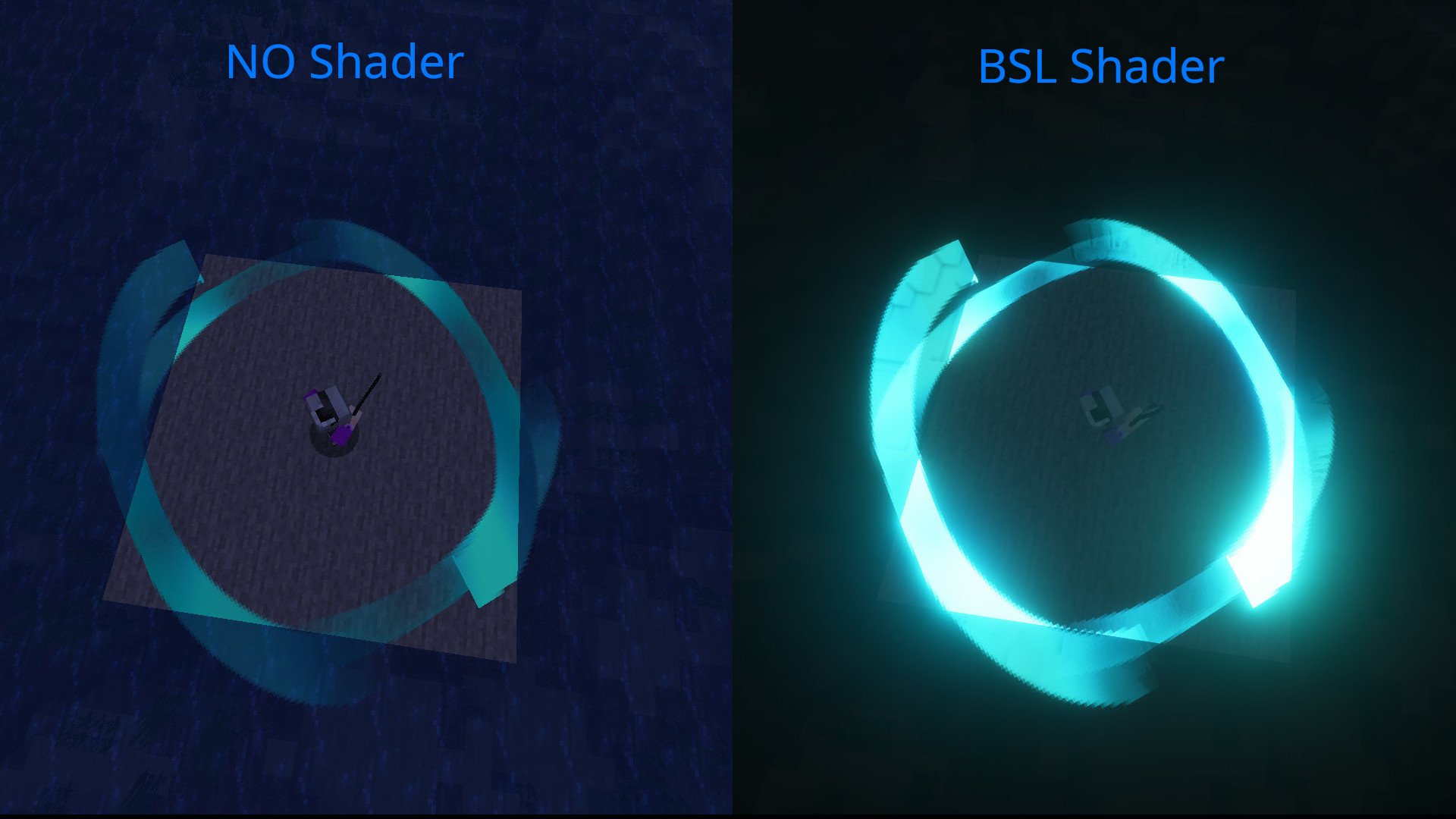
如果你安装了光影(shader),效果会更好。
功能:
- 剑技适用于多种武器类型,包括单手剑、斧、长矛、双持、武士刀、细剑、匕首、镰刀、爪和巨剑及锤。
- 目前约有 80 种剑技。
- 我们添加了衍生技能,如“横向四方斩”和“纵向四方斩”。
使用方法:
- 手持武器时,按下“打开技能选择界面”键。
- 使用 A 或 D 键选择剑技,确认选择并将其保存到某个槽位。
- 或者,你可以使用“快速使用技能-0~4”键将技能直接保存到对应的槽位。
- 屏幕顶部会出现 HUD。
- 按住“快速技能选择”键,滚动鼠标滚轮从槽位中选择技能。
- 使用“使用技能”键激活所选技能。
- 你也可以使用“快速使用技能-0~4”键直接激活对应槽位的技能。
1.2.0 版本及之后:
使用剑技现在需要消耗技能珠。 解锁剑技现在需要技能珠。 技能珠可以从地牢和村庄宝箱中获得。
衍生技能:
- 按住“使用技能”或“快速使用技能-0~4”键可激活衍生技能。
配置:
swordskill-client:
- 可以更改剑技的渲染方式。
- 可以调整 HUD 的显示位置和大小。
- 可以使用调整 HUD 位置键来调整 HUD 的位置。
swordskill-server:
- 可以调整剑技的威力。
- 可以调整剑技的冷却时间。
- 可以允许使用剑技进行 PVP。
- 可以调整剑技是否攻击中立生物。
- 可以允许自动配置武器类型。
- “是否要使用 1.2.0 版本及之后引入的剑技解锁系统?(即使选择不使用该模式,技能珠仍会生成。)
使用数据包
你可以创建数据包并使任何武器兼容。 步骤
- 创建数据包
- 根据 指南 创建基于 JSON 的武器类型文件 请从以下列表中选择武器类型。
DataPackName/data/swordskill/weapon_types/youritems.json
{
  "name" : "modname:youritems",
  "item" : ["modname:supersupersword",
    "modname:dark_repulsor",
    "modname:elucidator",
    "modname:aneal_blade",
    "modname2:god_sword",
    "modname3:yajuu_sword"
  ],
  "weapontype" : ["ONE_HANDED_SWORD","TWO_HANDED_SWORD",…]
}
SwordSkill
…is a Minecraft mod that allows you to use several unique sword techniques that appeared in the anime "Sword Art Online." This mod currently only works with Forge. Also, this text may be difficult to read because it uses translations. Sorry!
It will look even better if you install a shader.
Features:
- Sword skills are available for weapon types including one-handed swords, axes, spears, dual-wielding, katanas, rapiers, Dagger, Scythe, Claw, and greatswords and Mace.
- There are currently about 80 types of sword skills.
- We have added derivative skills such as "Horizontal Square" and "Vertical Square."
How to Use:
- While holding a weapon, press the "Open Skill Select Screen" key.
- Select a sword skill with the A or D keys, confirm your selection, and save it to a slot.
- Alternatively, you can instantly save a skill to the corresponding slot using the "QuickUse Skill-0~4" keys.
- A HUD will appear at the top of the screen.
- While holding the "Quick Skill Select" key, move the mouse wheel to select a skill from the slots.
- Use the "UseSkill" key to activate the selected skill.
- You can also instantly activate the corresponding skill using the "QuickUse Skill-0~4" keys.
Version 1.2.0 and later:
Skill Orbs are now required to use Sword Skills. Unlocking Sword Skills now requires Skill Orbs. Skill Orbs can be obtained from chests in dungeons and villages.
Derivative Skills:
- Hold down the "UseSkill" or "QuickUse Skill-0~4" keys to activate derivative skills.
Config:
swordskill-client:
- The rendering method for Sword Skills can be changed.
- You can adjust the display position and size of the HUD.
- You can adjust the HUD position with the Adjust HUD Position Key.
swordskill-server:
- You can adjust the power of sword skills.
- You can adjust the cooldown of sword skills.
- You can allow PVP using sword skills.
- You can adjust whether sword skills target neutral mobs.
- You can allow automatic weapon type configuration.
- "Do you want to use the Sword Skill unlock system introduced in version 1.2.0 and later? (Skill Orbs will still generate even if you choose not to use it.)
Using DataPack
You can create data packs and make any weapon compatible. Steps
- Create a data pack
- Create a weapon type json based on the guide Please select weapon type from the list below.
DataPackName/data/swordskill/weapon_types/youritems.json
{
  "name" : "modname:youritems",
  "item" : ["modname:supersupersword",
    "modname:dark_repulsor",
    "modname:elucidator",
    "modname:aneal_blade",
    "modname2:god_sword",
    "modname3:yajuu_sword"
  ],
  "weapontype" : ["ONE_HANDED_SWORD","TWO_HANDED_SWORD",…]
}

下载 Zoma's SwordSkill Mod
下载 Zoma's SwordSkill Mod
下载 Zoma's SwordSkill Mod
下载 Zoma's SwordSkill Mod
下载 Zoma's SwordSkill Mod
下载 Zoma's SwordSkill Mod
下载 Zoma's SwordSkill Mod
下载 Zoma's SwordSkill Mod
下载 Zoma's SwordSkill Mod
下载 Zoma's SwordSkill Mod
- 优化
- 修复了路由表未设置的问题。
关于这个资源的讨论、问题反馈与使用心得
还没有讨论,来发第一帖吧
你是这个资源的作者?登录后可认领此资源。
相似资源
 模组

可定制的鞘翅模组,支持装饰纹饰、旗帜图案等更多功能!
 模组
在游戏画面角落显示附近世界地形、玩家、生物和实体的地图。可创建路径点,帮助你找到标记过的位置。
 模组

新增 50+ 个独特生物群系,为你的世界增添新树木、花卉等更多元素!
 模组
添加全屏世界地图,显示你在世界中已探索的区域。与 Xaero's Minimap 搭配使用效果极佳。
 模组

基于 GTCEu 1.12.2 的现代 GregTech
 模组

让你能够在世界中的任何位置定位结构。
评论 0
登录后参与评分
还没有评论,来抢沙发吧