
技术工具
Tech Utils 是一个模组,为 Litematica、WorldEdit 以及其他小型实用工具提供客户端优化。
模组配置
要访问模组配置,请打开 Mod Menu 并选择此模组。
依赖版本锁定
Tech Utils 会锁定(即要求你使用)其每个依赖项(Litematica 和 WorldEdit)的特定版本,以防止在尝试安装较新版本的依赖项时发生冲突。 如果你决定使用 Dependency Overrides 移除这些限制,后果自负。若因此出现问题,请勿报告。
功能
-
Litematica 结构验证器的 Inventory Verifier 附加组件
- 方便地并排显示预期库存内容与实际发现内容之间的差异。
- 具有语义化槽位高亮显示(参见下文的功能
inventoryScreenOverlay)。 - 开启
verifyItemComponents将要求物品组件完全匹配,并在物品提示中可视化它们以便你进行比较。 - 启用结构创作者使用 物品谓词 —— 一种灵活指定物品应具备属性的方式。这里 有一个通过 Misode 便捷生成器生成的不切实际但详尽的例子。
查看该功能的展示视频:此功能仅在以下情况下有效:你的服务器安装了 Servux(或 1.20.1-4 版本的 PCA Protocol),或者你拥有 NBT 查询权限(例如作为操作员或安装了权限模组/插件),或者你在单人游戏中。
在多人游戏中,请确保已在 Litematica 设置中启用entityDataSync和entityDataSyncBackup。 -
同步 WorldEdit 选区
将 WorldEdit 区域对齐到当前活动的 Litematica 选区 -autoWeSync。
在你修改选区后不久,区域将同步,并在快捷栏上方显示确认消息。
-
Litematic 预览(1.21 及以下版本)
在“加载结构”菜单中显示选中 litematic 的 3D 渲染图 -renderPreview。
这仅适用于 .litematic 文件。
-
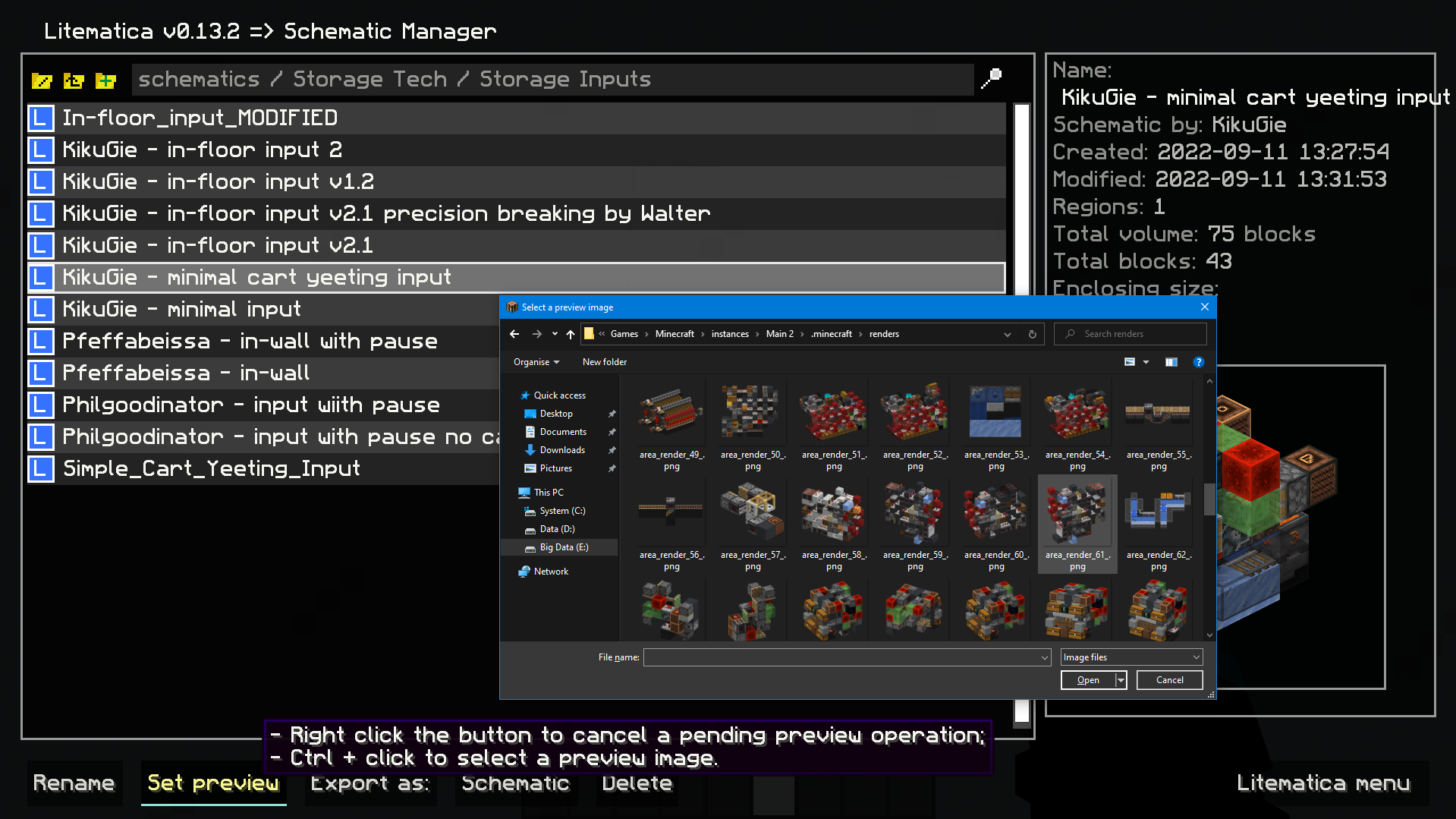
用于 litematica 预览的图片选择对话框:
将你选择的图片设置为 litematic 预览图,与 3D 预览功能不同,任何玩家即使没有此模组也能看到它。
在主 Litematica 菜单中进入“结构管理器”,选择一个 litematic 并按住 Ctrl + 点击“设置预览”按钮以打开提示框。
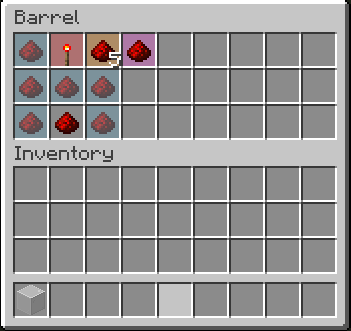
- 库存设置预览:
显示容器中应放置的物品,并高亮错误或不匹配的物品 -inventoryScreenOverlay。
*物品颜色与你放置方块的颜色相匹配。默认情况下:- 浅蓝色:缺少物品;
- 橙色:数量或 NBT 数据不匹配;
- 洋红色:不应存在的多余物品;
- 红色:错误的物品类型。*
- 紧凑记分板(移植自我的旧模组) -
compactScoreboard。
使用简短的数字格式:- 1000 -> 1k
- 1000000 -> 1M
- 1000000000 -> 1B
- 登录时禁用 WorldEdit 邻居更新 -
autoDisableUpdates。 - 用于 litematica 放置旋转和镜像的热键 -
rotatePlacement和mirrorPlacement。 /isorender selection快捷指令,用于在 Isometric Renders 中渲染当前 Litematica 选区。- 一个给自己赠送装满所持物品的容器热键 -
giveFullInv。支持盒子、箱子和绑匪袋。支持嵌套。 - 刷新材料列表的热键 -
refreshMaterialList。 - 使 Easy Place 功能如同所有方块均为完整方块一样运作。适用于放置具有小碰撞箱的方块。
- 更多功能即将推出!
依赖项
模组标志由 Mizeno 设计
Technical Utilities
Tech Utils is a mod providing client-side tweaks for Litematica, WorldEdit and other small utilities.
Mod config
To access mod config open Mod Menu and select this mod.
Dependency version lock
Tech Utils locks to (i.e. requires you to play) a specific version of each of its dependencies (Litematica and WorldEdit) to prevent conflicts from happening when you try to install a newer version of a dependency. You are on your own if you decide to remove these restrictions using Dependency Overrides. Do not report problems if you do this.
Features
-
Inventory Verifier addon to Litematica's Schematic Verifier
- Conveniently displays the difference between the expected and found inventory contents side-by-side.
- Has semantic slot highlighting (view feature
inventoryScreenOverlayfurther down). - Turning on
verifyItemComponentswill require item components to match and will also visualize them in the item tooltip for you to compare. - Enables schematic creators to use item predicates - a flexible way to specify what properties items should have. Here's an impractical but exhaustive example via Misode's handy generator.
Check out the feature's showcase video:This feature only works if your server has Servux (or PCA Protocol in 1.20.1-4), or you have nbt query permissions (e.g. by being an operator or installing a permissions mod/plugin), or you're in Singleplayer.
On Multiplayer, make sure you have enabledentityDataSyncandentityDataSyncBackupin Litematica's settings. -
Sync WorldEdit selection
Snap WorldEdit region to active Litematica selection -autoWeSync.
Region synchronizes shortly after you modify a selection, showing you a confirmation message above the hotbar. -
Litematic preview (1.21 and below)
Show 3D render of selected litematic in Load Schematics menu -renderPreview.
This only works for .litematic files. -
Image selection dialog for litematica preview:
Set litematic preview image to one you select, which unlike the 3D preview feature will be shown to any player, even without this mod.
In main Litematica menu go to Schematic Manager, select a litematic and ctrl + click on Set Preview button to open the prompt.
- Inventory setup preview:
Show items that have to be in a container and highlights wrong or mismatched ones -inventoryScreenOverlay.
*Item colors match your placement block colors. By default its:- Light blue: missing item;
- Orange: mismatched amount or nbt data;
- Magenta: extra item that shouldn't be present;
- Red: wrong item type.*
- Compact scoreboard (ported from my old mod) -
compactScoreboard.
Using short number format:- 1000 -> 1k
- 1000000 -> 1M
- 1000000000 -> 1B
- Disable WorldEdit neighbor updates on log-in -
autoDisableUpdates. - Hotkeys for litematic placement rotation & mirror -
rotatePlacementandmirrorPlacement. /isorender selectionshortcut for rendering current Litematica selection in Isometric Renders.- A hotkey to give yourself a container full of the item you're holding -
giveFullInv. Supports boxes, chests, and bundles. Nesting them is possible. - A hotkey to refresh the material list -
refreshMaterialList. - Make easy place act as if all blocks are full blocks. Useful for placing blocks with small hit boxes.
- And more to come!
Dependencies
Mod logo by Mizeno

下载 Technical Utilities
需要联机服务器吗?
稳定流畅、一键部署,几分钟即可和朋友联机开服
最低仅需 8 元/月 即可畅快联机
下载 Technical Utilities
需要联机服务器吗?
稳定流畅、一键部署,几分钟即可和朋友联机开服
最低仅需 8 元/月 即可畅快联机
下载 Technical Utilities
需要联机服务器吗?
稳定流畅、一键部署,几分钟即可和朋友联机开服
最低仅需 8 元/月 即可畅快联机
下载 Technical Utilities
需要联机服务器吗?
稳定流畅、一键部署,几分钟即可和朋友联机开服
最低仅需 8 元/月 即可畅快联机
下载 Technical Utilities
需要联机服务器吗?
稳定流畅、一键部署,几分钟即可和朋友联机开服
最低仅需 8 元/月 即可畅快联机
下载 Technical Utilities
需要联机服务器吗?
稳定流畅、一键部署,几分钟即可和朋友联机开服
最低仅需 8 元/月 即可畅快联机
下载 Technical Utilities
需要联机服务器吗?
稳定流畅、一键部署,几分钟即可和朋友联机开服
最低仅需 8 元/月 即可畅快联机
下载 Technical Utilities
需要联机服务器吗?
稳定流畅、一键部署,几分钟即可和朋友联机开服
最低仅需 8 元/月 即可畅快联机
下载 Technical Utilities
需要联机服务器吗?
稳定流畅、一键部署,几分钟即可和朋友联机开服
最低仅需 8 元/月 即可畅快联机
下载 Technical Utilities
需要联机服务器吗?
稳定流畅、一键部署,几分钟即可和朋友联机开服
最低仅需 8 元/月 即可畅快联机
- 更新 WorldEdit
- 更新 Litematica
关于这个资源的讨论、问题反馈与使用心得
还没有讨论,来发第一帖吧
你是这个资源的作者?登录后可认领此资源。
相似资源
 模组

显示你正在注视的方块的信息。(适用于 Minecraft 1.16+ 的 Hwyla/Waila 分支)
 模组

查看物品与配方
 模组
在游戏画面角落显示附近世界地形、玩家、生物和实体的地图。可创建路径点,帮助你找到标记过的位置。
 模组
使用 JavaScript 编辑配方、添加自定义物品、编写世界事件!
 模组
添加区块认领和玩家组队功能,并与 Xaero's Minimap 和 World Map 集成
 模组
添加全屏世界地图,显示你在世界中已探索的区域。与 Xaero's Minimap 搭配使用效果极佳。
评论 0
登录后参与评分
还没有评论,来抢沙发吧