



Easy Shulker Boxes 让你能够直接从背包中与潜影盒进行完整交互。无需将盒子放置在地面上,即可插入物品、取出物品、浏览内容并管理存储。?
受 Minecraft 现代携带箱(Bundle)机制启发,该模组让便携存储变得自然且直观。通过滚动浏览已存储的内容 ?️,精准选择你想要的具体物品 ?,使用简单点击进出物品,通过鼠标拖拽在多个槽位间转移物品,或使用单物品模式进行精确的库存管理。✨
除了原版潜影盒外,该模组还支持末影箱,并且可以通过数据包扩展以支持其他模组的存储物品。?
与简单的提示词模组不同,这不是一个仅客户端模组。它添加了真实的背包交互功能,因此必须在客户端和服务端同时安装。如果你只想在提示词中预览潜影盒的内容,请查看由 MisterPeModder 开发的客户端替代方案: Shulker Box Tooltip。?
也在使用携带箱?不妨看看 Bundle Upgrade,它为 Minecraft 的携带箱带来了同样品质的生活便利改进!?

- ? 基于背包的存储访问: 无需将存储物品放置在世界中,即可直接从支持的存储物品中插入和提取物品。
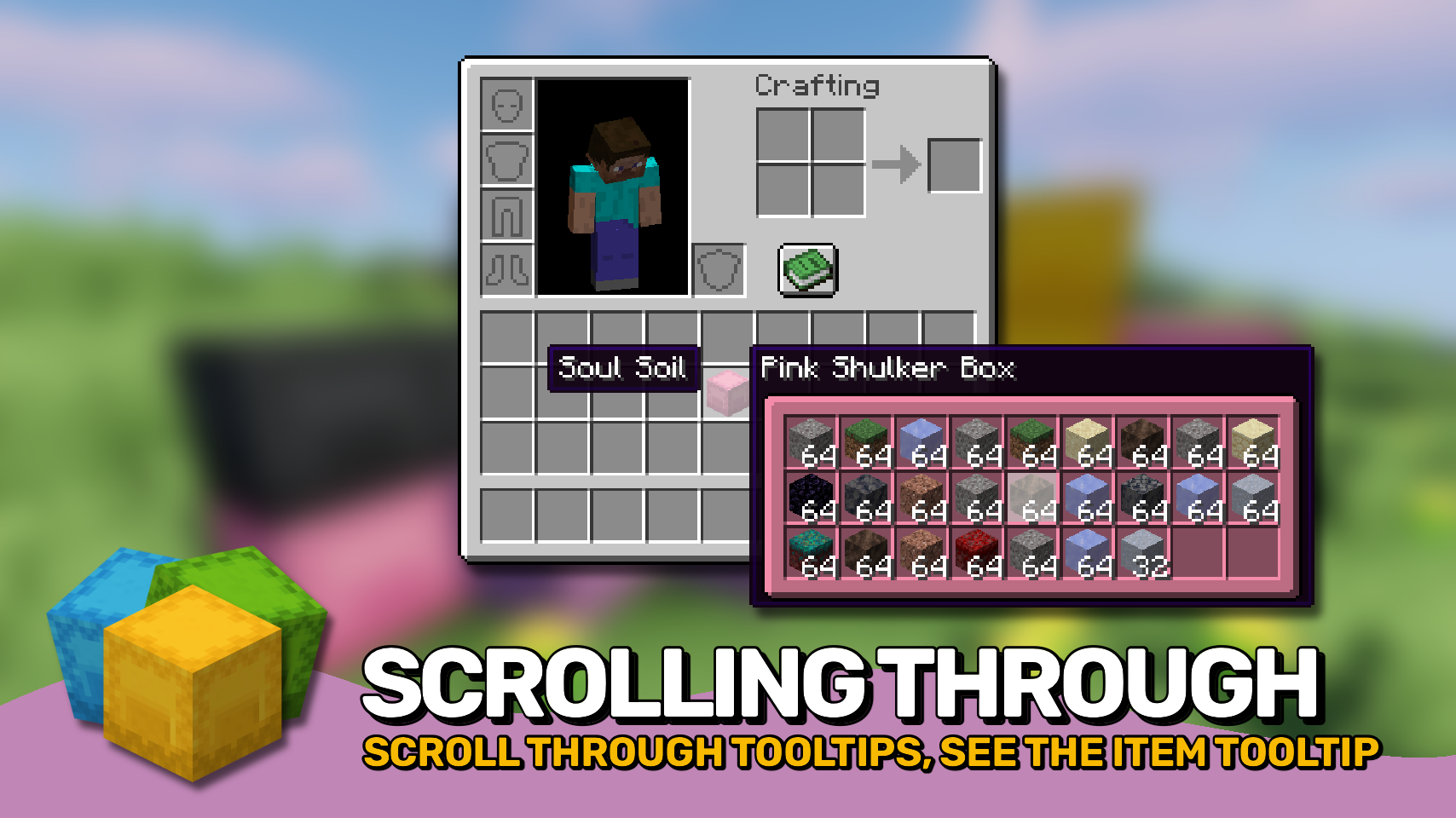
- ? 详细的内容预览: 直接在物品提示词中查看已存储的内容,轻松一目了然地了解每个存储物品中包含什么。
- ? 选择任意已存储物品: 使用滚轮或键盘方向键来选择你想要交互的具体已存储物品,而不再局限于最近插入的那个。
- ? 选中物品的详细信息: 在浏览存储内容时,即时查看当前选中物品的附加信息。
- ↔️ 快速物品传输: 点击物品到存储物品上,或点击存储物品到背包槽位上,即可快速移动内容的进出。
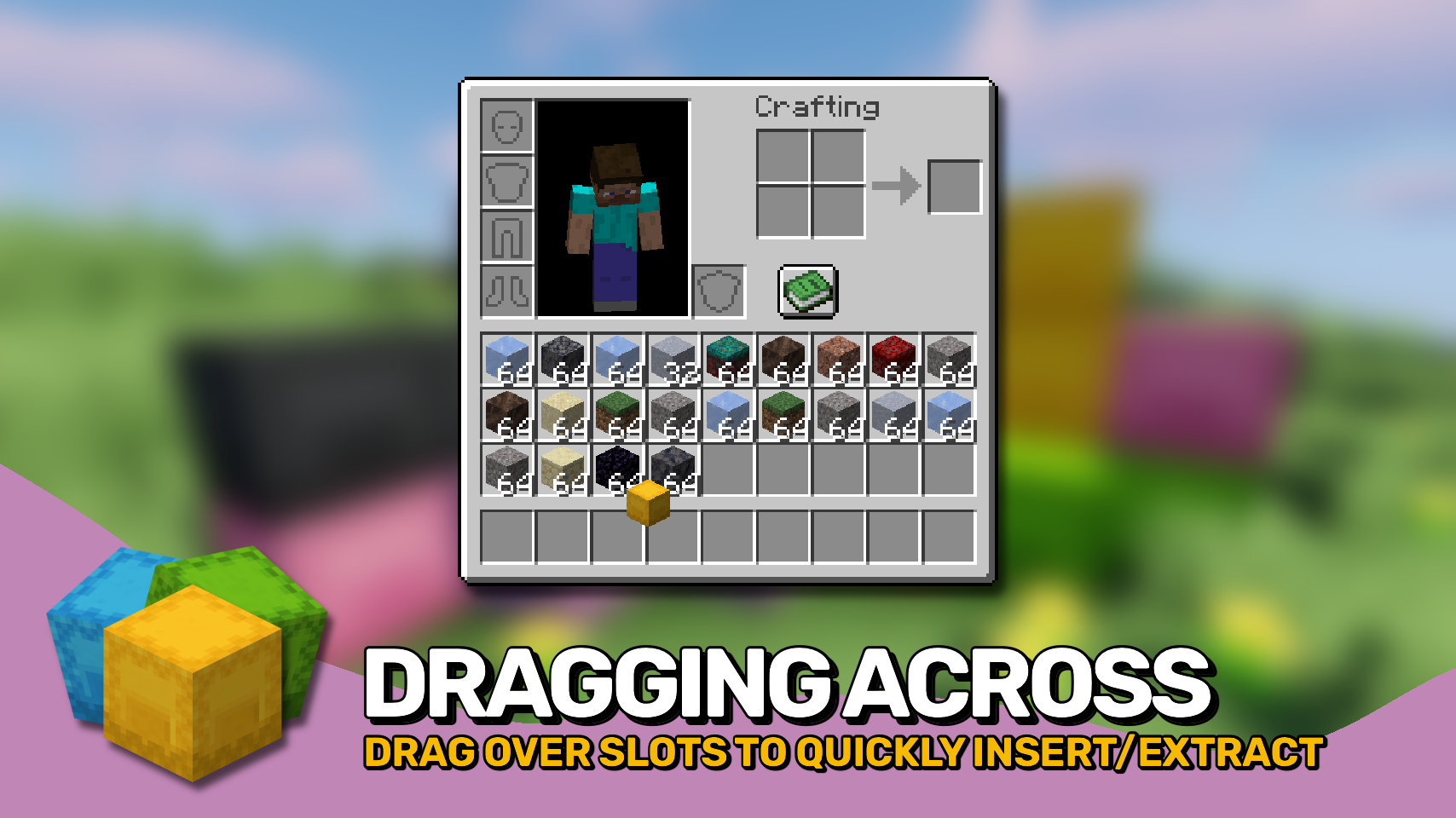
- ?️ 跨多个槽位拖拽: 在背包槽位上点击并拖拽,即可批量插入或提取物品,实现更快的库存管理。
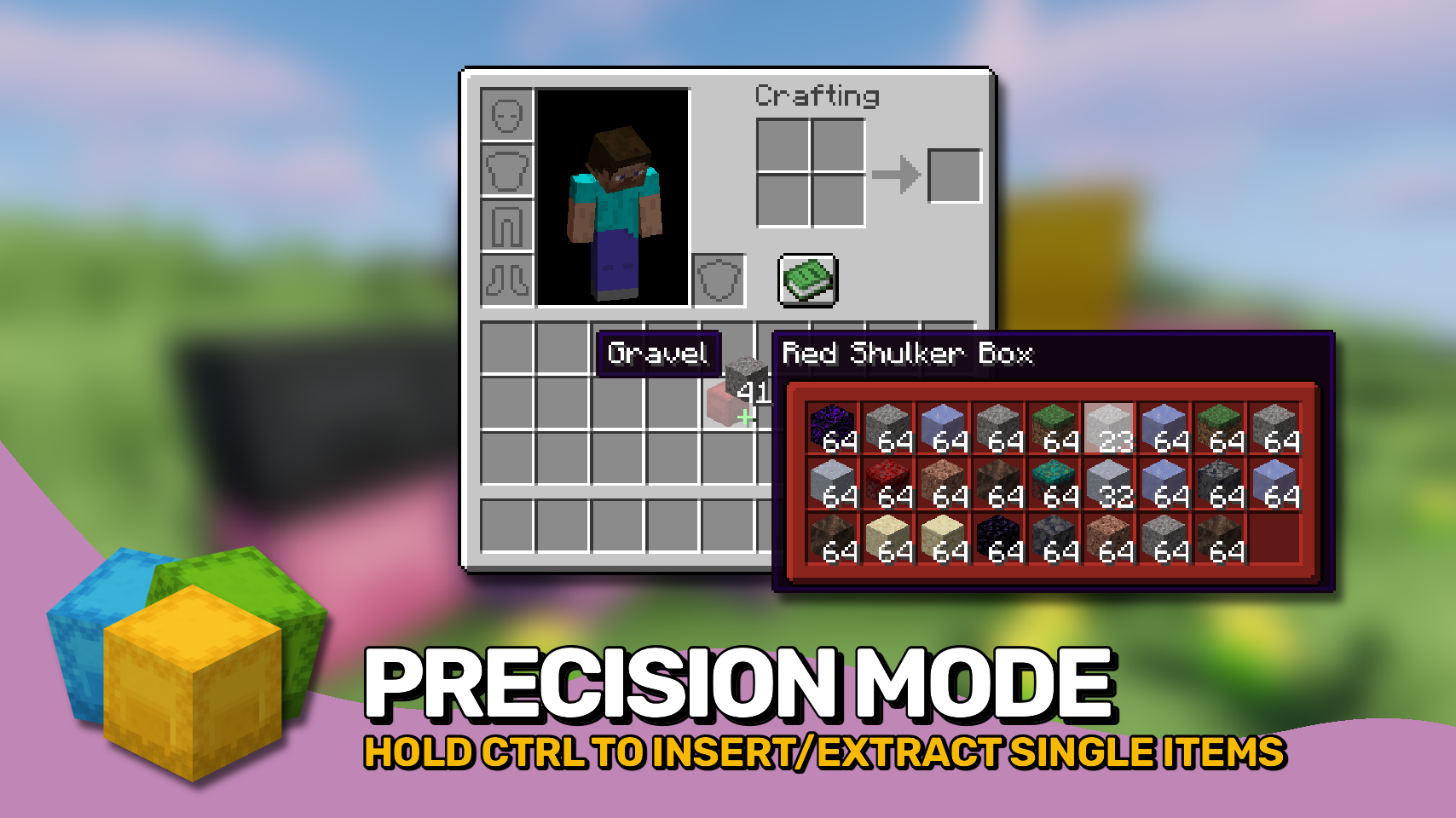
- ?️ 精准物品移动:按住
Control(Mac 上为Command)以移动单个物品而非整组,并精确控制转移数量。 - ? 存储填充指示器:可选地在受支持的存储物品上直接显示背包式填充条,一目了然地监控容量。
- ? 智能兼容性指示器:视觉提示会显示当前手持的物品是否可以放入,以及内部是否已存在匹配的物品。
- ⚙️ 高度可配置:自定义交互方式、控制选项、工具提示行为及视觉特性,以匹配你偏好的游玩风格。
- ? 由数据包驱动的兼容性:支持通过数据包添加对更多存储物品的支持,从而与众多模组背包和存储解决方案集成。


⏩ 客户端与服务端均需安装
⏩ 需要安装 PUZZLES LIB(Fabric & NeoForge)
⏩ 需要安装 FABRIC API(Fabric)
⏩ 需要安装 FORGE CONFIG API PORT(Fabric)

如果模组支持,可直接在游戏内使用模组菜单进行配置(Fabric 端需安装由 Prospector 开发的 Mod Menu)。
若使用外部文本编辑器进行手动配置,所有文件均位于 .minecraft/config 目录下,根据配置文件类型分别命名为 MOD_ID-client.toml、MOD_ID-common.toml 或 MOD_ID-server.toml。并非所有类型的配置文件都会存在于某个模组中,甚至可能完全不存在。

? 感谢 Kir_Antipov 以其 Packed Inventory 模组中的末影箱功能激发了本模组的灵感。
? 特别感谢 MrNiddala,他的灵感启发了本功能:允许你通过拖动物品在不同槽位之间移动,从而向容器类物品中放入物品或从中取出物品。
 |
 |
|
 |
 |
|
 |
 |
|
 |
 |
|
 |
 |

© 2026 @heyitsfuzs. 保留所有权利。此页面最后编辑时间为 2026 年 9 月 11 日 06:44 (UTC)。
Easy Shulker Boxes lets you fully interact with shulker boxes directly from your inventory. Insert items, remove items, browse contents, and manage storage without placing boxes on the ground. 📦
Inspired by Minecraft's modern bundle mechanics, the mod makes portable storage feel natural and intuitive. Scroll through stored contents 🖱️, select exactly which item you want 🎯, move items in or out with simple clicks, transfer items across multiple slots using mouse dragging, or use single-item mode for precise inventory management. ✨
Beyond vanilla shulker boxes, the mod also supports ender chests and can be extended to work with storage items from other mods through data packs. 🔗
Unlike simple tooltip mods, this is not a client-only mod. It adds real inventory interactions and must be installed on both the client and server. If you only want to preview shulker box contents in tooltips, check out the client-side alternative: Shulker Box Tooltip by MisterPeModder. 💡
Using bundles too? Check out Bundle Upgrade, which brings the same quality of life improvements to Minecraft's bundles too! 🎒
- 📦 Inventory Based Storage Access: Insert and extract items directly from supported storage items without placing them in the world.
- 🔍 Detailed Content Preview: View stored contents directly in item tooltips, making it easy to see what each storage item contains at a glance.
- 🎯 Select Any Stored Item: Use the scroll wheel or keyboard arrow keys to choose exactly which stored item you want to interact with instead of being limited to the most recently inserted one.
- 📝 Selected Item Details: Instantly see additional information about the currently selected item while browsing storage contents.
- ↔️ Fast Item Transfer: Click items onto storage items, or storage items onto inventory slots, to quickly move contents in and out.
- 🖱️ Drag Across Multiple Slots: Click and drag across inventory slots to insert or extract items in bulk for much faster inventory management.
- 🎚️ Precise Item Movement: Hold
Control(Commandon Mac) to move individual items instead of full stacks and precisely control transfer amounts. - 📊 Storage Fill Indicators: Optionally display bundle style fill bars directly on supported storage items to monitor capacity at a glance.
- 💡 Smart Compatibility Indicators: Visual hints show whether held items can be inserted and whether matching items are already present inside.
- ⚙️ Highly Configurable: Customize interactions, controls, tooltip behavior, and visual features to match your preferred playstyle.
- 🔗 Data Pack Driven Compatibility: Support for additional storage items can be added through data packs, allowing integration with many modded backpacks and storage solutions.
⏩ INSTALLATION REQUIRED ON CLIENT & REQUIRED ON SERVER
⏩ REQUIRES PUZZLES LIB TO BE INSTALLED (FABRIC & NEOFORGE)
⏩ REQUIRES FABRIC API TO BE INSTALLED (FABRIC)
⏩ REQUIRES FORGE CONFIG API PORT TO BE INSTALLED (FABRIC)
If available for a mod, configuration is possible directly from in-game using the mod menu (requires Mod Menu by Prospector to be installed on Fabric).
For manual configuration using an external text editor all files are found at .minecraft/config, named as MOD_ID-client.toml, MOD_ID-common.toml, or MOD_ID-server.toml, depending on the type of config. Not all types might exist for a mod, if any at all.
🌟 Thanks to Kir_Antipov for inspiring the ender chest feature from their Packed Inventory mod.
🌟 Big thanks to MrNiddala for inspiring the feature allowing you to insert items to or extract items from a container item via dragging that item accross different slots in your inventory.
|
|
|
|
|
|
|
|
|
|
|
|
|
|
© 2026 @heyitsfuzs. All rights reserved. This page was last edited on 11 September 2026, at 06:44 (UTC).

下载 Easy Shulker Boxes
下载 Easy Shulker Boxes
下载 Easy Shulker Boxes
需要联机服务器吗?
稳定流畅、一键部署,几分钟即可和朋友联机开服
最低仅需 8 元/月 即可畅快联机
下载 Easy Shulker Boxes
下载 Easy Shulker Boxes
下载 Easy Shulker Boxes
下载 Easy Shulker Boxes
需要联机服务器吗?
稳定流畅、一键部署,几分钟即可和朋友联机开服
最低仅需 8 元/月 即可畅快联机
下载 Easy Shulker Boxes
下载 Easy Shulker Boxes
需要联机服务器吗?
稳定流畅、一键部署,几分钟即可和朋友联机开服
最低仅需 8 元/月 即可畅快联机
下载 Easy Shulker Boxes
更新日志
本项目所有重要更改都将记录在此文件中。
格式遵循 Keep a Changelog, 并且本项目符合 语义化版本控制。
[v26.3.4-mc26.3.x] - 2026-11-09
变更
- 将内置的 Item Interactions 库升级至 v26.3.5
[v26.3.3-mc26.3.x] - 2026-10-15
变更
- 将内置的 Item Interactions 库升级至 v26.3.3
[v26.3.2-mc26.3.x] - 2026-10-15
变更
- 将内置的 Item Interactions 库升级至 v26.3.2
[v26.3.1-mc26.3.x] - 2026-09-23
变更
- 将内置的 Item Interactions 库升级至 v26.3.1
[v26.3.0-mc26.3.x] - 2026-09-23
变更
- 更新以支持 Minecraft 26.3.x
更新日志
本项目所有值得注意的更改都将记录在此文件中。
格式遵循 Keep a Changelog, 并且本项目遵循 语义化版本控制。
[v26.3.3-mc26.3.x] - 2026-10-15
变更
- 将内置的 Item Interactions 库升级至 v26.3.3
[v26.3.2-mc26.3.x] - 2026-10-15
变更
- 将内置的 Item Interactions 库升级至 v26.3.2
[v26.3.1-mc26.3.x] - 2026-09-23
变更
- 将内置的 Item Interactions 库升级至 v26.3.1
[v26.3.0-mc26.3.x] - 2026-09-23
变更
- 适配 Minecraft 26.3.x
关于这个资源的讨论、问题反馈与使用心得
还没有讨论,来发第一帖吧
你是这个资源的作者?登录后可认领此资源。
相似资源
 模组

显示你正在注视的方块的信息。(适用于 Minecraft 1.16+ 的 Hwyla/Waila 分支)
 模组
在游戏画面角落显示附近世界地形、玩家、生物和实体的地图。可创建路径点,帮助你找到标记过的位置。
 模组

查看物品与配方
 模组
使用 JavaScript 编辑配方、添加自定义物品、编写世界事件!
 模组
AE2:一款流行的自动化与存储模组
 模组
那是什么?一个 Waila/Hwyla 的分支。
评论 0
登录后参与评分
还没有评论,来抢沙发吧